engine PONTIAC G5 2010 Owners Manual
[x] Cancel search | Manufacturer: PONTIAC, Model Year: 2010, Model line: G5, Model: PONTIAC G5 2010Pages: 422, PDF Size: 2.22 MB
Page 301 of 422

5. Check that the jumper cables do not have loose ormissing insulation. If they do, you could get a
shock. The vehicles could be damaged too.
Before you connect the cables, here are some
basic things you should know. Positive (+) will go to
positive (+) or to a remote positive (+) terminal if
the vehicle has one. Negative ( −) will go to a heavy,
unpainted metal engine part or to a remote
negative (−) terminal if the vehicle has one.
Do not connect positive (+) to negative ( −)oryou
will get a short that would damage the battery
and maybe other parts too. And do not connect the
negative (−) cable to the negative ( −) terminal on
the dead battery because this can cause sparks.
6. Connect the red positive (+) cable to the positive (+) terminal location on the vehicle with the dead
battery. Use a remote positive (+) terminal if the
vehicle has one.
7. Do not let the other end touch metal. Connect it to the positive (+) terminal of the good battery. Use a
remote positive (+) terminal if the vehicle has one. 8. Now connect the black negative (
−) cable to the
negative (−) terminal of the good battery. Use a
remote negative ( −) terminal if the vehicle has one.
Do not let the other end touch anything until the
next step. The other end of the negative ( −) cable
does not go to the dead battery. It goes to a
heavy, unpainted metal engine part or to a remote
negative (−) terminal on the vehicle with the
dead battery.
9. Connect the other end of the negative ( −) cable to
the negative (−) terminal location on the vehicle with
the dead battery. Your vehicle has a remote
negative (−) terminal marked GND ( −).
10. Now start the vehicle with the good battery and run the engine for a while.
11. Try to start the vehicle that had the dead battery. If it will not start after a few tries, it probably needs
service.
6-37
Page 302 of 422
Notice:If the jumper cables are connected or
removed in the wrong order, electrical shorting may
occur and damage the vehicle. The repairs would
not be covered by the vehicle warranty. Always
connect and remove the jumper cables in the correct
order, making sure that the cables do not touch
each other or other metal.
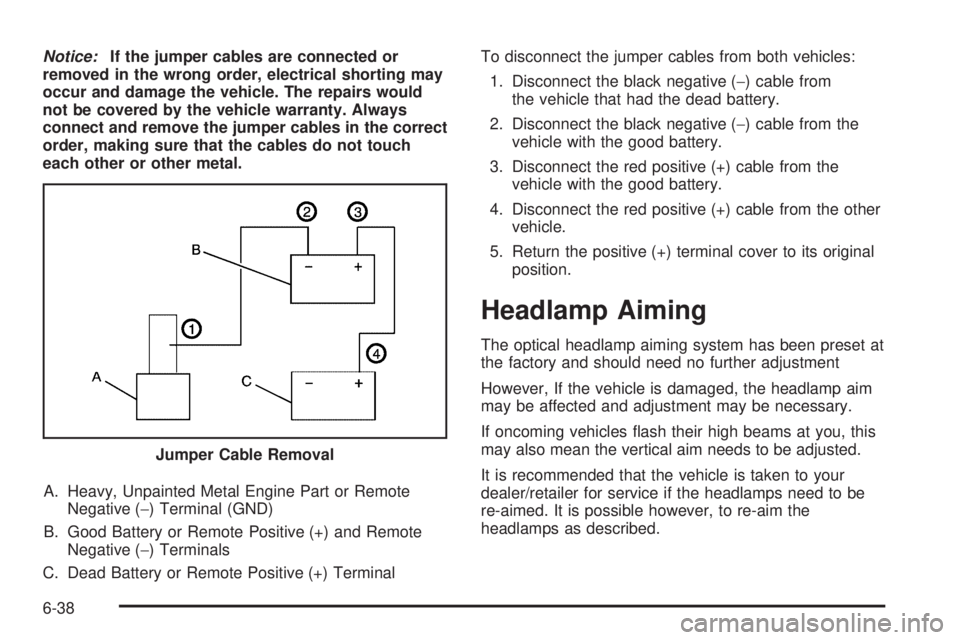
A. Heavy, Unpainted Metal Engine Part or Remote Negative (−) Terminal (GND)
B. Good Battery or Remote Positive (+) and Remote Negative (−) Terminals
C. Dead Battery or Remote Positive (+) Terminal To disconnect the jumper cables from both vehicles:
1. Disconnect the black negative ( −) cable from
the vehicle that had the dead battery.
2. Disconnect the black negative ( −) cable from the
vehicle with the good battery.
3. Disconnect the red positive (+) cable from the vehicle with the good battery.
4. Disconnect the red positive (+) cable from the other vehicle.
5. Return the positive (+) terminal cover to its original position.
Headlamp Aiming
The optical headlamp aiming system has been preset at
the factory and should need no further adjustment
However, If the vehicle is damaged, the headlamp aim
may be affected and adjustment may be necessary.
If oncoming vehicles flash their high beams at you, this
may also mean the vertical aim needs to be adjusted.
It is recommended that the vehicle is taken to your
dealer/retailer for service if the headlamps need to be
re-aimed. It is possible however, to re-aim the
headlamps as described.
Jumper Cable Removal
6-38
Page 315 of 422

(B) Tire Ply Material:The type of cord and
number of plies in the sidewall and under the
tread.
(C) Tire Identication Number (TIN)
:The letters
and numbers following the DOT (Department of
Transportation) code is the Tire Identification
Number (TIN). The TIN shows the manufacturer
and plant code, tire size, and date the tire was
manufactured. The TIN is molded onto both sides of
the tire, although only one side may have the date
of manufacture.
(D) Maximum Cold Ination Load Limit
:Maximum load that can be carried and the
maximum pressure needed to support that load.
(E) Tire Ination
:The temporary use tire or
compact spare tire should be inflated to 60 psi
(420 kPa). For more information on tire pressure
and inflation see Ination - Tire Pressure on
page 6-55.
(F) Tire Size
:A combination of letters and
numbers define a tire’s width, height, aspect ratio,
construction type and service description. The
letter T as the first character in the tire size means
the tire is for temporary use only. (G) TPC Spec (Tire Performance Criteria
Specication)
:Original equipment tires designed
to GM’s specific tire performance criteria have a
TPC specification code molded onto the sidewall.
GM’s TPC specifications meet or exceed all federal
safety guidelines.
Tire Size
The following illustration shows an example of a
typical passenger vehicle tire size.
(A) Passenger (P-Metric) Tire
:The United States
version of a metric tire sizing system. The letter P
as the first character in the tire size means a
passenger vehicle tire engineered to standards set
by the U.S. Tire and Rim Association. A tire size
without the letter P as the first character is certified
to European standards.
6-51
Page 324 of 422
TPMS Sensor Matching Process
Each TPMS sensor has a unique identification code.
Any time you replace one or more of the TPMS sensors
or rotate the vehicle’s tires, the identification codes need
to be matched to the new tire/wheel location. The sensors
are matched, to the tire/wheel locations, in the following
order: driver side front tire, passenger side front tire,
passenger side rear tire, and driver side rear tire using a
TPMS diagnostic tool. See your dealer/retailer for
service.
The TPMS sensors can also be matched to each
tire/wheel position by increasing or decreasing the tire’s
air pressure. When increasing the tire’s pressure, do
not exceed the maximum inflation pressure indicated on
the tire’s sidewall. To decrease the tire’s air-pressure
use the pointed end of the valve cap, a pencil-style
air pressure gage, or a key.
You have two minutes to match each tire and wheel
position. If it takes longer than two minutes to match any
tire and wheel position, the matching process stops
and you need to start over.
TPMS Matching Process for Vehicles
with Remote Keyless Entry (RKE)
1. Set the parking brake.
2. Turn the ignition switch to ON/RUN with theengine off.
3. Press and hold the Remote Keyless Entry (RKE) transmitter’s lock and unlock buttons, at the same
time, for about five seconds to start the TPMS learn
mode. The horn sounds twice indicating the
TPMS receiver is ready and in learn mode.
4. Start with the driver side front tire. The driver side front turn signal also comes on to indicate that
corner’s sensor is ready to be learned.
5. Remove the valve cap from the tire’s valve stem. Activate the TPMS sensor by increasing or
decreasing the tire’s air pressure for about
eight seconds. The horn chirp, can take up to
30 seconds to sound. It chirps one time and then all
the turn signals flash one time to confirm the sensor
identification code has been matched to the tire/
wheel position.
6. The passenger side front turn signal comes on to indicate that corner sensor is ready to be learned.
Proceed to the passenger side front tire and
repeat the procedure in Step 5.
6-60
Page 325 of 422

7. The passenger side rear turn signal comes on toindicate that corner sensor is ready to be learned.
Proceed to the passenger side rear tire and
repeat the procedure in Step 5.
8. The driver side rear turn signal comes on to indicate that corner sensor is ready to be learned.
Proceed to the driver side rear tire, and repeat
the procedure in Step 5.
9. After hearing the single horn chirp for the driver side rear tire, two additional horn chirps sound to
indicate the tire learning process is done. Turn
the ignition switch to LOCK/OFF.
If no tires are learned after entering the TPMS learn
mode, or if communication with the receiver
stops, or if the time limit has expired, turn the
ignition switch to LOCK/OFF and start over
beginning with Step 2.
10. Set all four tires to the recommended air pressure level as indicated on the Tire and Loading
Information label.
11. Put the valve caps back on the valve stems.TPMS Matching Process for Vehicles
without Remote Keyless Entry (RKE)
1. Set the parking brake.
2. Turn the ignition switch to ON/RUN with the engine off.
3. Using the Driver Information Center (DIC), press the INFO and Set/Reset buttons at the same time
for about one second. Then press and release
the INFO button until the TIRE LEARN? message
displays.
4. Press and hold the Set/Reset DIC button for approximately three seconds to start the TPMS
learn mode. The horn sounds twice to indicate the
TPMS receiver is ready and the TIRE LEARN
ON message displays. The driver side front turn
signal also comes on to indicate that corner sensor
is ready to be learned.
5. Start with the driver side front tire.
6. Remove the valve cap from the tire’s valve stem. Activate the TPMS sensor by increasing or
decreasing the tire’s air pressure for about
eight seconds. The horn chirp, can take up to
30 seconds to sound. It chirps one time and then all
the turn signals flash one time to confirm the sensor
identification code has been matched to the tire/
wheel position.
6-61
Page 335 of 422
A rear blowout, particularly on a curve, acts much like a
skid and may require the same correction you would
use in a skid. In any rear blowout, remove your foot from
the accelerator pedal. Get the vehicle under control
by steering the way you want the vehicle to go. It may
be very bumpy and noisy, but you can still steer. Gently
brake to a stop, well off the road if possible.
If a tire goes flat, avoid further tire and wheel damage
by driving slowly to a level place and stopping.1. Turn on the hazard warning flashers. See Hazard
Warning Flashers on page 4-3 .
2. Park the vehicle. Set the parking brake firmly and put the shift lever in P (Park).
3. Turn off the engine.
4. Inspect the flat tire.
{WARNING:
Lifting a vehicle and getting under it to do
maintenance or repairs is dangerous without the
appropriate safety equipment and training. If a jack
is provided with the vehicle, it is designed only for
changing a flat tire. If it is used for anything else,
you or others could be badly injured or killed if the
vehicle slips off the jack. If a jack is provided with
the vehicle, only use it for changing a flat tire.
This vehicle may come with a jack and spare tire or a
tire sealant and compressor kit. To use the jack and
spare tire, see Changing a Flat Tire on page 6-80 .To
use the tire sealant and compressor kit, see Tire Sealant
and Compressor Kit on page 6-72 .
6-71
Page 336 of 422
Tire Sealant and Compressor Kit
{WARNING:
Idling a vehicle in an enclosed area with poor
ventilation is dangerous. Engine exhaust may
enter the vehicle. Engine exhaust contains Carbon
Monoxide (CO) which cannot be seen or smelled.
It can cause unconsciousness and even death.
Never run the engine in an enclosed area that has
no fresh air ventilation. For more information, see
Engine Exhaust on page 3-33.
{WARNING:
Over-inflating a tire could cause the tire to rupture
and you or others could be injured. Be sure to read
and follow the tire sealant and compressor kit
instructions and inflate the tire to its recommended
pressure. Do not exceed the recommended
pressure.
{WARNING:
Storing the tire sealant and compressor kit or
other equipment in the passenger compartment of
the vehicle could cause injury. In a sudden stop or
collision, loose equipment could strike someone.
Store the tire sealant and compressor kit in its
original location.
If this vehicle has a tire sealant and compressor kit,
there may not be a spare tire, tire changing equipment,
and on some vehicles there may not be a place to
store a tire.
The tire sealant and compressor can be used to
temporarily seal punctures up to
1⁄4inch (6 mm) in the
tread area of the tire. It can also be used to inflate
an under inflated tire.
If the tire has been separated from the wheel, has
damaged sidewalls, or has a large puncture, the tire is
too severely damaged for the tire sealant and
compressor kit to be effective. See Roadside Assistance
Program on page 8-7 .
6-72
Page 344 of 422

3. Remove the retainer that holds the tire sealant andcompressor kit.
4. Remove the kit from the foam container.
To store the tire sealant and compressor kit, reverse the
steps.
Changing a Flat Tire
If a tire goes flat, avoid further tire and wheel damage
by driving slowly to a level place. Turn on the hazard
warning flashers. See Hazard Warning Flashers
on page 4-3.
{WARNING:
Changing a tire can be dangerous. The vehicle
can slip off the jack and roll over or fall on you or
other people. You and they could be badly injured
or even killed. Find a level place to change your
tire. To help prevent the vehicle from moving:
1. Set the parking brake firmly.
2. Put an automatic transmission shift lever in P (Park), or shift a manual transmission to
1 (First) or R (Reverse).
3. Turn off the engine and do not restart while the vehicle is raised.
4. Do not allow passengers to remain in the vehicle.
To be even more certain the vehicle will not move,
you should put blocks at the front and rear of the
tire farthest away from the one being changed.
That would be the tire on the other side, at the
opposite end of the vehicle.
6-80
Page 365 of 422
Vehicle Identication
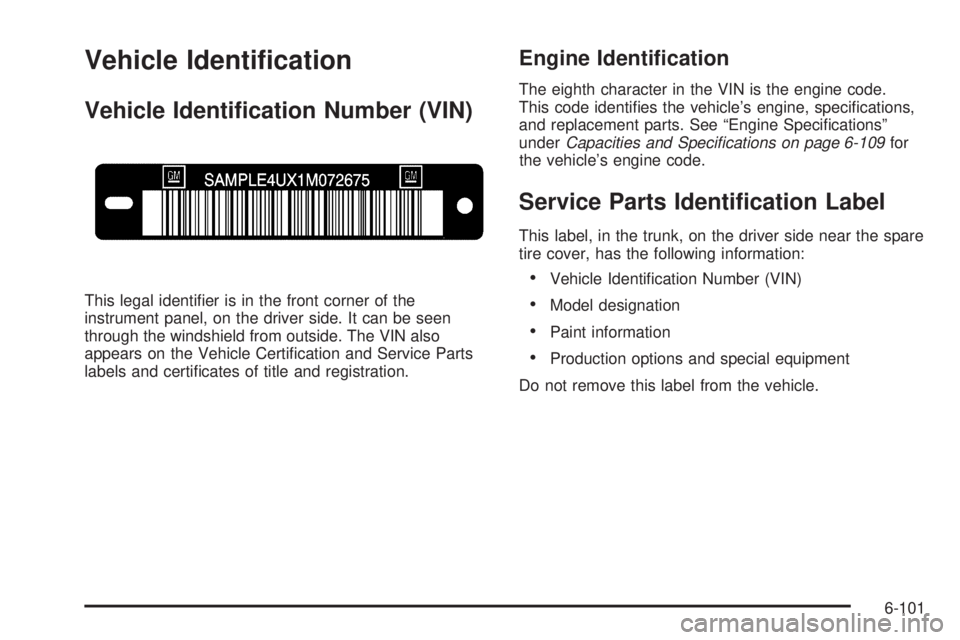
Vehicle Identication Number (VIN)
This legal identifier is in the front corner of the
instrument panel, on the driver side. It can be seen
through the windshield from outside. The VIN also
appears on the Vehicle Certification and Service Parts
labels and certificates of title and registration.
Engine Identication
The eighth character in the VIN is the engine code.
This code identifies the vehicle’s engine, specifications,
and replacement parts. See “Engine Specifications”
underCapacities and Specications on page 6-109 for
the vehicle’s engine code.
Service Parts Identication Label
This label, in the trunk, on the driver side near the spare
tire cover, has the following information:
•Vehicle Identification Number (VIN)
•Model designation
•Paint information
•Production options and special equipment
Do not remove this label from the vehicle.
6-101
Page 367 of 422
Fuses and Circuit Breakers
The wiring circuits in the vehicle are protected from
short circuits by a combination of fuses, circuit breakers
and fusible thermal links. This greatly reduces the
chance of damage caused by electrical problems.
Look at the silver-colored band inside the fuse. If the
band is broken or melted, replace the fuse. Be sure you
replace a bad fuse with a new one of the identical
size and rating.
If you ever have a problem on the road and do not have
a spare fuse, you can “borrow” one that has the same
amperage. Just pick some feature of the vehicle that you
can get along without — like the radio or cigarette
lighter — and use its fuse if it is the correct amperage.
Replace it as soon as you can.
There are two fuse blocks in the vehicle: the floor
console fuse block and the engine compartment fuse
block.
There is one additional fuse located in the back of the
vehicle near the battery.
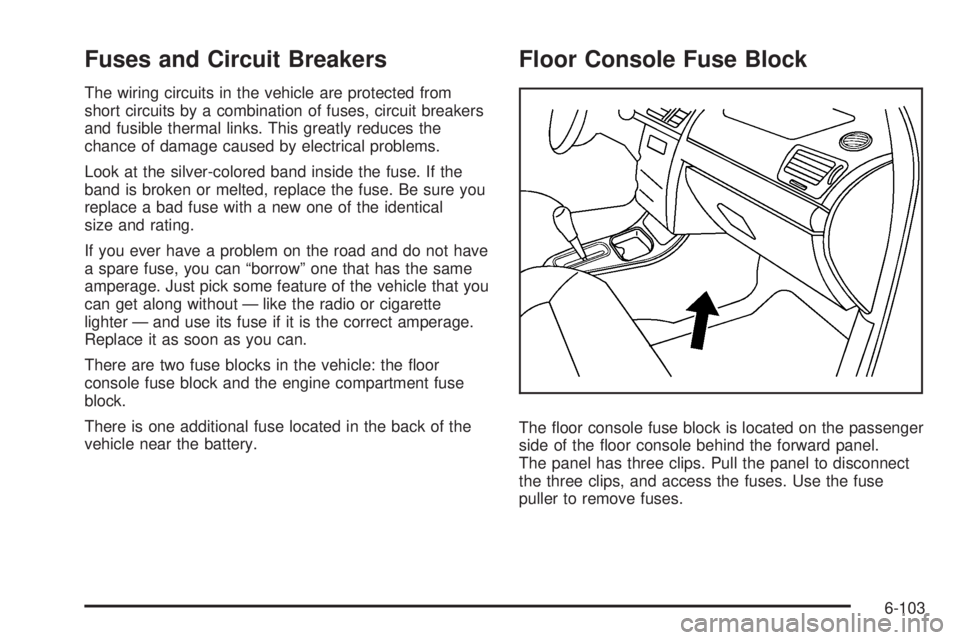
Floor Console Fuse Block
The floor console fuse block is located on the passenger
side of the floor console behind the forward panel.
The panel has three clips. Pull the panel to disconnect
the three clips, and access the fuses. Use the fuse
puller to remove fuses.
6-103