steering PONTIAC G6 2005 User Guide
[x] Cancel search | Manufacturer: PONTIAC, Model Year: 2005, Model line: G6, Model: PONTIAC G6 2005Pages: 354, PDF Size: 2.27 MB
Page 119 of 354
Windshield Wipers
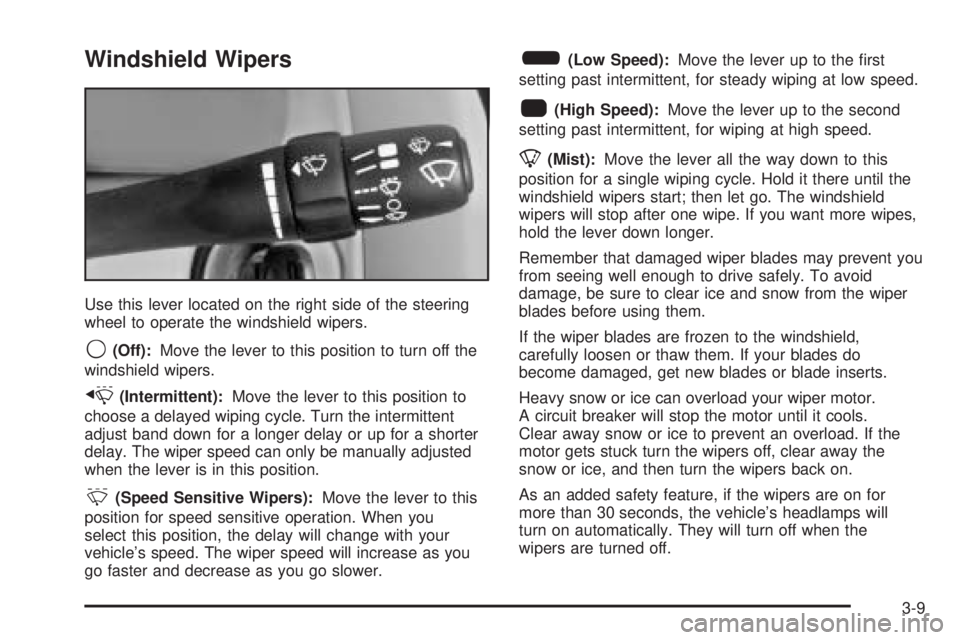
Use this lever located on the right side of the steering
wheel to operate the windshield wipers.
9(Off):Move the lever to this position to turn off the
windshield wipers.
x(Intermittent):Move the lever to this position to
choose a delayed wiping cycle. Turn the intermittent
adjust band down for a longer delay or up for a shorter
delay. The wiper speed can only be manually adjusted
when the lever is in this position.
&(Speed Sensitive Wipers):Move the lever to this
position for speed sensitive operation. When you
select this position, the delay will change with your
vehicle’s speed. The wiper speed will increase as you
go faster and decrease as you go slower.
6(Low Speed):Move the lever up to the rst
setting past intermittent, for steady wiping at low speed.
1(High Speed):Move the lever up to the second
setting past intermittent, for wiping at high speed.
8(Mist):Move the lever all the way down to this
position for a single wiping cycle. Hold it there until the
windshield wipers start; then let go. The windshield
wipers will stop after one wipe. If you want more wipes,
hold the lever down longer.
Remember that damaged wiper blades may prevent you
from seeing well enough to drive safely. To avoid
damage, be sure to clear ice and snow from the wiper
blades before using them.
If the wiper blades are frozen to the windshield,
carefully loosen or thaw them. If your blades do
become damaged, get new blades or blade inserts.
Heavy snow or ice can overload your wiper motor.
A circuit breaker will stop the motor until it cools.
Clear away snow or ice to prevent an overload. If the
motor gets stuck turn the wipers off, clear away the
snow or ice, and then turn the wipers back on.
As an added safety feature, if the wipers are on for
more than 30 seconds, the vehicle’s headlamps will
turn on automatically. They will turn off when the
wipers are turned off.
3-9
Page 121 of 354
Setting Cruise Control
{CAUTION:
If you leave your cruise control on when you
are not using cruise, you might hit a button
and go into cruise when you do not want to.
You could be startled and even lose control.
Keep the cruise control switch off until you
want to use cruise control.
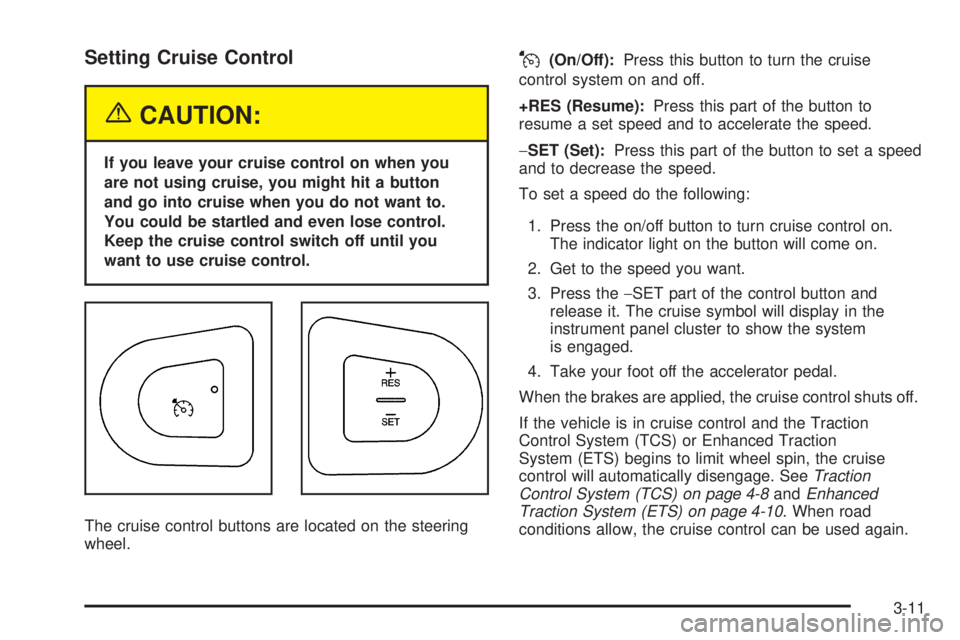
The cruise control buttons are located on the steering
wheel.
J(On/Off):Press this button to turn the cruise
control system on and off.
+RES (Resume):Press this part of the button to
resume a set speed and to accelerate the speed.
−SET (Set):Press this part of the button to set a speed
and to decrease the speed.
To set a speed do the following:
1. Press the on/off button to turn cruise control on.
The indicator light on the button will come on.
2. Get to the speed you want.
3. Press the−SET part of the control button and
release it. The cruise symbol will display in the
instrument panel cluster to show the system
is engaged.
4. Take your foot off the accelerator pedal.
When the brakes are applied, the cruise control shuts off.
If the vehicle is in cruise control and the Traction
Control System (TCS) or Enhanced Traction
System (ETS) begins to limit wheel spin, the cruise
control will automatically disengage. SeeTraction
Control System (TCS) on page 4-8andEnhanced
Traction System (ETS) on page 4-10. When road
conditions allow, the cruise control can be used again.
3-11
Page 123 of 354
Ending Cruise Control
There are two ways to disengage the cruise control:
Step lightly on the brake pedal; when cruise control
disengages, the cruise symbol in the instrument
panel cluster will go out.
Press the on/off button, this will turn off the cruise
control system.
Erasing Speed Memory
When you turn off the cruise control or the ignition, your
cruise control set speed memory is erased.
Headlamps
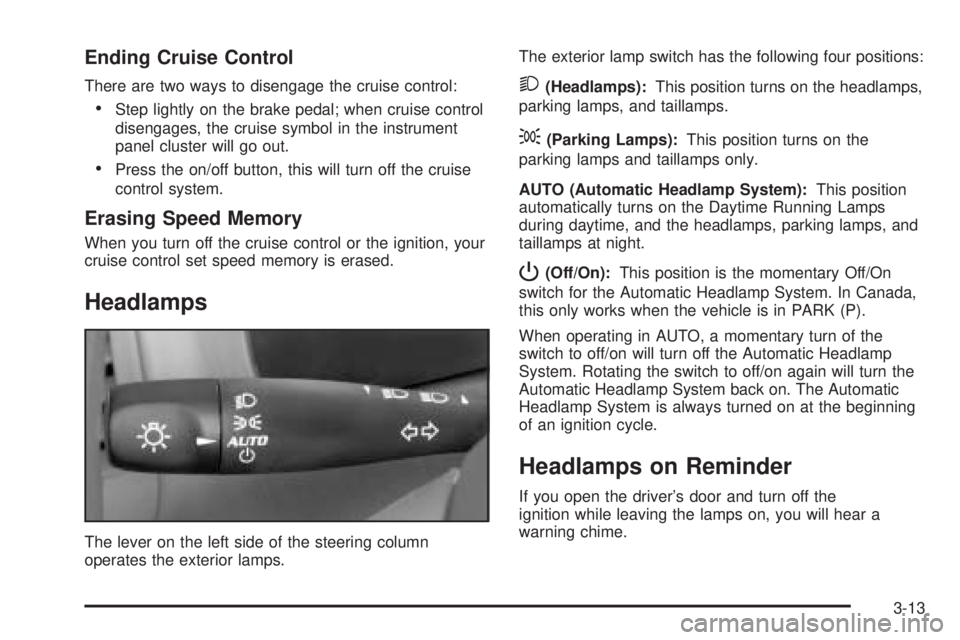
The lever on the left side of the steering column
operates the exterior lamps.The exterior lamp switch has the following four positions:
2(Headlamps):This position turns on the headlamps,
parking lamps, and taillamps.
;(Parking Lamps):This position turns on the
parking lamps and taillamps only.
AUTO (Automatic Headlamp System):This position
automatically turns on the Daytime Running Lamps
during daytime, and the headlamps, parking lamps, and
taillamps at night.
P(Off/On):This position is the momentary Off/On
switch for the Automatic Headlamp System. In Canada,
this only works when the vehicle is in PARK (P).
When operating in AUTO, a momentary turn of the
switch to off/on will turn off the Automatic Headlamp
System. Rotating the switch to off/on again will turn the
Automatic Headlamp System back on. The Automatic
Headlamp System is always turned on at the beginning
of an ignition cycle.
Headlamps on Reminder
If you open the driver’s door and turn off the
ignition while leaving the lamps on, you will hear a
warning chime.
3-13
Page 126 of 354
Fog Lamps
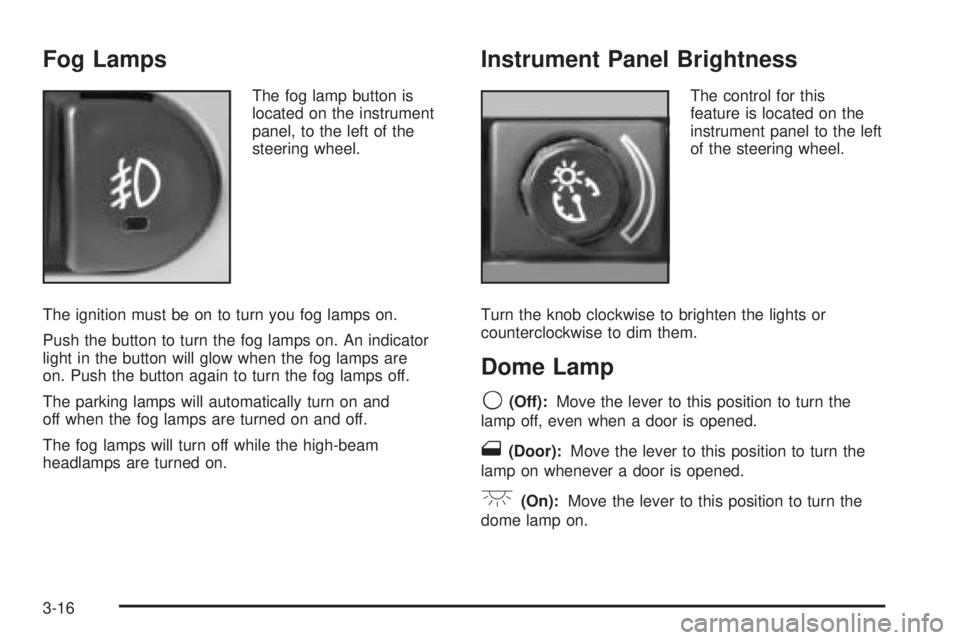
The fog lamp button is
located on the instrument
panel, to the left of the
steering wheel.
The ignition must be on to turn you fog lamps on.
Push the button to turn the fog lamps on. An indicator
light in the button will glow when the fog lamps are
on. Push the button again to turn the fog lamps off.
The parking lamps will automatically turn on and
off when the fog lamps are turned on and off.
The fog lamps will turn off while the high-beam
headlamps are turned on.
Instrument Panel Brightness
The control for this
feature is located on the
instrument panel to the left
of the steering wheel.
Turn the knob clockwise to brighten the lights or
counterclockwise to dim them.
Dome Lamp
9(Off):Move the lever to this position to turn the
lamp off, even when a door is opened.
1(Door):Move the lever to this position to turn the
lamp on whenever a door is opened.
+(On):Move the lever to this position to turn the
dome lamp on.
3-16
Page 145 of 354

Security Light
For information
regarding this light,
seeTheft-Deterrent
Systems on page 2-16.
Cruise Control Light
This light comes on
whenever you set your
cruise control.
The light will go out when the cruise control is turned
off. SeeCruise Control on page 3-10for more
information.
Highbeam On Light
This light will come on
when the high-beam
headlamps are in use.
SeeHeadlamp High/Low-Beam Changer on page 3-8.
Service Vehicle Soon Light
This light will come on
and a chime will sound
if it detects a problem
on the vehicle.
The Driver Information Center (DIC) may display a
message such as Low Coolant, Power Steering, Engine
Reduced Power, etc. These messages may help you
determine why the service vehicle soon indicator is on.
SeeDIC Warnings and Messages on page 3-40.
If this happens, see your GM dealer for necessary
repairs to maintain top vehicle performance.
3-35
Page 151 of 354

ENG PWR REDUCED:This message informs you that
the vehicle has reduced engine power to avoid
damaging the engine.
ICE POSSIBLE:This message appears when the
outside air temperature is cold enough to create icy
road conditions.
KEY FOB BATT LOW:This message is displayed if
the remote keyless entry transmitter battery is low.
LOW COOLANT:This message is displayed when there
is a low level of engine coolant. Have the cooling system
serviced by your GM dealer as soon as possible.
LOW FUEL:This message is displayed when your
vehicle is low on fuel. You should rell the tank as soon
as possible. You will also see a low fuel warning light
on the instrument panel cluster.
LOW WASHER FLUID:This message is displayed
when your vehicle is low on windshield washer uid.
You should rell the tank as soon as possible.PARKING BRAKE:This message is displayed if the
parking brake is left engaged and you try to drive away.
POWER STEERING:This message is displayed if a
problem has been detected with the electric power
steering. Have your vehicle serviced immediately
by your GM dealer.
SERVICE AIR BAG:There is a problem with the airbag
system when this message appears. Have your
vehicle serviced immediately by your GM dealer.
TRUNK AJAR:This message is displayed when the
trunk lid of your vehicle is not closed completely.
You should make sure that the trunk lid is closed
completely.
3-41
Page 186 of 354

CD Messages
CHECK CD:If this message appears on the display
and/or the CD comes out, it could be for one of the
following reasons:
It is very hot. When the temperature returns to
normal, the CD should play.
You are driving on a very rough road. When the
road becomes smoother, the CD should play.
The CD is dirty, scratched, wet, or upside down.
The air is very humid. If so, wait about an hour
and try again.
There may have been a problem while burning
the CD.
The label may be caught in the CD player.
If the CD is not playing correctly, for any other reason,
try a known good CD.
If any error occurs repeatedly or if an error cannot be
corrected, contact your GM dealer. If the radio displays
an error message, write it down and provide it to
your GM dealer when reporting the problem.
Theft-Deterrent Feature
THEFTLOCK®is designed to discourage theft of your
vehicle’s radio. The feature works automatically by
learning a portion of the Vehicle Identication
Number (VIN). If the radio is moved to a different vehicle,
it will not operate and LOCKED will appear on the display.
With THEFTLOCK
®activated, the radio will not operate
if stolen.
Audio Steering Wheel Controls
If your vehicle has this feature, some audio controls can
be adjusted at the steering wheel.
3-76
Page 189 of 354

Your Driving, the Road, and Your Vehicle..........4-2
Defensive Driving...........................................4-2
Drunken Driving.............................................4-2
Control of a Vehicle........................................4-5
Braking.........................................................4-5
Anti-Lock Brake System (ABS).........................4-6
Braking in Emergencies...................................4-8
Traction Control System (TCS).........................4-8
Enhanced Traction System (ETS)....................4-10
Steering......................................................4-11
Off-Road Recovery.......................................4-13
Passing.......................................................4-14
Loss of Control.............................................4-15
Driving at Night............................................4-16Driving in Rain and on Wet Roads..................4-18
City Driving..................................................4-20
Freeway Driving...........................................4-21
Before Leaving on a Long Trip.......................4-22
Highway Hypnosis........................................4-23
Hill and Mountain Roads................................4-24
Winter Driving..............................................4-25
If You Are Stuck: In Sand, Mud, Ice or Snow.....4-30
Rocking Your Vehicle to Get It Out.................4-30
Loading Your Vehicle....................................4-31
Towing..........................................................4-36
Towing Your Vehicle.....................................4-36
Recreational Vehicle Towing...........................4-36
Towing a Trailer...........................................4-38
Section 4 Driving Your Vehicle
4-1
Page 193 of 354
{CAUTION:
Drinking and then driving is very dangerous.
Your reexes, perceptions, attentiveness, and
judgment can be affected by even a small
amount of alcohol. You can have a serious — or
even fatal — collision if you drive after drinking.
Please do not drink and drive or ride with a
driver who has been drinking. Ride home in a
cab; or if you are with a group, designate a
driver who will not drink.
Control of a Vehicle
You have three systems that make your vehicle go
where you want it to go. They are the brakes, the
steering, and the accelerator. All three systems have to
do their work at the places where the tires meet the road.
Sometimes, as when you are driving on snow or ice, it
is easy to ask more of those control systems than
the tires and road can provide. That means you can lose
control of your vehicle. SeeTraction Control System
(TCS) on page 4-8.
Braking
Braking action involves perception time and
reaction time.
First, you have to decide to push on the brake pedal.
That is perception time. Then you have to bring up your
foot and do it. That is reaction time.
Average reaction time is about three-fourths of a
second. But that is only an average. It might be less
with one driver and as long as two or three seconds or
more with another. Age, physical condition, alertness,
coordination and eyesight all play a part. So do alcohol,
drugs and frustration. But even in three-fourths of a
second, a vehicle moving at 60 mph (100 km/h) travels
66 feet (20 m). That could be a lot of distance in an
emergency, so keeping enough space between
your vehicle and others is important.
And, of course, actual stopping distances vary greatly
with the surface of the road (whether it is pavement
or gravel); the condition of the road (wet, dry, icy); tire
tread; the condition of your brakes; the weight of
the vehicle and the amount of brake force applied.
4-5
Page 196 of 354

Using Anti-Lock
Do not pump the brakes. Just hold the brake pedal
down rmly and let anti-lock work for you. You may feel
a slight brake pedal pulsation or notice some noise,
but this is normal.
Braking in Emergencies
At some time, nearly every driver gets into a situation
that requires hard braking.
If you have anti-lock brakes, you can steer and brake at
the same time. However, if you do not have anti-lock
brakes, your rst reaction — to hit the brake pedal hard
and hold it down — may be the wrong thing to do.
Your wheels can stop rolling. Once they do, the vehicle
cannot respond to your steering. Momentum will
carry it in whatever direction it was headed when the
wheels stopped rolling. That could be off the road, into
the very thing you were trying to avoid, or into traffic.
If you do not have anti-lock brakes, use a “squeeze”
braking technique. This will give you maximum braking
while maintaining steering control. You can do this
by pushing on the brake pedal with steadily
increasing pressure.In an emergency, you will probably want to squeeze the
brakes hard without locking the wheels. If you hear or
feel the wheels sliding, ease off the brake pedal.
This will help you retain steering control. If you do have
anti-lock brakes, it is different. SeeAnti-Lock Brake
System (ABS) on page 4-6.
In many emergencies, steering can help you more than
even the very best braking.
Traction Control System (TCS)
Your vehicle may have a Traction Control System (TCS)
that limits wheel spin. This is especially useful in slippery
road conditions. The system operates only if it senses
that one or both of the front wheels are spinning or
beginning to lose traction. When this happens, the
system reduces engine power and may also upshift the
transaxle to limit wheel spin. Also, the traction control
system activates the appropriate corner brakes to gain
even quicker control to limit wheel spin.
4-8