warning PONTIAC G6 2005 Owner's Manual
[x] Cancel search | Manufacturer: PONTIAC, Model Year: 2005, Model line: G6, Model: PONTIAC G6 2005Pages: 354, PDF Size: 2.27 MB
Page 145 of 354

Security Light
For information
regarding this light,
seeTheft-Deterrent
Systems on page 2-16.
Cruise Control Light
This light comes on
whenever you set your
cruise control.
The light will go out when the cruise control is turned
off. SeeCruise Control on page 3-10for more
information.
Highbeam On Light
This light will come on
when the high-beam
headlamps are in use.
SeeHeadlamp High/Low-Beam Changer on page 3-8.
Service Vehicle Soon Light
This light will come on
and a chime will sound
if it detects a problem
on the vehicle.
The Driver Information Center (DIC) may display a
message such as Low Coolant, Power Steering, Engine
Reduced Power, etc. These messages may help you
determine why the service vehicle soon indicator is on.
SeeDIC Warnings and Messages on page 3-40.
If this happens, see your GM dealer for necessary
repairs to maintain top vehicle performance.
3-35
Page 146 of 354
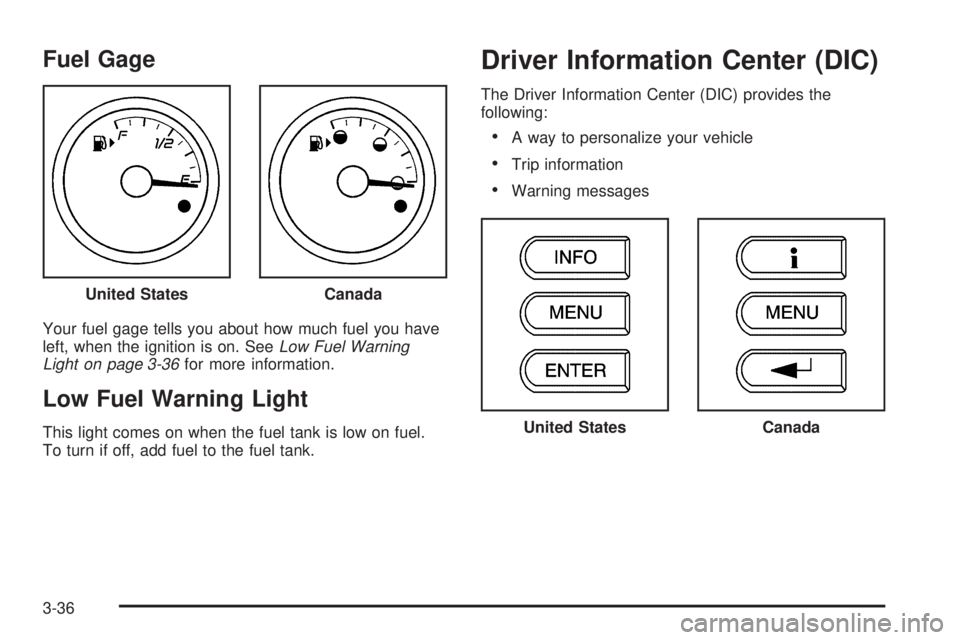
Fuel Gage
Your fuel gage tells you about how much fuel you have
left, when the ignition is on. SeeLow Fuel Warning
Light on page 3-36for more information.
Low Fuel Warning Light
This light comes on when the fuel tank is low on fuel.
To turn if off, add fuel to the fuel tank.
Driver Information Center (DIC)
The Driver Information Center (DIC) provides the
following:
A way to personalize your vehicle
Trip information
Warning messages
United States
Canada
United StatesCanada
3-36
Page 147 of 354
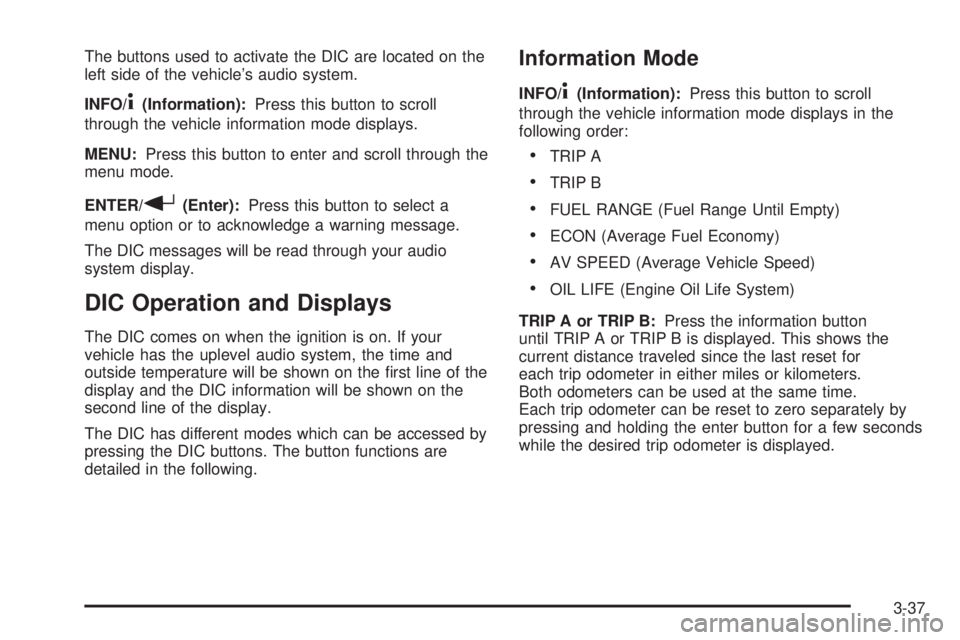
The buttons used to activate the DIC are located on the
left side of the vehicle’s audio system.
INFO/
4(Information):Press this button to scroll
through the vehicle information mode displays.
MENU:Press this button to enter and scroll through the
menu mode.
ENTER/
r(Enter):Press this button to select a
menu option or to acknowledge a warning message.
The DIC messages will be read through your audio
system display.
DIC Operation and Displays
The DIC comes on when the ignition is on. If your
vehicle has the uplevel audio system, the time and
outside temperature will be shown on the rst line of the
display and the DIC information will be shown on the
second line of the display.
The DIC has different modes which can be accessed by
pressing the DIC buttons. The button functions are
detailed in the following.
Information Mode
INFO/4(Information):Press this button to scroll
through the vehicle information mode displays in the
following order:
TRIP A
TRIP B
FUEL RANGE (Fuel Range Until Empty)
ECON (Average Fuel Economy)
AV SPEED (Average Vehicle Speed)
OIL LIFE (Engine Oil Life System)
TRIP A or TRIP B:Press the information button
until TRIP A or TRIP B is displayed. This shows the
current distance traveled since the last reset for
each trip odometer in either miles or kilometers.
Both odometers can be used at the same time.
Each trip odometer can be reset to zero separately by
pressing and holding the enter button for a few seconds
while the desired trip odometer is displayed.
3-37
Page 150 of 354
DIC Warnings and Messages
These messages will appear if there is a problem
sensed in one of your vehicle’s systems.
Any message will clear when the vehicle’s condition is no
longer present. To acknowledge a message and clear it
from the display, press any of the three DIC buttons.
The warning message will come back on the next time
the vehicle is turned off and back on if the condition is still
present. With most messages, a warning chime will
sound when the message is displayed. Your vehicle may
have other warning messages.
AUTO LIGHTS OFF:This message is displayed if the
automatic headlamp system is disabled with the
headlamp switch.
AUTO LIGHTS ON:This message is displayed if the
automatic headlamp system is enabled with the
headlamp switch.
BRAKE FLUID:This message will display if the ignition
is in ON to inform the driver that the brake uid level
is low. Have the brake system serviced by your
GM dealer as soon as possible.CHANGE OIL SOON:This message is displayed when
the life of the engine oil has expired and it should be
changed.
When you acknowledge the Change Engine Oil
message by clearing it from the display, you still must
reset the engine oil life system separately. See
Engine Oil Life System on page 5-16,Engine Oil on
page 5-13andScheduled Maintenance on page 6-4for
more information.
CHECK GAS CAP:This message will appear if the gas
cap has not been fully tightened. You should recheck
your gas cap to ensure that it is on properly. A few
driving trips with the cap properly installed should turn
the display off.
DOOR AJAR:This message is displayed if one or
more of the vehicle’s doors are not closed properly.
When this message appears, you should make sure that
the door is closed completely.
ENGINE DISABLED:This message is displayed if the
starting of the engine is disabled. Have your vehicle
serviced immediately by your GM dealer.
3-40
Page 151 of 354

ENG PWR REDUCED:This message informs you that
the vehicle has reduced engine power to avoid
damaging the engine.
ICE POSSIBLE:This message appears when the
outside air temperature is cold enough to create icy
road conditions.
KEY FOB BATT LOW:This message is displayed if
the remote keyless entry transmitter battery is low.
LOW COOLANT:This message is displayed when there
is a low level of engine coolant. Have the cooling system
serviced by your GM dealer as soon as possible.
LOW FUEL:This message is displayed when your
vehicle is low on fuel. You should rell the tank as soon
as possible. You will also see a low fuel warning light
on the instrument panel cluster.
LOW WASHER FLUID:This message is displayed
when your vehicle is low on windshield washer uid.
You should rell the tank as soon as possible.PARKING BRAKE:This message is displayed if the
parking brake is left engaged and you try to drive away.
POWER STEERING:This message is displayed if a
problem has been detected with the electric power
steering. Have your vehicle serviced immediately
by your GM dealer.
SERVICE AIR BAG:There is a problem with the airbag
system when this message appears. Have your
vehicle serviced immediately by your GM dealer.
TRUNK AJAR:This message is displayed when the
trunk lid of your vehicle is not closed completely.
You should make sure that the trunk lid is closed
completely.
3-41
Page 194 of 354

Avoid needless heavy braking. Some people drive
in spurts — heavy acceleration followed by heavy
braking — rather than keeping pace with traffic. This is
a mistake. Your brakes may not have time to cool
between hard stops. Your brakes will wear out much
faster if you do a lot of heavy braking. If you keep pace
with the traffic and allow realistic following distances,
you will eliminate a lot of unnecessary braking.
That means better braking and longer brake life.
If your engine ever stops while you are driving, brake
normally but do not pump your brakes. If you do,
the pedal may get harder to push down. If your engine
stops, you will still have some power brake assist.
But you will use it when you brake. Once the power
assist is used up, it may take longer to stop and
the brake pedal will be harder to push.Anti-Lock Brake System (ABS)
Your vehicle may have anti-lock brakes. ABS is an
advanced electronic braking system that will help
prevent a braking skid.
If your vehicle has anti-lock
brakes, this warning light
on the instrument panel will
come on briey when
you start your vehicle.
When you start your engine, or when you begin to drive
away, your anti-lock brake system will check itself.
You may hear a momentary motor or clicking noise while
this test is going on, and you may even notice that
your brake pedal moves or pulses a little. This is normal.
4-6
Page 197 of 354

This light, located on the
instrument panel, will come
on when your Traction
Control System is limiting
wheel spin.
You may feel or hear the system working, but this
is normal.
If your vehicle is in cruise control when the traction
control system begins to limit wheel spin, the cruise
control will automatically disengage. When road
conditions allow you to safely use it again, you may
re-engage the cruise control. SeeCruise Control
on page 3-10.
The Traction Control System operates in all transaxle
shift lever positions. But the system can upshift the
transaxle only as high as the shift lever position you’ve
chosen, so you should use the lower gears only
when necessary. SeeAutomatic Transaxle Operation on
page 2-24.When the system is on,
this warning light, located
on the instrument panel
cluster, will come on to
let you know if there’s
a problem.
When this warning light is on, the system will not limit
wheel spin. Adjust your driving accordingly.
To limit wheel spin, especially in slippery road conditions,
you should always leave the Traction Control System on.
But you can turn the system off if you prefer.
To turn the system on or off, press the traction control
button located under the climate controls.
When you turn the system off, the Traction Control
System warning light will come on and stay on. If the
Traction Control System is limiting wheel spin when you
press the button to turn the system off, the warning
light will come on – but the system won’t turn off right
away. It will wait until there’s no longer a current need to
limit wheel spin.
You can turn the system back on at any time by
pressing the button again. The Traction Control System
warning light should go off.
4-9
Page 198 of 354

Enhanced Traction System (ETS)
Your vehicle may have an Enhanced Traction System
(ETS) that limits wheel spin. This is especially useful in
slippery road conditions. The system operates only if it
senses that one or both of the front wheels are spinning
or beginning to lose traction. When this happens, the
system reduces engine power and may also upshift the
transaxle to limit wheel spin. Also, the traction control
system activates the appropriate corner brakes to gain
even quicker control to limit wheel spin.
This light, located on the
instrument panel, will come
on when your Enhanced
Traction System is
limiting wheel spin.
You may feel or hear the system working, but this
is normal.
If your vehicle is in cruise control when the enhanced
traction system begins to limit wheel spin, the cruise
control will automatically disengage. When road
conditions allow you to safely use it again, you may
re-engage the cruise control. SeeCruise Control
on page 3-10.The Enhanced Traction System operates in all transaxle
shift lever positions. But the system can upshift the
transaxle only as high as the shift lever position you’ve
chosen, so you should use the lower gears only
when necessary. SeeAutomatic Transaxle Operation on
page 2-24.
When the system is on,
this warning light, located
on the instrument panel
cluster, will come on to let
you know if there’s a
problem.
When this warning light is on, the system will not limit
wheel spin. Adjust your driving accordingly.
To limit wheel spin, especially in slippery road
conditions, you should always leave the Enhanced
Traction System on. But you can turn the system off if
you prefer.
To turn the system on or off, press the ETS button
located on the instrument panel. In order to effectively
“rock” the vehicle, you will need to turn off ETS.
4-10
Page 199 of 354

When you turn the system off, the Enhanced Traction
System warning light will come on and stay on. If
the Enhanced Traction System is limiting wheel spin
when you press the button to turn the system off,
the warning light will come on – but the system won’t
turn off right away. It will wait until there’s no longer
a current need to limit wheel spin.
You can turn the system back on at any time by
pressing the button again. The Enhanced Traction
System warning light should go off.
Steering
Electric Power Steering
If the engine stalls while you are driving, the power
steering assist system will continue to operate until you
are able to stop your vehicle. If you lose power
steering assist because the electric power steering
system is not functioning, you can steer, but it will take
more effort.
If you turn the steering wheel in either direction several
times until it stops, or hold the steering wheel in the
stopped position for an extended amount of time, you
may notice a reduced amount of power steering
assist. The normal amount of power steering assist
should return shortly after a few normal steering
movements.The electric power steering system does not require
regular maintenance. If you suspect steering system
problems, contact your dealer for service repairs.
SeeDIC Warnings and Messages on page 3-40and
Service Vehicle Soon Light on page 3-35.
Steering Tips
Driving on Curves
It is important to take curves at a reasonable speed.
A lot of the “driver lost control” accidents mentioned on
the news happen on curves. Here is why:
Experienced driver or beginner, each of us is subject to
the same laws of physics when driving on curves.
The traction of the tires against the road surface makes
it possible for the vehicle to change its path when
you turn the front wheels. If there is no traction, inertia
will keep the vehicle going in the same direction. If
you have ever tried to steer a vehicle on wet ice, you
will understand this.
The traction you can get in a curve depends on the
condition of your tires and the road surface, the angle at
which the curve is banked, and your speed. While
you are in a curve, speed is the one factor you
can control.
4-11
Page 204 of 354
Of course, traction is reduced when water, snow, ice,
gravel, or other material is on the road. For safety, you
will want to slow down and adjust your driving to
these conditions. It is important to slow down on slippery
surfaces because stopping distance will be longer and
vehicle control more limited.
While driving on a surface with reduced traction, try
your best to avoid sudden steering, acceleration,
or braking, including engine braking by shifting to a
lower gear. Any sudden changes could cause the tires
to slide. You may not realize the surface is slippery
until your vehicle is skidding. Learn to recognize warning
clues — such as enough water, ice, or packed snow
on the road to make a mirrored surface — and
slow down when you have any doubt.
If you have the anti-lock braking system (ABS),
remember: It helps avoid only the braking skid. If you do
not have ABS, then in a braking skid, where the
wheels are no longer rolling, release enough pressure
on the brakes to get the wheels rolling again. This
restores steering control. Push the brake pedal down
steadily when you have to stop suddenly. As long as the
wheels are rolling, you will have steering control.Driving at Night
Night driving is more dangerous than day driving.
One reason is that some drivers are likely to be
impaired — by alcohol or drugs, with night vision
problems, or by fatigue.
4-16