key PONTIAC G6 2005 Owner's Guide
[x] Cancel search | Manufacturer: PONTIAC, Model Year: 2005, Model line: G6, Model: PONTIAC G6 2005Pages: 354, PDF Size: 2.27 MB
Page 142 of 354

If the Light is Flashing
The following may prevent more serious damage to
your vehicle:
Reducing vehicle speed
Avoiding hard accelerations
Avoiding steep uphill grades
If you are towing a trailer, reduce the amount of
cargo being hauled as soon as it is possible
If the light stops ashing and remains on steady,
see “If the Light Is On Steady” following.
If the light continues to ash, when it is safe to do so,
stop the vehicle. Find a safe place to park your vehicle.
Turn the key off, wait at least 10 seconds and restart
the engine. If the light remains on steady, see “If the
Light Is On Steady” following. If the light is still ashing,
follow the previous steps, and see your dealer for
service as soon as possible.
If the Light Is On Steady
You may be able to correct the emission system
malfunction by considering the following:
Did you recently put fuel into your vehicle?
If so, reinstall the fuel cap, making sure to fully
install the cap. SeeFilling Your Tank on page 5-8.
The diagnostic system can determine if the fuel cap has
been left off or improperly installed. A loose or missing
fuel cap will allow fuel to evaporate into the atmosphere.
A few driving trips with the cap properly installed
should turn the light off.
Did you just drive through a deep puddle of water?
If so, your electrical system may be wet. The condition
will usually be corrected when the electrical system
dries out. A few driving trips should turn the light off.
3-32
Page 149 of 354

Personalization
MENU:Press this button while the vehicle is in ON to
scroll through each of the personalization options in
the following order. All of the personalization options
may not be available on your vehicle. Only the options
available will be displayed on your DIC.
Oil Life Reset
Units Selection (English/Metric)
Remote Start Capability
Horn Chirp During Remote Keyless Entry Locking
Horn Chirp During Remote Keyless Entry Unlocking
Exterior Light Flash During Remote Keyless Entry
Locking or Unlocking
Delayed Locking
Automatic Vehicle Unlocking: Specic Doors
Automatic Vehicle Unlocking: When Key is Off or
When Shift To Park
Exterior Perimeter Lighting During Remote Keyless
Entry Unlock
Security System Passive or Remote Keyless
Entry Arming
Select Language: (English, French, Spanish or
German)When the desired option is reached, press the enter
button to toggle between the modes of that option.
To make a selection, press the MENU button again.
If no selection is made within 10 seconds, the display
will revert back to the previous information displayed.
The MENU mode is exited when the information button
is pressed, a 10 second time period has elapsed,
the ignition is turned to OFF or the end of the MENU list
is reached.
SeeDIC Vehicle Personalization on page 3-42for more
information on the personalization options.
Enter
ENTER/r(Enter):Press this button to reset certain
functions and to turn off or acknowledge messages
on the DIC display. This button also toggles through the
options available in each personalization menu.
3-39
Page 151 of 354

ENG PWR REDUCED:This message informs you that
the vehicle has reduced engine power to avoid
damaging the engine.
ICE POSSIBLE:This message appears when the
outside air temperature is cold enough to create icy
road conditions.
KEY FOB BATT LOW:This message is displayed if
the remote keyless entry transmitter battery is low.
LOW COOLANT:This message is displayed when there
is a low level of engine coolant. Have the cooling system
serviced by your GM dealer as soon as possible.
LOW FUEL:This message is displayed when your
vehicle is low on fuel. You should rell the tank as soon
as possible. You will also see a low fuel warning light
on the instrument panel cluster.
LOW WASHER FLUID:This message is displayed
when your vehicle is low on windshield washer uid.
You should rell the tank as soon as possible.PARKING BRAKE:This message is displayed if the
parking brake is left engaged and you try to drive away.
POWER STEERING:This message is displayed if a
problem has been detected with the electric power
steering. Have your vehicle serviced immediately
by your GM dealer.
SERVICE AIR BAG:There is a problem with the airbag
system when this message appears. Have your
vehicle serviced immediately by your GM dealer.
TRUNK AJAR:This message is displayed when the
trunk lid of your vehicle is not closed completely.
You should make sure that the trunk lid is closed
completely.
3-41
Page 152 of 354

DIC Vehicle Personalization
The following personalization options may appear
on your vehicle’s audio display by pressing the
MENU button:
OIL LIFE RESET:When this option is displayed, you
can reset the engine oil life system. To reset the system
to 100%, press and hold the enter button for at least
one second. An ACKNOWLEDGED display message
will appear for three seconds or until the next button is
pressed. This will tell you the system has been reset.
SeeEngine Oil Life System on page 5-16for more
information.
UNITS:When UNITS appears on the display, press the
enter button to move between METRIC or ENGLISH.
When you have made your choice, press the MENU
button to record your selection. The initial setting from
the factory is English.
If you choose English, all information will be displayed
in English units. For example, distance in miles and fuel
economy in miles per gallon is displayed.If you choose metric, all information will be displayed in
metric units. For example, distance in kilometers and
fuel economy in liters per 100 kilometers is displayed.
The unit measurement will also change the trip odometer,
temperature and average fuel economy displays.
REMOTE START:The remote start option, if equipped,
can be enabled or disabled. When REMOTE START
appears on the display, press the enter button to move
between OFF and ON. When you have made your
choice, press the MENU button to record your selection.
The initial setting from the factory is ON.
LOCK HORN:If your vehicle has remote keyless entry,
this option which allows the vehicle’s horn to chirp
every time the lock button on the remote keyless entry
transmitter is pressed, can be enabled or disabled.
When LOCK HORN appears on the display, press the
enter button to move between ON and OFF. When you
have made your choice, press the MENU button to
record your selection. The initial setting from the
factory is ON.
3-42
Page 153 of 354

UNLOCK HORN:If your vehicle has remote keyless
entry, this option which allows the vehicle’s horn to chirp
every time the unlock button on the remote keyless
entry transmitter is pressed, can be enabled or disabled.
When UNLOCK HORN appears on the display, press
the enter button to move between ON and OFF.
When you have made your choice, press the MENU
button to record your selection. The initial setting from
the factory is OFF.
LIGHT FLASH:If your vehicle has remote keyless
entry, this option which allows the vehicle’s exterior
perimeter lighting to ash every time the lock or unlock
button on the remote keyless entry transmitter is
pressed, can be enabled or disabled. When LIGHT
FLASH appears on the display, press the enter button
to move between OFF and ON. When you have
made your choice, press the MENU button to record
your selection. The initial setting from the factory is ON.
DELAY LOCK:The delayed locking option, which
delays the actual locking of the vehicle, can be enabled
or disabled. When DELAY LOCK appears on the
display, press the enter button to move between OFF
and ON. When you have made your choice, press
the MENU button to record your selection. The initial
setting from the factory is ON.AUTO UNLK:The automatic door unlocking option,
which allows the vehicle to automatically unlock certain
doors can be enabled or disabled. When AUTO UNLK
appears on the display, press the enter button to
move between: ALL, DRIVER or NONE. When you
have made your choice, press and the MENU button
to record your selection. The initial setting from the
factory is ALL.
UNLK:This option determines when the automatic door
unlocking will occur, when either the key is turned to
OFF or the vehicle is shifted into PARK (P). When UNLK
appears on the display, press the enter button to move
between KEY OFF and SHIFT TO P. When you have
made your choice, press the MENU button to record
your selection. The initial setting from the factory
is SHIFT TO P.
EXT LIGHTS:If your vehicle has remote keyless entry,
this option which allows the vehicle’s exterior perimeter
lighting to turn on each time the unlock button on
the remote keyless entry transmitter is pressed, can be
enabled or disabled. When EXT LIGHTS appears on
the display, press the enter button to move between
ON and OFF. When you have made your choice, press
the MENU button to record your selection. The initial
setting from the factory is ON.
3-43
Page 154 of 354

SECURITY:If your vehicle has the remote keyless
entry system, this option allows you to select the
method used to arm the vehicle’s security system.
When SECURITY appears on the display, press the
enter button to move between RKE and PASSIVE.
When you have made your choice, press the MENU
button to record your selection. SeeContent
Theft-Deterrent on page 2-16for more information.
LANGUAGE:To select your choice of language,
press the enter button to move between the optional
languages.
The languages are English, French, Spanish and German.
Choosing a language will display all of the information
on the DIC in the desired language.
When you have made your choice, press the MENU button
for at least one second to record your selection. The initial
setting from the factory is ENGLISH.
Audio System(s)
Notice:Before adding any sound equipment to
your vehicle, like a tape player, CB radio, mobile
telephone, or two-way radio, make sure that it can be
added by checking with your dealer. Also, check
federal rules covering mobile radio and telephone
units. If sound equipment can be added, it is very
important to do it properly. Added sound equipment
may interfere with the operation of your vehicle’s
engine, radio, or other systems, and even damage
them. Your vehicle’s systems may interfere with the
operation of sound equipment that has been added
improperly.
Figure out which audio system is in your vehicle, nd out
what your audio system can do, and how to operate all of
its controls.
Your vehicle has a feature called Retained Accessory
Power (RAP). With RAP, the audio system can be
played even after the ignition is turned off. SeeRetained
Accessory Power (RAP) on page 2-21for more
information.
3-44
Page 191 of 354
Many adults — by some estimates, nearly half the adult
population — choose never to drink alcohol, so they
never drive after drinking. For persons under 21,
it is against the law in every U.S. state to drink alcohol.
There are good medical, psychological and
developmental reasons for these laws.
The obvious way to eliminate the leading highway
safety problem is for people never to drink alcohol and
then drive. But what if people do? How much is “too
much” if someone plans to drive? It is a lot less
than many might think. Although it depends on each
person and situation, here is some general information
on the problem.
The Blood Alcohol Concentration (BAC) of someone
who is drinking depends upon four things:
The amount of alcohol consumed
The drinker’s body weight
The amount of food that is consumed before and
during drinking
The length of time it has taken the drinker to
consume the alcohol
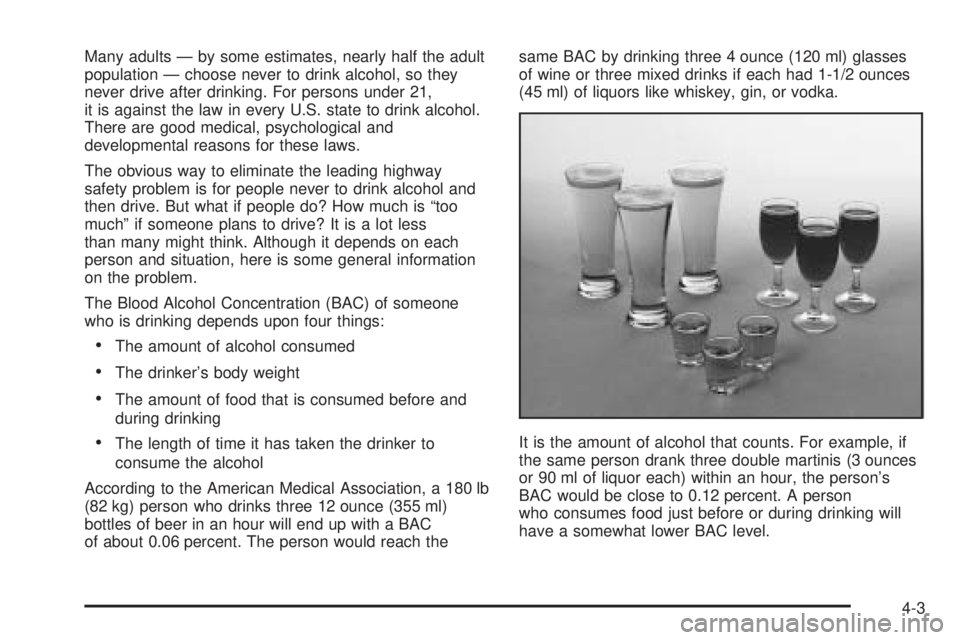
According to the American Medical Association, a 180 lb
(82 kg) person who drinks three 12 ounce (355 ml)
bottles of beer in an hour will end up with a BAC
of about 0.06 percent. The person would reach thesame BAC by drinking three 4 ounce (120 ml) glasses
of wine or three mixed drinks if each had 1-1/2 ounces
(45 ml) of liquors like whiskey, gin, or vodka.
It is the amount of alcohol that counts. For example, if
the same person drank three double martinis (3 ounces
or 90 ml of liquor each) within an hour, the person’s
BAC would be close to 0.12 percent. A person
who consumes food just before or during drinking will
have a somewhat lower BAC level.
4-3
Page 226 of 354

Dolly Towing
To tow your vehicle with two wheels on the ground and
a dolly, do the following:
1. Put the front wheels on a dolly.
2. Put the vehicle in PARK (P).
3. Set the parking brake and then remove the key.
4. Clamp the steering wheel in a straight-ahead
position with a clamping device designed for towing.
5. Release the parking brake.
Towing a Trailer
{CAUTION:
If you do not use the correct equipment and
drive properly, you can lose control when you
pull a trailer. For example, if the trailer is too
heavy, the brakes may not work well — or even
at all. You and your passengers could be
seriously injured. You may also damage your
vehicle; the resulting repairs would not be
covered by your warranty. Pull a trailer only if
you have followed all the steps in this section.
Ask your dealer for advice and information
about towing a trailer with your vehicle.
Your vehicle can tow a trailer if it is equipped with the
proper trailer towing equipment. To identify what
the vehicle trailering capacity is for your vehicle, you
should read the information in “Weight of the Trailer” that
appears later in this section. But trailering is different
than just driving your vehicle by itself. Trailering means
changes in handling, acceleration, braking, durability
and fuel economy. Successful, safe trailering takes
correct equipment, and it has to be used properly.
4-38
Page 313 of 354

Fuses Usage
1 Not Used
2 Driver Seat Controls
3 Not Used
4 Not Used
5 Emission 2
6 Park Lamps
7 Not Used
8 Not Used
9 Sliding Panel Roof
10 Sunroof Controls
11 Not Used
12 Not Used
13 Audio Amplier
14 Heated Seat Controls
15 Not Used
16Remote Keyless Entry System, XM
Satellite Radio, Rear Seat
Entertainment System, Homelink
17 Back-up Lamps
18 Not Used
19 Not Used
20Cigarette Lighter, Auxiliary Power
OutletFuses Usage
21 Not Used
22 Trunk
23 Rear Defog
24 Not Used
25 Fuel Pump
Relays Usage
26 Rear Window Defogger
27 Park Lamps
28 Not Used
29 Not Used
30 Not Used
31 Not Used
32 Not Used
33 Back-up Lamps
34 Not Used
35 Not Used
36 Trunk
37 Fuel Pump
38 (Diode) Cargo Lamp
5-81
Page 321 of 354
Maintenance Footnotes
†The U.S. Environmental Protection Agency or the
California Air Resources Board has determined that the
failure to perform this maintenance item will not nullify
the emission warranty or limit recall liability prior to
the completion of the vehicle’s useful life. We, however,
urge that all recommended maintenance services be
performed at the indicated intervals and the
maintenance be recorded.
(a)Visually inspect brake lines and hoses for proper
hook-up, binding, leaks, cracks, chang, etc. Inspect
disc brake pads for wear and rotors for surface
condition. Inspect other brake parts, including calipers,
parking brake, etc.
(b)Visually inspect front and rear suspension and
steering system for damaged, loose or missing parts or
signs of wear. Inspect power steering lines and
hoses for proper hook-up, binding, leaks, cracks,
chang, etc.
(c)Visually inspect hoses and have them replaced if
they are cracked, swollen or deteriorated. Inspect
all pipes, ttings and clamps; replace with genuine
GM parts as needed. To help ensure proper operation,
a pressure test of the cooling system and pressure
cap and cleaning the outside of the radiator and
air conditioning condenser is recommended at least
once a year.(d)Visually inspect wiper blades for wear or cracking.
Replace blades that appear worn or damaged or
that streak or miss areas of the windshield.
(e)Make sure the safety belt reminder light and all your
belts, buckles, latch plates, retractors and anchorages
are working properly. Look for any other loose or
damaged safety belt system parts. If you see anything
that might keep a safety belt system from doing its
job, have it repaired. Have any torn or frayed safety belts
replaced. Also look for any opened or broken airbag
coverings, and have them repaired or replaced.
(The airbag system does not need regular maintenance.)
(f)Lubricate all key lock cylinders, door hinges and
latches, hood hinges and latches and trunk lid hinges
and latches. More frequent lubrication may be required
when exposed to a corrosive environment. Applying
silicone grease on weatherstrips with a clean cloth
will make them last longer, seal better and not stick
or squeak.
(g)Check system for interference or binding and for
damaged or missing parts. Replace parts as needed.
Replace any components that have high effort or
excessive wear. Do not lubricate accelerator or cruise
control cables.
6-7