audio PONTIAC G6 2005 Owners Manual
[x] Cancel search | Manufacturer: PONTIAC, Model Year: 2005, Model line: G6, Model: PONTIAC G6 2005Pages: 354, PDF Size: 2.27 MB
Page 1 of 354
Seats and Restraint Systems........................... 1-1
Front Seats
............................................... 1-2
Rear Seats
............................................... 1-7
Safety Belts
.............................................. 1-8
Child Restraints
.......................................1-28
Airbag System
.........................................1-47
Restraint System Check
............................1-58
Features and Controls..................................... 2-1
Keys
........................................................ 2-2
Doors and Locks
....................................... 2-9
Windows
.................................................2-14
Theft-Deterrent Systems
............................2-16
Starting and Operating Your Vehicle
...........2-20
Mirrors
....................................................2-33
OnStar
®System
......................................2-36
HomeLink®Transmitter
.............................2-37
Storage Areas
.........................................2-41
Sunroof
..................................................2-42
Instrument Panel............................................. 3-1
Instrument Panel Overview
.......................... 3-4
Climate Controls
......................................3-19
Warning Lights, Gages, and Indicators
........3-24
Driver Information Center (DIC)
..................3-36
Audio System(s)
.......................................3-44Driving Your Vehicle....................................... 4-1
Your Driving, the Road, and Your Vehicle
..... 4-2
Towing
...................................................4-36
Service and Appearance Care.......................... 5-1
Service
..................................................... 5-3
Fuel
......................................................... 5-5
Checking Things Under the Hood
...............5-10
Bulb Replacement
....................................5-38
Windshield Wiper Blade Replacement
.........5-41
Tires
......................................................5-42
Appearance Care
.....................................5-66
Vehicle Identication
.................................5-74
Electrical System
......................................5-75
Capacities and Specications
.....................5-82
Maintenance Schedule..................................... 6-1
Maintenance Schedule
................................ 6-2
Customer Assistance and Information.............. 7-1
Customer Assistance and Information
........... 7-2
Reporting Safety Defects
...........................7-10
Index................................................................ 1
2005 Pontiac G6 Owner ManualM
Page 4 of 354
Vehicle Damage Warnings
Also, in this manual you will nd these notices:
Notice:These mean there is something that could
damage your vehicle.
A notice tells about something that can damage the
vehicle. Many times, this damage would not be covered
by your vehicle’s warranty, and it could be costly. But
the notice will tell what to do to help avoid the damage.
When you read other manuals, you might see
CAUTION and NOTICE warnings in different colors
or in different words.
There are also warning labels on the vehicle. They use
the same words, CAUTION or NOTICE.
Vehicle Symbols
The vehicle has components and labels that use
symbols instead of text. Symbols are shown along with
the text describing the operation or information
relating to a specic component, control, message,
gage, or indicator.
If you need help guring out a specic name of a
component, gage, or indicator, reference the
following topics:
Seats and Restraint Systems in Section 1
Features and Controls in Section 2
Instrument Panel Overview in Section 3
Climate Controls in Section 3
Warning Lights, Gages, and Indicators in Section 3
Audio System(s) in Section 3
Engine Compartment Overview in Section 5
iv
Page 103 of 354
OnStar®Personal Calling
As an OnStar®subscriber, the Personal Calling
capability is available if your hand-held cell phone is
lost, forgotten, or has a low battery. It is a hands-free
wireless phone that is integrated into the vehicle.
Calls can be placed nationwide using simple voice
commands with no additional contracts and no additional
roaming charges. To nd out more about OnStar
®
Personal Calling, refer to the OnStar®user’s guide in
the vehicle’s glove box or visit www.onstar.com or
www.onstarcanada.com; or speak with an OnStar
®
advisor by pressing the OnStar®button or by calling
1-888-4-ONSTAR (1-888-466-7827).
OnStar®Virtual Advisor
Virtual Advisor is a feature of OnStar®Personal Calling
that uses minutes to access up-to-date weather and
traffic reports for your area, news and sports updates,
stock quotes, entertainment and more. You are also able
to listen and reply to your e-mail through your vehicle’s
audio system. Customize your information prole at
www.myonstar.com. See the OnStar
®user’s guide for
more information.
HomeLink®Transmitter
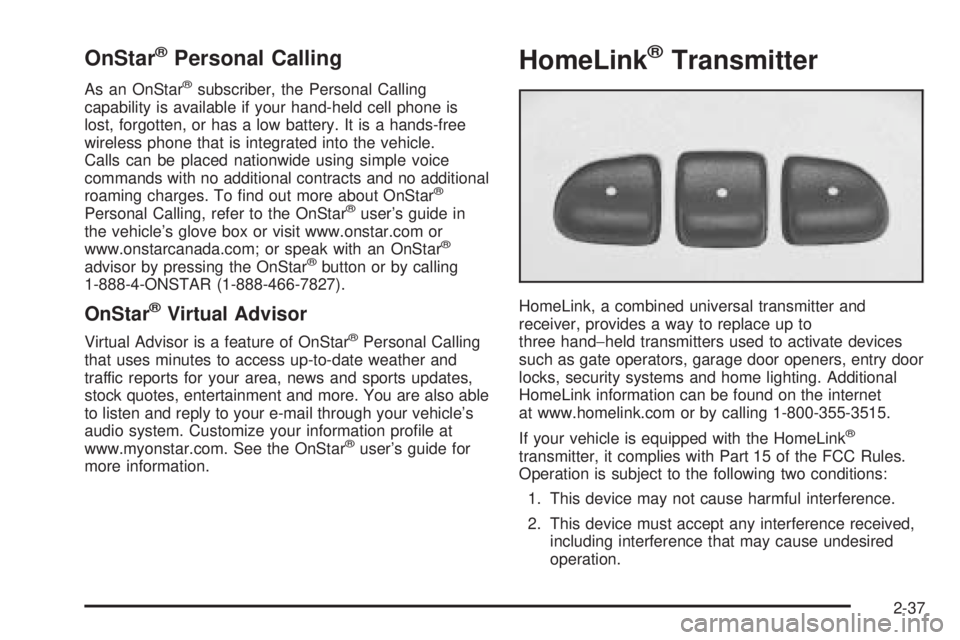
HomeLink, a combined universal transmitter and
receiver, provides a way to replace up to
three hand−held transmitters used to activate devices
such as gate operators, garage door openers, entry door
locks, security systems and home lighting. Additional
HomeLink information can be found on the internet
at www.homelink.com or by calling 1-800-355-3515.
If your vehicle is equipped with the HomeLink
®
transmitter, it complies with Part 15 of the FCC Rules.
Operation is subject to the following two conditions:
1. This device may not cause harmful interference.
2. This device must accept any interference received,
including interference that may cause undesired
operation.
2-37
Page 112 of 354

Driver Information Center (DIC).......................3-36
DIC Operation and Displays...........................3-37
DIC Warnings and Messages.........................3-40
DIC Vehicle Personalization............................3-42
Audio System(s).............................................3-44
Setting the Time for Radios without Radio
Data Systems (RDS)..................................3-45
Setting the Time for Radios with Radio
Data Systems (RDS)..................................3-45Radio with CD (Base Level)...........................3-46
Radio with CD (Up Level)..............................3-51
Radio with Six-Disc CD.................................3-62
Theft-Deterrent Feature..................................3-76
Audio Steering Wheel Controls.......................3-76
Radio Reception...........................................3-77
Care of Your CDs and DVDs.........................3-78
Care of Your CD and DVD Player...................3-78
Backglass Antenna.......................................3-78
XM™ Satellite Radio Antenna System.............3-78
Section 3 Instrument Panel
3-2
Page 115 of 354

The main components of your instrument panel are the following:
A. Side Air Outlets. SeeOutlet Adjustment on
page 3-23.
B. Side Window Outlets. SeeOutlet Adjustment on
page 3-23.
C. Turn Signal/Multifunction Lever. SeeTurn
Signal/Multifunction Lever on page 3-7.
D. Steering Wheel Controls and Cruise Controls.
SeeAudio Steering Wheel Controls on page 3-76
andCruise Control on page 3-10.
E. Instrument Panel Cluster. SeeInstrument Panel
Cluster on page 3-24.
F. Windshield Wiper and Washer Lever. See
Windshield Wipers on page 3-9andWindshield
Washer on page 3-10.
G. Ignition Switch. SeeIgnition Positions on page 2-20.
H. Center Air Outlets. SeeOutlet Adjustment on
page 3-23.
I. Hazard Warning Flashers Button. SeeHazard
Warning Flashers on page 3-6.
J. Audio System. SeeAudio System(s) on page 3-44.K. Adjustable Pedal Buttons (If Equipped). See
Adjustable Throttle and Brake Pedal on page 2-22.
L. Instrument Panel Brightness Control. SeeInstrument
Panel Brightness on page 3-16.
M. Fog Lamps. SeeFog Lamps on page 3-16.
N. Hood Release Handle. SeeHood Release on
page 5-11.
O. Horn. SeeHorn on page 3-6.
P. Climate Control System. SeeClimate Control
System on page 3-19.
Q. Shift Lever. SeeAutomatic Transaxle Operation on
page 2-24.
R. Accessory Power Outlet. SeeAccessory Power
Outlets on page 3-18.
S. Traction Control System Button (If Equipped).
SeeTraction Control System (TCS) on page 4-8.
Enhanced Traction System Button. SeeEnhanced
Traction System (ETS) on page 4-10.
T. Glove Box. SeeGlove Box on page 2-41.
3-5
Page 147 of 354
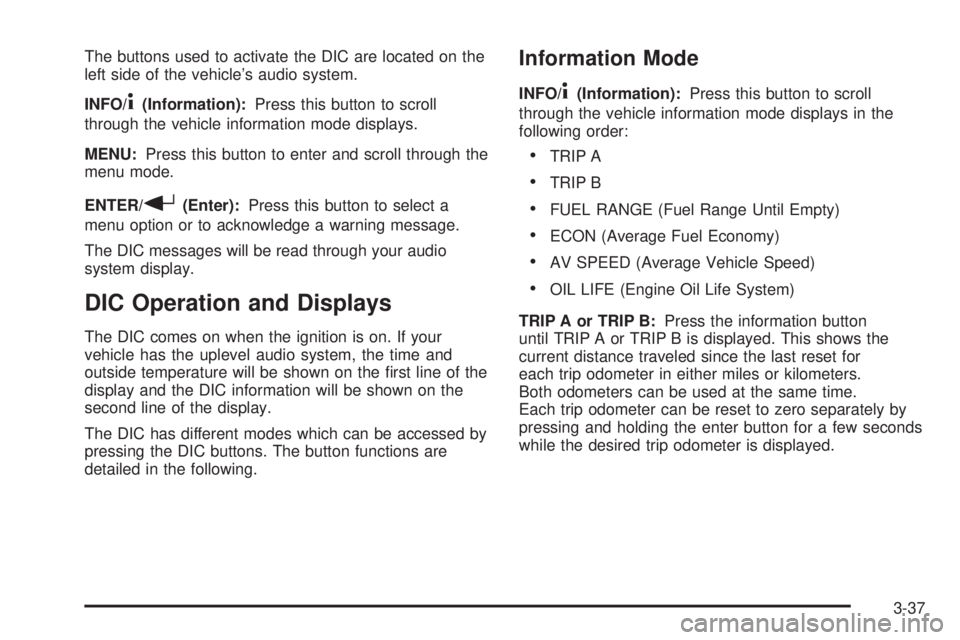
The buttons used to activate the DIC are located on the
left side of the vehicle’s audio system.
INFO/
4(Information):Press this button to scroll
through the vehicle information mode displays.
MENU:Press this button to enter and scroll through the
menu mode.
ENTER/
r(Enter):Press this button to select a
menu option or to acknowledge a warning message.
The DIC messages will be read through your audio
system display.
DIC Operation and Displays
The DIC comes on when the ignition is on. If your
vehicle has the uplevel audio system, the time and
outside temperature will be shown on the rst line of the
display and the DIC information will be shown on the
second line of the display.
The DIC has different modes which can be accessed by
pressing the DIC buttons. The button functions are
detailed in the following.
Information Mode
INFO/4(Information):Press this button to scroll
through the vehicle information mode displays in the
following order:
TRIP A
TRIP B
FUEL RANGE (Fuel Range Until Empty)
ECON (Average Fuel Economy)
AV SPEED (Average Vehicle Speed)
OIL LIFE (Engine Oil Life System)
TRIP A or TRIP B:Press the information button
until TRIP A or TRIP B is displayed. This shows the
current distance traveled since the last reset for
each trip odometer in either miles or kilometers.
Both odometers can be used at the same time.
Each trip odometer can be reset to zero separately by
pressing and holding the enter button for a few seconds
while the desired trip odometer is displayed.
3-37
Page 152 of 354

DIC Vehicle Personalization
The following personalization options may appear
on your vehicle’s audio display by pressing the
MENU button:
OIL LIFE RESET:When this option is displayed, you
can reset the engine oil life system. To reset the system
to 100%, press and hold the enter button for at least
one second. An ACKNOWLEDGED display message
will appear for three seconds or until the next button is
pressed. This will tell you the system has been reset.
SeeEngine Oil Life System on page 5-16for more
information.
UNITS:When UNITS appears on the display, press the
enter button to move between METRIC or ENGLISH.
When you have made your choice, press the MENU
button to record your selection. The initial setting from
the factory is English.
If you choose English, all information will be displayed
in English units. For example, distance in miles and fuel
economy in miles per gallon is displayed.If you choose metric, all information will be displayed in
metric units. For example, distance in kilometers and
fuel economy in liters per 100 kilometers is displayed.
The unit measurement will also change the trip odometer,
temperature and average fuel economy displays.
REMOTE START:The remote start option, if equipped,
can be enabled or disabled. When REMOTE START
appears on the display, press the enter button to move
between OFF and ON. When you have made your
choice, press the MENU button to record your selection.
The initial setting from the factory is ON.
LOCK HORN:If your vehicle has remote keyless entry,
this option which allows the vehicle’s horn to chirp
every time the lock button on the remote keyless entry
transmitter is pressed, can be enabled or disabled.
When LOCK HORN appears on the display, press the
enter button to move between ON and OFF. When you
have made your choice, press the MENU button to
record your selection. The initial setting from the
factory is ON.
3-42
Page 154 of 354

SECURITY:If your vehicle has the remote keyless
entry system, this option allows you to select the
method used to arm the vehicle’s security system.
When SECURITY appears on the display, press the
enter button to move between RKE and PASSIVE.
When you have made your choice, press the MENU
button to record your selection. SeeContent
Theft-Deterrent on page 2-16for more information.
LANGUAGE:To select your choice of language,
press the enter button to move between the optional
languages.
The languages are English, French, Spanish and German.
Choosing a language will display all of the information
on the DIC in the desired language.
When you have made your choice, press the MENU button
for at least one second to record your selection. The initial
setting from the factory is ENGLISH.
Audio System(s)
Notice:Before adding any sound equipment to
your vehicle, like a tape player, CB radio, mobile
telephone, or two-way radio, make sure that it can be
added by checking with your dealer. Also, check
federal rules covering mobile radio and telephone
units. If sound equipment can be added, it is very
important to do it properly. Added sound equipment
may interfere with the operation of your vehicle’s
engine, radio, or other systems, and even damage
them. Your vehicle’s systems may interfere with the
operation of sound equipment that has been added
improperly.
Figure out which audio system is in your vehicle, nd out
what your audio system can do, and how to operate all of
its controls.
Your vehicle has a feature called Retained Accessory
Power (RAP). With RAP, the audio system can be
played even after the ignition is turned off. SeeRetained
Accessory Power (RAP) on page 2-21for more
information.
3-44
Page 158 of 354
Adjusting the Speakers (Balance/Fade)
BAL/FADE /S(Balance/Fade):To adjust the
balance between the right and the left speakers, press
and release the balance and fade button until BAL
appears on the display. Turn the ADJ knob to move the
sound toward the right or the left speakers.
To adjust the fade between the front and the rear
speakers, press and release the balance and fade
button until FADE appears on the display. Then turn the
ADJ knob to move the sound toward the front or the
rear speakers.
To adjust the balance or the fade to the middle position,
select BAL or FADE. Then press and hold the balance
and fade button for more than two seconds. You will
hear a beep and the level will be adjusted to the middle
position.
To adjust the speaker controls to the middle position,
rst end out of balance and fade by pressing another
button, causing the radio to perform that function, or by
waiting ve seconds for the display to return to the
default display. Then press and hold the balance and
fade button for more than two seconds until you hear a
beep. ALL CENTERED will appear on the display.
Radio Messages
CALIBRATE:The audio system has been calibrated for
your vehicle from the factory. If CALIBRATE appears
on the display it means that the radio has not been
congured properly for your vehicle and must be
returned to your GM dealer for service.
LOCKED:This message is displayed when the
THEFTLOCK
®system has locked up. Take the vehicle
to your GM dealer for service.
If any error occurs repeatedly or if an error cannot be
corrected, contact your GM dealer.
Playing a CD
Insert a CD partway into the slot, label side up.
The player will pull it in and the CD should begin playing.
If you want to insert a CD with the ignition off, rst
press the eject button or the DISP knob.
As each new track starts to play, the track number will
appear on the display.
If the ignition or radio is turned off with a CD in the
player, it will stay in the player. When the ignition
or radio is turned on, the CD will start playing, where it
stopped, if it was the last selected audio source.
3-48
Page 161 of 354
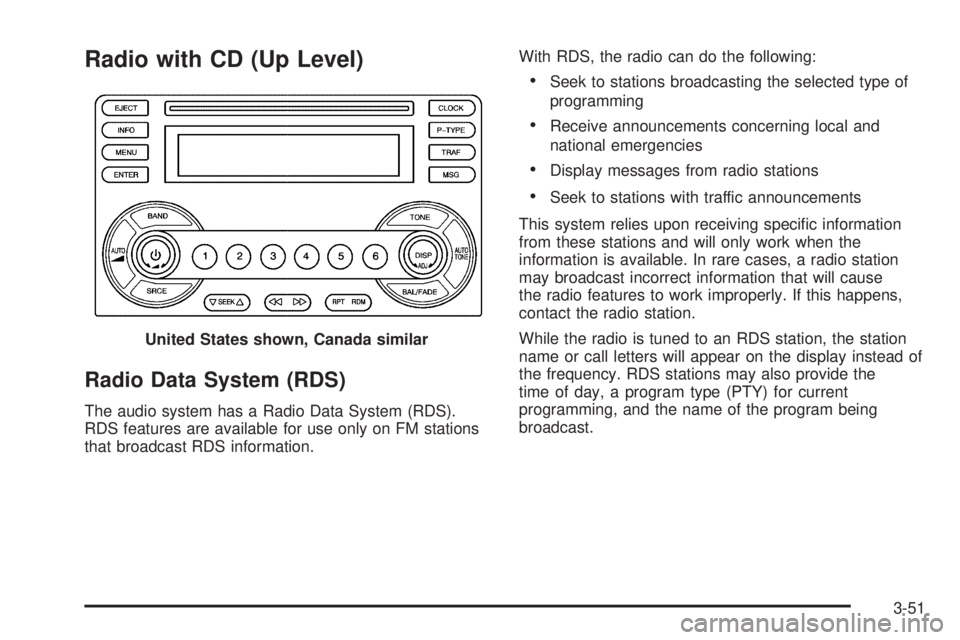
Radio with CD (Up Level)
Radio Data System (RDS)
The audio system has a Radio Data System (RDS).
RDS features are available for use only on FM stations
that broadcast RDS information.With RDS, the radio can do the following:
Seek to stations broadcasting the selected type of
programming
Receive announcements concerning local and
national emergencies
Display messages from radio stations
Seek to stations with traffic announcements
This system relies upon receiving specic information
from these stations and will only work when the
information is available. In rare cases, a radio station
may broadcast incorrect information that will cause
the radio features to work improperly. If this happens,
contact the radio station.
While the radio is tuned to an RDS station, the station
name or call letters will appear on the display instead of
the frequency. RDS stations may also provide the
time of day, a program type (PTY) for current
programming, and the name of the program being
broadcast. United States shown, Canada similar
3-51