buttons PONTIAC G6 2006 User Guide
[x] Cancel search | Manufacturer: PONTIAC, Model Year: 2006, Model line: G6, Model: PONTIAC G6 2006Pages: 416, PDF Size: 2.66 MB
Page 178 of 416
When the desired option is reached, press the enter
button to toggle between the modes of that option. To
make a selection, press the MENU button again.
If no selection is made within 10 seconds, the display
will revert back to the previous information displayed.
The MENU mode is exited when the information button
is pressed, a 10 second time period has elapsed,
the ignition is turned to OFF, or the end of the MENU
list is reached.
SeeDIC Vehicle Personalization on page 3-52for more
information on the personalization options.
Enter
ENTER/r(Enter):Press this button to reset certain
functions and to turn off or acknowledge messages
on the DIC display. This button also toggles through the
options available in each personalization menu.
DIC Warnings and Messages
These messages will appear if there is a problem
detected in one of your vehicle’s systems.
Any message will clear when the vehicle’s condition
is no longer present. To acknowledge a message
and clear it from the display, press any of the
three DIC buttons. The warning message will come
back on the next time the vehicle is turned off and back
on if the condition is still present. With most messages,
a warning chime will sound when the message is
displayed. Your vehicle may have other warning
messages.
AUTO (Automatic) LIGHTS OFF:This message will
display if the automatic headlamp system is disabled
with the headlamp switch.
AUTO (Automatic) LIGHTS ON:This message will
display if the automatic headlamp system is enabled
with the headlamp switch.
BRAKE FLUID:This message will display to inform the
driver that the brake uid level is low while the ignition
is in ON. Have the brake system serviced by your
GM dealer as soon as possible.
3-48
Page 180 of 416

LOW OIL LEVEL:This message may display on some
vehicles. For correct operation of the low oil sensing
system, your vehicle should be on a level surface.
A false LOW OIL LEVEL message may appear if the
vehicle is parked on a grade. The oil level sensing
system does not check for actual oil level if the engine
has been off for a short period of time, and the oil
level is never checked while the engine is running. If the
LOW OIL LEVEL message appears, and your vehicle
has been parked on level ground with the engine off for
at least 30 minutes, the oil level should be checked
by observing the oil dipstick. Prior to checking the
oil level, be sure the engine has been off for a few
minutes and your vehicle is on a level surface. Then
check the dipstick and add oil if necessary. SeeEngine
Oil on page 5-17.
LOW WASHER FLUID:This message will display
when your vehicle is low on windshield washer uid. You
should rell the windshield washer uid reservoir as
soon as possible. See “Adding Washer Fluid” under
Windshield Washer Fluid on page 5-38.
PARKING BRAKE:This message will display if the
parking brake is left engaged and you try to drive away.
SeeParking Brake on page 2-33for more information.
POWER STEERING:This message will display if
a problem has been detected with the electric power
steering, if equipped. Have your vehicle serviced
immediately by your GM dealer.SERVICE AIR BAG:There is a problem with the airbag
system when this message appears. Have your
vehicle serviced immediately by your GM dealer.
STABIL (StabiliTrak
®) NOT READY:When you rst
start your vehicle and drive away, especially during cold
winter weather, this message may display. This is
normal. The StabiliTrak
®performance is affected until
this message automatically clears from the DIC display.
If you acknowledge and clear this message by
pressing one of the DIC buttons, the StabiliTrak
®
system will not be ready. The system will only be ready
when this message clears from the DIC display on
its own. SeeStabiliTrak
®System on page 4-12for
more information.
TOP FAILED:If your vehicle has a retractable hardtop,
this message will display after ve unsuccessful
attempts at retractable hardtop operation. See your
GM dealer for service. SeeLowering the Retractable
Hardtop on page 2-49andRaising the Retractable
Hardtop on page 2-51for more information.
Top Inop (Inoperative) – Trunk:If your vehicle has a
retractable hardtop, this message will display if the
trunk lid is not completely closed when operating the
retractable hardtop. Make sure that the trunk lid is
closed when operating the retractable hardtop. See
Trunk on page 2-14,Lowering the Retractable Hardtop
on page 2-49, andRaising the Retractable Hardtop
on page 2-51for more information.
3-50
Page 187 of 416
To scan preset stations, press and hold either SEEK
button for more than four seconds until you hear
two beeps. The radio will go to the rst preset station
stored on the pushbuttons, play for a few seconds, then
go on to the next preset station. Press either SEEK
button again to stop scanning presets.
The radio will only seek and scan stations with a strong
signal that are in the selected band.
Setting Preset Stations
Up to 18 stations (six FM1, six FM2, and six AM), can
be programmed on the six numbered pushbuttons,
by performing the following steps:
1. Turn the radio on.
2. Press AM/FM/CD to select FM1, FM2, or AM.
3. Tune in the desired station.
4. Press and hold one of the six numbered
pushbuttons until you hear a beep. Whenever that
numbered pushbutton is pressed, the station
that was set will return.
5. Repeat the steps for each pushbutton.
Setting the Tone (Bass/Treble)
TONE /P/Q(Bass/Treble):To adjust the bass or the
treble, press and release the tone button until BASS
or TREB appears on the display. Turn the ADJ knob to
increase or to decrease. If a station is weak or noisy,
decrease the treble.
To adjust bass or treble to the middle position, select
BASS or TREB. Then press and hold the tone button for
more than two seconds. You will hear a beep and the
level will be adjusted to the middle position.
To adjust the tone controls to the middle position, rst
end out of tone by pressing another button, causing
the radio to perform that function, or by waiting
ve seconds for the display to return to the default
display. Then press and hold the tone button for more
than two seconds until you hear a beep. ALL
CENTERED will appear on the display.
3-57
Page 193 of 416
Finding a Station
BAND:Press this button to switch between FM1, FM2,
AM, or XM1 or XM2 (if equipped). The display will
show the selection.
ADJ (Adjust):Turn this knob to select radio stations.
xSEEKw:Press the down or up arrow to go to the
next or to the previous station and stay there.
To scan stations, press and hold either arrow for
two seconds until you hear a beep. The radio will go to
a station, play for a few seconds, then go on to the
next station. Press either arrow again to stop scanning.
To scan preset stations, press and hold either arrow
for more than four seconds until you hear two beeps.
The radio will go to the rst preset station stored on the
pushbuttons, play for a few seconds, then go on to
the next preset station. Press either arrow again to stop
scanning presets.
The radio will only seek and scan stations with a strong
signal that are in the selected band.
Setting Preset Stations
Up to 30 stations (six FM1, six FM2, and six AM,
six XM1 and six XM2 (if equipped)), can be programmed
on the six numbered pushbuttons, by performing the
following steps:
1. Turn the radio on.
2. Press BAND to select FM1, FM2, AM, or XM1
or XM2.
3. Tune in the desired station.
4. Press AUTO TONE or AUTO EQ to select the
equalization.
5. Press and hold one of the six numbered
pushbuttons until you hear a beep. Whenever that
numbered pushbutton is pressed, the station
that was set will return and the equalization that
was selected will be stored for that pushbutton.
6. Repeat the steps for each pushbutton.
3-63
Page 203 of 416
For XM™ (if equipped), press the DISP knob while in
XM mode to retrieve four different categories of
information related to the current song or channel:
Artist, Song Title, Category or PTY, Channel
Number/Channel Name.
To change the default on the display, press the DISP
knob until you see the display you want, then hold
the knob for two seconds. You will hear a beep and the
selected display will now be the default.
AUTO
u(Automatic Volume):With automatic
volume, the audio system adjusts automatically to make
up for road and wind noise as you drive.
Set the volume at the desired level. Press this button to
select LOW, MEDIUM, or HIGH. AUTO VOL LOW,
AUTO VOL MEDIUM, or AUTO VOL HIGH will appear
on the display. Each higher setting will allow for
more volume compensation at faster vehicle speeds.
Then as you drive, automatic volume increases
the volume, as necessary, to overcome noise at any
speed. The volume level should always sound the same
to you as you drive. AUTO VOL NONE will appear on
the display if the radio cannot determine the vehicle
speed or if the engine is not running. To turn automatic
volume off, press this button until AUTO VOL OFF
appears on the display.
Finding a Station
BAND:Press this button to switch between FM1, FM2,
AM, or XM1 or XM2 (if equipped). The display will
show the selection.
ADJ (Adjust):Turn this knob to select radio stations.
xSEEKw:Press the down or up arrow to go to the
next or to the previous station and stay there.
To scan stations, press and hold either arrow for
two seconds until you hear a beep. The radio will go to
a station, play for a few seconds, then go on to the
next station. Press either arrow again to stop scanning.
To scan preset stations, press and hold either arrow
for more than four seconds until you hear two beeps.
The radio will go to the rst preset station stored on the
pushbuttons, play for a few seconds, then go on to
the next preset station. Press either arrow again to stop
scanning presets.
The radio will only seek and scan stations with a strong
signal that are in the selected band.
3-73
Page 204 of 416
Setting Preset Stations
Up to 30 stations (six FM1, six FM2, and six AM,
six XM1 and six XM2 (if equipped)), can be programmed
on the six numbered pushbuttons, by performing the
following steps:
1. Turn the radio on.
2. Press BAND to select FM1, FM2, AM, or XM1
or XM2.
3. Tune in the desired station.
4. Press AUTO TONE or AUTO EQ to select the
equalization.
5. Press and hold one of the six numbered
pushbuttons until you hear a beep. Whenever that
numbered pushbutton is pressed, the station
that was set will return and the equalization that
was selected will be stored for that pushbutton.
6. Repeat the steps for each pushbutton.
Setting the Tone
(Bass/Midrange/Treble)
TONE /P/Q(Bass/Treble):Press and release this
button until BASS, MID, or TREB appears on the
display. Turn the ADJ knob to increase or to decrease.
The display will show the bass, mid, or treble level.
If a station is weak or noisy, decrease the treble.To adjust bass, midrange, or treble to the middle
position, select BASS, MID, or TREB. Then press and
hold the tone button for more than two seconds.
The display level will be adjusted to the middle position
and you will hear a beep.
To adjust all tone controls to the middle position, press
and hold the tone button when no tone control is
displayed. ALL CENTERED will appear on the display
and you will hear a beep.
AUTO TONE/AUTO EQ (Automatic Equalization):
Press this button to select customized equalization
settings designed for country, jazz, talk, pop, rock,
and classical.
The equalization setting last chosen will appear on the
display when you rst press this button. Each time you
press this button, another equalization setting will
appear on the display and automatic tone or automatic
equalization will switch to that preset equalization
settings.
To return to the manual mode, press the AUTO TONE or
AUTO EQ button until CUSTOM appears on the display.
Then manually adjust the bass, midrange, and treble
using the tone button.
3-74
Page 216 of 416
Theft-Deterrent Feature
THEFTLOCK®is designed to discourage theft of your
vehicle’s radio. The feature works automatically by
learning a portion of the Vehicle Identication
Number (VIN). If the radio is moved to a different
vehicle, it will not operate and LOCKED will appear on
the display.
With THEFTLOCK
®activated, the radio will not operate
if stolen.
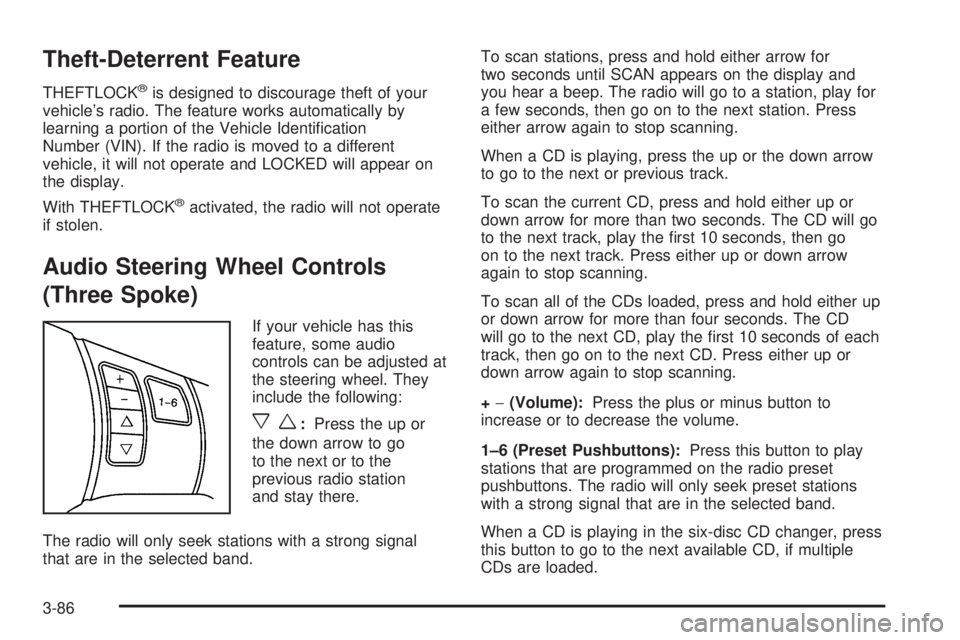
Audio Steering Wheel Controls
(Three Spoke)
If your vehicle has this
feature, some audio
controls can be adjusted at
the steering wheel. They
include the following:
xw:Press the up or
the down arrow to go
to the next or to the
previous radio station
and stay there.
The radio will only seek stations with a strong signal
that are in the selected band.To scan stations, press and hold either arrow for
two seconds until SCAN appears on the display and
you hear a beep. The radio will go to a station, play for
a few seconds, then go on to the next station. Press
either arrow again to stop scanning.
When a CD is playing, press the up or the down arrow
to go to the next or previous track.
To scan the current CD, press and hold either up or
down arrow for more than two seconds. The CD will go
to the next track, play the rst 10 seconds, then go
on to the next track. Press either up or down arrow
again to stop scanning.
To scan all of the CDs loaded, press and hold either up
or down arrow for more than four seconds. The CD
will go to the next CD, play the rst 10 seconds of each
track, then go on to the next CD. Press either up or
down arrow again to stop scanning.
+−(Volume):Press the plus or minus button to
increase or to decrease the volume.
1–6 (Preset Pushbuttons):Press this button to play
stations that are programmed on the radio preset
pushbuttons. The radio will only seek preset stations
with a strong signal that are in the selected band.
When a CD is playing in the six-disc CD changer, press
this button to go to the next available CD, if multiple
CDs are loaded.
3-86
Page 217 of 416
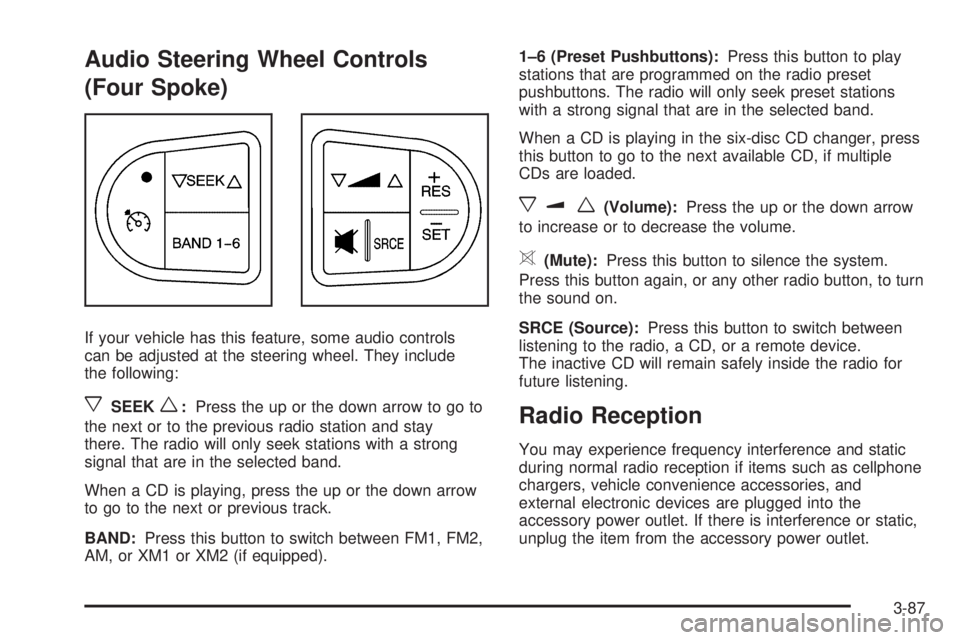
Audio Steering Wheel Controls
(Four Spoke)
If your vehicle has this feature, some audio controls
can be adjusted at the steering wheel. They include
the following:
xSEEKw:Press the up or the down arrow to go to
the next or to the previous radio station and stay
there. The radio will only seek stations with a strong
signal that are in the selected band.
When a CD is playing, press the up or the down arrow
to go to the next or previous track.
BAND:Press this button to switch between FM1, FM2,
AM, or XM1 or XM2 (if equipped).1–6 (Preset Pushbuttons):Press this button to play
stations that are programmed on the radio preset
pushbuttons. The radio will only seek preset stations
with a strong signal that are in the selected band.
When a CD is playing in the six-disc CD changer, press
this button to go to the next available CD, if multiple
CDs are loaded.
xuw(Volume):Press the up or the down arrow
to increase or to decrease the volume.
>(Mute):Press this button to silence the system.
Press this button again, or any other radio button, to turn
the sound on.
SRCE (Source):Press this button to switch between
listening to the radio, a CD, or a remote device.
The inactive CD will remain safely inside the radio for
future listening.
Radio Reception
You may experience frequency interference and static
during normal radio reception if items such as cellphone
chargers, vehicle convenience accessories, and
external electronic devices are plugged into the
accessory power outlet. If there is interference or static,
unplug the item from the accessory power outlet.
3-87
Page 289 of 416
After changing the engine oil and lter, the system must
be reset. To reset the oil life system, use the following
procedure:
1. With the CHANGE OIL SOON message displayed,
press any of the three DIC buttons to clear the
CHANGE OIL SOON message. SeeDIC Warnings
and Messages on page 3-48.
2. Display OIL LIFE RESET on the DIC.
3. Press and hold the ENTER button for at least one
second. An ACKNOWLEDGED display message will
appear for three seconds or until the next button is
pressed. This will tell you the system has been reset.
SeeDIC Vehicle Personalization on page 3-52.
4. Turn the ignition to OFF.
If the CHANGE OIL SOON message comes back on
when you start your vehicle, the engine oil life system
has not reset. Repeat the procedure.What to Do with Used Oil
Used engine oil contains certain elements that may be
unhealthy for your skin and could even cause cancer.
Do not let used oil stay on your skin for very long. Clean
your skin and nails with soap and water, or a good
hand cleaner. Wash or properly dispose of clothing or
rags containing used engine oil. See the manufacturer’s
warnings about the use and disposal of oil products.
Used oil can be a threat to the environment. If you
change your own oil, be sure to drain all the oil from the
lter before disposal. Never dispose of oil by putting it in
the trash, pouring it on the ground, into sewers, or into
streams or bodies of water. Instead, recycle it by taking it
to a place that collects used oil. If you have a problem
properly disposing of your used oil, ask your dealer, a
service station or a local recycling center for help.
5-21
Page 356 of 416

Cleaning the Inside of Your Vehicle
Your vehicle’s interior will continue to look its best if it is
cleaned often. Although not always visible, dust and dirt
can accumulate on your upholstery. Dirt can damage
carpet, fabric, leather, and plastic surfaces. Regular
vacuuming is recommended to remove particles from
your upholstery. It is important to keep your upholstery
from becoming and remaining heavily soiled. Soils should
be removed as quickly as possible. Your vehicle’s interior
may experience extremes of heat that could cause
stains to set rapidly.
Lighter colored interiors may require more frequent
cleaning. Use care because newspapers and garments
that transfer color to your home furnishings may also
transfer color to your vehicle’s interior.
When cleaning your vehicle’s interior, only use cleaners
specically designed for the surfaces being cleaned.
Permanent damage may result from using cleaners on
surfaces for which they were not intended. Use glass
cleaner only on glass. Remove any accidental over-spray
from other surfaces immediately. To prevent over-spray,
apply cleaner directly to the cleaning cloth.
Notice:If you use abrasive cleaners when cleaning
glass surfaces on your vehicle, you could scratch
the glass and/or cause damage to the rear window
defogger and the integrated radio antenna. When
cleaning the glass on your vehicle, use only a soft
cloth and glass cleaner.Many cleaners contain solvents that may become
concentrated in your vehicle’s breathing space.
Before using cleaners, read and adhere to all safety
instructions on the label. While cleaning your vehicle’s
interior, maintain adequate ventilation by opening
your vehicle’s doors and windows.
Dust may be removed from small buttons and knobs
using a small brush with soft bristles.
Your GM dealer has a product for cleaning your
vehicle’s glass. Should it become necessary, you can
also obtain a product from your GM dealer to remove
odors from your vehicle’s upholstery.
Do not clean your vehicle using the following cleaners
or techniques:
Never use a knife or any other sharp object to
remove a soil from any interior surface.
Never use a stiff brush. It can cause damage to
your vehicle’s interior surfaces.
Never apply heavy pressure or rub aggressively
with a cleaning cloth. Use of heavy pressure
can damage your interior and does not improve
the effectiveness of soil removal.
5-88