light PONTIAC G6 2007 Owner's Manual
[x] Cancel search | Manufacturer: PONTIAC, Model Year: 2007, Model line: G6, Model: PONTIAC G6 2007Pages: 486, PDF Size: 2.78 MB
Page 120 of 486

PASS-Key®III+
The PASS-Key®III+ system operates on a radio
frequency subject to Federal Communications
Commission (FCC) Rules and with Industry
Canada.
This device complies with Part 15 of the FCC
Rules. Operation is subject to the following two
conditions:
1. This device may not cause harmful
interference.
2. This device must accept any interference
received, including interference that may
cause undesired operation.
This device complies with RSS-210 of Industry
Canada. Operation is subject to the following two
conditions:
1. This device may not cause interference.
2. This device must accept any interference
received, including interference that may
cause undesired operation of the device.
Changes or modications to this system by other
than an authorized service facility could void
authorization to use this equipment.
PASS-Key
®III+ uses a radio frequency
transponder in the key that matches a decoder
in your vehicle.
PASS-Key®III+ Operation
Your vehicle has the PASS-Key®III+
(Personalized Automotive Security System)
theft-deterrent system. PASS-Key
®III+ is a
passive theft-deterrent system. This means you do
not have to do anything special to arm or disarm
the system. It works when you insert or remove the
key from the ignition.
When the PASS-Key
®III+ system senses that
someone is using the wrong key, it prevents the
vehicle from starting. Anyone using a trial-and-error
method to start the vehicle will be discouraged
because of the high number of electrical key codes.
When trying to start the vehicle if the engine does
not start and the SECURITY light comes on, the
key may have a damaged transponder. Turn the
ignition off and try again.
If the engine still does not start, and the key
appears to be undamaged, try another ignition key.
Also, check the fuse. SeeFuses on page 415.Ifthe
engine still does not start with the other key, your
vehicle needs service. If your vehicle does start, the
rst key may be faulty. See your dealer who can
service the PASS-Key
®III+ and have a new key
made. In an emergency, contact Roadside
Assistance.
120
Page 121 of 486

It is possible for the PASS-Key®III+ decoder
to “learn” the transponder value of a new or
replacement key. Up to 10 additional keys may
be programmed for the vehicle. The following
procedure is for programming additional keys only.
If all the currently programmed keys are lost or
do not operate, you must see your dealer or a
locksmith who can service PASS-Key
®III+ to have
keys made and programmed to the system.
See your dealer or a locksmith who can service
PASS-Key
®III+ to get a new key blank that is cut
exactly as the ignition key that operates the system.
To program the new key do the following:
1. Verify that the new key has
1stamped on it.
2. Insert the already programmed key in the
ignition and start the engine. If the engine
will not start, see your dealer for service.
3. After the engine has started, turn the key to
OFF, and remove the key.4. Insert the key to be programmed and turn it to
the ON position within ve seconds of
removing the original key.
5. The SECURITY light will turn off once the key
has been programmed.
6. Repeat Steps 1 through 5 if additional keys
are to be programmed.
If you are ever driving and the SECURITY light
comes on and stays on, you may be able to restart
your engine if you turn it off. Your PASS-Key
®III+
system, however, is not working properly and must
be serviced by your dealer. Your vehicle is not
protected by the PASS-Key
®III+ system at
this time.
If you lose or damage your PASS-Key
®III+ key,
see your dealer or a locksmith who can service
PASS-Key
®III+ to have a new key made.
121
Page 123 of 486
9(OFF):This is the only position from which
you can remove the key. For a vehicle with an
automatic transaxle, the shift lever must be in
PARK (P) with the ignition in OFF to remove the
key. For a vehicle with a manual transaxle, the shift
lever must be in REVERSE (R) to remove the key.
A warning chime will sound if you open the driver’s
door while the ignition is off and the key is in the
ignition.
ACC (Accessory):This position unlocks the
transaxle. It also lets you use things like the radio
and windshield wipers while the engine is not
running. To use ACC, turn the key clockwise to the
rst position. Use this position if your vehicle must
be pushed or towed. SeeRecreational Vehicle
Towing on page 294.
Never try to push-start your vehicle, unless it has a
manual transaxle.R(ON):This position is where the key returns to
after you start the engine and release the key. The
ignition switch will stay in this position while the
engine is running. But even while the engine is not
running, you can use ON to operate your electrical
accessories and to display some instrument
panel warning lights. Use the ON position for
push-starting a vehicle with a manual transaxle.
The battery could be drained if you leave the key in
the ACC or ON position with the engine off. You
may not be able to start your vehicle if the battery
is allowed to drain for an extended period of time.
/(START):This position starts the engine. When
the engine starts, release the key. The ignition
switch will return to the ON position for normal
driving.
123
Page 133 of 486

The transaxle will only allow you to shift into gears
appropriate for the vehicle speed and engine
revolutions per minute (RPM):
The transaxle will not automatically shift to the
next higher gear if the engine RPM is too high.
The transaxle will not allow shifting to the next
lower gear if the engine RPM is too high.
If the vehicle does not respond to a gear change, or
detects a problem with the transaxle, the range of
gears may be reduced and the Malfunction
Indicator Lamp will come on. SeeMalfunction
Indicator Lamp on page 204for more information.
SECOND (2)/THIRD (3)
Gear Start Feature
Notice:If you attempt a third gear start while
trailering or towing a heavy load, you will notice
reduced engine power. This could overheat and
damage your transaxle. Do not attempt a third
gear start while trailering or towing your
vehicle.If your vehicle has the 6-speed transaxle, when
accelerating your vehicle from a stop in snowy
and icy conditions, you may want to shift into
SECOND (2), or THIRD (3) gear. A higher gear,
and light application of the gas pedal, may allow
you to gain more traction on slippery surfaces.
With the TAP-Shift feature, the vehicle can
accelerate from a stop in SECOND (2) or
THIRD (3).
1. Move the shift lever from DRIVE (D) into the
MANUAL MODE (M) position.
2. With the vehicle stopped, press the plus (+)
paddle forward to select SECOND (2) or
THIRD (3)gear. The vehicle will start
from a stop position in SECOND (2) or
THIRD (3)gear.
3. Once the vehicle is moving select the desired
drive gear.
133
Page 135 of 486
Also, use REVERSE (R), along with the parking
brake, for parking your vehicle.
Once the shift lever is in REVERSE (R), the
ignition can be turned to OFF and the key
removed.
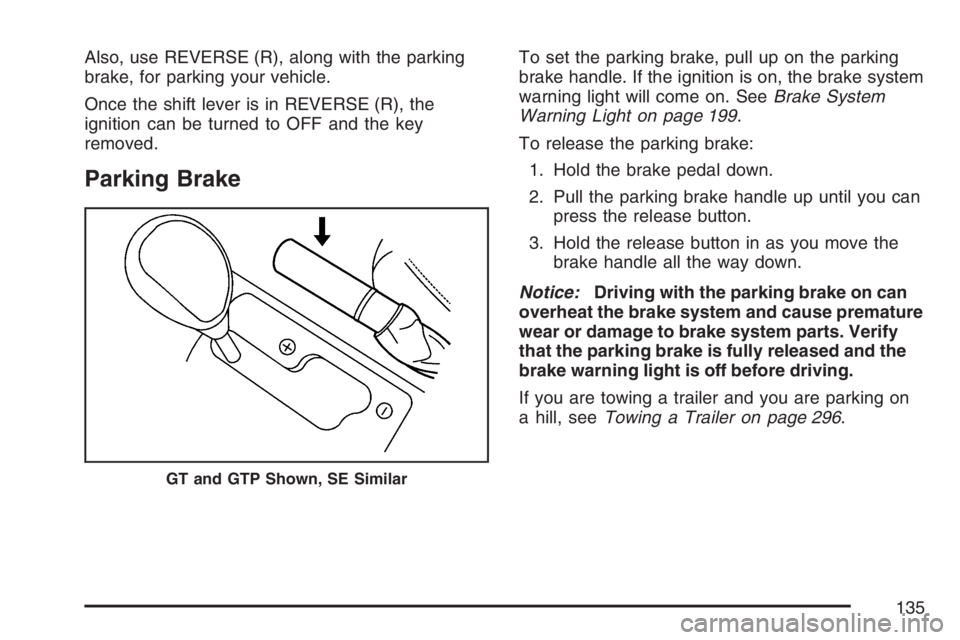
Parking Brake
To set the parking brake, pull up on the parking
brake handle. If the ignition is on, the brake system
warning light will come on. SeeBrake System
Warning Light on page 199.
To release the parking brake:
1. Hold the brake pedal down.
2. Pull the parking brake handle up until you can
press the release button.
3. Hold the release button in as you move the
brake handle all the way down.
Notice:Driving with the parking brake on can
overheat the brake system and cause premature
wear or damage to brake system parts. Verify
that the parking brake is fully released and the
brake warning light is off before driving.
If you are towing a trailer and you are parking on
a hill, seeTowing a Trailer on page 296.
GT and GTP Shown, SE Similar
135
Page 143 of 486

Automatic Dimming Rearview Mirror
with OnStar
®and Compass
Your vehicle may have an automatic dimming
rearview mirror with a compass and OnStar®
controls. For more information about OnStar®,
seeOnStar®System on page 148.
The automatic dimming feature turns on each time
the vehicle is started. To turn automatic dimming
off or on, press the left button below the mirror.
A green indicator light will be on when automatic
dimming is on.
There are also three OnStar
®buttons located at
the bottom of the mirror. See your dealer for more
information on the system and how to subscribe
to OnStar
®. SeeOnStar®System on page 148for
more information about the service OnStar®
provides.
Compass Operation
Press the on/off button once to turn the compass
on or off.
When the ignition and the compass feature are
on, the compass will show two character boxes for
a few seconds. After a few seconds, the mirror
will display the current compass direction.
Compass Calibration
If after a few seconds the display does not show a
compass direction, (N for North for example), there
may be a strong magnetic eld interfering with the
compass. Such interference may be caused by a
magnetic antenna mount, note pad holder, or
similar object. If the letter C appears in the compass
window, the compass may need to be reset or
calibrated.
The mirror can be calibrated by driving the vehicle
in circles at 5 mph (8 km/h) or less until the
display reads a direction.
143
Page 145 of 486

Automatic Dimming Rearview Mirror
with Compass
Your vehicle may have an automatic dimming
rearview mirror with a compass. This feature
enables the mirror to sense nighttime glare from
vehicle headlamps from behind and automatically
dim to reduce the glare to a safe level.
The automatic dimming feature turns on each time
the vehicle is started. Press the OFF button once
and the green indicator light located to the left of the
button will go out indicating the feature is off. To
turn the feature back on, press and release the
AUTO button and the green indicator light will
come on.
Compass Operation
Press the on/off button once to turn the compass
on or off.
When the ignition and the compass feature are
on, the compass will show two character boxes for
a few seconds. After a few seconds, the mirror
will display the current compass direction.
Compass Calibration
If after a few seconds the display does not show a
compass direction, (N for North for example), there
may be a strong magnetic eld interfering with the
compass. Such interference may be caused by a
magnetic antenna mount, note pad holder, or
similar object. If the letter C appears in the compass
window, the compass may need to be reset or
calibrated.
The mirror can be calibrated by driving the vehicle
in circles at 5 mph (8 km/h) or less until the
display reads a direction.
145
Page 161 of 486
Instrument Panel Overview........................ 164
Hazard Warning Flashers.......................... 166
Other Warning Devices............................. 166
Horn.......................................................... 167
Tilt Wheel.................................................. 167
Turn Signal/Multifunction Lever.................. 168
Turn and Lane-Change Signals................. 168
Headlamp High/Low-Beam Changer.......... 169
Flash-to-Pass............................................ 169
Windshield Wipers..................................... 169
Windshield Washer.................................... 171
Cruise Control........................................... 171
Headlamps................................................ 174
Headlamps on Reminder........................... 175
Headlamps Off in PARK (P)...................... 175
Delayed Headlamps.................................. 176
Daytime Running Lamps (DRL)................. 176
Automatic Headlamp System..................... 177
Fog Lamps................................................ 178
Instrument Panel Brightness...................... 178
Courtesy Lamps........................................ 178
Dome Lamp.............................................. 179
Entry/Exit Lighting...................................... 179
Parade Dimming........................................ 180Overhead Console Reading Lamps........... 180
Trunk Lamp............................................... 180
Battery Run-Down Protection..................... 181
Accessory Power Outlet(s)........................ 181
Climate Controls......................................... 182
Climate Control System............................. 182
Automatic Climate Control System............. 187
Outlet Adjustment...................................... 191
Warning Lights, Gages, and Indicators..... 192
Instrument Panel Cluster........................... 193
Speedometer and Odometer...................... 194
Trip Odometer........................................... 194
Tachometer............................................... 194
Safety Belt Reminder Light........................ 195
Passenger Safety Belt Reminder Light....... 195
Airbag Readiness Light............................. 196
Passenger Airbag Status Indicator............. 197
Charging System Light.............................. 199
Brake System Warning Light..................... 199
Anti-Lock Brake System Warning Light...... 200
Traction Control System (TCS)
Warning Light........................................ 201
Traction Control System Active Light......... 201
Section 3 Instrument Panel
161
Page 162 of 486
Enhanced Traction System Warning
Light...................................................... 202
Enhanced Traction System Active Light..... 202
StabiliTrak
®Not Ready Light...................... 203
StabiliTrak®Indicator Light......................... 203
Engine Coolant Temperature Gage............ 203
Malfunction Indicator Lamp........................ 204
Oil Pressure Light..................................... 207
Security Light............................................ 207
Cruise Control Light.................................. 208
Highbeam On Light................................... 208
Fuel Gage................................................. 208
Low Fuel Warning Light............................ 208
Driver Information Center (DIC).................. 209
DIC Operation and Displays...................... 209
DIC Warnings and Messages.................... 212
DIC Vehicle Personalization....................... 216Audio System(s)......................................... 219
Setting the Time for Radios without Radio
Data Systems (RDS).............................. 220
Setting the Time for Radios with Radio
Data Systems (RDS).............................. 221
Radio with CD........................................... 221
Radio with Six-Disc CD............................. 231
XM Radio Messages................................. 246
Theft-Deterrent Feature............................. 248
Audio Steering Wheel Controls.................. 248
Radio Reception........................................ 249
Care of Your CDs..................................... 250
Care of the CD Player.............................. 250
Fixed Mast Antenna.................................. 250
Backglass Antenna.................................... 250
XM™ Satellite Radio Antenna System....... 251
Section 3 Instrument Panel
162
Page 169 of 486
If a bulb is burned out, replace it to help avoid an
accident. If the arrows don’t go on at all when
you signal a turn, check for burned-out bulbs and
then check the fuse. SeeFuses on page 415.
Headlamp High/Low-Beam Changer
To change the headlamps from low beam to
high beam, push the turn signal/multifunction lever
away from you.
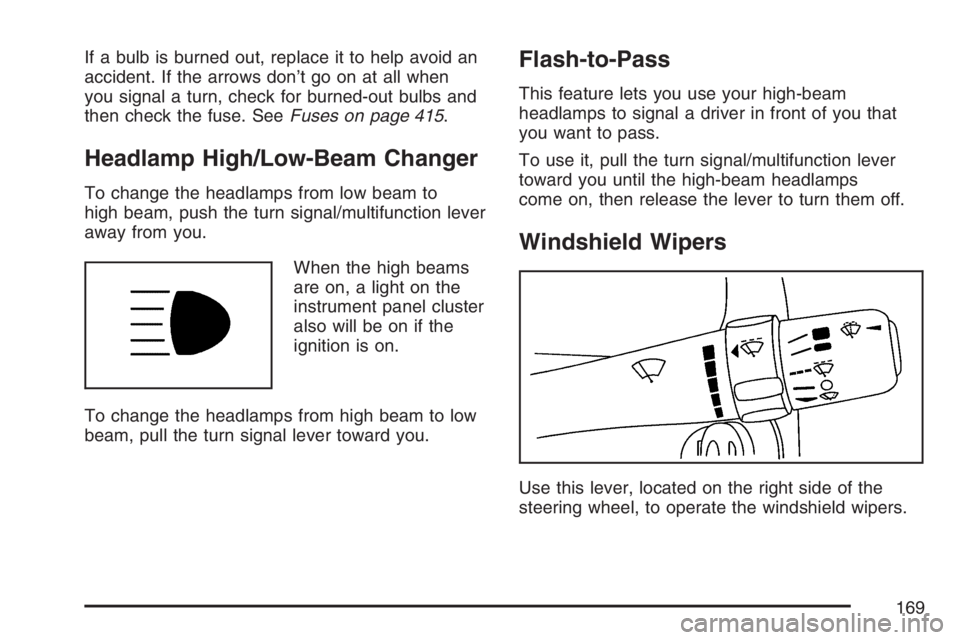
When the high beams
are on, a light on the
instrument panel cluster
also will be on if the
ignition is on.
To change the headlamps from high beam to low
beam, pull the turn signal lever toward you.
Flash-to-Pass
This feature lets you use your high-beam
headlamps to signal a driver in front of you that
you want to pass.
To use it, pull the turn signal/multifunction lever
toward you until the high-beam headlamps
come on, then release the lever to turn them off.
Windshield Wipers
Use this lever, located on the right side of the
steering wheel, to operate the windshield wipers.
169