display PONTIAC G6 2009 User Guide
[x] Cancel search | Manufacturer: PONTIAC, Model Year: 2009, Model line: G6, Model: PONTIAC G6 2009Pages: 410, PDF Size: 2.33 MB
Page 131 of 410

As the switch is being pulled, the hardtop will raise from
the trunk and move into place. The hardtop and trunk lid
will close and latch. If the engine is on, a chime will sound
when the hardtop has raised completely.
The Driver Information Center (DIC) will display the
TOP MOVE COMPLT message to signal the procedure
is complete. SeeDIC Warnings and Messages on
page 3-46for more information.After the hardtop has raised completely, release the
switch. If you continue to pull the switch for about
two seconds after the hardtop has raised completely,
the windows will automatically close.
If the switch is released before the hardtop cycle is
complete, the cycle will stop and the Driver Information
Center (DIC) will display the TOP NOT SECURE
message. Always pull and hold the switch until a chime
sounds, if the engine is on, and the Driver Information
Center (DIC) displays the TOP MOVE COMPLT to signal
the procedure is complete. SeeDIC Warnings and
Messages on page 3-46for more information.
The hardtop will not operate if the vehicle has an
electrical failure. If an electrical failure occurs, see
your dealer/retailer for service.
If your vehicle must be towed to a dealer/retailer for
service, your vehicle should be towed by atbed with the
vehicle facing backwards. Consult your dealer/retailer
or professional towing service if you need to have your
disabled vehicle towed. SeeRoadside Assistance
Program on page 7-7.
2-49
Page 134 of 410
Security Light...............................................3-41
Cruise Control Light......................................3-41
Highbeam On Light.......................................3-41
Fuel Gage...................................................3-42
Low Fuel Warning Light.................................3-42
Driver Information Center (DIC).......................3-42
DIC Operation and Displays...........................3-43
DIC Warnings and Messages.........................3-46
DIC Vehicle Personalization............................3-50Audio System(s).............................................3-52
Setting the Clock..........................................3-53
Radio(s)......................................................3-54
XM Radio Messages.....................................3-66
Theft-Deterrent Feature..................................3-68
Audio Steering Wheel Controls.......................3-68
Radio Reception...........................................3-69
Fixed Mast Antenna......................................3-69
Backglass Antenna.......................................3-70
XM™ Satellite Radio Antenna System.............3-70
Section 3 Instrument Panel
3-2
Page 143 of 410
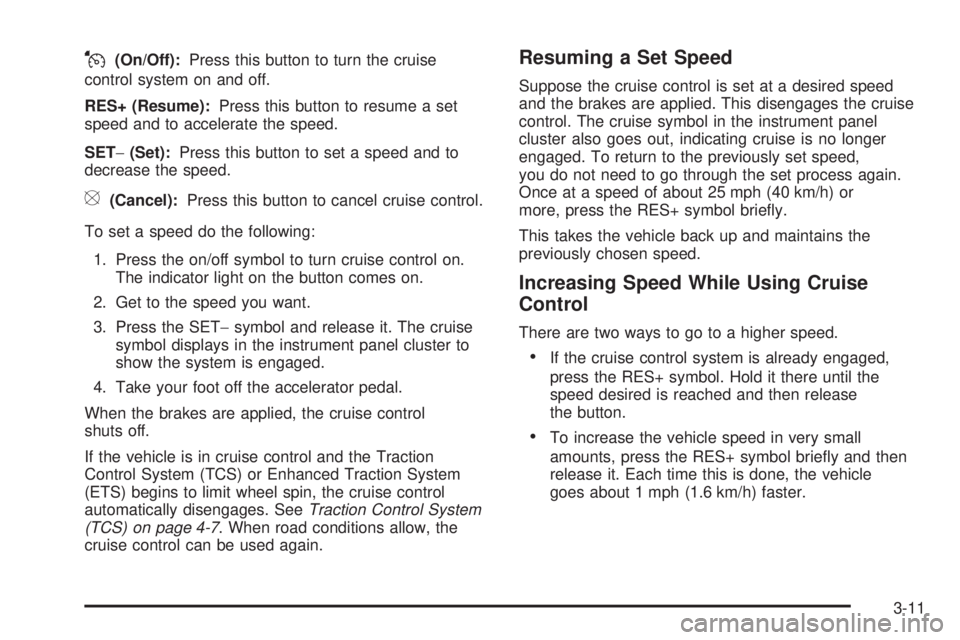
J(On/Off):Press this button to turn the cruise
control system on and off.
RES+ (Resume):Press this button to resume a set
speed and to accelerate the speed.
SET−(Set):Press this button to set a speed and to
decrease the speed.
[(Cancel):Press this button to cancel cruise control.
To set a speed do the following:
1. Press the on/off symbol to turn cruise control on.
The indicator light on the button comes on.
2. Get to the speed you want.
3. Press the SET−symbol and release it. The cruise
symbol displays in the instrument panel cluster to
show the system is engaged.
4. Take your foot off the accelerator pedal.
When the brakes are applied, the cruise control
shuts off.
If the vehicle is in cruise control and the Traction
Control System (TCS) or Enhanced Traction System
(ETS) begins to limit wheel spin, the cruise control
automatically disengages. SeeTraction Control System
(TCS) on page 4-7. When road conditions allow, the
cruise control can be used again.
Resuming a Set Speed
Suppose the cruise control is set at a desired speed
and the brakes are applied. This disengages the cruise
control. The cruise symbol in the instrument panel
cluster also goes out, indicating cruise is no longer
engaged. To return to the previously set speed,
you do not need to go through the set process again.
Once at a speed of about 25 mph (40 km/h) or
more, press the RES+ symbol briey.
This takes the vehicle back up and maintains the
previously chosen speed.
Increasing Speed While Using Cruise
Control
There are two ways to go to a higher speed.
If the cruise control system is already engaged,
press the RES+ symbol. Hold it there until the
speed desired is reached and then release
the button.
To increase the vehicle speed in very small
amounts, press the RES+ symbol briey and then
release it. Each time this is done, the vehicle
goes about 1 mph (1.6 km/h) faster.
3-11
Page 149 of 410

Parade Dimming
Parade mode automatically prohibits the dimming of the
instrument panel displays during the daylight while
the headlamps are on so that the displays are still able
to be seen.
Reading Lamps
For vehicles with front and rear reading lamps, press
the lens to turn the lamp on and off, while the doors are
closed. These lamps come on automatically when
any door is opened.
Trunk Lamp
The trunk lamp comes on when the trunk is opened and
turns off when the trunk is closed.
Electric Power Management
The vehicle has Electric Power Management (EPM) that
estimates the battery’s temperature and state of charge.
It then adjusts the voltage for best performance and
extended life of the battery.
When the battery’s state of charge is low, the voltage
is raised slightly to quickly bring the charge back
up. When the state of charge is high, the voltage is
lowered slightly to prevent overcharging. If the vehicle
has a voltmeter gage or a voltage display on the
Driver Information Center (DIC), you may see the
voltage move up or down. This is normal. If there is a
problem, an alert will be displayed.
The battery can be discharged at idle if the electrical
loads are very high. This is true for all vehicles.
This is because the generator (alternator) may not be
spinning fast enough at idle to produce all the power that
is needed for very high electrical loads.
3-17
Page 150 of 410
A high electrical load occurs when several of the
following are on, such as: headlamps, high beams,
fog lamps, rear window defogger, climate control fan at
high speed, heated seats, engine cooling fans, trailer
loads, and loads plugged into accessory power outlets.
EPM works to prevent excessive discharge of the
battery. It does this by balancing the generator’s output
and the vehicle’s electrical needs. It can increase
engine idle speed to generate more power, whenever
needed. It can temporarily reduce the power demands of
some accessories.
Normally, these actions occur in steps or levels, without
being noticeable. In rare cases at the highest levels
of corrective action, this action may be noticeable to
the driver. If so, a Driver Information Center (DIC)
message might be displayed, such as BATTERY
SAVER ACTIVE, BATTERY VOLTAGE LOW, or
LOW BATTERY. If this message is displayed, it is
recommended that the driver reduce the electrical loads
as much as possible. SeeDIC Warnings and Messages
on page 3-46.Battery Run-Down Protection
The battery run-down feature is designed to protect the
vehicle’s battery.
When any interior lamp (trunk, reading lamps, or dome
lamp) is left on when the ignition is turned off, the
battery run-down protection system automatically shuts
the lamp off after 20 minutes. This prevents draining
of the battery.
To reactivate the interior lamps, do one of the following:
Open any door.
Press any Remote Keyless Entry (RKE) transmitter
button.
Press the power door lock switch.
Press the remote trunk release.
Turn the lamp that was left on to off and then to
on again.
3-18
Page 156 of 410
Automatic Climate Control System
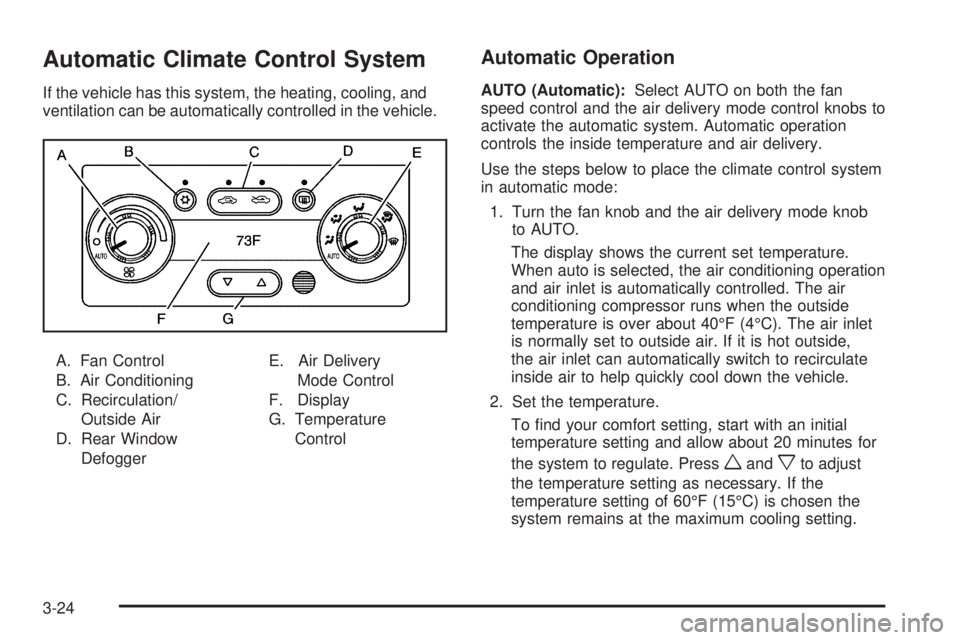
If the vehicle has this system, the heating, cooling, and
ventilation can be automatically controlled in the vehicle.
A. Fan Control
B. Air Conditioning
C. Recirculation/
Outside Air
D. Rear Window
DefoggerE. Air Delivery
Mode Control
F. Display
G. Temperature
Control
Automatic Operation
AUTO (Automatic):Select AUTO on both the fan
speed control and the air delivery mode control knobs to
activate the automatic system. Automatic operation
controls the inside temperature and air delivery.
Use the steps below to place the climate control system
in automatic mode:
1. Turn the fan knob and the air delivery mode knob
to AUTO.
The display shows the current set temperature.
When auto is selected, the air conditioning operation
and air inlet is automatically controlled. The air
conditioning compressor runs when the outside
temperature is over about 40°F (4°C). The air inlet
is normally set to outside air. If it is hot outside,
the air inlet can automatically switch to recirculate
inside air to help quickly cool down the vehicle.
2. Set the temperature.
To nd your comfort setting, start with an initial
temperature setting and allow about 20 minutes for
the system to regulate. Press
wandxto adjust
the temperature setting as necessary. If the
temperature setting of 60°F (15°C) is chosen the
system remains at the maximum cooling setting.
3-24
Page 157 of 410
If the temperature setting of 90°F (32°C) is chosen
the system remains at the maximum heat setting.
Choosing either maximum setting will not cause the
vehicle to heat or cool faster.
Be careful not to cover the sensor located on the
top of the instrument panel near the windshield.
This sensor regulates air temperature based on sun
load, and also turns on the headlamps.
Also be careful not to cover the sensor grille on the
lower right side of the climate control faceplate.
This senses the inside vehicle temperature needed
for proper regulation.
To avoid blowing cold air at start-up in cold weather,
the system delays turning on the fan until warm
air is available. The length of delay depends on the
engine coolant temperature. Turning the fan knob
overrides this delay and change the fan to a
selected speed.
If the vehicle has the remote start feature, the climate
control display initially shows “RS” in place of the
temperature to indicate the remote start has been
activated. The remote start system turns on using the
last temperature selected before the vehicle was
last turned off.For best performance, turn the fan and mode knobs to
the AUTO position. The fan speed and air delivery
modes will change to achieve the best comfort.
If the outside air temperature is below 45°F and the
air delivery mode knob is set to AUTO, the automatic
climate control system starts in the defrost mode to clear
the window.
The automatic climate control changes back to manual
operation by turning the vehicle on with the key.
Manual Operation
The air delivery mode or fan speed can be manually
adjusted.
9(Off):Turns off the entire climate control system.
Outside air still enters the vehicle, and is directed to the
oor. This direction can be changed by adjusting the
air delivery mode position.
9(Fan Control):Turn the knob clockwise or
counterclockwise to increase or decrease the fan speed.
xwTemperature Control:Press the up and down
arrows to increase or decrease the temperature
inside the vehicle.
Air Delivery Mode Control:Turn the knob clockwise
or counterclockwise to change the air delivery settings.
3-25
Page 162 of 410

Speedometer and Odometer
The speedometer shows the vehicle speed in both miles
per hour (mph) and kilometers per hour (km/h).
The odometer shows how far the vehicle has been
driven, in either miles (used in the United States)
or kilometers (used in Canada).
When in manual shift mode, the odometer will change
from the vehicle’s mileage to the letter M, for manual
mode, and a number indicating the requested gear
range when moving the shift lever forward or rearward.
For more information seeAutomatic Transmission
Operation on page 2-26.
This vehicle has a tamper resistant odometer.
Repair or replacement of the instrument panel cluster
should only be performed by your dealer/retailer.
Trip Odometer
The trip odometer can display how far the vehicle has
been driven since it was last reset.
For more information seeDIC Operation and Displays
on page 3-43.
Tachometer
The tachometer shows the
engine speed in revolutions
per minute (rpm).
Notice:If the engine is operated with the tachometer
in the shaded warning area, the vehicle could be
damaged, and the damages would not be covered by
the vehicle warranty. Do not operate the engine with
the tachometer in the shaded warning area.2.4L and 3.6L Engine
shown, 3.5L and
3.9L Engine similar
3-30
Page 174 of 410
Fuel Gage
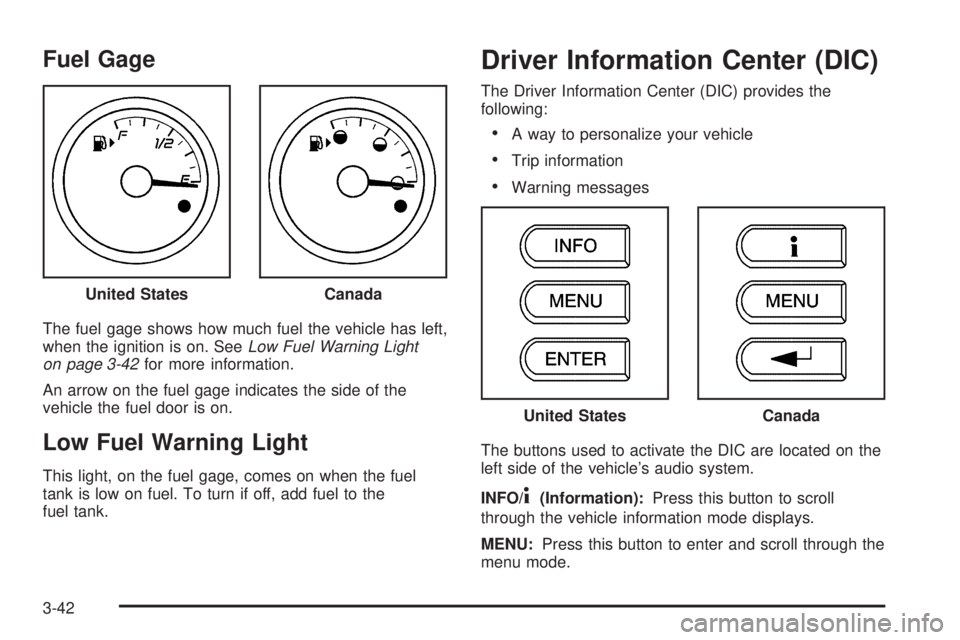
The fuel gage shows how much fuel the vehicle has left,
when the ignition is on. SeeLow Fuel Warning Light
on page 3-42for more information.
An arrow on the fuel gage indicates the side of the
vehicle the fuel door is on.
Low Fuel Warning Light
This light, on the fuel gage, comes on when the fuel
tank is low on fuel. To turn if off, add fuel to the
fuel tank.
Driver Information Center (DIC)
The Driver Information Center (DIC) provides the
following:
A way to personalize your vehicle
Trip information
Warning messages
The buttons used to activate the DIC are located on the
left side of the vehicle’s audio system.
INFO/
4(Information):Press this button to scroll
through the vehicle information mode displays.
MENU:Press this button to enter and scroll through the
menu mode. United States
Canada
United StatesCanada
3-42
Page 175 of 410
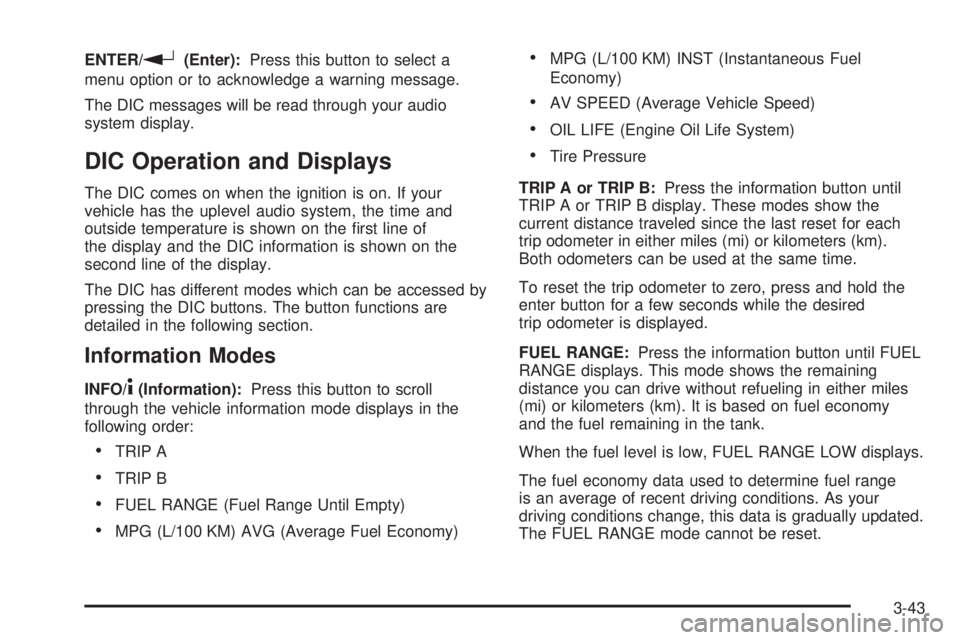
ENTER/r(Enter):Press this button to select a
menu option or to acknowledge a warning message.
The DIC messages will be read through your audio
system display.
DIC Operation and Displays
The DIC comes on when the ignition is on. If your
vehicle has the uplevel audio system, the time and
outside temperature is shown on the rst line of
the display and the DIC information is shown on the
second line of the display.
The DIC has different modes which can be accessed by
pressing the DIC buttons. The button functions are
detailed in the following section.
Information Modes
INFO/4(Information):Press this button to scroll
through the vehicle information mode displays in the
following order:
TRIP A
TRIP B
FUEL RANGE (Fuel Range Until Empty)
MPG (L/100 KM) AVG (Average Fuel Economy)
MPG (L/100 KM) INST (Instantaneous Fuel
Economy)
AV SPEED (Average Vehicle Speed)
OIL LIFE (Engine Oil Life System)
Tire Pressure
TRIP A or TRIP B:Press the information button until
TRIP A or TRIP B display. These modes show the
current distance traveled since the last reset for each
trip odometer in either miles (mi) or kilometers (km).
Both odometers can be used at the same time.
To reset the trip odometer to zero, press and hold the
enter button for a few seconds while the desired
trip odometer is displayed.
FUEL RANGE:Press the information button until FUEL
RANGE displays. This mode shows the remaining
distance you can drive without refueling in either miles
(mi) or kilometers (km). It is based on fuel economy
and the fuel remaining in the tank.
When the fuel level is low, FUEL RANGE LOW displays.
The fuel economy data used to determine fuel range
is an average of recent driving conditions. As your
driving conditions change, this data is gradually updated.
The FUEL RANGE mode cannot be reset.
3-43