service PONTIAC G6 2010 User Guide
[x] Cancel search | Manufacturer: PONTIAC, Model Year: 2010, Model line: G6, Model: PONTIAC G6 2010Pages: 448, PDF Size: 2.5 MB
Page 103 of 448

Any object, such as an aftermarket seat heater or a
comfort enhancing pad or device, installed under
or on top of the seat fabric, could also interfere with
the operation of the passenger sensing system.
This could either prevent proper deployment of the
passenger airbag(s) or prevent the passenger
sensing system from properly turning off the
passenger airbag(s). SeePassenger Sensing
System on page 2-67.
If you have any questions, call Customer
Assistance. The phone numbers and addresses for
Customer Assistance are in Step Two of the
Customer Satisfaction Procedure in this manual.
SeeCustomer Satisfaction Procedure on page 8-2.Q:Because I have a disability, I have to get my
vehicle modied. How can I nd out whether
this will affect my airbag system?
A:If you have questions, call Customer Assistance.
The phone numbers and addresses for Customer
Assistance are in Step Two of the Customer
Satisfaction Procedure in this manual. See
Customer Satisfaction Procedure on page 8-2.
In addition, your dealer/retailer and the service manual
have information about the location of the airbag sensors,
sensing and diagnostic module and airbag wiring.
2-73
Page 104 of 448

Restraint System Check
Checking the Restraint Systems
Safety Belts
Now and then, check that the safety belt reminder light,
safety belts, buckles, latch plates, retractors, and
anchorages are all working properly.
Look for any other loose or damaged safety belt system
parts that might keep a safety belt system from doing
its job. See your dealer/retailer to have it repaired. Torn
or frayed safety belts may not protect you in a crash.
They can rip apart under impact forces. If a belt is torn
or frayed, get a new one right away.
Make sure the safety belt reminder light is working. See
Safety Belt Reminders on page 4-27for more
information.
Keep safety belts clean and dry. SeeCare of Safety
Belts on page 6-110.
Airbags
The airbag system does not need regularly scheduled
maintenance or replacement. Make sure the airbag
readiness light is working. SeeAirbag Readiness Light
on page 4-28for more information.
Notice:If an airbag covering is damaged, opened,
or broken, the airbag may not work properly. Do
not open or break the airbag coverings. If there are
any opened or broken airbag covers, have the
airbag covering and/or airbag module replaced. For
the location of the airbag modules, seeWhat
Makes an Airbag Inflate? on page 2-65. See your
dealer/retailer for service.
2-74
Page 109 of 448
Remote Keyless Entry (RKE)
System
SeeRadio Frequency Statement on page 8-18for
information regarding Part 15 of the Federal
Communications Commission (FCC) Rules and
RSS-210/211 of Industry and Science Canada.
Changes or modifications to this system by other than
an authorized service facility could void authorization to
use this equipment.
If there is a decrease in the RKE operating range, try this:
•Check the distance. The transmitter may be too far
from the vehicle. Stand closer during rainy or
snowy weather.
•Check the location. Other vehicles or objects may be
blocking the signal. Take a few steps to the left or
right, hold the transmitter higher, and try again.
•Check the transmitter’s battery. See “Battery
Replacement” later in this section.
•If the transmitter is still not working correctly, see
your dealer/retailer or a qualified technician for
service.
Remote Keyless Entry (RKE)
System Operation
The Remote Keyless Entry (RKE) transmitter functions
work up to 60 m (195 feet) away from the vehicle.
There are other conditions which can affect the
performance of the transmitter. SeeRemote Keyless
Entry (RKE) System on page 3-3.
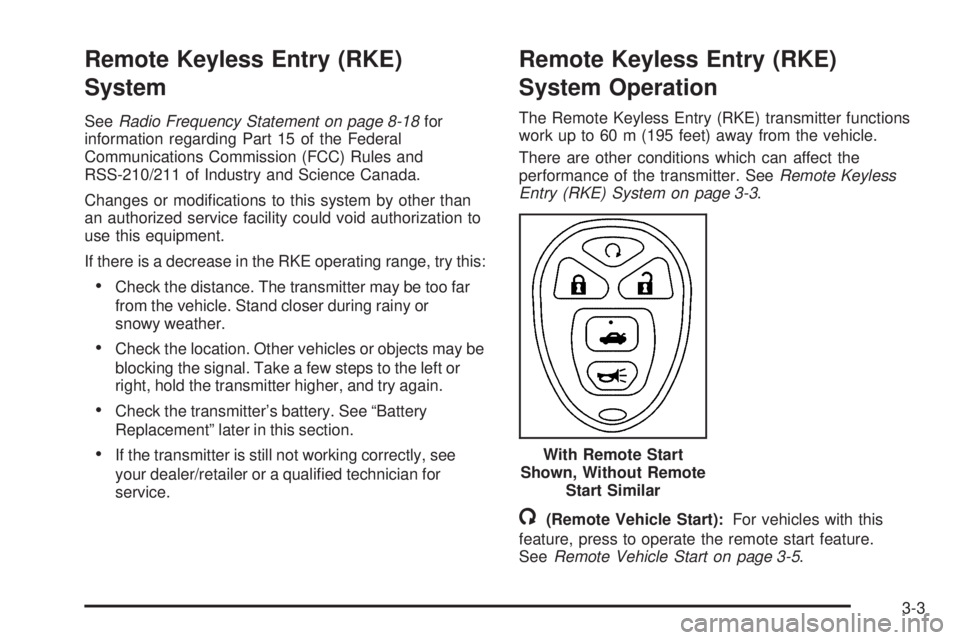
/(Remote Vehicle Start):For vehicles with this
feature, press to operate the remote start feature.
SeeRemote Vehicle Start on page 3-5. With Remote Start
Shown, Without Remote
Start Similar
3-3
Page 124 of 448
How to Detect a Tamper Condition
If three chirps are heard when the unlock or lock button
is pressed on the RKE transmitter, it means that the
content theft security system alarm was previously
triggered.
PASS-Key®III+ Electronic
Immobilizer
SeeRadio Frequency Statement on page 8-18for
information regarding Part 15 of the Federal
Communications Commission (FCC) Rules and
RSS-210/211 of Industry and Science Canada.
PASS-Key®III+ Electronic
Immobilizer Operation
Your vehicle has the PASS-Key®III+ (Personalized
Automotive Security System) theft-deterrent system.
PASS-Key
®III+ is a passive theft-deterrent system.
The system is automatically armed when the key
is removed from the ignition.You do not have to manually arm or disarm the system.
The security light will come on if there is a problem
with arming or disarming the theft-deterrent system.
When the PASS-Key
®III+ system senses that someone
is using the wrong key, it prevents the vehicle from
starting. Anyone using a trial-and-error method to start
the vehicle will be discouraged because of the high
number of electrical key codes.
When trying to start the vehicle if the engine does not
start and the security light comes on, the key may have a
damaged transponder. Turn the ignition off and try again.
If the engine still does not start, and the key appears to
be undamaged, try another ignition key. Also, check
the fuse. SeeFuses on page 6-116. If the engine
still does not start with the other key, your vehicle needs
service. If your vehicle does start, the first key may be
faulty. See your dealer/retailer who can service the
PASS-Key
®III+ and have a new key made. In an
emergency, contact Roadside Assistance.
3-18
Page 125 of 448

It is possible for the PASS-Key®III+ decoder to “learn”
the transponder value of a new or replacement key. Up to
10 additional keys may be programmed for the vehicle.
The following procedure is for programming additional
keys only. If all the currently programmed keys are lost or
do not operate, you must see your dealer/retailer or a
locksmith who can service PASS-Key
®III+ to have keys
made and programmed to the system.
See your dealer/retailer or a locksmith who can service
PASS-Key
®III+ to get a new key blank that is cut
exactly as the ignition key that operates the system.
To program the new key:
1. Verify that the new key has
1stamped on it.
2. Insert the already programmed key in the ignition
and start the engine. If the engine will not start,
see your dealer/retailer for service.
3. After the engine has started, turn the key to
LOCK/OFF, and remove the key.4. Insert the key to be programmed and turn it to the
ON/RUN position within five seconds of removing
the original key.
The security light will turn off once the key has
been programmed.
5. Repeat Steps 1 through 4 if additional keys are to
be programmed.
If you are ever driving and the security light comes on
and stays on, you may be able to restart your engine if
you turn it off. Your PASS-Key
®III+ system, however,
is not working properly and must be serviced by
your dealer/retailer. Your vehicle is not protected by the
PASS-Key
®III+ system at this time.
If you lose or damage your PASS-Key
®III+ key, see
your dealer/retailer or a locksmith who can service
PASS-Key
®III+ to have a new key made.
Do not leave the key or device that disarms or
deactivates the theft deterrent system in the vehicle.
3-19
Page 132 of 448
Notice:If your vehicle seems to accelerate slowly
or not shift gears when you go faster, and you
continue to drive your vehicle that way, you could
damage the transmission. Have your vehicle
serviced right away. You can drive in L (Low) when
you are driving less than 35 mph (56 km/h) and
D (Drive) for higher speeds until then.
3 (Third):This position is also used for normal driving.
However, it reduces vehicle speed more than D (Drive)
without using the brakes. Here are some times you
might choose 3 (Third) instead of D (Drive):
•When driving on hilly, winding roads.
•When towing a trailer, so there is less shifting
between gears.
•When going down a steep hill.
L (Low):This position reduces vehicle speed more
than 3 (Third) without using the brakes. You can
use L (Low) on hills. It can help control vehicle speed
going down steep mountain roads along with using
the brakes off and on.
You can use L (Low) on very steep hills, in deep snow
or mud. If the shift lever is in L (Low), the transmission
will not shift into first gear until the vehicle is going
slowly enough.Notice:Driving in LOW (L) for more than 25 miles
(40 km) or at speeds over 55 mph (90 km/h) may
damage the transmission. Also, shifting into
LOW (L) at speeds above 65 mph (105 km/h) can
cause damage. Drive in THIRD (3) or DRIVE (D)
instead of LOW (L).
Notice:Spinning the tires or holding the vehicle in
one place on a hill using only the accelerator
pedal may damage the transmission. The repair will
not be covered by the vehicle warranty. If you
are stuck, do not spin the tires. When stopping on a
hill, use the brakes to hold the vehicle in place.
M (Manual Mode):This position allows you to change
gears similar to a manual transmission. If the vehicle
has this feature, see Manual Shift Mode (MSM)
following.
Manual Shift Mode (MSM) (If Equipped)
To use this feature,
1. Move the shift lever from D (Drive) rearward into
the M (Manual Mode).
While driving in manual mode, the transmission will
remain in the driver selected gear.
2. Press the shift lever forward to upshift or rearward
to downshift.
3-26
Page 140 of 448
Mirrors
Manual Rearview Mirror
The vehicle may have a manual inside rearview mirror
with the OnStar®system.
Vehicles with OnStar have three additional control
buttons located at the bottom of the mirror. See your
dealer/retailer for more information on the OnStar
system and how to subscribe to OnStar. Also, see the
OnStar
®owners guide for more information about
the services OnStar provides.
Adjust the mirror to see clearly behind your vehicle. Hold
the mirror in the center to move it up or down and side to
side. Adjust the mirror to avoid glare from the headlamps
behind your vehicle. Move the lever to the right for
nighttime use and to the left for daytime use.
Automatic Dimming Rearview Mirror
The vehicle may have an automatic dimming rearview
mirror with a compass display and/or OnStar®controls.
For more information about OnStar, see the OnStar®
owners guide.
Vehicles with OnStar have three additional control
buttons located at the bottom of the mirror. See your
dealer/retailer for more information on the system
and how to subscribe to OnStar. See the OnStar
®
owners guide for more information about the service
OnStar provides.
For vehicles with OnStar:
O(On/Off):Press to turn the dimming feature on or off.
For vehicles without OnStar:
AUTO/OFF:Press AUTO/OFF to turn the dimming
feature on or off.
Automatic Dimming Mirror Operation
Automatic dimming reduces the glare of lights from
behind the vehicle. The dimming feature comes on and
the indicator light illuminates each time the vehicle is
started.
3-34
Page 149 of 448
After the hardtop has raised completely, release the
switch. If you continue to pull the switch for about
two seconds after the hardtop has raised completely,
the windows will automatically close.
If the switch is released before the hardtop cycle is
complete, the cycle stops and the Driver Information
Center (DIC) displays the TOP NOT SECURE message.
Always pull and hold the switch until a chime sounds,
if the engine is on, and the Driver Information Center
(DIC) displays the TOP MOVE COMPLT to signal
the procedure is complete. SeeDIC Warnings and
Messages on page 4-42for more information.The hardtop will not operate if the vehicle has an
electrical failure. If an electrical failure occurs,
see your dealer/retailer for service.
If your vehicle must be towed to a dealer/retailer for
service, your vehicle should be towed by flatbed with the
vehicle facing backwards. Consult your dealer/retailer
or professional towing service if you need to have
your disabled vehicle towed. SeeRoadside Assistance
Program on page 8-7.
3-43
Page 178 of 448

Airbag Readiness Light
The system checks the airbag’s electrical system for
possible malfunctions. If the light stays on it indicates
there is an electrical problem. The system check
includes the airbag sensor, the pretensioners, the airbag
modules, the wiring and the crash sensing and
diagnostic module. For more information on the airbag
system, seeAirbag System on page 2-59.
The airbag readiness light
flashes for a few seconds
when the engine is
started. If the light does
not come on then, have it
fixed immediately.{WARNING:
If the airbag readiness light stays on after the
vehicle is started or comes on while driving, it
means the airbag system might not be working
properly. The airbags in the vehicle might not
inflate in a crash, or they could even inflate
without a crash. To help avoid injury, have the
vehicle serviced right away.
If there is a problem with the airbag system, an airbag
Driver Information Center (DIC) message can also come
on. SeeDIC Warnings and Messages on page 4-42
for more information.
4-28
Page 179 of 448

Passenger Airbag Status Indicator
The vehicle has a passenger sensing system. See
Passenger Sensing System on page 2-67for important
safety information. The instrument panel has a
passenger airbag status indicator.
When the vehicle is started, the passenger airbag status
indicator will light ON and OFF, or the symbol for on
and off, for several seconds as a system check. If you
are using remote start to start the vehicle from a
distance, if equipped, you may not see the system
check. Then, after several more seconds, the status
indicator will light either ON or OFF, or either the on or
off symbol to let you know the status of the right
front passenger frontal and seat-mounted side impact
airbags.If the word ON or the on symbol is lit on the passenger
airbag status indicator, it means that the right front
passenger frontal airbag and seat-mounted side impact
airbag are enabled (may inflate).
If the word OFF or the off symbol is lit on the passenger
airbag status indicator, it means that the passenger
sensing system has turned off the right front passenger
frontal and seat-mounted side impact airbag.
If, after several seconds, both status indicator lights
remain on, or if there are no lights at all, there may be a
problem with the lights or the passenger sensing
system. See your dealer/retailer for service.
{WARNING:
If the airbag readiness light ever comes on and
stays on, it means that something may be wrong
with the airbag system. To help avoid injury to
yourself or others, have the vehicle serviced right
away. SeeAirbag Readiness Light on page 4-28
for more information, including important safety
information. United States
Canada
4-29