ignition PONTIAC G6 2010 Workshop Manual
[x] Cancel search | Manufacturer: PONTIAC, Model Year: 2010, Model line: G6, Model: PONTIAC G6 2010Pages: 448, PDF Size: 2.5 MB
Page 198 of 448
To change feature settings, use the following procedure:
Entering Personalization Menu
1. Turn the ignition on while the vehicle is stopped.
To avoid excessive drain on the battery, it is
recommended that the headlamps are turned off.
2. Press and hold the information and reset buttons at
the same time for one second, then release to enter
the personalization menu.
If the vehicle speed is greater than 3 km/h (2 mph),
only the UNITS menu will be accessible.
3. Press the information button to scroll through the
available personalization menu modes.
Press the reset button to scroll through the available
settings for each mode.
If you do not make a selection within ten seconds,
the display will go back to the previous information
displayed.
Personalization Menu Modes
OIL LIFE RESET
When this feature is displayed, you can reset the engine
oil life system. To reset the system, seeEngine Oil
Life System on page 6-24. See “OIL LIFE” underDIC
Operation and Displays on page 4-40for more
information.
UNITS
This feature allows you to select the units of
measurement in which the DIC will display the vehicle
information. When UNITS appears on the display, press
and hold the reset button for at least one second to
scroll through the available settings:
ENGLISH (default in United States):All information
will be displayed in English units.
METRIC (default in Canada):All information will be
displayed in metric units.
To select a setting and move on to the next feature,
press the information button while the desired setting is
displayed on the DIC.
TIRE LEARN?
If your vehicle has the Tire Pressure Monitor System
(TPMS) and does not have Remote Keyless Entry
(RKE), this feature allows the TPMS to relearn the tire
positions. After rotating the tires or after replacing a
tire or sensor, the TPMS must re-learn the tire positions.
To re-learn the tire positions, seeTire Pressure
Monitor Operation on page 6-67,Tire Inspection and
Rotation on page 6-73, andDIC Warnings and
Messages on page 4-42for more information.
4-48
Page 202 of 448
EXT (Exterior) LIGHTS
This feature, which allows the vehicle’s exterior
perimeter lighting to turn on each time the unlock button
on the Remote Keyless Entry (RKE) transmitter is
pressed, can be enabled or disabled. When EXT
LIGHTS appears on the display, press and hold the
reset button for at least one second to scroll through the
available settings:
OFF:The exterior perimeter lighting will not turn on
when the unlock button on the RKE transmitter is
pressed.
ON (default):The exterior perimeter lighting will turn on
when the unlock button on the RKE transmitter is
pressed.
SeeRemote Keyless Entry (RKE) System Operation on
page 3-3for more information.
To select a setting and move on to the next feature,
press the information button while the desired setting is
displayed on the DIC.
LANGUAGE
This feature allows you to select the language in which
the DIC will display. When LANGUAGE appears on
the display, press and hold the reset button for at least
one second to scroll through the available settings:
ENGLISH (default):All messages will appear in
English.
FRENCH:All messages will appear in French.
SPANISH:All messages will appear in Spanish.
GERMAN:All messages will appear in German.
To select a setting and exit out of the personalization
menu mode, press the information button while the
desired setting is displayed on the DIC.
Exiting Personalization Menu
The personalization menu will be exited when any of the
following conditions occur:
•A ten second time period has elapsed.
•The ignition is turned off.
•The end of the personalization menu list is reached.
4-52
Page 203 of 448
Audio System(s)
Determine which radio the vehicle has and read the
following pages to become familiar with its features.
{WARNING:
Taking your eyes off the road for extended periods
could cause a crash resulting in injury or death to
you or others. Do not give extended attention to
entertainment tasks while driving.
This system provides access to many audio and non
audio listings.
To minimize taking your eyes off the road while driving,
do the following while the vehicle is parked:
•Become familiar with the operation and controls of
the audio system.
•Set up the tone, speaker adjustments, and preset
radio stations.
For more information, seeDefensive Driving on
page 5-2.Notice:Contact your dealer/retailer before adding
any equipment.
Adding audio or communication equipment could
interfere with the operation of the vehicle’s engine,
radio, or other systems, and could damage them.
Follow federal rules covering mobile radio and
telephone equipment.
The vehicle has Retained Accessory Power (RAP). With
RAP, the audio system can be played even after the
ignition is turned off. SeeRetained Accessory Power
(RAP) on page 3-21for more information.
Setting the Clock
To set the time and date:
1. Turn the ignition key to ACC/ACCESSORY or
ON/RUN. Press
Oto turn the radio on.
2. Press
Hand the HR, MIN, MM, DD, YYYY (hour,
minute, month, day, and year) displays.
3. Press the softkey located below any one of the tabs
that you want to change.
4-53
Page 210 of 448
Loading a CD
Insert a CD partway into the slot, label side up. The
player pulls it in and the CD begins playing.
When the CD is inserted, the CD symbol displays. As
each new track starts to play, the track number displays.
The CD player can play the smaller 8 cm (3 in) single
CDs with an adapter ring. Full-size CDs and the smaller
CDs are loaded in the same manner.
Ejecting a CD
Z
EJECT:Press to eject the CD. If the CD is not
removed, after several seconds, the CD automatically
pulls back into the player.
Playing a CD
If the ignition or radio is turned off with a CD in the
player it stays in the player. When the ignition or radio
is turned on, the CD starts to play where it stopped,
if it was the last selected audio source.
f(Tune):Turn to select tracks on the CD currently
playing.
©SEEK:Press to go to the start of the current track,
if more than ten seconds have played. Press and
hold or press multiple times to continue moving
backward through the tracks on the CD.
¨SEEK:Press to go to the next track. Press and
hold or press multiple times to continue moving forward
through the tracks on the CD.
sREV (Reverse):Press and hold to reverse
playback quickly within a track. Sound is heard at a
reduced volume and the elapsed time of the track
displays. Release to resume playing the track.
\FWD (Fast Forward):Press and hold to advance
playback quickly within a track. Sound is heard at a
reduced volume and the elapsed time of the track
displays. Release to resume playing the track.
RDM (Random):Tracks can be listened to in random,
rather than sequential order.
To use random:
1. Press the softkey below RDM tab until Random
Current Disc displays.
2. Press the softkey again to turn off random play.
BAND:Press to listen to the radio while a CD is
playing. The CD remains inside the radio for future
listening.
4-60
Page 248 of 448

Hill and Mountain Roads
Driving on steep hills or through mountains is different
than driving on flat or rolling terrain. Tips for driving
in these conditions include:
•Keep the vehicle serviced and in good shape.
•Check all fluid levels and brakes, tires, cooling
system, and transmission.
•Going down steep or long hills, shift to a
lower gear.
{WARNING:
If you do not shift down, the brakes could get so
hot that they would not work well. You would then
have poor braking or even none going down a hill.
You could crash. Shift down to let the engine
assist the brakes on a steep downhill slope.
{WARNING:
Coasting downhill in N (Neutral) or with the ignition
off is dangerous. The brakes will have to do all the
work of slowing down and they could get so hot
that they would not work well. You would then
have poor braking or even none going down a hill.
You could crash. Always have the engine running
and the vehicle in gear when going downhill.
•Stay in your own lane. Do not swing wide or cut
across the center of the road. Drive at speeds
that let you stay in your own lane.
•Top of hills: Be alert — something could be in your
lane (stalled car, accident).
•Pay attention to special road signs (falling rocks
area, winding roads, long grades, passing or
no-passing zones) and take appropriate action.
5-14
Page 258 of 448
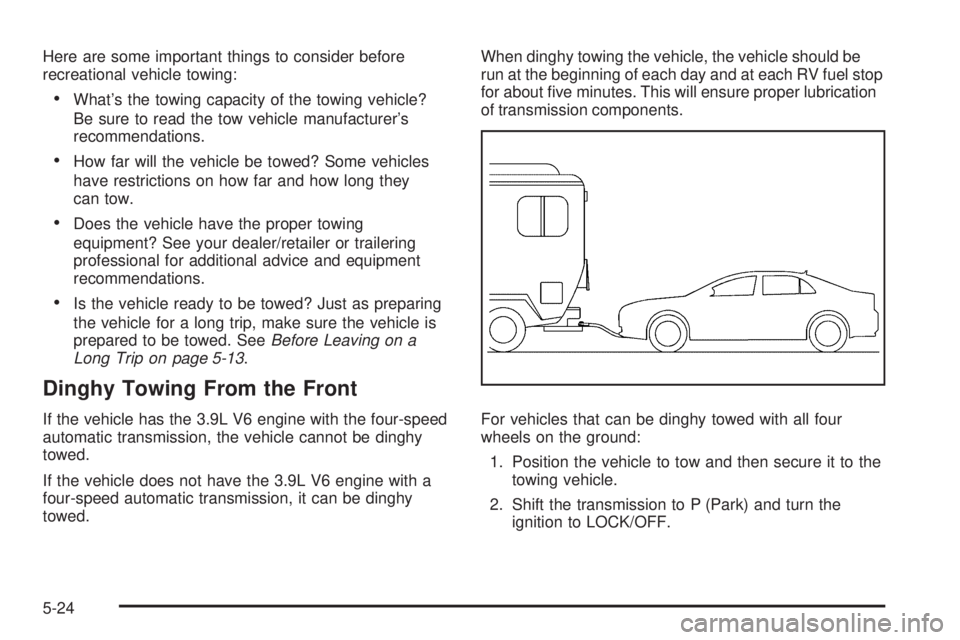
Here are some important things to consider before
recreational vehicle towing:
•What’s the towing capacity of the towing vehicle?
Be sure to read the tow vehicle manufacturer’s
recommendations.
•How far will the vehicle be towed? Some vehicles
have restrictions on how far and how long they
can tow.
•Does the vehicle have the proper towing
equipment? See your dealer/retailer or trailering
professional for additional advice and equipment
recommendations.
•Is the vehicle ready to be towed? Just as preparing
the vehicle for a long trip, make sure the vehicle is
prepared to be towed. SeeBefore Leaving on a
Long Trip on page 5-13.
Dinghy Towing From the Front
If the vehicle has the 3.9L V6 engine with the four-speed
automatic transmission, the vehicle cannot be dinghy
towed.
If the vehicle does not have the 3.9L V6 engine with a
four-speed automatic transmission, it can be dinghy
towed.When dinghy towing the vehicle, the vehicle should be
run at the beginning of each day and at each RV fuel stop
for about five minutes. This will ensure proper lubrication
of transmission components.
For vehicles that can be dinghy towed with all four
wheels on the ground:
1. Position the vehicle to tow and then secure it to the
towing vehicle.
2. Shift the transmission to P (Park) and turn the
ignition to LOCK/OFF.
5-24
Page 259 of 448

3. Set the parking brake.
4. To prevent the battery from draining while the
vehicle is being towed, remove the following
fuse from the instrument panel fuse block:
(IGN SENSOR). SeeInstrument Panel Fuse
Block on page 6-116for more information.
5. Turn the ignition to ACC/ACCESSORY.
6. Shift the transmission to N (Neutral).
7. Release the parking brake.
Remember to reinstall the IGN SENSOR fuse once the
destination has been reached.
Notice:If 105 km/h (65 mph) is exceeded while
towing the vehicle, it could be damaged. Never
exceed 105 km/h (65 mph) while towing the vehicle.Dinghy Towing From the Rear
Notice:Towing the vehicle from the rear could
damage it. Also, repairs would not be covered by
the vehicle warranty. Never have the vehicle towed
from the rear.
Do not dinghy tow the vehicle from the rear with all
four wheels on the ground.
5-25
Page 260 of 448
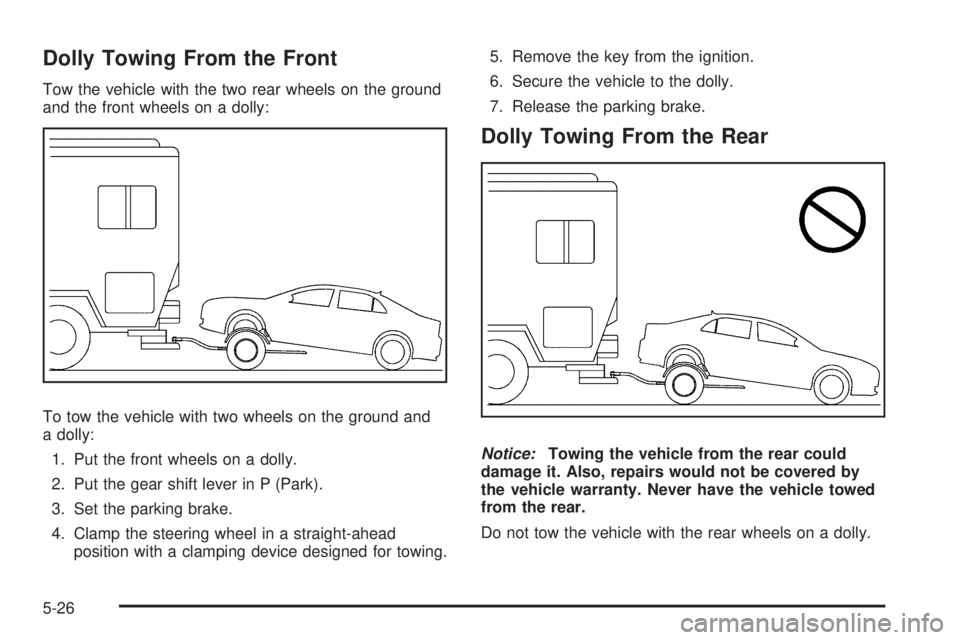
Dolly Towing From the Front
Tow the vehicle with the two rear wheels on the ground
and the front wheels on a dolly:
To tow the vehicle with two wheels on the ground and
a dolly:
1. Put the front wheels on a dolly.
2. Put the gear shift lever in P (Park).
3. Set the parking brake.
4. Clamp the steering wheel in a straight-ahead
position with a clamping device designed for towing.5. Remove the key from the ignition.
6. Secure the vehicle to the dolly.
7. Release the parking brake.
Dolly Towing From the Rear
Notice:Towing the vehicle from the rear could
damage it. Also, repairs would not be covered by
the vehicle warranty. Never have the vehicle towed
from the rear.
Do not tow the vehicle with the rear wheels on a dolly.
5-26
Page 293 of 448

How to Reset the Engine Oil Life
System
The Engine Oil Life System calculates when to change
the engine oil and filter based on vehicle use. Whenever
the oil is changed, reset the system so it can calculate
when the next oil change is required. If a situation occurs
where the oil is changed prior to a CHANGE OIL SOON
message being turned on, reset the system.
After changing the engine oil and filter, the system must
be reset. To reset the oil life system:
1. With the CHANGE OIL SOON message displayed,
press any of the three DIC buttons to clear the
CHANGE OIL SOON message. SeeDIC Warnings
and Messages on page 4-42.
2. Display OIL LIFE RESET on the DIC.
3. Press and hold the ENTER button for at least
one second. An ACKNOWLEDGED display
message will appear for three seconds or until the
next button is pressed. This tells you the system
has been reset. SeeDIC Vehicle Personalization
on page 4-47.
4. Turn the ignition to LOCK/OFF.
If the CHANGE OIL SOON message comes back on
when the vehicle is started, the engine oil life system
has not reset. Repeat the procedure.
What to Do with Used Oil
Used engine oil contains certain elements that can be
unhealthy for your skin and could even cause cancer.
Do not let used oil stay on your skin for very long. Clean
your skin and nails with soap and water, or a good hand
cleaner. Wash or properly dispose of clothing or rags
containing used engine oil. See the manufacturer’s
warnings about the use and disposal of oil products.
Used oil can be a threat to the environment. If you
change your own oil, be sure to drain all the oil from the
filter before disposal. Never dispose of oil by putting it
in the trash, pouring it on the ground, into sewers, or into
streams or bodies of water. Recycle it by taking it to a
place that collects used oil.
6-25
Page 312 of 448

Notice:If you leave the radio or other accessories
on during the jump starting procedure, they could
be damaged. The repairs would not be covered by
the warranty. Always turn off the radio and other
accessories when jump starting the vehicle.
3. Turn off the ignition on both vehicles. Unplug
unnecessary accessories plugged into the cigarette
lighter or the accessory power outlet. Turn off the
radio and all lamps that are not needed. This will
avoid sparks and help save both batteries. And it
could save the radio!
4. Open the hoods and locate the batteries. Find the
positive (+) and negative (−) terminal locations on
each vehicle. SeeEngine Compartment Overview
on page 6-16for more information on location.
{WARNING:
An electric fan can start up even when the engine
is not running and can injure you. Keep hands,
clothing and tools away from any underhood
electric fan.
{WARNING:
Using a match near a battery can cause battery
gas to explode. People have been hurt doing this,
and some have been blinded. Use a flashlight if
you need more light.
Be sure the battery has enough water. You do not
need to add water to the battery installed in your
new vehicle. But if a battery has filler caps, be
sure the right amount of fluid is there. If it is low,
add water to take care of that first. If you do not,
explosive gas could be present.
Battery fluid contains acid that can burn you.
Do not get it on you. If you accidentally get it in
your eyes or on your skin, flush the place with
water and get medical help immediately.
6-44