ignition PONTIAC G6 2010 Repair Manual
[x] Cancel search | Manufacturer: PONTIAC, Model Year: 2010, Model line: G6, Model: PONTIAC G6 2010Pages: 448, PDF Size: 2.5 MB
Page 336 of 448
At the same time a message to check the pressure
in a specific tire appears on the Driver Information
Center (DIC) display. The low tire pressure warning light
and the DIC warning message come on at each ignition
cycle until the tires are inflated to the correct inflation
pressure. Using the DIC, tire pressure levels can be
viewed by the driver. For additional information and
details about the DIC operation and displays seeDIC
Operation and Displays on page 4-40andDIC Warnings
and Messages on page 4-42.
The low tire pressure warning light may come on in
cool weather when the vehicle is first started, and then
turn off as you start to drive. This could be an early
indicator that the air pressure in the tire(s) are getting
low and need to be inflated to the proper pressure.
A Tire and Loading Information label shows the size of
your vehicle’s original equipment tires and the correct
inflation pressure for your vehicle’s tires when they are
cold. SeeLoading the Vehicle on page 5-18, for anexample of the Tire and Loading Information label and its
location on your vehicle. Also seeInation - Tire Pressure
on page 6-64.
Your vehicle’s TPMS system can warn you about a low
tire pressure condition but it does not replace normal
tire maintenance. SeeTire Inspection and Rotation
on page 6-73andTires on page 6-56.
Notice:Using non-approved tire sealants could
damage the Tire Pressure Monitor System (TPMS)
sensors. TPMS sensor damage caused by using
an incorrect tire sealant is not covered by the
vehicle warranty. Always use the GM approved
tire sealant available through your dealer/retailer.
Factory-installed Tire Inflator Kits use a GM approved
liquid tire sealant. Using non-approved tire sealants
could damage the TPMS sensors. SeeTire Sealant and
Compressor Kit on page 6-82for information regarding
the inflator kit materials and instructions.
6-68
Page 337 of 448
TPMS Malfunction Light and Message
The TPMS will not function properly if one or more of the
TPMS sensors are missing or inoperable. When the
system detects a malfunction, the low tire warning light
flashes for about one minute and then stays on for the
remainder of the ignition cycle. A DIC warning message
is also displayed. The low tire warning light and DIC
warning message come on at each ignition cycle until
the problem is corrected. Some of the conditions that
can cause the malfunction light and DIC message to
come on are:
•One of the road tires has been replaced with the
spare tire. The spare tire does not have a TPMS
sensor. The TPMS malfunction light and DIC
message should go off once you re-install the
road tire containing the TPMS sensor.
•The TPMS sensor matching process was started but
not completed or not completed successfully after
rotating the vehicle’s tires. The DIC message and
TPMS malfunction light should go off once the TPMS
sensor matching process is performed successfully.
See “TPMS Sensor Matching Process” later in this
section.
•One or more TPMS sensors are missing or
damaged. The DIC message and the TPMS
malfunction light should go off when the TPMS
sensors are installed and the sensor matching
process is performed successfully. See your
dealer/retailer for service.
•Replacement tires or wheels do not match your
vehicle’s original equipment tires or wheels. Tires
and wheels other than those recommended for your
vehicle could prevent the TPMS from functioning
properly. SeeBuying New Tires on page 6-75.
•Operating electronic devices or being near facilities
using radio wave frequencies similar to the TPMS
could cause the TPMS sensors to malfunction.
If the TPMS is not functioning it cannot detect or
signal a low tire condition. See your dealer/retailer for
service if the TPMS malfunction light and DIC message
comes on and stays on.
6-69
Page 338 of 448

TPMS Sensor Matching Process
Each TPMS sensor has a unique identification code.
Any time you replace one or more of the TPMS sensors
or rotate the vehicle’s tires, the identification codes need
to be matched to the new tire/wheel location. The sensors
are matched, to the tire/wheel locations, in the following
order: driver side front tire, passenger side front tire,
passenger side rear tire, and driver side rear tire using
a TPMS diagnostic tool. See your dealer/retailer for
service.
The TPMS sensors can also be matched to each
tire/wheel position by increasing or decreasing the
tire’s air pressure. When increasing the tire’s pressure,
do not exceed the maximum inflation pressure
indicated on the tire’s sidewall. To decrease the tire’s
air-pressure use the pointed end of the valve cap,
a pencil-style air pressure gage, or a key.
You have two minutes to match each tire and wheel
position. If it takes longer than two minutes to match
any tire and wheel position, the matching process
stops and you need to start over.
TPMS Matching Process for Vehicles
with Remote Keyless Entry (RKE)
1. Set the parking brake.
2. Turn the ignition switch to ON/RUN with the
engine off.
3. Press and hold the Remote Keyless Entry (RKE)
transmitter’s lock and unlock buttons, at the same
time, for about five seconds to start the TPMS learn
mode. The horn sounds twice indicating the TPMS
receiver is ready and in learn mode.
4. Start with the driver side front tire. The driver side
front turn signal also comes on to indicate that
corner’s sensor is ready to be learned.
5. Remove the valve cap from the tire’s valve stem.
Activate the TPMS sensor by increasing or
decreasing the tire’s air pressure for about
eight seconds. The horn chirp, can take up to
30 seconds to sound. It chirps one time and then
all the turn signals flash one time to confirm the
sensor identification code has been matched to
the tire/wheel position.
6-70
Page 339 of 448

6. The passenger side front turn signal comes on to
indicate that corner sensor is ready to be learned.
Proceed to the passenger side front tire and
repeat the procedure in Step 5.
7. The passenger side rear turn signal comes on to
indicate that corner sensor is ready to be learned.
Proceed to the passenger side rear tire and
repeat the procedure in Step 5.
8. The driver side rear turn signal comes on to
indicate that corner sensor is ready to be learned.
Proceed to the driver side rear tire, and repeat
the procedure in Step 5.
9. After hearing the single horn chirp for the driver
side rear tire, two additional horn chirps sound
to indicate the tire learning process is done.
Turn the ignition switch to LOCK/OFF.
If no tires are learned after entering the TPMS learn
mode, or if communication with the receiver stops, or
if the time limit has expired, turn the ignition switch to
LOCK/OFF and start over beginning with Step 2.
10. Set all four tires to the recommended air pressure
level as indicated on the Tire and Loading
Information label.
11. Put the valve caps back on the valve stems.TPMS Matching Process for Vehicles
without Remote Keyless Entry (RKE)
1. Set the parking brake.
2. Turn the ignition switch to ON/RUN with the
engine off.
3. Using the Driver Information Center (DIC), press
the INFO and Set/Reset buttons at the same time
for about one second. Then press and release
the INFO button until the TIRE LEARN? message
displays.
4. Press and hold the Set/Reset DIC button for
approximately three seconds to start the TPMS
learn mode. The horn sounds twice to indicate the
TPMS receiver is ready and the TIRE LEARN ON
message displays. The driver side front turn signal
also comes on to indicate that corner sensor is ready
to be learned.
5. Start with the driver side front tire.
6-71
Page 340 of 448

6. Remove the valve cap from the tire’s valve stem.
Activate the TPMS sensor by increasing or
decreasing the tire’s air pressure for about
eight seconds. The horn chirp, can take up to
30 seconds to sound. It chirps one time and then
all the turn signals flash one time to confirm the
sensor identification code has been matched to
the tire/wheel position.
7. The passenger side front turn signal comes on to
indicate that corner sensor is ready to be learned.
Proceed to the passenger side front tire and
repeat the procedure in Step 6.
8. The passenger side rear turn signal comes on to
indicate that corner sensor is ready to be learned.
Proceed to the passenger side rear tire and
repeat the procedure in Step 6.
9. The driver side rear turn signal comes on to
indicate that corner sensor is ready to be learned.
Proceed to the driver side rear tire, and repeat
the procedure in Step 6.10. After hearing the single horn chirp for the driver
side rear tire, two additional horn chirps sound
to indicate the tire learning process is done.
The LEARN COMPLETE message displays if
all four tire positions are learned. Turn the ignition
switch to LOCK/OFF.
If no tires are learned after entering the TPMS learn
mode, or if communication with the receiver stops,
or if the time limit has expired, the TIRE LEARN?
message displays on the DIC. Turn the ignition
switch to LOCK/OFF and start over beginning
with Step 2.
11. Set all four tires to the recommended air pressure
level as indicated on the Tire and Loading
Information label.
12. Put the valve caps back on the valve stems.
6-72
Page 385 of 448
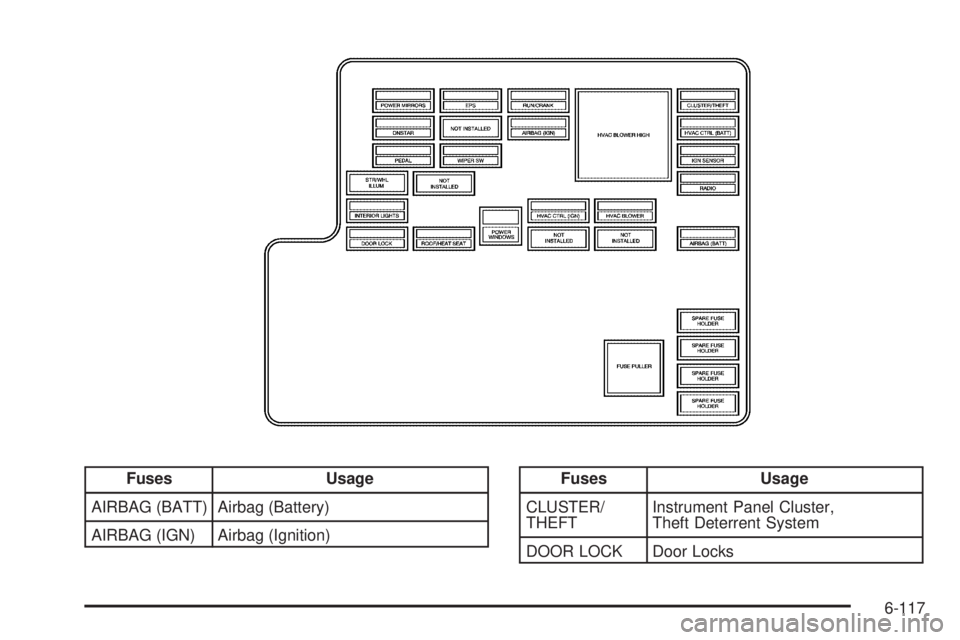
Fuses Usage
AIRBAG (BATT) Airbag (Battery)
AIRBAG (IGN) Airbag (Ignition)Fuses Usage
CLUSTER/
THEFTInstrument Panel Cluster,
Theft Deterrent System
DOOR LOCK Door Locks
6-117
Page 386 of 448
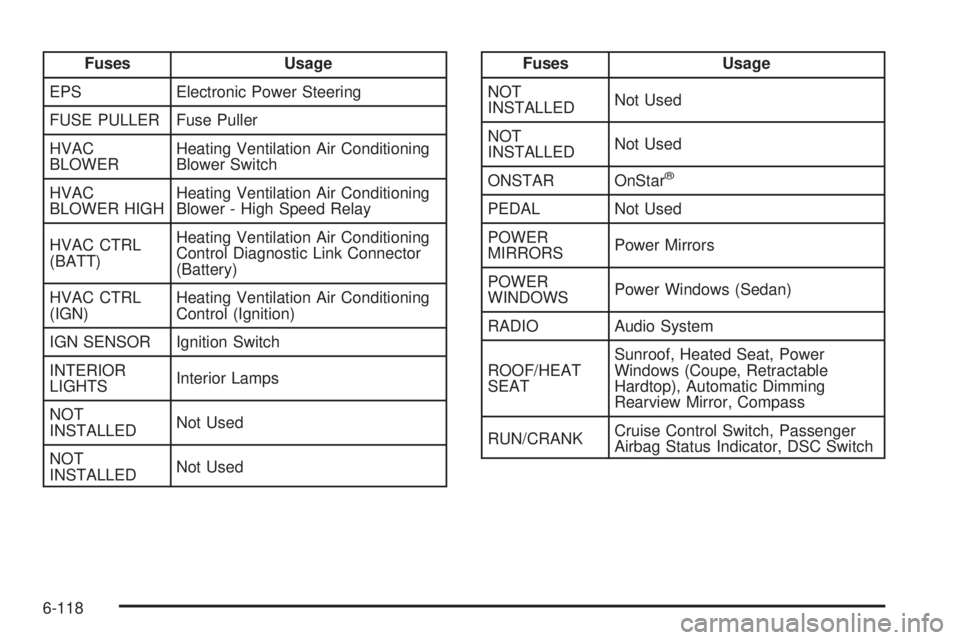
Fuses Usage
EPS Electronic Power Steering
FUSE PULLER Fuse Puller
HVAC
BLOWERHeating Ventilation Air Conditioning
Blower Switch
HVAC
BLOWER HIGHHeating Ventilation Air Conditioning
Blower - High Speed Relay
HVAC CTRL
(BATT)Heating Ventilation Air Conditioning
Control Diagnostic Link Connector
(Battery)
HVAC CTRL
(IGN)Heating Ventilation Air Conditioning
Control (Ignition)
IGN SENSOR Ignition Switch
INTERIOR
LIGHTSInterior Lamps
NOT
INSTALLEDNot Used
NOT
INSTALLEDNot UsedFuses Usage
NOT
INSTALLEDNot Used
NOT
INSTALLEDNot Used
ONSTAR OnStar
®
PEDAL Not Used
POWER
MIRRORSPower Mirrors
POWER
WINDOWSPower Windows (Sedan)
RADIO Audio System
ROOF/HEAT
SEATSunroof, Heated Seat, Power
Windows (Coupe, Retractable
Hardtop), Automatic Dimming
Rearview Mirror, Compass
RUN/CRANKCruise Control Switch, Passenger
Airbag Status Indicator, DSC Switch
6-118
Page 388 of 448

Fuses Usage
1 Air Conditioner Clutch
2 Electronic Throttle Control
3 Not UsedFuses Usage
4Transmission Control Module
Ignition 1
5 Mass Airflow Sensor (LY7)
6 Emission
6-120
Page 389 of 448

Fuses Usage
7 Left Headlamp Low Beam
8 Horn
9 Right Headlamp Low Beam
10 Front Fog Lamps
11 Left Headlamp High Beam
12 Right Headlamp High Beam
13 Engine Control Module (Battery)
14 Windshield Wiper
15 Antilock Brake System (IGN 1)
16 Engine Control Module (IGN 1)
17 Cooling Fan 1
18 Cooling Fan 2
19Run Relay, Heating, Ventilation,
Air Conditioning Blower
20 Body Control Module 1
21 Body Control Module Run/Crank
22 Rear Electrical Center 1
23 Rear Electrical Center 2
24 Antilock Brake System
25 Body Control Module 2Fuses Usage
26 Starter
41 Electric Power Steering
42Transmission Control Module
Battery
43Ignition Module (LE5, LE9, LZ4,
LZE, LZ9), Odd Cylinder
Injectors/Ignition Coils (LY7)
44Injectors (LE5, LE9, LZ4, LZE, LZ9),
Even Cylinder Injectors/Ignition
Coils (LY7)
45Rear Oxygen Sensors
(LZ4, LZE, LZ9, LY7)
46 Daytime Running Lamps
47 Center High-Mounted Stoplamp
50Front Power Windows Coupe/
Retractable Hardtop
51 Not Used
52 AIR Solenoid
54 Regulated Voltage Control
55 Antilock Brake System (Battery)
6-121
Page 390 of 448

Relays Usage
28 Cooling Fan 1
29 Cooling Fan Series/Parallel
30 Cooling Fan 2
31 Starter
32 Run/Crank, Ignition
33 Powertrain
34 Air Conditioning Clutch
35 High Beam
36 Front Fog Lamps
37 Horn
38 Low Beam
39 Windshield Wiper 1
40 Windshield Wiper 2
48 Daytime Running Lamps
49 Center High-Mounted Stoplamp
53 AIR SolenoidDiodes Usage
27 Wiper
Rear Compartment Fuse Block
The rear compartment fuse block is located in the trunk
of the vehicle. Access the fuse block through the
trunk panel on the driver side of the rear cargo area.
6-122