lock PONTIAC G6 2010 Owners Manual
[x] Cancel search | Manufacturer: PONTIAC, Model Year: 2010, Model line: G6, Model: PONTIAC G6 2010Pages: 448, PDF Size: 2.5 MB
Page 1 of 448
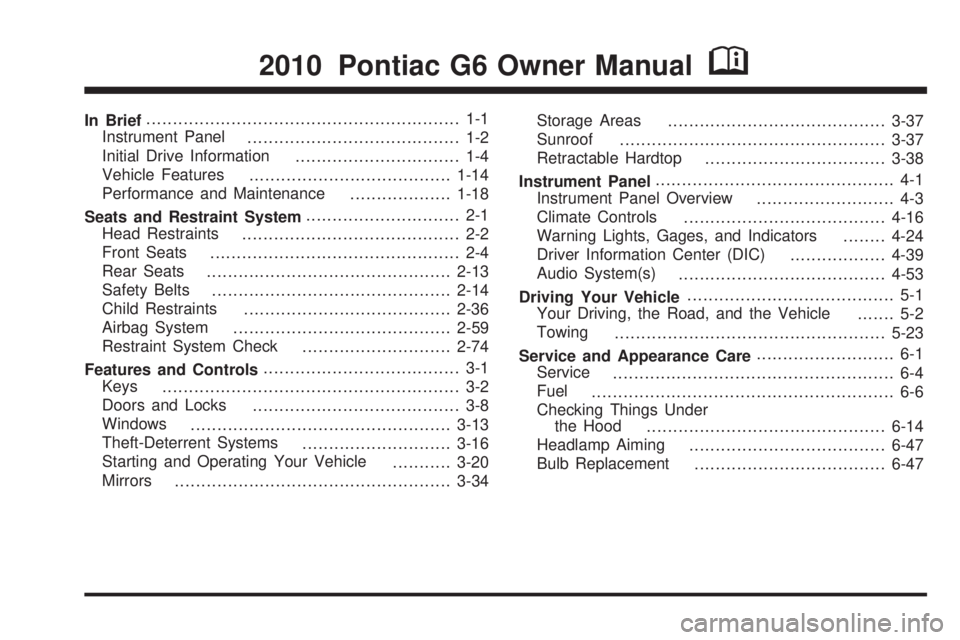
In Brief........................................................... 1-1
Instrument Panel
........................................ 1-2
Initial Drive Information
............................... 1-4
Vehicle Features
......................................1-14
Performance and Maintenance
...................1-18
Seats and Restraint System............................. 2-1
Head Restraints
......................................... 2-2
Front Seats
............................................... 2-4
Rear Seats
..............................................2-13
Safety Belts
.............................................2-14
Child Restraints
.......................................2-36
Airbag System
.........................................2-59
Restraint System Check
............................2-74
Features and Controls..................................... 3-1
Keys
........................................................ 3-2
Doors and Locks
....................................... 3-8
Windows
.................................................3-13
Theft-Deterrent Systems
............................3-16
Starting and Operating Your Vehicle
...........3-20
Mirrors
....................................................3-34Storage Areas
.........................................3-37
Sunroof
..................................................3-37
Retractable Hardtop
..................................3-38
Instrument Panel............................................. 4-1
Instrument Panel Overview
.......................... 4-3
Climate Controls
......................................4-16
Warning Lights, Gages, and Indicators
........4-24
Driver Information Center (DIC)
..................4-39
Audio System(s)
.......................................4-53
Driving Your Vehicle....................................... 5-1
Your Driving, the Road, and the Vehicle
....... 5-2
Towing
...................................................5-23
Service and Appearance Care.......................... 6-1
Service
..................................................... 6-4
Fuel
......................................................... 6-6
Checking Things Under
the Hood
.............................................6-14
Headlamp Aiming
.....................................6-47
Bulb Replacement
....................................6-47
2010 Pontiac G6 Owner ManualM
Page 5 of 448
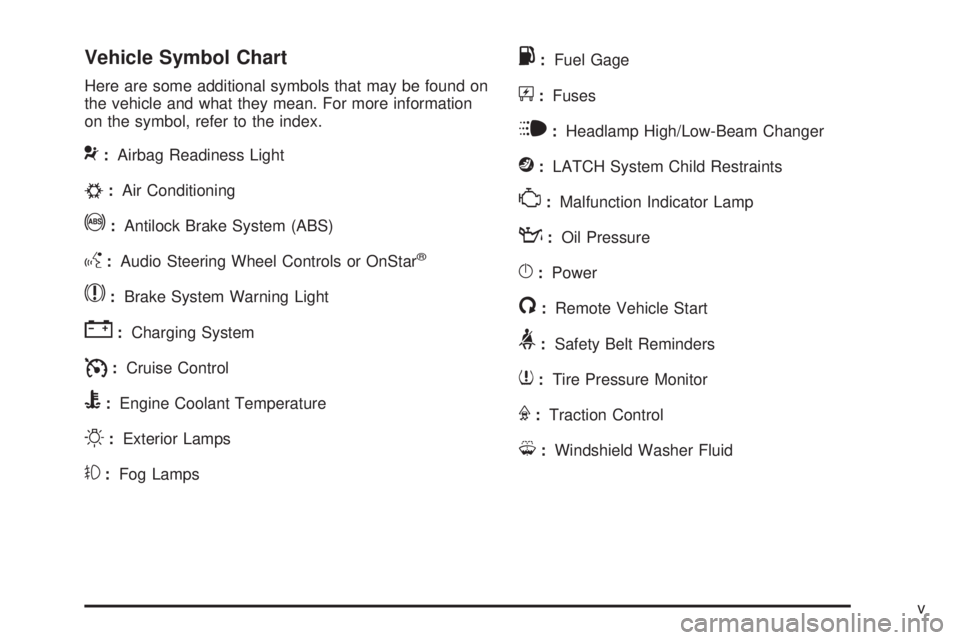
Vehicle Symbol Chart
Here are some additional symbols that may be found on
the vehicle and what they mean. For more information
on the symbol, refer to the index.
9:Airbag Readiness Light
#:Air Conditioning
!:Antilock Brake System (ABS)
g:Audio Steering Wheel Controls or OnStar®
$:Brake System Warning Light
":Charging System
I:Cruise Control
B:Engine Coolant Temperature
O:Exterior Lamps
#:Fog Lamps
.:Fuel Gage
+:Fuses
i:Headlamp High/Low-Beam Changer
j:LATCH System Child Restraints
*:Malfunction Indicator Lamp
::Oil Pressure
}:Power
/:Remote Vehicle Start
>:Safety Belt Reminders
7:Tire Pressure Monitor
F:Traction Control
M:Windshield Washer Fluid
v
Page 7 of 448
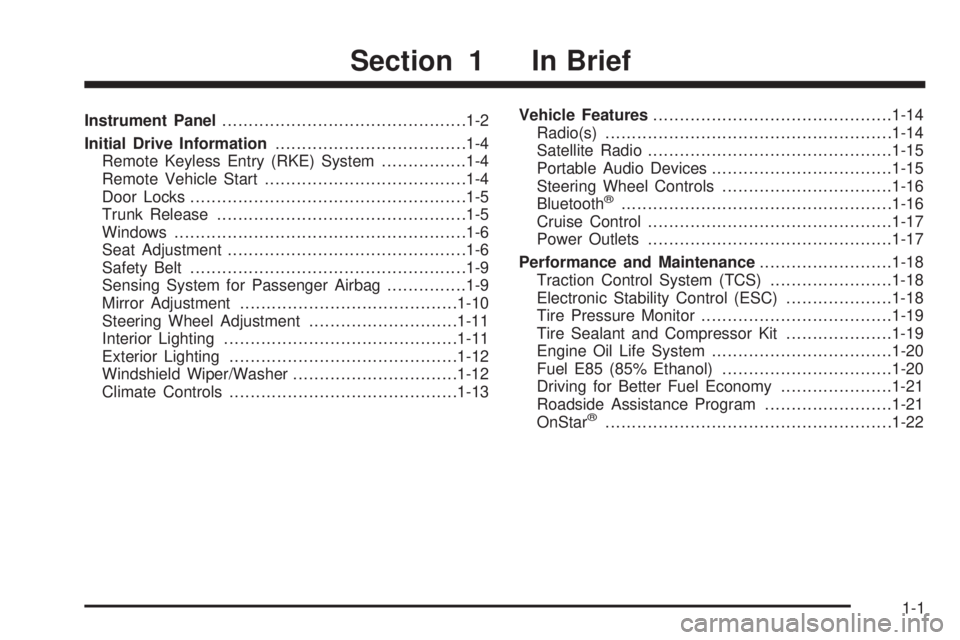
Instrument Panel..............................................1-2
Initial Drive Information....................................1-4
Remote Keyless Entry (RKE) System................1-4
Remote Vehicle Start......................................1-4
Door Locks....................................................1-5
Trunk Release...............................................1-5
Windows.......................................................1-6
Seat Adjustment.............................................1-6
Safety Belt....................................................1-9
Sensing System for Passenger Airbag...............1-9
Mirror Adjustment.........................................1-10
Steering Wheel Adjustment............................1-11
Interior Lighting............................................1-11
Exterior Lighting...........................................1-12
Windshield Wiper/Washer...............................1-12
Climate Controls...........................................1-13Vehicle Features.............................................1-14
Radio(s)......................................................1-14
Satellite Radio..............................................1-15
Portable Audio Devices..................................1-15
Steering Wheel Controls................................1-16
Bluetooth
®...................................................1-16
Cruise Control..............................................1-17
Power Outlets..............................................1-17
Performance and Maintenance.........................1-18
Traction Control System (TCS).......................1-18
Electronic Stability Control (ESC)....................1-18
Tire Pressure Monitor....................................1-19
Tire Sealant and Compressor Kit....................1-19
Engine Oil Life System..................................1-20
Fuel E85 (85% Ethanol)................................1-20
Driving for Better Fuel Economy.....................1-21
Roadside Assistance Program........................1-21
OnStar
®......................................................1-22
Section 1 In Brief
1-1
Page 10 of 448
Initial Drive Information
This section provides a brief overview about some of
the important features that may or may not be on your
specific vehicle.
For more detailed information, refer to each of the
features which can be found later in this owner manual.
Remote Keyless Entry (RKE)
System
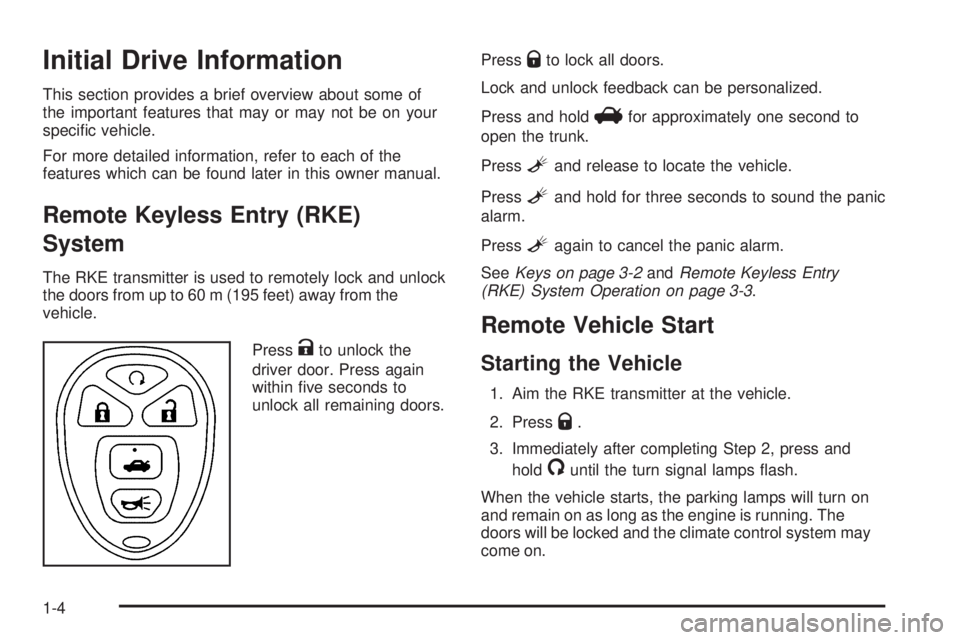
The RKE transmitter is used to remotely lock and unlock
the doors from up to 60 m (195 feet) away from the
vehicle.
Press
Kto unlock the
driver door. Press again
within five seconds to
unlock all remaining doors.Press
Qto lock all doors.
Lock and unlock feedback can be personalized.
Press and hold
Vfor approximately one second to
open the trunk.
Press
Land release to locate the vehicle.
Press
Land hold for three seconds to sound the panic
alarm.
Press
Lagain to cancel the panic alarm.
SeeKeys on page 3-2andRemote Keyless Entry
(RKE) System Operation on page 3-3.
Remote Vehicle Start
Starting the Vehicle
1. Aim the RKE transmitter at the vehicle.
2. Press
Q.
3. Immediately after completing Step 2, press and
hold
/until the turn signal lamps flash.
When the vehicle starts, the parking lamps will turn on
and remain on as long as the engine is running. The
doors will be locked and the climate control system may
come on.
1-4
Page 11 of 448
The engine will continue to run for 10 minutes. Repeat
the steps for a 10-minute time extension. Remote
start can be extended only once.
Canceling a Remote Start
To cancel a remote start:
•Aim the RKE transmitter at the vehicle and press
and hold
/until the parking lamps turn off.
•Turn on the hazard warning flashers.
•Turn the ignition switch on and then back to off.
SeeRemote Vehicle Start on page 3-5.
Door Locks
Manual Locks
Pull up or push down on the manual door lock knob
located inside the vehicle, on the windowsill to lock or
unlock a door.
SeeDoor Locks on page 3-8.
Power Door Locks
T
:Press the top of the switch to lock both doors.
Press the bottom of the switch to unlock both doors.
For more information, see:
•Power Door Locks on page 3-8.
•Delayed Locking on page 3-9.
•Automatic Door Lock on page 3-9.
Trunk Release
In addition to the trunk release button on the RKE
transmitter, there is a remote release
Vbutton located
on the driver door near the map pocket.
SeeTrunk on page 3-11andRemote Keyless Entry
(RKE) System Operation on page 3-3.
1-5
Page 12 of 448
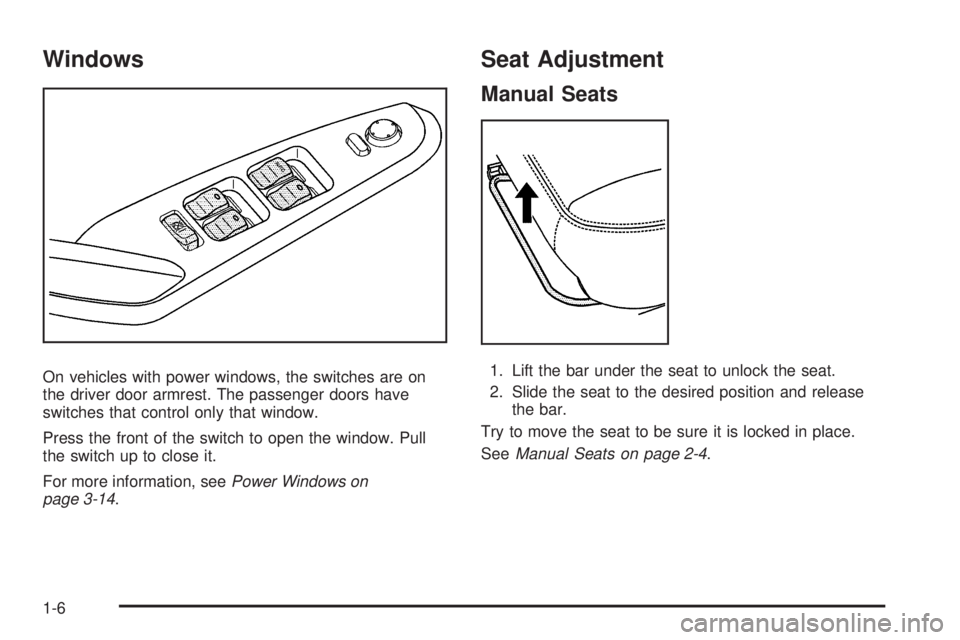
Windows
On vehicles with power windows, the switches are on
the driver door armrest. The passenger doors have
switches that control only that window.
Press the front of the switch to open the window. Pull
the switch up to close it.
For more information, seePower Windows on
page 3-14.
Seat Adjustment
Manual Seats
1. Lift the bar under the seat to unlock the seat.
2. Slide the seat to the desired position and release
the bar.
Try to move the seat to be sure it is locked in place.
SeeManual Seats on page 2-4.
1-6
Page 17 of 448
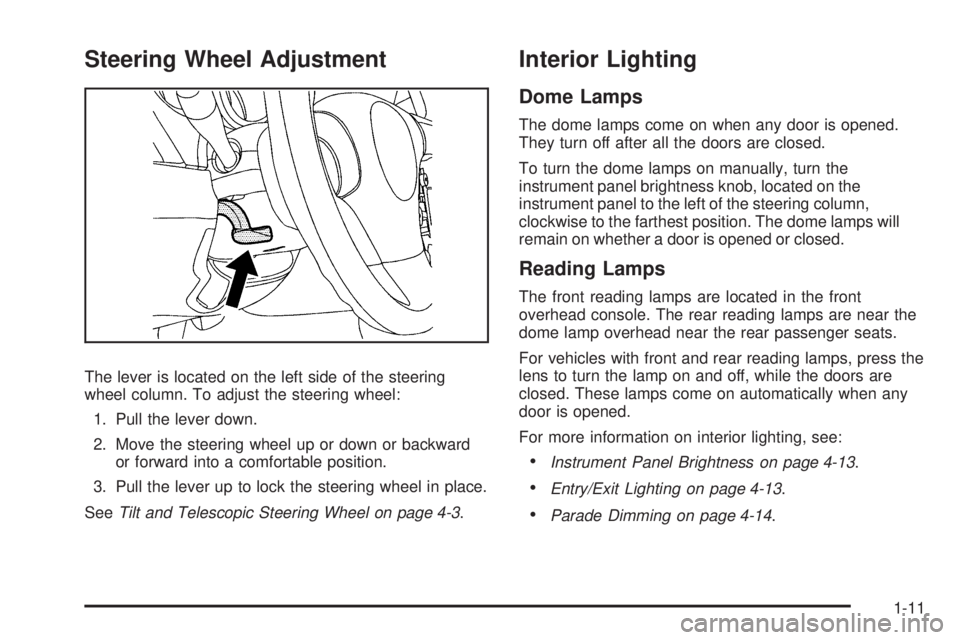
Steering Wheel Adjustment
The lever is located on the left side of the steering
wheel column. To adjust the steering wheel:
1. Pull the lever down.
2. Move the steering wheel up or down or backward
or forward into a comfortable position.
3. Pull the lever up to lock the steering wheel in place.
SeeTilt and Telescopic Steering Wheel on page 4-3.
Interior Lighting
Dome Lamps
The dome lamps come on when any door is opened.
They turn off after all the doors are closed.
To turn the dome lamps on manually, turn the
instrument panel brightness knob, located on the
instrument panel to the left of the steering column,
clockwise to the farthest position. The dome lamps will
remain on whether a door is opened or closed.
Reading Lamps
The front reading lamps are located in the front
overhead console. The rear reading lamps are near the
dome lamp overhead near the rear passenger seats.
For vehicles with front and rear reading lamps, press the
lens to turn the lamp on and off, while the doors are
closed. These lamps come on automatically when any
door is opened.
For more information on interior lighting, see:
•Instrument Panel Brightness on page 4-13.
•Entry/Exit Lighting on page 4-13.
•Parade Dimming on page 4-14.
1-11
Page 21 of 448

Setting the Clock
To set the time and date for the Radio with CD (MP3)
and USB port or the Radio with CD (MP3) player:
1. Turn the ignition key to ACC/ACCESSORY or
ON/RUN.
2. Press
Oto turn the radio on.
3. Press
Hand the HR, MIN, MM, DD, YYYY (hour,
minute, month, day, and year) displays.
4. Press the softkey located below any one of the tabs
that you want to change.
5. Increase or decrease the time or date by
turning
fclockwise or counterclockwise.
For detailed instructions on setting the clock for your
specific audio system, seeSetting the Clock on
page 4-53.
Satellite Radio
XM is a satellite radio service that is based in the
48 contiguous United States and 10 Canadian
provinces. XM satellite radio has a wide variety of
programming and commercial-free music,
coast-to-coast, and in digital-quality sound.
A fee is required to receive the XM service.
For more information, refer to:
•www.xmradio.com or call 1-800-929-2100 (U.S.)
•www.xmradio.ca or call 1-877-438-9677 (Canada)
See “XM Satellite Radio Service” underRadio(s)
on page 4-54andXM Radio Messages on page 4-70.
Portable Audio Devices
This vehicle may have an auxiliary input, located on the
audio faceplate. External devices such as iPods®,
laptop computers, MP3 players, CD changers, USB
storage devices, etc. can be connected to the auxiliary
port using a 3.5 mm (1/8 in) input jack or the USB
port depending on the audio system.
See “Using the Auxiliary Input Jack” and “Using the
USB Port” underRadio(s) on page 4-54.
1-15
Page 26 of 448
Engine Oil Life System
The engine oil life system calculates engine oil life
based on vehicle use and displays a DIC message when
it is necessary to change the engine oil and filter. The
oil life system should be reset to 100% only following an
oil change.
Resetting the Oil Life System
1. Turn the ignition to ON/RUN, with the engine off.
2. With the CHANGE OIL SOON message displayed,
press any of the three DIC buttons to clear the
CHANGE OIL SOON message.
3. Display OIL-LIFE RESET on the DIC.
4. Press and hold the ENTER button for at least
one second. An ACKNOWLEDGED display
message will appear for three seconds or until the
next button is pressed. This tells you the system
has been reset.
5. Turn the key to LOCK/OFF.
SeeEngine Oil Life System on page 6-24.
Fuel E85 (85% Ethanol)
The 8th digit of the Vehicle Identification Number (VIN)
shows the code letter or number that identifies the
vehicle’s engine. The VIN is at the top left of the
instrument panel. SeeVehicle Identication Number
(VIN) on page 6-114.
If the vehicle has the 2.4L L4 engine (VIN Code 0) or
the 3.5L V6 engine (VIN Code K), you can use either
unleaded gasoline or ethanol fuel containing up
to 85% ethanol (E85). SeeFuel on page 6-6. In all other
engines, use only the unleaded gasoline described under
Gasoline Octane on page 6-7.
Only vehicles that have the 2.4L L4 engine
(VIN Code 0) or the 3.5L V6 engine (VIN Code K) can
use 85% ethanol fuel (E85). We encourage the use
of E85 in vehicles that are designed to use it. The
ethanol in E85 is a “renewable” fuel, meaning it is made
from renewable sources such as corn and other crops.
1-20
Page 28 of 448

OnStar®
OnStar®uses several innovative technologies and live
advisors to provide a wide range of safety, security,
navigation, diagnostics, and calling services.
Automatic Crash Response
In a crash, built in sensors can automatically alert an
OnStar advisor who is immediately connected to the
vehicle to see if you need help.
How OnStar Service Works
Q
:This blue button connects you to a specially trained
OnStar advisor to verify your account information and to
answer questions.
]:Push this red emergency button to get priority help
from specially trained OnStar emergency advisors.
X:Push this button for hands-free, voice-activated
calling and to give voice commands for turn-by-turn
navigation.
Crisis Assist, Stolen Vehicle Assistance, Vehicle
Diagnostics, Remote Door Unlock, Roadside Assistance,
Turn-by-Turn Navigation and Hands-Free Calling are
available on most vehicles. Not all OnStar services are
available on all vehicles. For more information see the
OnStar Owner’s Guide or visit www.onstar.com (U.S.)
or www.onstar.ca (Canada), contact OnStar at
1-888-4-ONSTAR (1-888-466-7827) or
TTY 1-877-248-2080, or press
Qto speak with an
OnStar advisor 24 hours a day, 7 days a week.
1-22