trunk release PONTIAC G6 2010 Owners Manual
[x] Cancel search | Manufacturer: PONTIAC, Model Year: 2010, Model line: G6, Model: PONTIAC G6 2010Pages: 448, PDF Size: 2.5 MB
Page 7 of 448
Instrument Panel..............................................1-2
Initial Drive Information....................................1-4
Remote Keyless Entry (RKE) System................1-4
Remote Vehicle Start......................................1-4
Door Locks....................................................1-5
Trunk Release...............................................1-5
Windows.......................................................1-6
Seat Adjustment.............................................1-6
Safety Belt....................................................1-9
Sensing System for Passenger Airbag...............1-9
Mirror Adjustment.........................................1-10
Steering Wheel Adjustment............................1-11
Interior Lighting............................................1-11
Exterior Lighting...........................................1-12
Windshield Wiper/Washer...............................1-12
Climate Controls...........................................1-13Vehicle Features.............................................1-14
Radio(s)......................................................1-14
Satellite Radio..............................................1-15
Portable Audio Devices..................................1-15
Steering Wheel Controls................................1-16
Bluetooth
®...................................................1-16
Cruise Control..............................................1-17
Power Outlets..............................................1-17
Performance and Maintenance.........................1-18
Traction Control System (TCS).......................1-18
Electronic Stability Control (ESC)....................1-18
Tire Pressure Monitor....................................1-19
Tire Sealant and Compressor Kit....................1-19
Engine Oil Life System..................................1-20
Fuel E85 (85% Ethanol)................................1-20
Driving for Better Fuel Economy.....................1-21
Roadside Assistance Program........................1-21
OnStar
®......................................................1-22
Section 1 In Brief
1-1
Page 10 of 448
Initial Drive Information
This section provides a brief overview about some of
the important features that may or may not be on your
specific vehicle.
For more detailed information, refer to each of the
features which can be found later in this owner manual.
Remote Keyless Entry (RKE)
System
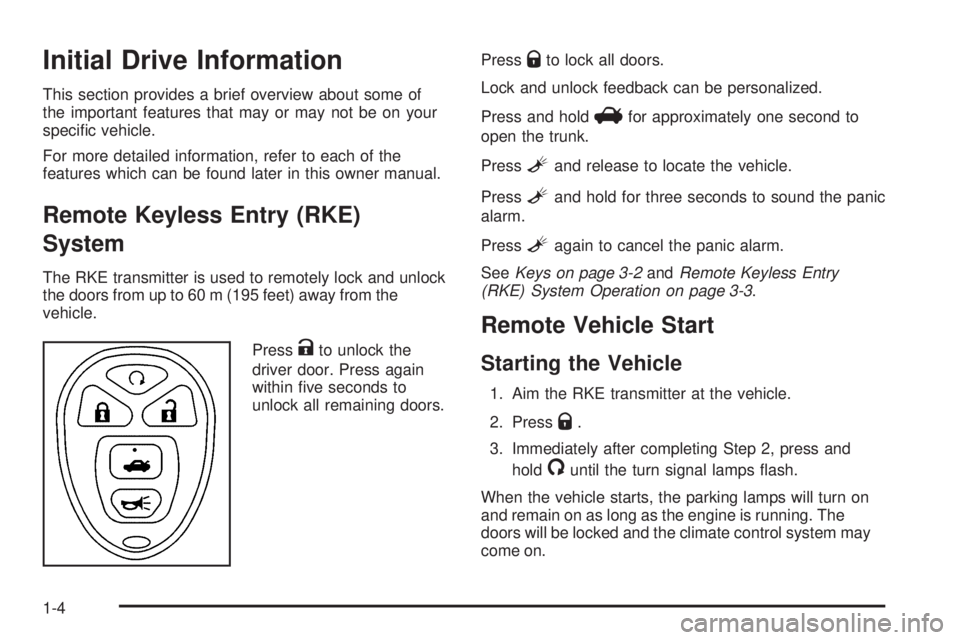
The RKE transmitter is used to remotely lock and unlock
the doors from up to 60 m (195 feet) away from the
vehicle.
Press
Kto unlock the
driver door. Press again
within five seconds to
unlock all remaining doors.Press
Qto lock all doors.
Lock and unlock feedback can be personalized.
Press and hold
Vfor approximately one second to
open the trunk.
Press
Land release to locate the vehicle.
Press
Land hold for three seconds to sound the panic
alarm.
Press
Lagain to cancel the panic alarm.
SeeKeys on page 3-2andRemote Keyless Entry
(RKE) System Operation on page 3-3.
Remote Vehicle Start
Starting the Vehicle
1. Aim the RKE transmitter at the vehicle.
2. Press
Q.
3. Immediately after completing Step 2, press and
hold
/until the turn signal lamps flash.
When the vehicle starts, the parking lamps will turn on
and remain on as long as the engine is running. The
doors will be locked and the climate control system may
come on.
1-4
Page 11 of 448
The engine will continue to run for 10 minutes. Repeat
the steps for a 10-minute time extension. Remote
start can be extended only once.
Canceling a Remote Start
To cancel a remote start:
•Aim the RKE transmitter at the vehicle and press
and hold
/until the parking lamps turn off.
•Turn on the hazard warning flashers.
•Turn the ignition switch on and then back to off.
SeeRemote Vehicle Start on page 3-5.
Door Locks
Manual Locks
Pull up or push down on the manual door lock knob
located inside the vehicle, on the windowsill to lock or
unlock a door.
SeeDoor Locks on page 3-8.
Power Door Locks
T
:Press the top of the switch to lock both doors.
Press the bottom of the switch to unlock both doors.
For more information, see:
•Power Door Locks on page 3-8.
•Delayed Locking on page 3-9.
•Automatic Door Lock on page 3-9.
Trunk Release
In addition to the trunk release button on the RKE
transmitter, there is a remote release
Vbutton located
on the driver door near the map pocket.
SeeTrunk on page 3-11andRemote Keyless Entry
(RKE) System Operation on page 3-3.
1-5
Page 110 of 448

Q(Lock):Press to lock all the doors. The interior
lamps turn off after all of the doors are closed. If enabled
through the Driver Information Center (DIC), the
remote lock feedback can be programmed to have the
horn chirp and/or the turn signals flash to confirm
locking. See “LOCK HORN” and “LIGHT FLASH” under
DIC Vehicle Personalization on page 4-47.
Pressing
Qmay also arm the content theft-deterrent
system. SeeContent Theft-Deterrent on page 3-16.
K(Unlock):Press to unlock the driver door. IfKis
pressed again within five seconds, all remaining
doors unlock. The interior lamps turn on and stay on for
20 seconds or until the ignition is turned on. If enabled
through the DIC, the remote unlock feedback can
be programmed to have the horn chirp and/or the turn
signals flash to confirm unlocking. See “UNLOCK
HORN” and “LIGHT FLASH” underDIC Vehicle
Personalization on page 4-47.
The high-beam headlamps, parking lamps, and back-up
lamps may turn on when
Kis pressed. See “EXT
(Exterior) LIGHTS” underDIC Vehicle Personalization
on page 4-47.
Pressing
Kon the RKE transmitter disarms the content
theft-deterrent system. SeeContent Theft-Deterrent
on page 3-16.
V(Remote Trunk Release):Press and hold for
approximately one second to open the trunk. The trunk
will open using the transmitter when the vehicle
speed is less than 3 km/h (2 mph), when the ignition is
off, or when the vehicle shift lever is in P (Park).
L(Vehicle Locator/Panic Alarm):Press to locate
the vehicle. The horn sounds three times and the
headlamps and turn signals flash three times.
Press and hold
Lfor approximately three seconds to
sound the panic alarm. The horn sounds and the
headlamps and turn signals flash for 30 seconds.
Press
Lagain to cancel the panic alarm.
Programming Transmitters to the
Vehicle
Only RKE transmitters programmed to the vehicle
will work. If a transmitter is lost or stolen, a replacement
can be purchased and programmed through your
dealer/retailer. When the replacement transmitter is
programmed to the vehicle, all remaining transmitters
must also be programmed. Any lost or stolen transmitters
no longer work once the new transmitter is programmed.
Each vehicle can have up to four transmitters
programmed to it.
3-4
Page 117 of 448

To cancel the rear door security lock:
1. Unlock the door and open it from the outside.
2. Insert the key into the security lock slot and turn it
so the slot is in the vertical position.
3. Do the same for the other rear door.
Lockout Protection
If your vehicle has power door locks, it will have this
feature. If you press the power door lock switch
when the key is in the ignition and any door is open, all
the doors will lock and the driver’s door will unlock.
Be sure to remove the key from the ignition when locking
your vehicle.
The lockout protection can be overridden by pressing
and holding the power door lock in the lock position for
three seconds.
Trunk
To open the trunk from the outside, press and hold the
trunk release button on the RKE transmitter. You
can also use the key in the trunk lock, except on
retractable hardtop models.
{WARNING:
Exhaust gases can enter the vehicle if it is driven
with the liftgate, trunk/hatch open, or with any
objects that pass through the seal between the
body and the trunk/hatch or liftgate. Engine
exhaust contains Carbon Monoxide (CO) which
cannot be seen or smelled. It can cause
unconsciousness and even death.
If the vehicle must be driven with the liftgate, or
trunk/hatch open:
•Close all of the windows.
•Fully open the air outlets on or under the
instrument panel.
•Adjust the Climate Control system to a setting
that brings in only outside air and set the fan
speed to the highest setting. See Climate
Control System in the Index.
•If the vehicle is equipped with a power liftgate,
disable the power liftgate function.
For more information about carbon monoxide, see
Engine Exhaust on page 3-32.
3-11
Page 118 of 448

Remote Trunk Release
Press this button located
on the driver’s door near
the map pocket to open
the trunk.
You can open the trunk when the gear selector
is in P (Park).
When the retractable hardtop is down and stowed in the
trunk, the trunk open function will be disabled. When
the ignition is on, the TRUNK NOT ALLOW message will
be displayed on the DIC when attempting to open the
trunk with the retractable hardtop stowed inside.
SeeDIC Warnings and Messages on page 4-42for
more information.
Emergency Trunk Release Handle
Notice:Do not use the emergency trunk release
handle as a tie-down or anchor point when securing
items in the trunk as it could damage the handle.
The emergency trunk release handle is only
intended to aid a person trapped in a latched trunk,
enabling them to open the trunk from the inside.
There is a glow-in-the-dark emergency trunk release
handle located inside the trunk on the trunk latch. This
handle will glow following exposure to light. Pull the
release handle up to open the trunk from the inside.
3-12
Page 146 of 448
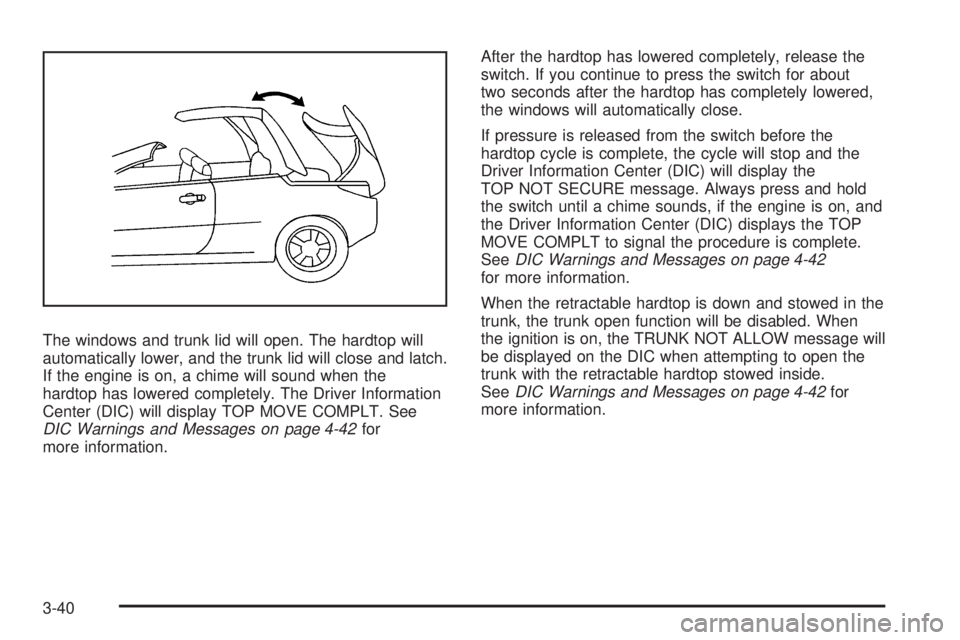
The windows and trunk lid will open. The hardtop will
automatically lower, and the trunk lid will close and latch.
If the engine is on, a chime will sound when the
hardtop has lowered completely. The Driver Information
Center (DIC) will display TOP MOVE COMPLT. See
DIC Warnings and Messages on page 4-42for
more information.After the hardtop has lowered completely, release the
switch. If you continue to press the switch for about
two seconds after the hardtop has completely lowered,
the windows will automatically close.
If pressure is released from the switch before the
hardtop cycle is complete, the cycle will stop and the
Driver Information Center (DIC) will display the
TOP NOT SECURE message. Always press and hold
the switch until a chime sounds, if the engine is on, and
the Driver Information Center (DIC) displays the TOP
MOVE COMPLT to signal the procedure is complete.
SeeDIC Warnings and Messages on page 4-42
for more information.
When the retractable hardtop is down and stowed in the
trunk, the trunk open function will be disabled. When
the ignition is on, the TRUNK NOT ALLOW message will
be displayed on the DIC when attempting to open the
trunk with the retractable hardtop stowed inside.
SeeDIC Warnings and Messages on page 4-42for
more information.
3-40
Page 165 of 448

Normally, these actions occur in steps or levels, without
being noticeable. In rare cases at the highest levels
of corrective action, this action may be noticeable to the
driver. If so, a Driver Information Center (DIC)
message might be displayed, such as BATTERY
SAVER ACTIVE, BATTERY VOLTAGE LOW, or LOW
BATTERY. If this message is displayed, it is
recommended that the driver reduce the electrical loads
as much as possible. SeeDIC Warnings and Messages
on page 4-42.
Battery Run-Down Protection
The battery run-down feature is designed to protect the
vehicle’s battery.
When any interior lamp (trunk, reading lamps, or dome
lamp) is left on when the ignition is turned off, the
battery run-down protection system automatically shuts
the lamp off after 20 minutes. This prevents draining
of the battery.
To reactivate the interior lamps, do one of the following:
•Open any door.
•Press any Remote Keyless Entry (RKE) transmitter
button.
•Press the power door lock switch.
•Press the remote trunk release.
•Turn the lamp that was left on to off and then to on
again.
Accessory Power Outlet(s)
Accessory power outlets can be used to connect
auxiliary electrical equipment, such as a cellular
telephone or CB radio.
There are two accessory power outlets, located on the
center console below the climate controls. If the
vehicle has a Traction Control System (TCS), one
accessory power outlet is in the center storage console
and the other is on the center console below the
climate controls.
To use an outlet, remove the protective cap. When not
in use, always cover the outlet with the protective
cap. The accessory power outlet is operational at all
times.
Notice:If electrical devices are left plugged into a
power outlet, the battery may drain causing the
vehicle not to start or damage to the battery. This
would not be covered by the vehicle warranty.
Always unplug all electrical devices when turning
off the vehicle.
4-15
Page 196 of 448
TIRE LOW ADD AIR
On vehicles with the Tire Pressure Monitor System
(TPMS), this message displays when the pressure in
one or more of the vehicle’s tires is low on air. The low
tire pressure warning light also comes on. SeeTire
Pressure Light on page 4-33. If this message appears
on the DIC, stop as soon as you can. Have the tire
pressures checked and set to those shown on the Tire
Loading Information label. SeeTires on page 6-56,
Loading the Vehicle on page 5-18, andInation - Tire
Pressure on page 6-64. The DIC also shows the
tire pressure values. SeeDIC Operation and Displays
on page 4-40.
TOP INOP (Inoperative) – TRUNK
If your vehicle has a retractable hardtop, this message
displays if the trunk lid is not completely closed
when operating the retractable hardtop. Make sure that
the trunk lid is closed when operating the retractable
hardtop. SeeTrunk on page 3-11,Lowering the
Retractable Hardtop on page 3-38, andRaising the
Retractable Hardtop on page 3-41for more information.
TOP MOVE COMPLT (Complete)
If your vehicle has a retractable hardtop, this message
displays when the retractable hardtop has lowered
or raised completely. SeeLowering the Retractable
Hardtop on page 3-38andRaising the Retractable
Hardtop on page 3-41for more information.
TOP NOT ALLOWED
If your vehicle has a retractable hardtop, this message
displays if the retractable hardtop button is pressed
while the vehicle is not in P (Park). Make sure that the
vehicle is in P (Park) when operating the retractable
hardtop. SeeLowering the Retractable Hardtop
on page 3-38andRaising the Retractable Hardtop on
page 3-41for more information.
TOP NOT SECURE
If your vehicle has a retractable hardtop, this message
displays when the retractable hardtop button is
released before the top open or close operation is
complete. Press and hold the retractable hardtop button
to fully open or close the top. SeeLowering the
Retractable Hardtop on page 3-38andRaising the
Retractable Hardtop on page 3-41for more information.
TOP OVER TEMP (Temperature)
If your vehicle has a retractable hardtop, this message
displays when the retractable hardtop button is
pressed and the hardtop pump motor temperature is too
hot. Wait for the hardtop pump motor to cool down
before using the retractable hardtop. SeeLowering the
Retractable Hardtop on page 3-38andRaising the
Retractable Hardtop on page 3-41for more information.
4-46
Page 200 of 448

LIGHT FLASH
This feature, which allows the vehicle’s exterior
hazard/turn signal lighting to flash every time the lock,
unlock, or trunk release buttons on the Remote Keyless
Entry (RKE) transmitter are pressed, can be enabled
or disabled. When LIGHT FLASH appears on the
display, press and hold the reset button for at least
one second to scroll through the available settings:
OFF:The exterior hazard/turn signal lighting will
not flash when the lock, unlock, or trunk release buttons
on the RKE transmitter are pressed.
ON (default):The exterior hazard/turn signal lighting
will flash when the lock, unlock, or trunk release buttons
on the RKE transmitter are pressed.
SeeRemote Keyless Entry (RKE) System Operation on
page 3-3for more information.
To select a setting and move on to the next feature,
press the information button while the desired setting is
displayed on the DIC.
DELAY LOCK
This feature, which delays the actual locking of the
vehicle, can be enabled or disabled. When DELAY
LOCK appears on the display, press and hold the reset
button for at least one second to scroll through the
available settings:
ON (default):The doors will not lock until five seconds
after the last door is closed. You can temporarily
override delayed locking by pressing the power lock
switch or the lock button on the Remote Keyless Entry
(RKE) transmitter a second time.
OFF:The doors will lock immediately when pressing
the power lock switch or the lock button on the
RKE transmitter.
SeePower Door Locks on page 3-8,Delayed Locking
on page 3-9, andRemote Keyless Entry (RKE)
System Operation on page 3-3for more information.
To select a setting and move on to the next feature,
press the information button while the desired setting is
displayed on the DIC.
4-50