reset PONTIAC G6 2010 Owners Manual
[x] Cancel search | Manufacturer: PONTIAC, Model Year: 2010, Model line: G6, Model: PONTIAC G6 2010Pages: 448, PDF Size: 2.5 MB
Page 20 of 448

Vehicle Features
Radio(s)
O:Press to turn the system on and off. Turn to
increase or decrease the volume.
BAND:Press to choose between FM, AM, or XM™, if
equipped.
f:Select radio stations.
©¨:Seek or scan stations.
4:Press to display additional text information related to
the current FM-RDS or XM station, or CD, MP3,
WMA song. Song title information will be displayed on
the top line of the display while the artist information will
be displayed on the bottom line, if the information is
available during XM, CD, MP3, or WMA playback.
For more information about these and other radio
features, seeRadio(s) on page 4-54.
Storing a Favorite Station
Depending on which radio the vehicle has, radio
stations are stored as either favorites or presets.
For vehicles with an XM radio, a maximum of 36 stations
can be stored as favorites using the six softkeys
located below the radio station frequency tabs and by
using the radio FAV button. Press FAV to go through up
to six pages of favorites, each having six favorite
stations available per page. Each page of favorites can
contain any combination of AM, FM, or XM stations.
SeeRadio(s) on page 4-54. Radio with CD (MP3) and USB Port shown
1-14
Page 26 of 448
Engine Oil Life System
The engine oil life system calculates engine oil life
based on vehicle use and displays a DIC message when
it is necessary to change the engine oil and filter. The
oil life system should be reset to 100% only following an
oil change.
Resetting the Oil Life System
1. Turn the ignition to ON/RUN, with the engine off.
2. With the CHANGE OIL SOON message displayed,
press any of the three DIC buttons to clear the
CHANGE OIL SOON message.
3. Display OIL-LIFE RESET on the DIC.
4. Press and hold the ENTER button for at least
one second. An ACKNOWLEDGED display
message will appear for three seconds or until the
next button is pressed. This tells you the system
has been reset.
5. Turn the key to LOCK/OFF.
SeeEngine Oil Life System on page 6-24.
Fuel E85 (85% Ethanol)
The 8th digit of the Vehicle Identification Number (VIN)
shows the code letter or number that identifies the
vehicle’s engine. The VIN is at the top left of the
instrument panel. SeeVehicle Identication Number
(VIN) on page 6-114.
If the vehicle has the 2.4L L4 engine (VIN Code 0) or
the 3.5L V6 engine (VIN Code K), you can use either
unleaded gasoline or ethanol fuel containing up
to 85% ethanol (E85). SeeFuel on page 6-6. In all other
engines, use only the unleaded gasoline described under
Gasoline Octane on page 6-7.
Only vehicles that have the 2.4L L4 engine
(VIN Code 0) or the 3.5L V6 engine (VIN Code K) can
use 85% ethanol fuel (E85). We encourage the use
of E85 in vehicles that are designed to use it. The
ethanol in E85 is a “renewable” fuel, meaning it is made
from renewable sources such as corn and other crops.
1-20
Page 112 of 448

The remote start feature needs to be reset after your
vehicle’s engine is started two times using the
transmitter’s remote start button. To reset the remote
start feature, insert the vehicle’s key into the ignition
switch and turn it to ON/RUN. SeeIgnition Positions on
page 3-20for information regarding the ignition
positions on your vehicle.
If your vehicle has the remote start feature, the RKE
transmitter functions will have an increased range
of operation. However, the range may be less while the
vehicle is running.
There are other conditions which can affect the
performance of the transmitter, seeRemote Keyless
Entry (RKE) System on page 3-3for additional
information.
/(Remote Start):This button will be on the
RKE transmitter if you have remote start.
To start the vehicle using the remote start feature:
1. Aim the transmitter at the vehicle.
2. Press and release the transmitter’s lock button,
then immediately press and hold the transmitter’s
remote start button until the vehicle’s turn signal
lamps flash.
When the vehicle starts, the parking lamps will turn
on and remain on while the engine is running.3. If it is the first remote start since the vehicle has been
driven, repeat these steps, while the engine is still
running, to extend the engine running time by
10 minutes. Remote start can be extended one time.
After entering the vehicle during a remote start, insert
and turn the key to ON/RUN to drive the vehicle.
The engine will shut off automatically after 10 minutes,
unless a time extension has been done or the
vehicle’s key is inserted into the ignition switch and
turned to ON/RUN.
To manually shut off a remote start:
•Aim the RKE transmitter at the vehicle and press
and release the remote start button.
•Turn on the hazard warning flashers.
•Turn the ignition switch ON/RUN and then
LOCK/OFF.
The parking lamps will turn off to indicate the engine
is off.
Your vehicle’s engine can be started two times, per
ignition cycle, using the transmitter’s remote start
feature.
If the remote start procedure is used again before the
first 10 minute time frame has ended, the first 10 minutes
will immediately expire and the second 10 minute time
frame will start.
3-6
Page 141 of 448
Compass
Compass Operation
PressOor depending on the vehicle, press AUTO/OFF
to turn the compass on or off.
When the ignition and the compass feature are on, the
compass displays the current compass direction
after a few seconds.
Compass Calibration
If after a few seconds the display does not show a
compass direction, (N for North for example), there may
be a strong magnetic field interfering with the compass.
Interference can be caused by a magnetic antenna
mount, note pad holder, or similar object. If the letter C
appears in the compass window, the compass may
need to be reset or calibrated.
The mirror can be calibrated by driving the vehicle in
circles at 8 km (5 mph) or less until the display reads a
direction.
Compass Variance
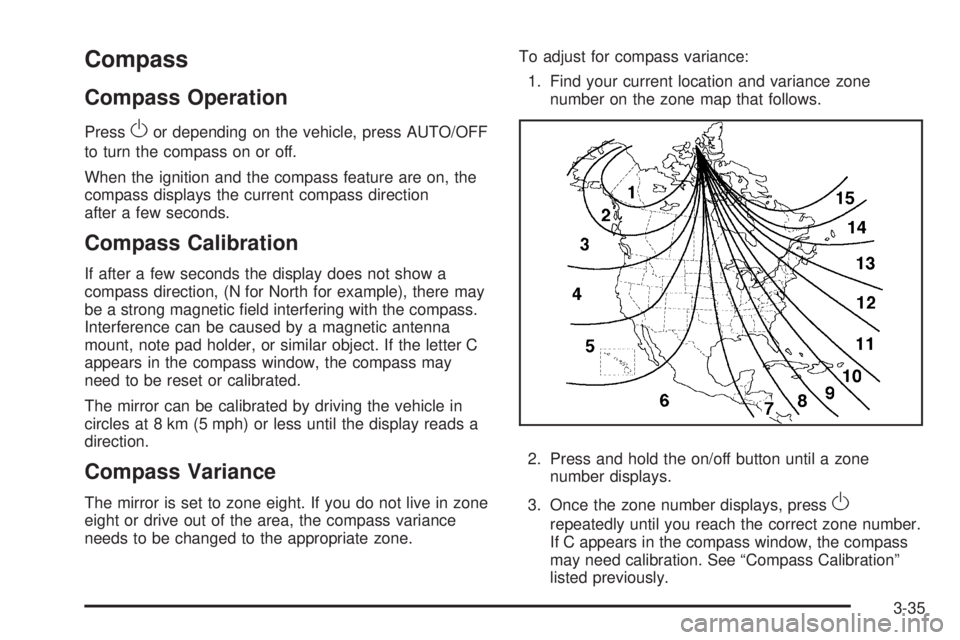
The mirror is set to zone eight. If you do not live in zone
eight or drive out of the area, the compass variance
needs to be changed to the appropriate zone.To adjust for compass variance:
1. Find your current location and variance zone
number on the zone map that follows.
2. Press and hold the on/off button until a zone
number displays.
3. Once the zone number displays, pressO
repeatedly until you reach the correct zone number.
If C appears in the compass window, the compass
may need calibration. See “Compass Calibration”
listed previously.
3-35
Page 176 of 448

Speedometer and Odometer
The speedometer shows the vehicle speed in both miles
per hour (mph) and kilometers per hour (km/h).
The odometer shows how far the vehicle has been
driven, in either miles (used in the United States)
or kilometers (used in Canada).
When in manual shift mode, the odometer will change
from the vehicle’s mileage to the letter M, for manual
mode, and a number indicating the requested gear
range when moving the shift lever forward or rearward.
For more information seeAutomatic Transmission
Operation on page 3-24.
This vehicle has a tamper resistant odometer.
Repair or replacement of the instrument panel cluster
should only be performed by your dealer/retailer.
Trip Odometer
The trip odometer can display how far the vehicle has
been driven since it was last reset.
For more information seeDIC Operation and Displays
on page 4-40.
Tachometer
The tachometer shows the
engine speed in
revolutions per minute
(rpm).
Notice:If the engine is operated with the
tachometer in the shaded warning area, the vehicle
could be damaged, and the damages would not
be covered by the vehicle warranty. Do not operate
the engine with the tachometer in the shaded
warning area.2.4L and 3.6L Engine
shown, 3.5L and
3.9L Engine similar
4-26
Page 181 of 448

When the ignition is on, the brake system warning light
also comes on when the parking brake is set. The
light will stay on if the parking brake does not fully
release. If it stays on after the parking brake is fully
released, it means there is a brake problem.
{WARNING:
The brake system might not be working properly if
the brake system warning light is on. Driving with
the brake system warning light on can lead to a
crash. If the light is still on after the vehicle has
been pulled off the road and carefully stopped,
have the vehicle towed for service.
If the light comes on while driving, pull off the road and
stop carefully. The pedal can be harder to push, or
the pedal could go closer to the floor. It could take
longer to stop. Try turning off and restarting the vehicle
one or two times, if the light is still on, have the
vehicle towed for service. SeeTowing Your Vehicle on
page 5-23.
Antilock Brake System (ABS)
Warning Light
The Antilock Brake
System (ABS) light comes
on briefly when the
engine is started.
If it does not, have the vehicle serviced by your
dealer/retailer. If the system is working normally the
indicator light then goes off.
If the ABS light stays on, turn the ignition off. If the light
comes on while driving, stop as soon as it is safely
possible and turn the ignition off. Then start the engine
again to reset the system. If the ABS light stays on,
or comes on again while driving, the vehicle needs
service. If the regular brake system warning light is not
on, the vehicle still has brakes, but not antilock
brakes. If the regular brake system warning light is also
on, the vehicle does not have antilock brakes and
there is a problem with the regular brakes. SeeBrake
System Warning Light on page 4-30.
For vehicles with a Driver Information Center (DIC), see
DIC Warnings and Messages on page 4-42for all
brake related DIC messages.
4-31
Page 189 of 448
Low Fuel Warning Light
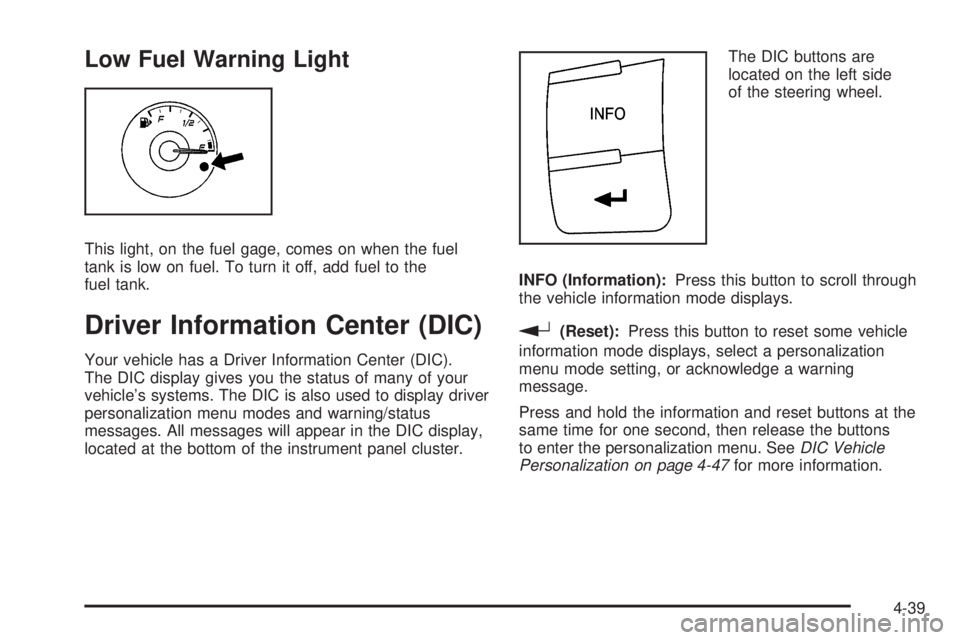
This light, on the fuel gage, comes on when the fuel
tank is low on fuel. To turn it off, add fuel to the
fuel tank.
Driver Information Center (DIC)
Your vehicle has a Driver Information Center (DIC).
The DIC display gives you the status of many of your
vehicle’s systems. The DIC is also used to display driver
personalization menu modes and warning/status
messages. All messages will appear in the DIC display,
located at the bottom of the instrument panel cluster.The DIC buttons are
located on the left side
of the steering wheel.
INFO (Information):Press this button to scroll through
the vehicle information mode displays.
r(Reset):Press this button to reset some vehicle
information mode displays, select a personalization
menu mode setting, or acknowledge a warning
message.
Press and hold the information and reset buttons at the
same time for one second, then release the buttons
to enter the personalization menu. SeeDIC Vehicle
Personalization on page 4-47for more information.
4-39
Page 190 of 448
DIC Operation and Displays
The DIC comes on when the ignition is on. The DIC has
different modes which can be accessed by pressing
the DIC buttons. The button functions are detailed in the
following.
Information Modes
INFO (Information):Press this button to scroll through
the following vehicle information modes:
Outside Air Temperature
The outside air temperature will be displayed at the
same time as the Odometer and the Trip Odometer.
The temperature outside of the vehicle will be displayed
in either degrees Celsius (°C) or degrees Fahrenheit (°F).
The outside air temperature appears on the left side of
the DIC display and the odometer, or trip odometer,
appears on the right side of the display.
Odometer
Press the information button until the outside air
temperature and the odometer displays. This mode
shows the total distance the vehicle has been driven in
either kilometers (km) or miles (mi).
To change the DIC display to English or metric units,
see “UNITS” underDIC Vehicle Personalization on
page 4-47.
Trip Odometer
Press the information button until the outside air
temperature along with A or B displays. These modes
show the current distance traveled since the last
reset for each trip odometer in either kilometers (km)
or miles (mi). Both odometers can be used at the
same time.
To reset the trip odometer to zero, press and hold
the reset button for a few seconds while the desired
trip odometer is displayed.
FUEL RANGE
Press the information button until FUEL RANGE
displays. This mode shows the remaining distance you
can drive without refueling in either kilometers (km)
or miles (mi). It is based on fuel economy and the fuel
remaining in the tank.
When the fuel level is low, FUEL RANGE LOW displays.
The fuel economy data used to determine fuel range
is an average of recent driving conditions. As your
driving conditions change, this data is gradually updated.
The FUEL RANGE mode cannot be reset.
4-40
Page 191 of 448
MPG (L/100 KM) AVG (Average)
Press the information button until MPG (L/100 KM) AVG
displays. This mode shows how many liters per
100 kilometers (L/100 km) or miles per gallon (mpg)
your vehicle is getting based on current and past driving
conditions.
To reset the average fuel economy, press and hold the
reset button while MPG (L/100 KM) AVG is displayed.
Average fuel economy is then calculated starting
from that point. If the average fuel economy is not reset,
it is continually updated each time you drive.
MPG (L/100 KM) INST (Instantaneous)
Press the information button until MPG (L/100 KM) INST
displays. This mode shows the current fuel economy
at a particular moment and changes frequently as
driving conditions change. This mode shows the
instantaneous fuel economy in liters per 100 kilometers
(L/100 km) or miles per gallon (mpg). Unlike average
fuel economy, this screen cannot be reset.
AV (Average) SPEED
Press the information button until AV SPEED displays.
This mode shows the vehicle’s average speed in
kilometers per hour (km/h) or miles per hour (mph).
To reset the average vehicle speed, press and hold the
reset button while AV SPEED is displayed.
OIL LIFE
Press the information button until OIL LIFE displays.
The engine oil life system shows an estimate of the oil’s
remaining useful life. It shows 100% when the system
is reset after an oil change. It alerts you to change the oil
on a schedule consistent with your driving conditions.
In addition to the engine oil life system monitoring the oil
life, additional maintenance is recommended in the
Maintenance Schedule in this manual. SeeEngine Oil
on page 6-21andScheduled Maintenance on page 7-3.
Always reset the engine oil life system after an oil
change. See “How to Reset the Engine Oil Life System”
underEngine Oil Life System on page 6-24.
Tire Pressure
On vehicles with the Tire Pressure Monitor System
(TPMS), the pressure for each tire can be viewed in the
DIC. The tire pressure is shown in either
kilopascals (kPa) or pounds per square inch (psi). Press
the information button until LF ## PSI (kPa) ## RF
displays for the front tires. Press the information button
again until LR ## PSI (kPa) ## RR displays for the
rear tires.
If a low tire pressure condition is detected by the
system while driving, a message advising you to add air
will appear in the display. SeeInation - Tire Pressure
on page 6-64andDIC Warnings and Messages on
page 4-42for more information.
4-41
Page 192 of 448
DIC Warnings and Messages
These messages appear if there is a problem detected
in one of your vehicle’s systems.
A message clears when the vehicle’s condition is no
longer present. To acknowledge a message and clear it
from the display, press and hold any of the DIC
buttons. If the condition is still present, the warning
message comes back on the next time the vehicle is
turned off and back on. With most messages, a warning
chime sounds when the message displays. Your
vehicle may have other warning messages.
AUTO (Automatic) LIGHTS OFF
This message displays if the automatic headlamp
system is disabled with the headlamp switch.
AUTO (Automatic) LIGHTS ON
This message displays if the automatic headlamp
system is enabled with the headlamp switch.
BRAKE FLUID
This message displays, while the ignition is on, when
the brake fluid level is low. The brake system warning
light on the instrument panel cluster also comes on. See
Brake System Warning Light on page 4-30for more
information. Have the brake system serviced by
your dealer/retailer as soon as possible.
CHANGE OIL SOON
This message displays when the life of the engine oil
has expired and it should be changed.
When this message is acknowledged and cleared from
the display, the engine oil life system must still be
reset separately. SeeEngine Oil Life System on
page 6-24,Engine Oil on page 6-21, andScheduled
Maintenance on page 7-3for more information.
CHECK CARGO TOP
If your vehicle has a retractable hardtop, this message
displays if the cargo cover is not in place when
operating the retractable hardtop. Open the trunk and
make sure the cargo cover is secure and no objects are
in contact with the cargo cover. SeeTrunk on
page 3-11,Lowering the Retractable Hardtop on
page 3-38, andRaising the Retractable Hardtop on
page 3-41for more information.
CHECK GAS CAP
This message displays if the fuel cap has not been fully
tightened. Recheck the fuel cap to make sure that it
is on properly. A few driving trips with the cap properly
installed should turn the message off.
4-42