remote control PONTIAC G8 2008 User Guide
[x] Cancel search | Manufacturer: PONTIAC, Model Year: 2008, Model line: G8, Model: PONTIAC G8 2008Pages: 334, PDF Size: 2.99 MB
Page 109 of 334
Digital speedo (speedometer)
Pressure Units
Rest reminder
Underspeed Chime
If you select Underspeed Chime you
will be able to enable or disable
the underspeed chime feature. See
DIC Operation and Displays on
page 4-23for more information.
Distance to go
If you select Distance to go you will
be able to choose if you want
the distance to go display to to be
shown on the DIC. SeeDIC
Operation and Displays on
page 4-23for more information.
Distance to go Default
If you select Distance to go Default
you will be able to change the
distance to go default setting. The
default setting is 500 km. Set
the value you want it to be.Digital speedometer
If you select Digital speedometer
you will be able to choose if
you want the digital speedometer to
be shown on the DIC display.
Pressure Units
If you select Pressure Units you can
choose how the tire pressures will
be displayed. If you select PSI
then all tire pressures will be
displayed in PSI. If you select kPa
then all tire pressures will be
displayed in kPa. If you select
Automatic and the Unit selection is
English then all tire pressures
will be displayed in PSI. If you select
Automatic and the Unit selection
is Metric then all tire pressures will
be displayed in kPa.
Rest reminder
If you select Rest reminder you will
be able to enable or disable the
rest reminder feature. SeeDIC
Warnings and Messages on
page 4-27for more information.
Language
This item will allow you to set the
language for the display to English
or French.
Remote Key programming
Choose Program if the vehicle’s
remote keys require programming.
Follow the instructions on the
DIC display to complete key
programming. All the vehicle’s keys
must be programmed at the
same time. If an existing key is not
reprogrammed during the
procedure it will no longer work.
Choose Instructions if information is
required to complete programming
procedure.
Choose Exit to return to the
customization menu.
SeeRemote Keyless Entry (RKE)
System Operation on page 2-4
for more information.
Instruments and Controls 4-35
2008 - Pontiac G8 Owner Manual
Page 110 of 334
OnStar®System
OnStar uses several innovative
technologies and live advisors to
provide a wide range of safety,
security, information, and
convenience services. If the airbags
deploy, the system is designed to
make an automatic call to OnStar
Emergency advisors who can
request emergency services be sent
to your location. If the keys are
locked in the vehicle, call OnStar at
1-888-4-ONSTAR and they can send
a signal to unlock the doors. For
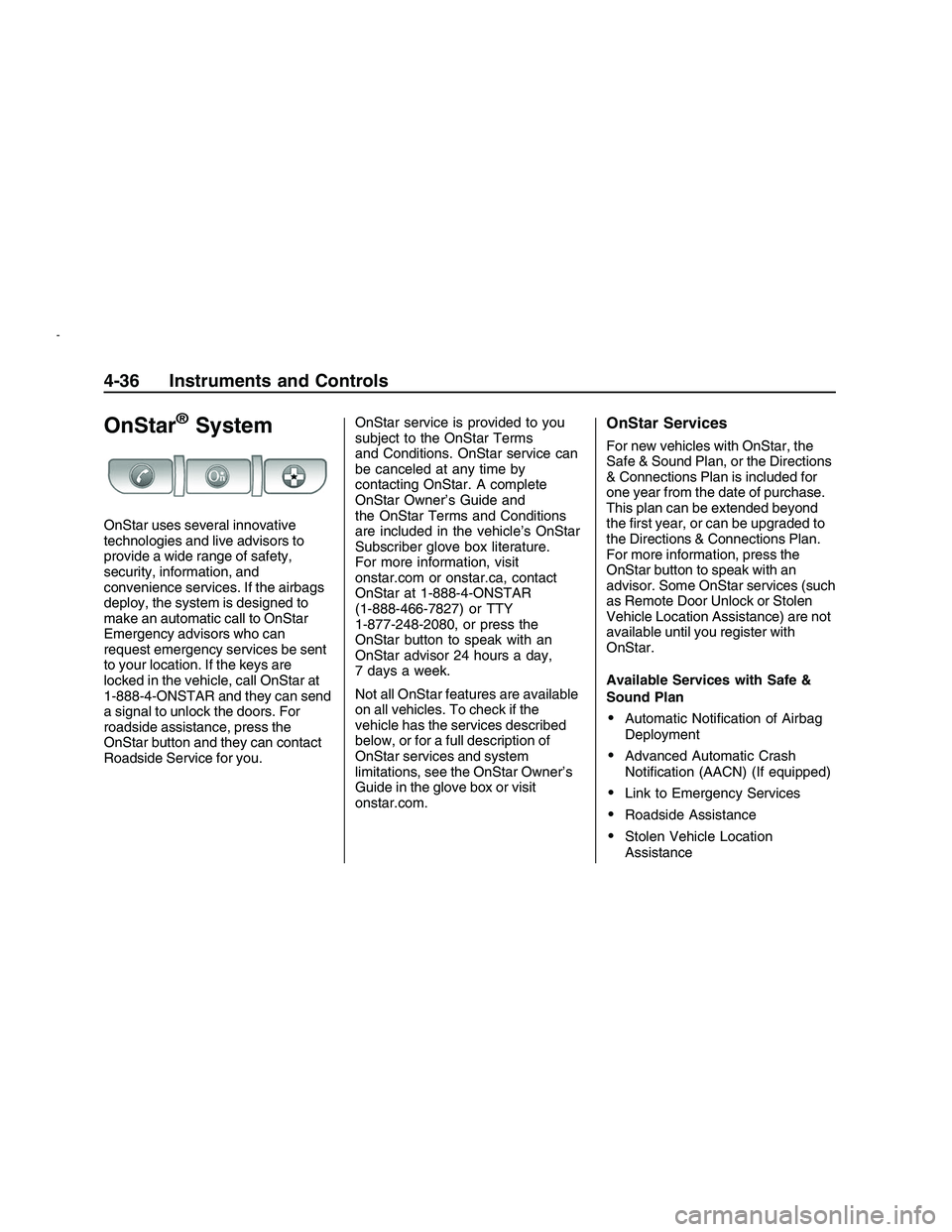
roadside assistance, press the
OnStar button and they can contact
Roadside Service for you.OnStar service is provided to you
subject to the OnStar Terms
and Conditions. OnStar service can
be canceled at any time by
contacting OnStar. A complete
OnStar Owner’s Guide and
the OnStar Terms and Conditions
are included in the vehicle’s OnStar
Subscriber glove box literature.
For more information, visit
onstar.com or onstar.ca, contact
OnStar at 1-888-4-ONSTAR
(1-888-466-7827) or TTY
1-877-248-2080, or press the
OnStar button to speak with an
OnStar advisor 24 hours a day,
7 days a week.
Not all OnStar features are available
on all vehicles. To check if the
vehicle has the services described
below, or for a full description of
OnStar services and system
limitations, see the OnStar Owner’s
Guide in the glove box or visit
onstar.com.
OnStar Services
For new vehicles with OnStar, the
Safe & Sound Plan, or the Directions
& Connections Plan is included for
one year from the date of purchase.
This plan can be extended beyond
the rst year, or can be upgraded to
the Directions & Connections Plan.
For more information, press the
OnStar button to speak with an
advisor. Some OnStar services (such
as Remote Door Unlock or Stolen
Vehicle Location Assistance) are not
available until you register with
OnStar.
Available Services with Safe &
Sound Plan
Automatic Notication of Airbag
Deployment
Advanced Automatic Crash
Notication (AACN) (If equipped)
Link to Emergency Services
Roadside Assistance
Stolen Vehicle Location
Assistance
4-36 Instruments and Controls
2008 - Pontiac G8 Owner Manual
Page 111 of 334
AccidentAssist
Remote Door Unlock/Vehicle
Alert
OnStar Vehicle Diagnostics
GM Goodwrench On Demand
Diagnostics
OnStar Hands-Free Calling with
30 complimentary minutes
OnStar Virtual Advisor
(U.S. Only)
Available Services included with
Directions & Connections Plan
All Safe and Sound Plan Services
Driving Directions - Advisor
delivered or OnStar Turn-by-Turn
Navigation (If equipped)
RideAssist
Information and Convenience
Services
OnStar Hands-Free Calling
OnStar Hands-Free Calling allows
eligible OnStar subscribers to
make and receive calls using voice
commands. Hands-Free Calling
is fully integrated into the vehicle,
and can be used with OnStar
Pre-Paid Minute Packages.
Hands-Free Calling can also be
linked to a Verizon Wireless service
plan in the U.S. or a Bell Mobility
service plan in Canada, depending
on eligibility. To nd out more,
refer to the OnStar Owner’s Guide
in the vehicle’s glove box, visit
www.onstar.com or www.onstar.ca,
or speak with an OnStar advisor
by pressing the OnStar button
or calling 1-888-4-ONSTAR
(1-888-466-7827).
OnStar Virtual Advisor
OnStar Virtual Advisor is a feature
of OnStar Hands-Free Calling
that uses minutes to access
location-based weather, local traffic
reports, and stock quotes. Press
the phone button and give afew simple voice commands to
browse through the various topics.
See the OnStar Owner’s Guide
for more information (only available
in the continental U.S.).
OnStar Steering Wheel
Controls
The vehicle may have a Talk/Mute
button that can be used to interact
with OnStar Hands-Free Calling.
On some vehicles, you may have to
hold the button for a few seconds
and give the command “ONSTAR” in
order to activate the OnStar
Hands-Free Calling feature.
On some vehicles, the mute button
can be used to dial numbers into
voicemail systems, or to dial phone
extensions. See the OnStar Owner’s
Guide for more information.
Instruments and Controls 4-37
2008 - Pontiac G8 Owner Manual
Page 112 of 334
How OnStar Service Works
The OnStar system can record and
transmit vehicle information. This
information is automatically sent to
an OnStar Call Center when the
OnStar button is pressed, the
emergency button is pressed, or if
the airbags or AACN system deploy.
The vehicle information usually
includes your GPS location and, in
the event of a crash, additional
information regarding the accident
that the vehicle has been involved in
(e.g. the direction from which the
vehicle was hit). When the Virtual
Advisor feature of OnStar
Hands-Free Calling is used, the
vehicle also sends OnStar your GPS
location so that we can provide
services where you are located.
OnStar service cannot work unless
the vehicle is in a place where
OnStar has an agreement with a
wireless service provider for service
in that area. OnStar service also
cannot work unless you are in
a place where the wireless service
provider OnStar has hired forthat area has coverage, network
capacity and reception when
the service is needed, and
technology that is compatible with
the OnStar service. Not all services
are available everywhere,
particularly in remote or enclosed
areas, or at all times.
Location information about the
vehicle is only available if the GPS
satellite signals are available
and unobstructed.
The vehicle must have a working
electrical system (including adequate
battery power) for the OnStar
equipment to operate. There are
other problems OnStar cannot
control that may prevent OnStar from
providing OnStar service to you at
any particular time or place. Some
examples are damage to important
parts of the vehicle in an accident,
hills, tall buildings, tunnels, weather
or wireless phone network
congestion.Your Responsibility
Increase the volume of the radio if
you cannot hear the OnStar advisor.
If the light next to the OnStar
buttons is red, the system is not
functioning properly and should be
checked by your dealer/retailer.
If the light appears clear (no light is
appearing), the OnStar subscription
has expired. Press the blue
OnStar button to conrm that the
OnStar equipment is active.
4-38 Instruments and Controls
2008 - Pontiac G8 Owner Manual
Page 116 of 334
Dome Lamp(s)
+
(On/Off):Press to turn the lamp
on or off.
&(Door):Press this button in and
the lamps automatically turn on
when a door is opened, the vehicle
is unlocked, or the key is removed
from the ignition.
The lamps dim to off after all the
doors are closed. They turn off
immediately if the ignition is turned
on and all the doors are closed.
The dome lamps turn on
automatically only when it is dark.
Perimeter Lighting
Press the unlock button on the
Remote Keyless Entry (RKE)
transmitter to turn the headlamps
and back-up lamps on for
60 seconds if it is dark enough
outside.
The lamps only turn on if the
exterior lamp control is left in the
AUTO position.
Reading Lamps
Front Reading Lamps
()(On/Off):Press to turn
the lamps on or off.
Battery Run-Down
Protection
This vehicle has a feature to help
prevent the battery from being
drained. The trunk lamp and
reading lamps automatically turn off
10 minutes after the key is turned
to LOCK/OFF.
The lamps are reactivated if any of
the following occur:
The ignition is turned on.
The vehicle is unlocked.
The trunk is opened.
The reading lamps are turned on.
5-4 Lighting
2008 - Pontiac G8 Owner Manual
Page 139 of 334
l(Forward):Press to go to the
next track or press
lmultiple times
until the desired track is reached.
g(Reverse):Press to go back to
the start of the current track or
press
gmultiple times until
the desired track is reached.
Theft-Deterrent Feature
The radio has an electronically
coded security system that links the
radio to the vehicle. When the
ignition is off, a ashing red light on
the upper left side of the radio
indicates the security system is on.
If the radio is moved to a different
vehicle, it will not operate and
Security Lockout Active displays.
Contact your dealer/retailer to
unlock the radio.
Audio Steering Wheel
Controls
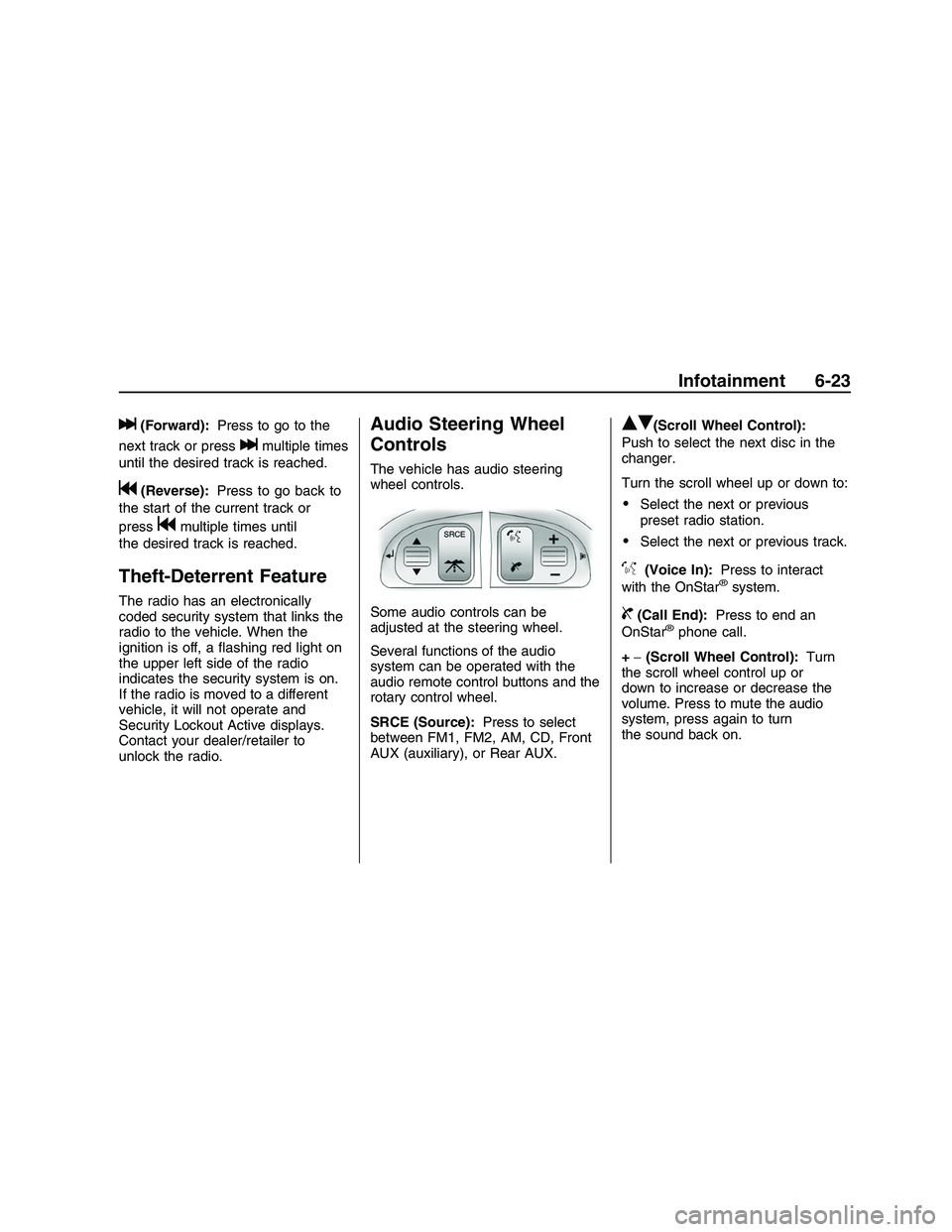
The vehicle has audio steering
wheel controls.
Some audio controls can be
adjusted at the steering wheel.
Several functions of the audio
system can be operated with the
audio remote control buttons and the
rotary control wheel.
SRCE (Source):Press to select
between FM1, FM2, AM, CD, Front
AUX (auxiliary), or Rear AUX.
QR(Scroll Wheel Control):
Push to select the next disc in the
changer.
Turn the scroll wheel up or down to:
Select the next or previous
preset radio station.
Select the next or previous track.
%(Voice In):Press to interact
with the OnStar®system.
{(Call End):Press to end an
OnStar®phone call.
+−(Scroll Wheel Control):Turn
the scroll wheel control up or
down to increase or decrease the
volume. Press to mute the audio
system, press again to turn
the sound back on.
Infotainment 6-23
2008 - Pontiac G8 Owner Manual
Page 144 of 334
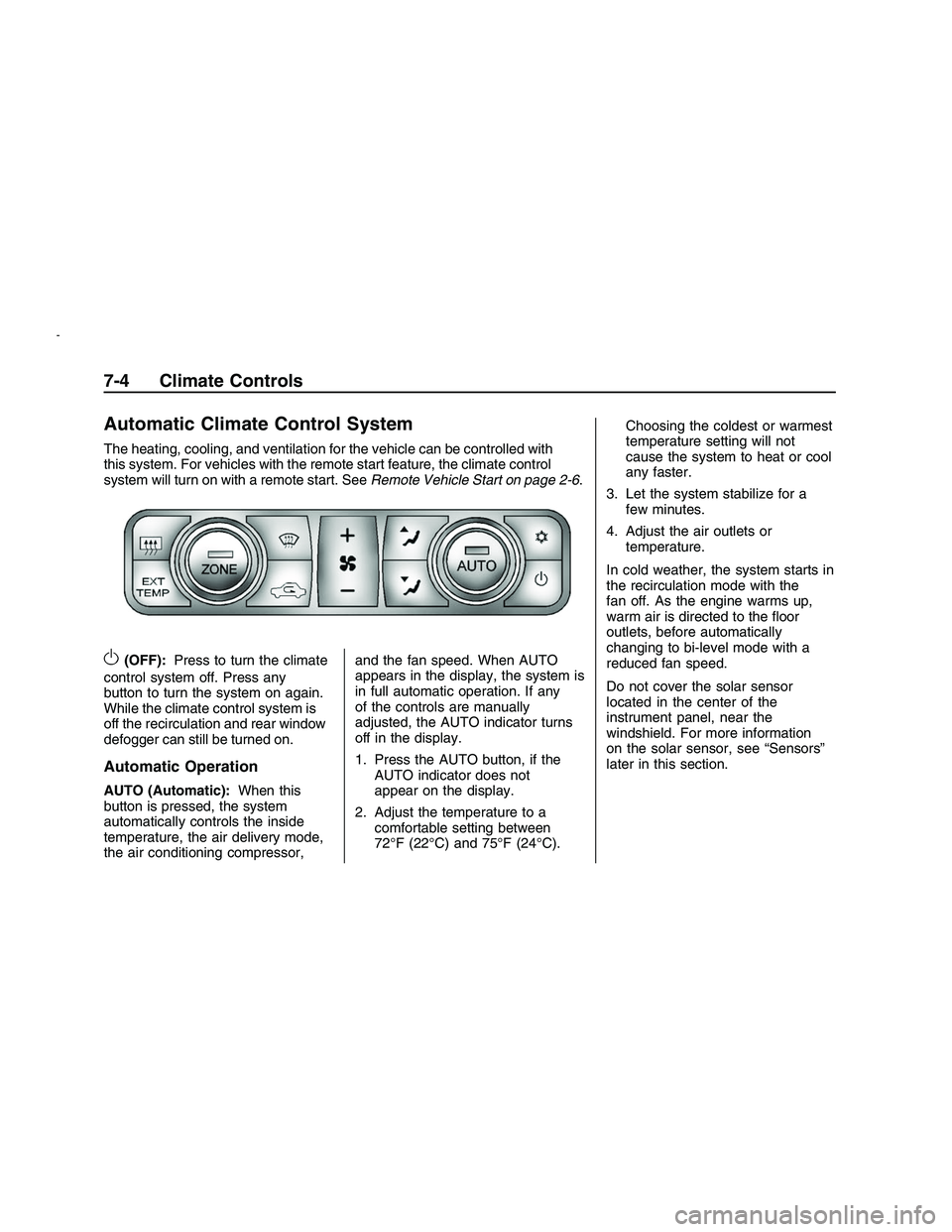
Automatic Climate Control System
The heating, cooling, and ventilation for the vehicle can be controlled with
this system. For vehicles with the remote start feature, the climate control
system will turn on with a remote start. SeeRemote Vehicle Start on page 2-6.
O(OFF):Press to turn the climate
control system off. Press any
button to turn the system on again.
While the climate control system is
off the recirculation and rear window
defogger can still be turned on.
Automatic Operation
AUTO (Automatic): When this
button is pressed, the system
automatically controls the inside
temperature, the air delivery mode,
the air conditioning compressor, and the fan speed. When AUTO
appears in the display, the system is
in full automatic operation. If any
of the controls are manually
adjusted, the AUTO indicator turns
off in the display.
1. Press the AUTO button, if the
AUTO indicator does not
appear on the display.
2. Adjust the temperature to a comfortable setting between
72°F (22°C) and 75°F (24°C). Choosing the coldest or warmest
temperature setting will not
cause the system to heat or cool
any faster.
3. Let the system stabilize for a few minutes.
4. Adjust the air outlets or temperature.
In cold weather, the system starts in
the recirculation mode with the
fan off. As the engine warms up,
warm air is directed to the oor
outlets, before automatically
changing to bi-level mode with a
reduced fan speed.
Do not cover the solar sensor
located in the center of the
instrument panel, near the
windshield. For more information
on the solar sensor, see “Sensors”
later in this section.
7-4 Climate Controls
2008 - Pontiac G8 Owner Manual
Page 148 of 334
By monitoring the solar radiation,
the air inside the vehicle and
air moving across the outside
sensor, the selected temperature
can be maintained while using
the AUTO mode by adjusting the
temperature, fan speed, and
air delivery system. The system
may also supply cooler air to
the side of the vehicle facing the
sun. The recirculation mode will also
be activated, as necessary. Do not
cover the sensors or the automatic
climate control system will not
work properly.
Remote Start Climate Control
Operation
For vehicles with the remote start
feature and it is activated, the climate
control system will automatically set
the temperature to 73°F (23°C).
When the ignition is turned to
ON/RUN the climate control system
heats and cools the inside of the
vehicle using the modes that were
set before the vehicle was turned off.
Personal Identity Keys
For vehicles with the Personal
Identity Key Locking System,
the system remembers the last
climate control settings used with
different keys.
When the unlock button is pressed,
the system remembers the key
and sets the climate control system
to the last settings used with that
key. SeeRemote Keyless Entry
(RKE) System Operation on
page 2-4.
Passenger Compartment
Air Filter
The vehicle has a passenger
compartment air lter that lters the
outside air entering the vehicle.
The lter removes contaminants,
such as pollen and dust. See your
dealer/retailer for more information.
Outlet Adjustment
The air outlets have adjustable
vanes to move up or down and left
or right to change the direction
of the airow. Use the thumbwheels
located near the air outlets on
the instrument panel, to shut off
the airow.
Operation Tips
Clear away any ice, snow or
leaves from the air inlets at
the base of the windshield that
may block the ow of air into
the vehicle.
Use of non-GM approved hood
deectors may adversely affect
performance of the system.
Keep the path under the front
seats clear of objects to help
circulate the air inside of
the vehicle more effectively.
Outside air is drawn into the
vehicle, unless recirculation mode
is selected.
7-8 Climate Controls
2008 - Pontiac G8 Owner Manual
Page 187 of 334
Accessories and
Modications
When non-dealer/non-retailer
accessories are added to your
vehicle they can affect your vehicle’s
performance and safety, including
such things as, airbags, braking,
stability, ride and handling,
emissions systems, aerodynamics,
durability, and electronic systems
like antilock brakes, traction control
and stability control. Some of
these accessories could even cause
malfunction or damage not
covered by warranty.
GM Accessories are designed to
complement and function with other
systems on your vehicle. Your
GM dealer/retailer can accessorize
your vehicle using genuine GM
Accessories. When you go to yourGM dealer/retailer and ask for GM
Accessories, you will know that
GM-trained and supported service
technicians will perform the
work using genuine GM
Accessories.
Also, seeAdding Equipment to Your
Airbag-Equipped Vehicle on
page 1-30.
California Proposition 65
Warning
Most motor vehicles, including this
one, contain and/or emit chemicals
known to the State of California
to cause cancer and birth defects or
other reproductive harm. Engine
exhaust, many parts and systems
(including some inside the vehicle),
many uids, and some component
wear by-products contain and/or
emit these chemicals.
California Perchlorate
Materials Requirements
Certain types of automotive
applications, such as airbag
initiators, seat belt pretensioners,
and lithium batteries contained
in remote keyless entry transmitters,
may contain perchlorate materials.
Special handling may be necessary.
For additional information, see
www.dtsc.ca.gov/hazardouswaste/
perchlorate.
Vehicle Service and Care 9-3
2008 - Pontiac G8 Owner Manual
Page 222 of 334
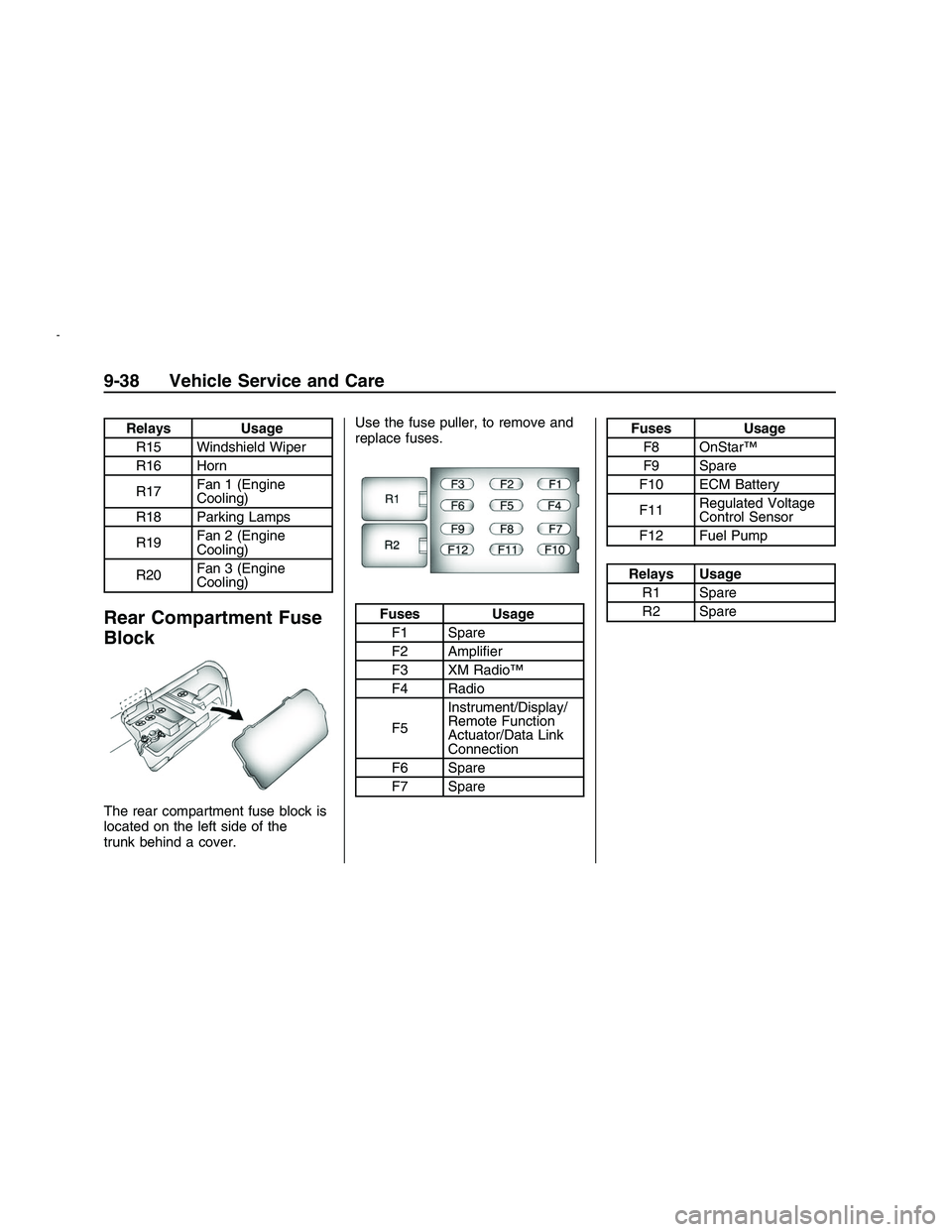
Relays Usage
R15 Windshield Wiper
R16 Horn
R17Fan 1 (Engine
Cooling)
R18 Parking Lamps
R19Fan 2 (Engine
Cooling)
R20Fan 3 (Engine
Cooling)
Rear Compartment Fuse
Block
The rear compartment fuse block is
located on the left side of the
trunk behind a cover.Use the fuse puller, to remove and
replace fuses.
Fuses Usage
F1 Spare
F2 Amplier
F3 XM Radio™
F4 Radio
F5Instrument/Display/
Remote Function
Actuator/Data Link
Connection
F6 Spare
F7 Spare
Fuses Usage
F8 OnStar™
F9 Spare
F10 ECM Battery
F11Regulated Voltage
Control Sensor
F12 Fuel Pump
Relays Usage
R1 Spare
R2 Spare
9-38 Vehicle Service and Care
2008 - Pontiac G8 Owner Manual