change wheel PONTIAC G8 2009 User Guide
[x] Cancel search | Manufacturer: PONTIAC, Model Year: 2009, Model line: G8, Model: PONTIAC G8 2009Pages: 356, PDF Size: 1.83 MB
Page 165 of 356
Personal Identity Keys
For vehicles with the Personal
Identity Key Locking System,
the system remembers the last
climate control settings used with
different keys.
When the unlock button is pressed,
the system remembers the key
and sets the climate control system
to the last settings used with that
key. SeeRemote Keyless Entry
(RKE) System Operation on
page 2-4.
Passenger Compartment
Air Filter
The vehicle has a passenger
compartment air lter that lters the
outside air entering the vehicle.
The lter removes contaminants,
such as pollen and dust. See
your dealer/retailer for more
information.
Outlet Adjustment
The air outlets have adjustable
vanes to move up or down and left or
right to change the direction of the
airow. Use the thumbwheels
located near the air outlets on the
instrument panel, to shut off the
airow.
Operation Tips
Clear away any ice, snow or
leaves from the air inlets at
the base of the windshield that
may block the ow of air into
the vehicle.
Use of non-GM approved hood
deectors may adversely affect
performance of the system.
Keep the path under the front
seats clear of objects to help
circulate the air inside of
the vehicle more effectively.
Outside air is drawn into the
vehicle, unless recirculation
mode is selected.
Climate Controls 7-9
Page 172 of 356
The length of time the heater should
remain plugged in depends on
several factors. Ask a dealer/retailer
in the area where you will be
parking the vehicle for the best
advice on this.
Automatic Transmission
Operation
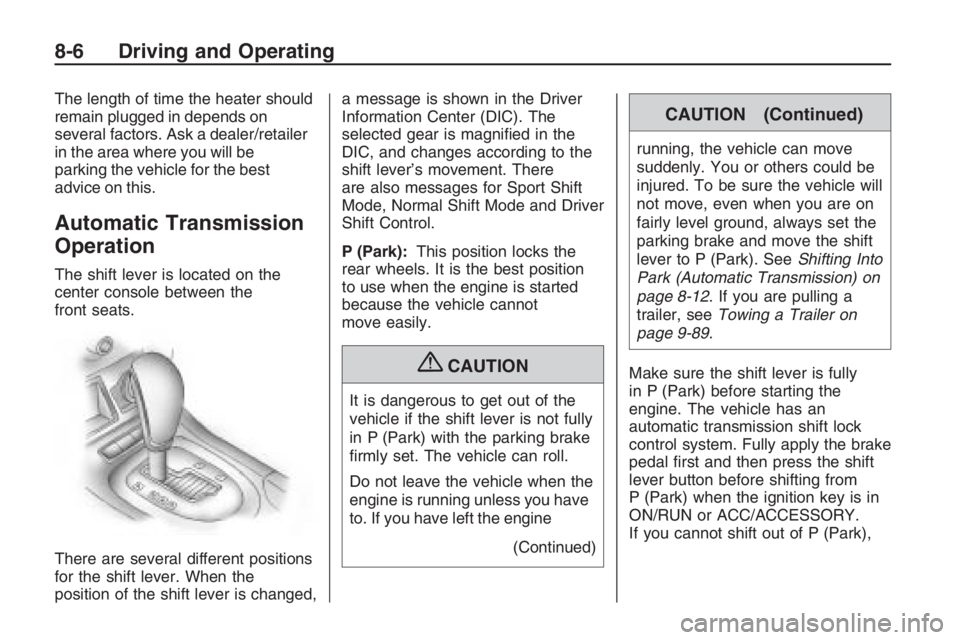
The shift lever is located on the
center console between the
front seats.
There are several different positions
for the shift lever. When the
position of the shift lever is changed,a message is shown in the Driver
Information Center (DIC). The
selected gear is magnied in the
DIC, and changes according to the
shift lever’s movement. There
are also messages for Sport Shift
Mode, Normal Shift Mode and Driver
Shift Control.
P (Park):This position locks the
rear wheels. It is the best position
to use when the engine is started
because the vehicle cannot
move easily.
{CAUTION
It is dangerous to get out of the
vehicle if the shift lever is not fully
in P (Park) with the parking brake
rmly set. The vehicle can roll.
Do not leave the vehicle when the
engine is running unless you have
to. If you have left the engine
(Continued)
CAUTION (Continued)
running, the vehicle can move
suddenly. You or others could be
injured. To be sure the vehicle will
not move, even when you are on
fairly level ground, always set the
parking brake and move the shift
lever to P (Park). SeeShifting Into
Park (Automatic Transmission) on
page 8-12. If you are pulling a
trailer, seeTowing a Trailer on
page 9-89.
Make sure the shift lever is fully
in P (Park) before starting the
engine. The vehicle has an
automatic transmission shift lock
control system. Fully apply the brake
pedal rst and then press the shift
lever button before shifting from
P (Park) when the ignition key is in
ON/RUN or ACC/ACCESSORY.
If you cannot shift out of P (Park),
8-6 Driving and Operating
Page 184 of 356
And, of course, actual stopping
distances vary greatly with the
surface of the road, whether it is
pavement or gravel; the condition of
the road, whether it is wet, dry, or icy;
tire tread; the condition of the brakes;
the weight of the vehicle; and the
amount of brake force applied.
Avoid needless heavy
braking. Some people drive in
spurts — heavy acceleration
followed by heavy braking — rather
than keeping pace with traffic.
This is a mistake. The brakes might
not have time to cool between
hard stops. The brakes will wear out
much faster if you do a lot of
heavy braking. If you keep pace
with the traffic and allow realistic
following distances, you will
eliminate a lot of unnecessary
braking. That means better braking
and longer brake life.
If your vehicle’s engine ever stops
while you are driving, brake normally
but do not pump the brakes. If you
do, the pedal could get harder topush down. If the engine stops, you
will still have some power brake
assist. But you will use it when you
brake. Once the power assist is used
up, it can take longer to stop and the
brake pedal will be harder to push.
Adding non-dealer/non-retailer
accessories can affect your vehicle’s
performance. SeeAccessories
and Modifications on page 9-3.
Antilock Brake
System (ABS)
Your vehicle has the Antilock Brake
System (ABS), an advanced
electronic braking system that will
help prevent a braking skid.
When you start the engine and
begin to drive away, ABS will check
itself. You might hear a momentary
motor or clicking noise while this
test is going on, and you might even
notice that the brake pedal moves
a little. This is normal.If there is a problem with ABS, this
warning light will stay on. See
Antilock Brake System (ABS)
Warning Light on page 4-16.
Let us say the road is wet and you
are driving safely. Suddenly, an
animal jumps out in front of you.
You slam on the brakes and continue
braking. Here is what happens
with ABS:
A computer senses that the wheels
are slowing down. If one of the
wheels is about to stop rolling, the
computer will separately work
the brakes at each wheel.
ABS can change the brake pressure
to each wheel, as required, faster
than any driver could. This can help
you steer around the obstacle while
braking hard.
8-18 Driving and Operating
Page 185 of 356
As you brake, the computer keeps
receiving updates on wheel speed
and controls braking pressure
accordingly.
Remember: ABS does not change
the time you need to get your
foot up to the brake pedal or always
decrease stopping distance. If
you get too close to the vehicle in
front of you, you will not have time to
apply the brakes if that vehicle
suddenly slows or stops. Always
leave enough room up ahead
to stop, even though you have ABS.
Using ABS
Do not pump the brakes. Just hold
the brake pedal down rmly and
let antilock work for you. You might
hear the antilock pump or motor
operate, and feel the brake
pedal pulsate, but this is normal.
Braking in Emergencies
With ABS, you can steer and
brake at the same time. In many
emergencies, steering can help
you more than even the very best
braking.
Electronic Stability
Program
The vehicle has the Electronic
Stability Program (ESP®) that assists
with directional control of the vehicle
in difficult driving conditions by
reducing engine power and applying
the brakes to individual wheels. This
is especially useful in slippery road
conditions. The system operates if it
senses that the rear wheels are
spinning too much, are beginning to
lose traction or if it senses that the
vehicle is not moving in its intended
direction. It turns on automatically
every time the vehicle is started.When ESP is working, this light
and the STABILITY CONTROL
ASSISTANCE message will come on
and the ESP CTRL message will be
displayed at the bottom of the DIC.
The STABILITY CONTROL
ASSISTANCE message will remain
on while the system is working
until the
3button is pressed to
display the trip computer. The
ESP CTRL message stays on at the
bottom of the DIC while the
system is working.
Driving and Operating 8-19
Page 190 of 356
In the steering or cornering skid, too
much speed or steering in a curve
causes tires to slip and lose
cornering force. And in the
acceleration skid, too much throttle
causes the driving wheels to spin.
If your vehicle starts to slide, ease
your foot off the accelerator pedal
and quickly steer the way you want
the vehicle to go. If you start steering
quickly enough, your vehicle may
straighten out. Always be ready for a
second skid if it occurs.
Of course, traction is reduced when
water, snow, ice, gravel, or other
material is on the road. For safety,
you want to slow down and
adjust your driving to these
conditions. It is important to slow
down on slippery surfaces because
stopping distance is longer and
vehicle control more limited.
While driving on a surface with
reduced traction, try your best to
avoid sudden steering, acceleration,
or braking, including reducing vehicle
speed by shifting to a lower gear.Any sudden changes could cause
the tires to slide. You might not
realize the surface is slippery until
your vehicle is skidding. Learn to
recognize warning clues — such as
enough water, ice, or packed snow
on the road to make a mirrored
surface — and slow down when you
have any doubt.
Remember: Any Antilock Brake
System (ABS) helps avoid only the
braking skid.
Driving at Night
Night driving is more dangerous
than day driving because some
drivers are likely to be impaired — by
alcohol or drugs, with night vision
problems, or by fatigue.
Night driving tips include:
Drive defensively.
Do not drink and drive.
Reduce headlamp glare by
adjusting the inside rearview
mirror.
Slow down and keep more space
between you and other vehicles
because headlamps can only
light up so much road ahead.
Watch for animals.
When tired, pull off the road.
Do not wear sunglasses.
Avoid staring directly into
approaching headlamps.
Keep the windshield and all glass
on your vehicle clean — inside
and out.
Keep your eyes moving,
especially during turns or curves.
No one can see as well at night as
in the daytime. But, as we get
older, these differences increase.
A 50-year-old driver might need
at least twice as much light to see
the same thing at night as a
20-year-old.
8-24 Driving and Operating
Page 196 of 356
Rocking Your Vehicle to
Get It Out
Turn the steering wheel left and right
to clear the area around the front
wheels. Turn off any stability system.
Shift back and forth between
R (Reverse) and a forward gear,
spinning the wheels as little as
possible. To prevent transmission
wear, wait until the wheels stop
spinning before shifting gears.
Release the accelerator pedal while
shifting, and press lightly on the
accelerator pedal when the
transmission is in gear. Slowly
spinning the wheels in the forward
and reverse directions causes a
rocking motion that could free the
vehicle. If that does not get the
vehicle out after a few tries, it might
need to be towed out. If the vehicle
does need to be towed out, see
Towing Your Vehicle on page 9-88.
Loading the Vehicle
It is very important to know how
much weight the vehicle can
carry. This weight is called the
vehicle capacity weight and
includes the weight of all
occupants, cargo and all
nonfactory-installed options.
Two labels on the vehicle show
how much weight it may
properly carry, the Tire and
Loading Information label and
the Certication label.{CAUTION
Do not load the vehicle any
heavier than the Gross Vehicle
Weight Rating (GVWR), or
either the maximum front or
rear Gross Axle Weight Rating
(GAWR). If you do, parts on
the vehicle can break, and it
can change the way your
vehicle handles. These could
cause you to lose control and
crash. Also, overloading can
shorten the life of the vehicle.
8-30 Driving and Operating
Page 231 of 356
Notice:Continuing to drive with
worn-out brake pads could
result in costly brake repair.
Some driving conditions or climates
can cause a brake squeal when
the brakes are rst applied or lightly
applied. This does not mean
something is wrong with the brakes.
Properly torqued wheel nuts are
necessary to help prevent
brake pulsation. When tires are
rotated, inspect brake pads for wear
and evenly tighten wheel nuts in
the proper sequence to torque
specications inCapacities and
Specifications on page 10-2.
Brake linings should always be
replaced as complete axle sets.Brake Pedal Travel
See your dealer/retailer if the brake
pedal does not return to normal
height, or if there is a rapid increase
in pedal travel. This could be a
sign that brake service might
be required.
Brake Adjustment
Every time he brakes are applied,
with or without the vehicle moving,
the brakes adjust for wear.
Replacing Brake System Parts
The braking system on a vehicle
is complex. Its many parts have
to be of top quality and work
well together if the vehicle is
to have really good braking.The vehicle was designed and
tested with top-quality brake parts.
When parts of the braking system
are replaced — for example,
when the brake linings wear
down and new ones are
installed — be sure to get new
approved replacement parts. If this
is not done, the brakes might
not work properly. For example,
if someone puts in brake linings that
are wrong for the vehicle, the
balance between the front and rear
brakes can change — for the
worse. The braking performance
expected can change in many other
ways if the wrong replacement
brake parts are installed.
Vehicle Service and Care 9-27
Page 258 of 356
The TPMS operates on a radio
frequency and complies with
RSS-210 of Industry and Science
Canada. Operation is subject to the
following two conditions:
1. This device may not cause
interference.
2. This device must accept any
interference received, including
interference that may cause
undesired operation of the device.
Changes or modications to this
system by other than an authorized
service facility could void
authorization to use this equipment.Tire Pressure Monitor
Operation
The Tire Pressure Monitor System
(TPMS) is designed to warn the
driver when a low tire pressure
condition exists. TPMS sensors are
mounted onto each tire and
wheel assembly, excluding the
spare tire and wheel assembly. The
TPMS sensors monitor the air
pressure in the vehicle’s tires and
transmit the tire pressure readings to
a receiver located in the vehicle.
When a low tire pressure condition
is detected, the TPMS turns on the
7
low tire pressure warning light.
At the same time a message to
check the pressure in a specic tire
appears on the Driver Information
Center (DIC) display. The low tire
pressure warning light and the DIC
warning message come on at each
ignition cycle until the tires are
inated to the correct ination
pressure. Using the DIC, tire
pressure levels can be viewed bythe driver. For additional information
and details about the DIC operation
and displays seeDIC Operation and
Displays on page 4-22andDIC
Warnings and Messages on
page 4-26.
The low tire pressure warning light
may come on in cool weather
when the vehicle is rst started, and
then turn off as you start to drive.
This could be an early indicator that
the air pressure in the tire(s) are
getting low and need to be inated
to the proper pressure.
A Tire and Loading Information label
shows the size of the vehicle’s
original equipment tires and the
correct ination pressure for the
vehicle’s tires when they are cold.
SeeLoading the Vehicle on
page 8-30, for an example of the Tire
and Loading Information label and its
location on the vehicle. Also see
Inflation - Tire Pressure on
page 9-49.
9-54 Vehicle Service and Care
Page 262 of 356
Any time you notice unusual
wear, rotate the tires as soon
as possible and check wheel
alignment. Also check for
damaged tires or wheels.
SeeWhen It Is Time for New
Tires on page 9-59andWheel
Replacement on page 9-64.
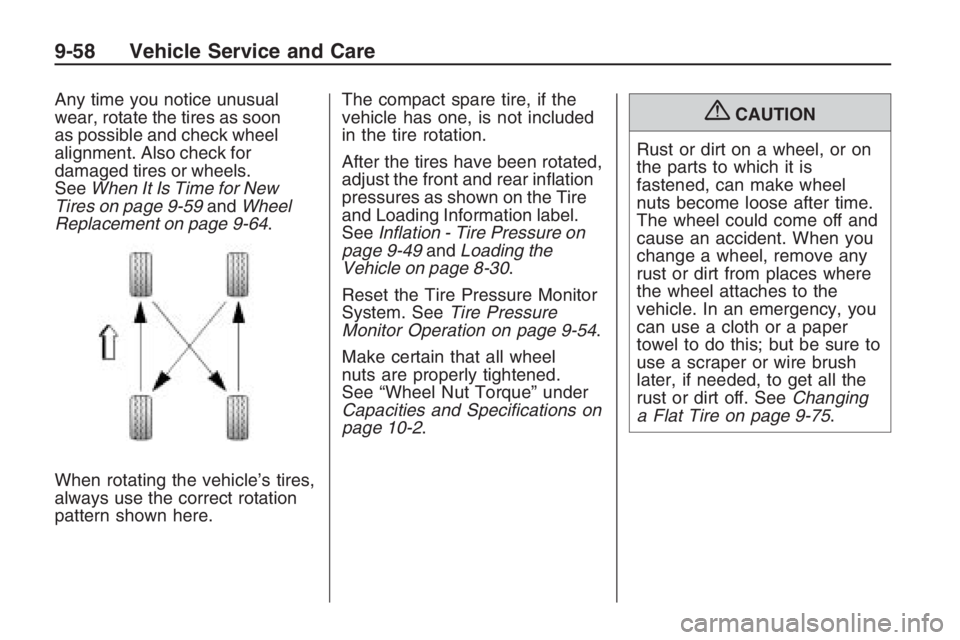
When rotating the vehicle’s tires,
always use the correct rotation
pattern shown here.The compact spare tire, if the
vehicle has one, is not included
in the tire rotation.
After the tires have been rotated,
adjust the front and rear ination
pressures as shown on the Tire
and Loading Information label.
SeeInflation - Tire Pressure on
page 9-49andLoading the
Vehicle on page 8-30.
Reset the Tire Pressure Monitor
System. SeeTire Pressure
Monitor Operation on page 9-54.
Make certain that all wheel
nuts are properly tightened.
See “Wheel Nut Torque” under
Capacities and Specifications on
page 10-2.{CAUTION
Rust or dirt on a wheel, or on
the parts to which it is
fastened, can make wheel
nuts become loose after time.
The wheel could come off and
cause an accident. When you
change a wheel, remove any
rust or dirt from places where
the wheel attaches to the
vehicle. In an emergency, you
can use a cloth or a paper
towel to do this; but be sure to
use a scraper or wire brush
later, if needed, to get all the
rust or dirt off. SeeChanging
a Flat Tire on page 9-75.
9-58 Vehicle Service and Care
Page 270 of 356
Tire Changing
If a Tire Goes Flat
It is unusual for a tire to blowout
while you are driving, especially if
you maintain your tires properly. See
Tires on page 9-42. If air goes out of
a tire, It is much more likely to leak
out slowly. But if you should ever
have a blowout, here are a few tips
about what to expect and what to do:
If a front tire fails, the at tire will
create a drag that pulls the vehicle
toward that side. Take your foot off
the accelerator pedal and grip the
steering wheel rmly. Steer to
maintain lane position, and then
gently brake to a stop well out of the
traffic lane.A rear blowout, particularly on a
curve, acts much like a skid
and may require the same correction
you would use in a skid. In any
rear blowout, remove your foot from
the accelerator pedal. Get the
vehicle under control by steering the
way you want the vehicle to go. It
may be very bumpy and noisy,
but you can still steer. Gently brake
to a stop, well off the road if
possible.
If a tire goes at, and your vehicle
has a compact spare tire, see
Changing a Flat Tire on page 9-75.
This information shows you how
to use the vehicle’s tire changing
equipment and how to change a at
tire safely.
{CAUTION
Lifting a vehicle and getting under
it to do maintenance or repairs is
dangerous without the appropriate
safety equipment and training. If a
jack is provided with the vehicle, it
is designed only for changing a
at tire. If it is used for anything
else, you or others could be badly
injured or killed if the vehicle slips
off the jack. If a jack is provided
with the vehicle, only use it for
changing a at tire.
9-66 Vehicle Service and Care