fuel PONTIAC G8 2009 User Guide
[x] Cancel search | Manufacturer: PONTIAC, Model Year: 2009, Model line: G8, Model: PONTIAC G8 2009Pages: 356, PDF Size: 1.83 MB
Page 98 of 356
Driver Information
Center (DIC)
The DIC displays information about
your vehicle. It also displays warning
messages if a system problem is
detected. The DIC also allows some
features to be customized. SeeDIC
Vehicle Customization on page 4-31
for more information. All messages
will appear in the DIC display located
in the center of the instrument panel
cluster.
When the ignition is turned on, a
vehicle system check is performed
and the status is shown on the
DIC display. If there are no warnings
or service reminders, the display
shows a series of welcome screens.
When the ignition is turned off,
the odometer appears on the display
for a short period of time unless
a service reminder is active.Active service reminders are
displayed for 10 seconds before
the odometer appears. The
odometer will reappear on the
display when the driver door is
opened. For more information on
the warnings and messages
seeDIC Warnings and Messages
on page 4-26.
DIC Operation and
Displays
The DIC has different displays
which can be accessed by pressing
the DIC buttons located on the
left side of the steering wheel.
The DIC displays trip, fuel, vehicle
system information, and warning
messages if a system problem
is detected.
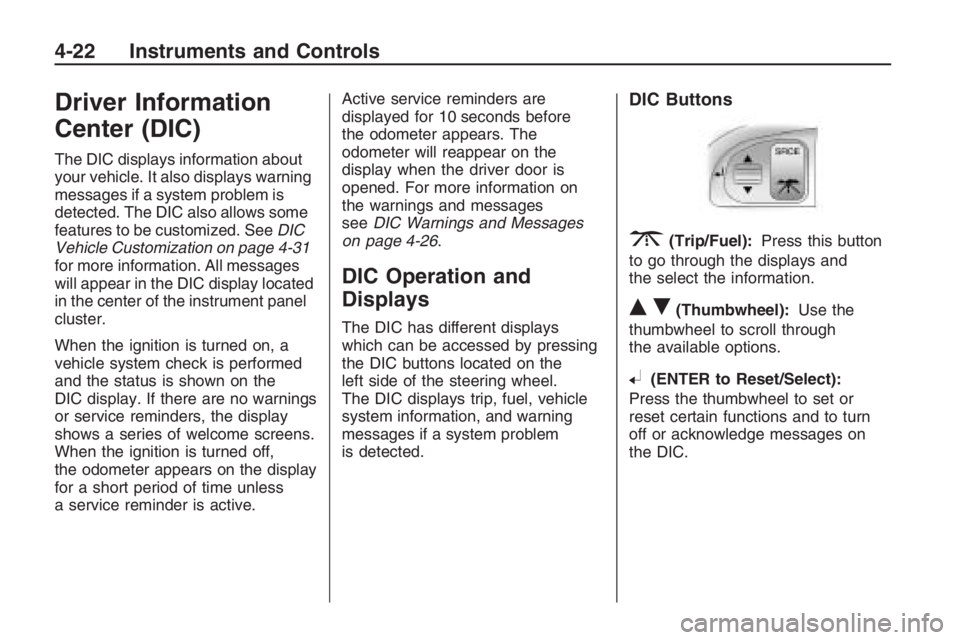
DIC Buttons
3(Trip/Fuel):Press this button
to go through the displays and
the select the information.
QR(Thumbwheel):Use the
thumbwheel to scroll through
the available options.
8(ENTER to Reset/Select):
Press the thumbwheel to set or
reset certain functions and to turn
off or acknowledge messages on
the DIC.
4-22 Instruments and Controls
Page 99 of 356
Trip/Fuel Menu Items
Press3to scroll through the
following menu items:
Speedometer
UNITS
Tire Pressure
Customize Options
Odometer/Trip Odometer
Distance/Time To Go
Range
Avg (Average)Speed/Avg
(Average) Fuel
OverSpeed
Speedometer
Press
3until the speedometer
is displayed.
The speedometer shows how fast
the vehicle is moving in either miles
per hour (MPH) or kilometers per
hour (km/h). To switch between
English and metric measurements,
see “UNITS” later in this section.The digital speedometer display can
be enabled or disabled. See “Digital
Speedometer” underDIC Vehicle
Customization on page 4-31for more
information.
UNITS
Move the thumbwheel up
Qor
down
Rto highlight English or Metric
when the UNITS display is active.
Press
8to conrm the setting.
This will change the displays on the
cluster, DIC, and the temperature
display in the mirror to either English
or metric measurements.
Tire Pressure
Press
3until Tire Pressure is
displayed.
The display will show a vehicle and
the approximate pressures of all four
tires. Tire pressure is displayed in
either pounds per square inch (PSI)
or in kilopascal (kPa).
This display can be customized.
SeeDIC Vehicle Customization on
page 4-31for more information.Customize Options
SeeDIC Vehicle Customization on
page 4-31for more information.
Odometer/Trip Odometer
Press
3until the Odometer/Trip
Odometer is displayed.
The odometer display shows the
distance the vehicle has been
driven in either miles (MI) or
kilometers (km). To switch between
English and metric measurements,
see “UNITS” earlier in this section.
The Trip Odometer display shows
the current distance traveled since
the last reset for the trip odometer.
The trip odometer can be reset to
zero by pressing and holding
8
while the trip odometer value is
highlighted. If
8is only pressed
briey, the Avg Speed/Avg Fuel
will be reset as well.
Instruments and Controls 4-23
Page 100 of 356
Distance/Time To Go
Press
3until To Go is displayed.
If this item doesn’t display, check
that the display is turned on through
the Customize Options menu.
SeeDIC Vehicle Customization on
page 4-31for more information.
At the start of a trip, estimate the
distance to arrival (for example,
from maps, road signs). Move the
thumbwheel up or down until
the display shows the estimated
trip distance. When driving, the
computer constantly updates
the time to arrival, based on
changing driving speeds. Use the
thumbwheel to adjust the distance
any time this display is shown.
Time to go is shown in hours and
minutes and is only shown if the
distance to go is more than zero.
This display can be turned on or off
and the default setting can be
changed.Range
Press3until Range is displayed.
This display shows the approximate
distance the vehicle can be driven
without refueling. The fuel range
estimate is based on an average of
the vehicle’s fuel economy over
recent driving history and the amount
of fuel remaining in the fuel tank.
Fuel range cannot be reset.
Avg (Average) Speed/Avg
(Average) Fuel
Press
3until Avg Speed/Avg
Fuel is displayed.
Avg Speed shows the average
speed (while the engine is running)
since the last reset.
Avg Fuel shows average fuel used
since the last reset.
To reset only the Avg Speed or Avg
Fuel, press and hold
8while either
value is highlighted. If
8is only
pressed briey, the Trip Odometer
will be reset as well.OverSpeed
OverSpeed allows the driver to set
a speed that they do not want to
exceed. OverSpeed will illuminate in
the display and a chime will sound
to warn that the vehicle’s speed
is equal or has exceeded the
preselected value. During an
OverSpeed warning, the OverSpeed
display is shown, allowing the
driver to make adjustments.
To set the OverSpeed warning
press
3when OverSpeed
is displayed to highlight the
OverSpeed mode. Move the
thumbwheel up
Qor downRto
scroll through and highlight one
of the following options:
Off:No OverSpeed warning set.
Manual:Allows you to manually
set the OverSpeed warning.
See “Manual OverSpeed” following.
4-24 Instruments and Controls
Page 104 of 356
:Check Oil
This message is displayed if the oil
pressure or oil level is low. Stop
when safe, turn off the engine and
check the engine oil level. See
Engine Oil on page 9-8. Do not run
the engine when this warning is
illuminated. If the oil level is normal,
have the system checked at your
dealer/retailer.
You can press
3or8to
acknowledge that you received the
message, but
:Check Oil will
continue to appear in the bottom of
the DIC display until the vehicle
has been serviced.
X Contact Dealer
This message is displayed when
there is a fault in the instrument
panel, see your dealer/retailer.
You can press
3or8to
acknowledge that you received the
message, butXService willcontinue to appear in the bottom of
the DIC display until the vehicle
has been serviced.
ICruise On, Cruise Off,
Cruise Active, and Cruise
Inactive
These messages display the
status of the cruise control system.
SeeCruise Control on page 4-5
for more information.
Engine Immobilized Refer to
Owners Manual
This message is displayed when the
engine has been shutdown due to
the theft-deterrent system. See
Immobilizer Operation on page 2-12
for more information.
You can press
3or8to
acknowledge that you received the
message, but
AEng Immo will
continue to appear in the bottom of
the DIC display until the vehicle
has been serviced.
BEngine Temp
(Temperature) Hot
This message is displayed when the
engine coolant temperature is
excessively hot. Stop the vehicle as
soon as it is safe to do so. See
Engine Overheating on page 9-20.
You can press
3or8to
acknowledge that you received the
message, but
BTemp Hot will
continue to appear in the bottom of
the DIC display until the vehicle
has been serviced.
.Low Fuel
This message is displayed when the
fuel level is low.
You can press
3or8to
acknowledge that you received the
message, but
.Low Fuel will
continue to appear in the bottom of
the DIC display until the fuel
tank has been lled above the low
fuel level.
4-28 Instruments and Controls
Page 107 of 356
You can press3or8to
acknowledge that you received
the message, but ESP OFF will
continue to appear in the bottom of
the DIC display until the vehicle
has been serviced.
7Check XX Tire Pressure
This message is displayed when the
ination pressure is low or very
low in the indicated tire.
You can press
3or8to
acknowledge that you received the
message, but
7LF Tire,7RF Tire,
7LR Tire, or7RR Tire will continue
to appear in the bottom of the DIC
display until the tire pressure is at a
normal level. SeeTire Pressure
Monitor System on page 9-52
for more information.
7Tire Pressure System Fault
This message is displayed when
there is a problem with the Tire
Pressure Monitor System.
You can press
3or8to
acknowledge that you received the
message, but
7Tire Fault will
continue to appear in the bottom
of the DIC display until the tire
pressure is at a normal level.
SeeTire Pressure Monitor System
on page 9-52for more information.
xVery Low Fuel
This message is displayed when the
fuel level is very low.
You can press
3or8to
acknowledge that you received the
message, but
.V.Low Fuel will
continue to appear in the bottom of
the DIC display until enough fuel
tank has been lled above the
low fuel level.
DIC Vehicle
Customization
Your vehicle has features that you
can customize through the DIC.
Using the Customization Menu
Press3until you see Customize
Options and then press
8.
The customization options will only
be available when the vehicle
speed is less than 6 mph (10 km/h).
If the vehicle is moving faster
than that the display will show
Not Available.
Move the thumbwheel up
Qor
down
Rto scroll through the
available options. Press
8to select
an item. To exit the current menu,
or go back, use the thumbwheel
to select
qat the top of the screen
and then press
8.
Instruments and Controls 4-31
Page 108 of 356
The following items are part of the
main customization menu.
Exit
Reset settings
Security
Lighting
Trip Computer
Language
Remote key
See the information following for
detailed descriptions of the
items available under each menu
item. There are also help screens
available to explain the features.
When selecting a menu item,
wait for a few seconds and a help
screen pops up with an explanation
of the selected feature.
Exit
To exit the customization menu
scroll to Exit and press
8.
You can also exit the customization
menu by:
Press3at any time to return
to the trip/fuel menu.
Drive the vehicle at more than
6 mph (10 km/h).
Turn the ignition off.
Reset settings
This item will reset all the
customization options to the
factory defaults.
Security
This item will allow you to customize:
Auto unlock
Auto lock
Flash remote lck (lock)
Beep remote lck (lock)
Flash rem (remote) unlock
2 Stage unlock
Remote Start
Some of these work with your
Remote Keyless Entry (RKE)
transmitter. SeeRemote Keyless
Entry (RKE) System Operation
on page 2-4for more information.
Auto unlock
If you select Auto unlock you will be
able to choose when you want
the doors to unlock automatically.
Off:No automatic unlock of
any doors.
Driver door key out:The driver
door will unlock when the key
is removed.
Driver door in park:The driver
door will unlock when you put
the shift lever into P (Park).
All doors at key out:All doors will
unlock when the key is removed.
4-32 Instruments and Controls
Page 167 of 356
Driving and
Operating
Starting and Operating
Your Vehicle
New Vehicle Break-In.........8-2
Ignition Positions................8-2
Retained Accessory
Power (RAP).....................8-3
Starting the Engine.............8-4
Engine Coolant Heater.......8-5
Automatic Transmission
Operation..........................8-6
Manual Transmission
Operation........................8-10
Parking Brake...................8-11
Shifting Into Park
(Automatic
Transmission)
..................8-12
Shifting Out of Park..........8-13
Parking the Vehicle
(Manual Transmission). . . .8-14
Parking Over Things
That Burn........................8-14
Engine Exhaust.................8-14
Running the Vehicle
While Parked..................8-15
Driving Your Vehicle
Defensive Driving..............8-16
Drunk Driving....................8-16
Control of a Vehicle..........8-17
Braking.............................8-17
Antilock Brake
System (ABS).................8-18
Electronic Stability
Program..........................8-19
Steering............................8-22
Off-Road Recovery............8-23
Passing.............................8-23
Loss of Control.................8-23
Driving at Night.................8-24
Driving in Rain and
on Wet Roads.................8-25
Before Leaving on
a Long Trip.....................8-26
Highway Hypnosis.............8-26
Hill and Mountain Roads. . . .8-26
Winter Driving...................8-27
If Your Vehicle is Stuck
in Sand, Mud, Ice,
or Snow
..........................8-29
Rocking Your Vehicle
to Get It Out...................8-30
Loading the Vehicle..........8-30
Fuel
Fuel..................................8-34
Gasoline Octane...............8-35
Gasoline Specications.....8-35
California Fuel..................8-35
Additives...........................8-36
Fuels in Foreign
Countries........................8-36
Filling the Tank.................8-37
Filling a Portable
Fuel Container................8-38
Driving and Operating 8-1
Page 171 of 356
Wait at least 15 seconds between
each try, to allow the cranking
motor to cool. When the engine
starts, let go of the key and
accelerator. If the vehicle starts
briey but then stops again,
repeat the procedure. This clears
the extra gasoline from the
engine. Do not race the engine
immediately after starting it.
Operate the engine and
transmission gently until the oil
warms up and lubricates all
moving parts.
Notice:The engine is designed
to work with the electronics
in the vehicle. If you add electrical
parts or accessories, you could
change the way the engine
operates. Before adding electrical
equipment, check with your
dealer/retailer. If you do not, the
engine might not perform
properly. Any resulting damage
would not be covered by the
vehicle warranty.Engine Coolant Heater
The engine coolant heater, if
available, can help in cold weather
conditions at or below 0°F (−18°C)
for easier starting and better fuel
economy during engine warm-up.
Plug in the coolant heater at least
four hours before starting your
vehicle. An internal thermostat in the
plug-end of the cord will prevent
engine coolant heater operation at
temperatures above 0°F (−18°C).
To Use The Engine Coolant
Heater
1. Turn off the engine.
2. Open the hood and unwrap the
electrical cord.
The electrical cord is located on
the driver side of the engine
compartment, behind the
air cleaner for V8 models.
The electrical cord is located
on the passenger side of
the engine compartment, behind
the engine compartment fuse
block for V6 models.3. Plug it into a normal, grounded
110-volt AC outlet.
{CAUTION
Plugging the cord into an
ungrounded outlet could cause an
electrical shock. Also, the wrong
kind of extension cord could
overheat and cause a re. You
could be seriously injured. Plug
the cord into a properly grounded
three-prong 110-volt AC outlet.
If the cord will not reach, use a
heavy-duty three-prong extension
cord rated for at least 15 amps.
4. Before starting the engine, be
sure to unplug and store the
cord as it was before to keep
it away from moving engine
parts. If you do not it could be
damaged.
Driving and Operating 8-5
Page 173 of 356
ease pressure on the shift lever and
push the shift lever all the way
into P (Park) while maintaining brake
application. Then press the shift
lever button and move the shift lever
into another gear. SeeShifting
Out of Park on page 8-13.
Notice:Shifting to R (Reverse)
while the vehicle is moving
forward could damage the
transmission. The repairs would
not be covered by the vehicle
warranty. Shift to R (Reverse)
only after the vehicle is stopped.
R (Reverse):Use this gear to
back up.
At low vehicle speeds, R (Reverse)
can also be used to rock the vehicle
back and forth to get out of snow, ice,
or sand without damaging the
transmission. SeeIf Your Vehicle is
Stuck in Sand, Mud, Ice, or Snow on
page 8-29for additional information.N (Neutral):In this position, the
engine does not connect with
the wheels. To restart the engine
when the vehicle is already moving,
use N (Neutral) only.
{CAUTION
Shifting into a drive gear while the
engine is running at high speed is
dangerous. Unless your foot is
rmly on the brake pedal, the
vehicle could move very rapidly.
You could lose control and hit
people or objects. Do not shift into
a drive gear while the engine is
running at high speed.
Notice:Shifting out of P (Park)
or N (Neutral) with the engine
running at high speed may
damage the transmission. The
repairs would not be covered by
the vehicle warranty. Be sure
the engine is not running at high
speed when shifting the vehicle.D (Drive):This position is for normal
driving. It provides the best fuel
economy. If more power is needed
for passing, and the vehicle is:
Going less than 35 mph
(55 km/h), push the accelerator
pedal about halfway down.
Going about 35 mph (55 km/h) or
more, push the accelerator all the
way down.
Downshifting the transmission in
slippery road conditions could result
in skidding, see Skidding under
Loss of Control on page 8-23
Notice:Spinning the tires or
holding the vehicle in one place
on a hill using only the
accelerator pedal may damage
the transmission. If you are stuck,
do not spin the tires. When
stopping on a hill, use the brakes
to hold the vehicle in place.
Driving and Operating 8-7
Page 175 of 356
While using the DSC mode, the
vehicle has rmer shifting and
increased performance. This can be
used for sport driving or when
climbing or descending hills, to stay
in gear longer, or to down shift
for more power or engine braking.
The transmission will only allow the
driver to shift into gears appropriate
for the vehicle speed and engine
Revolutions Per Minute (RPM). The
transmission will not automatically
shift to the next lower gear if the
engine RPM is too high.
If shifting is prevented for any
reason, the currently selected gear
will ash multiple times, indicating
that the transmission has not
shifted gears.While in the DSC mode, the
transmission automatically
downshifts when the vehicle comes
to a stop.
When accelerating the vehicle from
a stop in snowy and icy conditions,
1st, 2nd or 3rd gear starts can
be selected from a standing start.
This is useful for gentle acceleration
on slippery surfaces.
To return to Normal Shift mode,
slide the shift lever over from
the right quadrant to the left into
D (Drive). A Normal Shift message
will be displayed in the DIC.
Normal Shift Mode is recommended
for normal or freeway driving, as
it provides optimum fuel economy.Powertrain Braking
For vehicles with a 6 speed
automatic transmission, there is
an additional feature known as
Powertrain Braking. When driving
on steep descents where frequent
braking is required, the vehicle
will automatically downshift to
provide engine braking assistance.
This feature also reduces brake
temperatures and wear.
Downshifting will only occur when
the driver’s foot is applied to
the brake. Active Select Mode can
be switched on to override the
feature and gain complete control of
shifts if desired.
Driving and Operating 8-9