remote start PONTIAC G8 2009 User Guide
[x] Cancel search | Manufacturer: PONTIAC, Model Year: 2009, Model line: G8, Model: PONTIAC G8 2009Pages: 356, PDF Size: 1.83 MB
Page 109 of 356
All doors in park:All doors will
unlock when you put the shift lever
into P (Park).
Auto lock
If you select Auto lock you will be
able to choose when you want
the doors to lock automatically.
At vehicle speed:The doors will
lock when the vehicle speed is at or
above 8 mph (13 km/h).
Out of Park:The doors will lock
when you move the shift lever out
of P (Park).
Flash remote lock
If you select Flash remote lock you
will be able to choose if the parking
lamps will ash when you lock the
doors with the RKE transmitter.
Beep remote lock
If you select Beep remote lock you
will be able to choose if the horn
will sound when you lock the doors
with the RKE transmitter.Flash remote unlock
If you select Flash remote unlock
you will be able to choose if
the parking lamps will ash when
you unlock the doors with the
RKE transmitter.
2 Stage unlock
If you select 2 stage unlock you will
be able to choose if you want
only the driver door to unlock with
the rst press of the unlock
button on the RKE transmitter.
Remote Start
If you select Remote start you will
be able to enable or disable the
remote start feature. SeeRemote
Vehicle Start on page 2-6for
more information.
Lighting
This item will allow you to
customize:
Approach lighting
Egress lighting timerApproach lighting
If you select Approach lighting
you will be able to choose if you
want the exterior lamps to turn
on when you unlock the doors with
the RKE transmitter.
Egress lighting timer
If you select Egress lighting timer you
will be able to choose if, and for how
long, the exterior lamps should stay
on when you lock the doors.
Trip Computer
This item will allow you to
customize:
Underspeed Chime
Distance to go
Distance to go Default
Digital speedo (speedometer)
Pressure Units
Rest reminder
Instruments and Controls 4-33
Page 160 of 356
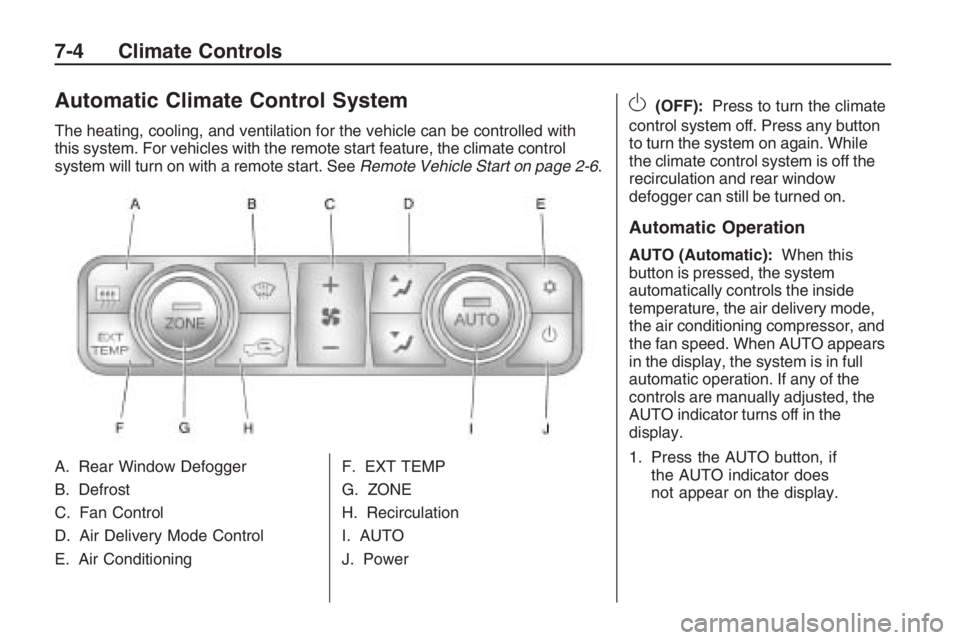
Automatic Climate Control System
The heating, cooling, and ventilation for the vehicle can be controlled with
this system. For vehicles with the remote start feature, the climate control
system will turn on with a remote start. SeeRemote Vehicle Start on page 2-6.
A. Rear Window Defogger
B. Defrost
C. Fan Control
D. Air Delivery Mode Control
E. Air Conditioning F. EXT TEMP
G. ZONE
H. Recirculation
I. AUTO
J. Power
O(OFF):
Press to turn the climate
control system off. Press any button
to turn the system on again. While
the climate control system is off the
recirculation and rear window
defogger can still be turned on.
Automatic Operation
AUTO (Automatic): When this
button is pressed, the system
automatically controls the inside
temperature, the air delivery mode,
the air conditioning compressor, and
the fan speed. When AUTO appears
in the display, the system is in full
automatic operation. If any of the
controls are manually adjusted, the
AUTO indicator turns off in the
display.
1. Press the AUTO button, if the AUTO indicator does
not appear on the display.
7-4 Climate Controls
Page 164 of 356
Rear Window Defogger
The rear window defogger uses a
warming grid to remove fog or
frost from the rear window. It only
works when the ignition is in
ON/RUN.
The rear window defogger will
only work when the ignition is in
ON/RUN.
+(Rear Window Defogger):
Press to turn the rear window
defogger on or off. The
+indicator
appears in the display. The rear
window defogger turns off
automatically if it is left on.
Notice:Do not use anything
sharp on the inside of the rear
window. If you do, you could cut
or damage the warming grid, and
the repairs would not be covered
by the vehicle warranty. Do not
attach a temporary vehicle
license, tape, a decal or anything
similar to the defogger grid.
EXT TEMP
EXT TEMP (Exterior Temperature):
Press EXT TEMP to show the
temperature outside the vehicle or
the normal display.
Pressing any other climate control
button will change the display from
showing the outside temperature to
showing the normal display.
The units for the EXT TEMP can be
displayed in °F or °C. SeeDIC
Vehicle Customization on page 4-31.
Sensors
The climate control system uses
three different sensors to maintain
the desired temperature. The
solar sensor is located on the
instrument panel, near the
windshield. The interior temperature
sensor is located on the instrument
panel near the steering wheel
and the outside temperature sensor
is in front of the radiator.By monitoring the solar radiation,
the air inside the vehicle and
air moving across the outside
sensor, the selected temperature
can be maintained while using
the AUTO mode by adjusting the
temperature, fan speed, and
air delivery system. The system
may also supply cooler air to
the side of the vehicle facing the
sun. The recirculation mode will
also be activated, as necessary.
Do not cover the sensors or
the automatic climate control
system will not work properly.Remote Start Climate Control
Operation
For vehicles with the remote start
feature and it is activated, the climate
control system will automatically set
the temperature to 73°F (23°C).
When the ignition is turned to
ON/RUN the climate control system
heats and cools the inside of the
vehicle using the modes that
were set before the vehicle was
turned off.
7-8 Climate Controls
Page 260 of 356
If the TPMS is not functioning it
cannot detect or signal a low
tire condition. See the dealer/retailer
for service if the TPMS malfunction
light and DIC message comes
on and stays on.
TPMS Sensor Matching
Process
Each TPMS sensor has a unique
identication code. Any time one or
more of the TPMS sensors are
replaced or the vehicle’s tires are
rotated, the identication codes
need to be matched to the
new tire/wheel location. The sensors
are matched, to the tire/wheel
locations, in the following order:
driver side front tire, passenger side
front tire, passenger side rear
tire, and driver side rear tire using a
TPMS diagnostic tool. See your
dealer/retailer for service.The TPMS sensors can also be
matched to each tire/wheel position
by increasing or decreasing the
tire’s air pressure. When increasing
the tire’s pressure, do not exceed
the maximum ination pressure
indicated on the tire’s sidewall. To
decrease the tire’s air-pressure
use the pointed end of the valve
cap, a pencil-style air pressure
gage, or a key.
You have two minutes to match
each tire and wheel position.
If it takes longer than two minutes to
match any tire and wheel position,
the matching process stops and you
need to start over.
The TPMS matching process is
outlined below:
1. Set the parking brake.
2. Turn the ignition switch to
ON/RUN with the engine off.
3. Press and hold the Remote
Keyless Entry (RKE) transmitter’s
lock and unlock buttons, at the
same time, for about ve secondsto start the TPMS learn mode.
The horn chirps two times
indicating the TPMS receiver is
ready and in learn mode.
4. Start with the driver side front
tire. The driver side front
indicator lamp also comes on to
indicate that corner’s sensor
is ready to be learned.
5. Remove the valve cap from the
tire’s valve stem. Activate the
TPMS sensor by increasing
or decreasing the tire’s air
pressure for about eight seconds.
The horn chirps one time to
conrm the sensor identication
code has been matched to
the tire/wheel position.
9-56 Vehicle Service and Care
Page 291 of 356
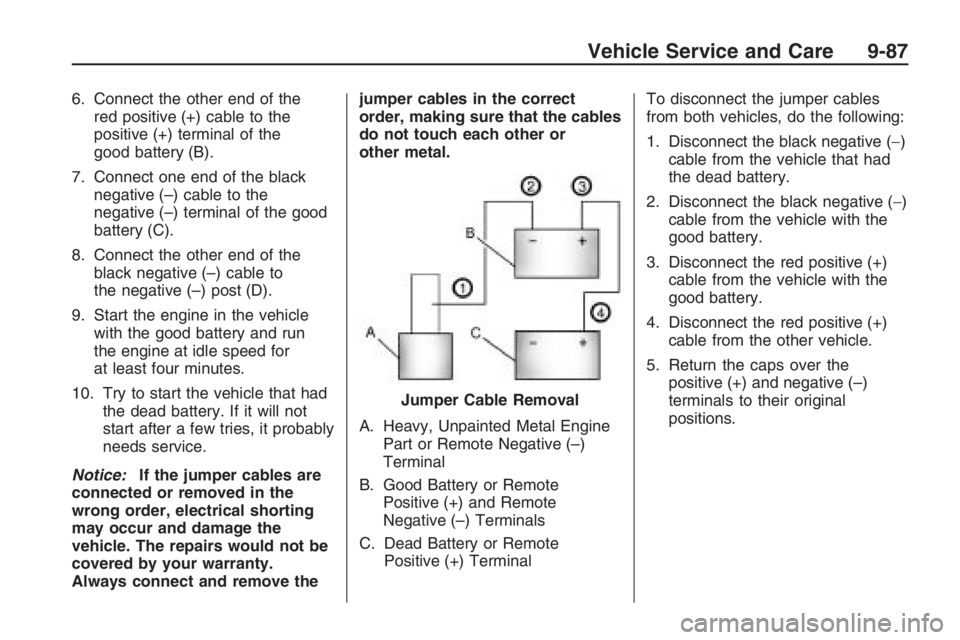
6. Connect the other end of the
red positive (+) cable to the
positive (+) terminal of the
good battery (B).
7. Connect one end of the black
negative (–) cable to the
negative (–) terminal of the good
battery (C).
8. Connect the other end of the
black negative (–) cable to
the negative (–) post (D).
9. Start the engine in the vehicle
with the good battery and run
the engine at idle speed for
at least four minutes.
10. Try to start the vehicle that had
the dead battery. If it will not
start after a few tries, it probably
needs service.
Notice:If the jumper cables are
connected or removed in the
wrong order, electrical shorting
may occur and damage the
vehicle. The repairs would not be
covered by your warranty.
Always connect and remove thejumper cables in the correct
order, making sure that the cables
do not touch each other or
other metal.
A. Heavy, Unpainted Metal Engine
Part or Remote Negative (–)
Terminal
B. Good Battery or Remote
Positive (+) and Remote
Negative (–) Terminals
C. Dead Battery or Remote
Positive (+) TerminalTo disconnect the jumper cables
from both vehicles, do the following:
1. Disconnect the black negative (−)
cable from the vehicle that had
the dead battery.
2. Disconnect the black negative (−)
cable from the vehicle with the
good battery.
3. Disconnect the red positive (+)
cable from the vehicle with the
good battery.
4. Disconnect the red positive (+)
cable from the other vehicle.
5. Return the caps over the
positive (+) and negative (–)
terminals to their original
positions. Jumper Cable Removal
Vehicle Service and Care 9-87
Page 335 of 356
Services Provided
Emergency Fuel Delivery:
Delivery of enough fuel for
the vehicle to get to the nearest
service station.
Lock-Out Service:Service is
provided to unlock the vehicle
if you are locked out. A remote
unlock may be available if
you have OnStar
®. For security
reasons, the driver must
present identication before this
service is given.
Emergency Tow From a Public
Road or Highway:Tow to the
nearest Pontiac dealer for
warranty service, or if the vehicle
was in a crash and cannot be
driven. Assistance is also given
when the vehicle is stuck in
sand, mud, or snow.
Flat Tire Change:Service is
provided to change a at tire
with the spare tire. The spare tire,
if equipped, must be in good
condition and properly inated.
It is the owner’s responsibility
for the repair or replacement of
the tire if it is not covered by
the warranty.
Battery Jump Start:Service is
provided to jump start a dead
battery.
Trip Interruption Benets
and Assistance:If your trip is
interrupted due to a warranty
failure, incidental expenses may
be reimbursed during the 5 years/
100,000 miles (160 000 km)
Powertrain warranty period. Items
considered are hotel, meals, and
rental car.
Services Not Included in
Roadside Assistance
Impound towing caused by
violation of any laws.
Legal nes.
Mounting, dismounting or
changing of snow tires, chains,
or other traction devices.
Towing or services for vehicles
driven on a non-public road or
highway.
Customer Information 12-7
Page 345 of 356
GM will not access this data or
share it with others except: with the
consent of the vehicle owner or, if the
vehicle is leased, with the consent
of the lessee; in response to an
official request of police or similar
government office; as part of GM’s
defense of litigation through the
discovery process; or, as required
by law. Data that GM collects or
receives may also be used for GM
research needs or may be made
available to others for research
purposes, where a need is shown
and the data is not tied to a specic
vehicle or vehicle owner.
OnStar®
If your vehicle has OnStar and you
subscribe to the OnStar services,
please refer to the OnStar Terms and
Conditions for information on data
collection and use. See alsoOnStar
®
System on page 4-35in this manual
for more information.
Navigation System
If your vehicle has a navigation
system, use of the system may result
in the storage of destinations,
addresses, telephone numbers, and
other trip information. Refer to the
navigation system operating manual
for information on stored data and for
deletion instructions.
Radio Frequency
Identication (RFID)
RFID technology is used in some
vehicles for functions such as
tire pressure monitoring and ignition
system security, as well as in
connection with conveniences
such as key fobs for remote door
locking/unlocking and starting, and
in-vehicle transmitters for garage
door openers. RFID technology in
GM vehicles does not use or record
personal information or link with
any other GM system containing
personal information.
Customer Information 12-17
Page 353 of 356
Online Owner Center............12-3
OnStar, Privacy..................12-17
OnStar
®System, see
OnStar®Manual...............4-35
Outlet Adjustment.................. 7-9
Outlets
Accessory Power................ 4-9
Outside
Convex Mirror..................2-18
Power Mirrors..................2-17
Owner Checks and
Services..........................11-9
Owner Checks, Service.......... 9-5
Owners, Canadian.................... ii
P
Paint, Damage...................9-102
Park
Shifting Into.....................8-12
Shifting Out of..................8-13
Park Brake..........................8-11
Parking
Over Things That Burn......8-14Parking (cont.)
Parking Your Vehicle............8-14
Passenger Airbag Status
Indicator..........................4-14
Passenger Sensing
System...........................1-27
Passing..............................8-23
Perchlorate Materials
Requirements, California...... 9-3
Perimeter Lighting.................. 5-4
Phone
Bluetooth
®.......................6-25
Power
Door Locks........................ 2-9
Electrical System..............9-36
Retained Accessory (RAP).... 8-3
Seat................................. 1-2
Steering Fluid...................9-21
Windows.........................2-15
Pressure Cap......................9-19
Privacy.............................12-16
Event Data Recorders.....12-16
Navigation System..........12-17
OnStar..........................12-17
Radio Frequency
Identication................12-17
R
Radio Frequency
Identication
(RFID), Privacy...............12-17
Radio(s)............................... 6-3
Radios
Reception........................6-36
Setting the Clock................ 6-2
Theft-Deterrent.................6-35
Reading Lamps..................... 5-4
Rear Door Security Locks....... 2-9
Rear Heated Seats................ 1-5
Rear Seat Operation.............. 1-5
Rearview Mirrors..................2-16
Reclining Seatbacks............... 1-3
Recommended Fluids and
Lubricants......................11-12
Recreational Vehicle Towing....9-89
Remote Keyless Entry
(RKE) System.................... 2-3
Remote Keyless Entry
(RKE) System, Operation..... 2-4
Remote Vehicle Start............. 2-6
Removing the Flat Tire and
Installing the Spare Tire.....9-77
INDEX i-7
Page 355 of 356
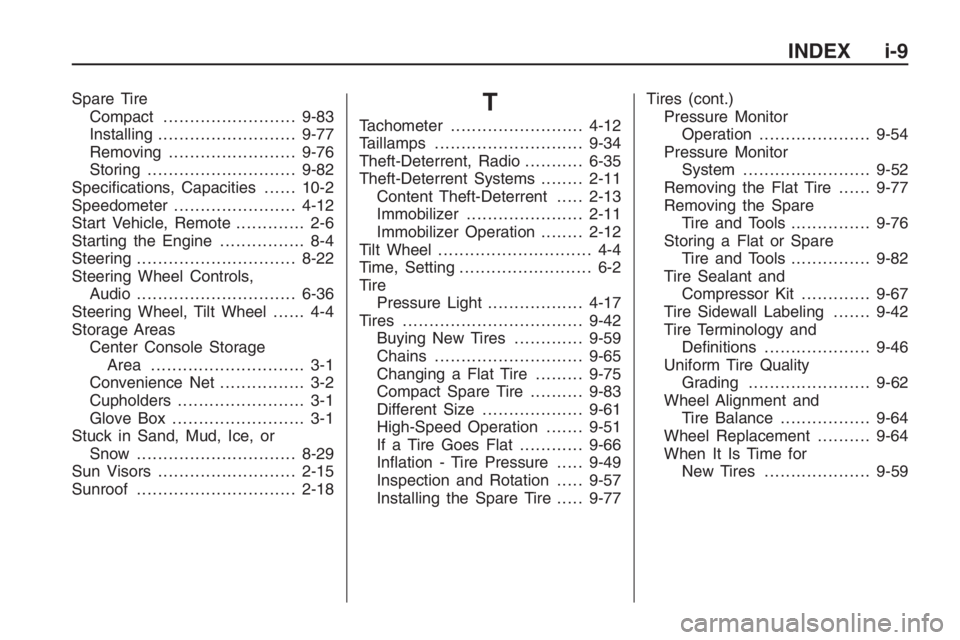
Spare Tire
Compact.........................9-83
Installing..........................9-77
Removing........................9-76
Storing............................9-82
Specications, Capacities......10-2
Speedometer.......................4-12
Start Vehicle, Remote............. 2-6
Starting the Engine................ 8-4
Steering..............................8-22
Steering Wheel Controls,
Audio..............................6-36
Steering Wheel, Tilt Wheel...... 4-4
Storage Areas
Center Console Storage
Area ............................. 3-1
Convenience Net................ 3-2
Cupholders........................ 3-1
Glove Box......................... 3-1
Stuck in Sand, Mud, Ice, or
Snow ..............................8-29
Sun Visors..........................2-15
Sunroof..............................2-18T
Tachometer.........................4-12
Taillamps............................9-34
Theft-Deterrent, Radio...........6-35
Theft-Deterrent Systems........2-11
Content Theft-Deterrent.....2-13
Immobilizer......................2-11
Immobilizer Operation........2-12
Tilt Wheel............................. 4-4
Time, Setting......................... 6-2
Tire
Pressure Light..................4-17
Tires..................................9-42
Buying New Tires.............9-59
Chains............................9-65
Changing a Flat Tire.........9-75
Compact Spare Tire..........9-83
Different Size...................9-61
High-Speed Operation.......9-51
If a Tire Goes Flat............9-66
Ination - Tire Pressure.....9-49
Inspection and Rotation.....9-57
Installing the Spare Tire.....9-77Tires (cont.)
Pressure Monitor
Operation.....................9-54
Pressure Monitor
System........................9-52
Removing the Flat Tire......9-77
Removing the Spare
Tire and Tools...............9-76
Storing a Flat or Spare
Tire and Tools...............9-82
Tire Sealant and
Compressor Kit.............9-67
Tire Sidewall Labeling.......9-42
Tire Terminology and
Denitions....................9-46
Uniform Tire Quality
Grading.......................9-62
Wheel Alignment and
Tire Balance.................9-64
Wheel Replacement..........9-64
When It Is Time for
New Tires....................9-59
INDEX i-9
Page 356 of 356
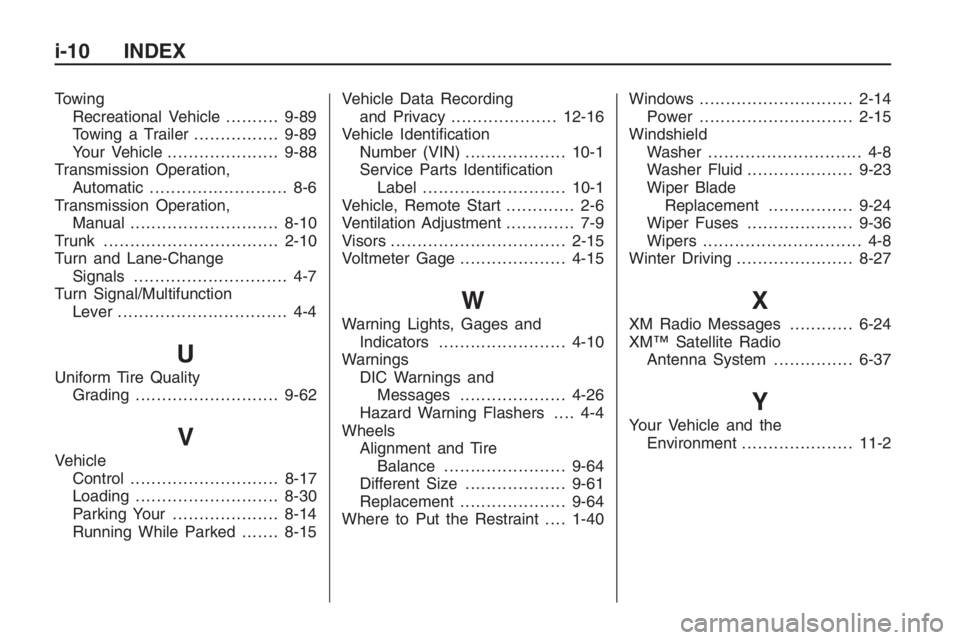
Towing
Recreational Vehicle..........9-89
Towing a Trailer................9-89
Your Vehicle.....................9-88
Transmission Operation,
Automatic.......................... 8-6
Transmission Operation,
Manual............................8-10
Trunk.................................2-10
Turn and Lane-Change
Signals............................. 4-7
Turn Signal/Multifunction
Lever................................ 4-4
U
Uniform Tire Quality
Grading...........................9-62
V
Vehicle
Control............................8-17
Loading...........................8-30
Parking Your....................8-14
Running While Parked.......8-15Vehicle Data Recording
and Privacy....................12-16
Vehicle Identication
Number (VIN)...................10-1
Service Parts Identication
Label...........................10-1
Vehicle, Remote Start............. 2-6
Ventilation Adjustment............. 7-9
Visors.................................2-15
Voltmeter Gage....................4-15
W
Warning Lights, Gages and
Indicators........................4-10
Warnings
DIC Warnings and
Messages....................4-26
Hazard Warning Flashers.... 4-4
Wheels
Alignment and Tire
Balance.......................9-64
Different Size...................9-61
Replacement....................9-64
Where to Put the Restraint....1-40Windows.............................2-14
Power.............................2-15
Windshield
Washer............................. 4-8
Washer Fluid....................9-23
Wiper Blade
Replacement................9-24
Wiper Fuses....................9-36
Wipers.............................. 4-8
Winter Driving......................8-27
X
XM Radio Messages............6-24
XM™ Satellite Radio
Antenna System...............6-37
Y
Your Vehicle and the
Environment.....................11-2
i-10 INDEX