audio PONTIAC G8 2009 Owner's Manual
[x] Cancel search | Manufacturer: PONTIAC, Model Year: 2009, Model line: G8, Model: PONTIAC G8 2009Pages: 356, PDF Size: 1.83 MB
Page 144 of 356
Bluetooth Controls
Use the buttons located on the
steering wheel to operate the
in-vehicle Bluetooth system. See
Audio Steering Wheel Controls
on page 6-36for more information.
%(Voice In):Press to answer
incoming calls, to conrm system
information, and to start speech
recognition.
{(Call End):Press to end a
call, reject a call, or to cancel an
operation.
Pairing
A Bluetooth enabled cell phone
must be paired to the in-vehicle
Bluetooth system rst and then
connected to the vehicle before it
can be used. See the cell phone
manufacturers user guide for
Bluetooth functions before pairing
the cell phone. If a Bluetooth phone
is not connected, calls will bemade using OnStar
®Hands Free
Calling, if available. Refer to
the OnStar owner’s guide for more
information.
Pairing Information:
Up to ve cell phones can be
paired to the in-vehicle
Bluetooth system.
The pairing process is disabled
when the vehicle is moving.
The in-vehicle Bluetooth system
automatically links with the rst
available paired cell phone in the
order the phone was paired.
Only one paired cell phone can
be connected to the in-vehicle
Bluetooth system at a time.
Pairing should only need to be
completed once, unless
changes to the pairing
information have been made or
the phone is deleted.
To link to a different paired phone,
see Linking to a Different Phone
later in this section.Pairing a Phone
1. Press and hold
%for
two seconds. The system
responds with “Ready”
followed by a tone.
2. Say “Bluetooth”. The system
responds with “Bluetooth
ready” followed by a tone.
3. Say “Pair”. The system responds
with instructions and a four digit
PIN number. The PIN number
will be used in Step 4.
4. Start the Pairing process on the
cell phone that will be paired to
the vehicle. Reference the
cell phone manufacturers user
guide for information on this
process.
Locate the device named
“General Motors” in the list on
the cellular phone and follow the
instructions on the cell phone
to enter the four digit PIN number
that was provided in Step 3.
6-26 Infotainment
Page 149 of 356
3. Say the entire number without
pausing.
If the system recognizes the
number, it responds with
“OK, Dialing” and dials
the number.
If the system does not
recognize the number, it
conrms the numbers followed
by a tone. If the number is
correct, say “Yes”. The system
responds with “OK, Dialing”
and dials the number. If the
number is not correct, say
“No”. The system will ask for
the number to be re-entered.
Using the Digit Dial Command
1. Press and hold
%for
two seconds. The system
responds with “Ready”
followed by a tone.
2. Say “Digit Dial”. The system
responds with “Digit dial using
the rst digit to dial” followed by
a tone.3. Say the digit to be dialed one at
a time. Following each digit, the
system will repeat back the
digit it heard followed by a tone.
4. Continue entering digits until the
number to be dialed is complete.
After the whole number has
been entered, say “Dial”.
The system responds with “OK,
Dialing” and dials the number.
If an unwanted number
is recognized by the system,
say “Clear” at any time to
clear the last number.
To hear all of the numbers
recognized by the system, say
“Verify” at any time and the
system will repeat them.
Using the Call Command
1. Press and hold
%for
two seconds. The system
responds with “Ready”
followed by a tone.2. Say “Call”. The system responds
with “Call using
Please say the name tag”
followed by a tone.
3. Say the name tag of the person
to call.
If the system clearly
recognizes the name tag it
responds with “OK, calling,
number.
If the system is unsure it
recognizes the right name tag,
it conrms the name tag
followed by a tone. If the name
tag is correct, say “Yes”. The
system responds with “OK,
calling,
the number. If the name tag is
not correct, say “No”. The
system will ask for the name
tag to be re-entered.
Once connected, the person called
will be heard through the audio
speakers.
Infotainment 6-31
Page 150 of 356
Using the Re-dial Command
1. Press and hold
%for
two seconds. The system
responds with “Ready”
followed by a tone.
2. After the tone, say “Re-dial”.
The system responds with
“Re-dial using
and dials the last number called
from the connected Bluetooth
phone.
Once connected, the person called
will be heard through the audio
speakers.
Receiving a Call
When an incoming call is received,
the audio system mutes and a
ring tone is heard in the vehicle.
Press%and begin speaking to
answer the call.
Press{to ignore a call.
Call Waiting
Call waiting must be supported on
the Bluetooth phone and enabled by
the wireless service carrier to work.
Press%to answer an incoming
call when another call is active.
The original call is placed on hold.
Press%again to return to the
original call.
To ignore the incoming call,
continue with the original call with
no action.
Press{to disconnect the current
call and switch to the call on hold.
Three-Way Calling
Three-Way Calling must be
supported on the Bluetooth phone
and enabled by the wireless service
carrier to work.
1. While on a call press
%. The
system responds with “Ready”
followed by a tone.
2. Say “Three-way call”. The system
responds with “Three-way call,
please say dial or call”.
3. Use the dial or call command to
dial the number of the third party
to be called.
4. Once the call is connected, press
%to link all the callers together.
Ending a Call
Press{to end a call.
6-32 Infotainment
Page 151 of 356
Muting a Call
During a call, all sounds from inside
the vehicle can be muted so that
the person on the other end of
the call cannot hear them.
To Mute a call
1. Press
%. The system responds
with “Ready” followed by a tone.
2. Say “Mute Call”. The system
responds with “Call muted”.
To Cancel Mute
1. Press
%. The system responds
with “Ready” followed by a tone.
2. After the tone, say “Mute Call”.
The system responds with
“Resuming call”.
Transferring a Call
Audio can be transferred between
the in-vehicle Bluetooth system
and the cell phone.
To Transfer Audio to the
Cell Phone
During a call with the audio in the
vehicle:
1. Press
%. The system responds
with “Ready” followed by a tone.
2. Say “Transfer Call.” The system
responds with “Transferring call”
and the audio will switch from
the vehicle to the cell phone.
To Transfer Audio to the
In-Vehicle Bluetooth System
The cellular phone must be paired
and connected with the Bluetooth
system before a call can be
transferred. The connection process
can take up to two minutes after
the key is turned to the ON/RUN or
ACC/ACCESSORY position.During a call with the audio on the
cell phone, press
%for more than
two seconds. The audio switches
from the cell phone to the vehicle.
Voice Pass-Thru
Voice Pass-Thru allows access to
the voice recognition commands on
the cell phone. See the cell phone
manufacturers user guide to see
if the cell phone supports this
feature. This feature can be used to
verbally access contacts stored
in the cell phone.
1. Press and hold
%for
two seconds. The system
responds with “Ready”
followed by a tone.
2. Say “Bluetooth”. The system
responds with “Bluetooth
ready” followed by a tone.
Infotainment 6-33
Page 154 of 356
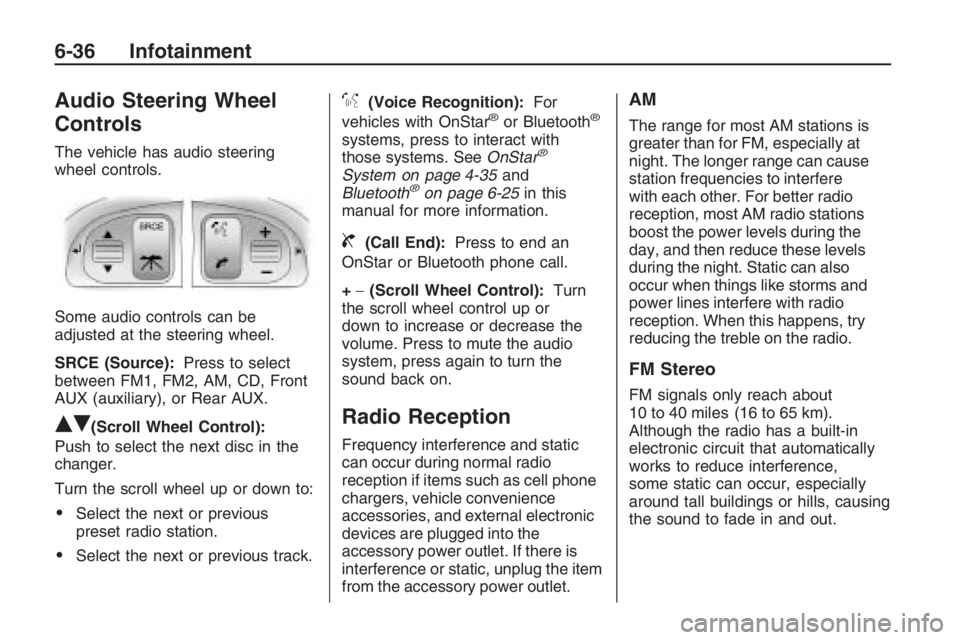
Audio Steering Wheel
Controls
The vehicle has audio steering
wheel controls.
Some audio controls can be
adjusted at the steering wheel.
SRCE (Source):Press to select
between FM1, FM2, AM, CD, Front
AUX (auxiliary), or Rear AUX.
QR(Scroll Wheel Control):
Push to select the next disc in the
changer.
Turn the scroll wheel up or down to:
Select the next or previous
preset radio station.
Select the next or previous track.
%(Voice Recognition):For
vehicles with OnStar®or Bluetooth®
systems, press to interact with
those systems. SeeOnStar®
System on page 4-35and
Bluetooth®on page 6-25in this
manual for more information.
{(Call End):Press to end an
OnStar or Bluetooth phone call.
+−(Scroll Wheel Control):Turn
the scroll wheel control up or
down to increase or decrease the
volume. Press to mute the audio
system, press again to turn the
sound back on.
Radio Reception
Frequency interference and static
can occur during normal radio
reception if items such as cell phone
chargers, vehicle convenience
accessories, and external electronic
devices are plugged into the
accessory power outlet. If there is
interference or static, unplug the item
from the accessory power outlet.
AM
The range for most AM stations is
greater than for FM, especially at
night. The longer range can cause
station frequencies to interfere
with each other. For better radio
reception, most AM radio stations
boost the power levels during the
day, and then reduce these levels
during the night. Static can also
occur when things like storms and
power lines interfere with radio
reception. When this happens, try
reducing the treble on the radio.
FM Stereo
FM signals only reach about
10 to 40 miles (16 to 65 km).
Although the radio has a built-in
electronic circuit that automatically
works to reduce interference,
some static can occur, especially
around tall buildings or hills, causing
the sound to fade in and out.
6-36 Infotainment
Page 169 of 356
A (LOCK/OFF):This is the only
position from which you can remove
the key. This locks the steering
wheel, ignition and automatic
transmission.
On vehicles with an automatic
transmission, the shift lever must
be in P (Park) to turn the ignition
switch to the LOCK/OFF position.
The ignition switch can bind in
the LOCK/OFF position with the
wheels turned off center. If this
happens, move the steering wheel
from right to left while turning the key
to ACC/ACCESSORY. If this doesn’t
work, then the vehicle needs service.
B (ACC/ACCESSORY):This
position provides power to some
of the electrical accessories.
It unlocks the steering wheel and
ignition. The transmission is
also unlocked in this position
on automatic transmission
vehicles. To move the key from
ACC/ACCESSORY to LOCK/OFF,
push in the key and then turn it
to LOCK/OFF.C (ON/RUN):The ignition switch
stays in this position when the
engine is running. This position can
be used to operate the electrical
accessories, including the ventilation
fan and 12 volt power outlet, as
well as to display some warning and
indicator lights.
The battery could be drained
if you leave the key in the
ACC/ACCESSORY or ON/RUN
position with the engine off.
You may not be able to start the
vehicle if the battery is allowed
to drain for an extended period
of time.
D (START):This position starts the
engine. When the engine starts,
release the key. The ignition switch
will return to ON/RUN for normal
driving.
A warning tone will sound when the
driver door is opened when the
ignition is still in ACC/ACCESSORY
and the key is in the ignition.Retained Accessory
Power (RAP)
These vehicle accessories may be
used for up to 10 minutes after
the engine is turned off:
Audio System
Power Windows
The power windows will continue to
work for up to 10 minutes or until
any door is opened. The radio
will work when the key is in ON/RUN
or ACC/ACCESSORY. Once the
key is turned from ON/RUN to
LOCK/OFF, the radio will continue
to work for 10 minutes or until
the driver door is opened.
Driving and Operating 8-3
Page 347 of 356
A
Accessories and
Modications...................... 9-3
Accessory Power Outlets........ 4-9
Adding Equipment to Your
Airbag-Equipped Vehicle....1-32
Additives, Fuel.....................8-36
Add-On Electrical
Equipment.......................9-36
Air Cleaner/Filter, Engine.......9-11
Air Conditioning...............7-1, 7-4
Airbag
Passenger Status
Indicator.......................4-14
Readiness Light................4-13
System, Replacing Parts
After a Crash................1-33
Airbag System.....................1-20
Adding Equipment to Your
Airbag-Equipped
Vehicle........................1-32
Check.............................1-33
How Does an Airbag
Restrain?.....................1-25Airbag System (cont.)
Passenger Sensing
System........................1-27
Servicing Your
Airbag-Equipped
Vehicle........................1-31
What Makes an Airbag
Inate?........................1-25
What Will You See After
an Airbag Inates?........1-25
When Should an Airbag
Inate?........................1-23
Where Are the Airbags?.....1-22
Antenna, Fixed Mast............6-37
Antenna, XM™ Satellite
Radio Antenna System......6-37
Antilock Brake
System (ABS)..................8-18
Antilock Brake, System
Warning Light...................4-16
Appearance Care
Chemical Paint
Spotting.....................9-102
Exterior Cleaning..............9-98Appearance Care (cont.)
Finish Damage...............9-102
Interior Cleaning...............9-95
Sheet Metal Damage.......9-102
Underbody Maintenance . . . 9-102
Appointments, Scheduling
Service...........................12-8
Audio System........................ 6-1
Audio Steering Wheel
Controls.......................6-36
Fixed Mast Antenna..........6-37
Radio Reception...............6-36
Setting the Clock................ 6-2
Theft-Deterrent Feature......6-35
XM™ Satellite Radio
Antenna System............6-37
Audio System(s).................... 6-3
Automatic Climate Control
System............................. 7-4
Automatic Headlamp
System............................. 5-2
Automatic Transmission
Operation.......................... 8-6
INDEX i-1
Page 355 of 356
Spare Tire
Compact.........................9-83
Installing..........................9-77
Removing........................9-76
Storing............................9-82
Specications, Capacities......10-2
Speedometer.......................4-12
Start Vehicle, Remote............. 2-6
Starting the Engine................ 8-4
Steering..............................8-22
Steering Wheel Controls,
Audio..............................6-36
Steering Wheel, Tilt Wheel...... 4-4
Storage Areas
Center Console Storage
Area ............................. 3-1
Convenience Net................ 3-2
Cupholders........................ 3-1
Glove Box......................... 3-1
Stuck in Sand, Mud, Ice, or
Snow ..............................8-29
Sun Visors..........................2-15
Sunroof..............................2-18T
Tachometer.........................4-12
Taillamps............................9-34
Theft-Deterrent, Radio...........6-35
Theft-Deterrent Systems........2-11
Content Theft-Deterrent.....2-13
Immobilizer......................2-11
Immobilizer Operation........2-12
Tilt Wheel............................. 4-4
Time, Setting......................... 6-2
Tire
Pressure Light..................4-17
Tires..................................9-42
Buying New Tires.............9-59
Chains............................9-65
Changing a Flat Tire.........9-75
Compact Spare Tire..........9-83
Different Size...................9-61
High-Speed Operation.......9-51
If a Tire Goes Flat............9-66
Ination - Tire Pressure.....9-49
Inspection and Rotation.....9-57
Installing the Spare Tire.....9-77Tires (cont.)
Pressure Monitor
Operation.....................9-54
Pressure Monitor
System........................9-52
Removing the Flat Tire......9-77
Removing the Spare
Tire and Tools...............9-76
Storing a Flat or Spare
Tire and Tools...............9-82
Tire Sealant and
Compressor Kit.............9-67
Tire Sidewall Labeling.......9-42
Tire Terminology and
Denitions....................9-46
Uniform Tire Quality
Grading.......................9-62
Wheel Alignment and
Tire Balance.................9-64
Wheel Replacement..........9-64
When It Is Time for
New Tires....................9-59
INDEX i-9