engine PONTIAC G8 2009 Owner's Manual
[x] Cancel search | Manufacturer: PONTIAC, Model Year: 2009, Model line: G8, Model: PONTIAC G8 2009Pages: 356, PDF Size: 1.83 MB
Page 104 of 356
:Check Oil
This message is displayed if the oil
pressure or oil level is low. Stop
when safe, turn off the engine and
check the engine oil level. See
Engine Oil on page 9-8. Do not run
the engine when this warning is
illuminated. If the oil level is normal,
have the system checked at your
dealer/retailer.
You can press
3or8to
acknowledge that you received the
message, but
:Check Oil will
continue to appear in the bottom of
the DIC display until the vehicle
has been serviced.
X Contact Dealer
This message is displayed when
there is a fault in the instrument
panel, see your dealer/retailer.
You can press
3or8to
acknowledge that you received the
message, butXService willcontinue to appear in the bottom of
the DIC display until the vehicle
has been serviced.
ICruise On, Cruise Off,
Cruise Active, and Cruise
Inactive
These messages display the
status of the cruise control system.
SeeCruise Control on page 4-5
for more information.
Engine Immobilized Refer to
Owners Manual
This message is displayed when the
engine has been shutdown due to
the theft-deterrent system. See
Immobilizer Operation on page 2-12
for more information.
You can press
3or8to
acknowledge that you received the
message, but
AEng Immo will
continue to appear in the bottom of
the DIC display until the vehicle
has been serviced.
BEngine Temp
(Temperature) Hot
This message is displayed when the
engine coolant temperature is
excessively hot. Stop the vehicle as
soon as it is safe to do so. See
Engine Overheating on page 9-20.
You can press
3or8to
acknowledge that you received the
message, but
BTemp Hot will
continue to appear in the bottom of
the DIC display until the vehicle
has been serviced.
.Low Fuel
This message is displayed when the
fuel level is low.
You can press
3or8to
acknowledge that you received the
message, but
.Low Fuel will
continue to appear in the bottom of
the DIC display until the fuel
tank has been lled above the low
fuel level.
4-28 Instruments and Controls
Page 105 of 356
yOverSpeed
This message is displayed when the
vehicle’s speed is greater than
the set OverSpeed value. See
“OverSpeed” underDIC Operation
and Displays on page 4-22.
You can press
8or move the
thumbwheel up
Qor downRto
acknowledge that you received
the message, but OverSpeed will
continue to appear in the bottom of
the DIC display as long as the
vehicle’s speed exceeds the
preset value.
$Park Brake
This message is displayed if the
parking brake is applied when you
are driving. Release the parking
brake. SeeParking Brake on
page 8-11.
Replace Battery in Remote Key
This message is displayed when the
battery in the remote keyless entry
transmitter needs to be replaced.
See your dealer/retailer to replace
the battery.
You can press
3or8to
acknowledge that you received the
message, but
QKey Batt will
continue to appear in the bottom
of the DIC display until the battery
has been replaced.
wRest Reminder
This feature reminds the driver
that they may have been driving
for too long without a break.
When the ignition is turned on, a
timer starts counting. After two hours
of continuous driving, the rest
reminder ashes to alert the driver.The Rest Reminder message is
displayed until
3or8are
pressed. The rest reminder
reappears after 20 minutes
accompanied by a chime, unless
the ignition has been turned off.
For information on how to turn the
rest reminder on and off, seeDIC
Vehicle Customization on page 4-31.
{Safety Mode Active and
Power Reduced
These messages display alternately
when there is a problem with the
engine control system, see your
dealer/retailer.
You can press
3or8to
acknowledge that you received the
message, but
{Safety will
continue to appear in the bottom of
the DIC display until the vehicle
has been serviced.
Instruments and Controls 4-29
Page 106 of 356
Service Charging System
This message is displayed when
there is a fault in the battery charging
system, see your dealer/retailer.
You can press
3or8to
acknowledge that you received the
message, but
"Low Batt will
continue to appear in the bottom of
the DIC display until the vehicle
has been serviced.
:Service Engine Oil
This message is displayed when the
engine oil needs to be changed.
When you change the engine oil,
be sure to reset the Oil Life System.
SeeEngine Oil Life System on
page 9-10for information on how to
reset the message. SeeEngine
Oil on page 9-8andScheduled
Maintenance on page 11-4for
more information.
vService Vehicle Soon
This message is displayed when
there is a problem with the vehicle,
see your dealer/retailer.
You can press
3or8to
acknowledge that you received the
message, but
*Service will
continue to appear in the bottom of
the DIC display until the vehicle
has been serviced.
DSport Shift
This message is displayed when the
automatic transmission is operating
in sport shift mode.
SeeAutomatic Transmission
Operation on page 8-6.
LStability Ctrl (Control)
Assistance
This message is displayed when the
Electronic Stability Program (ESP®)
is actively helping the vehicle
with road grip and stability.
ESP CTRL appears at the bottom of
the display and remains illuminated
as long as the ESP is actively
helping with road grip and stability.
SeeElectronic Stability Program
on page 8-19.
FStability Ctrl (Control) Off
This message is displayed when the
ESP has been turned off.
SeeElectronic Stability Program
on page 8-19. If this message is
displayed and you have not turned
off the ESP, it means there is a
problem with the ESP, see your
dealer/retailer.
4-30 Instruments and Controls
Page 120 of 356
Notice:Before adding any sound
equipment to your vehicle, such
as an audio system, CD player,
CB radio, mobile telephone, or
two-way radio, make sure that it
can be added by checking with
your dealer/retailer. Also, check
federal rules covering mobile
radio and telephone units. If
sound equipment can be added, it
is very important to do it properly.
Added sound equipment may
interfere with the operation of your
vehicle’s engine, radio, or other
systems, and even damage them.
Your vehicle’s systems may
interfere with the operation of
sound equipment that has been
added.
The vehicle has Retained Accessory
Power (RAP), and the audio system
can be played after the ignition is
turned off. SeeRetained Accessory
Power (RAP) on page 8-3for more
information.Setting the Clock
Radio with Single CD Player
The time and date can be adjusted
when the radio is either on or
off, press
Gto display the date.
To adjust the time and date:
1. Press and hold
Guntil the
display shows the Set Clock
screen and the hour display
ashes.
2. Turn the volume knob to adjust
the hour.
3. Press the volume knob and the
minute display will ash to
adjust the minutes.
4. Turn the volume knob to adjust
the minutes.
5. Repeat these steps to adjust the
month, date, and year.
6. Press
Gto save the settings.
If no adjustments are made for
eight seconds, the radio will
automatically save the settings.
Radio with Six-Disc CD Player
The time and date can be adjusted
when the radio is either on or
off, press
Gto display the date.
To adjust the time and date:
1. Press and hold
Gfor more than
two seconds to display the
Options menu.
2. Turn the MENU knob to highlight:
Hour, Minute, Date, Month,
and Year.
3. Highlight Hour and Press the
MENU knob.
4. Turn the MENU knob to adjust
the hours.
5. Press the MENU knob to return
to the Options menu.
6. Repeat steps 2 through 5 to
adjust the minutes, date, month,
and year.
7. Press
Gto save the settings.
If no adjustments are made for
eight seconds, the radio will
automatically save the settings.
6-2 Infotainment
Page 159 of 356
The air conditioning system removes
moisture from the air, so a small
amount of water might drip under the
vehicle while idling or after turning off
the engine. This is normal.
The air conditioning should be
turned on for at least ve to
ten minutes once every two weeks
to lubricate the air conditioning
seals, even in the winter.
Recirculation
/(Recirculation):Press to
change the air intake between
recirculated air and outside air.
An indicator light comes on when
the recirculation is on.
The recirculation mode recycles
interior air and is not recommended
for extended use. If it is used for
a long period of time, the system
automatically lets some fresh air into
the vehicle for ventilation.The recirculation mode cannot be
turned on in defrost mode. If
/is
pressed, the indicator light ashes
three times and recirculation
stays off.
Rear Window Defogger
The rear window defogger uses a
warming grid to remove fog from the
rear window. It only works when
the ignition is in ON/RUN.
+(Rear Window Defogger):
Press to turn on or off. An indicator
comes on when the rear window
defogger is on. The rear window
defogger turns off automatically if it
is left on.
Notice:Do not use anything
sharp on the inside of the rear
window. If you do, you could cut
or damage the warming grid, and
the repairs would not be covered
by the vehicle warranty. Do not
attach a temporary vehicle
license, tape, a decal or anything
similar to the defogger grid.
Passenger Compartment
Air Filter
The vehicle has a passenger
compartment air lter that lters the
outside air entering the vehicle.
The lter removes contaminants,
such as pollen and dust. See
your dealer/retailer for more
information.
Climate Controls 7-3
Page 161 of 356
2. Adjust the temperature to a
comfortable setting between
72°F (22°C) and 75°F (24°C).
Choosing the coldest or warmest
temperature setting will not cause
the system to heat or cool any
faster.
3. Let the system stabilize for a
few minutes.
4. Adjust the air outlets or
temperature.
In cold weather, the system starts in
the recirculation mode with the fan
off. As the engine warms up, warm
air is directed to the oor outlets,
before automatically changing to
bi-level mode with a reduced fan
speed.
Do not cover the solar sensor
located in the center of the
instrument panel, near the
windshield. For more information
on the solar sensor, see “Sensors”
later in this section.Manual Operation
+A−(Fan Control):Press + or−
to increase or decrease the fan
speed. The fan speed and indicator
appears in the display.
The climate control system sets the
fan speed automatically. When the
fan speed is adjusted the system
goes into semi-automatic operation.
Press the AUTO button to return to
automatic operation.
Temperature Control:The
temperature can be adjusted
separately for the driver and the
passenger. Turn the temperature
controls clockwise or
counterclockwise to increase or
decrease the temperature.
The temperature can be set
between 63°F (17°C) and
176°F (30°C). A setting between
72°F (22°C) and 75°F (24°C)
is recommended.The temperature settings for each
side are shown in the display.
If the temperature control is past
86°F (30°C), the display shows
H (hottest). Turning it past
63°F (17°C), shows C (coolest).
The EXT TEMP (Exterior
Temperature) can be displayed in
Fahrenheit (°F) or Celsius (°C).
SeeDIC Vehicle Customization on
page 4-31.
ZONE:Press to set the climate
control to single-zone (SZ) mode or
dual-zone (DZ) mode. SZ or DZ
appears in the display when a mode
is set.
Single-Zone (SZ) Mode:All zones
are set to the same temperature.
The temperature is shown in
the display. Turn the ZONE control
to set the temperature.
Climate Controls 7-5
Page 163 of 356
Air Conditioning
#(Air Conditioning):Press to
turn the air conditioning system on or
off. The
#appears in the display
when the air conditioning is on.
When the air conditioning is turned
off
#OFF appears in the display.
The air conditioning cannot be turned
off in defrost mode. If
#is pressed,
the indicator light ashes three times
and the air conditioning stays on.
For quick cool down on hot days,
open the windows to let the hot air to
escape. After a few minutes, close
the windows so the system will work
more effectively.
The air conditioning system removes
moisture from the air, so a small
amount of water might drip under the
vehicle while idling or after turning off
the engine. This is normal.The air conditioning might
automatically turn off during heavy
acceleration or towing with your
vehicle, but the
#will still display.
Recirculation
/(Recirculation):Press to
change the air intake between
recirculated air and outside air.
An indicator light comes when
the recirculation is activated.
The recirculation mode recycles
interior air and is not recommended
for extended use. If it is used for
a long period of time, the system
automatically lets some fresh air into
the vehicle for ventilation.
Do not use the recirculation mode
if occupants are smoking.The recirculation mode cannot
be turned on in defrost mode.
If
/is pressed, the indicator light
ashes three times and recirculation
stays off.
Pollution Mode:Press and hold
the
/button for four seconds to
turn the pollution mode on or off.
When it is activated, Pollution Mode
Activated appears in the display.
When it is turned off, Pollution Mode
Inactive appears in the display.
This mode can be set when
the vehicle speed is less than
9 mph (15 km/h). Recirculation
will automatically turn on to
help prevent exhaust fumes from
entering the vehicle in slow moving
traffic.
Climate Controls 7-7
Page 167 of 356
Driving and
Operating
Starting and Operating
Your Vehicle
New Vehicle Break-In.........8-2
Ignition Positions................8-2
Retained Accessory
Power (RAP).....................8-3
Starting the Engine.............8-4
Engine Coolant Heater.......8-5
Automatic Transmission
Operation..........................8-6
Manual Transmission
Operation........................8-10
Parking Brake...................8-11
Shifting Into Park
(Automatic
Transmission)
..................8-12
Shifting Out of Park..........8-13
Parking the Vehicle
(Manual Transmission). . . .8-14
Parking Over Things
That Burn........................8-14
Engine Exhaust.................8-14
Running the Vehicle
While Parked..................8-15
Driving Your Vehicle
Defensive Driving..............8-16
Drunk Driving....................8-16
Control of a Vehicle..........8-17
Braking.............................8-17
Antilock Brake
System (ABS).................8-18
Electronic Stability
Program..........................8-19
Steering............................8-22
Off-Road Recovery............8-23
Passing.............................8-23
Loss of Control.................8-23
Driving at Night.................8-24
Driving in Rain and
on Wet Roads.................8-25
Before Leaving on
a Long Trip.....................8-26
Highway Hypnosis.............8-26
Hill and Mountain Roads. . . .8-26
Winter Driving...................8-27
If Your Vehicle is Stuck
in Sand, Mud, Ice,
or Snow
..........................8-29
Rocking Your Vehicle
to Get It Out...................8-30
Loading the Vehicle..........8-30
Fuel
Fuel..................................8-34
Gasoline Octane...............8-35
Gasoline Specications.....8-35
California Fuel..................8-35
Additives...........................8-36
Fuels in Foreign
Countries........................8-36
Filling the Tank.................8-37
Filling a Portable
Fuel Container................8-38
Driving and Operating 8-1
Page 168 of 356
Starting and
Operating Your
Vehicle
New Vehicle Break-In
Notice:Your vehicle does not
need an elaborate break-in. But it
will perform better in the long
run if you follow these guidelines:
Do not drive at any one
constant speed, fast or slow,
for the rst 500 miles (805 km).
Do not make full-throttle
starts. Avoid downshifting to
brake or slow the vehicle.
During the rst 600 miles
(1 000 km), avoid using more
than moderate acceleration
in lower gears and avoid
vehicle speeds above 68 mph
(110 km/h).
Between the rst 600 miles
(1 000 km) and 3,000 miles
(5 000 km), heavy acceleration
in lower gears can be used.
Vehicle speeds above 68 mph
(110 km/h) should be limited to
ve minutes per use.
Avoid making hard stops for the
rst 200 miles (322 km) or so.
During this time the new brake
linings are not yet broken in.
Hard stops with new linings can
mean premature wear and
earlier replacement. Follow this
breaking-in guideline every
time you get new brake linings.
Do not tow a trailer during
break-in. SeeTowing a Trailer
on page 9-89for the trailer
towing capabilities of your
vehicle and more information.
Following break-in, engine speed
and load can be gradually
increased.
Ignition Positions
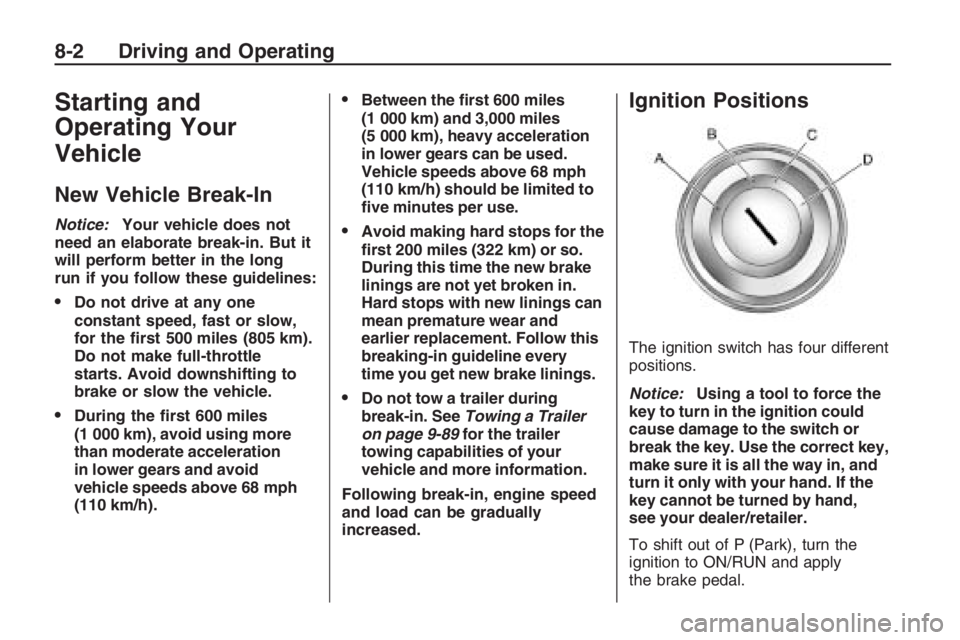
The ignition switch has four different
positions.
Notice:Using a tool to force the
key to turn in the ignition could
cause damage to the switch or
break the key. Use the correct key,
make sure it is all the way in, and
turn it only with your hand. If the
key cannot be turned by hand,
see your dealer/retailer.
To shift out of P (Park), turn the
ignition to ON/RUN and apply
the brake pedal.
8-2 Driving and Operating
Page 169 of 356
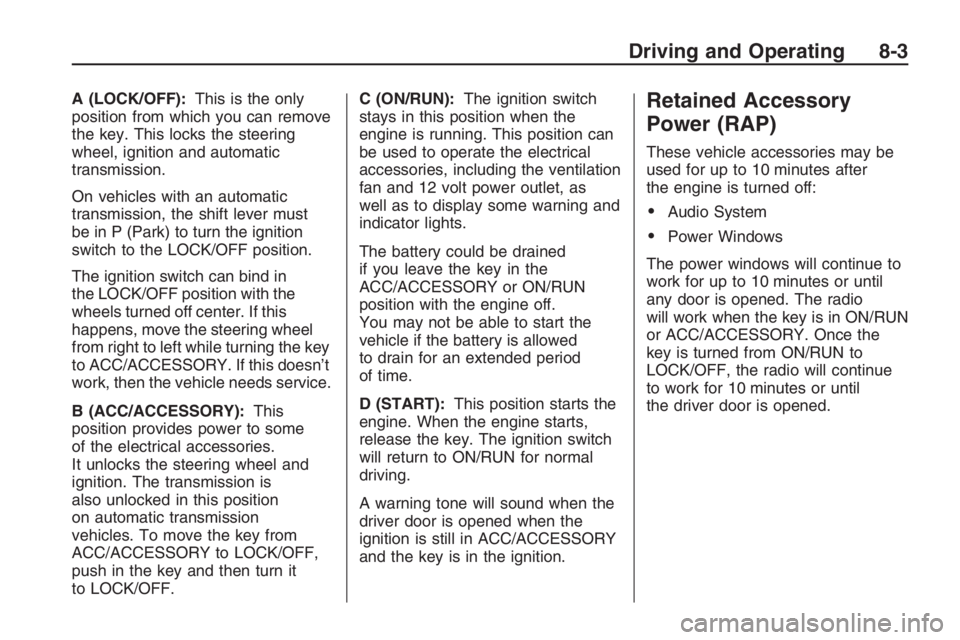
A (LOCK/OFF):This is the only
position from which you can remove
the key. This locks the steering
wheel, ignition and automatic
transmission.
On vehicles with an automatic
transmission, the shift lever must
be in P (Park) to turn the ignition
switch to the LOCK/OFF position.
The ignition switch can bind in
the LOCK/OFF position with the
wheels turned off center. If this
happens, move the steering wheel
from right to left while turning the key
to ACC/ACCESSORY. If this doesn’t
work, then the vehicle needs service.
B (ACC/ACCESSORY):This
position provides power to some
of the electrical accessories.
It unlocks the steering wheel and
ignition. The transmission is
also unlocked in this position
on automatic transmission
vehicles. To move the key from
ACC/ACCESSORY to LOCK/OFF,
push in the key and then turn it
to LOCK/OFF.C (ON/RUN):The ignition switch
stays in this position when the
engine is running. This position can
be used to operate the electrical
accessories, including the ventilation
fan and 12 volt power outlet, as
well as to display some warning and
indicator lights.
The battery could be drained
if you leave the key in the
ACC/ACCESSORY or ON/RUN
position with the engine off.
You may not be able to start the
vehicle if the battery is allowed
to drain for an extended period
of time.
D (START):This position starts the
engine. When the engine starts,
release the key. The ignition switch
will return to ON/RUN for normal
driving.
A warning tone will sound when the
driver door is opened when the
ignition is still in ACC/ACCESSORY
and the key is in the ignition.Retained Accessory
Power (RAP)
These vehicle accessories may be
used for up to 10 minutes after
the engine is turned off:
Audio System
Power Windows
The power windows will continue to
work for up to 10 minutes or until
any door is opened. The radio
will work when the key is in ON/RUN
or ACC/ACCESSORY. Once the
key is turned from ON/RUN to
LOCK/OFF, the radio will continue
to work for 10 minutes or until
the driver door is opened.
Driving and Operating 8-3