lights PONTIAC G8 2009 Owners Manual
[x] Cancel search | Manufacturer: PONTIAC, Model Year: 2009, Model line: G8, Model: PONTIAC G8 2009Pages: 356, PDF Size: 1.83 MB
Page 1 of 356
Seats and Restraints......... 1-1
Front Seats
.................... 1-2
Rear Seats
.................... 1-5
Safety Belts
................... 1-5
Airbag System
..............1-20
Child Restraints
.............1-34
Keys, Doors and
Windows............................ 2-1
Keys
............................. 2-2
Doors and Locks
............ 2-8
Theft-Deterrent
Systems
...................2-11
Windows
......................2-14
Mirrors
.........................2-16
Sunroof
........................2-18
Storage.............................. 3-1
Storage
......................... 3-1
Instruments and
Controls............................. 4-1
Instrument Panel
Overview
.................... 4-2
Warning Lights, Gages, and
Indicators
..................4-10Driver Information
Center (DIC)
.............4-22
OnStar
®System
............4-35
Lighting............................. 5-1
Lighting
......................... 5-1
Infotainment...................... 6-1
Audio System(s)
............. 6-1
Climate Controls............... 7-1
Climate Controls
............. 7-1
Driving and Operating....... 8-1
Starting and Operating
Your Vehicle
............... 8-2
Driving Your Vehicle
......8-16
Fuel
............................8-34
Vehicle Service
and Care............................ 9-1
Service
.......................... 9-2
Owner Checks
................ 9-5
Headlamp Aiming
..........9-28
Bulb Replacement
.........9-31
Electrical System
...........9-36
Tires
...........................9-42Tire Changing
...............9-66
Jump Starting
...............9-84
Towing
........................9-88
Appearance Care
..........9-95
Technical Data.................10-1
Vehicle Identication
......10-1
Capacities and
Specications
............10-2
Service and
Maintenance.....................11-1
Service and
Maintenance
..............11-1
Customer Information......12-1
Customer Information
.....12-1
Reporting Safety
Defects
...................12-14
Vehicle Data Recording
and Privacy
.............12-16
Index....................................i-1
2009 Pontiac G8 Owner ManualM
Page 9 of 356
Heated Seats
On vehicles with heated front seats,
the controls are located on the center
console. To operate the heated seats
the ignition must be on.
L(Heated Seat):Press to turn on
the heated seat.
A light indicates that the feature is
working. The number of indicator
lights shows the level of heat
selected: one for low, two for
medium, and three for high. Press
the button to cycle through the
temperature settings and to turn the
heat off.
Rear Seats
Rear Seat Operation
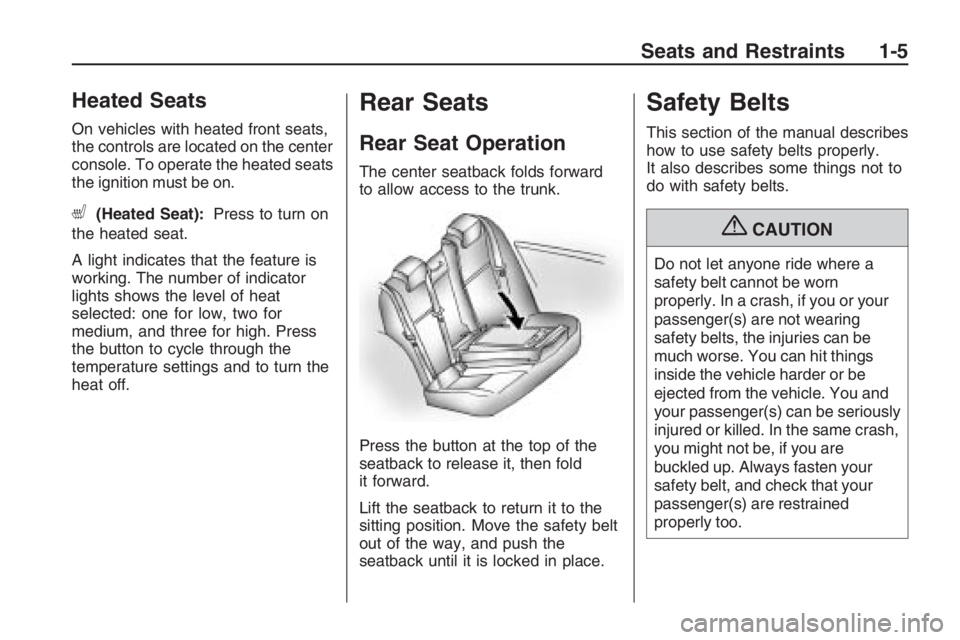
The center seatback folds forward
to allow access to the trunk.
Press the button at the top of the
seatback to release it, then fold
it forward.
Lift the seatback to return it to the
sitting position. Move the safety belt
out of the way, and push the
seatback until it is locked in place.
Safety Belts
This section of the manual describes
how to use safety belts properly.
It also describes some things not to
do with safety belts.
{CAUTION
Do not let anyone ride where a
safety belt cannot be worn
properly. In a crash, if you or your
passenger(s) are not wearing
safety belts, the injuries can be
much worse. You can hit things
inside the vehicle harder or be
ejected from the vehicle. You and
your passenger(s) can be seriously
injured or killed. In the same crash,
you might not be, if you are
buckled up. Always fasten your
safety belt, and check that your
passenger(s) are restrained
properly too.
Seats and Restraints 1-5
Page 77 of 356
Instruments and
Controls
Instrument Panel
Overview
Instrument Panel
Overview...........................4-2
Hazard Warning
Flashers............................4-4
Horn...................................4-4
Tilt Wheel...........................4-4
Turn Signal/Multifunction
Lever................................4-4
Cruise Control....................4-5
Turn and Lane-Change
Signals.............................4-7
Headlamp High/
Low-Beam Changer..........4-7
Windshield Wipers..............4-8
Windshield Washer.............4-8
Accessory Power
Outlet(s)............................4-9
Warning Lights, Gages,
and Indicators
Warning Lights, Gages,
and Indicators.................4-10
Instrument Panel
Cluster............................4-11
Speedometer....................4-12
Tachometer.......................4-12
Safety Belt Reminders......4-12
Airbag Readiness Light.....4-13
Passenger Airbag
Status Indicator...............4-14
Voltmeter Gage.................4-15
Charging System Light......4-15
Brake System Warning
Light................................4-15
Antilock Brake System
(ABS) Warning Light.......4-16
Engine Coolant
Temperature Gage..........4-17
Tire Pressure Light...........4-17
Malfunction
Indicator Lamp................4-18
Security Light....................4-20
Fog Lamp Light................4-20
Highbeam On Light...........4-20
Daytime Running
Lamps (DRL)
Indicator Light
.................4-21
Door Ajar Light.................4-21
Oil Pressure Gage............4-21
Fuel Gage........................4-21
Driver Information
Center (DIC)
Driver Information
Center (DIC)...................4-22
DIC Operation and
Displays..........................4-22
DIC Warnings and
Messages........................4-26
DIC Vehicle
Customization..................4-31
OnStar®System
OnStar®System................4-35
Instruments and Controls 4-1
Page 86 of 356
Warning Lights,
Gages, and Indicators
Warning lights and gages can
signal that something is wrong
before it becomes serious enough
to cause an expensive repair or
replacement. Paying attention to
the warning lights and gages could
prevent injury.
Warning lights come on when
there may be or is a problem with
one of the vehicle’s functions.
Some warning lights come on briey
when the engine is started to indicate
they are working.Gages can indicate when there may
be or is a problem with one of the
vehicle’s functions. Often gages and
warning lights work together to
indicate a problem with the vehicle.
When one of the warning lights
comes on and stays on while driving,
or when one of the gages shows
there may be a problem, check the
section that explains what to do.
Follow this manual’s advice.
Waiting to do repairs can be costly
and even dangerous.
4-10 Instruments and Controls
Page 90 of 356
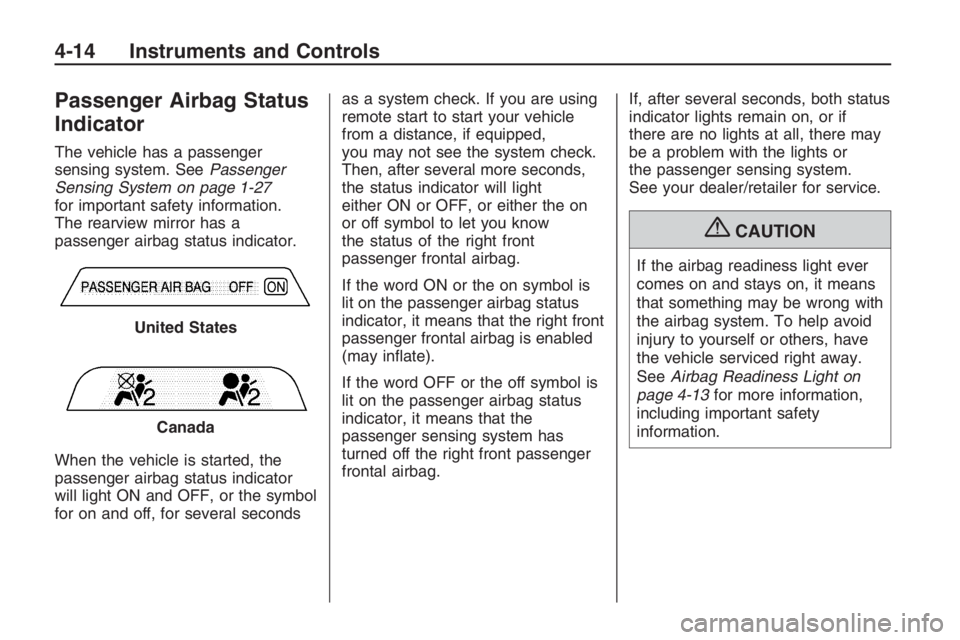
Passenger Airbag Status
Indicator
The vehicle has a passenger
sensing system. SeePassenger
Sensing System on page 1-27
for important safety information.
The rearview mirror has a
passenger airbag status indicator.
When the vehicle is started, the
passenger airbag status indicator
will light ON and OFF, or the symbol
for on and off, for several secondsas a system check. If you are using
remote start to start your vehicle
from a distance, if equipped,
you may not see the system check.
Then, after several more seconds,
the status indicator will light
either ON or OFF, or either the on
or off symbol to let you know
the status of the right front
passenger frontal airbag.
If the word ON or the on symbol is
lit on the passenger airbag status
indicator, it means that the right front
passenger frontal airbag is enabled
(may inate).
If the word OFF or the off symbol is
lit on the passenger airbag status
indicator, it means that the
passenger sensing system has
turned off the right front passenger
frontal airbag.If, after several seconds, both status
indicator lights remain on, or if
there are no lights at all, there may
be a problem with the lights or
the passenger sensing system.
See your dealer/retailer for service.
{CAUTION
If the airbag readiness light ever
comes on and stays on, it means
that something may be wrong with
the airbag system. To help avoid
injury to yourself or others, have
the vehicle serviced right away.
SeeAirbag Readiness Light on
page 4-13for more information,
including important safety
information. United States
Canada
4-14 Instruments and Controls
Page 93 of 356
If the light remains on after resetting
the system or comes on again
while driving, your vehicle needs
service. If the ABS light is on,
but the regular brake system
warning light is not on, the antilock
brakes are not working properly,
but the regular brakes are still
functioning. Have your vehicle
serviced right away. If both brake
lights are on, you do not have
antilock brakes, and there’s a
problem with your regular brakes as
well. Have your vehicle towed for
service. SeeTowing Your Vehicle
on page 9-88.
The ABS Fault message will remain
until
3(Trip/Fuel) or8(Enter)
are pressed, but the warning
light will remain until the problem is
xed. SeeDIC Warnings and
Messages on page 4-26for more
information.
Engine Coolant
Temperature Gage
This gage shows the engine coolant
temperature. If the gage pointer
moves into the red area, the engine
is too hot. It means that the engine
has overheated. Pull off the road,
stop the vehicle, and turn off the
engine as soon as possible. See
Engine Overheating on page 9-20.
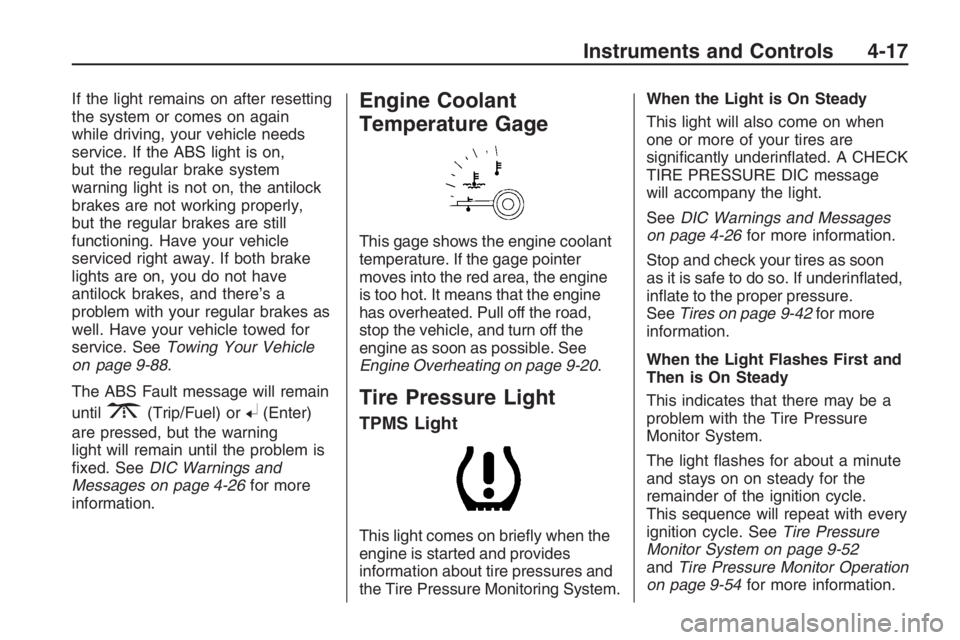
Tire Pressure Light
TPMS Light
This light comes on briey when the
engine is started and provides
information about tire pressures and
the Tire Pressure Monitoring System.When the Light is On Steady
This light will also come on when
one or more of your tires are
signicantly underinated. A CHECK
TIRE PRESSURE DIC message
will accompany the light.
SeeDIC Warnings and Messages
on page 4-26for more information.
Stop and check your tires as soon
as it is safe to do so. If underinated,
inate to the proper pressure.
SeeTires on page 9-42for more
information.
When the Light Flashes First and
Then is On Steady
This indicates that there may be a
problem with the Tire Pressure
Monitor System.
The light ashes for about a minute
and stays on on steady for the
remainder of the ignition cycle.
This sequence will repeat with every
ignition cycle. SeeTire Pressure
Monitor System on page 9-52
andTire Pressure Monitor Operation
on page 9-54for more information.
Instruments and Controls 4-17
Page 115 of 356
Lighting
Lighting
Exterior Lamps Controls.....5-1
Daytime Running
Lamps (DRL)....................5-2
Automatic Headlamp
System.............................5-2
Fog Lamps.........................5-3
Instrument Panel
Brightness.........................5-3
Dome Lamp(s)....................5-4
Perimeter Lighting...............5-4
Reading Lamps..................5-4
Battery Run-Down
Protection.........................5-4
Lighting
Exterior Lamps Controls
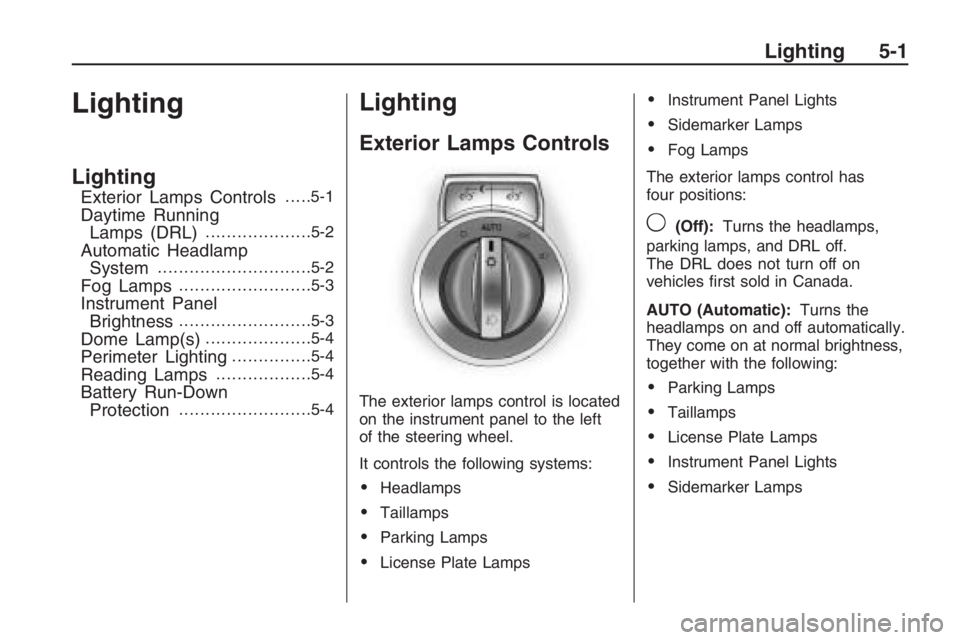
The exterior lamps control is located
on the instrument panel to the left
of the steering wheel.
It controls the following systems:
Headlamps
Taillamps
Parking Lamps
License Plate Lamps
Instrument Panel Lights
Sidemarker Lamps
Fog Lamps
The exterior lamps control has
four positions:
9(Off):Turns the headlamps,
parking lamps, and DRL off.
The DRL does not turn off on
vehicles rst sold in Canada.
AUTO (Automatic):Turns the
headlamps on and off automatically.
They come on at normal brightness,
together with the following:
Parking Lamps
Taillamps
License Plate Lamps
Instrument Panel Lights
Sidemarker Lamps
Lighting 5-1
Page 116 of 356
;(Parking Lamps):Turns on
the parking lamps together with the
following:
Taillamps
License Plate Lamps
Instrument Panel Lights
Sidemarker Lamps
2(Headlamps):Turns on the
headlamps together with the
following:
Parking Lamps
Taillamps
License Plate Lamps
Instrument Panel Lights
Sidemarker Lamps
A warning chime sounds if the
driver side door is opened while
the ignition switch is off and
the headlamps are on.
Daytime Running
Lamps (DRL)
Daytime Running Lamps (DRL) can
make it easier for others to see
the front of your vehicle during
the day. Fully functional daytime
running lamps are required on
all vehicles rst sold in Canada.
The DRL system makes the
headlamps come on at a reduced
brightness when the following
conditions are met:
The ignition is on.
The exterior lamps control is
in AUTO.
The light sensor determines
it is daytime.
When the DRL are on, the taillamps,
sidemarker, instrument panel and
other lamps will not be on.
The headlamps automatically switch
from DRL to the regular headlamps
depending on the darkness of the
surroundings. See “Automatic
headlamp system” following.To turn off the DRL lamps, turn the
exterior lamps control to
9and
then release. For vehicles rst sold
in Canada, the DRL lamps cannot
be turned off.
Automatic Headlamp
System
When it is dark enough outside
and the exterior lamps control
is in the automatic position, the
headlamps and parking lamps
will turn on and off automatically.
SeeExterior Lamps Controls
on page 5-1.
If the headlamps or parking
lamps are left on and the ignition
is turned to LOCK/OFF, the
lamps automatically turn off after
10 minutes. The lamps remain
off until the ignition is switched
on or the lamps are turned on again
using the exterior lamps control.
5-2 Lighting
Page 117 of 356
The vehicle has a light sensor
located on top of the instrument
panel. Do not cover the sensor or
the headlamps will come on
when they are not needed.
The system may also turn on the
headlamps when driving through a
parking garage or tunnel.
Fog Lamps
For vehicles with this feature, it
provides better visibility in foggy or
misty conditions.
The fog lamp switch is located on
the exterior lamps control on
the instrument panel to the left of
the steering column.
-(Fog Lamps):To turn on
the fog lamps, turn the exterior
lamps control to parking lamps
or headlamps and pull the fog
lamps control. Push the control
to turn the fog lamps off.The fog lamp indicator in the
instrument panel comes on when
the fog lamps are in use.
The fog lamps control can be
pulled out while the exterior lamps
control is in the AUTO position.
If left in this position, the fog lamps
come on automatically whenever
the parking lamps or low-beam
headlamps turn on.
When the high-beam headlamps are
turned on, the fog lamps turn off
automatically. When the high-beam
headlamps are turned off, the
fog lamps come on again.
Some localities have laws that
require the headlamps to be
on along with the fog lamps.
Instrument Panel
Brightness
The instrument panel lighting
buttons are located above the
exterior lamps control.
6:Press to brighten the
instrument panel lights.
f:Press to dim the instrument
panel lights.
Press both instrument panel
brightness buttons at the same time
to turn the night panel mode on
or off.
Night panel mode lights up the
speed, information displays
and warning reminders while the
rest of the instrument panel
lights are off.
Lighting 5-3
Page 123 of 356
Radio with Six-Disc CD Player
u(Volume/Mute):Turn to adjust
the volume. Press to immediately
stop the volume. While the volume
is off, MUTED displays.
To cancel Mute, do one of the
following:
Pressu.
Increase the radio volume.
Turn the radio off and on.
Finding a Station
BAND:Press BAND to select
between FM1, FM2, AM, XM1, XM2.
If the radio is in ASM (Auto Station
Memory) mode ASM appears on the
display and FM ASM, and AM ASM
can be selected.
r[(Tune):Press to tune the
radio frequency down or up. When
the XM Category setting is ON, only
stations in the chosen category can
be selected.
gl(Seek):Press to seek to the
previous or next station, or to select
the previous or next XM Category.
The radio can seek stations with a
weak or strong signal within the
selected band. Limit the automatic
seek from nding stations with a
weak or a strong signal by using
the Auto/Local/Distance feature.
See Auto/Local/Distance Selection,
for more information.
Auto/Local/Distant Selection:
The LO (Local) option reduces the
radio’s automatic seek tuning
sensitivity in FM and AM modes.
LO only allows the radio to seek
stations with a strong signal.
If a strong station cannot be found,
switch the radio to DX (Distant) so
that stations with weaker signals can
be found. The Auto (Automatic)
option will search for local stations
rst. If no stations can be found, the
radio searches for all stations.The Local/Distant feature has no
effect when the ASM search feature
is being used.
This feature does not function with
the XM radio stations.
To use Local/Distant on the radio
with a single CD player:
1. Press the volume knob to enter
the Option Menu.
2. Turn the volume knob until
SEEK SENS (seek sensitivity)
highlights.
3. Press the volume knob to enter
the SEEK SENS setting.
4. Turn the volume knob and
highlight either LO, DX, or AUTO.
5. Press the volume knob to
save and exit the setting.
6. Select the BACK option or wait
eight seconds to exit the menu.
Infotainment 6-5