audio PONTIAC GRAND-AM 1995 Owners Manual
[x] Cancel search | Manufacturer: PONTIAC, Model Year: 1995, Model line: GRAND-AM, Model: PONTIAC GRAND-AM 1995Pages: 354, PDF Size: 17.81 MB
Page 2 of 354
v The 1995 Pontiac Grand Am Owner’s Manual
... How to Use this Manual .............................................................. .111
Seats and Restraint Systems .......................................................... 1-1
Features and Controls ............................................................... 2-1
Comfort Controls and Audio Systems .................................................. 3-1
This section tells you how to use your manual and includes safety and vehicle damage warnings and symbols.
This section tells you how to use your seats and safety belts properly. It also explains the “SRS” system.
This section explains how to start and operate your Pontiac.
This section tells you how to adjust the ventilation and comfo\
rt controls and how to operate your
audio system.
Here you’ll find helpful information and tips about the road\
and how
to drive under different conditions.
This section tells you what to do
if you have a problem while driving, such as a flat tire or engine
overheating, etc.
Here the manual tells you how to keep your Pontiac running properly and looking good.
This section tells you when to perform vehicle maintenance and what fluids and lubricants to use.
This section tells you how to contact Pontiac for assistance and how to get service publications.
It also gives you information on “Reporting Safety Defects” on page 8-4.
Here’s an alphabetical listing of almost every subject in this manual. You can use it to quickly find
something you want to read.
YourDrivingandtheRoad ........................................................... 4-1
ProblemsontheRoad ............................................................... 5-1
Service and Appearance Care. ........................................................ 6-1
Maintenanceschedule ............................................................... 7-1
Customer Assistance Information ..................................................... 8-1
Index ........................................................................\
..... 9-1
i
ProCarManuals.com
Page 101 of 354
To reactivate the interior lamps, either:
The ignition must be turned on
The activated lamp switch must be turned off and
0 A front door must be opened.
The Battery Rundown Protection feature will also be
activated when any door of your vehicle is left open.
Also, if your vehicle is left with the ignition turned off
€or over 24 days, battery power to your clock, audio
system
and Keyless Entry (if you have this option) will
be
turned off to reduce battery drain. When the ignition
is turned on again, battery power will be resupplied.
However, under these conditions, it will be necessary to
reset the clock
and audio system settings.
then on, OR
Inside Manual Daymight Rearview
Mirror
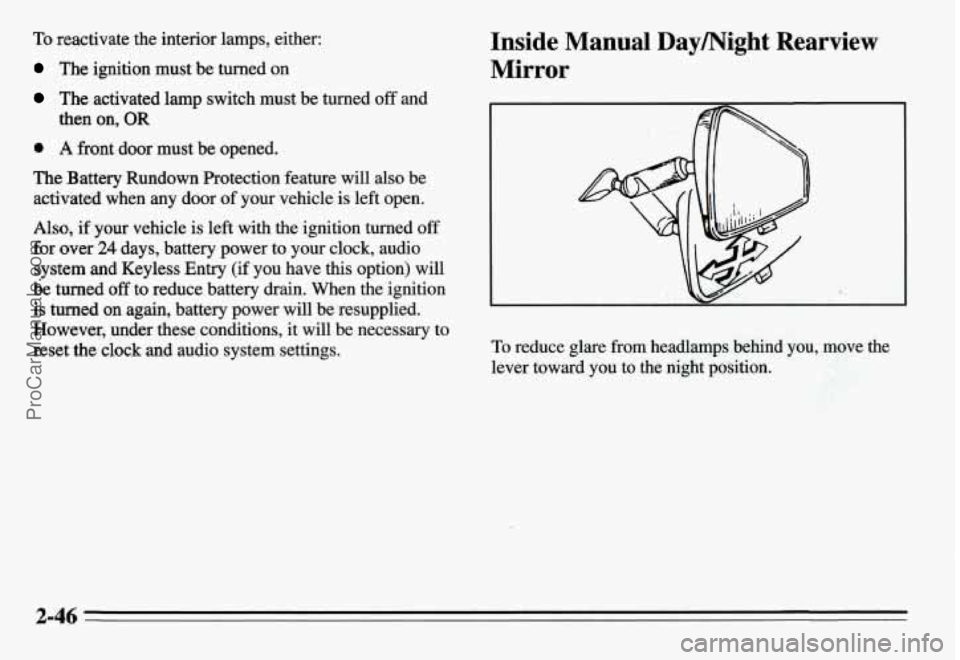
To reduce glare from headlamps behind you, move the
lever toward you to the night position.
2-46
ProCarManuals.com
Page 108 of 354
i
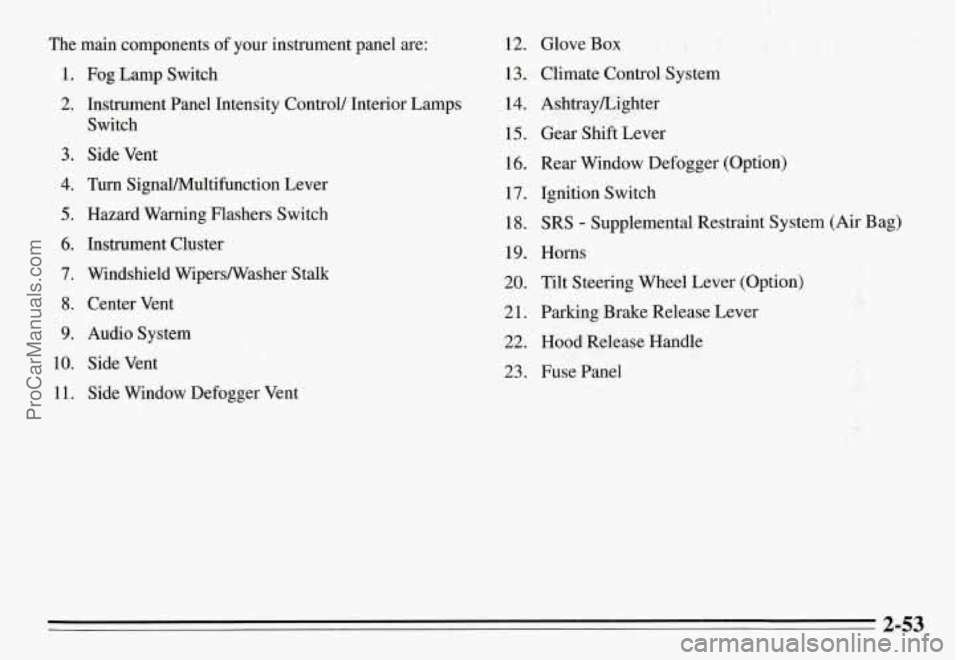
The main components of your instrument panel are:
1. Fog Lamp Switch
2. Instrument Panel Intensity Control/ Interior Lamps
Switch
3. Side Vent
4. Turn SignaVMultifunction Lever
5. Hazard Warning Flashers Switch
6. Instrument Cluster
7. Windshield WipersNasher Stalk
8. Center Vent
9. Audio System
10. Side Vent
11. Side Window Defogger Vent
12. Glove Box
13. Climate Control System
14. AshtrayLighter
15. Gear Shift Lever
16. Rear Window Defogger (Option)
17. Ignition Switch
18. SRS - Supplemental Restraint System (Air Bag)
19. Horns
20. Tilt Steering Wheel Lever (Option)
21. Parking Brake Release Lever
22. Hood Release Handle
23. Fuse Panel
2-53
ProCarManuals.com
Page 124 of 354
Section 3 Comfort Controls and Audio Systems
In this section you’ll find out how to operate the comfort
control systems and audio systems offered with your
Pontiac. Be sure to read about the particular system
supplied with your vehicle.
Climate Control System
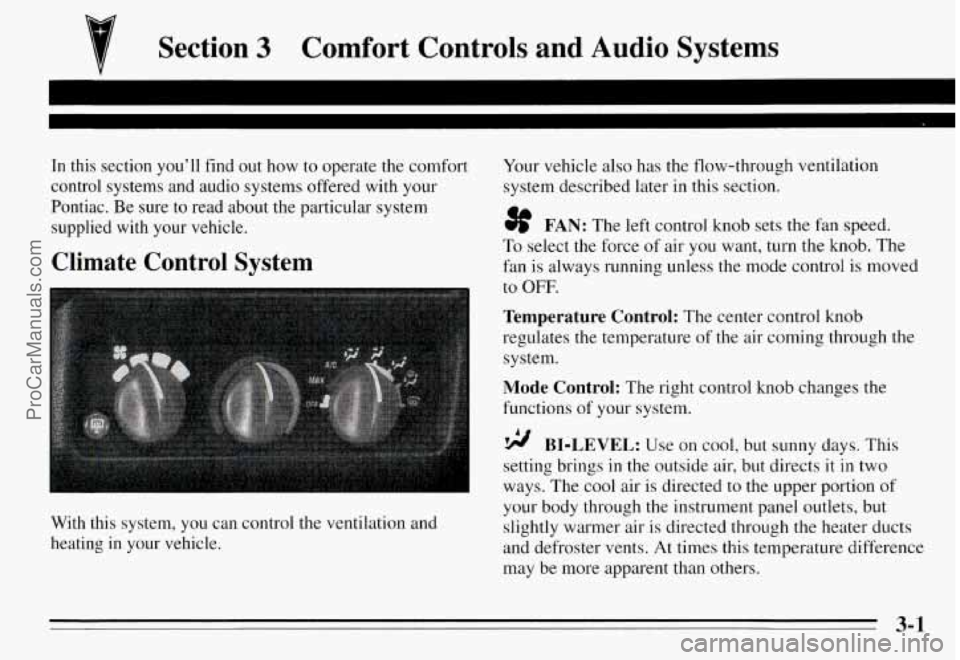
With this system, you can control the ventilation and
heating in your vehicle.
Your vehicle also has the flow-through ventilation
system described later in this section.
3f FAN: The left control knob sets the Fan speed.
To select the force of air you want, turn the knob. The
fan
is always running unless the mode control is moved
to OFF.
Temperature Control: The center control knob
regulates the temperature of the air coming through the
system.
Mode Control: The right control knob changes the
functions
of your system.
BI-LEVEL: Use on cool, but sunny days. This
setting brings
in the outside air, but directs it in two
ways. The cool air is directed to the upper portion of
your body through the instrument panel outlets, but
slightly warmer air is directed through the heater ducts
and defroster vents.
At times this temperature difference
may be more apparent than others.
3-1
ProCarManuals.com
Page 128 of 354
Audio Systems
The following pages describe the audio systems
available for your Pontiac, and how to get the best
performance
from them. Please read about the system in
your vehicle.
Setting the Clock
Radios with SEEK up and down arrow buttons:
1. With the ignition on and radio on or off, press SET.
The SET indicator will appear on the digital display
for five seconds.
2. Within five seconds, press the SEEK up arrow
button until the correct minute appears on the
display.
3. Press the SEEK down arrow button until the correct
hour appears on the display.
Radios with SEEK left and right arrow buttons
(CD Player):
1. With the ignition on and the radio on or off, press
SET. The
SET indicator will appear on the digital
display
for five seconds.
2. Within five seconds, press the SEEK right arrow
button until the correct minute appears on the
display.
3. Press and hold the SEEK left arrow button until the
correct hour appears on the display.
i- .. . .
. .,.. , ' ..
3-5
ProCarManuals.com
Page 134 of 354
Playing the Radio
VOL-BAL: With the ignition on, turn the upper knob
clockwise to turn your audio system on and to increase
the volume. Turn the knob counterclockwise to turn the
volume down and to turn the system
off.
PROG-RCL: Press the upper knob to change between
the clock and the radio station frequency display when
the radio is on.
Finding a Station
AM FM: Press the lower knob to change between the
AM and FM bands (the digital display will display AM
or FM and if the station is in stereo).
AMST: Press this button if you don’t want AM stereo,
such as when a station is weak or noisy. Press again to
return to
AM stereo.
TUNE: Turn the lower knob clockwise or
counterclockwise to tune in radio stations (the radio
station frequency will be displayed
on the digital
display).
SEEK: Each time you press SEEK, you will tune in the
next station higher or lower on the
AM or FM radio
band.
Presets: The four pushbuttons below the digital display
can be used to preset up to
14 radio stations (seven AM
and seven FM).
1. Tune in the desired station.
2. Press SET. The word SET will appear on the digital
display for five seconds.
3. While SET is displayed, press one of the four
pushbuttons. Whenever you press this button again,
the preset station
will be tuned in.
4. Repeat steps 1-3 for each of four AM and four FM
stations.
Up to three additional stations on each band may be
preset by “pairing” pushbuttons:
1. Tune in the desired station.
2. Press SET, and within five seconds press any two
adjacent pushbuttons at the same time. Whenever
you press these two buttons again, the preset station
will be tuned in.
3-11
ProCarManuals.com
Page 136 of 354
AM/FM Stereo with Compact Disc Player
(Option)
-1
The digital display indicates information on time or
radio station frequency, the
AM or FM radio band,
whether the station is
in stereo, and other radio
functions.
Playing the Radio
PWR:
With the ignition on, press this button to turn
your audio system on and off.
VOL: Turn the upper knob clockwise to increase
volume, and counterclockwise to decrease volume.
MUTE: Press the upper knob to mute the radio or
compact disc player. Press the knob again to listen.
RCL: Press this button to alternate the digital display
between the time, station and radio band.
Finding a Station
BAND: Press the lower knob to change between the
AM and FM bands (the digital display will display the
band you select).
TUNE: Turn the lower knob clockwise or
counterclockwise to tune in radio stations (the radio
station will be displayed on the digital display).
SEEK: Each time you press SEEK, you will tune in the
next station higher or lower on the
AM, FM1 or FM2
radio band.
3-13
ProCarManuals.com
Page 139 of 354
CD Player Theft Deterrent Feature
Delco LOC II@ is an anti-theft feature for the compact
disc player. It can be used or ignored. If ignored, the
system plays normally. If it is used, your player won’t be
usable
if it is ever stolen because it will go to LOC mode
any time battery power is removed. It will also go to
LOC mode any time power from the battery is turned
off
by the Battery Protection feature (see “Battery Rundown
Protection” in the Index). Until an unlock code is
entered,
it will not turn on.
The instructions below tell you how to enter a secret
code into the system. If your vehicle loses battery power
for any reason, you must unlock the system with the
secret code before the radio will turn on.
Setting the Anti-Theft System
1. Write down any six-digit number and keep it in a
safe place. This is your secret code.
2. Turn the ignition to the ACC or RUN position.
3. Press the PWR button to turn the radio off.
4. Press station preset buttons 1 and 4 at the same time
and hold until “---” appears on the display.
NOTE:
You now have only 15 seconds between each
of the following steps.
5. Press SET, and “000” will appear on the display.
6. Press the SEEK left or right arrow buttons until the
first digit of your code appears.
7. Turn the TUNE knob clockwise or counterclockwise
until the second and third digits
of your code appear.
8. Press the BAND knob (“000” will appear again on
the display).
9. Press the SEEK left or right arrow button until the
fourth digit of your code appears.
10. Turn the TUNE knob clockwise or counterclockwise
until the fifth and sixth digits of your code appear.
11. Press the BAND knob (“rEP” will appear for five
seconds, then “000”).
indicating that Delco LOC II@ is set, and your audio
system is secure.
12. Repeat steps 6- 11. This time SEC will appear,
3-16
ProCarManuals.com
Page 140 of 354
Disabling the Anti-Theft System
Enter your secret code by following these steps (you
will have only
15 seconds between each step).
1.
2.
3.
4.
5.
6.
7.
8.
Turn the ignition to the ACC or RUN position, and
turn the radio off.
Press station preset buttons 1 and 4 at the same time
for five seconds. SEC will appear on the display,
indicating the audio system is secure.
Press SET, and “000’ will appear on the display.
Press the SEEK left or right arrow button until the
first digit of your code appears.
Turn the TUNE knob clockwise or counterclockwise
until the second and third digits of your code appear.
Press the BAND knob
(“000” will appear again on
the display).
Press the SEEK left or right arrow button until the
fourth digit of your code appears.
Turn the TUNE knob clockwise or counterclockwise
until the fifth
and sixth digits of your code appear.
9. Press the BAND knob. If the display shows “---,”
the disabling sequence was successful. The numbers
matched the user-selected code or the factory
back-up code and the audio system is in the
unsecured mode.
If the display shows SEC, the
disabling sequence was unsuccessful. The numbers
did not match either of the codes and the audio
system will remain in the secured mode.
To Unlock the System After a Power Loss
When battery power is reapplied to a secured audio
system after a loss of power, the audio system will not
turn on and LOC will appear on the digital display.
You
will need to unlock the Delco LOC 11” system.
1. Turn the ignition to the ACC or RUN position, and
2. Press SET, and “000” will appear on the display.
3. Follow steps 4-8 for disabling your anti-theft
4. Press the BAND knob. The time will appear on the
turn the radio off.
system.
digital display if you are successful. If SEC appears,
however, the numbers did not match, and your audio
system is still locked.
3-17
ProCarManuals.com
Page 307 of 354
Part B: Owner Checks and Services
Listed below are owner checks and services which
should be performed at the intervals specified to help
ensure the safety, dependability and emission control
performance of your vehicle.
Be sure any necessary repairs are completed at once.
Whenever any fluids or lubricants are added to your
vehicle, make sure they are the proper ones, as shown in
Part
D.
At Each Fuel Fill
It is important for you or a service station attendant to
perfom these underhood checks at eachfuelfill.
Engine Oil Level
Check the engine oil level and add the proper oil if
necessary. See “Engine Oil” in the Index for further
details.
Engine Coolant Level
Check the engine coolant level and add the proper
coolant mix
if necessary. See “Coolant” in the Index for
further details.
Windshield Washer Fluid Level
Check the windshield washer fluid level in the
windshield washer tank and add the proper fluid
if
necessary. See “Windshield Washer Fluid” in the Index
for further details.
At Least Once a Month
Tire Inflation
Check tire inflation. Make sure tires are inflated to the
pressures specified on the Tire-Loading Information
label located on the rear edge
of the driver’s door. See
“Tires” in the Index for further details.
Cassette Deck
Clean cassette deck. Cleaning should be done every 50
hours of tape play. See “Audio Systems” in the Index for
further details.
At Least Twice a Year
Hydraulic Clutch System Inspection
Check the fluid level in the clutch reservoir. See
“Hydraulic Clutch Fluid” in the Index. A fluid loss in
this system could indicate a problem. Have the system
inspected and repaired at once.
7-38
ProCarManuals.com