reset PONTIAC GRAND AM 2003 User Guide
[x] Cancel search | Manufacturer: PONTIAC, Model Year: 2003, Model line: GRAND AM, Model: PONTIAC GRAND AM 2003Pages: 354, PDF Size: 16.3 MB
Page 165 of 354
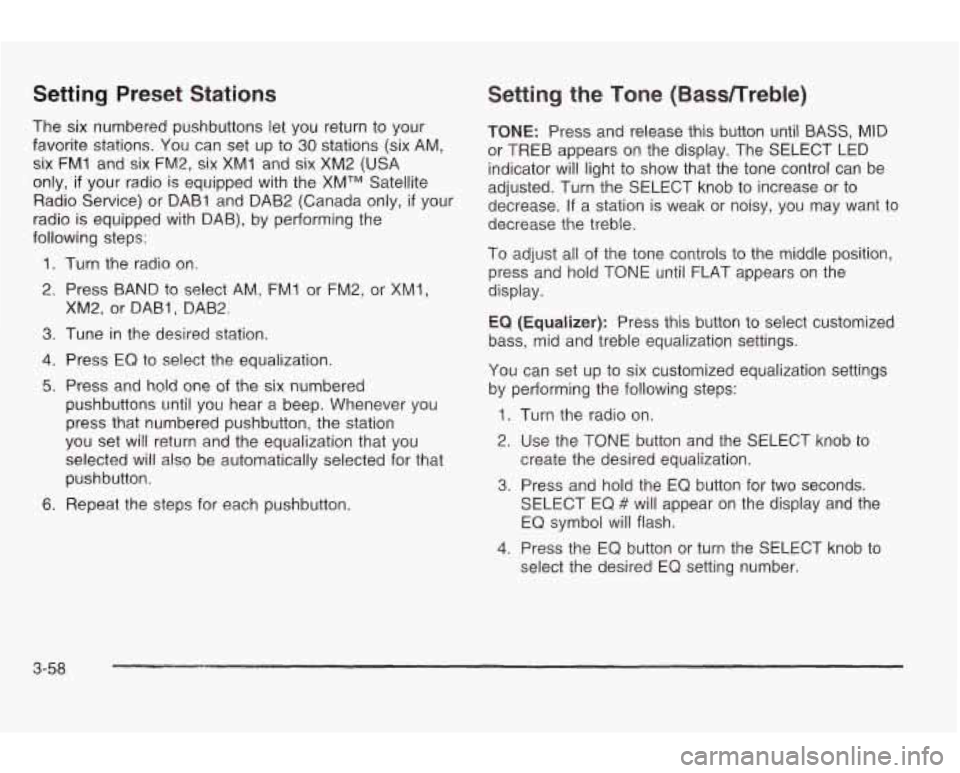
Setting Preset Stations
The six numbered pushbuttons let you return to your
favorite stations.
You can set up to 30 stations (six AM,
six
FM1 and six FM2, six XM1 and six XM2 (USA
only, if your radio is equipped with the XMTM Satellite
Radio Service) or DAB1 and DAB2 (Canada only,
if your
radio is equipped with DAB), by performing the
following
steps:
1. Turn the radio on.
2. Press BAND
to select AM, FM1 or FM2, or XM1,
XM2, or DABI, DAB2
3. Tune in the desired station.
4. Press EQ to select the equalization.
5. Press and hold one of the six numbered
pushbuttons until you hear a beep. Whenever you
press that numbered pushbutton, the station
you set will return and the equalization that you
selected will also be automatically selected for that
pushbutton.
6. Repeat the steps for each pushbutton.
Setting the Tone (BassRreble)
TONE: Press and release this button until BASS, MID
or TREB appears
on the display. The SELECT LED
indicator will light
to show that the tone control can be
adjusted. Turn the SELECT knob
to increase or to
decrease. If a station is weak or noisy, you may want to
decrease the treble.
To adjust all of the tone controls
to the middle position,
press and hold TONE until
FLAT appears on the
display.
EQ (Equalizer): Press this button to select customized
bass, mid and treble equalization settings.
You can set up
to six customized equalization settings
by performing the following steps:
1. Turn the radio on.
2. Use the TONE button and the SELECT knob to
3. Press and hold the EQ button for two seconds.
create the desired equalization.
SELECT
EQ # will appear on the display and the
EQ symbol will flash.
4. Press the EQ button or turn the SELECT knob to
select the desired EQ setting number.
3-58
Page 167 of 354
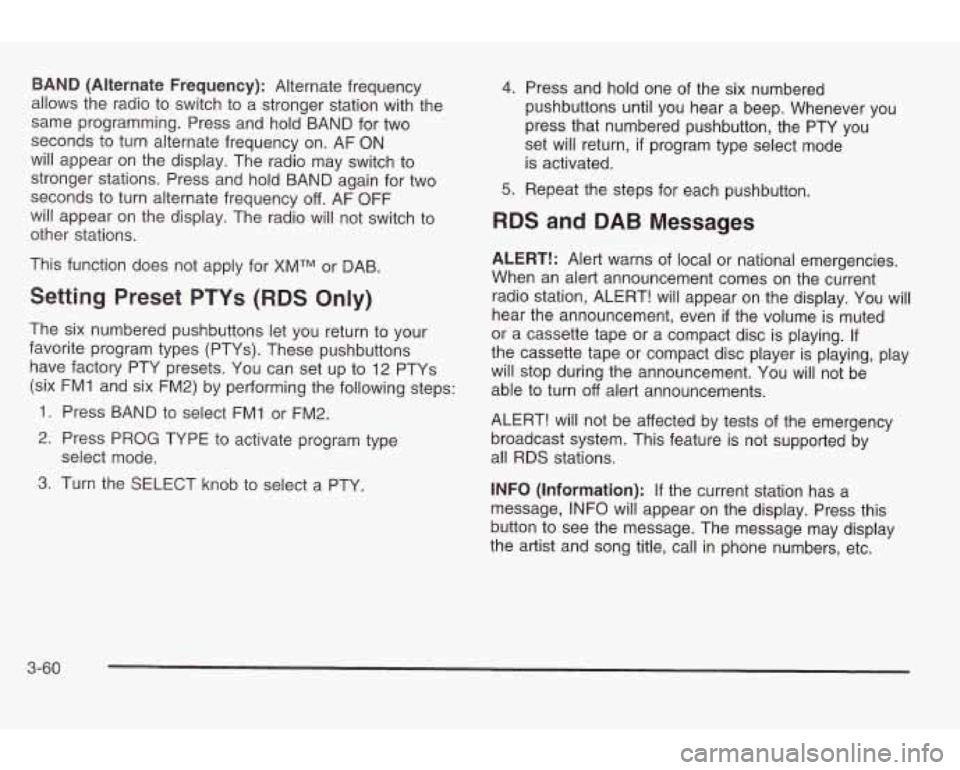
BAND (Alternate Frequency): Alternate frequency
allows the radio
to switch to a stronger station with the
same programming. Press and hold BAND for two
seconds to turn alternate frequency on. AF
ON
will appear on the display. The radio may switch to
stronger stations. Press and hold BAND again for two
seconds
to turn alternate frequency off. AF OFF
will appear on the display. The radio will not switch
to
other stations.
This function does not apply for XMTM or DAB.
Setting Preset PTYs (RDS Only)
The six numbered pushbuttons let you return to your
favorite program types (PTYs). These pushbuttons have factory PTY presets. You can set up
to 12 PTYs
(six FM1 and six FM2) by performing the following steps:
1. Press BAND
to select FM1 or FM2.
2. Press PROG TYPE to activate program type
3. Turn the SELECT knob to select a PTY.
select
mode.
4.
5.
Press and hold one of the six numbered
pushbuttons until you hear a beep. Whenever you
press that numbered pushbutton, the PTY you
set will return,
if program type select mode
is activated.
Repeat the steps for each pushbutton.
RDS and DAB Messages
ALERT!: Alert warns of local or national emergencies.
When an alert announcement comes on the current
radio station, ALERT! will appear on the display. You will
hear the announcement, even
if the volume is muted
or a cassette tape or a compact disc is playing. If
the cassette tape or compact disc player is playing, play
will stop during the announcement. You will not be
able to turn
off alert announcements.
ALERT! will not be affected by tests
of the emergency
broadcast system. This feature is not supported by
all RDS stations.
INFO (Information):
If the current station has a
message, INFO will appear on the display. Press this
button
to see the message. The message may display
the artist and song title, call in phone numbers, etc.
3-60
Page 169 of 354
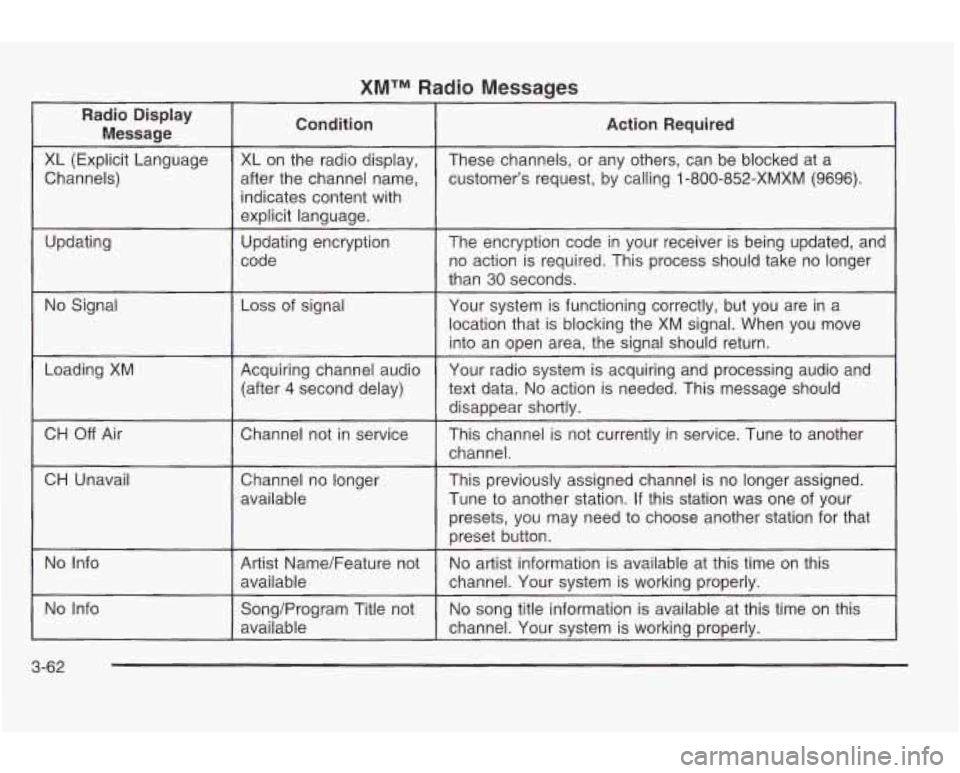
XMTM Radio Messages
Radio Display Message Condition
Action
Required
XL (Explicit Language
customer’s request, by calling
1-800-852-XMXM (9696).
after
the channel name,
Channels) These channels,
or any others, can be blocked at a
XL on the radio display,
indicates content with
explicit language.
code no action is required. This process should take no longer
Updating
The encryption code
in your receiver
is being updated, and
Updating encryption
than
30 seconds.
No Signal Loss
of signal
Your system is functioning correctly, but you are in a
location that is blocking the XM signal. When you move
into an open area, the signal should return.
Loading XM
CH
Off Air
CH Unavail Acquiring channel audio
text data.
No action is needed. This message should
(after 4 second delay) Your
radio system is acquiring and processing audio and
disappear shortlv.
..
Chatme1 not in service
This channel is not currently in service. Tune to another
channel.
Channel no longer
available This previously assigned channel
is no longer assigned.
Tune
to another station. If this station was one of your
presets, you may need
to choose another station for that
preset button.
No Info
No song title information is available at this time on this
Song/Program Title not
No Info
No artist information is available at this time on this
Artist Name/Feature not
available
channel. Your system is working properly.
available channel.
Your system is working properly.
3-62
Page 176 of 354
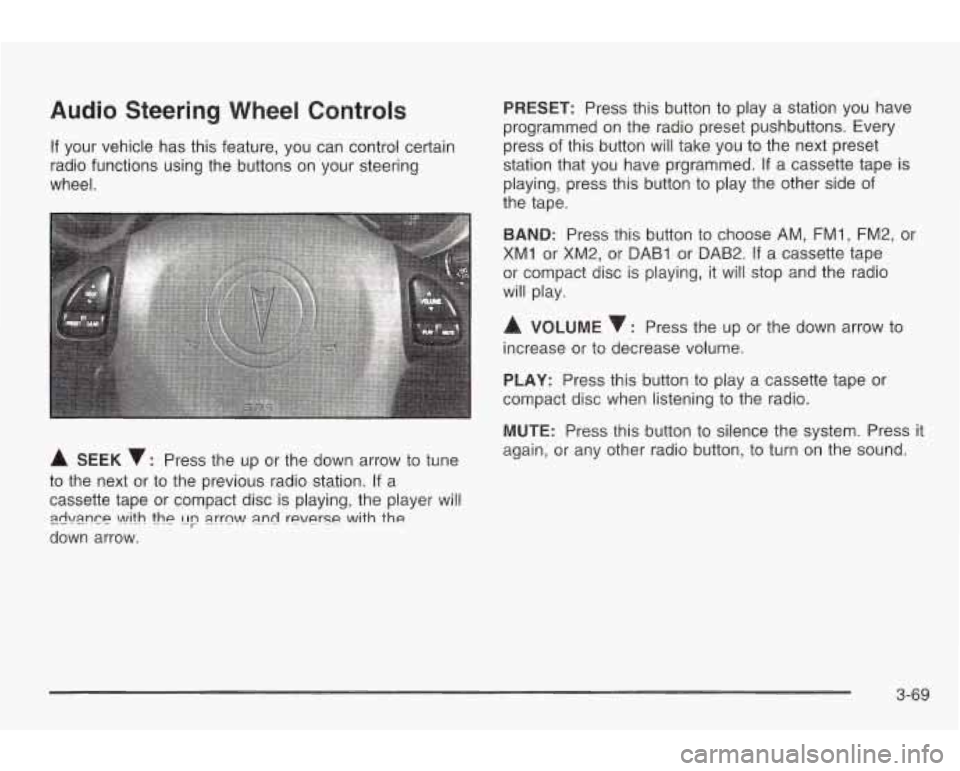
Audio Steering Wheel Controls
If your vehicle has this feature, you can control certain
radio functions using the buttons on your steering
wheel.
A SEEK v: Press the up or the down arrow to tune
to the next or to the previous radio station. If a
cassette tape or compact disc is playing, the player will
down arrow.
zwi\mn~~ \A!ith thp [Ip a.rrn\A/ a.nd reverse with the
PRESET: Press this button to play a station you have
programmed on the radio preset pushbuttons. Every
press of this button will take you to the next preset
station that you have prgrammed.
If a cassette tape is
playing, press this button to play the other side of
the tape.
BAND: Press this button to choose AM, FMI, FM2, or
XM1 or XM2, or DAB1 or DAB2. If a cassette tape
or compact disc is playing, it will stop and the radio
will play.
A VOLUME : Press the up or the down arrow to
increase or to decrease volume.
PLAY: Press this button to play a cassette tape or
compact disc when listening to the radio.
MUTE: Press this button
to silence the system. Press it
again, or any other radio button, to turn on the sound.
3-69
Page 177 of 354
Understanding Radio Reception
The range for most AM stations is greater than for FM,
especially at night. The longer range, however, can
cause stations to interfere with each other. AM can pick
up noise from things like storms and power lines. Try
reducing the treble
to reduce this noise if you ever get it.
FM Stereo
FM stereo will give you the best sound, but FM signals
will reach only about
10 to 40 miles (16 to 65 km).
Tall buildings or hills can interfere with FM signals,
causing the sound
to come and go.
XMTM Satellite Radio Service
XMTM Satellite Radio gives you digital radio reception
from coast
to coast. Just as with FM, tall buildings
or hills can interfere with Satellite radio signals, causing
the sound
to come and go. Your radio may display
"NO SIGNAL"
to indicate interference.
DAB Radio
DAB gives you digital radio reception. Just as with FM,
tall buildings or hills can interfere with radio signals,
causing the sound
to come and go. Your radio
may display
"NO SIGNAL" to indicate interference.
Care of Your Cassette Tape Player
A tape player that is not cleaned regularly can cause
reduced sound quality, ruined cassettes or a damaged
mechanism. Cassette tapes should be stored in their
cases away from contaminants, direct sunlight and
extreme heat. If they aren't, they may not operate
properly or may cause failure of the tape player.
Your tape player should be cleaned regularly after every
50 hours of use. Your radio will display CLEAN
PLAYER to indicate that you have used your tape
player for
50 hours without resetting the tape clean
timer. If this message appears on the display, your
cassette tape player needs
to be cleaned. It will still play
tapes, but you should clean it as soon as possible
to
prevent damage to your tapes and player. If you notice
a reduction in sound quality, try a known good
cassette to see
if the tape or the tape player is at fault.
If this other cassette has no improvement in sound
quality, clean the tape player.
3-70
Page 178 of 354
For best results, use a scrubbing action, non-abrasive
cleaning cassette with pads which scrub the tape
head as the hubs of the cleaner cassette turn. The
recommended cleaning cassette is available through
your dealership.
The broken tape detection feature of your cassette tape
player may identify the cleaning cassette as
a
damaged tape, in error. To prevent the cleaning cassette
from being ejected, use the following steps:
1. Turn the ignition on.
2. Turn the radio off.
3. Press and hold the CD TAPE button for five
seconds. READY
will appear on the display for five
seconds.
4. Insert the scrubbing action cleaning cassette.
5. Eject the cleaning cassette after the manufacturer’s
recommended cleaning time.
After the cleaning cassette is ejected, the broken tape
detection feature will be active again.
You may also choose a non-scrubbing action, wet-type
cleaner which uses a cassette with a fabric belt
to
clean the tape head. This type of cleaning cassette will not eject on
its own. A non-scrubbing action cleaner
may not clean as thoroughly as the scrubbing type
cleaner. The use
of a non-scrubbing action, dry-type
cleaning cassette is not recommended.
After you clean the player, press and hold the eject
button for five seconds
to reset the CLEAN PLAYER
indicator. The radio will display CLEANED
to show the
indicator was reset.
Cassettes are subject
to wear and the sound quality
may degrade over time. Always make sure the cassette
tape is in good condition before you have your tape
player serviced.
Care of Your CDs
Handle discs carefully. Store them in their original cases
or other protective cases and away from direct sunlight
and dust.
If the surface of a disc is soiled, dampen
a clean, soft cloth in a mild, neutral detergent solution
and clean it, wiping from the center
to the edge.
Be sure never
to touch the side without writing when
nanaiing aiscs. Pick up aiscs by grasping ihe ouier
edges or the edge of the hole and the outer edge.
3-71
Page 242 of 354
As in the chart shown previously, SAE 5W-30 is the
only viscosity grade recommended for your vehicle. You
should look for and use only oils which have the API
Starburst symbol and which are also identified as
SAE 5W-30. If you cannot find such SAE 5W-30 oils,
you can use an SAE IOW-30 oil which has the API
Starburst symbol,
if it's going to be 0°F (-18°C)
or above. Do not use other viscosity grade oils, such as
SAE
IOW-40 or SAE 20W-50 under any conditions.
Notice: Use only engine oil with the American
Petroleum Institute Certified For Gasoline Engines
starburst symbol. Failure to use the recommended
oil can result in engine damage not covered by
your warranty.
GM Goodwrench@ oil meets all the requirements for
your vehicle.
If you are in an area of extreme cold, where the
temperature falls below -20°F
(-29"C), it is
recommended that you use either an SAE 5W-30
synthetic oil or an SAE OW-30 oil. Both will provide
easier cold starting and better protection for your engine
at extremely low temperatures.
Engine Oil Additives
Don't add anything to your oil. The recommended oils
with the starburst symbol are ail you will need for
good performance and engine protection.
When to Change Engine Oil (GNI Oil
Life SystemTM)
Your vehicle has a computer system that lets you know
when to change the engine oil and filter. This is
based on engine revolutions and engine temperature,
and not on mileage. Based on driving conditions,
the mileage at which an oil change will be indicated can
vary considerably. For the oil life system
to work
properly, you must reset the system every time the oil
is
changed.
When the system has calculated that oil life has been
diminished, it will indicate that an oil change is
necessary. A CHANGE OIL light will come on. Change
your oil as soon as possible within the next two
times you stop for fuel.
It is possible that, if you are
driving under the best conditions, the
oil life system may
not indicate that an
oil change is necessary for over a
year. However, your engine oil and filter must be
changed at least once a year and at this time the system
must be reset. It is also important to check vour oil
regularly and keep
it at the proper level.
If the system is ever reset accidentally, you must
change your oil at 3,000 miles
(5 000 km) since your
last oil change. Remember
to reset the oil life system
whenever the oil
is changed.
5-1 9
Page 243 of 354
How to Reset the Change Oil Light
The GM Oil Life SystemTM calculates when to change
your engine oil and filter based on vehicle use. Anytime
your oil is changed, reset the system
so it can
calculate when the next oil change is required.
If a
situation occurs where you change your oil prior
to a
CHANGE OIL light being turned on, reset the system.
After changing the engine oil, the system must be reset.
To reset the oil life indicator, do the following steps:
1. With the ignition key in ON (a short time after
turning
off the engine), press the RESET button
located in the driver’s side instrument panel
fuse block. See “Instrument Panel Fuse Block”
under
Fuses and Circuit Breakers on page 5-81.
2. When the CHANGE OIL light starts to flash, press
and hold the RESET button again.
The reset is complete when you hear the chimes and
the CHANGE OIL light goes out.
If your vehicle is equipped with a 2.2L L4 ECOTEC
engine, it has a unique oil filter element. When
reinstalling the filter cap do not exceed
18 Ib ft (25 N*m ).
Inspect the condition of the O-ring and replace if
damaged.
What to Do with Used Oil
Used engine oil contains certain elements that may be
unhealthy for your skin and could even cause cancer.
Don’t let used oil stay on your skin for very long. Clean
your skin and nails with soap and water, or a
good
hand cleaner. Wash or properly dispose of clothing or
rags containing used engine oil. See the manufacturer’s
warnings about the use and disposal of oil products.
Used oil can be a threat
to the environment. If you
change your own oil, be sure to drain all the oil from the
filter before disposal. Never dispose of oil by putting it
in the trash, pouring it on the ground, into sewers, or into
streams or bodies of water. Instead, recycle it by
taking it to a place that collects used oil. If you have a
problem properly disposing of your used oil, ask
your dealer, a service station or a local recycling center
for help.
See your dealer for additional information.
5-20
Page 282 of 354
Wheel Alignment and Tire Balance
The wheels on your vehicle were aligned and balanced
carefully at the factory
to give you the longest tire life
and best overall performance.
Scheduled wheel alignment and wheel balancing are
not needed. However,
if you notice unusual tire wear or
your vehicle pulling one way or the other, the alignment
may need to be reset.
If you notice your vehicle
vibrating when driving on a smooth road, your wheels
may need to be rebalanced.
Wheel Replacement
Replace any wheel that is bent, cracked or badly rusted
or corroded. If wheel nuts keep coming loose, the
wheel, wheel bolts and wheel nuts should be replaced.
If the wheel leaks air, replace it (except some
aluminum wheels, which can sometimes be repaired).
See your dealer
if any of these conditions exist.
Your dealer will know the kind of wheel you need.
Each new ~hppl shnulc! hae the qqme inauj-carryin~
capacity, diameter, width, offset and be mounted
the same way as the one it replaces.
If you need to replace any of your wheels, wheel bolts
or wheel nuts, replace them only with new
GM
original equipment parts. This way, you will be sure to
have the right wheel, wheel bolts and wheel nuts
for your vehicle. Using the wrong replacement wheels, wheel
bolts or wheel nuts on your vehicle can be
dangerous.
It could affect the braking and
handling
of your vehicle, make your tires lose
air and make you lose control. You could have a collision in which you or others could be
injured. Always use the correct wheel, wheel
bolts and wheel nuts for replacement.
Notice: The wrong wheel can also cause problems
with bearing life, brake cooling, speedometer or odometer calibration, headlamp aim, bumper height,
vehicle ground clearance and tire or tire chain
clearance to the body and chassis.
See
Changing a flat Tire on page 5-62 for more
information.
5-59
Page 316 of 354
Scheduled Maintenance
The services shown in this schedule up to 100,000 miles
(1 66 000 km) should be repeated after 100,000 miles
(1 66 000 km) at the same intervals for the life of
this vehicle. The services shown at 150,000 miles
(240
QQO km) should be repeated at the same interval
after
150,000 miles (240 000 km) for the life of this
vehicle.
See
Part B: Owner Checks and Services on page 6-9
and Part C: Periodic Maintenance Inspections on
page
6- 13.
Footnotes
t The U.S. Environmental Protection Agency or the
California Air Resources Board has determined that the
failure to perform this maintenance item will not nullify
the emission warranty or limit recall liability prior to
the completion
of the vehicle's useful life. We, however,
urge that all recommended maintenance services be
performed at the indicated intervals and the
maintenance be recorded.
+A good time to check your brakes is during tire
rotation. See Brake System Inspection on page
6- 14.
Engine Oil Scheduled Maintenance
Change engine oil and filter as indicated by the GM
Oil Life SystemTM (or every 12 months, whichever
occurs first). Reset the system.
Your vehicle has a computer system that lets you know
when
to change the engine oil and filter. This is
based on engine revolutions and engine temperature,
and not on mileage. Based on driving conditions,
the mileage at which an oil change will be indicated can
vary considerably. For the oil life system
to work
properly, you must reset the system every time the oil is
changed.
When the system has calculated that oil life has been
diminished,
it will indicate that an oil change is
necessary.
A CHANGE OIL light will come on. Change
your
oil as soon as possible within the next two
times you stop for fuel.
It is possible that, if you are
driving under the best conditions, the oil life system may
not indicate that an oil change is necessary for over a
year. However, your engine oil and filter must be
changed at least once a year and at this time the svstem
must be reset.
It is also important to check your oil
regularly and keep it at the proper level.
6-5