battery PONTIAC GRAND AM 2005 User Guide
[x] Cancel search | Manufacturer: PONTIAC, Model Year: 2005, Model line: GRAND AM, Model: PONTIAC GRAND AM 2005Pages: 334, PDF Size: 2.27 MB
Page 201 of 334
4. To prevent your battery from draining while the
vehicle is being towed, remove the following
fuses from the driver’s side instrument panel fuse
block: WIPER, PCM ACC and IPC/BFC ACC.
See “Instrument Panel Fuse Block ” underFuses
and Circuit Breakers on page 5-80for the location of
these fuses.
5. Turn the ignition switch to ACCESSORY.
6. Shift your transaxle to Neutral (N).
7. Release the parking brake.
Remember to reinstall the fuses once you reach your
destination. To reinstall a fuse do the following:
1. Set the parking brake.
2. Remove the key from the ignition switch.
3. Put the fuse back in.
Notice:If you exceed 65 mph (110 km/h) while
towing your vehicle, it could be damaged. Never
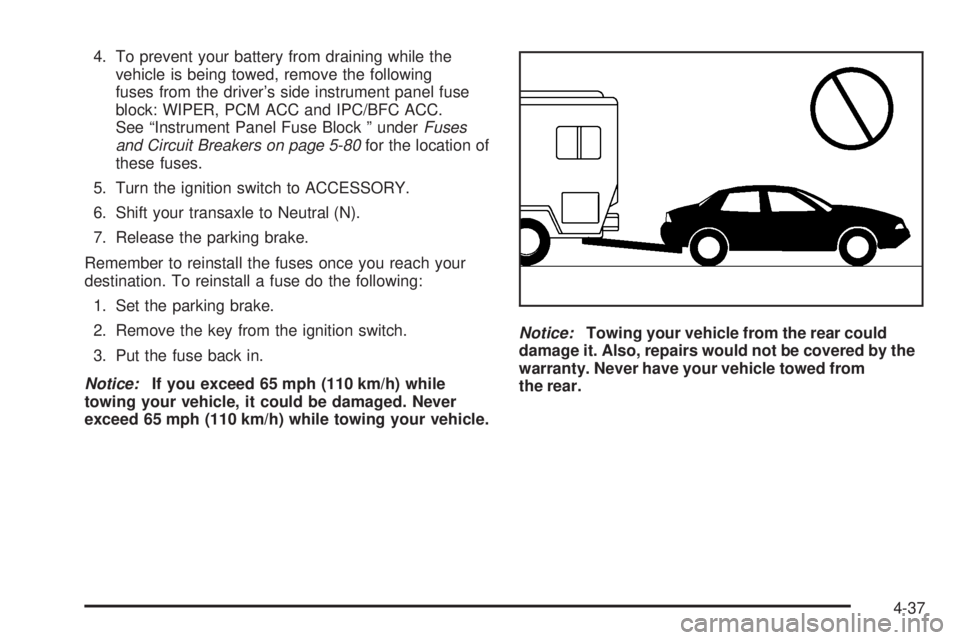
exceed 65 mph (110 km/h) while towing your vehicle.Notice:Towing your vehicle from the rear could
damage it. Also, repairs would not be covered by the
warranty. Never have your vehicle towed from
the rear.
4-37
Page 209 of 334
Service............................................................5-3
Doing Your Own Service Work.........................5-4
Adding Equipment to the Outside of Your
Vehicle......................................................5-5
Fuel................................................................5-5
Gasoline Octane............................................5-5
Gasoline Specifications....................................5-5
California Fuel...............................................5-5
Additives.......................................................5-6
Fuels in Foreign Countries...............................5-7
Filling Your Tank............................................5-7
Filling a Portable Fuel Container.......................5-9
Checking Things Under the Hood....................5-10
Hood Release..............................................5-10
Engine Compartment Overview.......................5-12
Engine Oil...................................................5-15
Engine Oil Life System..................................5-18
Engine Air Cleaner/Filter................................5-20
Automatic Transaxle Fluid..............................5-21
Engine Coolant.............................................5-22
Engine Overheating.......................................5-24
Cooling System............................................5-26
Power Steering Fluid.....................................5-31
Windshield Washer Fluid................................5-32
Brakes........................................................5-33
Battery........................................................5-36
Jump Starting...............................................5-37Bulb Replacement..........................................5-42
Halogen Bulbs..............................................5-42
Headlamps..................................................5-42
Front Turn Signal and Parking Lamps..............5-43
Center High-Mounted Stoplamp (CHMSL).........5-44
Taillamps, Turn Signal, and Stoplamps............5-44
Replacement Bulbs.......................................5-45
Windshield Wiper Blade Replacement..............5-45
Tires..............................................................5-46
Tire Sidewall Labelling...................................5-47
Tire Terminology and Definitions.....................5-49
Inflation - Tire Pressure.................................5-52
Tire Inspection and Rotation...........................5-53
When It Is Time for New Tires.......................5-54
Buying New Tires.........................................5-55
Uniform Tire Quality Grading..........................5-56
Wheel Alignment and Tire Balance..................5-57
Wheel Replacement......................................5-57
Tire Chains..................................................5-59
If a Tire Goes Flat........................................5-60
Changing a Flat Tire.....................................5-61
Removing the Spare Tire and Tools................5-62
Removing the Flat Tire and Installing the
Spare Tire................................................5-64
Storing a Flat or Spare Tire and Tools............5-69
Compact Spare Tire......................................5-70
Section 5 Service and Appearance Care
5-1
Page 221 of 334
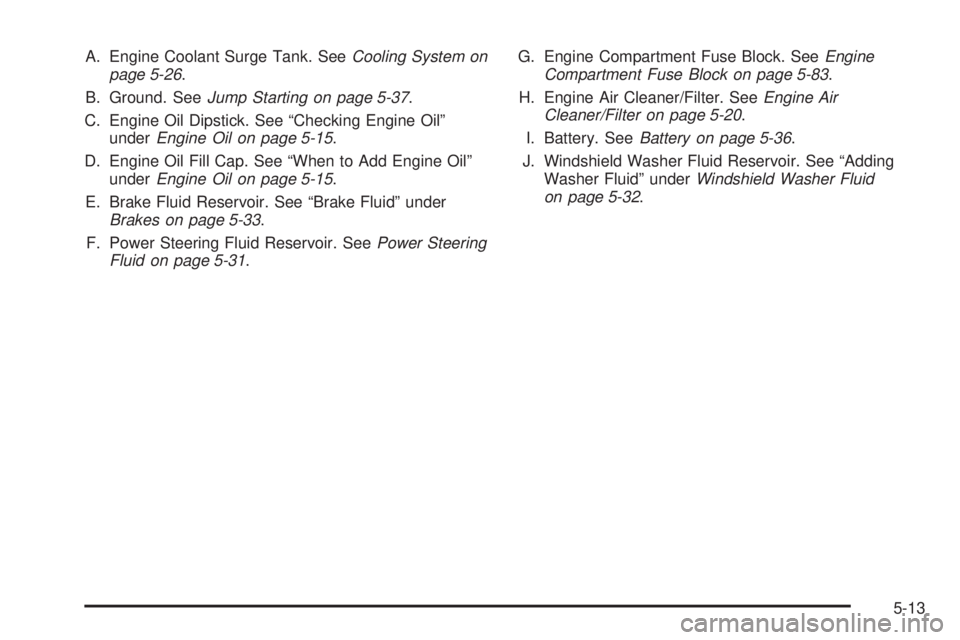
A. Engine Coolant Surge Tank. SeeCooling System on
page 5-26.
B. Ground. SeeJump Starting on page 5-37.
C. Engine Oil Dipstick. See “Checking Engine Oil”
underEngine Oil on page 5-15.
D. Engine Oil Fill Cap. See “When to Add Engine Oil”
underEngine Oil on page 5-15.
E. Brake Fluid Reservoir. See “Brake Fluid” under
Brakes on page 5-33.
F. Power Steering Fluid Reservoir. SeePower Steering
Fluid on page 5-31.G. Engine Compartment Fuse Block. SeeEngine
Compartment Fuse Block on page 5-83.
H. Engine Air Cleaner/Filter. SeeEngine Air
Cleaner/Filter on page 5-20.
I. Battery. SeeBattery on page 5-36.
J. Windshield Washer Fluid Reservoir. See “Adding
Washer Fluid” underWindshield Washer Fluid
on page 5-32.
5-13
Page 223 of 334
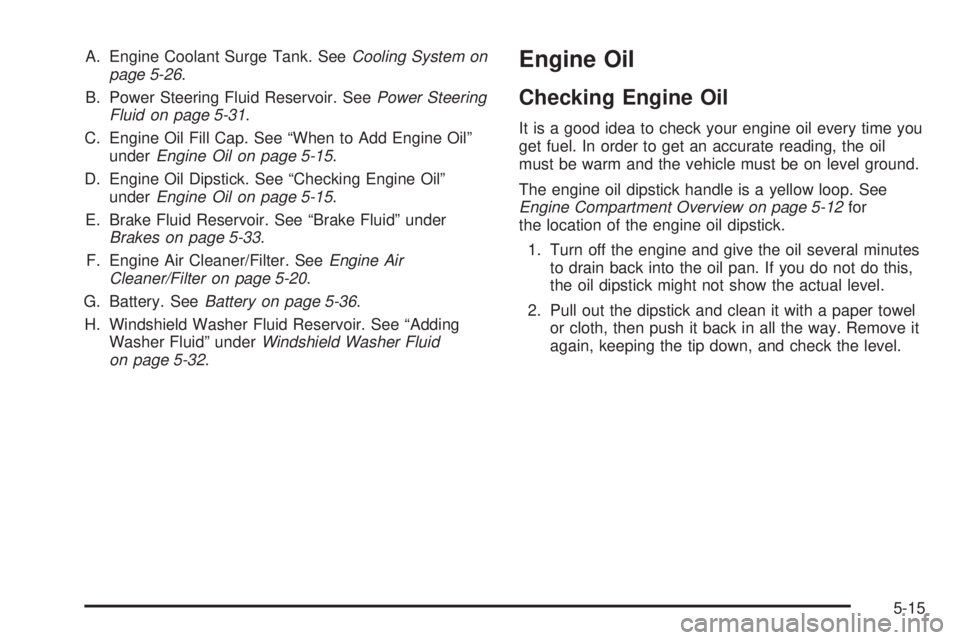
A. Engine Coolant Surge Tank. SeeCooling System on
page 5-26.
B. Power Steering Fluid Reservoir. SeePower Steering
Fluid on page 5-31.
C. Engine Oil Fill Cap. See “When to Add Engine Oil”
underEngine Oil on page 5-15.
D. Engine Oil Dipstick. See “Checking Engine Oil”
underEngine Oil on page 5-15.
E. Brake Fluid Reservoir. See “Brake Fluid” under
Brakes on page 5-33.
F. Engine Air Cleaner/Filter. SeeEngine Air
Cleaner/Filter on page 5-20.
G. Battery. SeeBattery on page 5-36.
H. Windshield Washer Fluid Reservoir. See “Adding
Washer Fluid” underWindshield Washer Fluid
on page 5-32.Engine Oil
Checking Engine Oil
It is a good idea to check your engine oil every time you
get fuel. In order to get an accurate reading, the oil
must be warm and the vehicle must be on level ground.
The engine oil dipstick handle is a yellow loop. See
Engine Compartment Overview on page 5-12for
the location of the engine oil dipstick.
1. Turn off the engine and give the oil several minutes
to drain back into the oil pan. If you do not do this,
the oil dipstick might not show the actual level.
2. Pull out the dipstick and clean it with a paper towel
or cloth, then push it back in all the way. Remove it
again, keeping the tip down, and check the level.
5-15
Page 244 of 334
Replacing Brake System Parts
The braking system on a vehicle is complex. Its many
parts have to be of top quality and work well together if
the vehicle is to have really good braking. Your
vehicle was designed and tested with top-quality GM
brake parts. When you replace parts of your braking
system — for example, when your brake linings
wear down and you need new ones put in — be sure
you get new approved replacement parts. If you do not,
your brakes may no longer work properly. For
example, if someone puts in brake linings that are
wrong for your vehicle, the balance between your front
and rear brakes can change — for the worse. The
braking performance you have come to expect
can change in many other ways if someone puts in the
wrong replacement brake parts.
Battery
Your vehicle has a maintenance free battery. When it is
time for a new battery, get one that has the replacement
number shown on the original battery’s label. We
recommend an ACDelco
®replacement battery. See
Engine Compartment Overview on page 5-12for battery
location.Warning:Battery posts, terminals and related
accessories contain lead and lead compounds,
chemicals known to the State of California to cause
cancer and reproductive harm. Wash hands after
handling.
Vehicle Storage
If you are not going to drive your vehicle for 25 days
or more, remove the black, negative (−) cable from
the battery. This will help keep your battery from
running down.
{CAUTION:
Batteries have acid that can burn you and gas
that can explode. You can be badly hurt if you
are not careful. SeeJump Starting on
page 5-37for tips on working around a battery
without getting hurt.
Also, for your audio system, seeTheft-Deterrent
Feature on page 3-67.
5-36
Page 245 of 334
Jump Starting
If your battery has run down, you may want to use
another vehicle and some jumper cables to start your
vehicle. Be sure to use the following steps to do it safely.
{CAUTION:
Batteries can hurt you. They can be dangerous
because:
They contain acid that can burn you.
They contain gas that can explode or
ignite.
They contain enough electricity to
burn you.
If you do not follow these steps exactly, some
or all of these things can hurt you.
Notice:Ignoring these steps could result in costly
damage to your vehicle that would not be covered
by your warranty.
Trying to start your vehicle by pushing or pulling it
will not work, and it could damage your vehicle.
1. Check the other vehicle. It must have a 12-volt
battery with a negative ground system.Notice:If the other vehicle’s system is not a 12-volt
system with a negative ground, both vehicles can
be damaged. Only use vehicles with 12-volt systems
with negative grounds to jump start your vehicle.
2. Get the vehicles close enough so the jumper cables
can reach, but be sure the vehicles are not touching
each other. If they are, it could cause a ground
connection you do not want. You would not be able
to start your vehicle, and the bad grounding
could damage the electrical systems.
To avoid the possibility of the vehicles rolling, set
the parking brake firmly on both vehicles involved in
the jump start procedure. Put an automatic
transaxle in PARK (P) or a manual transaxle in
NEUTRAL before setting the parking brake.
Notice:If you leave your radio or other accessories
on during the jump starting procedure, they could
be damaged. The repairs would not be covered
by your warranty. Always turn off your radio and
other accessories when jump starting your vehicle.
3. Turn off the ignition on both vehicles. Unplug
unnecessary accessories plugged into the cigarette
lighter. Turn off the radio and all lamps that are
not needed. This will avoid sparks and help save
both batteries. And it could save the radio!
5-37
Page 246 of 334
4. Open the hoods and locate the batteries. Find the
positive (+) and negative (−) terminal locations on
each vehicle. SeeEngine Compartment Overview
on page 5-12for more information on location.
{CAUTION:
An electric fan can start up even when the
engine is not running and can injure you. Keep
hands, clothing and tools away from any
underhood electric fan.
{CAUTION:
Using a match near a battery can cause battery
gas to explode. People have been hurt doing
this, and some have been blinded. Use a
ashlight if you need more light.
Be sure the battery has enough water. You do
not need to add water to the battery installed
in your new vehicle. But if a battery has ller
caps, be sure the right amount of uid is there.
If it is low, add water to take care of that rst.
If you do not, explosive gas could be present.
Battery uid contains acid that can burn you.
Do not get it on you. If you accidentally get it
in your eyes or on your skin, ush the place
with water and get medical help immediately.
5-38
Page 247 of 334
{CAUTION:
Fans or other moving engine parts can injure
you badly. Keep your hands away from moving
parts once the engine is running.
5. Check that the jumper cables do not have loose or
missing insulation. If they do, you could get a
shock. The vehicles could be damaged too.
Before you connect the cables, here are some
basic things you should know. Positive (+) will go to
positive (+) or to a remote positive (+) terminal if
the vehicle has one. Negative (−) will go to a heavy,
unpainted metal engine part or to a remote
negative (−) terminal if the vehicle has one.
Do not connect positive (+) to negative (−)oryou
will get a short that would damage the battery
and maybe other parts too. And do not connect the
negative (−) cable to the negative (−) terminal on
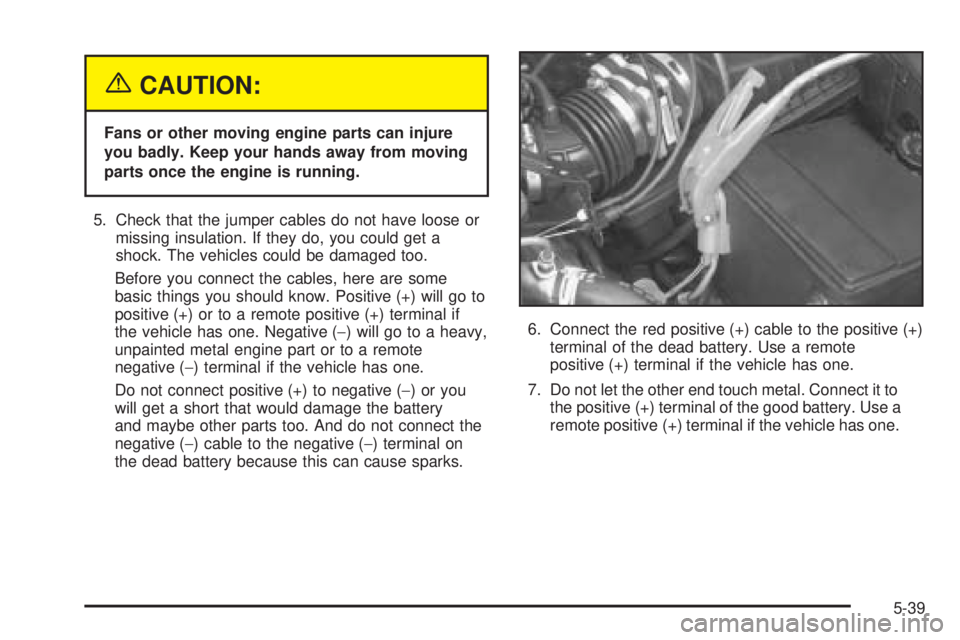
the dead battery because this can cause sparks.6. Connect the red positive (+) cable to the positive (+)
terminal of the dead battery. Use a remote
positive (+) terminal if the vehicle has one.
7. Do not let the other end touch metal. Connect it to
the positive (+) terminal of the good battery. Use a
remote positive (+) terminal if the vehicle has one.
5-39
Page 248 of 334
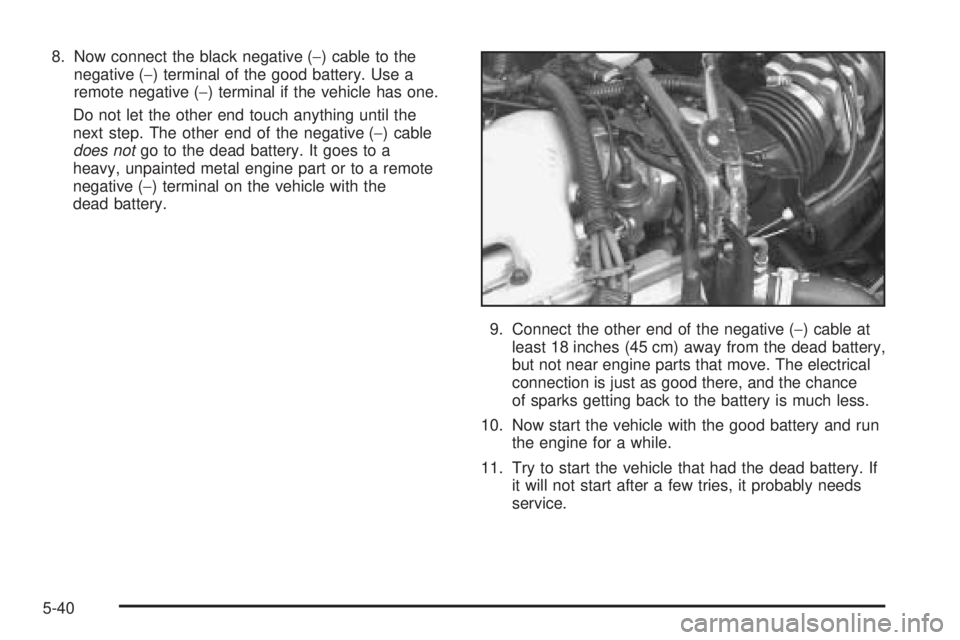
8. Now connect the black negative (−) cable to the
negative (−) terminal of the good battery. Use a
remote negative (−) terminal if the vehicle has one.
Do not let the other end touch anything until the
next step. The other end of the negative (−) cable
does notgo to the dead battery. It goes to a
heavy, unpainted metal engine part or to a remote
negative (−) terminal on the vehicle with the
dead battery.
9. Connect the other end of the negative (−) cable at
least 18 inches (45 cm) away from the dead battery,
but not near engine parts that move. The electrical
connection is just as good there, and the chance
of sparks getting back to the battery is much less.
10. Now start the vehicle with the good battery and run
the engine for a while.
11. Try to start the vehicle that had the dead battery. If
it will not start after a few tries, it probably needs
service.
5-40
Page 249 of 334
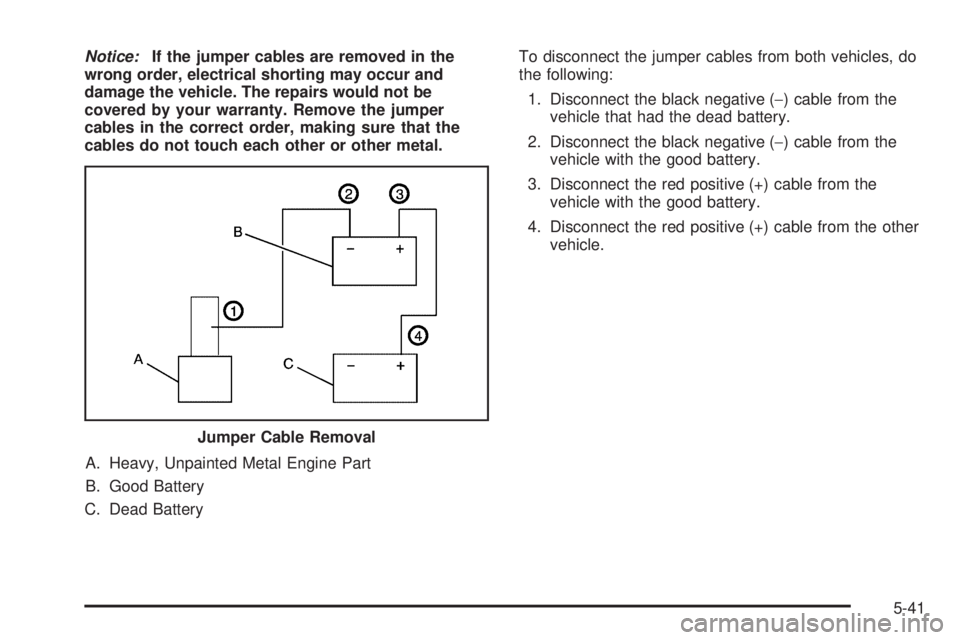
Notice:If the jumper cables are removed in the
wrong order, electrical shorting may occur and
damage the vehicle. The repairs would not be
covered by your warranty. Remove the jumper
cables in the correct order, making sure that the
cables do not touch each other or other metal.
A. Heavy, Unpainted Metal Engine Part
B. Good Battery
C. Dead BatteryTo disconnect the jumper cables from both vehicles, do
the following:
1. Disconnect the black negative (−) cable from the
vehicle that had the dead battery.
2. Disconnect the black negative (−) cable from the
vehicle with the good battery.
3. Disconnect the red positive (+) cable from the
vehicle with the good battery.
4. Disconnect the red positive (+) cable from the other
vehicle.
Jumper Cable Removal
5-41