ECU PONTIAC GRAND PRIX 2004 Owner's Manual
[x] Cancel search | Manufacturer: PONTIAC, Model Year: 2004, Model line: GRAND PRIX, Model: PONTIAC GRAND PRIX 2004Pages: 432, PDF Size: 2.99 MB
Page 80 of 432
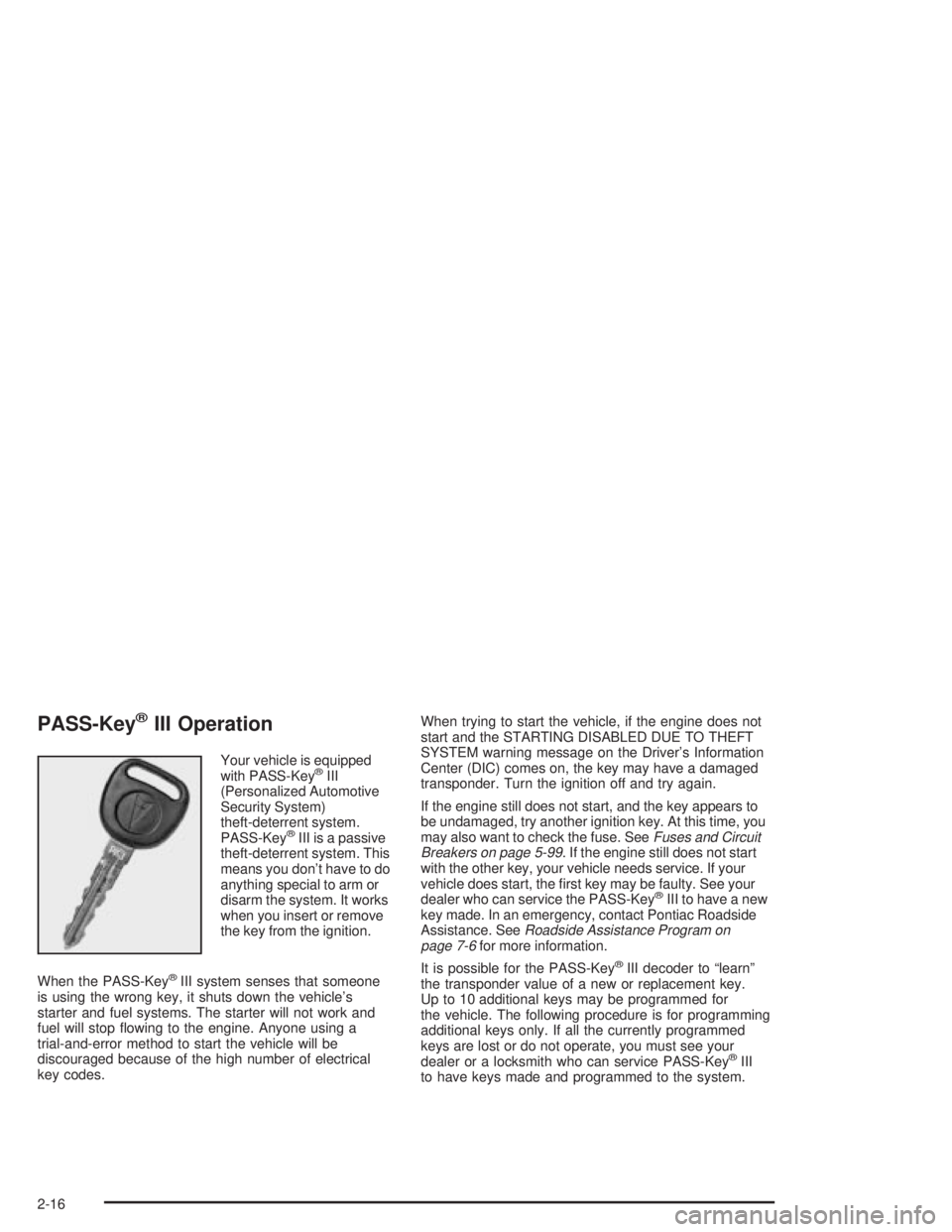
PASS-KeyžIII Operation
Your vehicle is equipped
with PASS-KeyžIII
(Personalized Automotive
Security System)
theft-deterrent system.
PASS-Key
žIII is a passive
theft-deterrent system. This
means you don't have to do
anything special to arm or
disarm the system. It works
when you insert or remove
the key from the ignition.
When the PASS-Key
žIII system senses that someone
is using the wrong key, it shuts down the vehicle's
starter and fuel systems. The starter will not work and
fuel will stop ¯owing to the engine. Anyone using a
trial-and-error method to start the vehicle will be
discouraged because of the high number of electrical
key codes.When trying to start the vehicle, if the engine does not
start and the STARTING DISABLED DUE TO THEFT
SYSTEM warning message on the Driver's Information
Center (DIC) comes on, the key may have a damaged
transponder. Turn the ignition off and try again.
If the engine still does not start, and the key appears to
be undamaged, try another ignition key. At this time, you
may also want to check the fuse. See
Fuses and Circuit
Breakers on page 5-99. If the engine still does not start
with the other key, your vehicle needs service. If your
vehicle does start, the ®rst key may be faulty. See your
dealer who can service the PASS-Key
žIII to have a new
key made. In an emergency, contact Pontiac Roadside
Assistance. See
Roadside Assistance Program on
page 7-6for more information.
It is possible for the PASS-Key
žIII decoder to ªlearnº
the transponder value of a new or replacement key.
Up to 10 additional keys may be programmed for
the vehicle. The following procedure is for programming
additional keys only. If all the currently programmed
keys are lost or do not operate, you must see your
dealer or a locksmith who can service PASS-Key
žIII
to have keys made and programmed to the system.
2-16
Page 81 of 432
Canadian Owners:If you lose or damage your keys,
only a GM dealer can service PASS-KeyžIII to
have new keys made. To program additional keys,
you will need two current driver's keys. You must add a
step to the following procedure. After Step 2, repeat
Steps 1 and 2 with the second current driver's key.
Then continue with Step 3.
To program the new key do the following:
1. Verify that the new key has PK3 stamped on it.
2. Insert the master key in the ignition and start
the engine. If the engine will not start, see your
dealer for service.
3. After the engine has started, turn the key to OFF,
and remove the key.
4. Insert the key to be programmed and turn it to RUN
within ®ve seconds of removing the original key.5. The SECURITY DISABLED DUE TO THEFT
SYSTEM warning message on the DIC will turn off,
once the key has been programmed. It may not
be apparent that the SECURITY DISABLED DUE
TO THEFT SYSTEM warning message went on due
to how quickly the key is programmed.
6. Repeat Steps 1 through 5 if additional keys are to
be programmed.
If you are ever driving and the SECURITY DISABLED
DUE TO THEFT SYSTEM warning message on the DIC
comes on and stays on, you will be able to restart
your engine if you turn it off. Your PASS-Key
žIII system,
however, is not working properly and must be serviced
by your dealer. Your vehicle is not protected by the
PASS-Key
žIII system at this time.
If you lose or damage your PASS-Key
žIII key, see your
dealer or a locksmith who can service PASS-KeyžIII
to have a new key made.
2-17
Page 99 of 432
OnStaržSystem
OnStaržuses global positioning system (GPS) satellite
technology, wireless communications, and call centers
to provide you with a wide range of safety, security,
information and convenience services. An OnStar
ž
subscription plan is included in the price of your vehicle.
You can upgrade or extend your OnStaržservices to
meet your needs.
A complete OnStar
žuser's guide and the terms and
conditions of the OnStaržSubscription Service
Agreement are included in your vehicle's glove box
literature. For more information, visit www.onstar.com,
contact OnStar
žat 1-888-4-ONSTAR (1-888-466-7827),
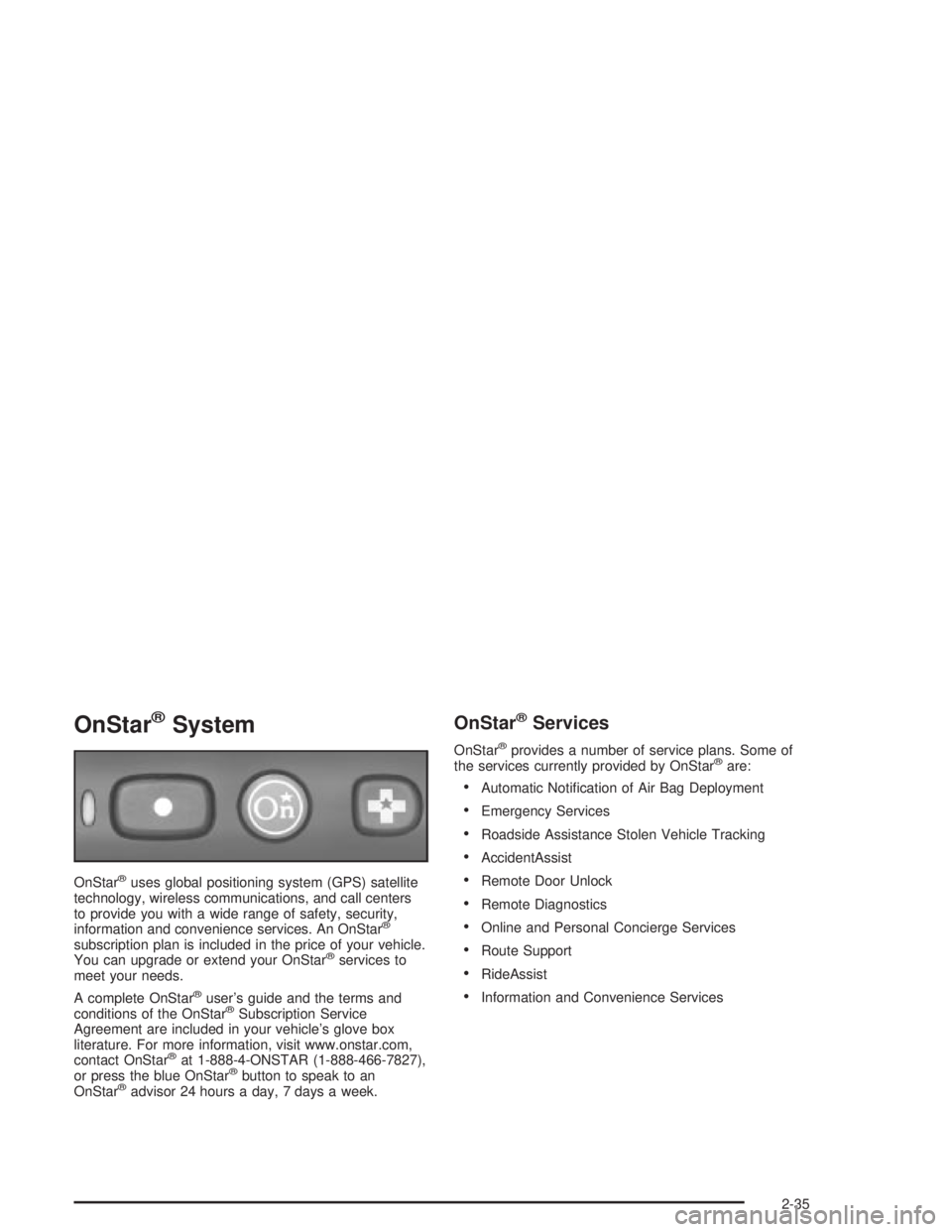
or press the blue OnStaržbutton to speak to an
OnStaržadvisor 24 hours a day, 7 days a week.
OnStaržServices
OnStaržprovides a number of service plans. Some of
the services currently provided by OnStaržare:
·Automatic Noti®cation of Air Bag Deployment
·Emergency Services
·Roadside Assistance Stolen Vehicle Tracking
·AccidentAssist
·Remote Door Unlock
·Remote Diagnostics
·Online and Personal Concierge Services
·Route Support
·RideAssist
·Information and Convenience Services
2-35
Page 102 of 432
Assist Handles
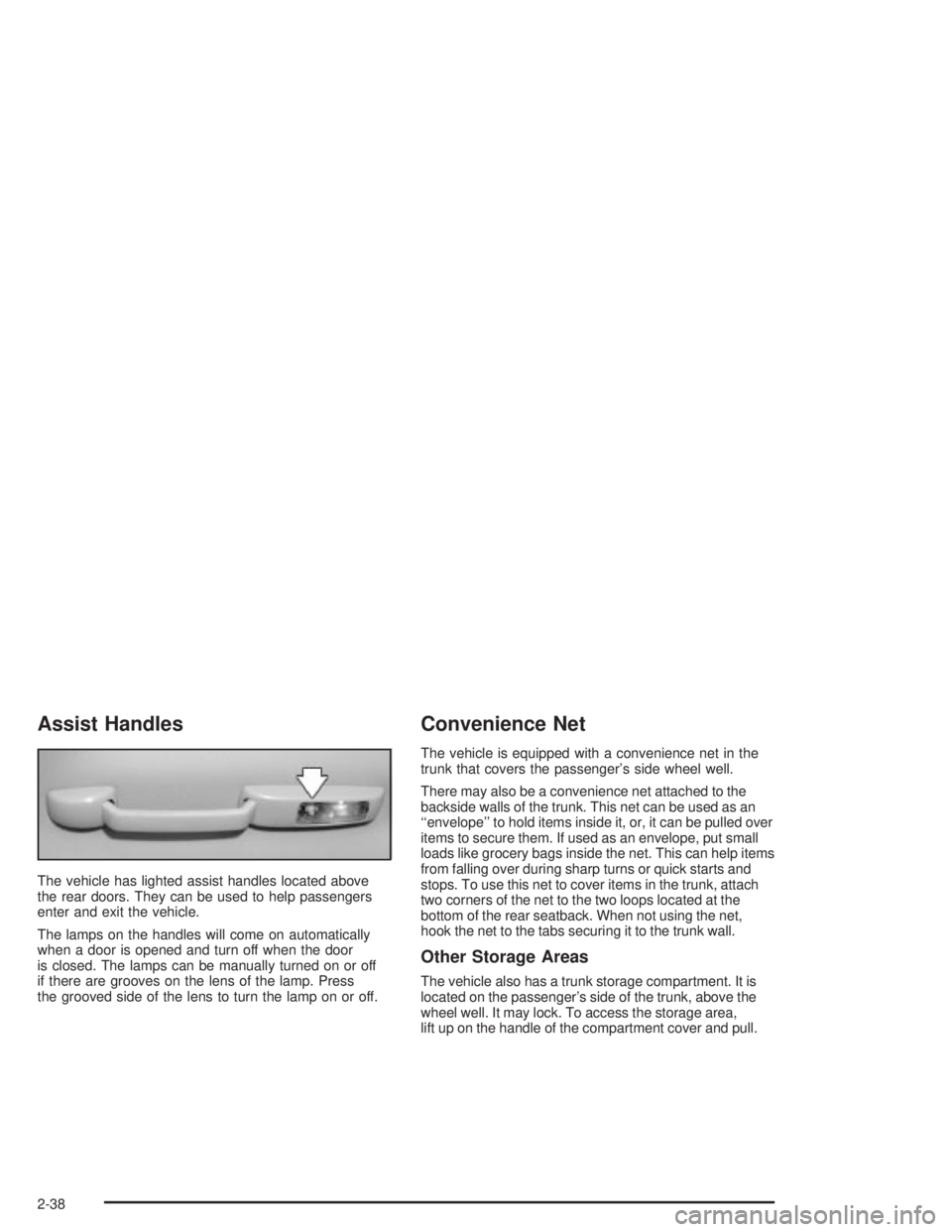
The vehicle has lighted assist handles located above
the rear doors. They can be used to help passengers
enter and exit the vehicle.
The lamps on the handles will come on automatically
when a door is opened and turn off when the door
is closed. The lamps can be manually turned on or off
if there are grooves on the lens of the lamp. Press
the grooved side of the lens to turn the lamp on or off.
Convenience Net
The vehicle is equipped with a convenience net in the
trunk that covers the passenger's side wheel well.
There may also be a convenience net attached to the
backside walls of the trunk. This net can be used as an
``envelope'' to hold items inside it, or, it can be pulled over
items to secure them. If used as an envelope, put small
loads like grocery bags inside the net. This can help items
from falling over during sharp turns or quick starts and
stops. To use this net to cover items in the trunk, attach
two corners of the net to the two loops located at the
bottom of the rear seatback. When not using the net,
hook the net to the tabs securing it to the trunk wall.
Other Storage Areas
The vehicle also has a trunk storage compartment. It is
located on the passenger's side of the trunk, above the
wheel well. It may lock. To access the storage area,
lift up on the handle of the compartment cover and pull.
2-38
Page 201 of 432
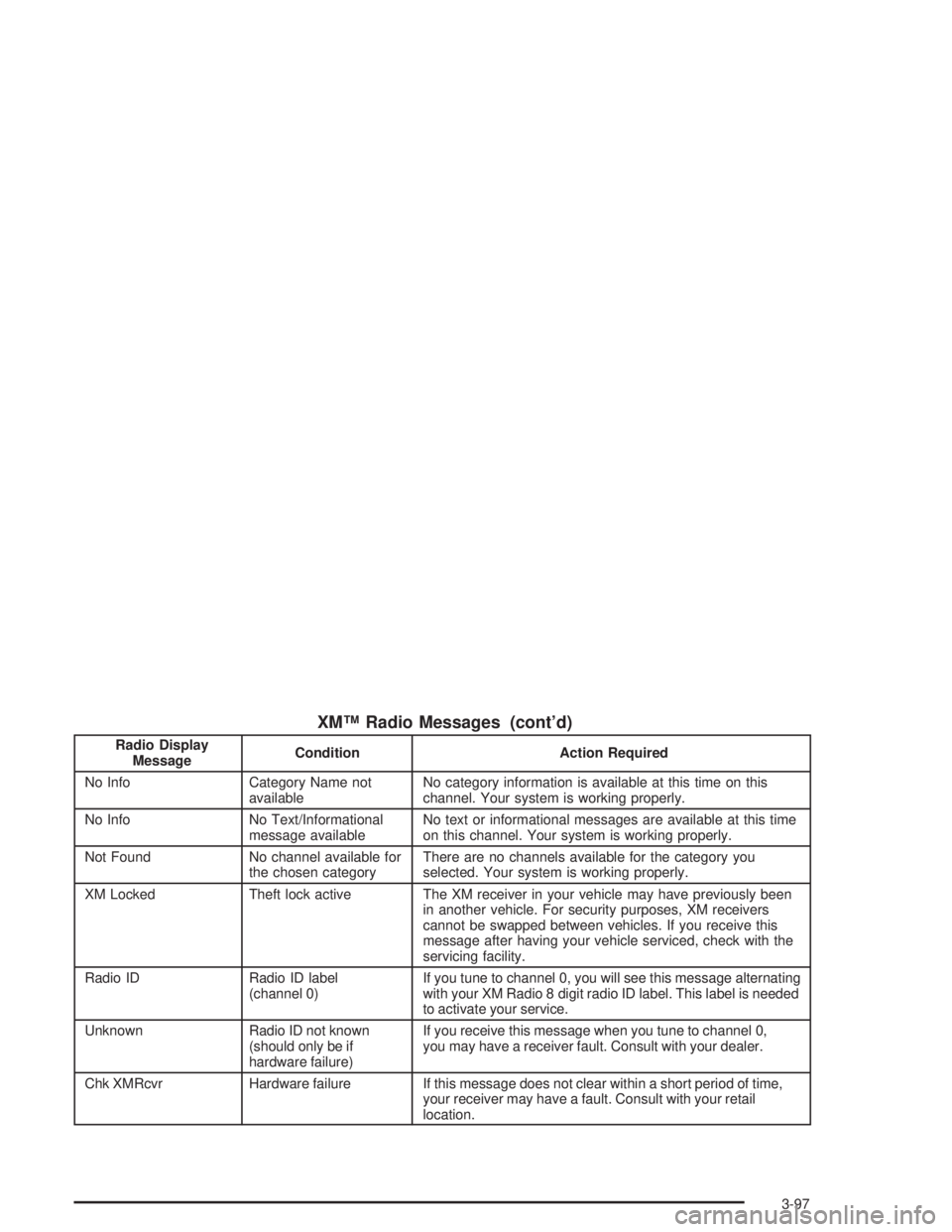
XMŸ Radio Messages (cont'd)
Radio Display
MessageCondition Action Required
No Info Category Name not
availableNo category information is available at this time on this
channel. Your system is working properly.
No Info No Text/Informational
message availableNo text or informational messages are available at this time
on this channel. Your system is working properly.
Not Found No channel available for
the chosen categoryThere are no channels available for the category you
selected. Your system is working properly.
XM Locked Theft lock active The XM receiver in your vehicle may have previously been
in another vehicle. For security purposes, XM receivers
cannot be swapped between vehicles. If you receive this
message after having your vehicle serviced, check with the
servicing facility.
Radio ID Radio ID label
(channel 0)If you tune to channel 0, you will see this message alternating
with your XM Radio 8 digit radio ID label. This label is needed
to activate your service.
Unknown Radio ID not known
(should only be if
hardware failure)If you receive this message when you tune to channel 0,
you may have a receiver fault. Consult with your dealer.
Chk XMRcvr Hardware failure If this message does not clear within a short period of time,
your receiver may have a fault. Consult with your retail
location.
3-97
Page 212 of 432
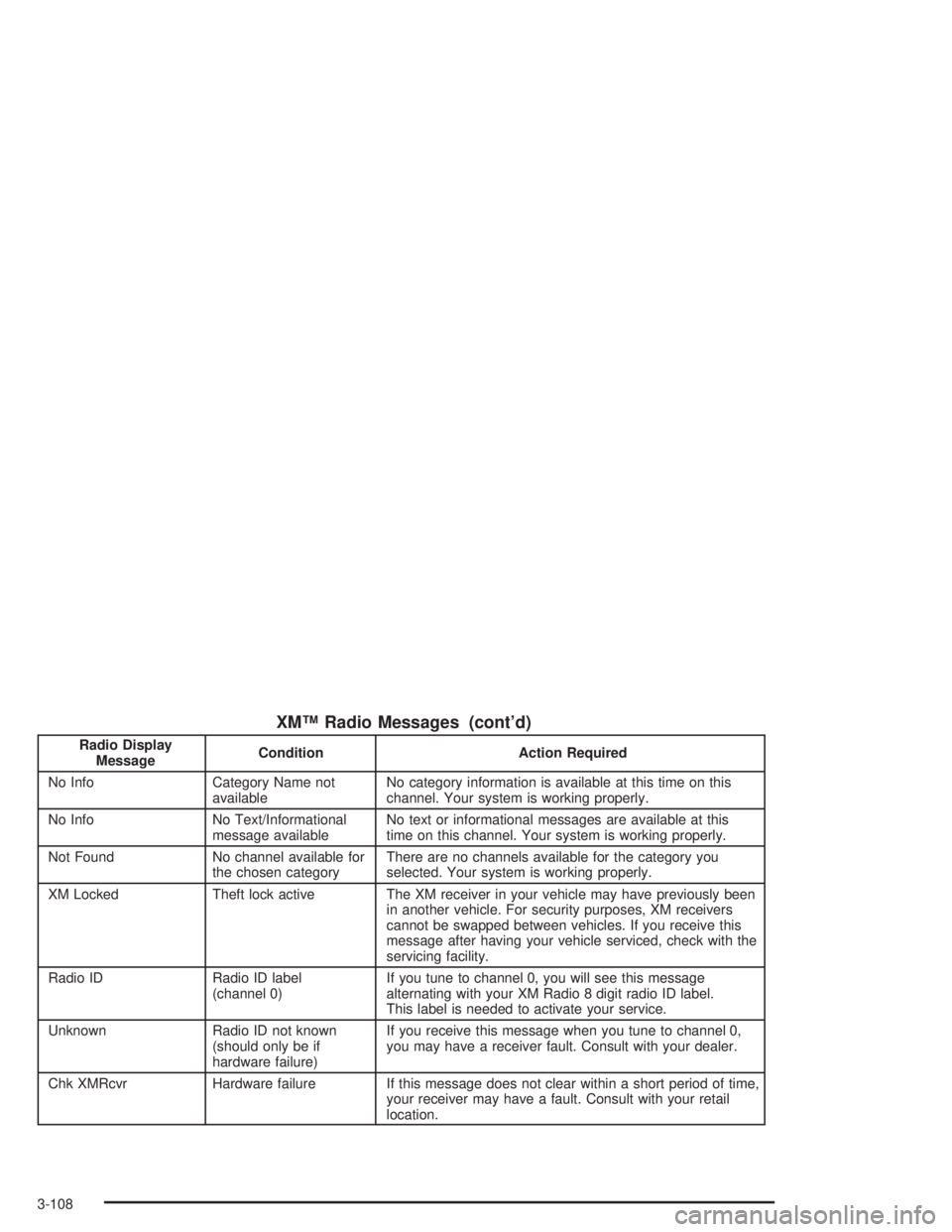
XMŸ Radio Messages (cont'd)
Radio Display
MessageCondition Action Required
No Info Category Name not
availableNo category information is available at this time on this
channel. Your system is working properly.
No Info No Text/Informational
message availableNo text or informational messages are available at this
time on this channel. Your system is working properly.
Not Found No channel available for
the chosen categoryThere are no channels available for the category you
selected. Your system is working properly.
XM Locked Theft lock active The XM receiver in your vehicle may have previously been
in another vehicle. For security purposes, XM receivers
cannot be swapped between vehicles. If you receive this
message after having your vehicle serviced, check with the
servicing facility.
Radio ID Radio ID label
(channel 0)If you tune to channel 0, you will see this message
alternating with your XM Radio 8 digit radio ID label.
This label is needed to activate your service.
Unknown Radio ID not known
(should only be if
hardware failure)If you receive this message when you tune to channel 0,
you may have a receiver fault. Consult with your dealer.
Chk XMRcvr Hardware failure If this message does not clear within a short period of time,
your receiver may have a fault. Consult with your retail
location.
3-108
Page 226 of 432
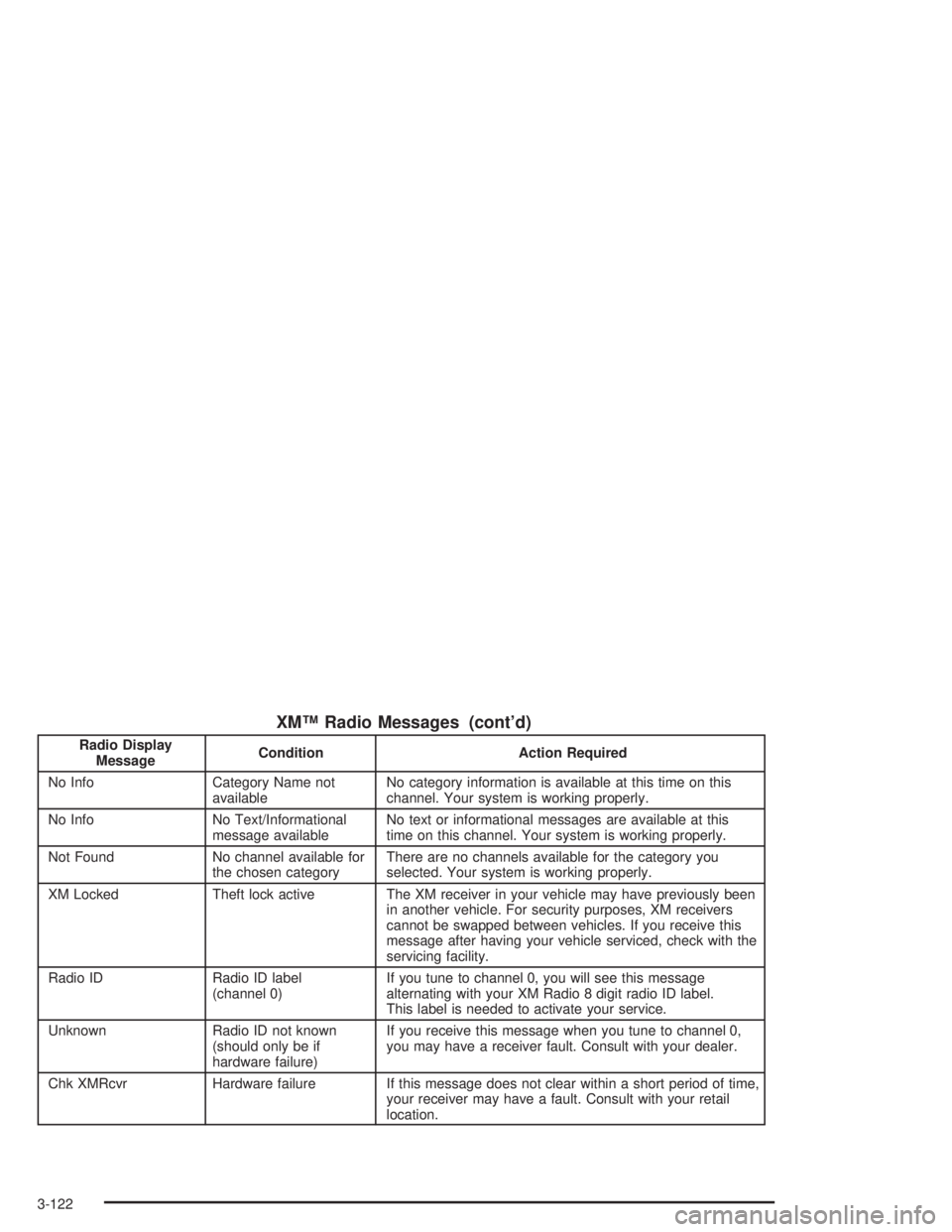
XMŸ Radio Messages (cont'd)
Radio Display
MessageCondition Action Required
No Info Category Name not
availableNo category information is available at this time on this
channel. Your system is working properly.
No Info No Text/Informational
message availableNo text or informational messages are available at this
time on this channel. Your system is working properly.
Not Found No channel available for
the chosen categoryThere are no channels available for the category you
selected. Your system is working properly.
XM Locked Theft lock active The XM receiver in your vehicle may have previously been
in another vehicle. For security purposes, XM receivers
cannot be swapped between vehicles. If you receive this
message after having your vehicle serviced, check with the
servicing facility.
Radio ID Radio ID label
(channel 0)If you tune to channel 0, you will see this message
alternating with your XM Radio 8 digit radio ID label.
This label is needed to activate your service.
Unknown Radio ID not known
(should only be if
hardware failure)If you receive this message when you tune to channel 0,
you may have a receiver fault. Consult with your dealer.
Chk XMRcvr Hardware failure If this message does not clear within a short period of time,
your receiver may have a fault. Consult with your retail
location.
3-122
Page 264 of 432
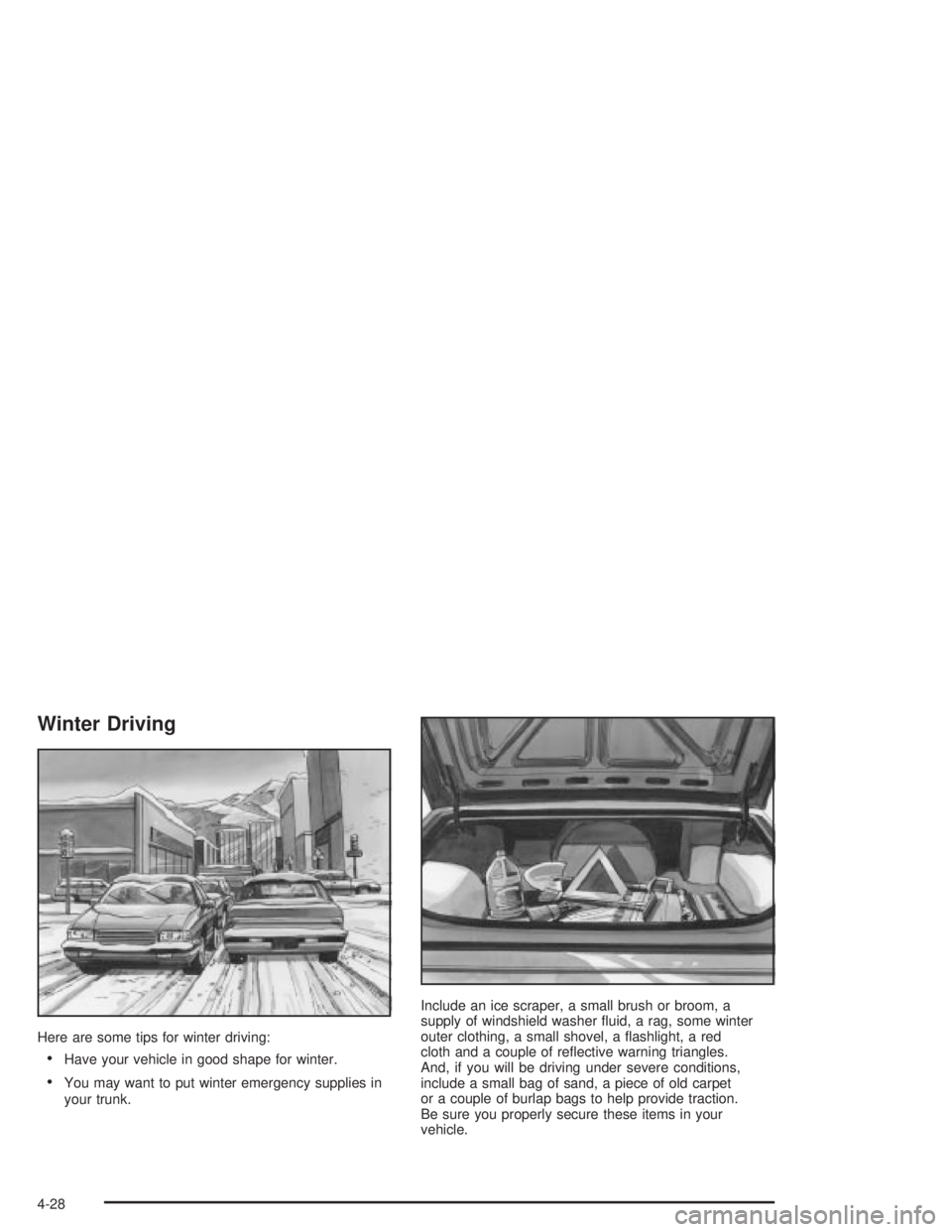
Winter Driving
Here are some tips for winter driving:
·Have your vehicle in good shape for winter.
·You may want to put winter emergency supplies in
your trunk.Include an ice scraper, a small brush or broom, a
supply of windshield washer ¯uid, a rag, some winter
outer clothing, a small shovel, a ¯ashlight, a red
cloth and a couple of re¯ective warning triangles.
And, if you will be driving under severe conditions,
include a small bag of sand, a piece of old carpet
or a couple of burlap bags to help provide traction.
Be sure you properly secure these items in your
vehicle.
4-28
Page 272 of 432
If you do have a heavy load, spread it out. Don't carry
more than 167 lbs (75 kg) in your trunk.
{CAUTION:
Do not load your vehicle any heavier than the
GVWR, or either the maximum front or rear
GAWR. If you do, parts on your vehicle can
break, and it can change the way your vehicle
handles. These could cause you to lose
control and crash. Also, overloading can
shorten the life of your vehicle.
Notice:Your warranty does not cover parts or
components that fail because of overloading.
If you put things inside your vehicle Ð like suitcases,
tools, packages or anything else Ð they will go as fast
as the vehicle goes. If you have to stop or turn
quickly, or if there is a crash, they'll keep going.
{CAUTION:
Things you put inside your vehicle can strike
and injure people in a sudden stop or turn, or
in a crash.
·Put things in the trunk of your vehicle. In a
trunk, put them as far forward as you can.
Try to spread the weight evenly.
·Never stack heavier things, like suitcases,
inside the vehicle so that some of them
are above the tops of the seats.
·Don't leave an unsecured child restraint in
your vehicle.
·When you carry something inside the
vehicle, secure it whenever you can.
·Don't leave a seat folded down unless you
need to.
4-36
Page 277 of 432
Driving with a Trailer
Towing a trailer requires a certain amount of experience.
Before setting out for the open road, you'll want to get
to know your rig. Acquaint yourself with the feel of
handling and braking with the added weight of the trailer.
And always keep in mind that the vehicle you are
driving is now a good deal longer and not nearly as
responsive as your vehicle is by itself.
Before you start, check the trailer hitch and platform
(and attachments), safety chains, electrical connector,
lamps, tires and mirror adjustment. If the trailer has
electric brakes, start your vehicle and trailer moving and
then apply the trailer brake controller by hand to be
sure the brakes are working. This lets you check your
electrical connection at the same time.
During your trip, check occasionally to be sure that the
load is secure, and that the lamps and any trailer
brakes are still working.
Following Distance
Stay at least twice as far behind the vehicle ahead as
you would when driving your vehicle without a trailer.
This can help you avoid situations that require
heavy braking and sudden turns.
Passing
You'll need more passing distance up ahead when
you're towing a trailer. And, because you're a good
deal longer, you'll need to go much farther beyond the
passed vehicle before you can return to your lane.
Backing Up
Hold the bottom of the steering wheel with one hand.
Then, to move the trailer to the left, just move that hand
to the left. To move the trailer to the right, move your
hand to the right. Always back up slowly and, if possible,
have someone guide you.
4-41