radio PONTIAC GRAND PRIX 2005 Owner's Guide
[x] Cancel search | Manufacturer: PONTIAC, Model Year: 2005, Model line: GRAND PRIX, Model: PONTIAC GRAND PRIX 2005Pages: 444, PDF Size: 2.6 MB
Page 216 of 444
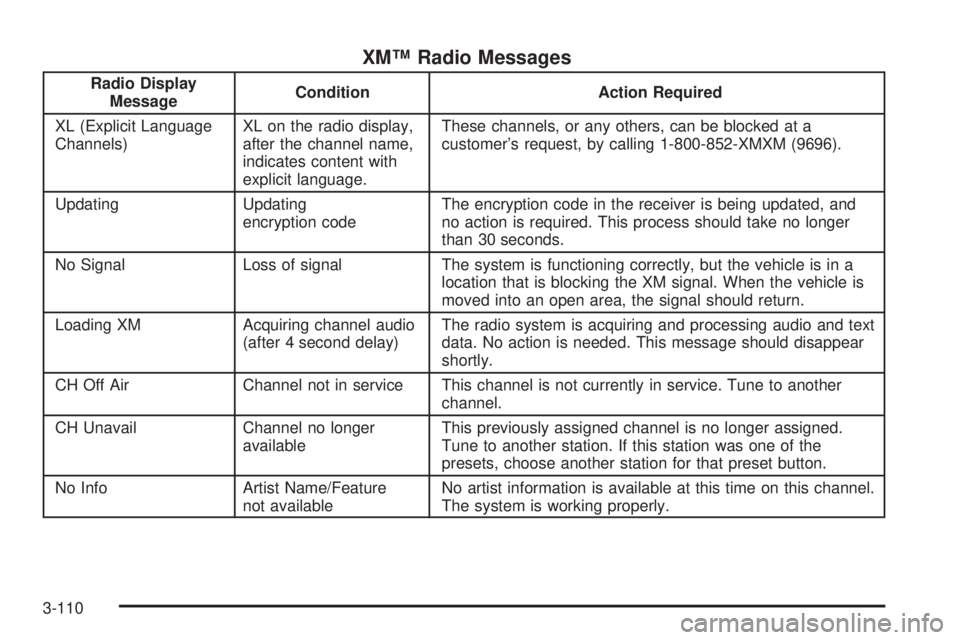
XM™ Radio Messages
Radio Display
MessageCondition Action Required
XL (Explicit Language
Channels)XL on the radio display,
after the channel name,
indicates content with
explicit language.These channels, or any others, can be blocked at a
customer’s request, by calling 1-800-852-XMXM (9696).
Updating Updating
encryption codeThe encryption code in the receiver is being updated, and
no action is required. This process should take no longer
than 30 seconds.
No Signal Loss of signal The system is functioning correctly, but the vehicle is in a
location that is blocking the XM signal. When the vehicle is
moved into an open area, the signal should return.
Loading XM Acquiring channel audio
(after 4 second delay)The radio system is acquiring and processing audio and text
data. No action is needed. This message should disappear
shortly.
CH Off Air Channel not in service This channel is not currently in service. Tune to another
channel.
CH Unavail Channel no longer
availableThis previously assigned channel is no longer assigned.
Tune to another station. If this station was one of the
presets, choose another station for that preset button.
No Info Artist Name/Feature
not availableNo artist information is available at this time on this channel.
The system is working properly.
3-110
Page 217 of 444
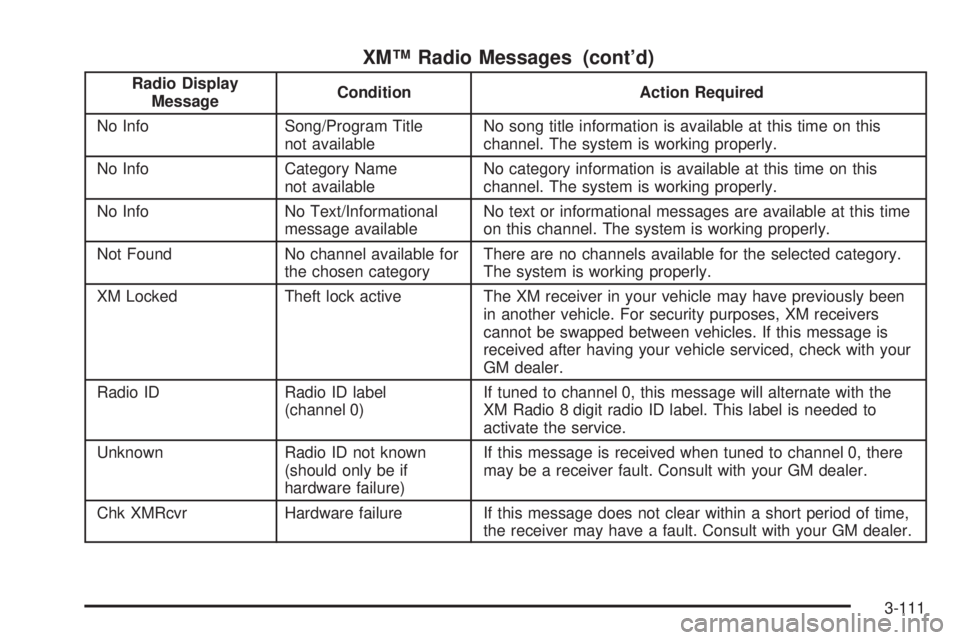
XM™ Radio Messages (cont’d)
Radio Display
MessageCondition Action Required
No Info Song/Program Title
not availableNo song title information is available at this time on this
channel. The system is working properly.
No Info Category Name
not availableNo category information is available at this time on this
channel. The system is working properly.
No Info No Text/Informational
message availableNo text or informational messages are available at this time
on this channel. The system is working properly.
Not Found No channel available for
the chosen categoryThere are no channels available for the selected category.
The system is working properly.
XM Locked Theft lock active The XM receiver in your vehicle may have previously been
in another vehicle. For security purposes, XM receivers
cannot be swapped between vehicles. If this message is
received after having your vehicle serviced, check with your
GM dealer.
Radio ID Radio ID label
(channel 0)If tuned to channel 0, this message will alternate with the
XM Radio 8 digit radio ID label. This label is needed to
activate the service.
Unknown Radio ID not known
(should only be if
hardware failure)If this message is received when tuned to channel 0, there
may be a receiver fault. Consult with your GM dealer.
Chk XMRcvr Hardware failure If this message does not clear within a short period of time,
the receiver may have a fault. Consult with your GM dealer.
3-111
Page 218 of 444
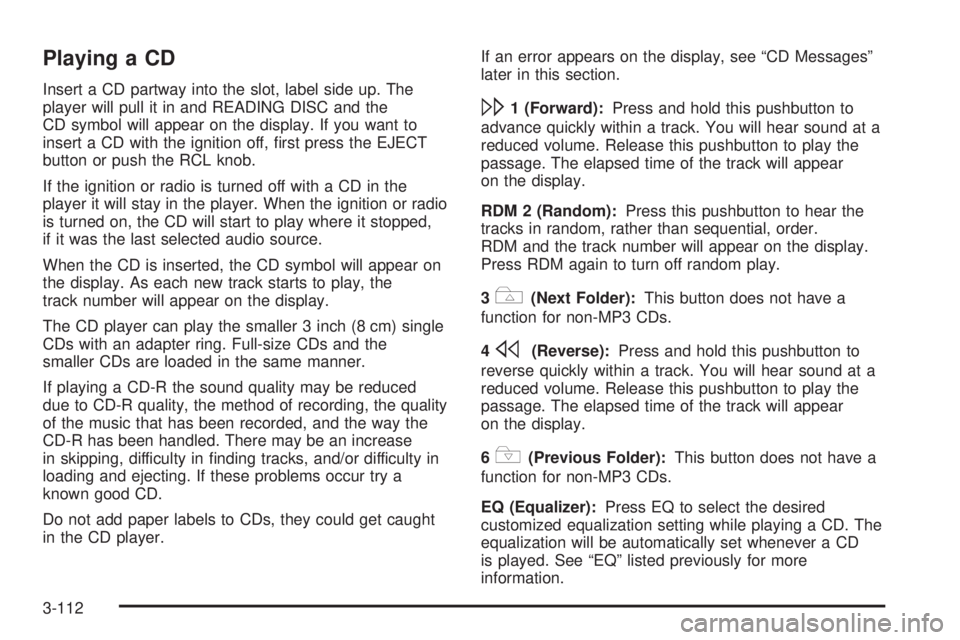
Playing a CD
Insert a CD partway into the slot, label side up. The
player will pull it in and READING DISC and the
CD symbol will appear on the display. If you want to
insert a CD with the ignition off, rst press the EJECT
button or push the RCL knob.
If the ignition or radio is turned off with a CD in the
player it will stay in the player. When the ignition or radio
is turned on, the CD will start to play where it stopped,
if it was the last selected audio source.
When the CD is inserted, the CD symbol will appear on
the display. As each new track starts to play, the
track number will appear on the display.
The CD player can play the smaller 3 inch (8 cm) single
CDs with an adapter ring. Full-size CDs and the
smaller CDs are loaded in the same manner.
If playing a CD-R the sound quality may be reduced
due to CD-R quality, the method of recording, the quality
of the music that has been recorded, and the way the
CD-R has been handled. There may be an increase
in skipping, difficulty in nding tracks, and/or difficulty in
loading and ejecting. If these problems occur try a
known good CD.
Do not add paper labels to CDs, they could get caught
in the CD player.If an error appears on the display, see “CD Messages”
later in this section.
\1 (Forward):Press and hold this pushbutton to
advance quickly within a track. You will hear sound at a
reduced volume. Release this pushbutton to play the
passage. The elapsed time of the track will appear
on the display.
RDM 2 (Random):Press this pushbutton to hear the
tracks in random, rather than sequential, order.
RDM and the track number will appear on the display.
Press RDM again to turn off random play.
3
#(Next Folder):This button does not have a
function for non-MP3 CDs.
4
s(Reverse):Press and hold this pushbutton to
reverse quickly within a track. You will hear sound at a
reduced volume. Release this pushbutton to play the
passage. The elapsed time of the track will appear
on the display.
6
!(Previous Folder):This button does not have a
function for non-MP3 CDs.
EQ (Equalizer):Press EQ to select the desired
customized equalization setting while playing a CD. The
equalization will be automatically set whenever a CD
is played. See “EQ” listed previously for more
information.
3-112
Page 219 of 444
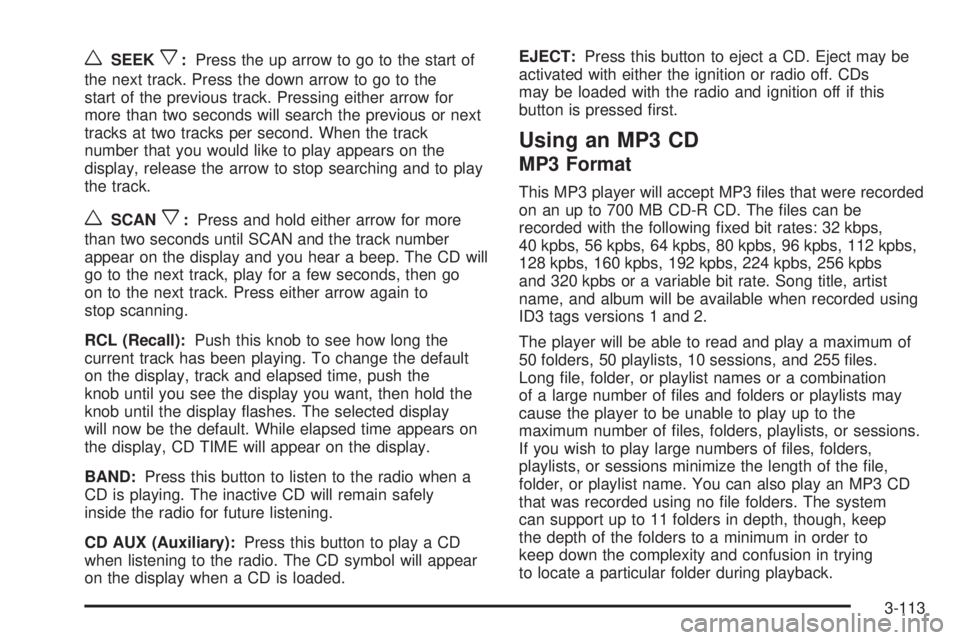
wSEEKx:Press the up arrow to go to the start of
the next track. Press the down arrow to go to the
start of the previous track. Pressing either arrow for
more than two seconds will search the previous or next
tracks at two tracks per second. When the track
number that you would like to play appears on the
display, release the arrow to stop searching and to play
the track.
wSCANx:Press and hold either arrow for more
than two seconds until SCAN and the track number
appear on the display and you hear a beep. The CD will
go to the next track, play for a few seconds, then go
on to the next track. Press either arrow again to
stop scanning.
RCL (Recall):Push this knob to see how long the
current track has been playing. To change the default
on the display, track and elapsed time, push the
knob until you see the display you want, then hold the
knob until the display ashes. The selected display
will now be the default. While elapsed time appears on
the display, CD TIME will appear on the display.
BAND:Press this button to listen to the radio when a
CD is playing. The inactive CD will remain safely
inside the radio for future listening.
CD AUX (Auxiliary):Press this button to play a CD
when listening to the radio. The CD symbol will appear
on the display when a CD is loaded.EJECT:Press this button to eject a CD. Eject may be
activated with either the ignition or radio off. CDs
may be loaded with the radio and ignition off if this
button is pressed rst.
Using an MP3 CD
MP3 Format
This MP3 player will accept MP3 les that were recorded
on an up to 700 MB CD-R CD. The les can be
recorded with the following xed bit rates: 32 kbps,
40 kpbs, 56 kpbs, 64 kpbs, 80 kpbs, 96 kpbs, 112 kpbs,
128 kpbs, 160 kpbs, 192 kpbs, 224 kpbs, 256 kpbs
and 320 kpbs or a variable bit rate. Song title, artist
name, and album will be available when recorded using
ID3 tags versions 1 and 2.
The player will be able to read and play a maximum of
50 folders, 50 playlists, 10 sessions, and 255 les.
Long le, folder, or playlist names or a combination
of a large number of les and folders or playlists may
cause the player to be unable to play up to the
maximum number of les, folders, playlists, or sessions.
If you wish to play large numbers of les, folders,
playlists, or sessions minimize the length of the le,
folder, or playlist name. You can also play an MP3 CD
that was recorded using no le folders. The system
can support up to 11 folders in depth, though, keep
the depth of the folders to a minimum in order to
keep down the complexity and confusion in trying
to locate a particular folder during playback.
3-113
Page 220 of 444
If a CD contains more than the maximum of 50 folders,
50 playlists, 10 sessions, and 255 les the player will
let you access and navigate up to the maximum, but all
items over the maximum will be ignored.
Root Directory
The root directory will be treated as a folder. If the root
directory has compressed audio les, the directory
will be displayed as F1 ROOT. All les contained directly
under the root directory will be accessed prior to any
root directory folders. However, playlists (Px) will always
be accessed before root folders or les.
Empty Directory or Folder
If a root directory or a folder exists somewhere in the
le structure that contains only folders/subfolders and no
compressed les directly beneath them, the player will
advance to the next folder in the le structure that
contains compressed audio les and the empty folder
will not be displayed or numbered.
No Folder
When the CD contains only compressed les, the les
will be located under the root folder. The next and
previous folder functions will have no function on a CD
that was recorded without folders or playlists. When
displaying the name of the folder the radio will
display ROOT.When the CD contains only playlists and compressed
audio les, but no folders, all les will be located under
the root folder. The folder down and the folder up
buttons will search playlists (Px) rst and then go to the
root folder. When the radio displays the name of the
folder the radio will display ROOT.
Order of Play
Tracks will be played in the following order:
Play will begin from the rst track in the rst playlist
and will continue sequentially through all tracks in
each playlist. When the last track of the last playlist
has been played, play will continue from the rst
track of the rst playlist.
If the CD does not contain any playlists, then play
will begin from the rst track under the root
directory. When all tracks from the root directory
have been played, play will continue from les
according to their numerical listing. After playing the
last track from the last folder, play will begin
again at the rst track of the rst folder or root
directory.
When play enters a new folder, the display will not
automatically show the new folder name unless
you have chosen the folder mode as the default display.
See RCL later in this section for more information.
The new track name will appear on the display.
3-114
Page 221 of 444
File System and Naming
The song name that will be displayed will be the song
name that is contained in the ID3 tag. If the song
name is not present in the ID3 tag, then the radio
will display the le name without the extension
(such as .mp3) as the track name.
Track names longer than 32 characters or 4 pages
will be shortened. The display will not show parts
of words on the last page of text and the extension
of the lename will not be displayed.
Preprogrammed Playlists
You can access preprogrammed playlists which
were created by WinAmp™, MusicMatch™, or Real
Jukebox™ software, however, you will not have editing
capability. These playlists will be treated as special
folders containing compressed audio song les.
Playing an MP3
Insert a CD partway into the slot, label side up. The
player will pull it in, and READING will appear on
the display. The CD should begin playing and the CD
symbol will appear on the display. If you want to insert
a CD with the ignition off, rst press the EJECT
button or the RCL knob.If the ignition or radio is turned off with a CD in the
player it will stay in the player. When the ignition or radio
is turned on, the CD will start to play where it stopped,
if it was the last selected audio source.
As each new track starts to play, the track number will
appear on the display.
The CD player can play the smaller 3 inch (8 cm)
single CDs with an adapter ring. Full-size CDs and the
smaller CDs are loaded in the same manner.
If playing a CD-R the sound quality may be reduced
due to CD-R quality, the method of recording, the quality
of the music that has been recorded, and the way the
CD-R has been handled. There may be an increase
in skipping, difficulty in nding tracks, and/or difficulty in
loading and ejecting. If these problems occur try a
known good CD.
Do not add paper labels to CDs, they could get caught
in the CD player.
If an error appears on the display, see “CD Messages”
later in this section.
3-115
Page 222 of 444
\1 (Forward):Press and hold this pushbutton to
advance quickly within a track. Press and hold this
pushbutton for less than two seconds to advance at
10 times the normal playing speed. Press and hold it for
more than two seconds to advance at 20 times the
normal playing speed. Release this pushbutton to play
the track. FWD and the elapsed time of the track
will appear on the display.
RDM 2 (Random):To repeat the tracks in the current
folder or playlist, press and release this pushbutton.
FOLDER RANDOM will appear on the display. Once all
of the tracks in the current folder or playlist have
been played, the system will move on to the next folder
or playlist and play all of the tracks in random order.
To repeat the tracks on the CD, press and hold
this pushbutton for two seconds. You will hear a beep
and DISC RANDOM will appear on the display. This
feature will not work with playlists.
When in random, pressing and releasing either SEEK
arrow will take you to the next or previous random track.
Press and release this pushbutton again to turn off
random play. NO RANDOM will appear on the display.3#(Next Folder):Press this pushbutton to go to
the rst track in the next folder or playlist. If the
disc contains playlists, it will go through the playlist,
then the folders. Pressing this button while in folder
random mode will take you to the next folder and
random the tracks in that folder. This function will not
work on a CD that does not contain folders or playlists.
4 REV (Reverse):Press and hold this pushbutton
to reverse quickly within a track. Press and hold this
pushbutton for less than two seconds to reverse
at 10 times the normal playing speed. Press and hold it
for more than two seconds to reverse at 20 times the
normal playing speed. Release this pushbutton to
play the track. REV and the elapsed time of the track
will appear on the display. If this pushbutton is pressed
for more than 20 seconds, the radio will stop reversing
and begin to play.
6
!(Previous Folder):Press this pushbutton to go
to the rst track in the previous folder or playlist. If
the disc contains playlists, it will go through the playlist,
then the folders. Pressing this pushbutton while in
folder random mode will take you to the previous folder
and random the tracks in that folder. This function
will not work on a CD that does not contain folders or
playlists.
3-116
Page 223 of 444
wSEEKx:Press the up arrow to go to the start of
the next track. Press the down arrow to go to the
start of the previous track. Pressing either arrow for
more than two seconds will search the previous or next
tracks at two tracks per second. When the track
number that you would like to play appears on the
display, release the arrow to stop searching and to play
the track.
TUNE:Turn this knob to fast track reverse or advance
through tracks in all folders or playlists. The track
number and le name will appear on the display for
each track. Turn this knob while in random to fast track
reverse or advance the tracks in sequential order.
RCL (Recall):Push this knob to switch between track
mode, folder/playlist mode, and time of day mode.
The display will show only 13 characters, but there can
be up to three pages of text. If there are more than
13 characters in the song, folder, or playlist name
pushing this knob within two seconds will take you to
the next page of text. If there are no other pages to be
shown, pushing this knob within two seconds will
take you to the next display mode.
Track mode will display the current track number and
the ID3 tag song name.Folder/playlist mode will display the current folder or
playlist number and the folder/playlist name.
Time of day mode will display the time of day and the
ID3 tag song name.
To change the default on the display, push this knob
until you see the display you want, then hold this knob
for two seconds. The radio will produce one beep
and the selected display will now be the default.
INFO (Information):INFO will appear on the display
whenever a current track has ID3 tag information. Press
this button to display the artist name and album
contained in the tag. INFO will disappear from the
display when the information in the ID3 tag has nished.
BAND:Press this button to listen to the radio when a
CD is playing. The inactive CD will remain safely
inside the radio for future listening.
CD AUX (Auxiliary):Press this button to play a CD
when listening to the radio. The CD symbol will appear
on the display when a CD is loaded.
EJECT:Press this button to eject a CD. Eject may be
activated with either the ignition or radio off. CDs
may be loaded with the radio and ignition off if this
button is pressed rst.
3-117
Page 224 of 444
CD Messages
CHECK CD:If this message appears on the display
and/or the CD comes out, it could be for one of the
following reasons:
It is very hot. When the temperature returns to
normal, the CD should play.
You are driving on a very rough road. When the
road becomes smoother, the CD should play.
The CD is dirty, scratched, wet, or upside down.
The air is very humid. If so, wait about an hour
and try again.
The format of the CD may not be compatible.
See “MP3 Format” earlier in this section.
There may have been a problem while burning
the CD.
The label may be caught in the CD player.
If the CD is not playing correctly, for any other reason,
try a known good CD.
If any error occurs repeatedly or if an error cannot be
corrected, contact your GM dealer. If the radio displays
an error message, write it down and provide it to
your GM dealer when reporting the problem.
Radio with Six-Disc CD
Radio Data System (RDS)
The audio system has a Radio Data System (RDS).
RDS features are available for use only on FM stations
that broadcast RDS information.
With RDS, the radio can do the following:
Seek to stations broadcasting the selected type of
programming
Receive announcements concerning local and
national emergencies
Display messages from radio stations
Seek to stations with traffic announcements
3-118
Page 225 of 444
This system relies upon receiving specic information
from these stations and will only work when the
information is available. In rare cases, a radio station
may broadcast incorrect information that will cause
the radio features to work improperly. If this happens,
contact the radio station.
While the radio is tuned to an RDS station, the station
name or call letters will appear on the display instead of
the frequency. RDS stations may also provide the
time of day, a program type (PTY) for current
programming, and the name of the program being
broadcast.
XM™ Satellite Radio Service
XM™ is a satellite radio service that is based in
the 48 contiguous United States. XM™ offers
100 coast-to-coast channels including music, news,
sports, talk, and children’s programming. XM™ provides
digital quality audio and text information that includes
song title and artist name. A service fee is required
in order to receive the XM™ service. For more
information, contact XM™ at www.xmradio.com or
call 1-800-852-XMXM (9696).
Playing the Radio
PWR (Power):Push this knob to turn the system
on and off.
VOLUME:Turn this knob to increase or to decrease
the volume.
RCL (Recall):Press this knob to switch the display
between the radio station frequency and the time. When
the ignition is off, press this knob to display the time.
For RDS, press the RCL knob to change what appears
on the display while using RDS. The display options
are station name, RDS station frequency, PTY, and the
name of the program (if available).
For XM™ (if equipped), press the RCL knob while in
XM mode to retrieve four different categories of
information related to the current song or channel:
Artist, Song Title, Category or PTY, Channel
Number/Channel Name.
To change the default on the display, press the RCL
knob until you see the display you want, then hold the
knob until the display ashes. The selected display
will now be the default.
AUTO VOL (Automatic Volume):With automatic
volume, the audio system adjusts automatically to make
up for road and wind noise as you drive.
3-119