radio PONTIAC GRAND PRIX 2005 User Guide
[x] Cancel search | Manufacturer: PONTIAC, Model Year: 2005, Model line: GRAND PRIX, Model: PONTIAC GRAND PRIX 2005Pages: 444, PDF Size: 2.6 MB
Page 163 of 444
REMOTE START:If your vehicle has the remote start
feature, this screen allows this feature to be turned
OFF or ON. The remote start feature allows you to start
the engine from outside of the vehicle using your
remote keyless entry transmitter. See “Remote Vehicle
Start” underRemote Keyless Entry System Operation
on page 2-5for more information.
If OFF is selected, the remote start feature will be
disabled.
If ON is selected, the remote start feature will be
enabled.
To program this mode, use the following procedure:
1. Press the set/reset button to scroll to OFF or ON.
2. Press the options button again to advance to
the next screen.
PROGRAMMING FINISHED will appear on the next
screen. This conrms that the personal options
programming is complete.
DISPLAY OFF will appear on the next screen. The
screen will count down and then go blank. Press the
options button to advance to a new screen.DIC Controls and Displays
(Uplevel DIC with Trip Computer)
The Driver Information Center (DIC) control buttons and
the message display screen are located above the
radio. The DIC gives important safety and maintenance
facts concerning the vehicle. The status of many of
the vehicle’s systems along with driver personalization
menus and warning messages about the vehicle’s
systems may display on the DIC screen.
The outside temperature automatically appears on the
bottom right corner of the DIC display screen. If the
outside temperature is below 38°F (3°C), the temperature
reading will toggle between displaying the outside
temperature and the word ICE for two minutes. If there is
a problem with the system that controls the temperature
display, the letters OC (Open Circuit) or SC (Short
Circuit) will appear on the display. If this occurs, have the
vehicle serviced by your GM dealer.
The vehicle’s transaxle position and the direction the
vehicle is traveling will also appear on the DIC screen.
3-57
Page 167 of 444
The time is set through the radio. SeeSetting the Time
on page 3-93for more information.
To set the date, use the following procedure:
1. Press the options button until the date is displayed
on the DIC.
2. Press the set/reset button to access the RESET
YEAR screen. The second position in the year
will be selected. Press and hold the set/reset button
to scroll through the available digits. Release the
button when the correct digit appears.
3. Press the options button to advance to the rst
position in the year. Press and hold the set/reset
button to scroll through the available digits. Release
the button when the correct digit appears.
4. Press the options button to advance to the months
of the year.
5. Press the set/reset button to scroll through the
months of the year, releasing the button when
the correct month appears.
6. Press the options button to advance to the
days of the month.
7. Press the set/reset button to scroll through the
days of the month, releasing the button when
the correct day appears.
8. Press the options button again to advance to the
main date screen. The screen will now display
the new date.Language:This menu allows selection of the language
in which the DIC messages will appear. The DIC can
be programmed in one of three languages: English,
French, or Spanish. The message on the HUD, if
equipped, will also appear in the language selected.
To change the language, use the following procedure:
1. Press the options button to enter the language
screen.
2. Press the set/reset button to scroll through and set
the language choice.
3. Press the options button again to advance to the
next screen.
Display Units:This menu allows selection of
measurements to be displayed in English or metric
units. The messages on the HUD, if equipped, and the
instrument panel cluster will also appear in the type
of measurement selected.
To set the display units function, use the following
procedure:
1. Press the set/reset button to select ENGLISH or
METRIC.
2. Press the options button to advance to the next
screen.
3-61
Page 198 of 444
Any of the following conditions may cause the traction
control system to turn off:
The traction control system is turned off by pressing
the TC (traction control) button located on the
center console. SeeTraction Control System (TCS)
on page 4-9orEnhanced Traction System (ETS)
on page 4-10for more information.
The battery is low.
There is a traction control system failure. See your
GM dealer for service.
TURN SIGNAL ON
This message will comes on if the vehicle is driven
for more than 0.75 mile (1.21 km) with one of the turn
signals on. It appears as a reminder to turn off the
turn signal.
This message only displays when the ignition is in RUN.
A chime will sound for two seconds and the message
will not disappear until the turn signal is manually turned
off, or a turn is completed.
Audio System(s)
Notice:Before adding any sound equipment to
your vehicle, like a tape player, CB radio, mobile
telephone, or two-way radio, make sure that it can
be added by checking with your dealer. Also,
check federal rules covering mobile radio and
telephone units. If sound equipment can be added,
it is very important to do it properly. Added
sound equipment may interfere with the operation
of your vehicle’s engine, radio, or other systems,
and even damage them. Your vehicle’s systems may
interfere with the operation of sound equipment
that has been added improperly.
Figure out which audio system is in your vehicle, nd
out what your audio system can do, and how to operate
all of its controls.
Your vehicle has a feature called Retained Accessory
Power (RAP). With RAP, the audio system can be
played even after the ignition is turned off. SeeRetained
Accessory Power (RAP) on page 2-22for more
information.
3-92
Page 199 of 444
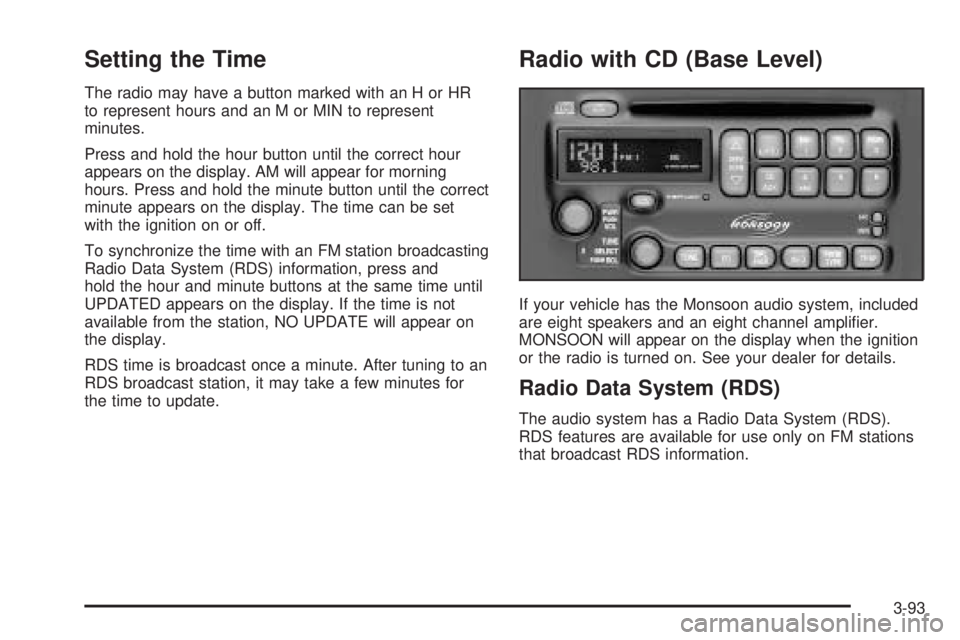
Setting the Time
The radio may have a button marked with an H or HR
to represent hours and an M or MIN to represent
minutes.
Press and hold the hour button until the correct hour
appears on the display. AM will appear for morning
hours. Press and hold the minute button until the correct
minute appears on the display. The time can be set
with the ignition on or off.
To synchronize the time with an FM station broadcasting
Radio Data System (RDS) information, press and
hold the hour and minute buttons at the same time until
UPDATED appears on the display. If the time is not
available from the station, NO UPDATE will appear on
the display.
RDS time is broadcast once a minute. After tuning to an
RDS broadcast station, it may take a few minutes for
the time to update.
Radio with CD (Base Level)
If your vehicle has the Monsoon audio system, included
are eight speakers and an eight channel amplier.
MONSOON will appear on the display when the ignition
or the radio is turned on. See your dealer for details.
Radio Data System (RDS)
The audio system has a Radio Data System (RDS).
RDS features are available for use only on FM stations
that broadcast RDS information.
3-93
Page 200 of 444
With RDS, the radio can do the following:
Seek to stations broadcasting the selected type of
programming
Receive announcements concerning local and
national emergencies
Display messages from radio stations
Seek to stations with traffic announcements
This system relies upon receiving specic information
from these stations and will only work when the
information is available. In rare cases, a radio station
may broadcast incorrect information that will cause
the radio features to work improperly. If this happens,
contact the radio station.
While the radio is tuned to an RDS station, the station
name or call letters will appear on the display instead of
the frequency. RDS stations may also provide the
time of day, a program type (PTY) for current
programming, and the name of the program being
broadcast.
XM™ Satellite Radio Service
XM™ is a satellite radio service that is based in the
48 contiguous United States. XM™ offers 100 coast to
coast channels including music, news, sports, talk,
and children’s programming. XM™ provides digital
quality audio and text information that includes song
title and artist name. A service fee is required in order
to receive the XM™ service. For more information,
contact XM™ at www.xmradio.com or call
1-800-852-XMXM (9696).
Playing the Radio
PWR (Power):Push this knob to turn the system
on and off.
VOL (Volume):Turn this knob to increase or to
decrease the volume.
SCV (Speed-Compensated Volume):With SCV,
the audio system adjusts automatically to make up
for road and wind noise as you drive.
3-94
Page 201 of 444
Set the volume at the desired level. Press this button to
select MIN, MED, or MAX. Each higher setting will
allow for more volume compensation at faster vehicle
speeds. Then, as you drive, SCV automatically
increases the volume, as necessary, to overcome noise
at any speed. The volume level should always sound
the same to you as you drive. To turn SCV off, press this
button until OFF appears on the display.
RCL (Recall):Push this knob to switch the display
between the radio station frequency and the time. When
the ignition is off, push this knob to display the time.
For RDS, push the RCL knob to change what appears
on the display while using RDS. The display options
are station name, RDS station frequency, PTY, and the
name of the program (if available).
For XM™ (if equipped), push the RCL knob while in
XM™ mode to retrieve four different categories of
information related to the current song or channel:
Artist, Song Title, Category or PTY, Channel
Number/Channel Name.
To change the default on the display, push the RCL
knob until you see the display you want, then hold the
knob until the display ashes. The selected display
will now be the default.Finding a Station
BAND:Press this button to switch between FM1, FM2,
AM, or XM1 or XM2 (if equipped). The display will
show the selection.
TUNE:Turn this knob to select radio stations.
wSEEKx:Press the up or the down arrow to go
to the next or to the previous station and stay there.
The radio will only seek stations with a strong signal that
are in the selected band.
wSCANx:Press and hold either arrow for
two seconds until SCAN appears on the display and
you hear a beep. The radio will go to a station, play
for a few seconds, then go on to the next station.
Press either arrow again to stop scanning.
To scan preset stations, press and hold either SCAN
arrow for more than four seconds until PSCAN and the
preset number appear on the display and you hear
a double beep. The radio will go to the rst preset
station stored on the pushbuttons, play for a few
seconds, then go on to the next preset station. Press
either SCAN arrow again to stop scanning presets.
The radio will only scan stations with a strong signal
that are in the selected band.
3-95
Page 202 of 444
Setting Preset Stations
Up to 30 stations (six FM1, six FM2, and six AM,
six XM1 and six XM2 (if equipped)), can be programmed
on the six numbered pushbuttons, by performing the
following steps:
1. Turn the radio on.
2. Press BAND to select FM1, FM2, AM, or XM1
or XM2.
3. Tune in the desired station.
4. Press EQ to select the equalization.
5. Press and hold one of the six numbered
pushbuttons until you hear a beep. Whenever that
numbered pushbutton is pressed, the station
that was set will return and the equalization that
was selected will be stored for that pushbutton.
6. Repeat the steps for each pushbutton.
Setting the Tone (Bass/Treble)
TONE:Press and release this button until BASS, MID,
or TREB appears on the display. The SELECT LED
indicator will light to show that the tone control can be
adjusted. Turn the SELECT knob to increase or to
decrease. If a station is weak or noisy, decrease
the treble.To return all of the tone controls to the middle position,
press and hold the TONE button until FLAT appears
on the display
EQ (Equalizer):Press this button to select customized
equalization settings.
Up to six customized equalization settings, can be
programmed, by performing the following steps:
1. Turn the radio on.
2. Use the TONE button and the SELECT knob to
create the equalization.
3. Press and hold the EQ button for two seconds.
SELECT EQ # will appear on the display and the
EQ symbol will ash.
4. Press EQ or turn the SELECT knob to select the
EQ number.
5. Press and hold the EQ button or push the SELECT
knob to store the equalization setting and the
number. EQ SAVED will appear on the display and
you will hear a beep.
6. Repeat the steps for the other EQ settings and
numbers.
EQ 5 has been programmed at the factory for use with
talk radio, but it can be preset to a different tone.
3-96
Page 203 of 444
Adjusting the Speakers (Balance/Fade)
BAL (Balance):To adjust the balance between the
right and the left speakers, press and release this button
until BAL appears on the display. The SELECT LED
indicator will light to show that the speakers can
be adjusted. Turn the SELECT knob to move the sound
toward the right or the left speakers.
FADE:To adjust the fade between the front and the
rear speakers, press and release this button until FADE
appears on the display. The SELECT LED indicator
will light to show that the speakers can be adjusted.
Turn the SELECT knob to move the sound toward the
front or the rear speakers.
Pressing and holding the BAL FADE button for
two seconds will return all speaker settings to the
middle position.
Finding a Program Type (PTY) Station
(RDS and XM™)
To select and nd a desired PTY perform the following:
1. Press the PROG TYPE button to activate program
type select mode. PTY will appear on the display.
2. Turn the SELECT knob to select a PTY.3. Once the desired PTY is displayed, press either
SEEK arrow to select the PTY and take you to
the PTY’s rst station.
4. To go to another station within that PTY, and the
PTY is displayed, press either SEEK arrow once.
If the PTY is not displayed, press either SEEK arrow
twice to display the PTY and then to go to another
station.
5. Press PROG TYPE to exit program type
select mode.
If PTY times out and is no longer on the display,
go back to Step 1.
If both PTY and TRAF are on, the radio will search for
stations with the selected PTY and traffic
announcements.
SCAN:Scan the stations within a PTY by performing
the following:
1. Press PROG TYPE to activate program type select
mode. PTY will appear on the display.
2. Turn the SELECT knob to select a PTY.
3. Once the desired PTY is displayed, press and hold
either SCAN arrow, and the radio will begin
scanning the stations in the PTY.
4. Press either SCAN arrow to stop at a station.
3-97
Page 204 of 444
If both PTY and TRAF are on, the radio will scan for
stations with the selected PTY and traffic
announcements.
BAND (Alternate Frequency):Alternate frequency
allows the radio to switch to a stronger station with the
same program type. To turn alternate frequency on,
press and hold BAND for two seconds. AF ON will
appear on the display. The radio may switch to stations
with a stronger frequency.
To turn alternate frequency off, press and hold BAND
again for two seconds. AF OFF will appear on the
display. The radio will not switch to other stations.
This function does not apply for XM™ Satellite Radio
Service.
Setting Preset PTYs (RDS Only)
These pushbuttons have factory PTY presets. Up to
12 PTYs (six FM1 and six FM2), can be programmed on
the six numbered pushbuttons, by performing the
following steps:
1. Press BAND to select FM1 or FM2.
2. Press PROG TYPE to activate program type select
mode. PTY will appear on the display.
3. Turn the SELECT knob to select a PTY.4. Press and hold one of the six numbered
pushbuttons until you hear a beep. Whenever that
numbered pushbutton is pressed, the PTY that
was set will return, if program type select mode is
activated.
5. Repeat the steps for each pushbutton.
RDS Messages
ALERT!:Alert warns of local or national emergencies.
When an alert announcement comes on the current
radio station, ALERT! will appear on the display. You will
hear the announcement, even if the volume is low or
a CD is playing. If a CD is playing, play will stop during
the announcement. Alert announcements cannot be
turned off.
ALERT! will not be affected by tests of the emergency
broadcast system. This feature is not supported by
all RDS stations.
INFO (Information):If the current station has a
message, INFO will appear on the display. Press this
button to see the message. The message may display
the artist, song title, call in phone numbers, etc.
3-98
Page 205 of 444
If the entire message is not displayed, parts of the
message will appear every three seconds. To scroll
through the message, press and release the INFO
button. A new group of words will appear on the display
after every press of the button. Once the complete
message has been displayed, INFO will disappear from
the display until another new message is received.
The last message can be displayed by pressing
the INFO button. You can view the last message until
a new message is received or a different station is
tuned to.
TRAF (Traffic):If TRAF appears on the display, the
tuned station broadcasts traffic announcements.
To receive the traffic announcement from the tuned
station, press this button. Brackets will be displayed
around TRAF and when a traffic announcement comes
on the tuned radio station you will hear it.
If the station does not broadcast traffic announcements,
press the TRAF button and the radio will seek to a
station that does. When a station that broadcasts traffic
announcements is found, the radio will stop seeking
and brackets will be displayed around TRAF. If no
station is found that broadcasts traffic announcements,
NO TRAFFIC will appear on the display.If the brackets are on the display and TRAF is not,
press the TRAF button to remove the brackets or use
the TUNE knob or the SEEK arrows to go to a
station that supports traffic announcements.
The radio will play the traffic announcement if the
volume is low. The radio will interrupt the play of a CD if
the last tuned station broadcasts traffic announcements
and the brackets are displayed.
This function does not apply to XM™ Satellite Radio
Service.
Radio Messages
CALIBRATE:The audio system has been calibrated for
your vehicle from the factory. If CALIBRATE appears
on the display it means that the radio has not been
congured properly for your vehicle and must be
returned to the dealer for service.
LOCKED:This message is displayed when the
THEFTLOCK
®system has locked up. Take the vehicle
to the dealer for service.
If any error occurs repeatedly or if an error cannot be
corrected, contact your dealer.
3-99