trip computer PONTIAC GRAND PRIX 2006 User Guide
[x] Cancel search | Manufacturer: PONTIAC, Model Year: 2006, Model line: GRAND PRIX, Model: PONTIAC GRAND PRIX 2006Pages: 472, PDF Size: 2.82 MB
Page 140 of 472
When the ignition key is turned to RUN, the HUD will
display an introductory message for a short time,
until the HUD has warmed up.
The following indicator lights come on the instrument
panel when activated and will also appear on the HUD:
Turn Signal Indicators
High-Beam Indicator Symbol
The HUD will temporarily display CHECK TRIP
COMPUTER when there are messages on the DIC trip
computer.
The HUD will also display the following messages when
these systems, if equipped, are active:
TRACTION CONTROL ACTIVE
STABILITY CONTROL ACTIVE
The HUD will temporarily display the TRACTION
CONTROL OFF message when the traction control
system is turned off.
The HUD will temporarily display the CRUISE SET
message when cruise control is activated or cruise
speed is increased.
Notice:If you try to use the HUD image as a
parking aid, you may misjudge the distance and
damage your vehicle. Do not use the HUD image as
a parking aid.When the HUD is on, the speedometer reading will
continually be displayed. The current radio station or
CD track number will display for a short period of time
after the radio or CD track status changes. This will
happen whenever one of the radio controls is pressed.
The speedometer size will be reduced when radio,
CD information, warnings, or turn-by-turn navigation
information are displayed on the HUD.
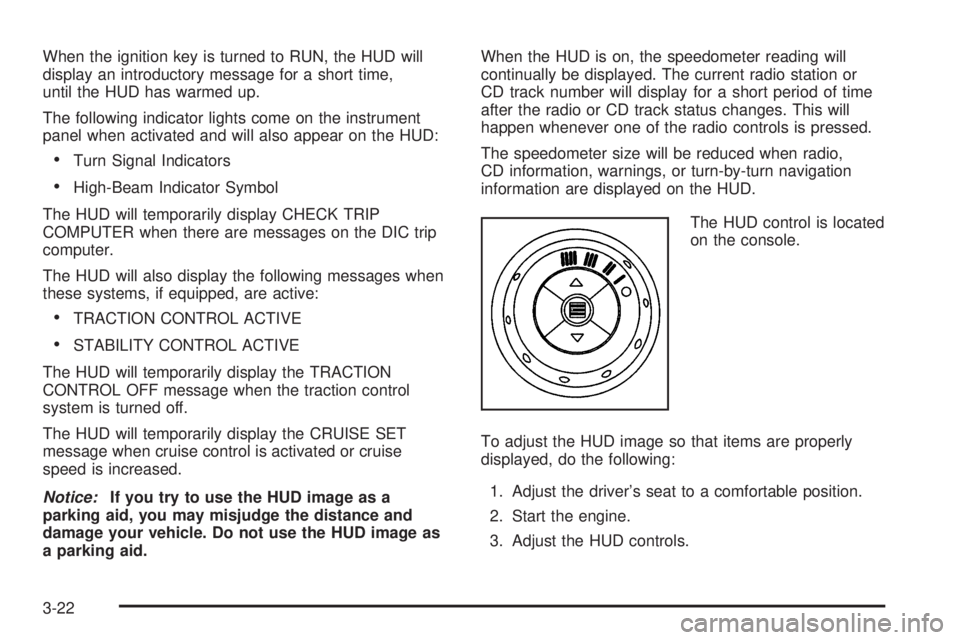
The HUD control is located
on the console.
To adjust the HUD image so that items are properly
displayed, do the following:
1. Adjust the driver’s seat to a comfortable position.
2. Start the engine.
3. Adjust the HUD controls.
3-22
Page 155 of 472
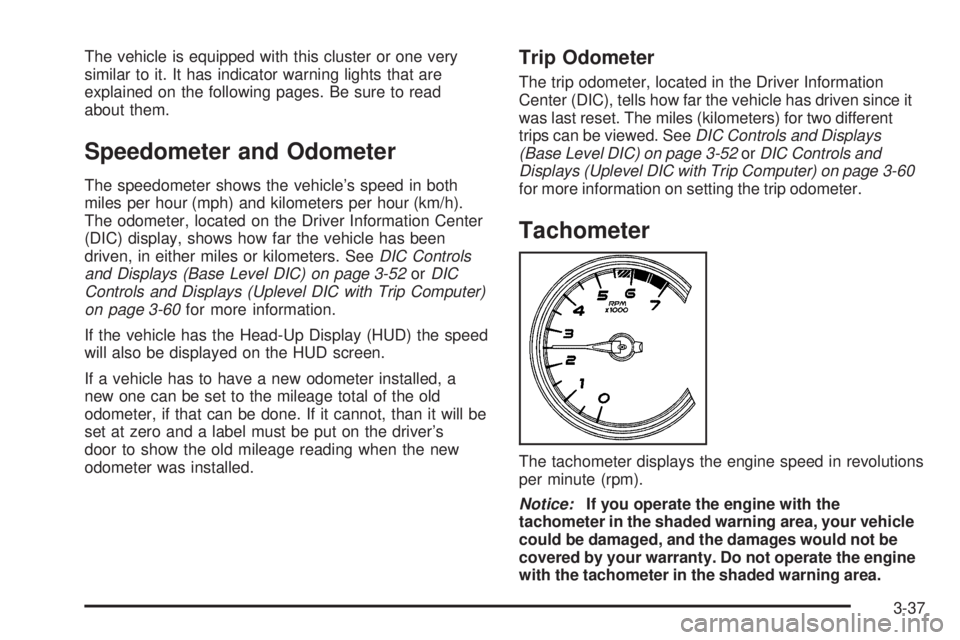
The vehicle is equipped with this cluster or one very
similar to it. It has indicator warning lights that are
explained on the following pages. Be sure to read
about them.
Speedometer and Odometer
The speedometer shows the vehicle’s speed in both
miles per hour (mph) and kilometers per hour (km/h).
The odometer, located on the Driver Information Center
(DIC) display, shows how far the vehicle has been
driven, in either miles or kilometers. SeeDIC Controls
and Displays (Base Level DIC) on page 3-52orDIC
Controls and Displays (Uplevel DIC with Trip Computer)
on page 3-60for more information.
If the vehicle has the Head-Up Display (HUD) the speed
will also be displayed on the HUD screen.
If a vehicle has to have a new odometer installed, a
new one can be set to the mileage total of the old
odometer, if that can be done. If it cannot, than it will be
set at zero and a label must be put on the driver’s
door to show the old mileage reading when the new
odometer was installed.
Trip Odometer
The trip odometer, located in the Driver Information
Center (DIC), tells how far the vehicle has driven since it
was last reset. The miles (kilometers) for two different
trips can be viewed. SeeDIC Controls and Displays
(Base Level DIC) on page 3-52orDIC Controls and
Displays (Uplevel DIC with Trip Computer) on page 3-60
for more information on setting the trip odometer.
Tachometer
The tachometer displays the engine speed in revolutions
per minute (rpm).
Notice:If you operate the engine with the
tachometer in the shaded warning area, your vehicle
could be damaged, and the damages would not be
covered by your warranty. Do not operate the engine
with the tachometer in the shaded warning area.
3-37
Page 178 of 472
DIC Controls and Displays (Uplevel
DIC with Trip Computer)
The Driver Information Center (DIC) control buttons and
the message display screen are located above the
radio. The DIC gives important safety and maintenance
facts concerning the vehicle. The status of many of
the vehicle’s systems along with driver personalization
menus and warning messages about the vehicle’s
systems may display on the DIC screen.
The outside temperature automatically appears on the
bottom right corner of the DIC display screen. If the
outside temperature is below 38°F (3°C), the temperature
reading will toggle between displaying the outside
temperature and the word ICE for two minutes. If there is
a problem with the system that controls the temperature
display, the letters OC (Open Circuit) or SC (Short
Circuit) will appear on the display. If this occurs, have the
vehicle serviced by
your GM dealer.
The vehicle’s transaxle position and the direction the
vehicle is traveling will also appear on the DIC screen.The compass is self-calibrating, which eliminates the
need to manually set the compass. However, under
certain circumstances, such as during a long distance
cross-country trip, it will be necessary to compensate for
compass variance and reset the zone through the
DIC. See “Setting the Compass” later in this section for
more information.
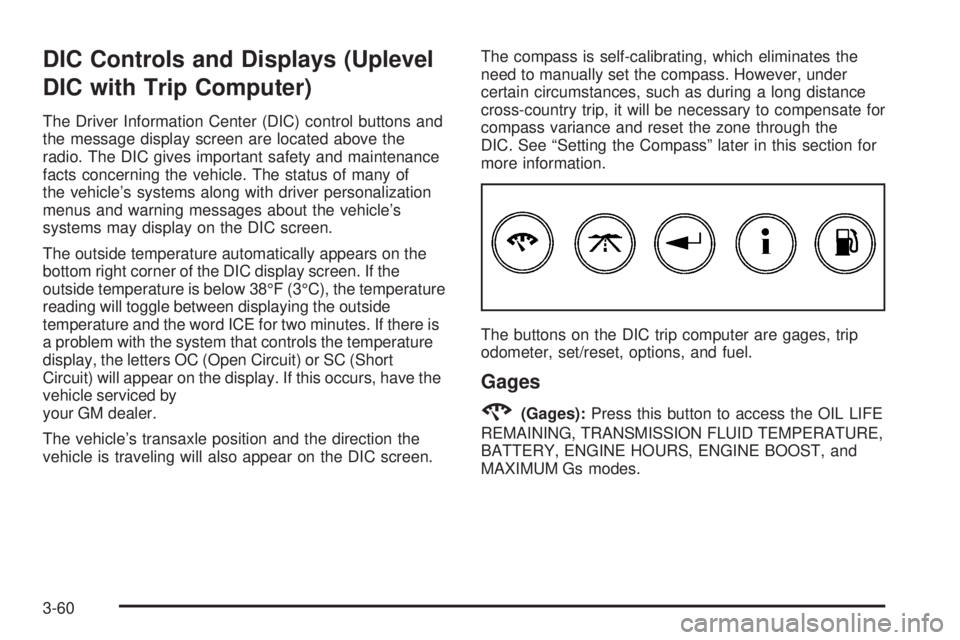
The buttons on the DIC trip computer are gages, trip
odometer, set/reset, options, and fuel.
Gages
2(Gages):Press this button to access the OIL LIFE
REMAINING, TRANSMISSION FLUID TEMPERATURE,
BATTERY, ENGINE HOURS, ENGINE BOOST, and
MAXIMUM Gs modes.
3-60
Page 190 of 472
DIC Warnings and Messages
These messages will appear if there is a problem in
one of the vehicle’s systems. They will override
any other mode or screen the Driver Information
Center (DIC) may be in.
Some messages can be cleared from the DIC screen.
In order to do this the message must be acknowledged.
To acknowledge or clear the message from the
screen, press the set/reset button on the DIC. SeeDIC
Controls and Displays (Base Level DIC) on page 3-52
orDIC Controls and Displays (Uplevel DIC with
Trip Computer) on page 3-60for DIC button
descriptions.
Other warning messages are not allowed to be cleared
until the problem indicated by the warning message
is taken care of. When the problem indicated by
the message is resolved, it can be acknowledged and
the screen can be reset.
Be sure to take any message that appears on the DIC
screen seriously and remember that clearing the
messages that are able to be acknowledged, will only
make the message disappear, not the problem.
A/C OFF FOR ENGINE PROTECTION
This warning message comes on when the engine
coolant becomes hotter than the normal operating
temperature. To avoid added strain on a hot engine, the
air conditioning compressor is automatically turned
off. When the coolant temperature returns to normal, the
air conditioning compressor will turn back on. The
vehicle can then continue to be driven.
This message comes on while the ignition is in RUN. A
chime will sound for two seconds when this message
is displayed. Press the set/reset button to acknowledge
this warning message and to clear it from the screen.
This message will continue to display for three seconds
if it has not been acknowledged when the engine is
turned off. It will also re-display for three seconds if the
message has been acknowledged, but the condition
still exists when the engine is turned off.
If the condition still exists, the message will re-appear
when the engine is turned on.
3-72
Page 192 of 472
The CHANGE OIL SOON message is reset by
acknowledging the message. The ENGINE OIL
MONITOR SYSTEM screen under the options menu on
the DIC must also be reset. See “Engine Oil Monitor
System” in options underDIC Controls and Displays
(Base Level DIC) on page 3-52orDIC Controls
and Displays (Uplevel DIC with Trip Computer) on
page 3-60for more information.
This message will display while the ignition is in RUN.
Press the set/reset button to acknowledge this message
and to clear it from the screen.
This message will continue to display for three seconds
if it has not been acknowledged when the engine is
turned off. It will also re-display for three seconds if the
message has been acknowledged, but the condition
still exists when the engine is turned off.
If the condition still exists, the message will re-appear
when the engine is turned on.CHARGING SYSTEM FAILURE
This symbol comes on
with the CHARGING
SYSTEM FAILURE
warning message.
This warning message indicates that there is a problem
with the generator and battery charging systems.
Have the electrical system checked by your GM dealer
as soon as possible.
This message will display while the ignition is in RUN. A
chime will sound for two seconds when this message
is displayed. Press the set/reset button to acknowledge
this message and to clear it from the screen.
This message will continue to display if it has not been
acknowledged when the engine is turned off. It will
also re-display for three seconds if the message has
been acknowledged, but the condition still exists
when the engine is turned off.
If the condition still exists, the message will re-appear
when the engine is turned on.
3-74
Page 193 of 472
CHECK GAS CAP
This warning message comes on when the gas cap is
not on, or is not fully tightened. Check the gas cap
to ensure it is on and properly tightened. The diagnostic
system can determine if the fuel cap has been left off
or improperly installed. A loose or missing fuel cap
will allow fuel to evaporate into the atmosphere. A few
driving trips with the cap properly installed should
turn this message off. SeeFilling the Tank on page 5-7
for more information.
This message will display while the ignition is in RUN. A
chime will sound for two seconds when this message
is displayed and then the message continues to display.
Press the set/reset button to acknowledge this
message and to clear it from the screen.
This message will continue to display for three seconds
if it has not been acknowledged when the engine is
turned off. It will also re-display for three seconds if the
message has been acknowledged, but the condition
still exists when the engine is turned off.
If the condition still exists, the message will re-appear
when the engine is turned on.
CHECK TIRE PRESSURE
This symbol comes
on with the CHECK
TIRE PRESSURE
warning message.
If the vehicle has ABS brakes, this warning message
will appear when the air pressure in one of the tires
is too low or too high. Check the vehicle’s tire pressure
as soon as possible, and ll or deate the affected
tire to the appropriate level. The correct tire ination
pressure should be set to those shown on the
tire-loading information label on the vehicle. See
Loading Your Vehicle on page 4-33for more information.
The CHECK TIRE PRESSURE screen is reset when
it is acknowledged. However, the TIRE INFLATION
MONITOR SYSTEM screen, located under the option
menu in the DIC, must also be reset. See “Tire Ination
Monitor System” in the options section underDIC
Controls and Displays (Base Level DIC) on page 3-52
orDIC Controls and Displays (Uplevel DIC with Trip
Computer) on page 3-60for more information.
3-75
Page 194 of 472
This message will display while the ignition is in RUN. A
chime will sound for two seconds when this message
is displayed. Press the set/reset button to acknowledge
this message and to clear it from the screen.
This message will continue to display for three seconds
if it has not been acknowledged when the engine is
turned off. It will also re-display for three seconds if the
message has been acknowledged, but the condition
still exists when the engine is turned off.
If the condition still exists, the message will re-appear
when the engine is turned on.
CRUISE SET
This symbol comes
on with the CRUISE
SET message.
This message and symbol come on briey whenever
the cruise control is set. The cruise control light on the
instrument panel cluster will also come on whencruise control is set. SeeCruise Control Light on
page 3-51. CRUISE SET will also appear briey in the
Head-Up Display (HUD), if your vehicle has this feature.
This message will display when the ignition is in RUN.
SeeCruise Control on page 3-11for more information.
This message does not need to be acknowledged.
DELAYED LOCKING
This message comes on when the doors of the vehicle
are closed and the delayed locking feature has been
programmed through the DIC. See “Delayed Locking” in
the options menu underDIC Controls and Displays
(Base Level DIC) on page 3-52orDIC Controls
and Displays (Uplevel DIC with Trip Computer) on
page 3-60for more information.
This message will appear when the ignition is in OFF. A
chime will sound for two seconds when this message
is displayed.
This message cannot be acknowledged.
3-76
Page 196 of 472
This message will display only while the ignition is in
RUN. A chime will sound continuously when this
message is displayed. Press the set/reset button to
acknowledge this message and to clear it from
the screen.
This message will continue to display if it has not been
acknowledged when the engine is turned off. It will
also re-display for three seconds if the message has
been acknowledged, but the condition still exists
when the engine is turned off.
If the condition still exists, the message will re-appear
when the engine is turned on.
HOT ENGINE OIL. REDUCE SPEED
On some vehicles, this warning message comes on
when the vehicle’s engine oil is above the proper engine
operating temperature. Reduce the speed of the
vehicle. If the warning message continues to display,
have the vehicle serviced by your GM dealer as soon as
possible. A chime will sound continuously when this
message is displayed. Press the set/reset button
to acknowledge this warning message. This clears it
from the screen.
If the condition still exists, the message will re-appear
when the engine is turned on.
HOT TRANS FLUID
This symbol comes on with
the HOT TRANS FLUID
warning message.
This warning message will appear when the transaxle
uid in the vehicle is too hot. Stop the vehicle and allow
it to idle until it cools down. If the warning message
continues to display, have the vehicle serviced by your
GM dealer as soon as possible.
If the vehicle has the Uplevel Trip Computer DIC, you
can determine the actual temperature of the transaxle
uid using the vehicle’s gages button. SeeDIC Controls
and Displays (Base Level DIC) on page 3-52orDIC
Controls and Displays (Uplevel DIC with Trip Computer)
on page 3-60for more information.
This message will display while the ignition is in RUN. A
chime will sound for two seconds when this message
is displayed. Press the set/reset button to acknowledge
this message and to clear it from the screen.
3-78
Page 203 of 472
See “REMOTE START” underDIC Controls and
Displays (Base Level DIC) on page 3-52orDIC Controls
and Displays (Uplevel DIC with Trip Computer) on
page 3-60and “Remote Vehicle Start” underRemote
Keyless Entry System Operation on page 2-4for
more information.
RIGHT FRONT TURN LAMP OUT
This warning message will come on when the vehicle’s
right front turn signal needs to be replaced. See
Front Turn Signal, Parking and Fog Lamps on page 5-56
for bulb replacement procedures.
This message will display only while the ignition is in
RUN. A chime will sound for two seconds while
this message is displayed. Press the set/reset button
to acknowledge this message and to clear it from
the screen.
This message will continue to display if it has not been
acknowledged when the engine is turned off. It will
also re-display for three seconds if the message has
been acknowledged, but the condition still exists
when the engine is turned off.
If the condition still exists, the message will re-appear
when the engine is turned on.
RIGHT REAR TURN LAMP OUT
This warning message will come on when the vehicle’s
right rear turn signal needs to be replaced. See
Taillamps, Turn Signal, and Stoplamps on page 5-57for
bulb replacement procedures.
This message will display only while the ignition is in
RUN. A chime will sound for two seconds while
this message is displayed. Press the set/reset button
to acknowledge this message and to clear it from
the screen.
This message will continue to display if it has not been
acknowledged when the engine is turned off. It will
also re-display for three seconds if the message has
been acknowledged, but the condition still exists
when the engine is turned off.
If the condition still exists, the message will re-appear
when the engine is turned on.
3-85
Page 326 of 472
How to Reset the Engine Oil
Life System
The Engine Oil Life System calculates when to change
the engine oil and lter based on vehicle use. Anytime
the oil is changed, reset the system so it can calculate
when the next oil change is required. If a situation
occurs where you change the oil prior to a CHANGE
OIL SOON message appearing on the DIC, reset
the system.
To reset the oil life system, after the oil has been
changed, use the following procedure:
1. Press the options button on the DIC until ENGINE
OIL MONITOR appears on the DIC screen.
2. Press the set/reset button to reset the system.
The next screen indicates that the engine oil
monitor system has been reset.
If the vehicle is equipped with the trip computer
DIC, when the gage button is pressed and the OIL
LIFE REMAINING mode appears, it should read
100 percent OIL LIFE REMAINING.
3. Turn the key to OFF.
If the CHANGE OIL SOON message comes back on
when you start your vehicle, the engine oil life system
has not reset. Repeat the procedure.
What to Do with Used Oil
Used engine oil contains certain elements that may be
unhealthy for your skin and could even cause cancer.
Do not let used oil stay on your skin for very long. Clean
your skin and nails with soap and water, or a good
hand cleaner. Wash or properly dispose of clothing or
rags containing used engine oil. See the manufacturer’s
warnings about the use and disposal of oil products.
Used oil can be a threat to the environment. If you
change your own oil, be sure to drain all the oil from the
lter before disposal. Never dispose of oil by putting it in
the trash, pouring it on the ground, into sewers, or into
streams or bodies of water. Instead, recycle it by taking it
to a place that collects used oil. If you have a problem
properly disposing of used oil, ask your dealer, a service
station, or a local recycling center for help.
Supercharger Oil
Because they are technically qualied and have the
proper tools, you should have your dealer perform this
maintenance.
5-20