ESP PONTIAC GRAND PRIX 2006 Owners Manual
[x] Cancel search | Manufacturer: PONTIAC, Model Year: 2006, Model line: GRAND PRIX, Model: PONTIAC GRAND PRIX 2006Pages: 472, PDF Size: 2.82 MB
Page 20 of 472
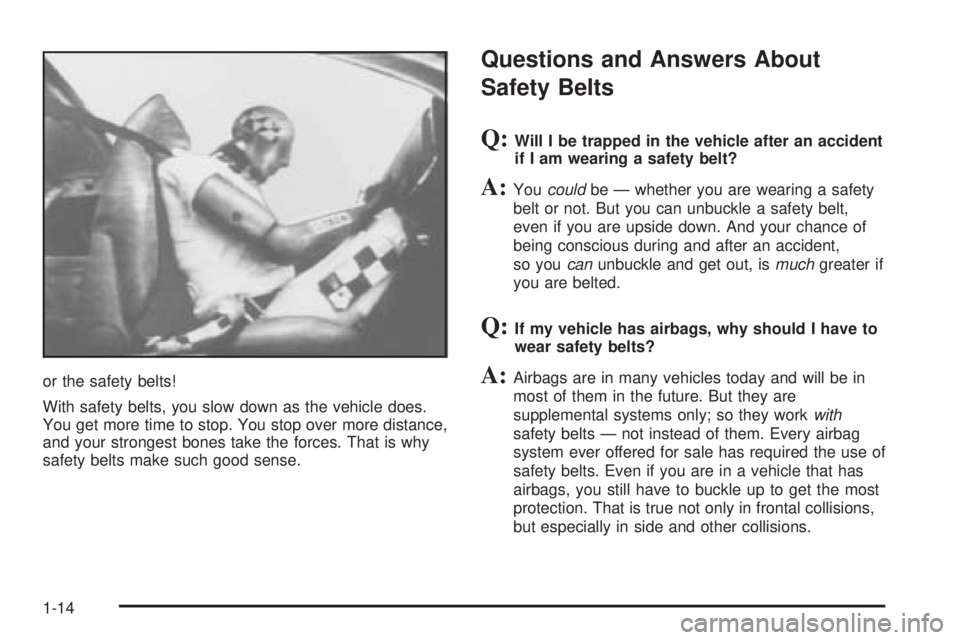
or the safety belts!
With safety belts, you slow down as the vehicle does.
You get more time to stop. You stop over more distance,
and your strongest bones take the forces. That is why
safety belts make such good sense.
Questions and Answers About
Safety Belts
Q:Will I be trapped in the vehicle after an accident
if I am wearing a safety belt?
A:Youcouldbe — whether you are wearing a safety
belt or not. But you can unbuckle a safety belt,
even if you are upside down. And your chance of
being conscious during and after an accident,
so youcanunbuckle and get out, ismuchgreater if
you are belted.
Q:If my vehicle has airbags, why should I have to
wear safety belts?
A:Airbags are in many vehicles today and will be in
most of them in the future. But they are
supplemental systems only; so they workwith
safety belts — not instead of them. Every airbag
system ever offered for sale has required the use of
safety belts. Even if you are in a vehicle that has
airbags, you still have to buckle up to get the most
protection. That is true not only in frontal collisions,
but especially in side and other collisions.
1-14
Page 84 of 472
Doors and Locks
Door Locks
{CAUTION:
Unlocked doors can be dangerous.
Passengers — especially children — can
easily open the doors and fall out of a
moving vehicle. When a door is locked, the
handle will not open it. You increase the
chance of being thrown out of the vehicle
in a crash if the doors are not locked. So,
wear safety belts properly and lock the
doors whenever you drive.
Young children who get into unlocked
vehicles may be unable to get out. A child
can be overcome by extreme heat and can
suffer permanent injuries or even death
from heat stroke. Always lock your vehicle
whenever you leave it.
Outsiders can easily enter through an
unlocked door when you slow down or
stop your vehicle. Locking your doors can
help prevent this from happening.There are several ways to lock and unlock the vehicle.
From the outside, use the key or remote keyless
entry transmitter.
From the inside, use the manual or power door locks.
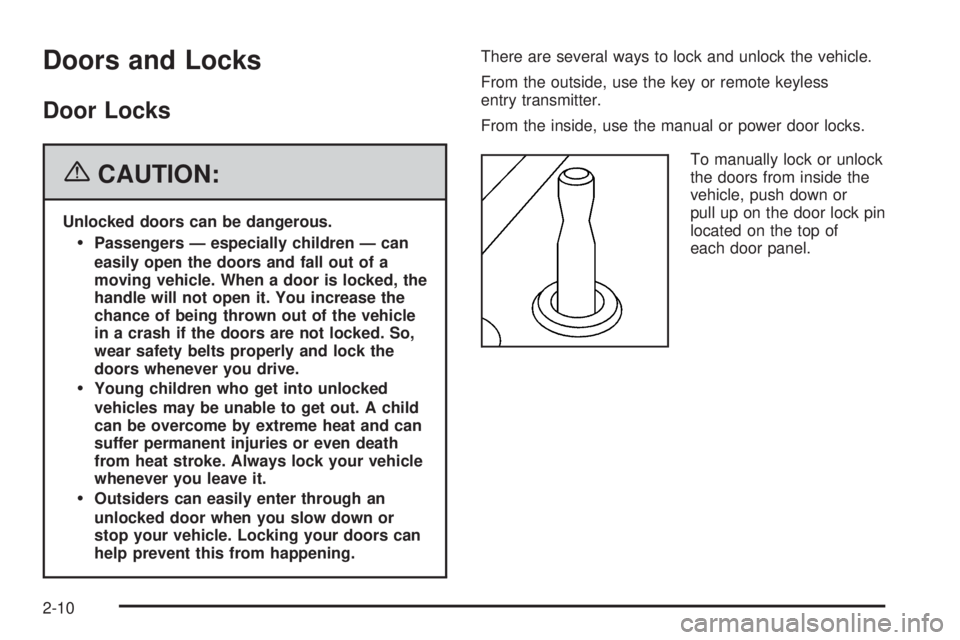
To manually lock or unlock
the doors from inside the
vehicle, push down or
pull up on the door lock pin
located on the top of
each door panel.
2-10
Page 88 of 472
To open the trunk from the inside, use the power door
lock switch located on the driver’s or front passenger’s
door. See “Remote Trunk Release” following.
The vehicle must be in PARK (P) in order for the trunk
to open.
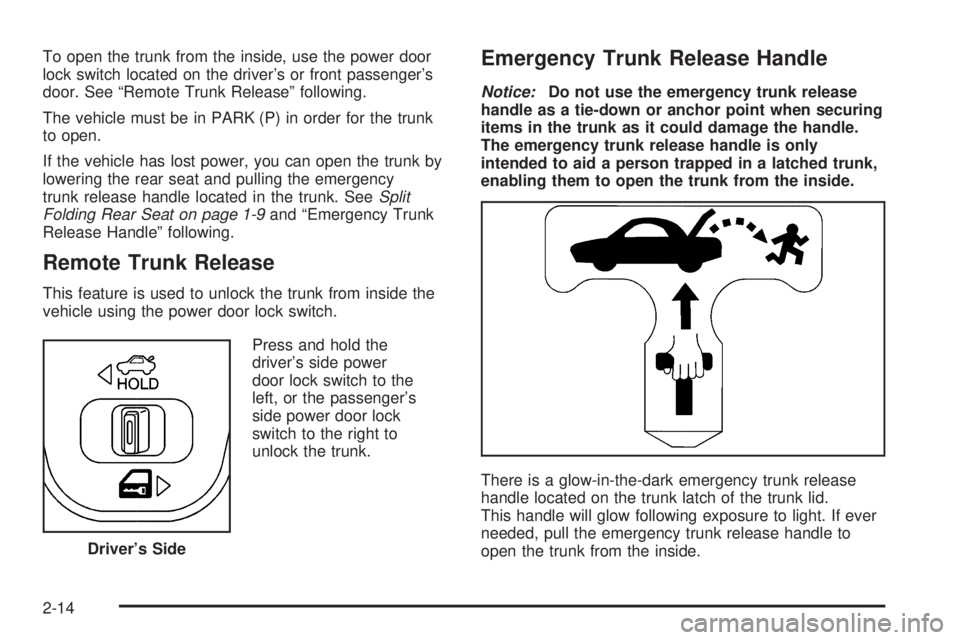
If the vehicle has lost power, you can open the trunk by
lowering the rear seat and pulling the emergency
trunk release handle located in the trunk. SeeSplit
Folding Rear Seat on page 1-9and “Emergency Trunk
Release Handle” following.
Remote Trunk Release
This feature is used to unlock the trunk from inside the
vehicle using the power door lock switch.
Press and hold the
driver’s side power
door lock switch to the
left, or the passenger’s
side power door lock
switch to the right to
unlock the trunk.
Emergency Trunk Release Handle
Notice:Do not use the emergency trunk release
handle as a tie-down or anchor point when securing
items in the trunk as it could damage the handle.
The emergency trunk release handle is only
intended to aid a person trapped in a latched trunk,
enabling them to open the trunk from the inside.
There is a glow-in-the-dark emergency trunk release
handle located on the trunk latch of the trunk lid.
This handle will glow following exposure to light. If ever
needed, pull the emergency trunk release handle to
open the trunk from the inside. Driver’s Side
2-14
Page 89 of 472
Windows
{CAUTION:
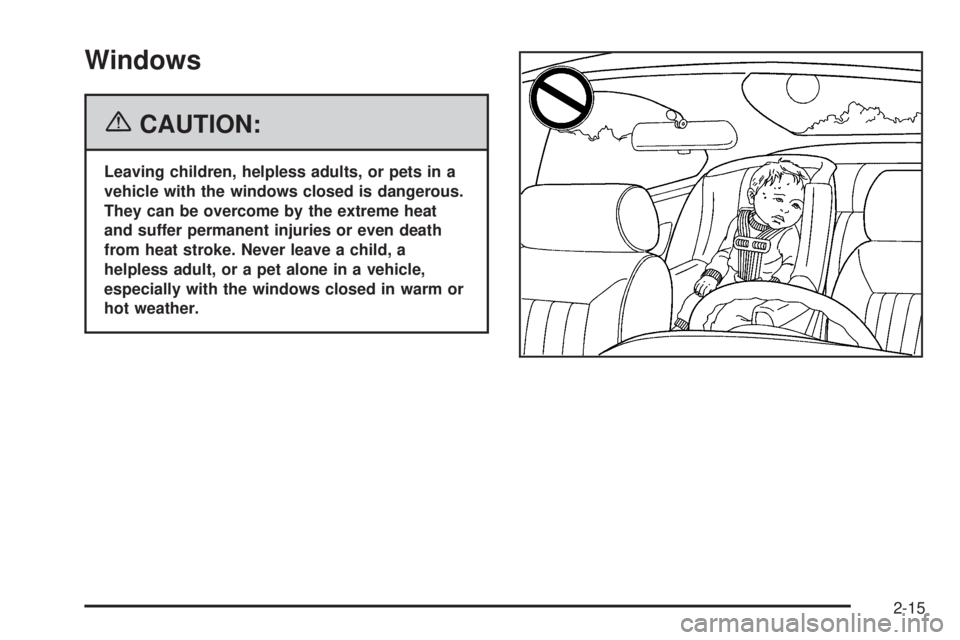
Leaving children, helpless adults, or pets in a
vehicle with the windows closed is dangerous.
They can be overcome by the extreme heat
and suffer permanent injuries or even death
from heat stroke. Never leave a child, a
helpless adult, or a pet alone in a vehicle,
especially with the windows closed in warm or
hot weather.
2-15
Page 91 of 472
Sun Visors
To help block out glare, pull the sun visors down. Pull
on the inside edges of the sun visors to swing them from
the front windshield to the side window.
Visor Vanity Mirror
Raise the cover on the top of the sun visor to expose
the vanity mirror. If the vehicle has lighted vanity mirrors,
the lamps come on when the cover is opened.
Theft-Deterrent Systems
Vehicle theft is big business, especially in some cities.
Although your vehicle has a number of theft-deterrent
features, we know that nothing we put on it can make it
impossible to steal.
Content Theft-Deterrent
The vehicle has a content theft-deterrent alarm system.
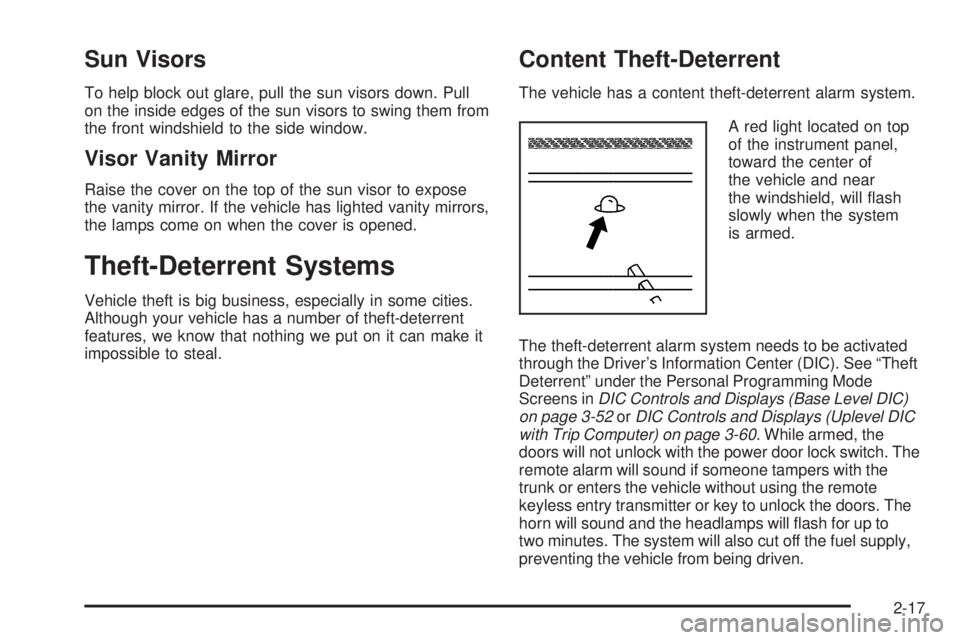
A red light located on top
of the instrument panel,
toward the center of
the vehicle and near
the windshield, will ash
slowly when the system
is armed.
The theft-deterrent alarm system needs to be activated
through the Driver’s Information Center (DIC). See “Theft
Deterrent” under the Personal Programming Mode
Screens inDIC Controls and Displays (Base Level DIC)
on page 3-52orDIC Controls and Displays (Uplevel DIC
with Trip Computer) on page 3-60. While armed, the
doors will not unlock with the power door lock switch. The
remote alarm will sound if someone tampers with the
trunk or enters the vehicle without using the remote
keyless entry transmitter or key to unlock the doors. The
horn will sound and the headlamps will ash for up to
two minutes. The system will also cut off the fuel supply,
preventing the vehicle from being driven.
2-17
Page 103 of 472
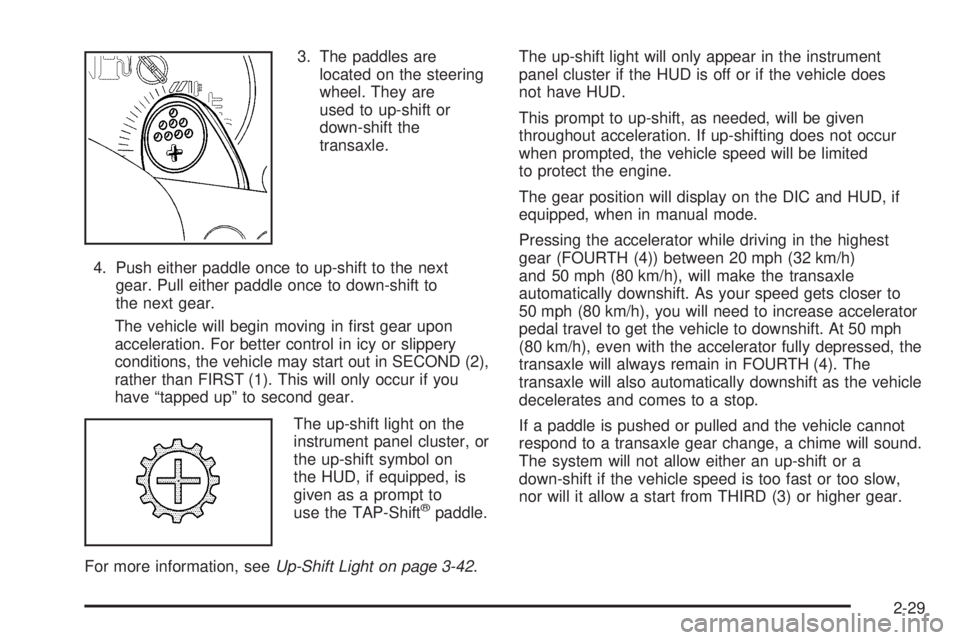
3. The paddles are
located on the steering
wheel. They are
used to up-shift or
down-shift the
transaxle.
4. Push either paddle once to up-shift to the next
gear. Pull either paddle once to down-shift to
the next gear.
The vehicle will begin moving in rst gear upon
acceleration. For better control in icy or slippery
conditions, the vehicle may start out in SECOND (2),
rather than FIRST (1). This will only occur if you
have “tapped up” to second gear.
The up-shift light on the
instrument panel cluster, or
the up-shift symbol on
the HUD, if equipped, is
given as a prompt to
use the TAP-Shift
®paddle.
For more information, seeUp-Shift Light on page 3-42.The up-shift light will only appear in the instrument
panel cluster if the HUD is off or if the vehicle does
not have HUD.
This prompt to up-shift, as needed, will be given
throughout acceleration. If up-shifting does not occur
when prompted, the vehicle speed will be limited
to protect the engine.
The gear position will display on the DIC and HUD, if
equipped, when in manual mode.
Pressing the accelerator while driving in the highest
gear (FOURTH (4)) between 20 mph (32 km/h)
and 50 mph (80 km/h), will make the transaxle
automatically downshift. As your speed gets closer to
50 mph (80 km/h), you will need to increase accelerator
pedal travel to get the vehicle to downshift. At 50 mph
(80 km/h), even with the accelerator fully depressed, the
transaxle will always remain in FOURTH (4). The
transaxle will also automatically downshift as the vehicle
decelerates and comes to a stop.
If a paddle is pushed or pulled and the vehicle cannot
respond to a transaxle gear change, a chime will sound.
The system will not allow either an up-shift or a
down-shift if the vehicle speed is too fast or too slow,
nor will it allow a start from THIRD (3) or higher gear.
2-29
Page 114 of 472
OnStar®Personal Calling
As an OnStar®subscriber, the Personal Calling
capability allows you to make hands-free calls using a
wireless system that is integrated into the vehicle.
Calls can be placed nationwide using simple voice
commands with no additional contracts and no additional
roaming charges. To nd out more about OnStar
®
Personal Calling, refer to the OnStar®User’s Guide in
the vehicle’s glove box, visit www.onstar.com or
www.onstar.ca, or speak to an OnStar
®advisor by
pressing the OnStar®button or calling 1-888-4-ONSTAR
(1-888-466-7827).
OnStar®Virtual Advisor
Your vehicle may have Virtual Advisor. It is a feature of
OnStar®Personal Calling that uses minutes to access
weather, local traffic reports, and stock quotes. By
pressing the phone button and giving a few simple voice
commands, you can browse through the various
topics. Customize your information prole at
www.myonstar.com. See the OnStar
®User’s Guide for
more information.
OnStar®Steering Wheel Controls
Your vehicle may be
equipped with a Talk/Mute
button that can be used to
interact with OnStar
®. See
the Audio Steering Wheel
Control section for your
specic vehicle operation.
When calling into voice mail systems, or to dial directory
numbers, press this button once, wait for the response,
say the number(s) to be dialed, wait for the number(s)
to be repeated and then say “dial”. See the OnStar
®
User’s Guide for more information.
Storage Areas
Glove Box
Open the glove box by lifting up on the lever. Close the
glove box with a rm push.
2-40
Page 134 of 472
Daytime Running Lamps (DRL)
Daytime Running Lamps (DRL) can make it easier for
others to see the front of your vehicle during the
day. DRL can be helpful in many different driving
conditions, but they can be especially helpful in the short
periods after dawn and before sunset. Daytime running
lamps are required to function at all times on all
vehicles rst sold in Canada.
A light sensor on top of the instrument panel makes the
DRL work, so be sure it is not covered.
The DRL system will make the low-beam headlamps
come on at reduced brightness when the following
conditions are met:
The ignition is on.
The exterior lamps control is off.
The parking brake is released.
While the DRL are on, only the vehicle’s low-beam
headlamps will be on at reduced brightness. The turn
signal, taillamps, sidemarker and other lamps will not be
on. The instrument panel cluster will not be lit up either.When it is dark enough outside, the DRL will turn off
and the vehicle’s headlamps and parking lamps will turn
on. The other lamps that come on with the headlamps
will also come on.
When it is bright enough outside, the headlamps will go
off and the DRL will come on.
To idle the vehicle with the DRL off, turn the exterior
lamp control off and then do one of the following:
Turn the exterior lamp control to the parking
lamp position.
Turn the exterior lamp control to the
headlamp position.
Turn the exterior lamp control from AUTO to off and
back to AUTO.
This feature is not available for vehicles rst sold
in Canada.
To turn off the automatic headlamp feature when it is
dark outside, move the exterior lamp control to the
parking lamp position. The parking lamps will remain
illuminated and the headlamps will turn off. The
fog lamps will also go on if they were on previously.
As with any vehicle, the regular headlamp system
should be turned on when needed.
3-16
Page 252 of 472
To insert multiple CDs, do the following:
1. Turn the ignition on.
2. Press and hold the LOAD button for two seconds.
You will hear a beep and the light, located to the
right of the slot, will begin to ash.
3. Once the light stops ashing and turns green, load
a CD. Insert the CD partway into the slot, label side
up. The player will pull the CD in.
4. Once the CD is loaded, the light will begin ashing
again. Press the LOAD button again. Once the light
turns green, load the next disc. Repeat this
procedure for each CD. The CD player takes up to
six CDs. Do not try to load more than six.
To load more than one CD but less than six, complete
Steps 1 through 3. When nished loading CDs, the
radio will begin to play the last CD loaded.
If more than one CD has been loaded, a number for
each CD will be displayed.Playing a Specic Loaded CD
For every CD loaded, a number will appear on the
display. To play a specic CD, rst press the CD AUX
button, then press the numbered pushbutton that
corresponds to the CD. A small bar will appear under
the CD number that is playing and the track number
will appear.
If an error appears on the display, see “CD Messages”
later in this section.
LOAD CD
Z(Eject):Press the CD eject side of this
button to eject a CD(s). You will hear a beep and the
indicator light will ash to let you know when a CD
is being ejected.
REMOVE CD will appear on the display. The CD can
be removed. If the CD is not removed, after 25 seconds,
the CD will be automatically pulled back into the
player. If the CD is pushed back into the player, before
the 25 second time period is complete, the player
will sense an error and will try to eject the CD several
times before stopping.
3-134
Page 258 of 472
When a CD is playing, press either arrow to go to the
previous or next track, if more than eight seconds have
played. If either arrow is held or pressed more than
once, the player will continue moving backward
or forward through the CD.
BAND:Press this button to switch between FM1, FM2,
AM, or XM1 or XM2 (if equipped).
1-6:Press this button to scan the stations that are
programmed on the radio preset pushbuttons. The radio
will go to the next preset station stored on the
pushbuttons, play for a few seconds, then go on to the
next preset station. Press this button again to stop
scanning. The radio will only scan preset stations with a
strong signal that are in the selected band.
$(Mute/OnStar®):Press and release this button to
silence the audio system. Press it again, or any
other radio button to turn the sound on.
If your vehicle is equipped with OnStar, press and hold
this button to interact with the OnStar system. See
theOnStar
®System on page 2-38in this manual for
more information.
r(Play):When listening to the radio, press this
button to play a cassette tape or CD.
wux(Volume):Press the up or down arrow to
increase or decrease the volume.
Radio Reception
You may experience frequency interference and static
during normal radio reception if items such as cellphone
chargers, vehicle convenience accessories, and
external electronic devices are plugged into the
accessory power outlet. If there is interference or static,
unplug the item from the accessory power outlet.
AM
The range for most AM stations is greater than for
FM, especially at night. The longer range can cause
station frequencies to interfere with each other.
For better radio reception, most AM radio stations will
boost the power levels during the day, and then reduce
these levels during the night. Static can also occur
when things like storms and power lines interfere with
radio reception. When this happens, try reducing
the treble on your radio.
FM Stereo
FM stereo will give the best sound, but FM signals will
reach only about 10 to 40 miles (16 to 65 km). Tall
buildings or hills can interfere with FM signals, causing
the sound to fade in and out.
3-140