display PONTIAC GRAND PRIX 2008 User Guide
[x] Cancel search | Manufacturer: PONTIAC, Model Year: 2008, Model line: GRAND PRIX, Model: PONTIAC GRAND PRIX 2008Pages: 450, PDF Size: 2.64 MB
Page 121 of 450
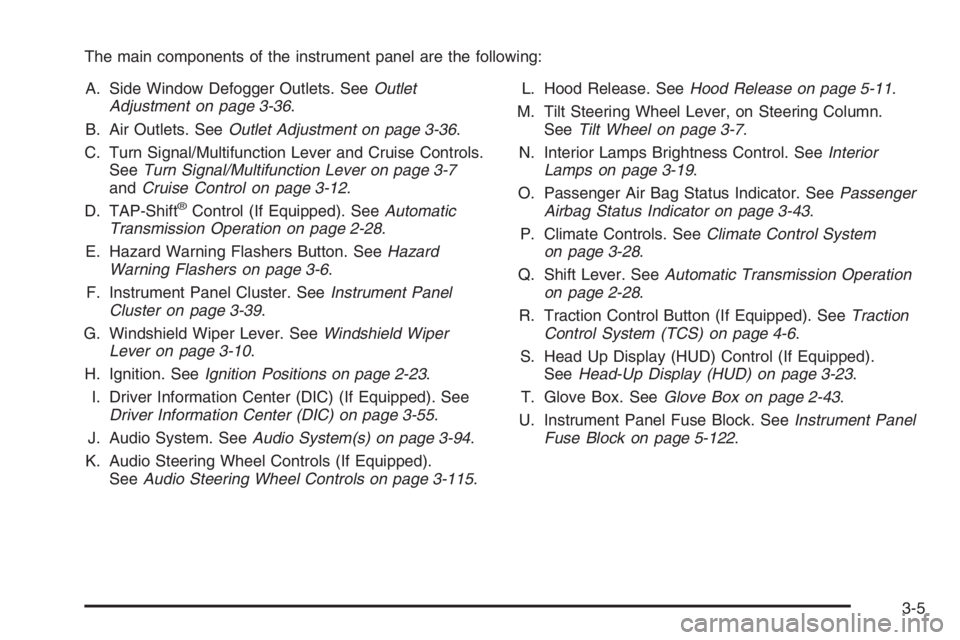
The main components of the instrument panel are the following:
A. Side Window Defogger Outlets. SeeOutlet
Adjustment on page 3-36.
B. Air Outlets. SeeOutlet Adjustment on page 3-36.
C. Turn Signal/Multifunction Lever and Cruise Controls.
SeeTurn Signal/Multifunction Lever on page 3-7
andCruise Control on page 3-12.
D. TAP-Shift
®Control (If Equipped). SeeAutomatic
Transmission Operation on page 2-28.
E. Hazard Warning Flashers Button. SeeHazard
Warning Flashers on page 3-6.
F. Instrument Panel Cluster. SeeInstrument Panel
Cluster on page 3-39.
G. Windshield Wiper Lever. SeeWindshield Wiper
Lever on page 3-10.
H. Ignition. SeeIgnition Positions on page 2-23.
I. Driver Information Center (DIC) (If Equipped). See
Driver Information Center (DIC) on page 3-55.
J. Audio System. SeeAudio System(s) on page 3-94.
K. Audio Steering Wheel Controls (If Equipped).
SeeAudio Steering Wheel Controls on page 3-115.L. Hood Release. SeeHood Release on page 5-11.
M. Tilt Steering Wheel Lever, on Steering Column.
SeeTilt Wheel on page 3-7.
N. Interior Lamps Brightness Control. SeeInterior
Lamps on page 3-19.
O. Passenger Air Bag Status Indicator. SeePassenger
Airbag Status Indicator on page 3-43.
P. Climate Controls. SeeClimate Control System
on page 3-28.
Q. Shift Lever. SeeAutomatic Transmission Operation
on page 2-28.
R. Traction Control Button (If Equipped). SeeTraction
Control System (TCS) on page 4-6.
S. Head Up Display (HUD) Control (If Equipped).
SeeHead-Up Display (HUD) on page 3-23.
T. Glove Box. SeeGlove Box on page 2-43.
U. Instrument Panel Fuse Block. SeeInstrument Panel
Fuse Block on page 5-122.
3-5
Page 124 of 450
Turn and Lane-Change Signals
To signal a turn, move the turn signal lever located on
the left side of the steering column all the way up
or down. The lever returns automatically when the turn
is complete.
An arrow on the instrument
panel cluster will ash in
the direction of the
turn or lane change.
If the vehicle is equipped with the Head-Up-Display
(HUD), a right or left turn signal will appear in the
HUD area when making turns or lane changes.
SeeHead-Up Display (HUD) on page 3-23for more
information.
Raise or lower the lever until the arrow starts to ash
to signal a lane change. Hold it there until the lane
change is complete. The lever returns to its original
position when it is released.Arrows that ash rapidly when signaling for a turn or
lane change may be caused by a burned-out signal bulb.
Other drivers will not see the signal.
Replace burned-out bulbs to help avoid possible
accidents. SeeReplacement Bulbs on page 5-60,
Front Turn Signal, Parking and Fog Lamps on
page 5-57, andTaillamps, Turn Signal, and Stoplamps
on page 5-58. Also, check the fuse for burned-out
bulbs if a turn signal arrow fails to work when signaling
a turn. SeeFuses and Circuit Breakers on page 5-121
for location information.
Turn Signal On Chime
If the turn signal is left on for more than 0.75 of a mile
(1.21 km), a warning chime will sound and the TURN
SIGNAL ON warning message will appear on the
Driver Information Center (DIC) display. See “Turn
Signal On” underDIC Warnings and Messages
on page 3-67.
3-8
Page 125 of 450
Headlamp High/Low-Beam Changer
Push forward on the exterior lamps control lever to
change the headlamps from low to high-beam. Pull the
lever back and then release it to change from high
to low-beam.
This symbol appears on
the instrument panel
cluster when the
high-beam headlamps
are on.
When the high-beam headlamps are on, the fog lamps
will not be on. If the vehicle is equipped with the
Head-Up-Display (HUD) an arrow will appear in the
HUD area indicating that the high-beams are on.
SeeHead-Up Display (HUD) on page 3-23for more
information.
Flash-to-Pass
This feature allows the use of the high-beam headlamps
to signal the driver in front of you that you want to pass.
Pull and hold the exterior lamps control lever to use this
feature. When this is done, the following will occur:
The high-beam headlamps will turn on, while
the headlamps are off, in low-beam, or in Daytime
Running Lamps (DRL) mode. They will stay on
as long as the lever is held in this position. Release
the lever to turn them off.
The headlamps will switch to low beam if the
headlamps had been in the high-beam mode.
To return to high-beam, push the lever.
If the vehicle is equipped with the Head-Up Display
(HUD), an arrow will appear on the display to indicate
that the high beams are on.
3-9
Page 127 of 450
x(Delay Adjustment):Turn the band, located on
the left of the windshield wiper lever, to set the length of
the delay between wiper cycles when using the delay
feature. There are ve delay adjustment settings.
Turn the band up to make the delays shorter in between
wiper cycles. Turn the band down to make the delays
longer between wiper cycles. The windshield wiper lever
must be in delay for this feature to work.
6(Low Speed):Push the lever up to the
second position for steady wiping cycles at a slow
speed.
1(High Speed):Push the lever up to the
third position for steady wiping cycles at a high speed.
7(Mist):For a single wiping cycle, push the
lever down once and let go. The wipers will stop after
one cycle. For additional cycles, hold the lever down.
About 30 seconds after the wipers are on, the
headlamps, taillamps, and instrument panel lighting
will come on, and the Driver Information Center (DIC)
back lighting will decrease to the night time mode.
About ten seconds after the wipers are turned off, all
the lamps will go back to the AUTO (Automatic) mode.
SeeExterior Lamps on page 3-16.
Windshield Washer
{CAUTION:
In freezing weather, do not use your washer
until the windshield is warmed. Otherwise the
washer uid can form ice on the windshield,
blocking your vision.
The windshield washer button is located at the end of
the windshield wiper lever.
K(Washer Fluid):Press this button to activate the
washer uid to spray onto the windshield. The wipers
will run for a few cycles to clear the windshield. For more
wash cycles, press and hold the button.
If the vehicle is low on washer uid, the LOW WASHER
FLUID message will appear on the Driver Information
Center (DIC) display. See “LOW WASHER FLUID”
underDIC Warnings and Messages on page 3-67for
more information.
3-11
Page 130 of 450
The CRUISE SET message will also appear briey on
the Head-Up Display (HUD), if your vehicle has one,
when the cruise control lever is pushed to the minus
(set) or the plus (resume/accelerate) positions.
A cruise control light will also appear on the instrument
panel cluster when the cruise control is on. This light
will disappear when the brakes are applied or the
cruise control is cancelled. It will reappear when the set
cruise speed is resumed. The light will go out when
the cruise control is turned off. SeeCruise Control Light
on page 3-53.
Resuming a Set Speed
Once you are going about 25 mph (40 km/h) or more,
you can move the cruise control switch briey from on
to resume/accelerate.
Your vehicle will go back up to your previously chosen
speed and stay there.
If you hold the switch at resume/accelerate the vehicle
will keep going faster until you release the switch or
apply the brake. Do not hold the switch at resume/
accelerate, unless you want the vehicle to go faster.
Increasing Speed While Using
Cruise Control
There are two ways to go to a higher speed:
Use the accelerator pedal to get to the higher
speed. Press the set button at the end of the
lever, then release the button and the accelerator
pedal. You will now cruise at the higher speed. If the
accelerator pedal is held longer than 60 seconds,
cruise control will turn off.
Move the cruise switch from on to
resume/accelerate. Hold it there until you get up
to the speed desired, and then release the
switch. To increase the vehicle speed in
very small amounts, move the switch briey to
resume/accelerate. Each time this is done,
the vehicle will go about 1 mph (1.6 km/h) faster.
The acceleration feature will only work after the
cruise control speed has been set by pushing the
cruise control set button.
3-14
Page 138 of 450
Electric Power Management
The vehicle has Electric Power Management (EPM) that
estimates the battery’s temperature and state of charge.
It then adjusts the voltage for best performance and
extended life of the battery.
When the battery’s state of charge is low, the voltage is
raised slightly to quickly put the charge back in. When the
state of charge is high, the voltage is lowered slightly to
prevent overcharging. If the vehicle has a voltmeter gage
or voltage display on the Driver Information Center (DIC),
you may see the voltage move up or down. This is
normal. If there is a problem, an alert will be displayed.
The battery can be discharged at idle if the electrical
loads are very high. This is true for all vehicles.
This is because the generator (alternator) may not be
spinning fast enough at idle to produce all the power
that is needed for very high electrical loads.
A high electrical load occurs when several of the
following loads are on: headlamps, high beams, fog
lamps, rear window defogger, climate control fan at
high speed, heated seats, engine cooling fans, trailer
loads, and loads plugged into accessory power outlets.
EPM works to prevent excessive discharge of the
battery. It does this by balancing the generator’s output
and the vehicle’s electrical needs. It can increase
engine idle speed to generate more power, whenever
needed. It can temporarily reduce the power demands
of some accessories.Normally, these actions occur in steps or levels, without
being noticeable. In rare cases at the highest levels
of corrective action, this action may be noticeable to
the driver. If so, a Driver Information Center (DIC)
message might be displayed, such as Battery Saver
Active. If this message is displayed, it is recommended
that the driver reduce the electrical loads as much
as possible. SeeDIC Warnings and Messages
on page 3-67.
Battery Run-Down Protection
The vehicle has a feature to help prevent the battery
from draining in case the interior, trunk, or underhood
lamps are accidentally left on. If any of these lamps are
left on while the ignition is in LOCK/OFF, they will
automatically turn off after 10 minutes. The lamps will not
come back on again until any of the following are done:
The ignition is turned to ON/RUN or
ACC/ACCESSORY.
The interior lamps control is turned completely to
the right, then back slightly to the left.
Open, or close and reopen, a door that is closed.
If the vehicle has less than 15 miles (25 km) on the
odometer, the battery saver will turn off the lamps
after only three minutes.
3-22
Page 139 of 450
Head-Up Display (HUD)
{CAUTION:
If the HUD image is too bright or too high in
your eld of view, it may take you more time
to see things you need to see when it is dark
outside. Be sure to keep the HUD image dim
and placed low in your eld of view.
If the vehicle has the Head-Up Display (HUD), some
information concerning the operation of the vehicle
is projected onto the windshield. This includes
the speedometer reading, transmission positions,
compass direction, outside air temperature, the tap
shift gear and the upshift symbol if active, and a brief
display of the current radio station, including XM
information or CD track. It will also display turn-by-turn
guidance information if the vehicle has a navigation
radio. The images are projected by the HUD lens
located on the driver’s side of the instrument panel.
The tap shift gear and the upshift symbol will also
appear on the HUD if the vehicle has tap shift and
it is active.The HUD information can be displayed in one of
three languages, English, French, or Spanish. The
speedometer reading and other numerical values can
be displayed in either English or metric units.
The language selection and the units of measurement
are changed through the trip computer in the Driver
Information Center (DIC). See “Options” under
DIC Operation and Displays (Uplevel DIC with
Trip Computer) on page 3-55orDIC Operation and
Displays (Base Level DIC) on page 3-62.
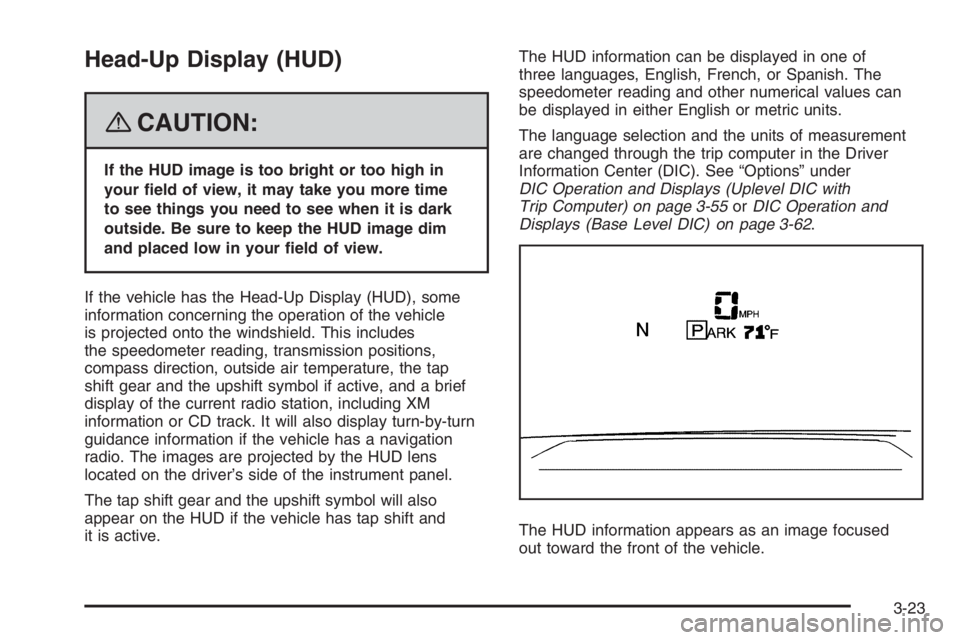
The HUD information appears as an image focused
out toward the front of the vehicle.
3-23
Page 140 of 450
When the ignition key is turned to ON/RUN, the HUD
will display an introductory message for a short
time, until the HUD has warmed up.
The following indicator lights come on the instrument
panel when activated and will also appear on the HUD:
Turn Signal Indicators
High-Beam Indicator Symbol
The HUD will temporarily display CHECK TRIP
COMPUTER when there are messages on the
DIC trip computer.
The HUD will also display the following messages when
these systems, if the vehicle has them, are active:
TRACTION CONTROL ACTIVE
STABILITY CONTROL ACTIVE
The HUD will temporarily display the TRACTION
CONTROL OFF message when the traction control
system is turned off.
The HUD will temporarily display the CRUISE SET
message when cruise control is activated or cruise
speed is increased.
Notice:If you try to use the HUD image as a
parking aid, you may misjudge the distance and
damage your vehicle. Do not use the HUD image
as a parking aid.When the HUD is on, the speedometer reading will
continually be displayed. The current radio station or
CD track number will display for a short period of time
after the radio or CD track status changes. This will
happen whenever one of the radio controls is pressed.
The speedometer size will be reduced when radio,
CD information, warnings, or turn-by-turn guidance
information are displayed on the HUD.
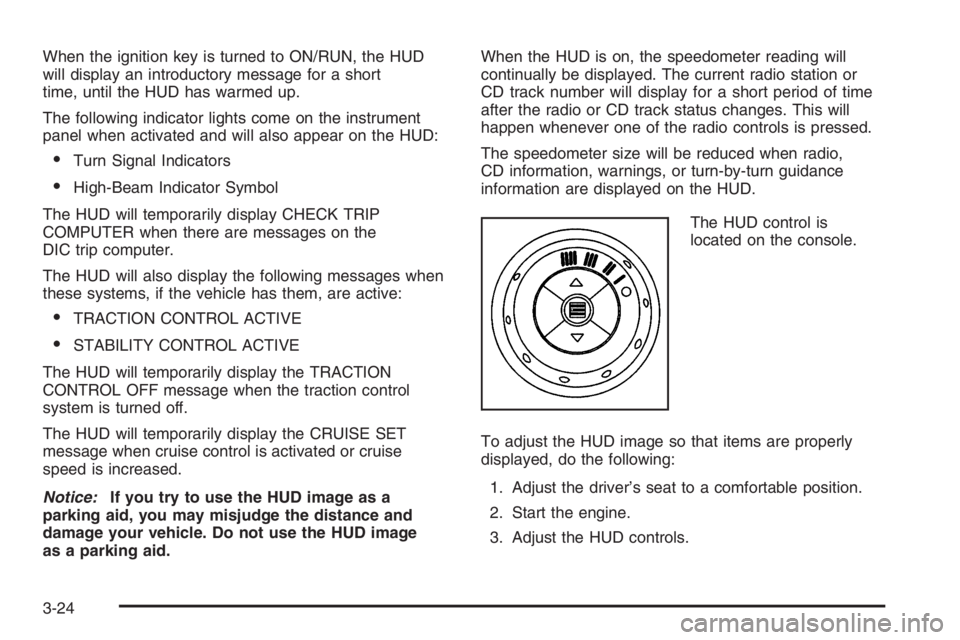
The HUD control is
located on the console.
To adjust the HUD image so that items are properly
displayed, do the following:
1. Adjust the driver’s seat to a comfortable position.
2. Start the engine.
3. Adjust the HUD controls.
3-24
Page 141 of 450
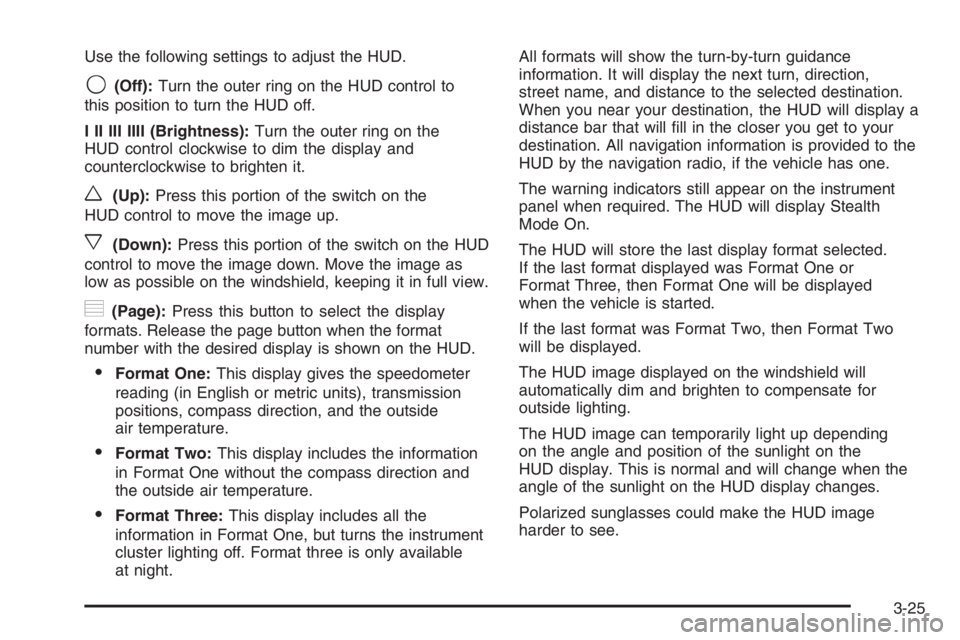
Use the following settings to adjust the HUD.
9(Off):Turn the outer ring on the HUD control to
this position to turn the HUD off.
I II III IIII (Brightness):Turn the outer ring on the
HUD control clockwise to dim the display and
counterclockwise to brighten it.
w(Up):Press this portion of the switch on the
HUD control to move the image up.
x(Down):Press this portion of the switch on the HUD
control to move the image down. Move the image as
low as possible on the windshield, keeping it in full view.
?(Page):Press this button to select the display
formats. Release the page button when the format
number with the desired display is shown on the HUD.
Format One:This display gives the speedometer
reading (in English or metric units), transmission
positions, compass direction, and the outside
air temperature.
Format Two:This display includes the information
in Format One without the compass direction and
the outside air temperature.
Format Three:This display includes all the
information in Format One, but turns the instrument
cluster lighting off. Format three is only available
at night.All formats will show the turn-by-turn guidance
information. It will display the next turn, direction,
street name, and distance to the selected destination.
When you near your destination, the HUD will display a
distance bar that will ll in the closer you get to your
destination. All navigation information is provided to the
HUD by the navigation radio, if the vehicle has one.
The warning indicators still appear on the instrument
panel when required. The HUD will display Stealth
Mode On.
The HUD will store the last display format selected.
If the last format displayed was Format One or
Format Three, then Format One will be displayed
when the vehicle is started.
If the last format was Format Two, then Format Two
will be displayed.
The HUD image displayed on the windshield will
automatically dim and brighten to compensate for
outside lighting.
The HUD image can temporarily light up depending
on the angle and position of the sunlight on the
HUD display. This is normal and will change when the
angle of the sunlight on the HUD display changes.
Polarized sunglasses could make the HUD image
harder to see.
3-25
Page 148 of 450

Dual Automatic Climate Control
System
With this system you can control the heating, cooling,
and ventilation for your vehicle.
Automatic Operation
AUTO (Automatic):Turn both the fan and mode knob to
AUTO for automatic control of the inside temperature, the
air delivery mode and the fan speed. You may notice a
delay of two to three minutes before the fan comes on
when the automatic operation is used in cold weather.For the automatic system to function, the temperature
must be set between 60°F (15°C) and 90°F (32°C).
1. Adjust the temperature to a comfortable setting.
2. Press the PASS button to turn the passenger
climate control system on and off. When the
passenger system is off, the driver’s temperature
setting is also used for the passenger and the
passenger display is off.
In cold weather, the system will start at reduced fan
speeds to avoid blowing cold air into your vehicle
until warmer air is available. The system will
start out blowing air at the oor but may change
modes automatically as the vehicle warms up
to maintain the chosen temperature setting. The
length of time needed for the air to warm up
will depend on the outside temperature and the
length of time that has elapsed since your vehicle
was last driven.
3. Wait for the system to regulate. This may take from
10 to 30 minutes. Then adjust the temperature,
if necessary.
Do not cover the solar sensor located in the center
of the instrument panel, near the windshield. For more
information on the solar sensor, see “Sensors” later
in this section.
3-32