instrument panel PONTIAC GTO 2004 User Guide
[x] Cancel search | Manufacturer: PONTIAC, Model Year: 2004, Model line: GTO, Model: PONTIAC GTO 2004Pages: 326, PDF Size: 2.24 MB
Page 92 of 326

Vehicle Personalization
Vehicle Personalization mode enables the driver to
customize some of the vehicle features using the trip
computer switch and instrument panel center display.
Only features that are equipped on the vehicle will
be displayed.
The following list shows features that can be reset or
customized.
•Restore To Factory Settings
•Underspeed Chime
•Distance To Arrival Display
•Arrival Default
•Trip Computer A and B
•Stop Watch
•Rest Reminder
•Digital Speedometer
•Radio Display
•Confirmation Beeps
•Speed Dependent Volume
•Audio Distortion Limiter
•Headlights Off Delay Time
•Headlights Approach Time
•Auto Headlights Sensitivity
•Courtesy Lamp Timeout
•Ignition Off Courtesy Lamp
•Two Stage Unlock
•Auto Lock In Drive (Automatic Transmission Only)
•Door Lock Indication
2-32
Page 93 of 326

Entering Programming Mode
The vehicle programming mode is accessed through the
Options Menu. To access the Options Menu, do the
following:
1. When the vehicle is
stationary, hold down
the MODE button while
turning the ignition
from LOCK to ON.
2. When the vehicle has been started, the system
check completed and the vehicle speed is less
than 6 mph (10 km/h), then the Options Menu is
displayed for three seconds.
If the vehicle speed exceeds 6 mph (10 km/h), the
Options Menu disappears and the display reverts
back to the previous trip computer function.
The programming mode is not accessible if an
alarm warning has been activated or a warning
symbol on the instrument panel has been triggered.
RQ(Programming Mode Selection):When the
Options Menu is displayed, use the trip computer up or
down arrows to enter the programming mode.
There are help screens available to assist you in
understanding the feature that you are adjusting. If a
menu item is selected and the screen is left for
more than five seconds, a help screen displays to
inform you how to operate the selected feature.
Navigating the Menu
To scroll through the different personalization features,
press the MODE button. To change the setting, use
the up or down arrows. To continue, press the MODE
button.
The following information shows how to reset or
customize features after entering the main menu:
RESTORE TO FACTORY SETTINGS
This option restores the instrument panel, audio system
and other general vehicle systems to the factory
default settings. Use the up or down arrows to select
Yes or No. Press the MODE button to continue. If Yes
is selected, the next feature will be displayed after a
two second delay. This delay is to allow time for
the default parameters to be set.
2-33
Page 95 of 326

RADIO DISPLAY
This option is used to enable or disable the audio
system display on the instrument panel. Detailed
information on the operation of the radio and CD is
provided in the audio section. Use the up or down
arrows to select On or Off. If On is selected, the Radio
display is activated, the default is On. Press the
MODE button to continue. SeeRadio with Six-Disc CD
on page 3-43. The default selection is On.
CONFIRMATION BEEPS
This option is used to enable or disable the audio
system confirmation beeps function. This function is
explained further in the audio section. The audio system
option level fitted to your vehicle determines the
menu choices available. Use the up or down arrows to
select ’On’ or Off, Beeps On, CD Load & Eject Only
or Beeps Off. If On is selected, the audio system
confirmation beeps function is activated, the default is
On. Press the MODE button to continue. SeeRadio
with Six-Disc CD on page 3-43. The default selection
is On.
SPEED DEPENDENT VOLUME
This option is used to enable or disable the audio
system speed dependent volume function. This function
is explained further in the audio section. Use the up
or down arrows to adjust the setting to Off, 1, 2, 3, 4 or
Max, the default is 2. Press the MODE button to
continue. SeeRadio with Six-Disc CD on page 3-43.
The default selection is 2.
AUDIO DISTORTION LIMITER
This option is used to enable or disable the audio
system distortion limiting function. This function is
explained further in the audio section. Use the up or
down arrows to select On or Off. If On is selected, the
audio distortion limiting function is activated, the
default is On. Press the MODE button to continue.
SeeRadio with Six-Disc CD on page 3-43. The default
selection is On.
2-35
Page 99 of 326
Instrument Panel Overview...............................3-2
Hazard Warning Flashers................................3-4
Other Warning Devices...................................3-4
Horn.............................................................3-4
Tilt Wheel.....................................................3-5
Turn Signal/Multifunction Lever.........................3-5
Exterior Lamps.............................................3-12
Interior Lamps..............................................3-15
Accessory Power Outlets...............................3-17
Ashtrays and Cigarette Lighter........................3-18
Climate Controls............................................3-19
Climate Control System.................................3-19
Outlet Adjustment.........................................3-22
Warning Lights, Gages, and Indicators............3-23
Instrument Panel Cluster................................3-24
Speedometer...............................................3-25
Tachometer.................................................3-25
Safety Belt Reminder Light.............................3-25
Air Bag Readiness Light................................3-26
Charging System Light..................................3-27
Brake System Warning Light..........................3-27Anti-Lock Brake System Warning Light.............3-28
Engine Coolant Temperature Gage..................3-28
Malfunction Indicator Lamp.............................3-29
Oil Pressure Light.........................................3-32
Change Engine Oil Light................................3-33
Security Light...............................................3-33
Fog Lamp Light............................................3-33
Highbeam On Light.......................................3-33
Daytime Running Lamps Indicator Light...........3-34
Service Vehicle Soon Light............................3-34
Fuel Gage...................................................3-35
Trip Computer................................................3-36
Audio System(s).............................................3-42
Setting the Time...........................................3-42
Radio with Six-Disc CD.................................3-43
Theft-Deterrent Feature..................................3-52
Audio Steering Wheel Controls.......................3-53
Radio Reception...........................................3-54
Care of Your CDs.........................................3-54
Care of Your CD Player................................3-54
Backglass Antenna.......................................3-55
Section 3 Instrument Panel
3-1
Page 100 of 326
Instrument Panel Overview
3-2
Page 101 of 326

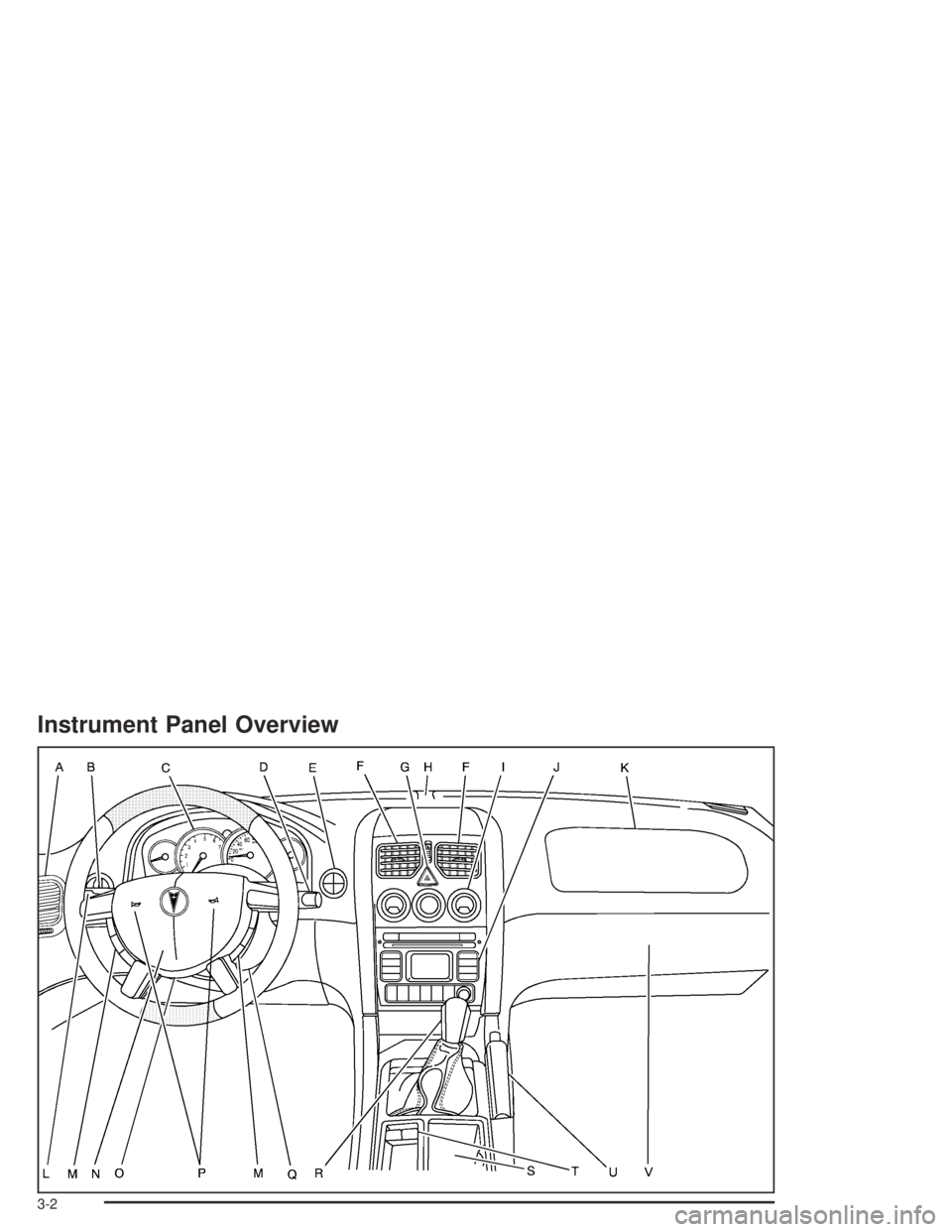
The main components of the instrument panel are the following:
A. Side Outlets. SeeOutlet Adjustment on page 3-22.
B. Headlamps Dial. SeeExterior Lamps on page 3-12.
C. Instrument Panel Cluster. SeeInstrument Panel
Cluster on page 3-24.
D. Windshield Wiper Lever. See “Windshield Wipers”
underTurn Signal/Multifunction Lever on page 3-5.
E. Trip Computer Control. SeeTrip Computer on
page 3-36.
F. Outlets. SeeOutlet Adjustment on page 3-22.
G. Hazard Warning Lights. SeeHazard Warning
Flashers on page 3-4.
H. Sunlight Sensor. See “Automatic Headlamp System”
underExterior Lamps on page 3-12.
I. Climate Controls. SeeClimate Control System on
page 3-19.
J. Audio System Controls. SeeAudio System(s) on
page 3-42.
K. Passenger’s Air Bag. SeeWhere Are the Air Bags?
on page 1-48.L. Cruise Control Lever. See “Cruise Control” under
Turn Signal/Multifunction Lever on page 3-5.
M. Audio Steering Wheel Controls. SeeAudio Steering
Wheel Controls on page 3-53.
N. Driver’s Air Bag. SeeWhere Are the Air Bags? on
page 1-48.
O. Tilt Wheel. SeeTilt Wheel on page 3-5.
P. Horn. SeeHorn on page 3-4.
Q. Ignition Switch. SeeIgnition Positions on page 2-16.
R. Shift Lever. SeeShifting Into Park (P) on page 2-24.
S. Cupholders. SeeCupholder(s) on page 2-31.
T. Power Window Switches. SeePower Windows on
page 2-11.
U. Parking Brake. SeeParking Brake on page 2-23.
V. Glovebox. SeeGlove Box on page 2-30.
3-3
Page 102 of 326

Hazard Warning Flashers
Your hazard warning flashers let you warn others. They
also let police know you have a problem. Your front
and rear turn signal lamps will flash on and off.
The hazard warning
flasher button is located
near the center of the
instrument panel.Your hazard warning flashers work no matter what
position your key is in, and even if the key isn’t in.
Press the button to make the front and rear turn signal
lamps flash on and off. Press the button again to
turn the flashers off.
When the hazard warning flashers are on, your turn
signals won’t work.
Other Warning Devices
If you carry reflective triangles, you can set one up at
the side of the road about 300 feet (100 m) behind your
vehicle.
Horn
You can sound the horn by pressing the horn symbol
anywhere on your steering wheel.
3-4
Page 104 of 326

Turn and Lane-Change Signals
To signal a turn, move the lever all the way up to signal
right turn and all the way down to signal a left turn.
When the turn is finished, the lever will return
automatically.
An arrow on the instrument
panel cluster will flash in
the direction of the
turn or lane change.
To signal a lane change, just raise or lower the lever
until the arrow starts to flash. Hold it there until you
complete your lane change. The lever will return by itself
when you release it.
As you signal a turn or a lane change, if the arrows
flash rapidly, a signal bulb may be burned out and other
drivers won’t see your turn signal.
If a bulb is burned out, replace it to help avoid an
accident. If the arrows don’t go on at all when you signal
a turn, check for burned-out bulbs and then check the
fuse. SeeFuses and Circuit Breakers on page 5-87.
Headlamp High/Low-Beam Changer
To change the headlamps from low beam to high beam
with the headlamps on, push the turn signal/multifunction
lever away from you. The headlamps will change from
low beam to high beam.
When the high beams are
on, a light on the
instrument panel cluster
also will be on if the
ignition is on.
If the fog lamps are on when the high-beam headlamps
are activated, the fog lamps will turn off. The fog
lamp indicator in the instrument panel cluster will
turn off.
3-6
Page 105 of 326

Flash-to-Pass Feature
This feature lets you use your high-beam headlamps to
signal a driver in front of you that you want to pass,
even if the headlamps and ignition are turned off.
To use it, pull the turn signal/multifunction lever toward
you until the high-beam headlamps come on, then
release the lever to turn them off.
If flash-to-pass is activated, then the headlamp
high/low-beam changer indicator will display on the
instrument panel cluster. The fog lamps are turned off
while this feature is active.
Windshield Wipers
The lever on the right side of the steering column
operates the windshield wipers and washer.
These functions operate when the ignition is turned
to ON.
INT (Intermittent):Push the lever up to turn on the
wipers. Put the lever in the first position for intermittent
wiping cycles. The delay will change as your vehicle’s
speed changes. The delay will decrease as you go
faster and increase as you go slower.
3-7
Page 110 of 326

Exterior Lamps
The dial to the left of the
steering wheel on the
instrument panel controls
the following positions:
;(Parking Lamps):Turn the dial to this position to
turn on the parking lamps, together with the taillamps,
sidemarker lamps, license plate lamps, and instrument
panel lights.
2(Headlamps):Turn the dial to this position to turn
on the headlamps, together with the parking lamps,
taillamps, sidemarker lamps, and license plate lamps.AUTO (Automatic Headlamps):Turn the dial to AUTO
to provide for automatic operation of the headlamps,
taillamps, sidemarker lamps, and parking lamps.
For more information see “Automatic Headlamp System”
following.
9(Off):Turn the switch to this position to turn all
lamps off.
Daytime Running Lamps (DRL)
Daytime Running Lamps (DRL) can make it easier for
others to see the front of your vehicle during the
day. DRL can be helpful in many different driving
conditions, but they can be especially helpful in the short
periods after dawn and before sunset.
The DRL system will make your low-beam headlamps
come on at a reduced brightness when the following
conditions are met:
•The ignition is on.
•The exterior lamp control is turned to AUTO and
the light sensor detects daytime light.
•The exterior lamp control is turned to the off
position.
•The parking brake is released.
•For vehicles with automatic transmissions, the shift
lever is not in PARK (P).
3-12