radio PONTIAC GTO 2004 Owner's Manual
[x] Cancel search | Manufacturer: PONTIAC, Model Year: 2004, Model line: GTO, Model: PONTIAC GTO 2004Pages: 326, PDF Size: 2.24 MB
Page 150 of 326

Theft-Deterrent Feature
Your radio has an electronically coded security system.
The system recognizes the vehicle which your radio
has been installed. If the radio is kept in the vehicle, the
PIN should not be required, even if the battery or the
radio has been removed and reinstalled.
If the link between your vehicle and the radio is
disrupted, the radio will prompt you for a 4-digit PIN
code to be entered.
The PIN is supplied on your security card. As the pin is
the only means of enabling operation of the radio,
place the security card in a safe place. Do not leave the
security card in your glovebox. The PIN should also
be written down and kept with other important
documents.
If your security card is lost and the PIN is not recorded,
the PIN can be requested from your dealer, after
supplying proof of ownership. There may be a charge
for this service.
When the radio and vehicle are turned off, the blinking
red light indicates that your radio is armed.
Security Release Procedure
To type in your PIN code, do the following:
1. Turn the ignition to ACCESSORY.
2. Turn the radio on. CODE____will appear on the
display.
3. Use the preset buttons to enter the PIN code.
If the wrong PIN code is entered, the radio will display
CODE ERR WAIT.
After a few seconds, the radio will display
CODE 2____,indicating that this is the second
attempt. The correct code should now be entered.
After three attempts, the radio will display
LOCK OUT 1 HR. After 1 hour, the radio will allow
another three attempts to enter the PIN.
3-52
Page 151 of 326
Audio Steering Wheel Controls
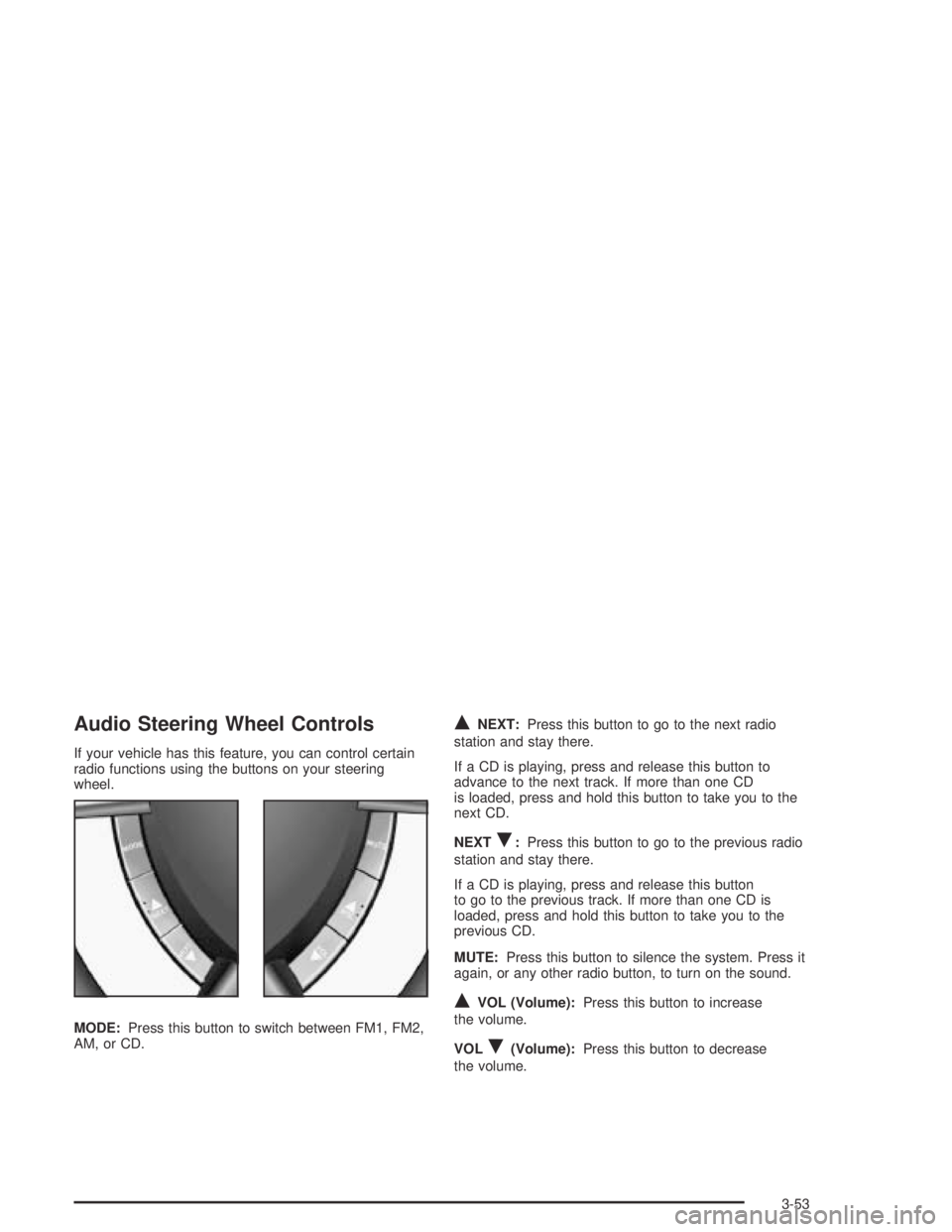
If your vehicle has this feature, you can control certain
radio functions using the buttons on your steering
wheel.
MODE:Press this button to switch between FM1, FM2,
AM, or CD.
QNEXT:Press this button to go to the next radio
station and stay there.
If a CD is playing, press and release this button to
advance to the next track. If more than one CD
is loaded, press and hold this button to take you to the
next CD.
NEXT
R:Press this button to go to the previous radio
station and stay there.
If a CD is playing, press and release this button
to go to the previous track. If more than one CD is
loaded, press and hold this button to take you to the
previous CD.
MUTE:Press this button to silence the system. Press it
again, or any other radio button, to turn on the sound.
QVOL (Volume):Press this button to increase
the volume.
VOL
R(Volume):Press this button to decrease
the volume.
3-53
Page 152 of 326
Radio Reception
AM
The range for most AM stations is greater than for FM,
especially at night. The longer range, however, can
cause stations to interfere with each other. AM can pick
up noise from things like storms and power lines. Try
reducing the treble to reduce this noise.
FM
FM stereo will give you the best sound, but FM signals
will reach only about 10 to 40 miles (16 to 65 km).
Tall buildings or hills can interfere with FM signals,
causing the sound to come and go.
Care of Your CDs
Handle CDs carefully. Store them in their original cases
or other protective cases and away from direct
sunlight and dust. If the surface of a CD is soiled,
dampen a clean, soft cloth in a mild, neutral detergent
solution and clean it, wiping from the center to the edge.
Be sure never to touch the side without writing when
handling CDs. Pick up CDs by grasping the outer edges
or the edge of the hole and the outer edge.
Care of Your CD Player
The use of CD lens cleaners for CD players is not
advised, due to the risk of contaminating the lens of the
CD optics with lubricants internal to the CD mechanism.
3-54
Page 153 of 326

Backglass Antenna
The AM-FM antenna is integrated with the rear window
defogger, located in the rear window. Be sure that
the inside surface of the rear window is not scratched
and that the lines on the glass are not damaged. If
the inside surface is damaged, it could interfere
with radio reception. Also, for proper radio reception,
the antenna connector at the top-center of the rear
window needs to be properly attached to the post on
the glass.
Notice:Using a razor blade or sharp object to
clear the inside rear window may damage the rear
window antenna and/or the rear window defogger.
Repairs would not be covered by your warranty.
Do not clear the inside rear window with sharp
objects.
Notice:Do not apply aftermarket glass tinting with
metallic lm. The metallic lm in some tinting
materials will interfere with or distort the incoming
radio reception. Any damage caused to your
backglass antenna due to metallic tinting materials
will not be covered by your warranty.Because this antenna is built into your rear window,
there is a reduced risk of damage caused by car washes
and vandals.
If you choose to add a cellular telephone to your
vehicle, and the antenna needs to be attached to the
glass, be sure that you do not damage the grid lines for
the AM-FM antenna. There is enough space between
the lines to attach a cellular telephone antenna
without interfering with radio reception.
Do not apply aftermarket glass tinting to the back glass.
The metallic film in some tinting materials will interfere
with or distort the incoming radio reception. Care
must be taken when cleaning the rear window because
it breaks in the resistive material heating element
and will adversely affect radio and defogger
performance. See your dealer for details.
3-55
Page 233 of 326

Notice:If you leave your radio or other accessories
on during the jump starting procedure, they could
be damaged. The repairs would not be covered
by your warranty. Always turn off your radio and
other accessories when jump starting your vehicle.
3. Turn off the ignition on both vehicles. Unplug
unnecessary accessories plugged into the cigarette
lighter. Turn off the radio and all lamps that aren’t
needed. This will avoid sparks and help save
both batteries. And it could save your radio!
4. Open the hoods and locate the batteries. Find the
positive (+) and negative (−) terminal locations on
each vehicle. SeeEngine Compartment Overview
on page 5-12for more information on location.
{CAUTION:
An electric fan can start up even when the
engine is not running and can injure you. Keep
hands, clothing and tools away from any
underhood electric fan.
{CAUTION:
Using a match near a battery can cause battery
gas to explode. People have been hurt doing
this, and some have been blinded. Use a
ashlight if you need more light.
Be sure the battery has enough water. You do
not need to add water to the battery installed
in your new vehicle. But if a battery has ller
caps, be sure the right amount of uid is there.
If it is low, add water to take care of that rst.
If you don’t, explosive gas could be present.
Battery uid contains acid that can burn you.
Do not get it on you. If you accidentally get it
in your eyes or on your skin, ush the place
with water and get medical help immediately.
5-43
Page 271 of 326

Cleaning the Top of the Instrument
Panel
Use only mild soap and water to clean the top surfaces
of the instrument panel. Sprays containing silicones
or waxes may cause annoying reflections in the
windshield and even make it difficult to see through the
windshield under certain conditions.
Cleaning Interior Plastic Components
Use only a mild soap and water solution on a soft cloth
or sponge. Commercial cleaners may affect the
surface finish.
Cleaning Glass Surfaces
Glass should be cleaned often. GM Glass Cleaner or a
liquid household glass cleaner will remove normal
tobacco smoke and dust films on interior glass. See
Vehicle Care/Appearance Materials on page 5-85.
Notice:If you use abrasive cleaners when cleaning
glass surfaces on your vehicle, you could scratch
the glass and/or cause damage to the rear window
defogger and the integrated radio antenna. When
cleaning the glass on your vehicle, use only a soft
cloth and glass cleaner.
Care of Safety Belts
Keep belts clean and dry.
{CAUTION:
Do not bleach or dye safety belts. If you do, it
may severely weaken them. In a crash, they
might not be able to provide adequate
protection. Clean safety belts only with mild
soap and lukewarm water.
Weatherstrips
Silicone grease on weatherstrips will make them last
longer, seal better, and not stick or squeak. Apply
silicone grease with a clean cloth at least every
six months. During very cold, damp weather more
frequent application may be required. See
Recommended Fluids and Lubricants on page 6-13.
5-81
Page 277 of 326

Electrical System
Add-On Electrical Equipment
Notice:Don’t add anything electrical to your
vehicle unless you check with your dealer rst.
Some electrical equipment can damage your vehicle
and the damage wouldn’t be covered by your
warranty. Some add-on electrical equipment can
keep other components from working as they
should.
Your vehicle has an air bag system. Before attempting
to add anything electrical to your vehicle, see
Servicing Your Air Bag-Equipped Vehicle on page 1-52.
Fuses and Circuit Breakers
The wiring circuits in your vehicle are protected from
short circuits by fuses, circuit breakers and thermal links
in the wiring itself. This greatly reduces the chance of
fires caused by electrical problems.
Look at the metallic band inside the fuse. If the band is
broken or melted, replace the fuse. Be sure you
replace a bad fuse with a new one of the correct size.
If you ever have a problem on the road and don’t have a
spare fuse, you can borrow one. Just pick some
feature of your vehicle that you can get along
without — like the radio or cigarette lighter — and use
its fuse, if it is the size you need. Replace it as soon as
you can.
Before replacing a fuse, turn every vehicle electrical
switch off.
There are two fuse blocks in your vehicle: the
instrument panel fuse block and the engine compartment
fuse block.
5-87
Page 279 of 326

Fuses Usage
ACC HTR
CONT INST.
TRIP COMPHeater Controls, Trip Computer
CIGAR
LIGHTERCigarette Lighter
CRUISE CONT.
PWR STEER,
MIRRORSCruise Control System, Power
Steering, Power Mirrors
RADIO,
CELLPHONERadio System, Cellphone
ACC SOCKET Accessory Power Outlet
FRONT WIPER Front Windshield Wipers
SPARE Spare
PWR DOOR
LOCKS, ANT.
& WINDOWSPower Door Locks, Antenna, Power
Windows
INSTRUMENTS
THEFT HORNTheft System, Horn
HEATED REAR
WINDOWRear Window Defogger
RADIO Radio SystemFuses Usage
SUB WOOFER
& AMPLIFIERSub Woofer and Amplifier
SPARE Spare
AIRBAG Airbag
ABS Anti-Lock Brake System
SPARE Spare
SPARE Spare
SPARE Spare
Relays Usage
ACC RELAY Accessory Power Outlet
IGNITION
RELAYIgnition Switch
POWER
WINDOW
RELAYPower Windows
BLOWER
INHIBIT RELAYBlower
PARK LAMPS
RELAYParking Lamps
INTERIOR
ILLUM RELAYInterior Light Controls
5-89
Page 313 of 326
A
Accessory Control...........................................3-16
Accessory Power Outlets.................................3-17
Adding Washer Fluid.......................................5-37
Additional Program Information........................... 7-8
Additives, Fuel................................................. 5-6
Add-On Electrical Equipment............................5-87
Adjusting the Speakers (Balance/Fade)..............3-45
Air Bag
Readiness Light..........................................3-26
Air Bag Systems.............................................1-46
How Does an Air Bag Restrain?....................1-50
Servicing Your Air Bag-Equipped Vehicle.........1-52
What Makes an Air Bag Inflate?....................1-50
What Will You See After an Air Bag
Inflates?..................................................1-50
When Should an Air Bag Inflate?...................1-49
Where Are the Air Bags?..............................1-48
Air Cleaner/Filter, Engine.................................5-18
Airbag Sensing and Diagnostic Module (SDM)...... 7-9
Altering Overspeed Presets..............................3-39
AM ...............................................................3-54
Antenna, Backglass.........................................3-55
Anti-lock Brake System (ABS)............................ 4-6
Anti-Lock Brake, System Warning Light..............3-28Appearance Care............................................5-78
Care of Safety Belts....................................5-81
Chemical Paint Spotting...............................5-84
Cleaning the Inside of Your Vehicle................5-79
Cleaning the Outside of Your Vehicle..............5-82
Finish Damage............................................5-84
Sheet Metal Damage...................................5-84
Underbody Maintenance...............................5-84
Vehicle Care/Appearance Materials................5-85
Weatherstrips..............................................5-81
Arming the System.........................................2-14
ARRIVAL DEFAULT.........................................2-34
Ashtray.........................................................3-18
Ashtrays........................................................3-18
AUDIO DISTORTION LIMITER.........................2-35
Audio System(s).............................................3-42
Audio Steering Wheel Controls......................3-53
Backglass Antenna......................................3-55
Care of Your CD Player...............................3-54
Care of Your CDs........................................3-54
Radio with Six-Disc CD................................3-43
Setting the Time..........................................3-42
Theft-Deterrent Feature................................3-52
Understanding Radio Reception.....................3-54
AUTO HEADLIGHTS SENSITIVITY...................2-36
1
Page 321 of 326

Mirrors
Manual Rearview Mirror................................2-29
Outside Convex Mirror.................................2-30
Outside Power Mirrors..................................2-29
MyGMLink.com................................................ 7-3
N
Navigating the Menu.......................................2-33
New Vehicle Break-In......................................2-15
Normal Maintenance Replacement Parts............6-15
O
Odometer......................................................3-36
Off-Road Recovery..........................................4-11
Oil
Change Engine Oil Light...............................3-33
Engine.......................................................5-13
Pressure Light.............................................3-32
Older Children, Restraints................................1-26
One to Four Shift Light (Manual Transmission)....2-22
Online Owner Center........................................ 7-3
Operation......................................................3-19
Operation Tips................................................3-22
Options Menu.................................................3-49
O/SPEED (Overspeed)....................................3-38
O/Speed P2 (Overspeed Presets)......................3-38
Other Warning Devices...................................... 3-4Outlet Adjustment............................................3-22
Outside
Convex Mirror.............................................2-30
Power Mirrors.............................................2-29
Overseas – Customer Assistance........................ 7-4
Owner Checks and Services.............................. 6-9
Owner’s Information........................................7-11
P
Park (P)
Shifting Into................................................2-24
Shifting Out of............................................2-26
Parking
Brake........................................................2-23
Over Things That Burn.................................2-27
Your Vehicle/Key Removal............................2-26
Passing.........................................................4-12
Plan Ahead When Possible................................ 7-7
Playing a CD.................................................3-45
Playing the Radio...........................................3-43
Power
Accessory Outlets........................................3-17
Seat............................................................ 1-2
Steering Fluid.............................................5-36
Windows....................................................2-11
Power Steering................................................ 4-9
Pretensioners, Safety Belt................................1-25
9