radio PONTIAC GTO 2004 User Guide
[x] Cancel search | Manufacturer: PONTIAC, Model Year: 2004, Model line: GTO, Model: PONTIAC GTO 2004Pages: 326, PDF Size: 2.24 MB
Page 140 of 326
Audio System(s)
Notice:Before you add any sound equipment to
your vehicle – like a tape player, CB radio, mobile
telephone or two-way radio – be sure you can
add what you want. If you can, it’s very important to
do it properly. Added sound equipment may
interfere with the operation of your vehicle’s engine,
radio or other systems, and even damage them.
Your vehicle’s systems may interfere with the
operation of sound equipment that has been added
improperly.
So, before adding sound equipment, check with
your dealer and be sure to check federal rules
covering mobile radio and telephone units.
Your audio system has been designed to operate easily
and to give years of listening pleasure. You will get
the most enjoyment out of it if you acquaint yourself with
it first. Figure out which radio you have in your vehicle,
find out what your audio system can do, and how to
operate all of its controls to be sure you are getting
the most out of the advanced engineering that went
into it.
Setting the Time
When the time is displayed and the radio is on, do the
following:
1. Press the TIME button for more than two seconds.
TIME ADJ or SET TIME will appear on the display
and the time will flash.
2. Press either SEEK arrow to adjust the hour.
3. Press either TUNE arrow to adjust the minutes.
4. Press the TIME button again to save the new time.
The radio will automatically exit the time setting mode
if no adjustments are made for eight seconds.
3-42
Page 141 of 326
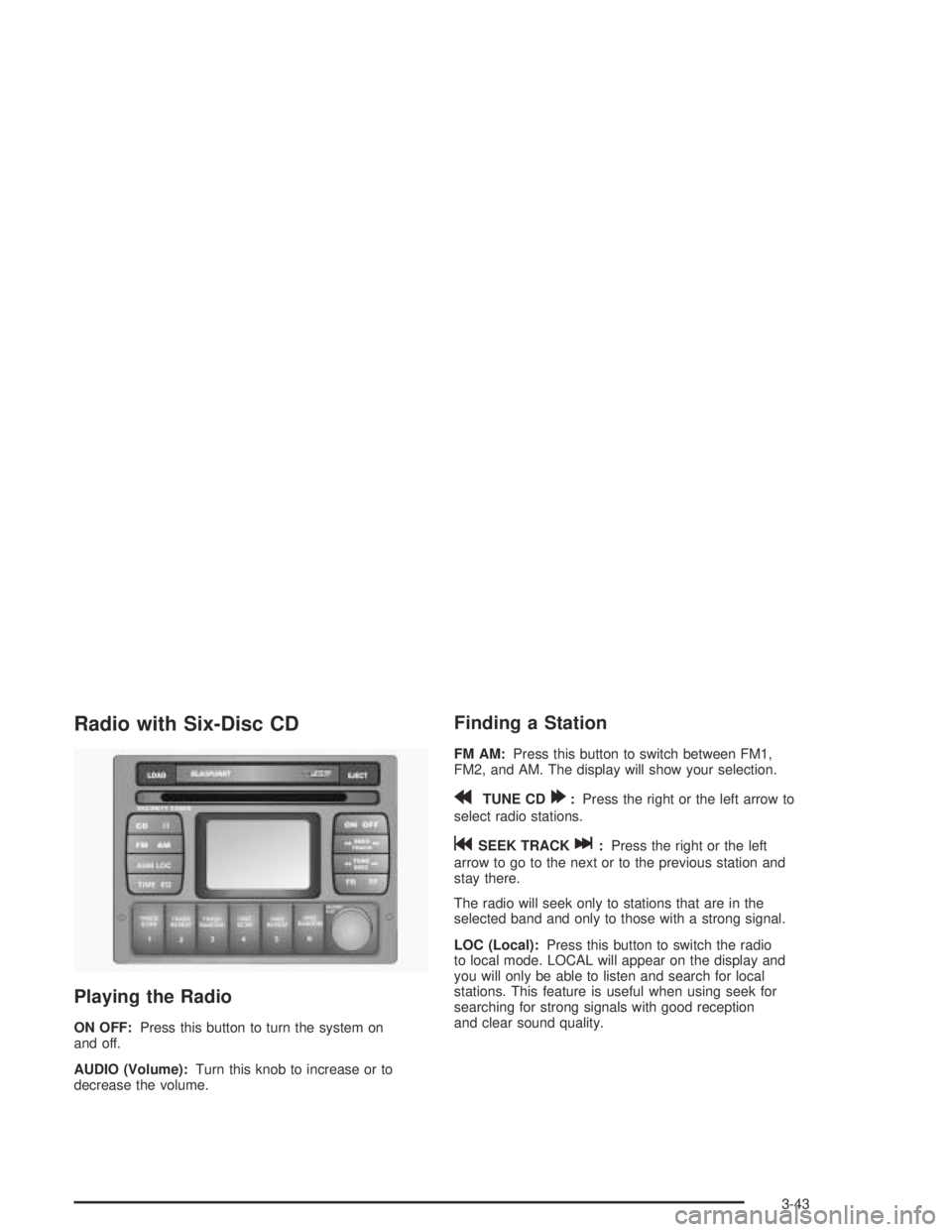
Radio with Six-Disc CD
Playing the Radio
ON OFF:Press this button to turn the system on
and off.
AUDIO (Volume):Turn this knob to increase or to
decrease the volume.
Finding a Station
FM AM:Press this button to switch between FM1,
FM2, and AM. The display will show your selection.
rTUNE CD[:Press the right or the left arrow to
select radio stations.
gSEEK TRACKl:Press the right or the left
arrow to go to the next or to the previous station and
stay there.
The radio will seek only to stations that are in the
selected band and only to those with a strong signal.
LOC (Local):Press this button to switch the radio
to local mode. LOCAL will appear on the display and
you will only be able to listen and search for local
stations. This feature is useful when using seek for
searching for strong signals with good reception
and clear sound quality.
3-43
Page 142 of 326
Setting Preset Stations
The six numbered pushbuttons let you return to
your favorite stations. You can set up to 18 stations,
six FM1, six FM2, and six AM, by performing the
following steps:
1. Turn the radio on.
2. Press FM AM to select FM1, FM2, or AM.
3. Tune in the desired station.
4. Press EQ to select the equalization.
5. Press and hold one of the six numbered
pushbuttons until you hear a beep. Whenever you
press that numbered pushbutton, the station
you set will return and the equalization that you
selected will be automatically stored for that
pushbutton.
6. Repeat the steps for each pushbutton.ASM (Automatic Station Memory):The radio will
automatically store the six strongest AM and FM radio
stations for the current area without deleting the
preset stations that you have stored.
To activate ASM do the following:
1. Turn the radio on.
2. Press FM AM to select FM1, FM2, or AM.
3. Press the ASM button for more than two seconds.
The sound will be briefly mute and SEARCH will
appear on the display while the radio is in the
process of finding and storing radio stations.
When storing is complete, ASM will appear on the
display, the six strongest radio stations will be
stored. The radio station now stored on
pushbutton 1 will begin to play.
4. Press any of the pushbuttons to listen to the station
stored on that pushbutton.
5. To stop listening to the stations stored by ASM,
press the ASM button and ASM will go off the
display.
6. Repeat the above steps if you have driven out of
the stored stations’ range to select new stations.
3-44
Page 143 of 326
Setting the Tone (Bass/Treble)
AUDIO:Push the AUDIO knob until BASS or TREBLE
appears on the display. Turn the knob to increase or
to decrease. If a station is weak or noisy, you may want
to decrease the treble.
To adjust bass or treble to the middle position, select
BASS or TREB and push and hold the AUDIO knob.
The radio will produce one beep and adjust the display
level to zero.
To adjust all tone and speaker controls to the middle
position, push and hold the AUDIO knob when no tone
or speaker control is displayed. CENTERED will
appear on the display and you will hear a beep.
EQ (Equalization):Press this button to select
customized equalization settings designed for rock, pop,
jazz, classical, and vocal.
To turn equalization off, press this button until EQ OFF
appears on the display.
To give an equalization setting a boost, push the
AUDIO knob once while in any equalization setting.
BOOST will appear on the display. Turn the AUDIO
knob to select one of the available boost levels. Different
levels of boost can be set for each of the equalization
settings.
Adjusting the Speakers (Balance/Fade)
AUDIO:To adjust the balance between the right
and the left speakers, push the AUDIO knob until
BALANCE appears on the display. Turn the knob to
move the sound toward the left or the right speakers.
To adjust the fade between the front and the rear
speakers, push and hold the AUDIO knob until FADER
appears on the display. Turn the knob to move the
sound toward the front or the rear speakers.
Playing a CD
If playing a CD-R the sound quality may be reduced
due to CD-R quality, the method of recording, the quality
of the music that has been recorded and the way the
CD-R has been handled. You may experience an
increase in skipping, difficulty in finding tracks and/or
difficulty in loading and ejecting. If these problems occur
try a known good CD.
Do not add paper labels to CDs, they could get caught
in the CD player.
Do not play 3 inch (8 cm) CDs without a standard
adapter disc.
If an error appears on the display, see “CD Messages”
later in this section.
3-45
Page 144 of 326
LOAD CDZ:Press the LOAD button to load CDs
into the CD player. This CD player will hold up to
six CDs.
To insert one CD, do the following:
1. Turn the ignition on.
2. Press and release the LOAD button.
3. Wait for INSERT CD to appear on the display, the
light located to the left of the slot to flash, and for
the radio to produce a beep, if beeps are turned on.
See “Confirmation Beeps” later in this section for
information about turning beeps on and off.
4. Load a CD. Insert the CD partway into the slot,
label side up. The player will pull the CD in.
When a CD is inserted, the CD number will appear in
the CD symbol on the display. If you select an
equalization setting for your CD, it will be activated each
time you play a CD.
Whether the radio is on or off, the CD will begin to play
automatically.
To insert multiple CDs, do the following:
1. Turn the ignition on.
2. Press and hold the LOAD button for two seconds.3. Wait for LOAD ALL to appear on the display, the
light located to the left of the slot to flash, and for
the radio to produce a beep, if beeps are turned on.
See “Confirmation Beeps” later in this section for
information about turning beeps on
and off.
4. Once the light stops flashing and turns green, load
a CD. Insert the CD partway into the slot, label side
up. The player will pull the CD in.
Once the CD is loaded, the light will begin flashing
again. Once the light stops flashing and turns
green, you can load another CD. The CD player
takes up to six CDs. Do not try to load more
than six.
To load more than one CD but less than six, complete
Steps 1 through 3. When you have finished loading
CDs, with the radio on or off, press the EJECT button to
cancel the loading function. The radio will begin to
play the last CD loaded.
When a CD is inserted, the CD number will appear in
the CD symbol on the display. If more than one CD has
been loaded, a number for each CD will be displayed.
If you select an equalization setting for your CD, it will be
activated each time you play a CD.
3-46
Page 145 of 326
Whether the radio is on or off, the last CD loaded will
begin to play automatically.
As each new track starts to play, the track number will
appear on the display.
For every CD loaded, a number will appear on the
display. To play a specific CD, press the numbered
pushbutton that corresponds to the CD you want to play.
The CD number that is playing will flash, and the
track number will appear.
If an error appears on the display, see “CD Messages”
later in this section.
TRACK SCAN:Press this button to listen to the first
10 seconds of each track on the CD that is playing.
Press this button again to stop scanning.
TRACK REPEAT:Press this button to repeat the track
that is playing. Press this button again to turn off
repeat play.
TRACK RANDOM:Press this button to listen to the
tracks, on the CD that is playing, in random, rather than
sequential order. Press this button again to turn off
random play.
CD SCAN:If more than one CD is loaded, press this
button to listen to the first 10 seconds of the first track on
each CD that is loaded. Press this button again to
stop scanning.CD REPEAT:If more than one CD is loaded, press this
button to repeat the CD that is currently playing.
Press this button again to turn off repeat play.
CD RANDOM:If more than one CD is loaded, press
this button to play all of the CDs in random, rather than
sequential order. Press this button again to turn off
random play.
II (Pause):Press this button to pause a CD. PAUSE or
CD PAUSED will appear on the display. Press this
button again to play the CD.
FM AM:Press this button to listen to the radio when a
CD(s) is playing.
EQ (Equalization):Press EQ to select the desired
equalization setting while playing a CD. The equalization
will be automatically set whenever you play a CD. For
more information on EQ, see “EQ” listed previously
in this section.
gSEEK TRACKl:Press the left arrow to go to
the start of the current track, if more than 10 seconds
have passed. Press the right arrow to go to the
next track. If you press either arrow more than once, the
player will continue moving backward or forward
through the CD.
3-47
Page 146 of 326
rTUNE CD[:When more than one CD is loaded,
press the left or right arrow to go to the previous or
next CD loaded.
FR FF (Fast Reverse/ Fast Forward):Press and hold
FR to reverse quickly within a track. Press and hold
FF to advance quickly within a track. You will hear sound
at a reduced volume. Release the button to play the
passage. The elapsed time of the track will appear on
the display.
EJECT:Press this button to eject a single CD or
multiple CDs.
To eject the CD that is currently playing, press and
release this button. REMOVE CD will appear on
the display, the light located to the left of the slot will
flash, and the radio will produce a beep, if beeps
are turned on. See “Confirmation Beeps” later in this
section for information about turning beeps on and off.
You can now remove the CD. Press the LOAD
button to cancel the eject function.To eject multiple CDs, press and hold this button for two
seconds. EJECTING ALL will appear on the display,
the light located to the left of the slot will flash, and the
radio will produce a beep, if beeps are turned on.
See “Confirmation Beeps” later in this section for
information about turning beeps on and off. You can
now remove the CD. Press the LOAD button to cancel
the eject function.
If the CD is not removed, after 25 seconds, the CD will
be automatically pulled back into the player. If you
try to push the CD back into the player before the
25 second time period is complete, the player will sense
an error and will try to eject the CD several times
before stopping.
Do not repeatedly press the EJECT button to eject a
CD after you have tried to push it in manually. The
player’s 25-second eject timer will reset at each press of
eject, which will cause the player to not eject the CD
until the 25-second time period has elapsed.
Once the player stops and the CD is ejected, remove
the CD. After removing the CD, press the ON OFF
button off and then on again. This will clear the
CD-sensing feature and enable CDs to be loaded into
the player again.
3-48
Page 147 of 326
CD Messages
CD ERROR PLAY:The CD cannot be read. The CD is
dirty, scratched, wet, or upside down.
CD ERROR MECH (Mechanism):If this message
appears on the display, it could be for one of the
following reasons:
•The CD is stuck in the player and cannot be
played, loaded, or ejected.
•It is very hot. When the temperature returns to
normal, the CD should play.
•You are driving on a very rough road. When the
road becomes smoother, the CD should play.
•The air is very humid. If so, wait about an hour and
try again.
•There may have been a problem while burning
the CD.
•The label may be caught in the CD player.
If the CD is not playing correctly for any other reason,
try a known good CD.
If any error occurs repeatedly or if an error cannot be
corrected, contact your dealer. If your radio displays an
error message, write it down and provide it to your
dealer when reporting the problem.
Options Menu
The following features can be adjusted through the
vehicle’s options menu located in the instrument panel
cluster in the trip computer display window.
Conrmation Beeps
Beeps are used to confirm various actions of the radio
such as storing a preset. The beeps can be turned
on or off using the options menu. See “Options Menu
Adjustment” later in this section to adjust the
confirmation beeps.
All Beeps On:The radio will make a beep sound when
storing radio stations, when it is time to insert or
remove a CD from the CD changer, or to confirm that
the LOAD ALL or EJECT ALL functions have started.
CD Beeps Only:The radio will make a beep sound
when it is time to insert or remove a CD from the CD
changer or to confirm that the LOAD ALL or EJECT ALL
functions have started.
Beeps Off:The radio will not produce any beeps.
3-49
Page 148 of 326

Speed Dependent Volume (SDV)
With SDV, your audio system adjusts automatically to
make up for road or wind noise as you drive.
This feature will never completely compensate for
driving noise. There are other factors such as road
surface, wind noise, windows open, and engine speed
that may alter the interior noise for any given road
speed.
You can select compensation rates between 0 (off) and
5 (maximum compensation) in the options menu.
See “Options Menu Adjustment” later in this section to
adjust SDV.
Dynamic Distortion Limiting (DDL)
Your radio has a feature that limits the amount of
amplifier distortion that you can hear. When this feature
is turned on, it continuously monitors the quality of
the signal to the speakers. When the signal distortion
exceeds the preset limits the radio will automatically limit
or reduce the volume until the distortion is minimized.
Under some circumstances, distortion may be heard for
a very short period of time until the system has taken
the necessary steps to limit it.
The main source of distortion in music is the low
frequency bass caused by drums or large instruments.
Music that features very strong bass may trigger the
distortion limiting system and the system will then
reduce the volume to minimize the distortion.Increasing the bass control or the EQ boost may also
result in a reduced volume level due to the emphasized
bass. See “Setting the Tone (Bass/Treble)” previously
in this section. The DDL can be turned off so that
the radio will deliver a higher volume level, but distortion
will also be increased.
See “Options Menu Adjustment” later in this section to
adjust DDL.
Options Menu Adjustment
Confirmation beeps, SDV, and DDL can all be adjusted
by doing the following:
1. Turn off the radio by pressing the OFF button.
2. Press the ON button and pushbutton 1 at the same
time until Options Menu appears on the display.
3. Push the AUDIO knob until the correct option
appears on the display.
4. Turn the AUDIO knob to adjust the setting of the
option being displayed.
5. Push the AUDIO knob to select another option or
press the OFF button to exit the options menu.
Your selection will be saved.
If no buttons are pressed or turned for eight
seconds, the radio will automatically exit the menu
and the radio will turn on.
3-50
Page 149 of 326

Master Reset
Your radio has a reset feature that allows you to return
certain settings back to the factory default settings.
Use this feature when adjustments have been made that
affect the sound quality or operation of the radio and
you are unsure of how to return to the original settings.
This master reset feature will reset the following:
•Bass, Treble, Fade, and Balance
•Confirmation beeps to on
•SDV to setting 2
•DDL to on
•EQ to off.
To perform the master reset, do the following:
1. Turn off the radio by pressing the OFF button.
2. Press the ON button and pushbutton 4 at the same
time for about two seconds.
After the radio has finished resetting, the radio will
turn on with the original settings and no message
will appear on the display.
Mobile Telephone
Your radio includes a telephone adapter. The phone
adapter and the radio are connected. If a mobile phone
hands-free kit with the correct features, such as mute
line and wiring for a separate speaker has been
connected to it, the sound of the radio or CD will be
muted when the phone rings, the voice of the caller will
then be heard through the vehicle’s speakers, and
VOICE ON will appear on the display. When the call
ends, the radio or CD will come back on.
If the radio is off, it will turn on for a phone call if the
vehicle’s ignition is in ON or ACCESSORY.
If a call is in progress when the vehicle is turned off, the
radio will remain on until the call is completed.
You can adjust the volume, bass, treble, fade, and
balance when a phone call is in progress without
affecting the radio settings.
3-51