oil level PONTIAC GTO 2006 Owners Manual
[x] Cancel search | Manufacturer: PONTIAC, Model Year: 2006, Model line: GTO, Model: PONTIAC GTO 2006Pages: 326, PDF Size: 1.62 MB
Page 146 of 326

To adjust all tone and speaker controls to the middle
position, push and hold the AUDIO knob when no tone
or speaker control is displayed. STD will appear on
the display and you will hear a beep.
EQ (Equalization):Press this button to select
customized equalization settings designed for rock, pop,
jazz, classical, and vocal.
To turn equalization off, press this button until EQ OFF
appears on the display.
To give an equalization setting a boost, push the AUDIO
knob once while in any equalization setting. BOOST will
appear on the display. Turn the AUDIO knob to select
one of the available boost levels. Different levels of boost
can be set for each of the equalization settings.
Adjusting the Speakers (Balance/Fade)
AUDIO:To adjust the balance between the right
and the left speakers, push and release the AUDIO
knob until BALANCE appears on the display. Turn the
knob to move the sound toward the right or the left
speakers.
To adjust the fade between the front and the rear
speakers, push and release the AUDIO knob until
FADER appears on the display. Turn the knob to move
the sound toward the front or the rear speakers.
Playing a CD
If the ignition or radio is turned off, with a CD in the
player, it will stay in the player. When the ignition
or radio is turned on, the CD will start playing where it
stopped, if it was the last selected audio source.
When a CD is inserted, the CD number will appear in
the CD symbol on the display. As each new track starts
to play, the track number will appear on the display.
The CD player can play the smaller 3 inch (8 cm) single
CDs with an adapter ring. Full-size CDs and the
smaller CDs are loaded in the same manner.
If playing a CD-R, the sound quality may be reduced
due to CD-R quality, the method of recording, the quality
of the music that has been recorded, and the way the
CD-R has been handled. There may be an increase
in skipping, difficulty in ®nding tracks, and/or difficulty in
loading and ejecting. If these problems occur, check
the bottom surface of the CD. If the surface of the CD is
damaged, such as cracked, broken, or scratched, the
CD will not play properly. If the surface of the CD
is soiled, see
Care of Your CDs on page 3-57for more
information.
If there is no apparent damage, try a known good CD.
3-48
2006 - Pontiac GTO Owner Manual
Page 155 of 326

Radio Reception
You may experience frequency interference and static
during normal radio reception if items such as cellphone
chargers, vehicle convenience accessories, and
external electronic devices are plugged into the
accessory power outlet. If there is interference or static,
unplug the item from the accessory power outlet.
AM
The range for most AM stations is greater than for FM,
especially at night. The longer range can cause
station frequencies to interfere with each other. For
better radio reception, most AM radio stations will boost
the power levels during the day, and then reduce
these levels during the night. Static can also occur when
things like storms and power lines interfere with radio
reception. When this happens, try reducing the treble on
your radio.
FM Stereo
FM stereo will give the best sound, but FM signals will
reach only about 10 to 40 miles (16 to 65 km). Tall
buildings or hills can interfere with FM signals, causing
the sound to fade in and out.
Care of Your CDs
Handle CDs carefully. Store them in their original cases
or other protective cases and away from direct
sunlight and dust. The CD player scans the bottom
surface of the disc. If the surface of a CD is damaged,
such as cracked, broken, or scratched, the CD will
not play properly or not at all. If the surface of a CD is
soiled, take a soft, lint free cloth or dampen a clean, soft
cloth in a mild, neutral detergent solution mixed with
water, and clean it. Make sure the wiping process starts
from the center to the edge.
Do not touch the bottom side of a CD while handling it;
this could damage the surface. Pick up CDs by
grasping the outer edges or the edge of the hole and
the outer edge.
Care of the CD Player
The use of CD lens cleaners for CD players is not
advised, due to the risk of contaminating the internal
lens of the CD optics with lubricants.
3-57
2006 - Pontiac GTO Owner Manual
Page 171 of 326
A cornering skid is best handled by easing your foot off
the accelerator pedal.
Remember: Any traction control system helps avoid only
the acceleration skid. If your traction control system is
off, then an acceleration skid is also best handled
by easing your foot off the accelerator pedal.
If your vehicle starts to slide, ease your foot off the
accelerator pedal and quickly steer the way you want
the vehicle to go. If you start steering quickly enough,
your vehicle may straighten out. Always be ready
for a second skid if it occurs.
Of course, traction is reduced when water, snow, ice,
gravel, or other material is on the road. For safety, you
will want to slow down and adjust your driving to
these conditions. It is important to slow down on slippery
surfaces because stopping distance will be longer and
vehicle control more limited.
While driving on a surface with reduced traction, try
your best to avoid sudden steering, acceleration,
or braking, including engine braking by shifting to a
lower gear. Any sudden changes could cause the tires
to slide. You may not realize the surface is slippery
until your vehicle is skidding. Learn to recognize
warning clues Ð such as enough water, ice, or packed
snow on the road to make a mirrored surface Ð and
slow down when you have any doubt.
Remember: Any Anti-Lock Brake System (ABS) helps
avoid only the braking skid.Competitive Driving
See your warranty book before using your vehicle for
competitive driving.
Notice:If you use your vehicle for racing or other
competitive driving, the engine may use more
oil than it would with normal use. Low oil levels can
damage the engine. Be sure to check the oil level
often during racing or other competitive driving and
keep the level at or near the upper mark that
shows the proper operating range on the engine oil
dipstick. For information on how to add oil, see
Engine Oil on page 5-13.
4-15
2006 - Pontiac GTO Owner Manual
Page 177 of 326
Before Leaving on a Long Trip
Make sure you are ready. Try to be well rested. If you
must start when you are not fresh Ð such as after
a day's work Ð do not plan to make too many miles that
®rst part of the journey. Wear comfortable clothing
and shoes you can easily drive in.
Is your vehicle ready for a long trip? If you keep it
serviced and maintained, it is ready to go. If it needs
service, have it done before starting out. Of course, you
will ®nd experienced and able service experts in GM
dealerships all across North America. They will be ready
and willing to help if you need it.
Here are some things you can check before a trip:
·Windshield Washer Fluid:Is the reservoir full? Are
all windows clean inside and outside?
·Wiper Blades:Are they in good shape?
·Fuel, Engine Oil, Other Fluids:Have you checked
all levels?
·Lamps:Are they all working? Are the lenses clean?
·Tires:They are vitally important to a safe,
trouble-free trip. Is the tread good enough for
long-distance driving? Are the tires all in¯ated to the
recommended pressure?
·Weather Forecasts:What is the weather outlook
along your route? Should you delay your trip a short
time to avoid a major storm system?
·Maps:Do you have up-to-date maps?
Highway Hypnosis
Is there actually such a condition as highway hypnosis?
Or is it just plain falling asleep at the wheel? Call it
highway hypnosis, lack of awareness, or whatever.
There is something about an easy stretch of road with
the same scenery, along with the hum of the tires on the
road, the drone of the engine, and the rush of the
wind against the vehicle that can make you sleepy. Do
not let it happen to you! If it does, your vehicle can
leave the road in less than a second, and you could
crash and be injured.
What can you do about highway hypnosis? First, be
aware that it can happen.
Then here are some tips:
·Make sure your vehicle is well ventilated, with a
comfortably cool interior.
·Keep your eyes moving. Scan the road ahead and
to the sides. Check your rearview mirrors and your
instruments frequently.
·If you get sleepy, pull off the road into a rest,
service, or parking area and take a nap, get some
exercise, or both. For safety, treat drowsiness
on the highway as an emergency.
4-21
2006 - Pontiac GTO Owner Manual
Page 203 of 326

A. Engine Compartment Fuse Block. SeeEngine
Compartment Fuse Block on page 5-88.
B. Windshield Washer Fluid Reservoir. See ªAdding
Washer Fluidº under
Windshield Washer Fluid
on page 5-34.
C. Battery. See
Battery on page 5-37.
D. Radiator Pressure Cap (Out of View). See
Radiator
Pressure Cap on page 5-26.
E. Engine Oil Dipstick. See ªChecking Engine Oilº
under
Engine Oil on page 5-13.
F. Engine Oil Fill Cap. See ªWhen to Add Engine Oilº
under
Engine Oil on page 5-13.
G. Automatic Transmission Dipstick (If Equipped). See
ªChecking the Fluid Levelº under
Automatic
Transmission Fluid on page 5-19.
H. Power Steering Fluid Reservoir. See
Power Steering
Fluid on page 5-33.
I. Brake Fluid Reservoir. See ªBrake Fluidº under
Brakes on page 5-35.
J. Hydraulic Clutch Fluid Reservoir (If Equipped). See
Hydraulic Clutch on page 5-22.
K. Engine Air Cleaner/Filter. See
Engine Air
Cleaner/Filter on page 5-18.
L. Engine Coolant Over¯ow Reservoir. See
Engine
Coolant on page 5-23.
Engine Oil
If the Service Engine Oil message appears on the trip
computer display, it means you need to check your
engine oil level right away. For more information, see
Trip Computer on page 3-33. You should check
your engine oil level regularly; this is an added reminder.
Checking Engine Oil
It is a good idea to check your engine oil every time you
get fuel. In order to get an accurate reading, the oil
must be warm and the vehicle must be on level ground.
The engine oil dipstick handle is a yellow loop. See
Engine Compartment Overview on page 5-12for
the location of the engine oil dipstick.
1. Turn off the engine and give the oil several minutes
to drain back into the oil pan. If you do not do this,
the oil dipstick might not show the actual level.
2. Pull out the dipstick and clean it with a paper towel
or cloth, then push it back in all the way. Remove it
again, keeping the tip down, and check the level.
5-13
2006 - Pontiac GTO Owner Manual
Page 204 of 326
When to Add Engine Oil
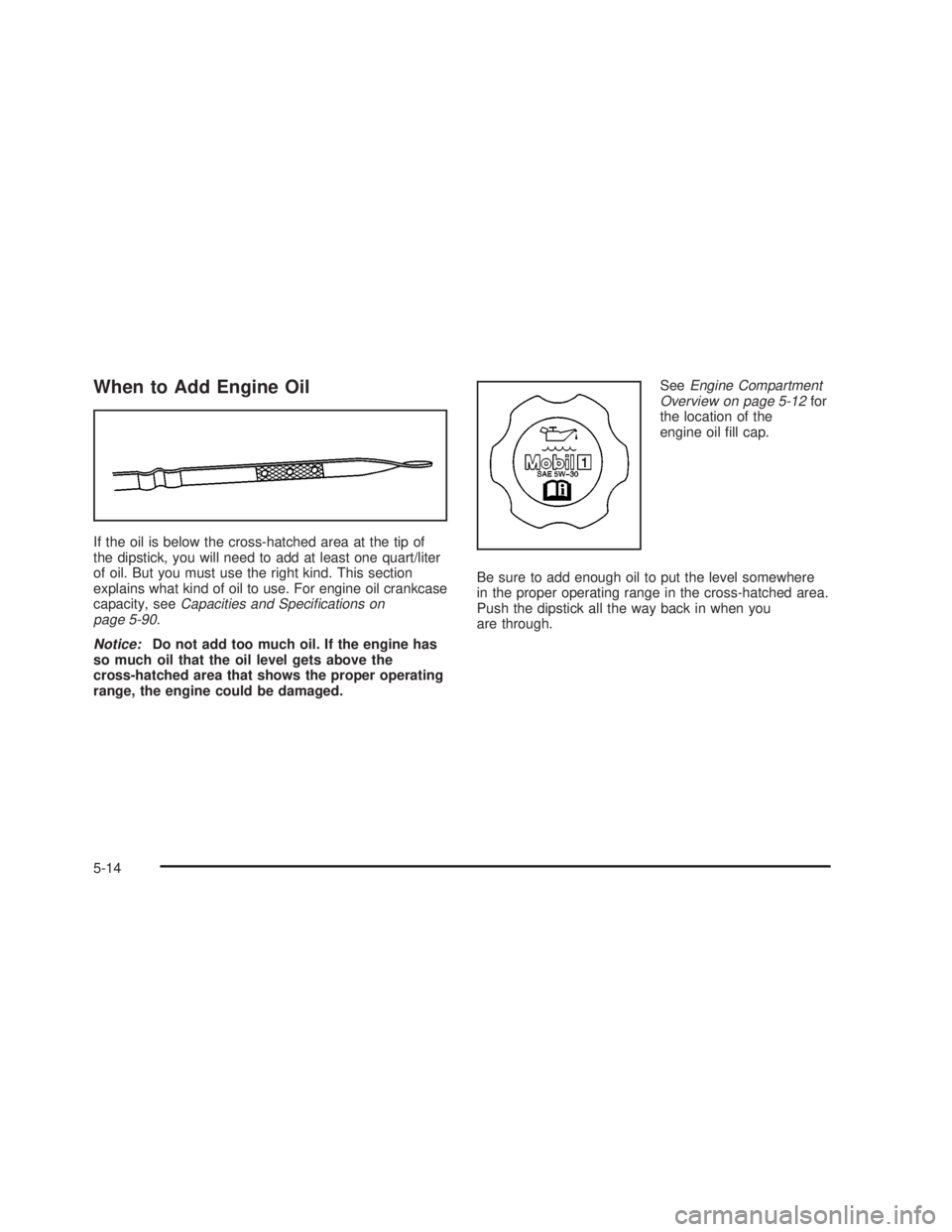
If the oil is below the cross-hatched area at the tip of
the dipstick, you will need to add at least one quart/liter
of oil. But you must use the right kind. This section
explains what kind of oil to use. For engine oil crankcase
capacity, see
Capacities and Speci®cations on
page 5-90.
Notice:Do not add too much oil. If the engine has
so much oil that the oil level gets above the
cross-hatched area that shows the proper operating
range, the engine could be damaged.See
Engine Compartment
Overview on page 5-12for
the location of the
engine oil ®ll cap.
Be sure to add enough oil to put the level somewhere
in the proper operating range in the cross-hatched area.
Push the dipstick all the way back in when you
are through.
5-14
2006 - Pontiac GTO Owner Manual
Page 206 of 326

Your vehicle's engine is ®lled at the factory with a
Mobil 1žsynthetic oil, which meets all requirements for
your vehicle.
Substitute Engine Oil: When adding oil to maintain
engine oil level, oil meeting GM Standard GM4718M
may not be available. You can add substitute oil
designated SAE 5W-30 with the starburst symbol at all
temperatures. Substitute oil not meeting GM Standard
GM4718M should not be used for an oil change.
Engine Oil Additives
Do not add anything to the oil. The recommended oils
with the starburst symbol that meet GM Standard
GM4718M are all you will need for good performance
and engine protection.
Engine Oil Life System
When to Change Engine Oil
Your vehicle has a computer system that lets you know
when to change the engine oil and ®lter. This is
based on engine revolutions and engine temperature,
and not on mileage. Based on driving conditions,
the mileage at which an oil change will be indicated can
vary considerably. For the oil life system to work
properly, you must reset the system every time the oil is
changed.
When the system has calculated that oil life has been
diminished, it will indicate that an oil change is
necessary. A Service Engine Oil message on the trip
computer display will come on. See
Trip Computer
on page 3-33. Change engine oil as soon as possible
within the next 600 miles (1 000 km). It is possible that, if
you are driving under the best conditions, the oil life
system may not indicate that an oil change is necessary
for over a year. However, the engine oil and ®lter
must be changed at least once a year and at this time
the system must be reset. Your dealer has GM-trained
service people who will perform this work using
genuine GM parts and reset the system. It is also
important to check engine oil regularly and keep it at
the proper level.
5-16
2006 - Pontiac GTO Owner Manual
Page 209 of 326
{CAUTION:
Operating the engine with the air cleaner/®lter
off can cause you or others to be burned. The
air cleaner not only cleans the air; it helps to
stop ¯ames if the engine back®res. If it is not
there and the engine back®res, you could be
burned. Do not drive with it off, and be careful
working on the engine with the air
cleaner/®lter off.
Notice:If the air cleaner/®lter is off, a back®re can
cause a damaging engine ®re. And, dirt can
easily get into your engine, which will damage it.
Always have the air cleaner/®lter in place when you
are driving.
Automatic Transmission Fluid
When to Check and Change Automatic
Transmission Fluid
A good time to check your automatic transmission ¯uid
level is when the engine oil is changed.
Change the ¯uid and ®lter at the intervals listed in
Additional Required Services on page 6-6, and be sure
to use the transmission ¯uid listed inRecommended
Fluids and Lubricants on page 6-12.
How to Check Automatic Transmission
Fluid
Because this operation can be a little difficult, you may
choose to have this done at the dealership service
department.
If you do it yourself, be sure to follow all the instructions
here, or you could get a false reading on the dipstick.
Notice:Too much or too little ¯uid can damage
your transmission. Too much can mean that some
of the ¯uid could come out and fall on hot engine
part or exhaust system parts, starting a ®re.
Too little ¯uid could cause the transmission to
overheat. Be sure to get an accurate reading if you
check your transmission ¯uid.
Wait at least 30 minutes before checking the
transmission ¯uid level if you have been driving in the
following conditions:
·When outside temperatures are above 90ÉF (32ÉC).
·At high speed for quite a while.
·In heavy traffic Ð especially in hot weather.
To get the right reading, the ¯uid should be at normal
operating temperature, which is 180ÉF to
200ÉF (82ÉC to 93ÉC).
5-19
2006 - Pontiac GTO Owner Manual
Page 211 of 326

The level should never read over the HOT mark, so be
careful not to add too much. It does not take much
¯uid, generally less than 0.6 pints (0.3 L). Do not over®ll.
Notice:Use of the incorrect automatic transmission
¯uid may damage your vehicle, and the damages
may not be covered by your warranty. Always
use the automatic transmission ¯uid listed in
Recommended Fluids and Lubricants on page 6-12.
·After adding ¯uid, recheck the ¯uid level as
described under ªHow to Check Automatic
Transmission Fluid,º earlier in this section.
·When the correct ¯uid level is obtained, push the
dipstick back in all the way.
Remember to always replace the dipstick and lock
the handle down.
·If ¯uid has to be added often, there may be a
problem or leak and you should see your dealer.
Manual Transmission Fluid
When to Check Manual Transmission
Fluid
A good time to have your manual transmission ¯uid
checked is when the engine oil is changed. However,
the ¯uid in your manual transmission does not
require changing.
How to Check Manual Transmission
Fluid
Because this operation can be difficult, you may choose
to have this done at the dealership service department.
If you do it yourself, be sure to follow all the instructions
here, or you could get a false reading.
Notice:Too much or too little ¯uid can damage
your transmission. Too much can mean that some
of the ¯uid could come out and fall on hot engine
part or exhaust system parts, starting a ®re.
Too little ¯uid could cause the transmission to
overheat. Be sure to get an accurate reading if you
check your transmission ¯uid.
Check the ¯uid level only when your engine is off, the
vehicle is parked on a level place, and the transmission
is cool enough for you to rest your ®ngers on the
transmission case.
Then, follow these steps:
1. Remove the reverse light switch.
2. Check that the lubricant level is up to the bottom of
the switch hole.
3. If the ¯uid level is good, install the switch and be
sure it is fully seated. If the ¯uid level is low, add
more ¯uid as described in the next steps.
5-21
2006 - Pontiac GTO Owner Manual
Page 213 of 326
How to Check and Add Fluid
To check the ¯uid level, look at the markings on the
reservoir. If the ¯uid level is between the MIN and the
MAX line, the ¯uid level is correct. If the ¯uid level
is between these marks do not remove the cap, as the
¯uid will quickly absorb moisture. See
Engine
Compartment Overview on page 5-12for more
information on reservoir location.
If ¯uid does need to be added, ®rst turn the vehicle off.
Remove the cap and add the proper ¯uid. Remember
to replace the cap and clean up any spilled ¯uid.
Engine Coolant
The cooling system in your vehicle is ®lled with
DEX-COOLžengine coolant. This coolant is designed
to remain in the vehicle for ®ve years or 150,000 miles
(240 000 km), whichever occurs ®rst, if only
DEX-COOL
žextended life coolant is added.The following explains the cooling system and how to
add coolant when it is low. If there is a problem
with engine overheating or if coolant needs to be added
to the radiator, see
Engine Overheating on page 5-26.
A 50/50 mixture of clean, drinkable water and
DEX-COOL
žcoolant will:
·Give freezing protection down to-34ÉF (-37ÉC).
·Give boiling protection up to 265ÉF (129ÉC).
·Protect against rust and corrosion.
·Help keep the proper engine temperature.
·Let the warning lights and gages work as
they should.
Notice:Using coolant other than DEX-COOLžmay
cause premature engine, heater core, or radiator
corrosion. In addition, the engine coolant may
require changing sooner, at the ®rst maintenance
service after each 30,000 miles (50 000 km) or
24 months, whichever occurs ®rst. Any repairs
would not be covered by your warranty. Always use
DEX-COOL
ž(silicate-free) coolant in your vehicle.
5-23
2006 - Pontiac GTO Owner Manual