reset PONTIAC PONTIAC 1995 User Guide
[x] Cancel search | Manufacturer: PONTIAC, Model Year: 1995, Model line: PONTIAC, Model: PONTIAC PONTIAC 1995Pages: 354, PDF Size: 17.27 MB
Page 137 of 354
Entering a Code Unlocking the System
1.
2.
3.
4.
5.
6.
7.
8.
9.
Write down any number from 000 to 1999. This is
your code.
Turn the ignition to ACC or
RUN.
Turn the radio off.
Press the
1 and 4 preset buttons at the same time and
hold until
“- - -” shows-on the display.
You now have only 15 seconds between each of the
following steps.
Press MIN and
“000” will appear on the display.
Press
MIN again and hold until the last two digits of
your code appear.
Press and hold
HR until the first digit or digits of
your code appear.
Press
A” after you make sure the code matches
the one you wrote down. “rEP” will appear on the
display, meaning you should repeat Steps
5 through 7.
After you repeat the steps, press A”. SEC
should appear on the display, meaning your system is
secured.
If your ignition is off, the THEmZOCK
indicator light on the radio face will flash.
Store the paper with your code written on it in
a safe
place (not in your vehicle).
If battery power is removed €or any reason, LOC will
appear on
the display when power is reapplied. You will
need to enter your code to unlock the system. You have
only 15 seconds between each of the following steps.
1. Turn the ignition on. LOC will appear on the display.
2. Press MIN and “000” will appear on the display.
3. Press MIN again and hold until the last two digits of
4. Press and hold HR until the first digit or digits of
your code appear.
your
code appear.
5. Press AM/FM after you make sure the code matches
the one you wrote down.
SEC should appear on the
display, meaning you can now use your system, and.
it is secured. If LOC appears, you entered the wrong
code and the system is still locked.
If you enter the wrong code eight times, InOP will
appear on the display. You will have to wait an hour
with the ignition on before you can try again. When you
try again, you will only have
three chances to enter the
correct code before InOP appears.
If you lose or forget your code and cannot unlock the
system, contact you dealer.
3-12
ProCarManuals.com
Page 138 of 354
Disabling THEFTLOCK
If you want to turn off THEFTLOCK, you will neea to
enter
your code. If you lose or forget your code, see
your dealer.
1. Turn the ignition on and the radio off.
2. Press the 1 and 4 preset buttons at the same time and
hold until
SEC shows on the display.
You now have only
1.5 seconds between each of the
following steps.
3. Press MIN and “000” will appear on the display.
4. Press MIN again and hold until the last two digits of
your code appear.
5. Press and hold HR until the first digit or digits of
your code appear.
the one you wrote down.
“- - -” should appear on the
display, meaning your system
is unsecured. If SEC
appears, you entered the wrong code and the system
is still secured.
6. Press AMEM after you make sure the code matches
Understanding Radio Reception
FM Stereo
FM Stereo will give you the best sound, but mVr signals
will reach only about 10 to
40 miles (1 6 to 65 km). Tall
buildings or hills can interfere with
FM signals, causing
the sound to come and go.
I
AM
The range for most AM stations is greater than for FM,
especially at night. The longer range, however, can
cause stations to interfere with each other.
AM can also
pick up noise from things like storms and power lines.
To lower this noise,
try reducing the treble level.
3-13
ProCarManuals.com
Page 140 of 354
Care of Your Cassette Tape Player
A tape player that is not cleaned regularly is subject to
reduced sound quality, ruining the cassette,
or damaging
the mechanism. Tape cassettes that are not properly
stored in their plastic cases away from contaminants,
direct sunlight, and extreme heat may not operate
properly and could cause premature failure
of the tape
player.
Your tape player should be cleaned with every
50 hours
of use to provide optimum performance. Your radio may
display Cln to indicate that you have used your tape
player for
50 hours without resetting the tape clean
timer. If you notice a reduction in sound quality,
regardless of when the tape player was last cleaned, try
playing a different cassette to see if the tape or the tape
player is at fault. If the second cassette results in no
improvement in sound quality, try cleaning the tape
player.
Proper tape player cleaning should be done with a
scrubbing action, nonabrasive cleaner cassette. This is a
wet-type cleaning system that uses a cleaning cassette
with pads which scrub the tape head as the hubs of the
cleaner cassette turn.
To properly clean your tape player,
follow the instructions with the cleaning cassette. If you
use this type
of cleaner, the radio may display an error
and eject the cartridge. This
is normal and is the result
of an added feature in the tape player that detects broken
tapes.
If an error occurs, you will need to insert the
cleaning cassette at least three times to thoroughly clean the tape player.
You may prefer to use a non-scrubbing action, wet-type
cleaner.
This type of cleaner uses a fabric belt to clean
the tape head.
This type of cleaner cassette will not
cause an error, but it may not clean the tape player as
thoroughly as the scrubbing type cleaner.
A scrubbing action cleaner is available through your
dealer
(GM Part No. 12344600).
Cassettes are subject to wear and the sound quality may
degrade over time. Always verify that the cassette tape is in good condition and the tape player is clean before
obtaining service
on your tape player.
Care of Your Compact Discs
Handle discs carefully. Store them in their original cases
or other protective cases and away from direct sunlight
and dust. If the surface of a disc is soiled, dampen a
clean, soft cloth in a mild, neutral detergent solution and
clean it, wiping from the center to the edge.
Be sure never to touch the signal surface when handling
discs. Pick up discs by grasping the outer edges or the
edge of the hole and the outer edge.
3-15
ProCarManuals.com
Page 142 of 354
Steering Wheel Touch Controls
(Option)
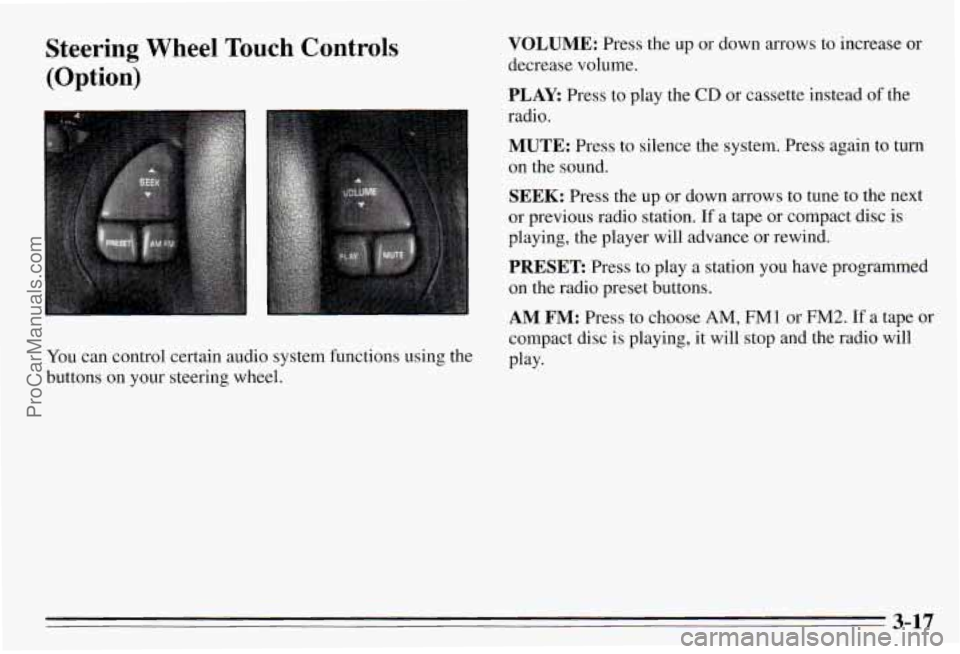
You can control certain audio system functions using the
buttons on your steering wheel.
VOLUME: Press the up or down arrows to increase or
decrease volume.
PLAY: Press to play the CD or cassette instead of the
radio.
MUTE: Press to silence the system. Press again to turn
on the sound.
SEEK: Press the up or down arrows to tune to the next
or previous radio station.
If a tape or compact disc is
playing, the player will advance or rewind.
PRESET Press to play a station you have programmed
on the radio preset buttons.
AM FM: Press to choose AM, FM1 or FM2. If a tape or
compact disc is playing, it will stop and the radio will
Play-
3-17
ProCarManuals.com
Page 235 of 354
Radiator Pressure Cap
NOTICE:
Your radiator cap is a 15 psi (105 kPa)
pressure-type cap and must be tightly installed
to prevent coolant loss and possible engine
damage from overheating. Be sure the arrows
on
the cap line up with the overflow tube on the
radiator filler neck.
When you replace your radiator pressure cap, an A@
cap is recommended.
Thermostat
Engine coolant temperature is controlled by a thermostat
in the engine coolant system. The thermostat stops the
flow
of coolant through the radiator until the coolant
reaches a preset temperature.
When you replace your thermostat, an
AC@ thermostat
is recommended.
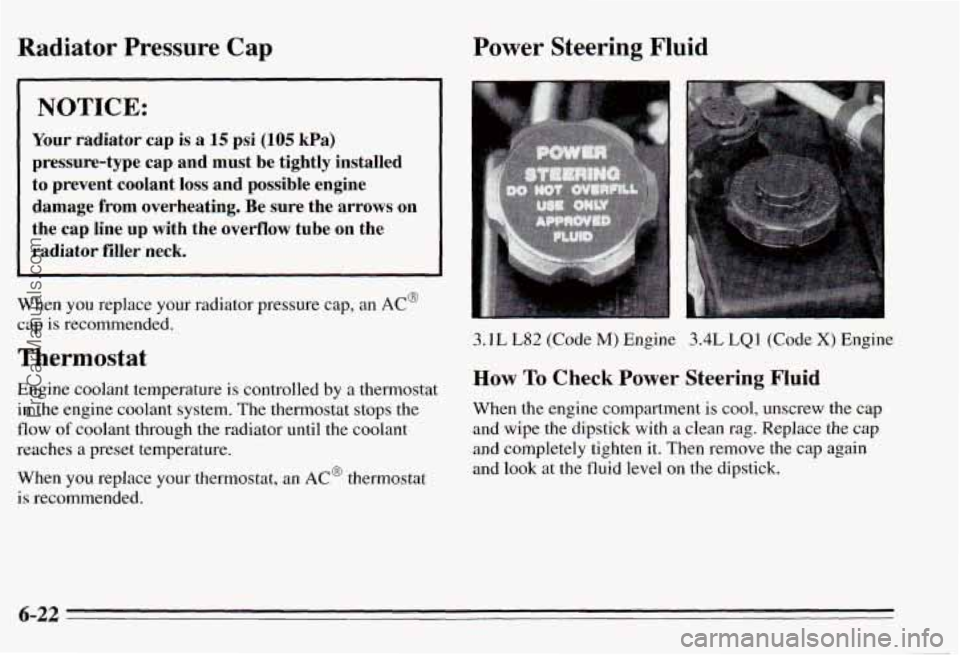
Power Steering Fluid
3.1L L82 (Code M) Engine 3.4L LQl (Code X) Engine
How To Check Power Steering Fluid
When the engine compartment is cool, unscrew the cap
and wipe the dipstick with a clean rag. Replace the cap
and completely tighten it. Then remove the cap again
and look at the fluid level on the dipstick.
6-22
ProCarManuals.com
Page 265 of 354
While the tires available as standard or optional equipment on General Motors vehicles may vary with
respect to these grades, all such tires meet General
Motors performance standards and have been approved for use on General Motors vehicles. All passenger type
(P Metric) tires must conform to Federal safety
requirements in addition to these grades.
Wheel Alignment and Tire Balance
The wheels on your vehicle were aligned and balanced
carefully at the factory to give you the longest tire life
and best overall performance.
In most cases, you will not need to have your wheels
aligned again. However, if you notice unusual tire wear
or your vehicle pulling one way or the other, the
alignment may need to be reset. If you notice your
vehicle vibrating when driving on a smooth road, your
wheels may need to be rebalanced.
Wheel Replacement
Replace any wheel thatsis bent, cracked, or badly rusted
or corroded. If wheel nuts keep coming loose, the wheel,
wheel bolts, and wheel nuts should be replaced.
If the
wheel leaks air, replace it (except some aluminum
wheels, which can sometimes be repaired). See your
Pontiac dealer
if any of these conditions exist.
Your dealer will know the kind of wheel you need.
Each new wheel should have the same load carrying
capacity, diameter, width, offset, and be mounted the
same way
as the one it replaces.
If you need to replace any of your wheels, wheel bolts,
or wheel nuts, replace them only with new
GM original
equipment parts. This way, you will be sure to have the
right wheel, wheel bolts, and wheel nuts for your
Pontiac model.
6-52 ProCarManuals.com