Page 1 PONTIAC SOLSTICE 2007 Owner's Guide
[x] Cancel search | Manufacturer: PONTIAC, Model Year: 2007, Model line: SOLSTICE, Model: PONTIAC SOLSTICE 2007Pages: 396, PDF Size: 2.27 MB
Page 87 of 396
To release the parking brake, hold the brake pedal
down. Pull the parking brake lever up until you can
press the release button. Hold the release button in
as you move the brake lever all the way down.
If you forget to release your parking brake, a chime
will sound and a warning message will be
displayed in the Driver Information Center (DIC)
when the vehicle is moving faster than 5 mph
(8 kph). SeeDIC Warnings and Messages
on page 148.
Notice:Driving with the parking brake on can
overheat the brake system and cause
premature wear or damage to brake system
parts. Verify that the parking brake is fully
released and the brake warning light is
off before driving.Shifting Into Park (P)
(Automatic Transmission)
{CAUTION:
It can be dangerous to get out of your
vehicle if the shift lever is not fully in
PARK (P) with the parking brake rmly
set. Your vehicle can roll. If you have left
the engine running, the vehicle can move
suddenly. You or others could be injured.
To be sure your vehicle will not move,
even when you are on fairly level ground,
use the steps that follow.
1. Hold the brake pedal down and set the
parking brake.
2. Move the shift lever into PARK (P) by holding
the button on the shift lever and pushing the
lever all the way toward the front of the vehicle.
3. Turn the ignition key to LOCK.
4. Remove the key and take it with you. If you
can leave your vehicle with the ignition key in
your hand, your vehicle is in PARK (P).
87
Page 88 of 396

Leaving Your Vehicle With the
Engine Running
{CAUTION:
It can be dangerous to leave your vehicle
with the engine running. Your vehicle
could move suddenly if the shift lever is
not fully in PARK (P) with the parking
brake rmly set. And, if you leave the
vehicle with the engine running, it could
overheat and even catch re. You or
others could be injured. Do not leave your
vehicle with the engine running.
If you have to leave your vehicle with the engine
running, be sure your vehicle is in PARK (P) and
your parking brake is rmly set before you leave it.
After you have moved the shift lever into PARK (P),
hold the regular brake pedal down. If the vehicle
has an automatic transmission, see if you can move
the shift lever away from PARK (P) without rst
pushing the shift lock release button. If you can, it
means that the shift lever was not fully locked into
PARK (P).
Torque Lock
If you are parking on a hill and you do not shift
your transmission into PARK (P) properly,
the weight of the vehicle may put too much force
on the parking pawl in the transmission. You
may nd it difficult to pull the shift lever out
of PARK (P). This is called “torque lock.” To
prevent torque lock, set the parking brake and then
shift into PARK (P) properly before you leave
the driver’s seat. To nd out how, seeShifting Into
Park (P) (Automatic Transmission) on page 87.
When you are ready to drive, move the shift
lever out of PARK (P)beforeyou release the
parking brake.
If torque lock does occur, you may need to have
another vehicle push yours a little uphill to
take some of the pressure from the parking pawl
in the transmission, so you can pull the shift
lever out of PARK (P).
88
Page 89 of 396
Shifting Out of Park (P)
Your vehicle has an automatic transmission shift
lock control system.
To shift out of PARK (P):
1. Apply the regular brake pedal.
2. Then press the shift lever button.
3. Move the shift lever to the desired gear.
If you are still unable to shift out of PARK (P):
1. Fully release the shift lever button.
2. While holding down the brake pedal, press
the shift lever button again.
3. Move the shift lever to the desired gear.
If you still cannot move the shift lever from
PARK (P), consult your dealer.
Parking Your Vehicle
(Manual Transmission)
Before leaving your manual transmission vehicle,
fully press the clutch pedal in, move the shift
lever in either FIRST (1) gear or REVERSE (R),
and rmly apply the parking brake. SeeManual
Transmission Operation on page 85.
89
Page 92 of 396
Running the Engine While Parked
It is better not to park with the engine running. But if
you ever have to, here are some things to know.
{CAUTION:
Idling the engine with the climate control
system off could allow dangerous exhaust
into your vehicle. See the earlier caution
underEngine Exhaust on page 91.
Also, idling in a closed-in place can let
deadly carbon monoxide (CO) into your
vehicle even if the climate control fan is at
the highest setting. One place this can
happen is a garage. Exhaust — with
CO — can come in easily. NEVER park in
a garage with the engine running.
Another closed-in place can be a blizzard.
SeeWinter Driving on page 220.
{CAUTION:
It can be dangerous to get out of your
vehicle if the automatic transmission shift
lever is not fully in PARK (P) with the
parking brake rmly set. Your vehicle can
roll. Do not leave your vehicle when the
engine is running unless you have to.
If you have left the engine running, the
vehicle can move suddenly. You or others
could be injured. To be sure your vehicle
will not move, even when it is on fairly
level ground, always set the parking brake
and move the automatic transmission
shift lever to PARK (P), or the manual
transmission shift lever to NEUTRAL.
Follow the proper steps to be sure your vehicle
will not move. SeeShifting Into Park (P)
(Automatic Transmission) on page 87andParking
Your Vehicle (Manual Transmission) on page 89.
92
Page 93 of 396

Mirrors
Manual Rearview Mirror
When you are sitting in a comfortable driving
position, adjust the mirror so you can see clearly
behind your vehicle. Grip the mirror in the
center to move it up or down and side to side.
The day/night adjustment allows you to adjust the
mirror to avoid glare from the lamps behind
you. Move the lever to the right for nighttime use
and to the left for daytime use.
Manual Rearview Mirror with
OnStar
®
If the vehicle has this mirror, while sitting in a
comfortable driving position, adjust the mirror so
you can see clearly behind the vehicle. Grip
the mirror in the center and move it up and down
or side to side. The day/night control, located
at the bottom of the mirror, allows adjustment to
lessen glare from the lamps behind you. Move the
lever right for nighttime use; move the lever left
for daytime use.
There are three OnStar
®buttons located at the
bottom of the mirror face. For more information
about OnStar
®and the services it provides,
seeOnStar®System on page 94.
Outside Manual Mirror
Adjust the outside rearview mirror so you can see
a little of the side of your vehicle, and the area
beside your vehicle from a comfortable driving
position. Some mirrors can be folded in to enter
narrow passageways.
93
Page 97 of 396
OnStar®Steering Wheel Controls
Your vehicle may have a Talk/Mute button that
can be used to interact with OnStar®Hands-Free
Calling. SeeAudio Steering Wheel Controls on
page 185for more information.
On some vehicles, you may have to hold the
button for a few seconds and give the command
“ONSTAR” in order to activate the OnStar
®
Hands-Free Calling feature.
On some vehicles, the mute button can be used to
dial numbers into voicemail systems, or to dial
phone extensions. See the OnStar
®Owner’s
Guide for more information.
How OnStar®Service Works
In order to provide you with OnStar®services, your
vehicle’s OnStar®system has the capability of
recording and transmitting vehicle information. This
information is automatically sent to an OnStar
®Call
Center at the time of an OnStar®button press,
Emergency button press or if your airbags or AACN
system deploys. The vehicle information usually
includes your GPS location and, in the event of a
crash, additional information regarding the accident
that your vehicle has been involved in (e.g. the
direction from which your vehicle was hit).When you use the Virtual Advisor feature of
OnStar
®Hands-Free Calling, your vehicle also
sends OnStar®your GPS location so that we can
provide you with location-based services.
OnStar
®service cannot work unless your vehicle is
in a place where OnStar®has an agreement with a
wireless service provider for service in that area.
OnStar
®service also cannot work unless you are in
a place where the wireless service provider
OnStar
®has hired for that area has coverage,
network capacity and reception when the service is
needed, and technology that is compatible with the
OnStar
®service. Not all services are available
everywhere, particularly in remote or enclosed
areas, or at all times.
OnStar
®service that involves location information
about your vehicle cannot work unless GPS
satellite signals are unobstructed and available in
that place as well.
97
Page 99 of 396
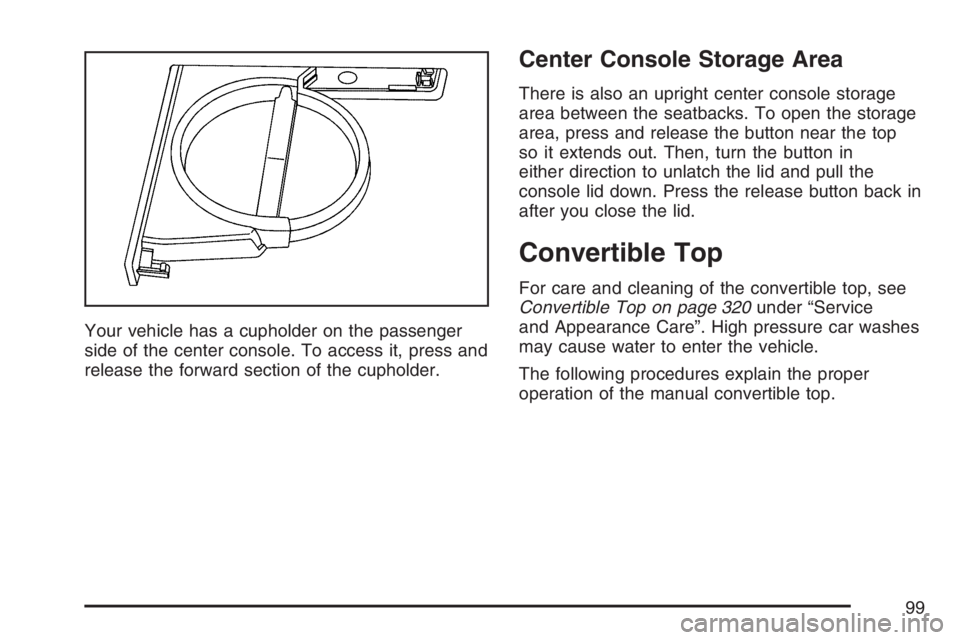
Your vehicle has a cupholder on the passenger
side of the center console. To access it, press and
release the forward section of the cupholder.
Center Console Storage Area
There is also an upright center console storage
area between the seatbacks. To open the storage
area, press and release the button near the top
so it extends out. Then, turn the button in
either direction to unlatch the lid and pull the
console lid down. Press the release button back in
after you close the lid.
Convertible Top
For care and cleaning of the convertible top, see
Convertible Top on page 320under “Service
and Appearance Care”. High pressure car washes
may cause water to enter the vehicle.
The following procedures explain the proper
operation of the manual convertible top.
99
Page 109 of 396
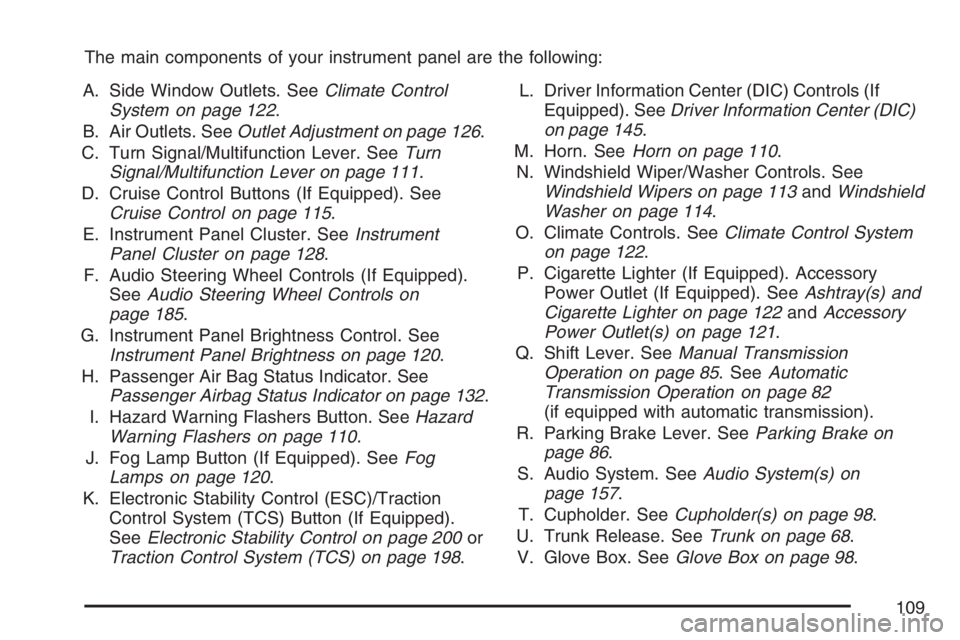
The main components of your instrument panel are the following:
A. Side Window Outlets. SeeClimate Control
System on page 122.
B. Air Outlets. SeeOutlet Adjustment on page 126.
C. Turn Signal/Multifunction Lever. SeeTurn
Signal/Multifunction Lever on page 111.
D. Cruise Control Buttons (If Equipped). See
Cruise Control on page 115.
E. Instrument Panel Cluster. SeeInstrument
Panel Cluster on page 128.
F. Audio Steering Wheel Controls (If Equipped).
SeeAudio Steering Wheel Controls on
page 185.
G. Instrument Panel Brightness Control. See
Instrument Panel Brightness on page 120.
H. Passenger Air Bag Status Indicator. See
Passenger Airbag Status Indicator on page 132.
I. Hazard Warning Flashers Button. SeeHazard
Warning Flashers on page 110.
J. Fog Lamp Button (If Equipped). SeeFog
Lamps on page 120.
K. Electronic Stability Control (ESC)/Traction
Control System (TCS) Button (If Equipped).
SeeElectronic Stability Control on page 200or
Traction Control System (TCS) on page 198.L. Driver Information Center (DIC) Controls (If
Equipped). SeeDriver Information Center (DIC)
on page 145.
M. Horn. SeeHorn on page 110.
N. Windshield Wiper/Washer Controls. See
Windshield Wipers on page 113andWindshield
Washer on page 114.
O. Climate Controls. SeeClimate Control System
on page 122.
P. Cigarette Lighter (If Equipped). Accessory
Power Outlet (If Equipped). SeeAshtray(s) and
Cigarette Lighter on page 122andAccessory
Power Outlet(s) on page 121.
Q. Shift Lever. SeeManual Transmission
Operation on page 85. SeeAutomatic
Transmission Operation on page 82
(if equipped with automatic transmission).
R. Parking Brake Lever. SeeParking Brake on
page 86.
S. Audio System. SeeAudio System(s) on
page 157.
T. Cupholder. SeeCupholder(s) on page 98.
U. Trunk Release. SeeTrunk on page 68.
V. Glove Box. SeeGlove Box on page 98.
109
Page 111 of 396

Tilt Wheel
A tilt wheel allows you to adjust the steering wheel
before you drive. You can raise the steering
wheel to the highest level to give your legs more
room when you enter and exit the vehicle.
The lever that allows you to tilt the steering wheel
is located on the left side of the steering column.
To tilt the wheel, pull down the lever. Then move
the wheel to a comfortable position, pull up
the lever to lock the wheel in place.
Turn Signal/Multifunction Lever
The lever on the left side of the steering column
includes the following:
GTurn and Lane-Change Signals. See
Turn and Lane-Change Signals on page 112.
23Headlamp High/Low-Beam Changer.
SeeHeadlamp High/Low-Beam Changer on
page 112.
Flash-to-Pass. SeeFlash-to-Pass on page 113.
OExterior Lamp Control. SeeHeadlamps on
page 118.
111
Page 112 of 396

Turn and Lane-Change Signals
The turn signal has two upward (for right) and
two downward (for left) positions. These positions
allow you to signal a turn or a lane change.
To signal a turn, move the lever all the way up or
down. When the turn is nished, the lever will
return automatically.
An arrow on the
instrument panel cluster
will ash in the
direction of the turn or
lane change.
To signal a lane change, raise or lower the lever
until the arrow starts to ash. Hold it there until you
complete your lane change. The lever will return
by itself when you release it.As you signal a turn or a lane change, if the
arrows ash rapidly, a signal bulb may be burned
out and other drivers will not see your turn
signal. If a bulb is burned out, replace it to help
avoid an accident.
If the arrows do not go on at all when you signal a
turn, check the fuse. SeeFuses and Circuit
Breakers on page 326.
Headlamp High/Low-Beam Changer
To change the headlamps from low beam to high
beam, push the turn signal lever away from you.
When the high beams
are on, this light on the
instrument panel
cluster will also be on.
To change the headlamps from high beam to low
beam, pull the turn signal lever toward you.
112