ECO mode PONTIAC TORRENT 2006 Owners Manual
[x] Cancel search | Manufacturer: PONTIAC, Model Year: 2006, Model line: TORRENT, Model: PONTIAC TORRENT 2006Pages: 368, PDF Size: 2.37 MB
Page 74 of 368
Remote Keyless Entry System
Operation
With this feature, you can lock and unlock the doors
from about 26 feet (8 m) away using the remote keyless
entry transmitter supplied with your vehicle.
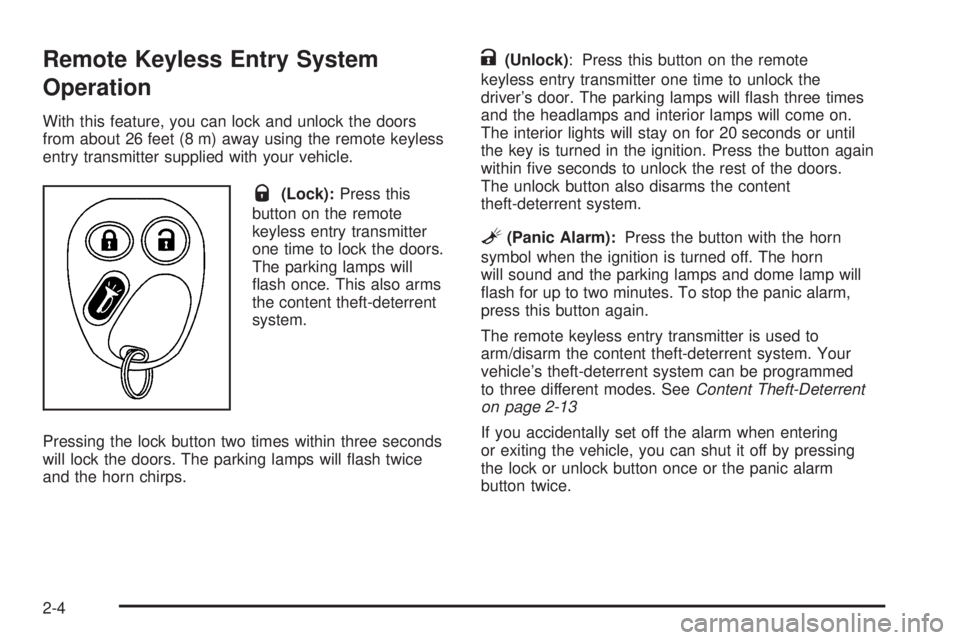
Q(Lock):Press this
button on the remote
keyless entry transmitter
one time to lock the doors.
The parking lamps will
ash once. This also arms
the content theft-deterrent
system.
Pressing the lock button two times within three seconds
will lock the doors. The parking lamps will ash twice
and the horn chirps.
K(Unlock): Press this button on the remote
keyless entry transmitter one time to unlock the
driver’s door. The parking lamps will ash three times
and the headlamps and interior lamps will come on.
The interior lights will stay on for 20 seconds or until
the key is turned in the ignition. Press the button again
within ve seconds to unlock the rest of the doors.
The unlock button also disarms the content
theft-deterrent system.
L(Panic Alarm):Press the button with the horn
symbol when the ignition is turned off. The horn
will sound and the parking lamps and dome lamp will
ash for up to two minutes. To stop the panic alarm,
press this button again.
The remote keyless entry transmitter is used to
arm/disarm the content theft-deterrent system. Your
vehicle’s theft-deterrent system can be programmed
to three different modes. SeeContent Theft-Deterrent
on page 2-13
If you accidentally set off the alarm when entering
or exiting the vehicle, you can shut it off by pressing
the lock or unlock button once or the panic alarm
button twice.
2-4
Page 83 of 368
Theft-Deterrent Systems
Vehicle theft is big business, especially in some cities.
Although your vehicle has a number of theft-deterrent
features, we know that nothing we put on it can make
it impossible to steal.
Content Theft-Deterrent
Your vehicle has a
content theft-deterrent
alarm system.
The remote keyless entry transmitter is used to
arm/disarm the content theft-deterrent system.
SeeRemote Keyless Entry System Operation on
page 2-4. Your vehicle’s theft-deterrent system can
be programmed to three different modes.Active Arming:The system will arm when the lock
button on the remote keyless entry transmitter is
pressed. The security system light will come on steady
for thirty seconds. During this time you can still get
back into the vehicle without triggering the alarm.
Once the light starts ashing the system is armed.
The system will disarm when the unlock button on
the transmitter is pressed.
Passive Arming:The system will arm itself one minute
after the ignition is turned off and the driver’s door
has been opened and closed. If the lock button on the
transmitter is pressed before the minute has passed,
the system will arm immediately. The system will disarm
when the unlock button is pressed.
Security System Disable:The system will not arm.
2-13
Page 84 of 368
Content Theft-Deterrent Personalization
To change the mode that your vehicle is programmed to,
do the following:
1. Turn the ignition to RUN or ACC (Accessory).
2. Press the panic alarm button on the transmitter
slowly four times within ve seconds.
3. You must complete one of the following within
three seconds to change the mode.
To select the active arming mode, press the
lock button on the transmitter once within
three seconds. A chime will sound two times
to acknowledge that the active arming mode
has been selected.
To select the passive arming mode, press the
lock button on the transmitter twice within
three seconds. A chime will sound three times
to acknowledge that the passive arming
mode has been selected.
To select the security system disable mode,
press the unlock button on the transmitter
once within three seconds. A chime will sound
one time to acknowledge that the security system
disabled mode has been selected.
If you accidentally set off the alarm when entering or
exiting the vehicle, you can shut it off by pressing either
the lock or unlock button once on the remote keyless
entry transmitter. The panic alarm button needs to
be pressed twice to turn off the alarm. There is a
ten second pre-alarm grace period indicated by a
rapid beeping. By pressing the transmitter buttons as
indicated above, you can disarm the system before
the horn begins to sound and the exterior lights begin
to ash.
If you hear three horn chirps when you press the
unlock button on the transmitter, that means the
vehicle’s alarm was triggered while you were away.
2-14
Page 91 of 368
AUTOMATIC OVERDRIVE (D):This position is for
normal driving with the automatic transaxle. If you
need more power for passing, and you are:
Going less than about 35 mph (55 km/h), push
your accelerator pedal about halfway down.
Going about 35 mph (55 km/h), push your
accelerator all the way down.
LOW FOUR (L4):This position is also used for
normal driving, however, it offers more power and lower
fuel economy than AUTOMATIC OVERDRIVE (D).
Here are some times you might choose LOW FOUR (L4)
instead of AUTOMATIC OVERDRIVE (D):
When driving on hilly, winding roads.
When going down a steep hill.
LOW TWO (L2):This position gives you more
power but lower fuel economy than AUTOMATIC
OVERDRIVE (D). You can use LOW TWO (L2) on
hills. It can help control your speed as you go down
steep mountain roads, but then you would also want
to use your brakes off and on.
Notice:Do not drive in LOW TWO (L2) for more
than 25 miles (40 km), or at speeds over 55 mph
(90 km/h), or you can damage your transaxle.Use AUTOMATIC OVERDRIVE (D) or LOW FOUR
(L4) as much as possible. Do not shift into
LOW TWO (L2) unless you are going slower than
65 mph (105 km/h) or you can damage your engine.
Notice:Spinning the tires or holding the vehicle
in one place on a hill using only the accelerator
pedal may damage the transaxle. If you are stuck,
do not spin the tires. When stopping on a hill,
use the brakes to hold the vehicle in place.
Transaxle Overheating
If the transaxle uid temperature rises above
284°F (140°C) or rises rapidly, the Engine Coolant
Temperature Warning Light will ash. SeeEngine
Coolant Temperature Warning Light on page 3-31for
more information. When the transaxle overheats it will go
into a protection mode and will default shift into fth gear
if in the AUTOMATIC OVERDRIVE (D) position, or
second gear if in the LOW TWO (L2) position. Continue
driving the vehicle in either position depending on the
required vehicle speed and load. Once the uid
temperature lowers to the normal temperature range,
the transaxle will return to the normal shift patterns.
Towing or driving on long hills can cause the transaxle
uid temperature to be higher than normal. If the
transaxle uid temperature will not cool, you may
need to pull over and check the transaxle uid level.
You should also check the engine coolant temperature.
If it is hot, seeEngine Overheating on page 5-23.
2-21
Page 98 of 368
Compass Variance
Press the on/off button twice to turn on the compass.
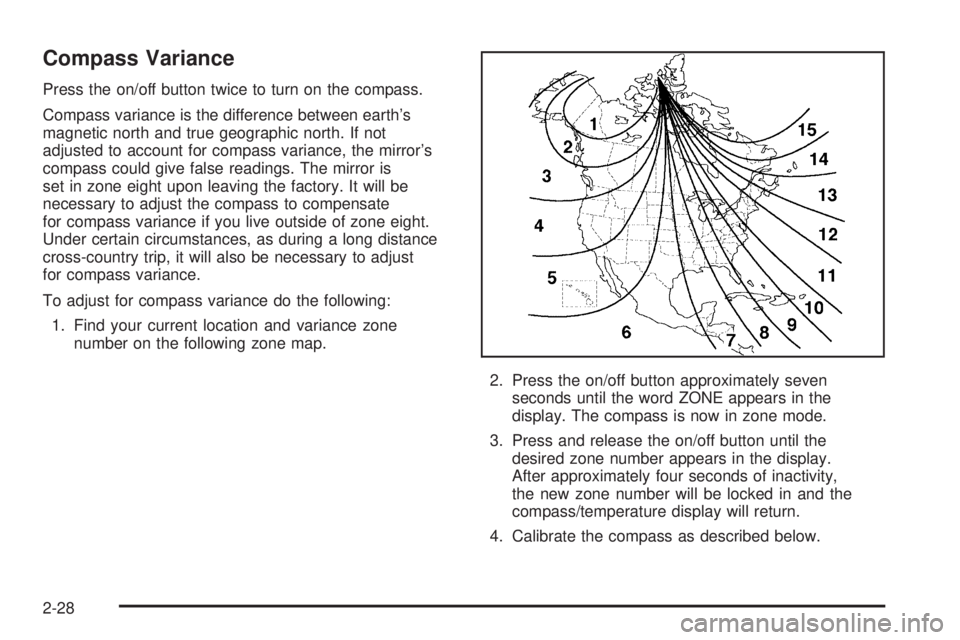
Compass variance is the difference between earth’s
magnetic north and true geographic north. If not
adjusted to account for compass variance, the mirror’s
compass could give false readings. The mirror is
set in zone eight upon leaving the factory. It will be
necessary to adjust the compass to compensate
for compass variance if you live outside of zone eight.
Under certain circumstances, as during a long distance
cross-country trip, it will also be necessary to adjust
for compass variance.
To adjust for compass variance do the following:
1. Find your current location and variance zone
number on the following zone map.
2. Press the on/off button approximately seven
seconds until the word ZONE appears in the
display. The compass is now in zone mode.
3. Press and release the on/off button until the
desired zone number appears in the display.
After approximately four seconds of inactivity,
the new zone number will be locked in and the
compass/temperature display will return.
4. Calibrate the compass as described below.
2-28
Page 100 of 368
Temperature and Compass Display
Press the on/off button, located in the center, to cycle
between °F, °C and off. If the display reads CAL,
the compass needs to be calibrated. For more
information, see “Compass Calibration” later in
this section.
If an abnormal temperature reading is displayed for an
extended period of time, please consult your dealer.
Under certain circumstances, a delay in updating
the temperature is normal.
Compass Variance
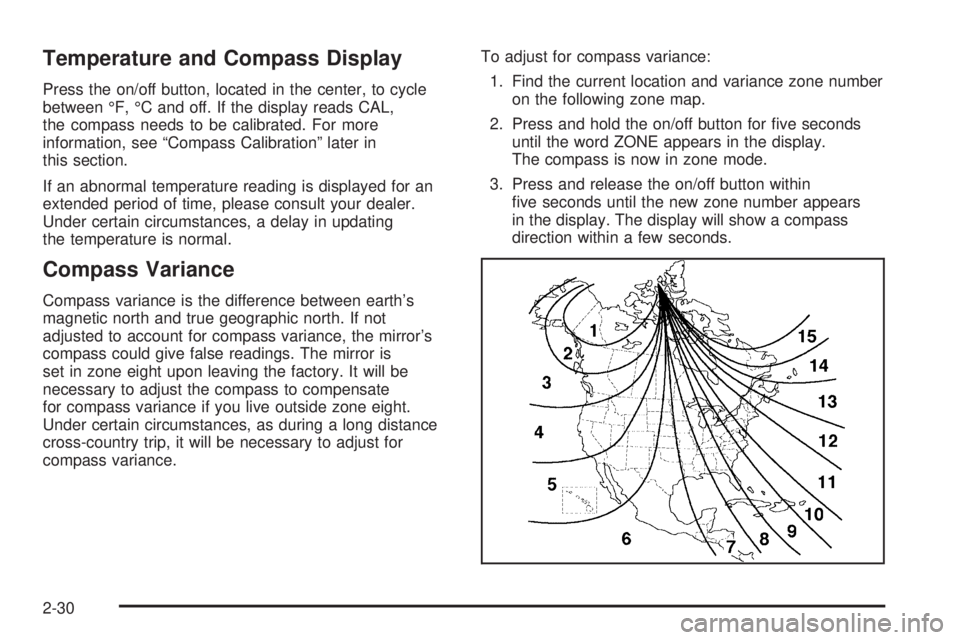
Compass variance is the difference between earth’s
magnetic north and true geographic north. If not
adjusted to account for compass variance, the mirror’s
compass could give false readings. The mirror is
set in zone eight upon leaving the factory. It will be
necessary to adjust the compass to compensate
for compass variance if you live outside zone eight.
Under certain circumstances, as during a long distance
cross-country trip, it will be necessary to adjust for
compass variance.To adjust for compass variance:
1. Find the current location and variance zone number
on the following zone map.
2. Press and hold the on/off button for ve seconds
until the word ZONE appears in the display.
The compass is now in zone mode.
3. Press and release the on/off button within
ve seconds until the new zone number appears
in the display. The display will show a compass
direction within a few seconds.
2-30
Page 135 of 368
Speedometer and Odometer
Your speedometer lets you see your speed in both
miles per hour (mph) and kilometers per hour (km/h).
Your odometer shows how far your vehicle has
been driven, in either miles (used in the United States)
or kilometers (used in Canada).
Your vehicle has a tamper resistant odometer. The
digital odometer will read 999,999 if someone tries to
turn it back.
The ERROR message is displayed on the odometer
indicating that the speedometer reading is approximately
10 percent above the actual speed. Press the trip
odometer button to return to the odometer/trip mode.
This message will appear every 10 minutes. If this
occurs, see your dealer for service.
You may wonder what happens if your vehicle needs
a new odometer installed. If the new one can be set
to the mileage total of the old odometer, then it must be.
If not, then it is set at zero and a label must be put
on the driver’s door to show the old mileage reading
when the new odometer was installed.
Trip Odometer
Your trip odometer is located on the instrument panel
and shows how far your vehicle has been driven
since the trip odometer was last reset. To reset the trip
odometer to zero, press and hold the trip/reset button
on the speedometer for about two seconds.
Tachometer
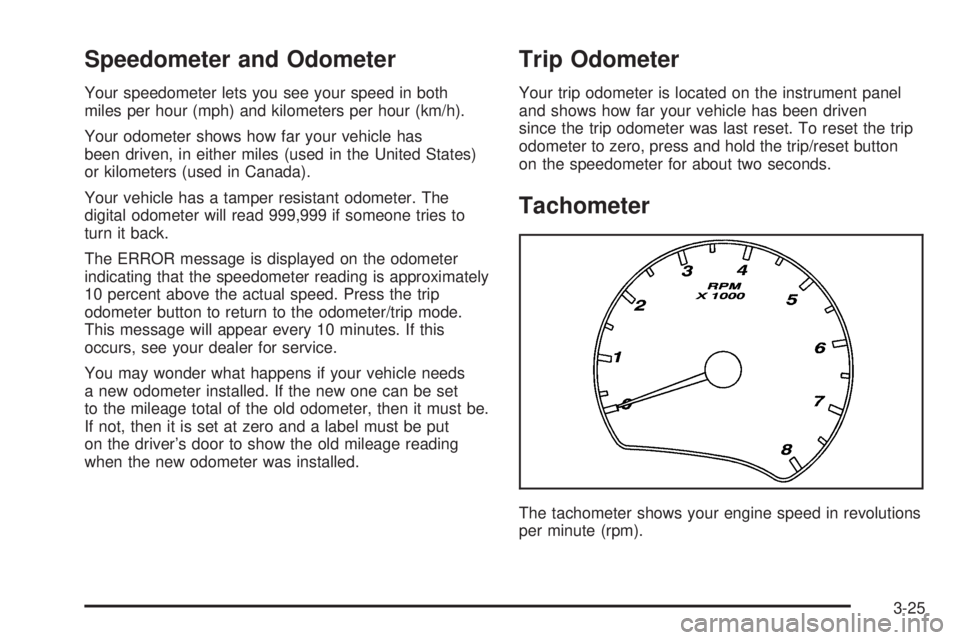
The tachometer shows your engine speed in revolutions
per minute (rpm).
3-25
Page 150 of 368

Setting the Time
To set the hour, press the clock button. The clock
symbol will appear on the audio display and the hour
number will ash. Then turn the ADJ knob to increase
or to decrease the hour. To set the minutes, press
the clock button again. The minute numbers will ash.
Then turn the ADJ knob to increase or to decrease
the minutes. The time can be set with the ignition
on or off.
To synchronize the time with an FM station broadcasting
Radio Data System (RDS) information, press and
release the clock button to enter the clock set mode,
then press and hold the clock button for three seconds
until UPDATED appears on the display. If the time
is not available from the station, NO TIME UPDATE
will appear on the display.
RDS time is broadcast once a minute. After tuning to
an RDS broadcast station, it may take a few minutes
for the time to update.
Radio with CD (Base Level)
Radio Data System (RDS)
The audio system has a Radio Data System (RDS).
RDS features are available for use only on FM stations
that broadcast RDS information.
With RDS, the radio can do the following:
Seek to stations broadcasting the selected type
of programming
Receive announcements concerning local and
national emergencies
Display messages from radio stations
3-40
Page 152 of 368
DISP (Display):For RDS, press the DISP knob to
change what appears on the display while using RDS.
The display options are station name, RDS station
frequency, PTY, and the name of the program
(if available).
For XM™ (if equipped), press the DISP knob while
in XM™ mode to retrieve four different categories
of information related to the current song or channel:
Artist, Song Title, Category or PTY, Channel
Number/Channel Name.
Finding a Station
AM/FM:Press this button to switch between FM1, FM2
or AM. The display will show the selection.
XM/AUX:Press this button to switch between XM1 or
XM2 (if equipped).
ADJ (Adjust):Turn this knob to select radio stations.
oSEEKp:Press the left or right arrow to go to
the previous or the next station and stay there.
The radio will only seek stations with a strong signal
that are in the selected band.
©SCAN¨:Press and hold either arrow for less
than two seconds until SCAN appears on the display
and you hear a beep. The radio will go to a station,
play for a few seconds, then go on to the next station.
Press either arrow again to stop scanning. If no
station can be found during scan, NOT FOUND will
appear on the display and the radio will go back to the
last tuned station.
To scan preset stations, press and hold SCAN for
more than two seconds until you hear a beep. The
radio will go to the rst preset station stored on
the pushbuttons, play for ve seconds, then go on to
the next preset station. Press SCAN again to stop
scanning presets.
The radio will only scan stations with a strong signal
that are in the selected band.
1–6 (Preset Pushbuttons):Press this button to play
stations that are programmed on the radio preset
pushbuttons.
The radio will only seek preset stations with a strong
signal that are in the selected band.
3-42
Page 153 of 368
Setting Preset Stations
Up to 30 stations (six FM1, six FM2, and six AM,
six XM1 and six XM2 (if equipped)), can be programmed
on the six numbered pushbuttons, by performing the
following steps:
1. Turn the radio on.
2. Press AM/FM to select FM1, FM2 or AM.
Press XM/AUX to select XM1 or XM2.
3. Tune in the desired station.
4. Press EQ to select the equalization.
5. Press and hold one of the six numbered
pushbuttons until you hear a beep. Whenever
that numbered pushbutton is pressed, the station
that was set will return and the equalization that
was selected will be stored for that pushbutton.
6. Repeat the steps for each pushbutton.
Setting the Tone
(Bass/Midrange/Treble)
P
/Q(Bass/Treble):Press this button until BASS,
MID, or TREBLE appears on the display. Turn the
ADJ knob to increase or to decrease. The display will
show the bass, mid, or treble level. If a station is weak
or noisy, decrease the treble.
To adjust bass, midrange, or treble to the middle
position, select BASS, MID, or TREBLE. Then press
and hold this button for more than two seconds.
You will hear one beep and the tone control will be
adjusted to the middle position.
To adjust all tone controls to the middle position, push
and hold the tone button when no tone control is
displayed. ALL CENTERED will appear on the display
and you will hear one beep. The bass, midrange,
and treble will be adjusted to the middle position.
EQ (Equalizer):Press this button to select customized
equalization settings designed for country, jazz, talk,
pop, rock, and classical.
To return to the manual mode, press and release the
EQ button until TONE Custom appears on the display.
You can also manually adjust the bass, midrange,
and treble using the Bass/Treble button.
3-43