light PONTIAC VIBE 2007 Owner's Manual
[x] Cancel search | Manufacturer: PONTIAC, Model Year: 2007, Model line: VIBE, Model: PONTIAC VIBE 2007Pages: 432, PDF Size: 2.54 MB
Page 111 of 432
Overdrive Off
Vehicles with an automatic transaxle have an O/D
(overdrive off) button located on the left side of
the shift lever.
When you turn on your vehicle overdrive will
automatically come on until you turn it off.
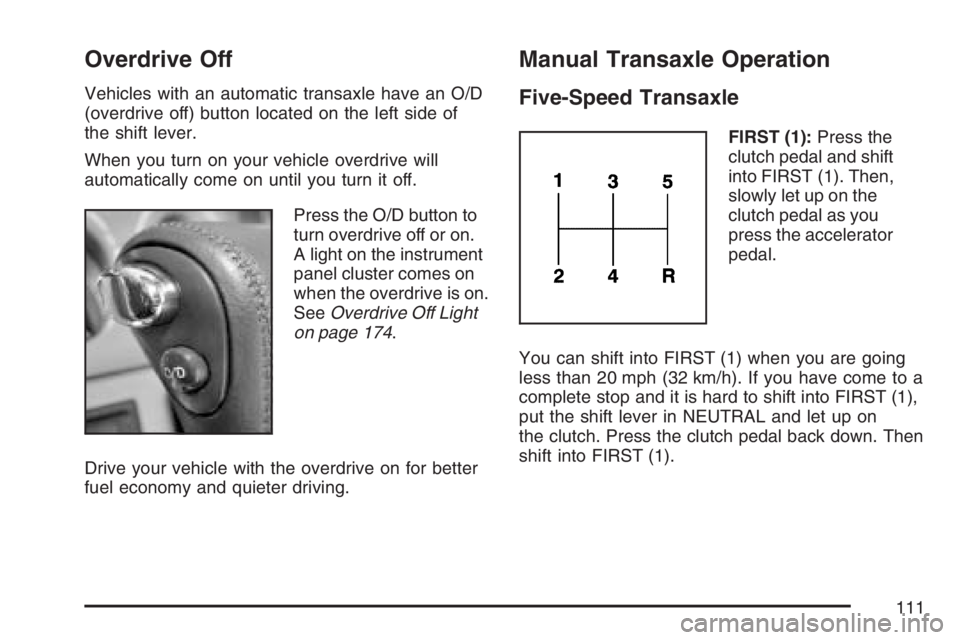
Press the O/D button to
turn overdrive off or on.
A light on the instrument
panel cluster comes on
when the overdrive is on.
SeeOverdrive Off Light
on page 174.
Drive your vehicle with the overdrive on for better
fuel economy and quieter driving.
Manual Transaxle Operation
Five-Speed Transaxle
FIRST (1):Press the
clutch pedal and shift
into FIRST (1). Then,
slowly let up on the
clutch pedal as you
press the accelerator
pedal.
You can shift into FIRST (1) when you are going
less than 20 mph (32 km/h). If you have come to a
complete stop and it is hard to shift into FIRST (1),
put the shift lever in NEUTRAL and let up on
the clutch. Press the clutch pedal back down. Then
shift into FIRST (1).
111
Page 114 of 432
Parking Brake
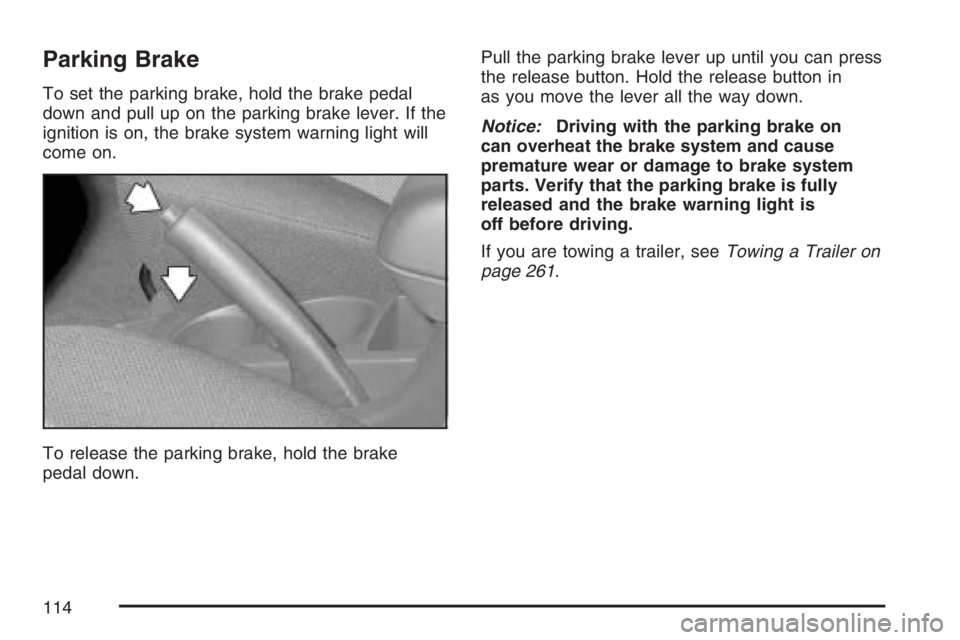
To set the parking brake, hold the brake pedal
down and pull up on the parking brake lever. If the
ignition is on, the brake system warning light will
come on.
To release the parking brake, hold the brake
pedal down.Pull the parking brake lever up until you can press
the release button. Hold the release button in
as you move the lever all the way down.
Notice:Driving with the parking brake on
can overheat the brake system and cause
premature wear or damage to brake system
parts. Verify that the parking brake is fully
released and the brake warning light is
off before driving.
If you are towing a trailer, seeTowing a Trailer on
page 261.
114
Page 121 of 432
Mirrors
Manual Rearview Mirror
While sitting in a comfortable driving position,
adjust the mirror so you can see clearly behind
your vehicle. Move the mirror in the center to
move it up or down and side to side.
The control at the bottom of the mirror is the
day/night feature that allows adjustment to
the mirror so that the glare of headlamps from
behind is reduced. Pull the control for night driving
to reduce glare; push it to return to the day
position.
The mirror may have map lights beneath the
mirror. Press the switch to turn each light
on or off.
Manual Rearview Mirror with
OnStar
®
The vehicle may have an inside rearview mirror
with OnStar®. See your dealer for more information
on the system and how to subscribe to OnStar®.
SeeOnStar®System on page 123for information
on the services OnStar®provides.
While sitting in a comfortable position, adjust the
mirror so you can see clearly behind your
vehicle. Move the mirror in the center to move it
up or down and side to side. The control at
the bottom of the mirror is the day/night feature
that allows adjustment to the mirror so that
the glare of headlamps from behind is reduced.
Move the control from left to right for day or night
conditions.
121
Page 122 of 432
Automatic Dimming Rearview Mirror
While sitting in a comfortable driving position,
adjust the mirror so you can see clearly behind
your vehicle. Hold the mirror in the center to move
it up or down and side to side.
The mirror may have an automatic dimming
feature that darkens gradually to reduce the glare
of headlamps from behind. When the ignition
key is inserted and turned on, the inside rear view
mirror always turns on in the automatic function
mode. An indicator light located on the mirror
will come on to show you that the function is on.
When the inside air temperature is low, it may take
a little longer for the mirror to darken in response
to the detection of headlights. Press the button
in the center of the mirror to turn this feature
on or off.
One photocell on the front of the mirror senses
when it is becoming dark outside. Another
photocell, facing rearward, senses headlamps
behind you.
To keep the photocells operating well, occasionally
clean them with a cotton swab and glass cleaner.
Outside Remote Control Mirrors
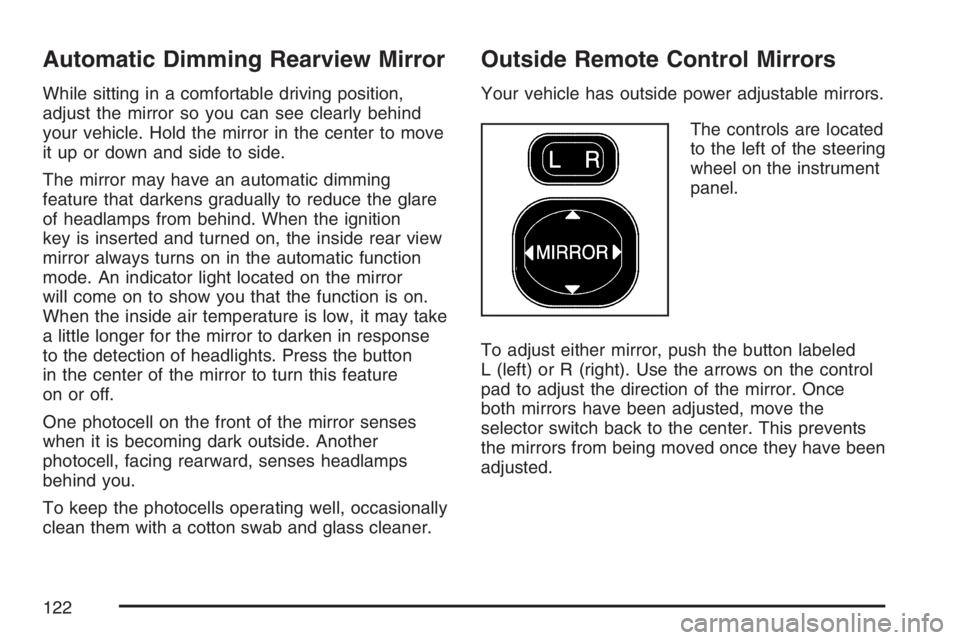
Your vehicle has outside power adjustable mirrors.
The controls are located
to the left of the steering
wheel on the instrument
panel.
To adjust either mirror, push the button labeled
L (left) or R (right). Use the arrows on the control
pad to adjust the direction of the mirror. Once
both mirrors have been adjusted, move the
selector switch back to the center. This prevents
the mirrors from being moved once they have been
adjusted.
122
Page 126 of 432
How OnStar®Service Works
In order to provide you with OnStar®services,
your vehicle’s OnStar®system has the capability
of recording and transmitting vehicle information.
This information is automatically sent to an
OnStar
®Call Center at the time of an OnStar®
button press, Emergency button press or if
your airbags or AACN system deploys. The vehicle
information usually includes your GPS location
and, in the event of a crash, additional information
regarding the accident that your vehicle has
been involved in (e.g. the direction from which
your vehicle was hit). When you use the Virtual
Advisor feature of OnStar
®Hands-Free Calling,
your vehicle also sends OnStar®your GPS
location so that we can provide you with
location-based services.
OnStar
®service cannot work unless your vehicle
is in a place where OnStar®has an agreement
with a wireless service provider for service in that
area. OnStar
®service also cannot work unless
you are in a place where the wireless service
provider OnStar
®has hired for that area
has coverage, network capacity and reception
when the service is needed, and technology that
is compatible with the OnStar
®service.Not all services are available everywhere,
particularly in remote or enclosed areas, or
at all times.
OnStar
®service that involves location information
about your vehicle cannot work unless GPS
satellite signals are unobstructed and available in
that place as well.
Your vehicle must have a working electrical
system (including adequate battery power) for the
OnStar
®equipment to operate. There are other
problems OnStar®cannot control that may prevent
OnStar®from providing OnStar®service to you
at any particular time or place. Some examples are
damage to important parts of your vehicle in an
accident, hills, tall buildings, tunnels, weather
or wireless phone network congestion.
Your Responsibility
You may need to increase the volume of your
radio to hear the OnStar®advisor. If the light next
to the OnStar®buttons is red, this means that
your system is not functioning properly and should
be checked by a dealer. If the light appears
clear (no light is appearing), your OnStar
®
subscription has expired. You can always press
the blue OnStar®button to conrm that your
OnStar®equipment is active.
126
Page 133 of 432
Instrument Panel Overview........................ 136
Hazard Warning Flashers.......................... 138
Other Warning Devices............................. 138
Horn.......................................................... 138
Tilt Wheel.................................................. 139
Turn Signal/Multifunction Lever.................. 139
Turn and Lane-Change Signals................. 140
Headlamp High/Low-Beam Changer.......... 140
Flash-to-Pass............................................ 141
Windshield Wipers..................................... 141
Windshield Washer.................................... 142
Rear Window Wiper/Washer...................... 142
Cruise Control........................................... 143
Exterior Lamps.......................................... 146
Headlamps on Reminder........................... 146
Daytime Running Lamps (DRL)................. 147
Automatic Headlamp System..................... 147
Fog Lamps................................................ 148
Instrument Panel Brightness...................... 148
Interior Lamps Control............................... 149
Entry Lighting............................................ 149
Reading Lamps......................................... 150
Accessory Power Outlet(s)........................ 150Power Outlet 115 Volt Alternating
Current.................................................. 151
Ashtray(s) and Cigarette Lighter................ 151
Climate Controls......................................... 152
Climate Control System............................. 152
Outlet Adjustment...................................... 155
Passenger Compartment Air Filter............. 156
Warning Lights, Gages, and Indicators..... 158
Instrument Panel Cluster........................... 159
Speedometer and Odometer...................... 160
Trip Odometers......................................... 160
Tachometer............................................... 161
Safety Belt Reminder Light........................ 161
Airbag Readiness Light............................. 162
Passenger Airbag Status Indicator............. 163
Charging System Light.............................. 165
Brake System Warning Light..................... 166
Anti-Lock Brake System Warning Light...... 167
Low Tire Pressure Warning Light.............. 167
Traction Control System (TCS)
Warning Light........................................ 168
StabiliTrak
®Indicator Light......................... 168
Section 3 Instrument Panel
133
Page 134 of 432
Engine Coolant Temperature Gage............ 169
Malfunction Indicator Lamp........................ 170
Oil Pressure Light..................................... 173
Lights On Reminder.................................. 174
Taillamp Indicator Light............................. 174
Cruise Control Light.................................. 174
Overdrive Off Light.................................... 174
Highbeam On Light................................... 175
Low Washer Fluid Warning Light............... 175
Door Ajar Light.......................................... 175
Fuel Gage................................................. 176
Low Fuel Warning Light............................ 177Audio System(s)......................................... 177
Setting the Time........................................ 178
Radio with CD (Base Level)...................... 179
Radio with CD (MP3)................................ 188
Radio with Six-Disc CD............................. 198
Using an MP3........................................... 210
XM Radio Messages................................. 216
Radio Reception........................................ 218
Care of Your CDs..................................... 219
Care of the CD Player.............................. 219
Fixed Mast Antenna.................................. 219
XM™ Satellite Radio Antenna System....... 219
Section 3 Instrument Panel
134
Page 137 of 432
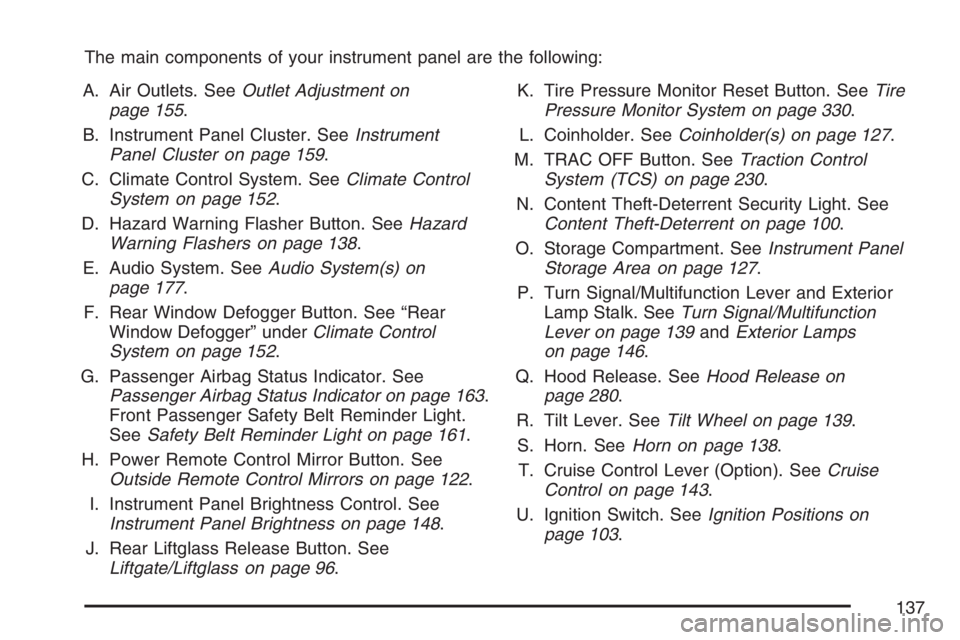
The main components of your instrument panel are the following:
A. Air Outlets. SeeOutlet Adjustment on
page 155.
B. Instrument Panel Cluster. SeeInstrument
Panel Cluster on page 159.
C. Climate Control System. SeeClimate Control
System on page 152.
D. Hazard Warning Flasher Button. SeeHazard
Warning Flashers on page 138.
E. Audio System. SeeAudio System(s) on
page 177.
F. Rear Window Defogger Button. See “Rear
Window Defogger” underClimate Control
System on page 152.
G. Passenger Airbag Status Indicator. See
Passenger Airbag Status Indicator on page 163.
Front Passenger Safety Belt Reminder Light.
SeeSafety Belt Reminder Light on page 161.
H. Power Remote Control Mirror Button. See
Outside Remote Control Mirrors on page 122.
I. Instrument Panel Brightness Control. See
Instrument Panel Brightness on page 148.
J. Rear Liftglass Release Button. See
Liftgate/Liftglass on page 96.K. Tire Pressure Monitor Reset Button. SeeTire
Pressure Monitor System on page 330.
L. Coinholder. SeeCoinholder(s) on page 127.
M. TRAC OFF Button. SeeTraction Control
System (TCS) on page 230.
N. Content Theft-Deterrent Security Light. See
Content Theft-Deterrent on page 100.
O. Storage Compartment. SeeInstrument Panel
Storage Area on page 127.
P. Turn Signal/Multifunction Lever and Exterior
Lamp Stalk. SeeTurn Signal/Multifunction
Lever on page 139andExterior Lamps
on page 146.
Q. Hood Release. SeeHood Release on
page 280.
R. Tilt Lever. SeeTilt Wheel on page 139.
S. Horn. SeeHorn on page 138.
T. Cruise Control Lever (Option). SeeCruise
Control on page 143.
U. Ignition Switch. SeeIgnition Positions on
page 103.
137
Page 138 of 432
V. Windshield Wiper Lever. SeeWindshield
Wipers on page 141.
W. Cigarette Lighter or Accessory Power Outlet.
SeeAshtray(s) and Cigarette Lighter on
page 151orAccessory Power Outlet(s) on
page 150.
X. Shift Lever. SeeAutomatic Transaxle Operation
on page 108orManual Transaxle Operation
on page 111.
Y. Power Outlet. SeePower Outlet 115 Volt
Alternating Current on page 151.
Z. Parking Brake. SeeParking Brake on
page 114.
AA. Center Console Storage Area. SeeCenter
Console Storage Area on page 127.
AB. Glove Box. SeeGlove Box on page 127.
Hazard Warning Flashers
The hazard warning ashers let you warn the
police and others that you have a problem. The
front and rear turn signal lamps will ash on
and off.The hazard warning
asher button is located
in the center of the
instrument panel.
The hazard warning ashers work no matter what
position the key is in, and even if the key is not
in the ignition switch.
Press the button to make the front and rear turn
signal lamps ash on and off. Press the button
again to turn the ashers off.
While the hazard warning ashers are on, the turn
signals do not work.
Other Warning Devices
If you carry reective triangles, you can set
them up at the side of the road about 300 feet
(100 m) behind your vehicle.
Horn
Press near or on the horn symbols on your
steering wheel pad to sound the horn.
138
Page 140 of 432
Turn and Lane-Change Signals
The turn signal has an upward (for right) and a
downward (for left) position. These positions allow
you to signal a turn or a lane change.
To signal a turn, move the lever all the way up or
down. When the turn is nished, the lever will
return automatically.
To signal a lane change, raise or lower the lever
until the arrow starts to ash. Hold it there until you
complete your lane change. The lever will return
by itself when you release it.
An arrow on the
instrument panel cluster
will ash in the
direction of the turn or
lane change.
If you signal a turn or a lane change and notice
the arrow ashing rapidly, a signal bulb may
be burned out and other drivers will not see your
turn signal.If a bulb is burned out, have it replaced to help
avoid an accident. If the arrows do not go on at all
when you signal a turn, check for burned-out
bulbs and then check the fuse. SeeFuses and
Circuit Breakers on page 365.
Headlamp High/Low-Beam Changer
The headlamps must be on for this feature to
work. For high beams, push the turn signal lever
away from you.
When the high beams
are on, this light on the
instrument panel
cluster also will be on.
It will go off when you switch to the low beams. To
switch back to low beams, pull the lever toward you.
140