instrument panel PONTIAC VIBE 2008 Owner's Manual
[x] Cancel search | Manufacturer: PONTIAC, Model Year: 2008, Model line: VIBE, Model: PONTIAC VIBE 2008Pages: 368, PDF Size: 5.7 MB
Page 121 of 368
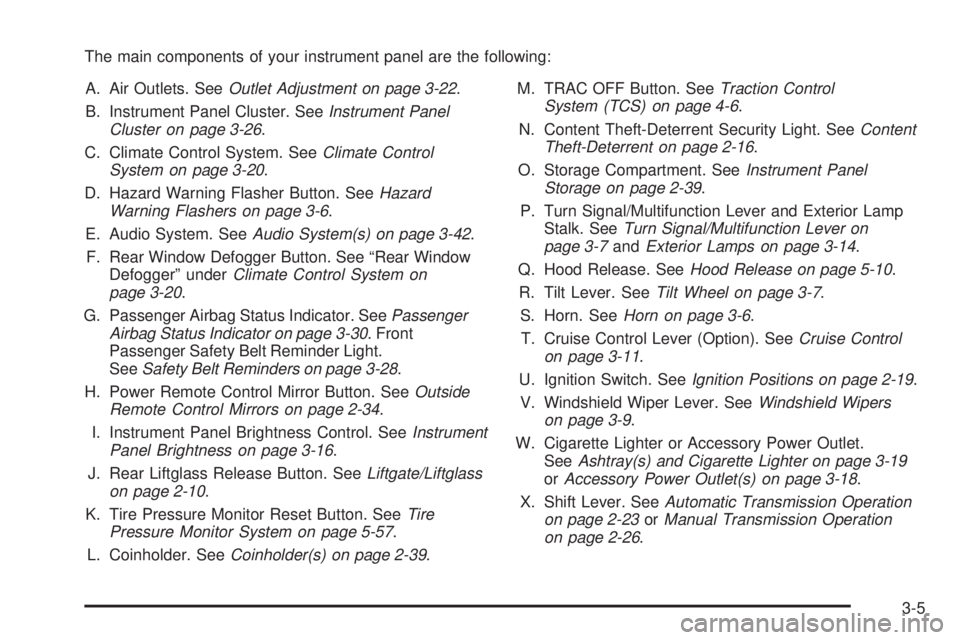
The main components of your instrument panel are the following:
A. Air Outlets. SeeOutlet Adjustment on page 3-22.
B. Instrument Panel Cluster. SeeInstrument Panel
Cluster on page 3-26.
C. Climate Control System. SeeClimate Control
System on page 3-20.
D. Hazard Warning Flasher Button. SeeHazard
Warning Flashers on page 3-6.
E. Audio System. SeeAudio System(s) on page 3-42.
F. Rear Window Defogger Button. See “Rear Window
Defogger” underClimate Control System on
page 3-20.
G. Passenger Airbag Status Indicator. SeePassenger
Airbag Status Indicator on page 3-30. Front
Passenger Safety Belt Reminder Light.
SeeSafety Belt Reminders on page 3-28.
H. Power Remote Control Mirror Button. SeeOutside
Remote Control Mirrors on page 2-34.
I. Instrument Panel Brightness Control. SeeInstrument
Panel Brightness on page 3-16.
J. Rear Liftglass Release Button. SeeLiftgate/Liftglass
on page 2-10.
K. Tire Pressure Monitor Reset Button. SeeTire
Pressure Monitor System on page 5-57.
L. Coinholder. SeeCoinholder(s) on page 2-39.M. TRAC OFF Button. SeeTraction Control
System (TCS) on page 4-6.
N. Content Theft-Deterrent Security Light. SeeContent
Theft-Deterrent on page 2-16.
O. Storage Compartment. SeeInstrument Panel
Storage on page 2-39.
P. Turn Signal/Multifunction Lever and Exterior Lamp
Stalk. SeeTurn Signal/Multifunction Lever on
page 3-7andExterior Lamps on page 3-14.
Q. Hood Release. SeeHood Release on page 5-10.
R. Tilt Lever. SeeTilt Wheel on page 3-7.
S. Horn. SeeHorn on page 3-6.
T. Cruise Control Lever (Option). SeeCruise Control
on page 3-11.
U. Ignition Switch. SeeIgnition Positions on page 2-19.
V. Windshield Wiper Lever. SeeWindshield Wipers
on page 3-9.
W. Cigarette Lighter or Accessory Power Outlet.
SeeAshtray(s) and Cigarette Lighter on page 3-19
orAccessory Power Outlet(s) on page 3-18.
X. Shift Lever. SeeAutomatic Transmission Operation
on page 2-23orManual Transmission Operation
on page 2-26
.
3-5
Page 122 of 368
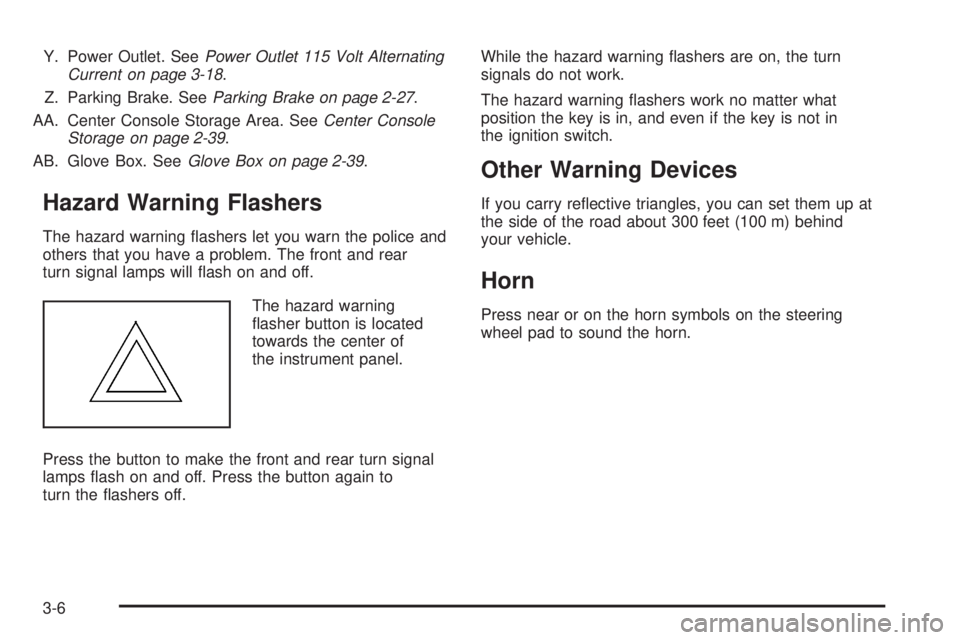
Y. Power Outlet. SeePower Outlet 115 Volt Alternating
Current on page 3-18.
Z. Parking Brake. SeeParking Brake on page 2-27.
AA. Center Console Storage Area. SeeCenter Console
Storage on page 2-39.
AB. Glove Box. SeeGlove Box on page 2-39.
Hazard Warning Flashers
The hazard warning ashers let you warn the police and
others that you have a problem. The front and rear
turn signal lamps will ash on and off.
The hazard warning
asher button is located
towards the center of
the instrument panel.
Press the button to make the front and rear turn signal
lamps ash on and off. Press the button again to
turn the ashers off.While the hazard warning ashers are on, the turn
signals do not work.
The hazard warning ashers work no matter what
position the key is in, and even if the key is not in
the ignition switch.
Other Warning Devices
If you carry reective triangles, you can set them up at
the side of the road about 300 feet (100 m) behind
your vehicle.
Horn
Press near or on the horn symbols on the steering
wheel pad to sound the horn.
3-6
Page 124 of 368

Turn and Lane-Change Signals
The turn signal has an upward (for right) and a
downward (for left) position. These positions allow
you to signal a turn or a lane change.
To signal a turn, move the lever all the way up or
down. When the turn is nished, the lever will return
automatically.
To signal a lane change, raise or lower the lever until
the arrow starts to ash. Hold it there until you complete
your lane change. The lever will return by itself when
you release it.
An arrow on the instrument
panel cluster will ash in
the direction of the turn or
lane change.
If you signal a turn or a lane change and notice the
arrow ashing rapidly, a signal bulb may be burned
out and other drivers will not see your turn signal.
If a bulb is burned out, have it replaced to help avoid an
accident. If the arrows do not go on at all when you signal
a turn, check for burned-out bulbs and then check the
fuse. SeeFuses and Circuit Breakers on page 5-91.
Headlamp High/Low-Beam Changer
The headlamps must be on for this feature to work.
For high beams, push the turn signal lever away
from you.
When the high beams
are on, this light on the
instrument panel cluster
also will be on.
It will go off when you switch to the low beams.
To switch back to low beams, pull the lever toward you.
Flash-to-Pass
With the lever in the low-beam position, pull the lever
toward you to momentarily switch to high beams
(to signal that you are going to pass). If you have the
headlamps on when you release the lever, they will
return to the low beams.
3-8
Page 128 of 368
Setting Cruise Control
{CAUTION:
If you leave your cruise control on when you
are not using cruise, you might hit a button
and go into cruise when you do not want to.
You could be startled and even lose control.
Keep the cruise control switch off until you
want to use cruise control.
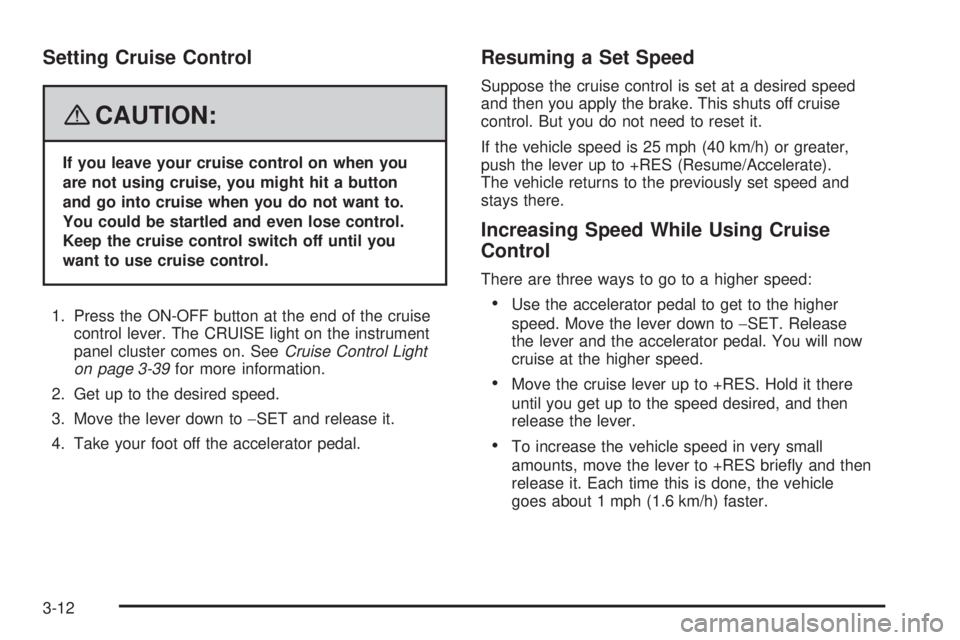
1. Press the ON-OFF button at the end of the cruise
control lever. The CRUISE light on the instrument
panel cluster comes on. SeeCruise Control Light
on page 3-39for more information.
2. Get up to the desired speed.
3. Move the lever down to−SET and release it.
4. Take your foot off the accelerator pedal.
Resuming a Set Speed
Suppose the cruise control is set at a desired speed
and then you apply the brake. This shuts off cruise
control. But you do not need to reset it.
If the vehicle speed is 25 mph (40 km/h) or greater,
push the lever up to +RES (Resume/Accelerate).
The vehicle returns to the previously set speed and
stays there.
Increasing Speed While Using Cruise
Control
There are three ways to go to a higher speed:
Use the accelerator pedal to get to the higher
speed. Move the lever down to−SET. Release
the lever and the accelerator pedal. You will now
cruise at the higher speed.
Move the cruise lever up to +RES. Hold it there
until you get up to the speed desired, and then
release the lever.
To increase the vehicle speed in very small
amounts, move the lever to +RES briey and then
release it. Each time this is done, the vehicle
goes about 1 mph (1.6 km/h) faster.
3-12
Page 130 of 368

Exterior Lamps
The lever on the left side of the steering column
operates the exterior lamps.
O(Exterior Lamps):Turn the outside part of the
lever with the symbol on it, to operate the lamps.
For vehicles sold in the U. S., this symbol will appear
on the instrument panel cluster when your exterior lamps
are on.The exterior lamp switch has three positions:
OFF:Turning the switch to this position turns off all
lamps, except the Daytime Running Lamps (DRL).
O(Parking Lamps):Turning the switch to this position
turns on the parking lamps together with the following:
Sidemarker Lamps
Taillamps
License Plate Lamp
Instrument Panel Lights
A symbol will appear on the instrument panel cluster
when your parking lamps are on. SeeLights On
Reminder on page 3-39andTaillamp Indicator Light
on page 3-39for additional information.
3(Headlamps):Turning the switch to this position
turns on the headlamps, together with the previously
listed lamps and lights.
3-14
Page 131 of 368
Headlamps on Reminder
If you turn the ignition to LOCK or ACC and leave the
lamps on, you will hear a tone when you open the
driver’s door.
Daytime Running Lamps (DRL)
Daytime Running Lamps (DRL) can make it easier for
others to see the front of your vehicle during the day.
DRL can be helpful in many different driving conditions,
but they can be especially helpful in the short periods
after dawn and before sunset. Fully functional daytime
running lamps are required on all vehicles rst sold in
Canada.
The DRL system will make the headlamps come on at
a reduced brightness when the following conditions
are met:
The ignition is on with the engine running.
The exterior lamps switch is off.
The parking brake is released.When the DRL are on, only the headlamps will be on at
a reduced brightness. The taillamps, sidemarker and
other lamps will not be on. The instrument panel will
not be lit up either.
When you turn the exterior lamp switch to the headlamp
position, the DRL will go off and the headlamps will
come on. The other lamps that come on with the
headlamps will also come on.
When it begins to get dark, the headlamps will
automatically switch from DRL to the regular headlamps.
See “Automatic Headlamp System” following.
When you turn the exterior lamp switch off, the regular
lamps will go off and the headlamps will change to
the reduced brightness of DRL provided it is not dark
outside. DRL also comes on if only the parking
lamps are being used.
3-15
Page 132 of 368
Automatic Headlamp System
Your vehicle has an automatic light sensor on the top
left corner of the instrument panel, so be sure it is
not covered or the headlamps will be on continuously.
When it is dark enough outside, the automatic headlamp
system will turn on the low-beam headlamps at the
normal brightness along with other lamps such as the
taillamps, sidemarker, parking lamps and instrument
panel lights. This is indicated by the headlamp symbol
on your instrument panel cluster. SeeInstrument
Panel Cluster on page 3-26.
If you are driving through a parking garage, overcast
weather, or a tunnel, the automatic headlamp system
may turn on the low-beam headlamps at a normal
brightness along with the taillamps, sidemarker, parking
lamps and the instrument panel lights. The radio lights
will be dimmer, and the instrument panel cluster lights
may dim. There will be a delay before the lights will turn
on when starting the car at night.
Fog Lamps
-(Fog Lamps):Turn the band on the turn
signal/multifunction lever to the fog lamp symbol
to turn the fog lamps on. They will come on only
when the headlamps are on low beam.
Some localities have laws that require the headlamps to
be on along with the fog lamps.
Instrument Panel Brightness
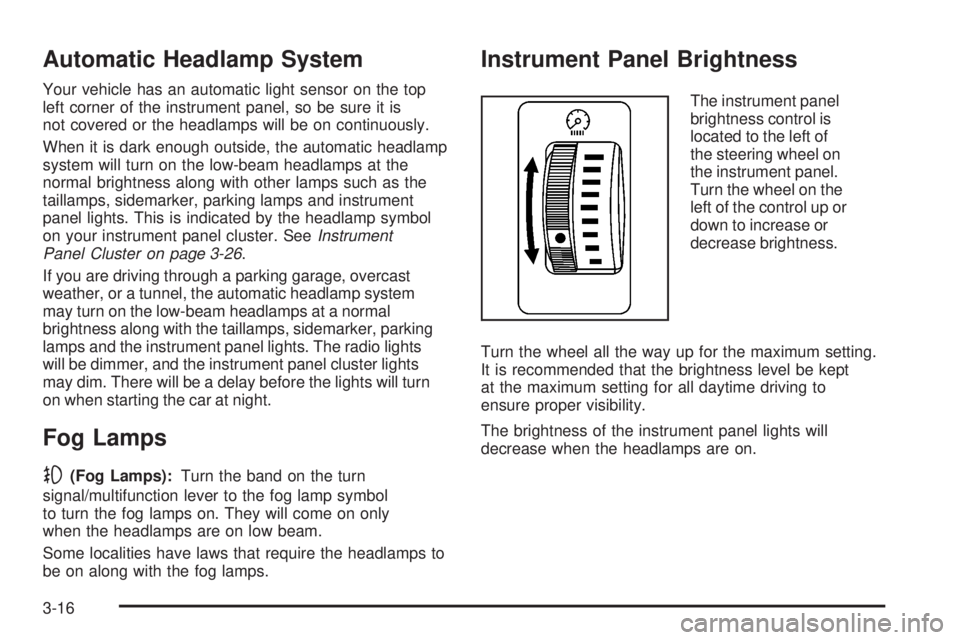
The instrument panel
brightness control is
located to the left of
the steering wheel on
the instrument panel.
Turn the wheel on the
left of the control up or
down to increase or
decrease brightness.
Turn the wheel all the way up for the maximum setting.
It is recommended that the brightness level be kept
at the maximum setting for all daytime driving to
ensure proper visibility.
The brightness of the instrument panel lights will
decrease when the headlamps are on.
3-16
Page 135 of 368
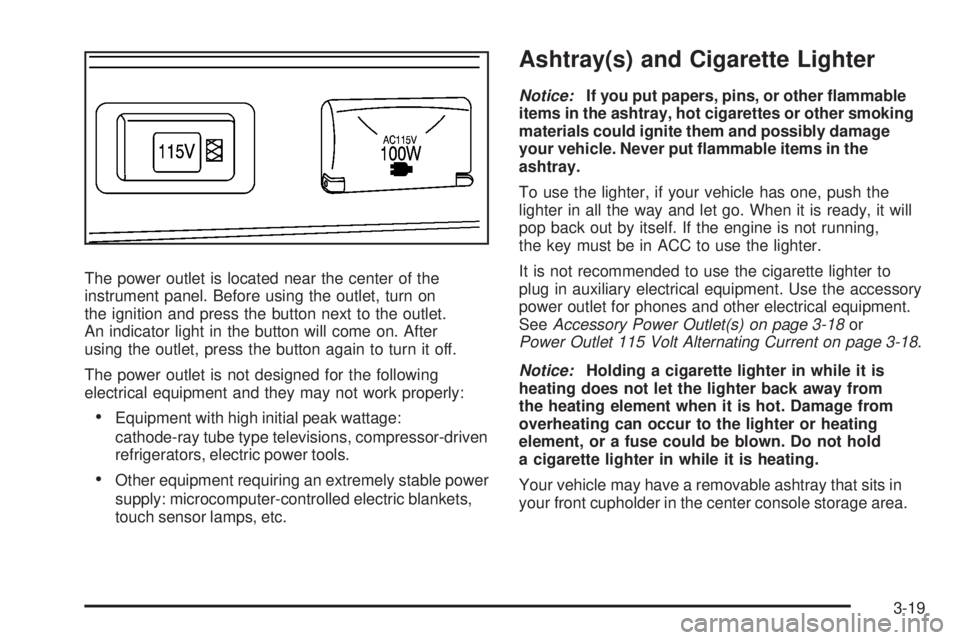
The power outlet is located near the center of the
instrument panel. Before using the outlet, turn on
the ignition and press the button next to the outlet.
An indicator light in the button will come on. After
using the outlet, press the button again to turn it off.
The power outlet is not designed for the following
electrical equipment and they may not work properly:
Equipment with high initial peak wattage:
cathode-ray tube type televisions, compressor-driven
refrigerators, electric power tools.
Other equipment requiring an extremely stable power
supply: microcomputer-controlled electric blankets,
touch sensor lamps, etc.
Ashtray(s) and Cigarette Lighter
Notice:If you put papers, pins, or other ammable
items in the ashtray, hot cigarettes or other smoking
materials could ignite them and possibly damage
your vehicle. Never put ammable items in the
ashtray.
To use the lighter, if your vehicle has one, push the
lighter in all the way and let go. When it is ready, it will
pop back out by itself. If the engine is not running,
the key must be in ACC to use the lighter.
It is not recommended to use the cigarette lighter to
plug in auxiliary electrical equipment. Use the accessory
power outlet for phones and other electrical equipment.
SeeAccessory Power Outlet(s) on page 3-18or
Power Outlet 115 Volt Alternating Current on page 3-18.
Notice:Holding a cigarette lighter in while it is
heating does not let the lighter back away from
the heating element when it is hot. Damage from
overheating can occur to the lighter or heating
element, or a fuse could be blown. Do not hold
a cigarette lighter in while it is heating.
Your vehicle may have a removable ashtray that sits in
your front cupholder in the center console storage area.
3-19
Page 136 of 368
Climate Controls
Climate Control System
With this system you can control the heating, cooling
and ventilation for your vehicle.
Operation
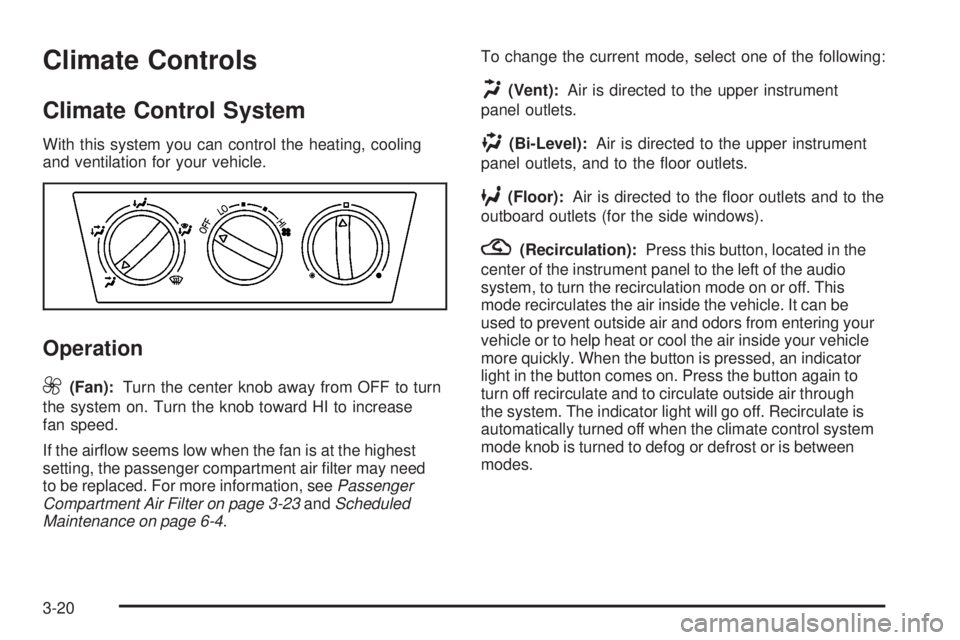
9
(Fan):Turn the center knob away from OFF to turn
the system on. Turn the knob toward HI to increase
fan speed.
If the airow seems low when the fan is at the highest
setting, the passenger compartment air lter may need
to be replaced. For more information, seePassenger
Compartment Air Filter on page 3-23andScheduled
Maintenance on page 6-4.To change the current mode, select one of the following:
H(Vent):Air is directed to the upper instrument
panel outlets.
)(Bi-Level):Air is directed to the upper instrument
panel outlets, and to the oor outlets.
6(Floor):Air is directed to the oor outlets and to the
outboard outlets (for the side windows).
?(Recirculation):Press this button, located in the
center of the instrument panel to the left of the audio
system, to turn the recirculation mode on or off. This
mode recirculates the air inside the vehicle. It can be
used to prevent outside air and odors from entering your
vehicle or to help heat or cool the air inside your vehicle
more quickly. When the button is pressed, an indicator
light in the button comes on. Press the button again to
turn off recirculate and to circulate outside air through
the system. The indicator light will go off. Recirculate is
automatically turned off when the climate control system
mode knob is turned to defog or defrost or is between
modes.
3-20
Page 137 of 368
Temperature Control:Turn the right knob clockwise
or counterclockwise to increase or decrease the
temperature inside the vehicle.
A/C (Air Conditioning):Press this button, located in
the center of the instrument panel to the left of the audio
system, to turn the air-conditioning system on or off.
When A/C is pressed, an indicator light in the button
comes on to let you know that the air conditioning
is activated.
MAX A/C (Maximum Air Conditioning):Press the A/C
and recirculation buttons at the same time to select
MAX A/C.
On hot days, open the windows to let hot inside air
escape; then close them. This helps to reduce the time
it takes for the vehicle to cool down. It also helps the
system to operate more efficiently.
The air-conditioning system removes moisture from
the air, so you might notice a small amount of water
dripping underneath your vehicle while idling or
after turning off the engine. This is normal.Defogging and Defrosting
Fog on the inside of windows is a result of high humidity
(moisture) condensing on the cool window glass. This
can be minimized if the climate control system is used
properly. There are two modes to clear fog or frost from
the windshield. Use the defog mode to clear the inside
of the windshield of fog or moisture and warm the
passengers. Use the defrost mode to remove fog or
frost from the outside of the windshield more quickly.
-(Defog):Air is directed between the windshield,
side windows, instrument panel outlets and the
oor outlets. The air-conditioning compressor will
run automatically in this setting without pressing
A/C, unless the outside temperature is at or
below 32°F (0°C).
1(Defrost):Air is directed to the windshield,
instrument panel outlets and the side windows.
The air-conditioning compressor will run automatically
in this setting without pressing A/C, unless the
outside temperature is at or below 32°F (0°C).
Do not drive the vehicle until all the windows are clear.
3-21