AUX PONTIAC VIBE 2010 Owners Manual
[x] Cancel search | Manufacturer: PONTIAC, Model Year: 2010, Model line: VIBE, Model: PONTIAC VIBE 2010Pages: 318, PDF Size: 1.7 MB
Page 86 of 318
Controls
Steering Wheel
Adjustment
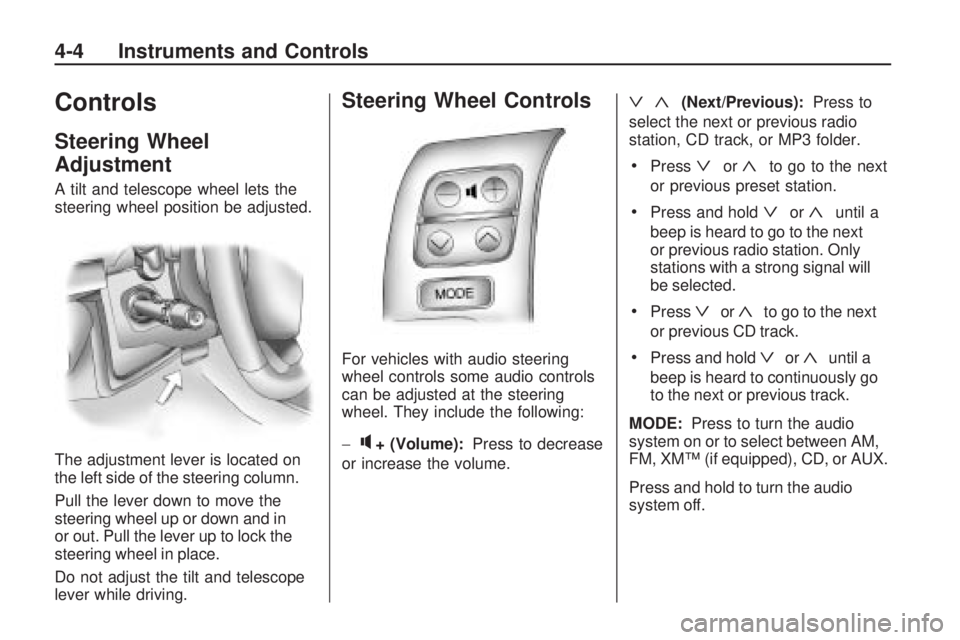
A tilt and telescope wheel lets the
steering wheel position be adjusted.
The adjustment lever is located on
the left side of the steering column.
Pull the lever down to move the
steering wheel up or down and in
or out. Pull the lever up to lock the
steering wheel in place.
Do not adjust the tilt and telescope
lever while driving.
Steering Wheel Controls
For vehicles with audio steering
wheel controls some audio controls
can be adjusted at the steering
wheel. They include the following:
−
q+ (Volume):Press to decrease
or increase the volume.
ª«(Next/Previous): Press to
select the next or previous radio
station, CD track, or MP3 folder.
•Pressªor«to go to the next
or previous preset station.
•Press and holdªor«until a
beep is heard to go to the next
or previous radio station. Only
stations with a strong signal will
be selected.
•Pressªor«to go to the next
or previous CD track.
•Press and holdªor«until a
beep is heard to continuously go
to the next or previous track.
MODE: Press to turn the audio
system on or to select between AM,
FM, XM™ (if equipped), CD, or AUX.
Press and hold to turn the audio
system off.
4-4 Instruments and Controls
Page 90 of 318
Cigarette Lighter
For vehicles with a lighter, push
the lighter down and it will pop up
when it is ready to be used. The
ignition switch must be in the
ACC/ACCESSORY or ON/RUN
position to use the lighter.
Notice:Holding a cigarette
lighter in while it is heating does
not let the lighter back away from
the heating element when it is hot.
Damage from overheating can
occur to the lighter or heating
element, or a fuse could be blown.
Do not hold a cigarette lighter in
while it is heating.
It is not recommended to use the
cigarette lighter to plug in auxiliary
electrical equipment. Use the
accessory power outlet for phones and other electrical equipment. See
Power Outlets (Accessory Power
Outlets) on page 4-6
orPower
Outlets (115 Volt Alternating
Current) on page 4-7 .
Ashtrays
For vehicles with a removable
ashtray, it is located in the front
cupholder in the center console
storage area.
Notice:If papers, pins, or other
ammable items are put in the
ashtray, hot cigarettes or other
smoking materials could ignite
them and possibly damage the
vehicle. Never put ammable
items in the ashtray.
Warning Lights,
Gages, and Indicators
Warning lights come on when there
could be a problem with a vehicle
function. Some warning lights come
on briefly when the engine is started
to indicate they are working.
Gages can indicate when there
could be a problem with a vehicle
function. Often gages and warning
lights work together to indicate
a problem with the vehicle.
When one of the warning lights
comes on and stays on while driving,
or when one of the gages shows
there may be a problem, check the
section that explains what to do.
Follow this manual’s advice. Waiting
to do repairs can be costly and even
dangerous.
4-8 Instruments and Controls
Page 115 of 318

Infotainment
System
IntroductionIntroduction.........................
.6-1
Operation ............................
.6-2
RadioAM-FM Radio......................
.6-4
Satellite Radio .....................
.6-6
Radio Reception ..................
.6-8
Fixed Mast Antenna ..............
.6-8
Satellite Radio Antenna ..........6-9
Audio PlayersCD Player...........................
.6-9
MP3 .................................
.6-11
Auxiliary Devices ................
.6-14
Introduction
Read the following pages to
become familiar with the audio
system’s features.
{CAUTION
Taking your eyes off the road for
extended periods could cause a
crash resulting in injury or death
to you or others. Do not give
extended attention to
entertainment tasks while driving.
This system provides access to
many audio and non audio listings.
To minimize taking your eyes
off the road while driving, do the
following while the vehicle is parked:
•Become familiar with the
operation and controls of
the audio system.
•Set up the tone, speaker
adjustments, and preset radio
stations. For more information, see
Defensive
Driving on page 8-2.
Notice: Contact your dealer/
retailer before adding any
equipment.
Adding audio or communication
equipment could interfere with the
operation of the vehicle’s engine,
radio, or other systems, and could
damage them. Follow federal
rules covering mobile radio
and telephone equipment.
The vehicle has Retained Accessory
Power (RAP). With RAP, the audio
system can be played even after the
ignition is turned off. See Retained
Accessory Power (RAP) on
page 8-18 for more information.
Infotainment System 6-1
Page 124 of 318

(FWD REV)(Fast Forward/
Fast Reverse): Press and hold
(
to advance playback quickly within a
track. Release to resume playing the
track. Press and hold
)to reverse
playback quickly within a track.
Release to resume playing the track.
BAND: Press to listen to the radio
when a CD is playing.
CD/AUX (CD/Auxiliary): Press to
play a CD when listening to the
radio.
Press the CD/AUX button again and
the system begins playing audio from
the connected portable audio player.
If a portable audio player is not
connected, “No Aux Input Device”
displays.
See “Using the Auxiliary Input Jack”
later in this section. INFO (Information):
Press to
switch the display between the track
number, elapsed time of the track,
and the time. When the ignition is off,
press this button to display the time.
EQ (Equalization): Press to select
an equalization setting while playing
a CD. See “EQ” listed previously for
more information. If an EQ setting is
selected for a CD, it is activated each
time a CD is played.
Care of CDs
The sound quality of the CD player
can be reduced because of:
•The CD-R quality.
•The method of recording
the CD-R.
•The quality of the music that has
been recorded on the CD-R.
•The way the CD-R has been
handled. Store CD-R(s) in their original cases
or other protective cases and away
from dust and direct sunlight. The
CD player scans the bottom surface
of the disc. If the surface of a CD
is damaged, such as cracked,
broken, or scratched, the CD may
not play properly or at all. Do not
touch the bottom side of a CD while
handling it; this could damage the
surface. Pick up CDs by grasping the
outer edges or the edge of the hole
and the outer edge.
To clean a CD, use a soft lint free
cloth, or dampen a clean soft
cloth in a mild neutral detergent
solution mixed with water. Wipe the
CD from the center to the edge.
6-10 Infotainment System
Page 127 of 318

Music Navigator
The music navigator feature lets
MP3 CDs play in order by artist or
album.
•The MP3 player scans the disc
to sort the files by artist and
album ID3 tag information.
•It can take several minutes to
scan the disc depending on
the number of MP3 files recorded
to the CD-R.
•The radio starts playing while the
disc is being scanned.
•After the scan is finished, the
disc starts playing.
Playing an MP3
The MP3 player can play the
smaller 3 inch (8 cm) single CDs
with an adapter ring.
1. Insert a CD label side uppartway into the slot.
2. The CD player pulls the CD in and begins playing. 3. The CD stays in the player if the
ignition or radio is turned off.
4. If the CD was the last source selected, it resumes playing
when the radio is turned on.
Y(EJECT): Press and release to
eject a CD. Once the disc is ejected
it can be removed. If the CD is not
removed after several seconds the
CD player automatically pulls the
disc back into the player and starts
playing.
ySEEK TRACKz: Press to
go to the start of the current track,
if more than ten seconds have
played. Press
zto go to the next
track. Holding or pressing
yorz
multiple times will cause the player
to continue moving backward or
forward through the tracks on
the CD.
(FWD REV)(Fast Forward/
Fast Reverse): Press and hold
(
to advance playback quickly within a
track. Release
(to resume playing
the track. Press and hold
)to
reverse playback quickly within a
track. Release
(to resume playing
the track.
BAND: Press to listen to the radio
when a CD is playing.
INFO (Information): Press when
an MP3 CD is loaded, then press
the button below the Song, Artist,
Album, or Folder label to view the
information.
CD/AUX (CD/Auxiliary): Press to
play a CD when listening to the radio.
Press the CD/AUX button again and
the system begins playing audio from
the connected portable audio player.
If a portable audio player is not
connected, “No Aux Input Device”
displays.
Infotainment System 6-13
Page 128 of 318

RDM (Random):Press the button
below the RDM label to hear
the tracks in random order.
S c(Previous Folder): Press
the button below to go to the
first track in the previous folder.
c T(Next Folder): Press
the button below to go to the first
track in the next folder.
h(Music Navigator): Press the
button below to play MP3 files in
order by artist or album.
SORT: Press the button below the
SORT label to change between
playback by artist or album while
using the Music Navigator.
BACK: Press the button below the
BACK label to return to the main
music navigator screen.
ST(Previous/Next): Press
the button below to go to the
next or previous artist or album
in alphabetical order while using
the Music Navigator.
Auxiliary Devices
The radio has an auxiliary input
jack located on the lower right side
of the faceplate. This is not an audio
output; do not plug the headphone
set into the front auxiliary input jack.
An external audio device such as an
iPod, laptop computer, MP3 player,
CD changer, etc. can be connected
to the auxiliary input jack for use as
another audio source.
To use a portable audio player,
connect a 3.5 mm (1/8 inch) cable
to the radio’s front auxiliary input
jack. When a device is connected,
press the radio CD/AUX button
to begin playing audio from
the device over the vehicle
speakers. PWR VOL (Power/Volume):
Turn
to adjust the volume. Additional
volume adjustments may have to be
made from the portable device if
the volume is too quiet or not loud.
BAND: Press to listen to the
radio when a portable audio device
is playing.
CD/AUX (CD/Auxiliary): Press to
play a CD when a portable audio
device is playing. Press again and
the system begins playing audio from
the connected portable audio player.
6-14 Infotainment System
Page 309 of 318

A
Accessories andModifications ...................... 9-3
Accessory Power .................8-18
Adding Equipment to the Airbag-Equipped Vehicle ....2-35
Add-On Electrical Equipment ....................... 8-50
Adjustments Seat, Front ........................ 2-4
Seat, Initial Drive ................ 2-3
Air Cleaner/Filter, Engine .......9-16
Air Filter, Passenger Compartment ..................... 7-4
Air Vents .............................. 7-4
Airbag System Check ............................. 2-36
How Does an Airbag Restrain? ..................... 2-28
Passenger Sensing System ........................ 2-29
What Makes an Airbag Inflate? ........................ 2-27Airbag System (cont.)
What Will You See Afteran Airbag Inflates? ........2-28
When Should an Airbag Inflate? ........................ 2-26
Where Are the Airbags? .....2-24
Airbags Adding Equipment to theVehicle ........................ 2-35
Passenger Status Indicator ....................... 4-13
Readiness Light ................4-12
Servicing Airbag-Equipped Vehicles ....................... 2-34
System Check ..................2-23
Alarm System Anti-Theft .......................... 1-7
All-Wheel Drive ............8-31, 9-29
All-Wheel-Drive Service Light ............................... 4-18
AM-FM Radio ........................ 6-4
Antenna Satellite Radio ................... 6-9
Antilock Brake System (ABS) ..................8-32
Warning Light ................... 4-17Anti-Theft
Alarm System .................... 1-7
Appearance Care Exterior ........................... 9-75
Interior ............................ 9-80
Ashtrays ...............................
4-8
Assistance Program, Roadside ......................... 12-6
Audio Players ........................ 6-9
CD ................................... 6-9
MP3 ............................... 6-11
Audio System Fixed Mast Antenna ............ 6-8
Audio Systems Radio Reception ................. 6-8
Automatic Headlamp System .............. 5-3
Automatic Transmission ............8-24, 8-27
Fluid ............................... 9-12
Manual Mode ................... 8-28
Auxiliary Devices ..................6-14
INDEX i-1
Page 311 of 318

CoversCargo ............................... 3-2
Cruise Control ..................... 8-36
Light ............................... 4-21
Cupholders ........................... 3-1
Customer Assistance ............12-4
Offices ............................ 12-3
Text Telephone (TTY) Users .......................... 12-4
Customer Information Service PublicationsOrdering Information .....12-12
Customer Satisfaction Procedure ........................ 12-1
D
Damage Repair, Collision ....12-10
Danger, Warnings, and Cautions .............................. iii
Data Recorders Event ............................ 12-14
Daytime Running Lamps (DRL) ..................... 5-2 Defensive Driving
................... 8-2
Devices, Auxiliary .................6-14
Dome Lamps ........................ 5-4
Door Ajar Light ........................ 4-21
Locks ............................... 1-5
Power Locks ...................... 1-6
Drive Systems All-Wheel Drive ........8-31, 9-29
Driving Better Fuel Economy .......... 8-2
Characteristics and Towing Tips .................. 8-44
Defensive .......................... 8-2
Drunk ............................... 8-3
Highway Hypnosis .............. 8-8
Hill and Mountain Roads ..... 8-8
If the Vehicle is Stuck .......8-11
Loss of Control .................. 8-6
Off-Road Recovery ............. 8-6
Vehicle Load Limits ...........8-12
Winter .............................. 8-9
E
Electrical Equipment
Add-On Equipment ............8-50
Electrical System Engine Compartment FuseBlock ........................... 9-38
Fuses and Circuit Breakers ...................... 9-38
Instrument Panel Fuse Block ........................... 9-41
Overload ......................... 9-37
Engine Air Cleaner/Filter ...............9-16
Check and Service Engine Soon Lamp .................. 4-14
Compartment Overview ....... 9-6
Coolant ........................... 9-19
Coolant Temperature Gage .........4-11
Cooling System ................9-19
Drive Belt Routing .............11-4
Exhaust ........................... 8-23
Oil ................................... 9-9
Overheating ..................... 9-23
INDEX i-3