tires PORSCHE 911 2009 5.G User Guide
[x] Cancel search | Manufacturer: PORSCHE, Model Year: 2009, Model line: 911, Model: PORSCHE 911 2009 5.GPages: 310, PDF Size: 3.39 MB
Page 145 of 310
Instruments, On-Board Computer, Warnings
143
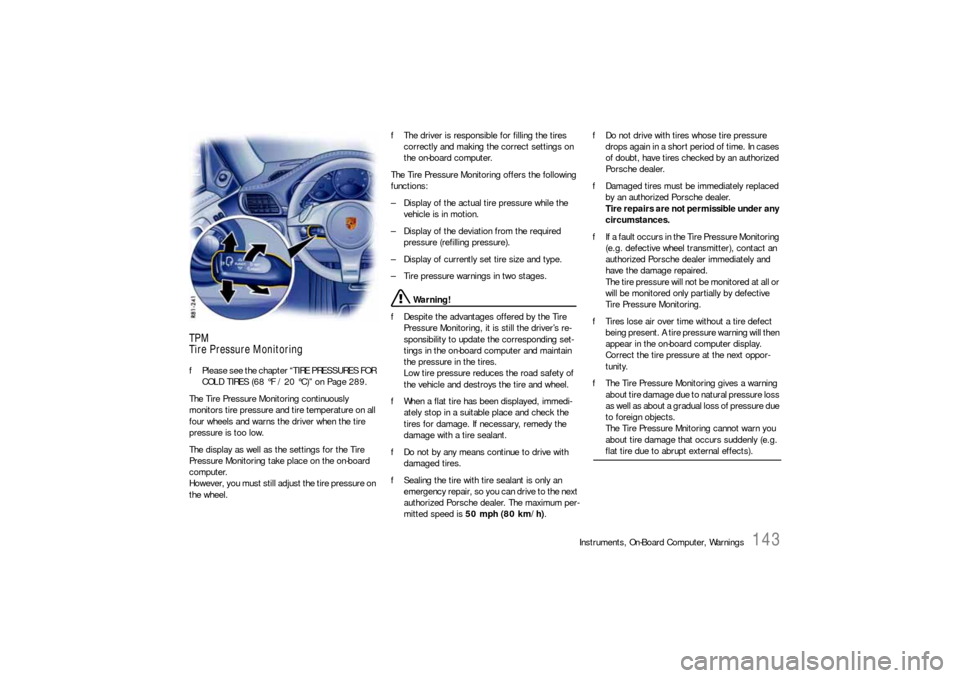
TPM
Tire Pressure MonitoringfPlease see the chapter “TIRE PRESSURES FOR
COLD TIRES (68 °F / 20 °C)” on Page 289.
The Tire Pressure Monitoring continuously
monitors tire pressure and tire temperature on all
four wheels and warns the driver when the tire
pressure is too low.
The display as well as the settings for the Tire
Pressure Monitoring take place on the on-board
computer.
However, you must still adjust the tire pressure on
the wheel.fThe driver is responsible for filling the tires
correctly and making the correct settings on
the on-board computer.
The Tire Pressure Monitoring offers the following
functions:
– Display of the actual tire pressure while the
vehicle is in motion.
– Display of the deviation from the required
pressure (refilling pressure).
– Display of currently set tire size and type.
– Tire pressure warnings in two stages.
Warning!
fDespite the advantages offered by the Tire
Pressure Monitoring, it is still the driver’s re-
sponsibility to update the corresponding set-
tings in the on-board computer and maintain
the pressure in the tires.
Low tire pressure reduces the road safety of
the vehicle and destroys the tire and wheel.
fWhen a flat tire has been displayed, immedi-
ately stop in a suitable place and check the
tires for damage. If necessary, remedy the
damage with a tire sealant.
fDo not by any means continue to drive with
damaged tires.
fSealing the tire with tire sealant is only an
emergency repair, so you can drive to the next
authorized Porsche dealer. The maximum per-
mitted speed is 50 mph (80 km/h).fDo not drive with tires whose tire pressure
drops again in a short period of time. In cases
of doubt, have tires checked by an authorized
Porsche dealer.
fDamaged tires must be immediately replaced
by an authorized Porsche dealer.
Tire repairs are not permissible under any
circumstances.
fIf a fault occurs in the Tire Pressure Monitoring
(e.g. defective wheel transmitter), contact an
authorized Porsche dealer immediately and
have the damage repaired.
The tire pressure will not be monitored at all or
will be monitored only partially by defective
Tire Pressure Monitoring.
fTires lose air over time without a tire defect
being present. A tire pressure warning will then
appear in the on-board computer display.
Correct the tire pressure at the next oppor-
tunity.
fThe Tire Pressure Monitoring gives a warning
about tire damage due to natural pressure loss
as well as about a gradual loss of pressure due
to foreign objects.
The Tire Pressure Mnitoring cannot warn you
about tire damage that occurs suddenly (e.g.
flat tire due to abrupt external effects).
Page 147 of 310
Instruments, On-Board Computer, Warnings
145
The tire pressure to be corrected (refill pressure)
is indicated on the displayed wheel.
Example: If “ –1.5 psi (–0.1 bar)” is displayed,
1.5 psi (0.1 bar) must be added to this tire.
Note
The tire pressure menu can only be called up when
the vehicle is stationary.
Calling up the “Info pressure” display
fPush operating lever forward in order to switch
on the selection field.
fSelect “TPM” with the operating lever.
fPush operating lever forward.
The display changes to the tire pressure menu.
fSelect “Info pressure” with the operating lever.
fPush operating lever forward.
Note
After the ignition is switched on, it can take up to
approx. 1 minute before all tire pressures are
displayed. Dashes (“-.-”) appear instead of the tire
pressures. Tire type info in Tire pressure menu
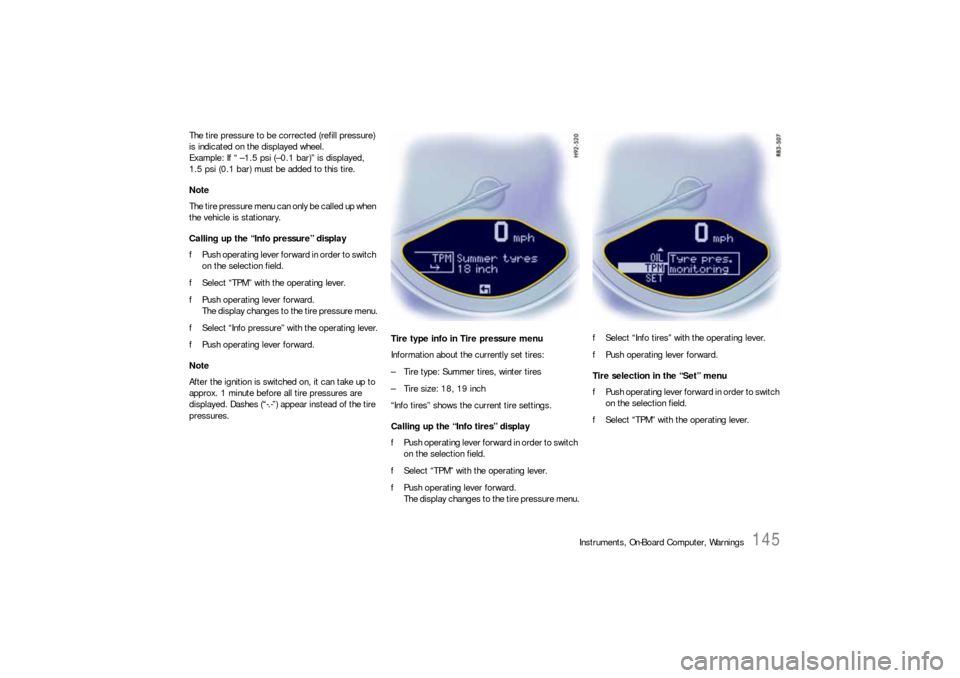
Information about the currently set tires:
– Tire type: Summer tires, winter tires
– Tire size: 18, 19 inch
“Info tires” shows the current tire settings.
Calling up the “Info tires” display
fPush operating lever forward in order to switch
on the selection field.
fSelect “TPM” with the operating lever.
fPush operating lever forward.
The display changes to the tire pressure menu.fSelect “Info tires” with the operating lever.
fPush operating lever forward.
Tire selection in the “Set” menu
fPush operating lever forward in order to switch
on the selection field.
fSelect “TPM” with the operating lever.
Page 150 of 310
148
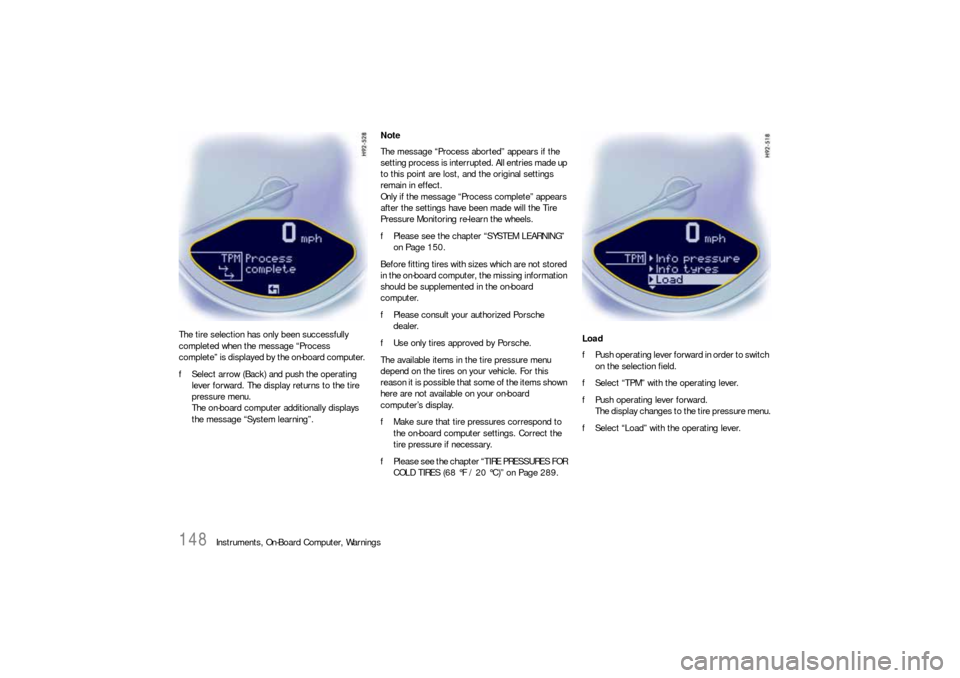
Instruments, On-Board Computer, Warnings The tire selection has only been successfully
completed when the message “Process
complete” is displayed by the on-board computer.
fSelect arrow (Back) and push the operating
lever forward. The display returns to the tire
pressure menu.
The on-board computer additionally displays
the message “System learning”.Note
The message “Process aborted” appears if the
setting process is interrupted. All entries made up
to this point are lost, and the original settings
remain in effect.
Only if the message “Process complete” appears
after the settings have been made will the Tire
Pressure Monitoring re-learn the wheels.
fPlease see the chapter “SYSTEM LEARNING”
on Page 150.
Before fitting tires with sizes which are not stored
in the on-board computer, the missing information
should be supplemented in the on-board
computer.
fPlease consult your authorized Porsche
dealer.
fUse only tires approved by Porsche.
The available items in the tire pressure menu
depend on the tires on your vehicle. For this
reason it is possible that some of the items shown
here are not available on your on-board
computer’s display.
fMake sure that tire pressures correspond to
the on-board computer settings. Correct the
tire pressure if necessary.
fPlease see the chapter “TIRE PRESSURES FOR
COLD TIRES (68 °F / 20 °C)” on Page 289.Load
fPush operating lever forward in order to switch
on the selection field.
fSelect “TPM” with the operating lever.
fPush operating lever forward.
The display changes to the tire pressure menu.
fSelect “Load” with the operating lever.
Page 151 of 310
Instruments, On-Board Computer, Warnings
149
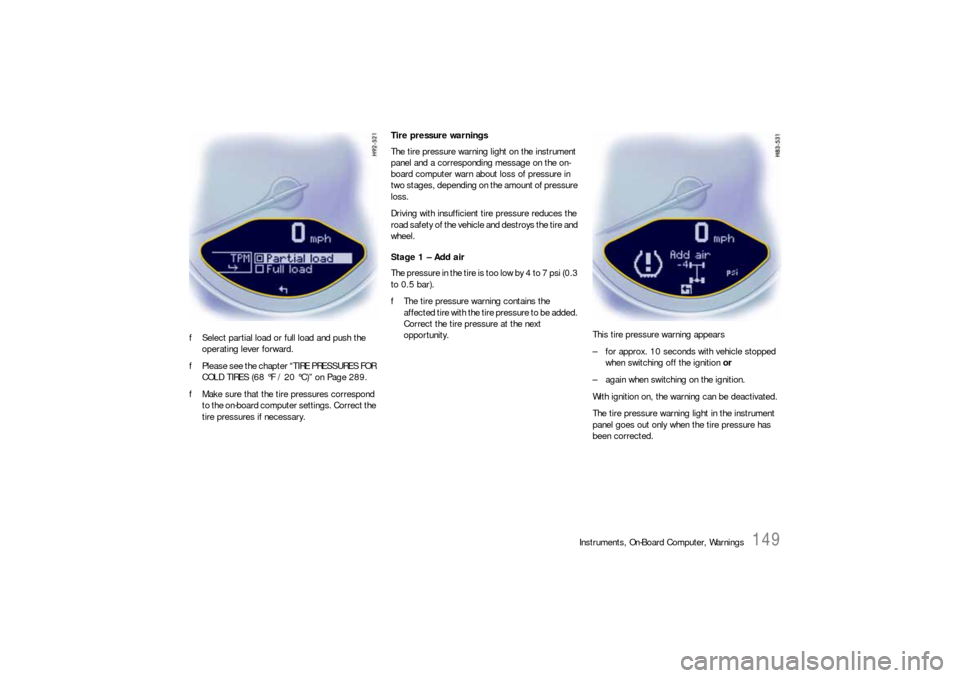
fSelect partial load or full load and push the
operating lever forward.
fPlease see the chapter “TIRE PRESSURES FOR
COLD TIRES (68 °F / 20 °C)” on Page 289.
fMake sure that the tire pressures correspond
to the on-board computer settings. Correct the
tire pressures if necessary.Tire pressure warnings
The tire pressure warning light on the instrument
panel and a corresponding message on the on-
board computer warn about loss of pressure in
two stages, depending on the amount of pressure
loss.
Driving with insufficient tire pressure reduces the
road safety of the vehicle and destroys the tire and
wheel.
Stage 1 – Add air
The pressure in the tire is too low by 4 to 7 psi (0.3
to 0.5 bar).
fThe tire pressure warning contains the
affected tire with the tire pressure to be added.
Correct the tire pressure at the next
opportunity. This tire pressure warning appears
– for approx. 10 seconds with vehicle stopped
when switching off the ignition or
– again when switching on the ignition.
With ignition on, the warning can be deactivated.
The tire pressure warning light in the instrument
panel goes out only when the tire pressure has
been corrected.
Page 152 of 310
150
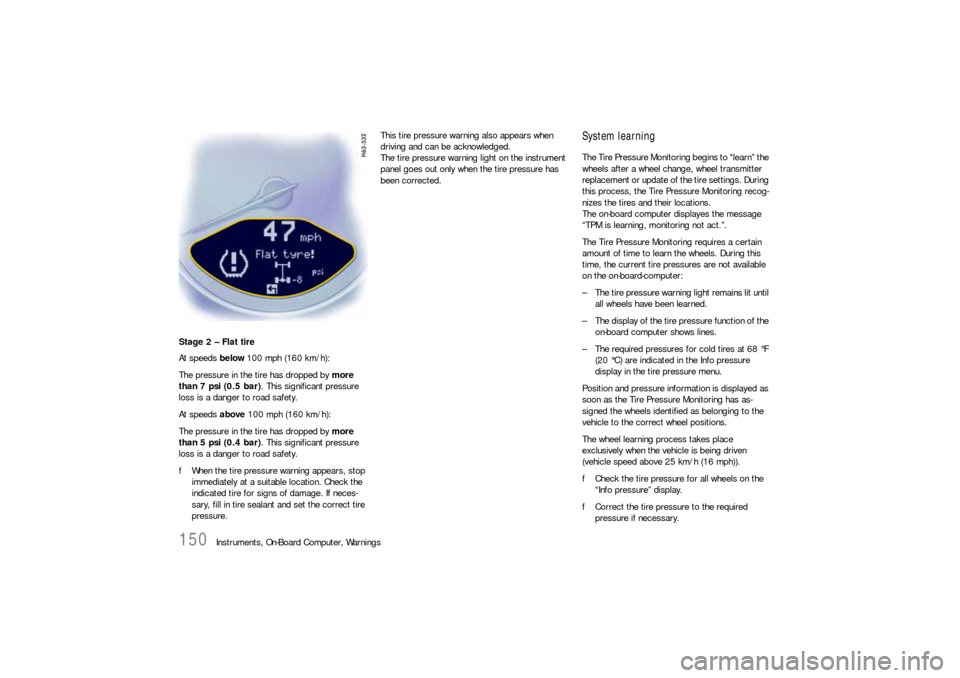
Instruments, On-Board Computer, Warnings Stage 2 – Flat tire
At speeds below 100 mph (160 km/h):
The pressure in the tire has dropped by more
than 7 psi (0.5 bar). This significant pressure
loss is a danger to road safety.
At speeds above 100 mph (160 km/h):
The pressure in the tire has dropped by more
than 5 psi (0.4 bar). This significant pressure
loss is a danger to road safety.
fWhen the tire pressure warning appears, stop
immediately at a suitable location. Check the
indicated tire for signs of damage. If neces-
sary, fill in tire sealant and set the correct tire
pressure.This tire pressure warning also appears when
driving and can be acknowledged.
The tire pressure warning light on the instrument
panel goes out only when the tire pressure has
been corrected.
System learningThe Tire Pressure Monitoring begins to “learn” the
wheels after a wheel change, wheel transmitter
replacement or update of the tire settings. During
this process, the Tire Pressure Monitoring recog-
nizes the tires and their locations.
The on-board computer displayes the message
“TPM is learning, monitoring not act.”.
The Tire Pressure Monitoring requires a certain
amount of time to learn the wheels. During this
time, the current tire pressures are not available
on the on-board-computer:
– The tire pressure warning light remains lit until
all wheels have been learned.
– The display of the tire pressure function of the
on-board computer shows lines.
– The required pressures for cold tires at 68 °F
(20 °C) are indicated in the Info pressure
display in the tire pressure menu.
Position and pressure information is displayed as
soon as the Tire Pressure Monitoring has as-
signed the wheels identified as belonging to the
vehicle to the correct wheel positions.
The wheel learning process takes place
exclusively when the vehicle is being driven
(vehicle speed above 25 km/h (16 mph)).
fCheck the tire pressure for all wheels on the
“Info pressure” display.
fCorrect the tire pressure to the required
pressure if necessary.
Page 153 of 310

Instruments, On-Board Computer, Warnings
151
Changing a wheel and replacing tiresfNew wheels must be fitted with radio transmit-
ters for the Tire Pressure Monitoring.
Before tires are changed, the battery charge
state of the wheel transmitters should be
checked at an authorized Porsche dealer.
fSwitch the ignition off when changing a wheel.
The tire settings on the on-board computer must
be updated after changing a wheel.
If the tire settings are not updated, the message
“Wheel change? Input new TPM settings!” is
displayed on the on-board computer.
fUpdate the on-board computer settings when
the vehicle is stationary the next time.
Warning!
Your vehicle has also been equipped with a Tire
Pressure Monitoring (TPM) malfunction indicator
when the system is not operating properly.
The TPM malfunction indicator is combined with a
low tire pressure telltale.
When the system detects a malfunction, the tellta-
le will flash for approx. one minute and then remain
continuously illuminated. This sequence will conti-
nue upon subsequent vehicle start-ups as long as
the malfunction exists.
When the malfunction indicator is illuminated, the
system may not be able to detect or signal low tire
pressure as intended.
TPM malfuntions may occur for a variety of
reasons, including the installation of replacement
or alternate tires or wheels on the vehicle that
prevent the TPM from functioning properly.
Always check the TPM malfunction telltale after
replacing one or more tires or wheels on your
vehicle to ensure that the replacement or alter-
nate tires and wheels allow the TPM to continue to
function properly.The warning light in the speedometer lights up:
– When a loss in pressure has been detected.
– When learning newly mounted wheels/wheel
sensors, as long as the vehicle’s own wheels
have not yet been recognized.
In the event of a defect in Tire Pressure Monitoring
or a temporary fault, the warning light in the
speedometer flashes for approx. one minute and
then remains continuously illuminated.
The tire pressure warning light in the instrument
panel goes out only when the cause of the fault
has been rectified.
Partial monitoringMonitoring of the other wheels is continued if there
is a fault in one or two wheel transmitters.
– The tire pressure warning light lights up.
– The message “TPM partial monitoring” is
displayed on the on-board computer.
– No tire pressures are displayed on the on-
board computer for wheels with faulty wheel
transmitters.
Warning light
Page 154 of 310

152
Instruments, On-Board Computer, Warnings
No monitoringIn the event of faults the Tire Pressure Monitoring
cannot monitor the tire pressure.
The warning light in the speedometer flashes for
approx. one minute and then remains continuously
illuminated and a corresponding message
appears on the on-board computer.
Monitoring is not active when:
– the Tire Pressure Monitoring is faulty,
– wheel transmitters for the Tire Pressure
Monitoring are missing,
– during the learning phase after the tire settings
have been updated,
– after a wheel change without updating the tire
settings,
– more than four wheel transmitters are
detected,
– there is external interference by other radio
sources, e.g. wireless headphones,
– tire temperatures are too high.
fPlease see the chapter “WARNINGS ON THE
INSTRUMENT PANEL AND THE ON-BOARD
COMPUTER” on Page 158.
Pressure increase as the result of
temperature increaseIn accordance with physical principles, the air
pressure changes as the temperature changes.
The tire pressure increases or decreases by
around 1.5 psi (0.1 bar) for every 18 °F (10 °C)
change in temperature.
The Tire Pressure Monitoring takes this relation-
ship between tire pressure and temperature into
account.Tire pressure specificationsInformation on tire pressure for public roads can
be found in this Owner's Manual in the Technical
Data chapter or on the tire-pressure plate in the
left door aperture.
These values apply to cold tires at 68 °F (20 °C)
ambient temperature.
Page 167 of 310

Warnings
165
Rear lid
not closedThe convertible top cannot be operated with the
rear lid open.
Flat tyre! Tire Pressure Monitoring has detected a serious
pressure loss.
Stop at a suitable place and check tires for dam-
age. Fill in tire sealant if necessary.
Add air The Tire Pressure Monitoring has detected a
gradual pressure loss. Correct tire pressure at
the next opportunity.
TPM is learning
monitoring
not act.The Tire Pressure Monitoring is learning the
wheels on the vehicle. The Tire Pressure Moni-
toring is searching for the tires and their posi-
tion. During this period the current pressure
specifications are not available on the on-board
computer.
TPM inactive The Tire Pressure Monitoring is faulty.
Consult an authorized Porsche dealer.
TPM partial monitoring 1 or 2 wheel transmitters are faulty. The tyre
pressures of these wheels are not monitored.
The other wheels are still monitored.
Consult an authorized Porsche dealer.
TPM inactive
Brief disturbance
TPM inactive
Too many wheel transmittersThe Tire Pressure Monitoring is temporarily de-
activated by excessive tire temperatures (ap-
prox. 248 °F (120 °C)) or external interference
(e.g. from other wheel transmitters inside the
car). Once the source of the interference is re-
moved, the system is automatically reactivated.
Wheel change?
Input new
TPM settings!Update the settings in the TPM menu of the
on-board computer at the next opportunity.
Wrong entries will affect the correct pressure in-
formation in the menu. The safety of your vehi-
cle is at risk.
Instrument
panelOn-board
computerText display on on-board
computerMeaning/measure
Page 216 of 310

214
Maintenance, Car Care
Fuel Economy Fuel economy will vary depending on where,
when and how you drive, optional equipment
installed, and the general condition of your
car.
A car tuned to specifications and correctly
maintained, will help you to achieve optimal
fuel economy.
fHave your vehicle tuned to specifications.
Air cleaner should be dirt free to allow proper
engine “breathing”.
Battery should be fully charged.
Wheels should be properly aligned.
Tires should be inflated at correct pressure.
fAlways monitor your fuel consumption.
fDrive smoothly, avoid abrupt changes in speed
as much as possible.
fAvoid jack rabbit starts and sudden stops.
fDo not drive longer than necessary in the lower
gears. Shifting into a higher gear early without
lugging the engine will help save fuel.
fProlonged “warm up” idling wastes gas. Start
the vehicle just before you are ready to drive.
Accelerate slowly and smoothly.
fSwitch off the engine if stationary for longer
periods. fAny additional weight carried in the vehicle re-
duces fuel economy. Always keep cargo to a
minimum and remove all unnecessary items.
fOrganize your trips to take in several errands
in one trip.
fAll electrical accessories contribute to in-
creased fuel consumption.
fOnly switch on the air conditioning when neces-
sary.
fDo not drive with the Roof Transport System
mounted unless you need it.
The EPA estimated mpg. is to be used for
comparison purposes, actual mileage may
be different from the estimated mpg.,
depending on your driving speed, weather
conditions and trip length. Your actual
highway mileage will probably be less than
the estimated mpg.
fPlease observe all local and national speed
limits.
Operating your Porsche in other
Countries Government regulations in the United States and
Canada require that automobiles meet specific
emission regulations and safety standards. There-
fore, cars built for the U.S. and Canada differ from
vehicles sold in other countries.
If you plan to take your Porsche outside the conti-
nental limits of the United States or Canada, there
is the possibility that
– unleaded fuel may not be available;
– unleaded fuel may have a considerably lower
octane rating. Excessive engine knock and se-
rious damage to both engine and catalytic con-
verters could result;
– se rvice ma y be inade qua te due to lack of prop-
er service facilities, tools or diagnostic equip-
ment;
– replacement parts may not be available or very
difficult to get.
Porsche cannot be responsible for the
mechanical damage that could result
because of inadequate fuel, service or parts
availability.
If you purchased your Porsche abroad and want to
bring it back home, be sure to find out about ship-
ping and forwarding requirements, as well as cur-
rent import and customs regulations.
Page 226 of 310

224
Maintenance, Car Care
Car Care Instructions fPlease see the chapter “EXERCISE EXTREME
CAUTION WHEN WORKING ON YOUR VEHICLE”
on Page 206.
Regular and correct care helps to maintain
the value of your car and is also a
precondition for the New Vehicle Warranty
and the Anti Corrosion Warranty.
Your authorized Porsche dealer has specially
developed car-care products from the
Porsche program available either singly or
as complete car-care sets. They will be
pleased to help you select suitable products.
Whether you use Porsche products or other
commercially available cleaning agents first
make sure of their correct application.
A Porsche that is well-cared for can look like new
for years. It all depends on the amount of care the
owner is willing to give the car.
Warning!
Risk of serious personal injury or damage to
the vehicle or property.
Cleaning agents may be hazardous to your
health.
Most chemical cleaners are concentrates
which require dilution. High concentrations
might cause problems ranging from irritation
to serious injury as well as damage to your
vehicle. fKeep cleaning agents out of reach from chil-
dren.
fObserve all caution labels.
fAlways read directions on the container before
using any product. These directions may con-
tain information necessary to avoid personal
injury.
fDo not use fuel, kerosene, naphtha, nail polish
remover or other volatile cleaning fluids. They
may be toxic, flammable or hazardous in other
ways. Only use spot removing fluids in a well
vented area.
fDo not clean the underside of chassis, fend-
ers, wheel covers, etc., without protecting
your hands and arms as you may cut yourself
on sharp-edged metal parts.
Moisture and road salt on brakes may affect brak-
ing efficiency.
fTest the brakes after each vehicle washing.
Decorative film
Caution!
Risk of damage due to separation of the
decorative film when cleaning your vehicle
with high-pressure cleaning equipment or
steam cleaners.
fDo not use high-pressure cleaning equipment or steam cleaners for cleaning decorative film.
High-pressure cleaning units, steam
cleaners
Warning!
High-pressure cleaning units or steam clean-
ers can damage the following components:
–tires,
– logos, emblems,
– painted surfaces,
– alternator,
– ParkAssist sensors.
fPlease observe the operating instructions from
the unit manufacturer.
fWhen cleaning with a flat-jet nozzle or the like,
maintain a minimum distance of 20 inches (50
cm).
fNever use high-pressure cleaning units or
steam cleaners with a round-jet nozzle. A high-
pressure cleaning unit or steam cleaner with
round nozzle will damage your vehicle.
fThe tires are particularly susceptible to dam-
age.
fDo not point the cleaning jet directly at any of the aforementioned components.