warning PORSCHE 911 CARRERA 2010 5.G Repair Manual
[x] Cancel search | Manufacturer: PORSCHE, Model Year: 2010, Model line: 911 CARRERA, Model: PORSCHE 911 CARRERA 2010 5.GPages: 310, PDF Size: 3.39 MB
Page 113 of 310
Instruments, On-Board Computer, Warnings
111 Instruments, On-Board Computer, Warnings
Instrument Panel USA Models..................... 112
Instrument Panel Canada Models ................ 114
Engine Oil Temperature .............................. 116
Automatic Speed Control Indicator light ...... 116
Instrument Illumination............................... 116
Trip Odometer........................................... 117
Speedometer ............................................ 118
Changing over between Miles / Kilometers .. 118
Tachometer .............................................. 119
Turn Signal Indicator Light.......................... 119
High Beam Indicator Light .......................... 119
Gear Shift Indicator “A”
(in vehicles with manual transmission) ......... 119
Cooling System ......................................... 120
Porsche Doppelkupplung (PDK) .................. 121
Fuel.......................................................... 122
Clock ....................................................... 123
Outside Temperature ................................. 123
Engine Oil Pressure ................................... 124
Check Engine (Emission Control) ................ 125
On-Board Computer (BC) ............................ 126
Warnings on the instrument panel
and the on-board computer ........................ 158
Page 114 of 310

112
Instruments, On-Board Computer, Warnings
Instrument Panel USA Models Also refer to the corresponding chapters in
the Owner’s Manual.
1. Engine oil temperature gage
2. Speedometer with analogue display
3. Tire pressure warning light
4. Turn signal indicator light, left
5. Tachometer
6. High beam indicator light
7. Turn signal indicator light, right
8. ABS warning light
9. Cooling system
Temperature gage, warning light
10.Fuel
Level gage, warning light
11.Engine oil pressure gage
12.Adjustment button for instrument illumination
and trip counter
13.Odometer and daily trip mileage display
14.Automatic speed control indicator light15.Light sensor for instrument illumination
16.Airbag warning light
17.Check Engine warning light
(Emission control warning light)
18.Central warning light
19.On-board computer display
20.Porsche Stability Management
PSM Multifunctional light
21.Brake warning light
22.Safety belt warning light
23.PDK transmission, gear display
24.PDK transmission, selector lever position
25.Clock and outside temperature display
26.Adjustment button for clockWhen the ignition is switched on, the warning
lights light up for a lamp check.
Note
Warnings that have been given are stored in the
appropriate control unit memory and can be read
out at an authorized Porsche dealer.
This information can help to warn you about situa-
tions which may be hazardous to you or your car.
Page 115 of 310

Instruments, On-Board Computer, Warnings
113
Page 116 of 310

114
Instruments, On-Board Computer, Warnings
Instrument Panel Canada Models Also refer to the corresponding chapters in
the Owner’s Manual.
1. Engine oil temperature gage
2. Speedometer with analogue display
3. Tire pressure warning light
4. Turn signal indicator light, left
5. Tachometer
6. High beam indicator light
7. Turn signal indicator light, right
8. ABS warning light
9. Cooling system
Temperature gage, warning light
10.Fuel
Level gage, warning light
11.Engine oil pressure gage
12.Adjustment button for instrument illumination
and trip counter
13.Odometer and daily trip mileage display
14.Automatic speed control indicator light15.Light sensor for instrument illumination
16.Airbag warning light
17.Check Engine warning light
(Emission control warning light)
18.Central warning light
19.On-board computer display
20.Porsche Stability Management
PSM Multifunctional light
21.Brake warning light
22.Safety belt warning light
23.PDK transmission, gear display
24.PDK transmission, selector lever position
25.Clock and outside temperature display
26.Adjustment button for clockWhen the ignition is switched on, the warning
lights light up for a lamp check.
Note
Warnings that have been given are stored in the
appropriate control unit memory and can be read
out at an authorized Porsche dealer.
This information can help to warn you about situa-
tions which may be hazardous to you or your car.
Page 117 of 310

Instruments, On-Board Computer, Warnings
115
Page 118 of 310

116
Instruments, On-Board Computer, Warnings The engine oil temperature is indicated in the left
instrument.
A- Adjustment button for instrument illumination and
trip counter Indicates automatic speed control readiness.
Instrument Illumination The illumination is automatically adjusted to the
ambient brightness by the light sensor in the
tachometer.
In addition, when the car lights are switched on,
the instrument and switch symbol brightness can
be manually adjusted.
Warning!
Risk of loss of control or accident, resulting
in serious personal injury or death.
fDo not reach through the steering-wheel spokes while driving.
Note
When the car lights are switched on, the instru-
ment lighting for light dials switches on and off
automatically depending on the ambient bright-
ness.
Engine Oil Temperature
Automatic Speed Control
Indicator light
Page 119 of 310

Instruments, On-Board Computer, Warnings
117
Dimming instrument illumination
fTurn adjustment button A in the appropriate di-
rection and hold it until the desired brightness
has been reached.
The chosen level of brightness is indicated by a
bar display in the display field of the on-board
computer.
Trip Odometer
Warning!
Risk of loss of control or accident, resulting
in serious personal injury or death.
fDo not reach through the steering-wheel spokes while driving.
Resetting to zero fPress adjustment button A for approximately
one second or
fReset the distance in the “SET” menu of the on-
board computer.
Please see the chapter “SET BASIC SETTING
ON ON-BOARD COMPUTER” on Page 155.
After exceeding 6,213 miles or 9,999 kilometers,
the counter returns to “0”.
Page 120 of 310

118
Instruments, On-Board Computer, Warnings
Speedometer The digital speedometer is integrated in the on-
board computer.
The indication changes from mph to km/h when
the units are changed from miles to kilometers.
Changing over between
Miles / Kilometers The units of the distance and speed displays can
be changed in the “SET” menu of the on-board
computer.
fPlease see the chapter “SET BASIC SETTING
ON ON-BOARD COMPUTER” on Page 155.
Page 121 of 310
Instruments, On-Board Computer, Warnings
119
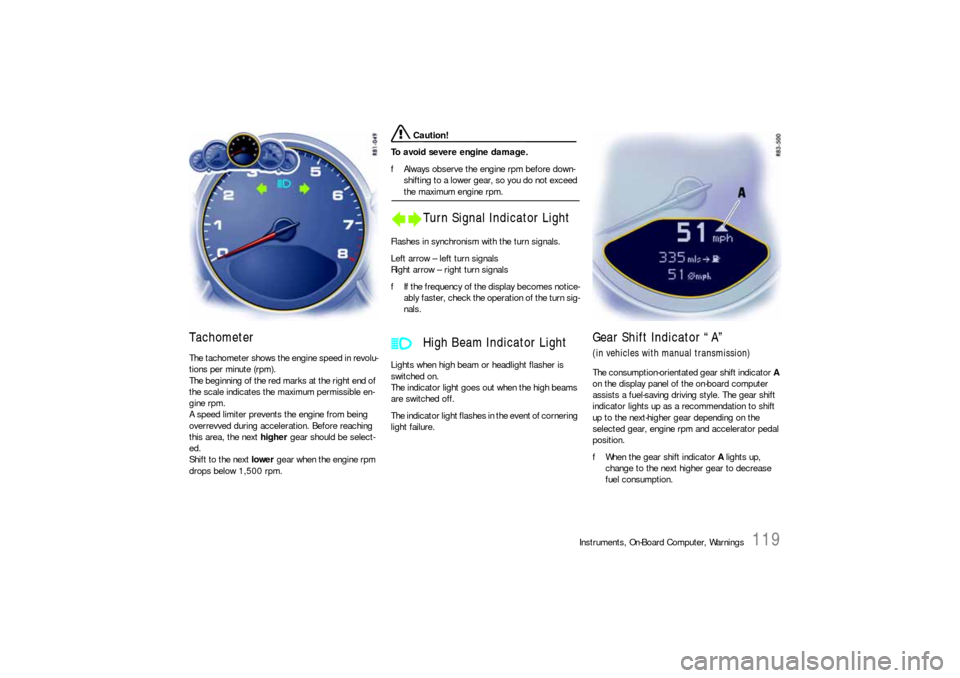
Tachometer The tachometer shows the engine speed in revolu-
tions per minute (rpm).
The beginning of the red marks at the right end of
the scale indicates the maximum permissible en-
gine rpm.
A speed limiter prevents the engine from being
overrevved during acceleration. Before reaching
this area, the next higher gear should be select-
ed.
Shift to the next lower gear when the engine rpm
drops below 1,500 rpm.
Caution!
To avoid severe engine damage.
fAlways observe the engine rpm before down-
shifting to a lower gear, so you do not exceed the maximum engine rpm.
Flashes in synchronism with the turn signals.
Left arrow – left turn signals
Right arrow – right turn signals
fIf the frequency of the display becomes notice-
ably faster, check the operation of the turn sig-
nals.
Lights when high beam or headlight flasher is
switched on.
The indicator light goes out when the high beams
are switched off.
The indicator light flashes in the event of cornering
light failure.
Gear Shift Indicator “A”(in vehicles with manual transmission)The consumption-orientated gear shift indicator A
on the display panel of the on-board computer
assists a fuel-saving driving style. The gear shift
indicator lights up as a recommendation to shift
up to the next-higher gear depending on the
selected gear, engine rpm and accelerator pedal
position.
fWhen the gear shift indicator A lights up,
change to the next higher gear to decrease
fuel consumption.
Turn Signal Indicator Light
High Beam Indicator Light
Page 122 of 310
120
Instruments, On-Board Computer, Warnings
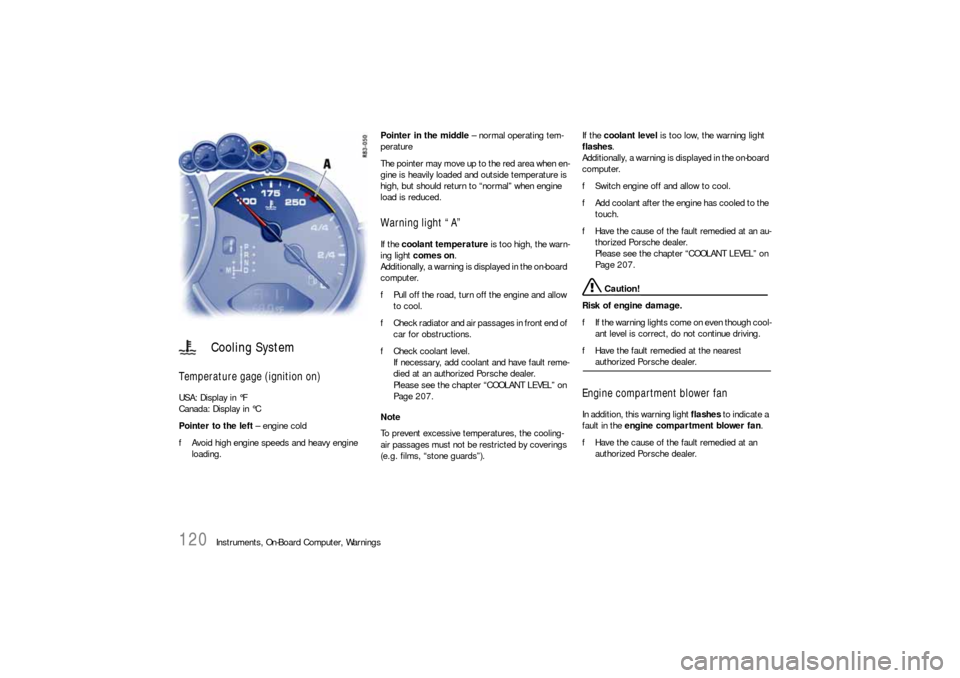
Temperature gage (ignition on) USA: Display in °F
Canada: Display in °C
Pointer to the left – engine cold
fAvoid high engine speeds and heavy engine
loading. Pointer in the middle – normal operating tem-
perature
The pointer may move up to the red area when en-
gine is heavily loaded and outside temperature is
high, but should return to “normal” when engine
load is reduced.
Warning light “A” If the coolant temperature is too high, the warn-
ing light comes on.
Additionally, a warning is displayed in the on-board
computer.
fPull off the road, turn off the engine and allow
to cool.
fCheck radiator and air passages in front end of
car for obstructions.
fCheck coolant level.
If necessary, add coolant and have fault reme-
died at an authorized Porsche dealer.
Please see the chapter “COOLANT LEVEL” on
Page 207.
Note
To prevent excessive temperatures, the cooling-
air passages must not be restricted by coverings
(e.g. films, “stone guards”). If the coolant level is too low, the warning light
flashes.
Additionally, a warning is displayed in the on-board
computer.
fSwitch engine off and allow to cool.
fAdd coolant after the engine has cooled to the
touch.
fHave the cause of the fault remedied at an au-
thorized Porsche dealer.
Please see the chapter “COOLANT LEVEL” on
Page 207.
Caution!
Risk of engine damage.
fIf the warning lights come on even though cool-
ant level is correct, do not continue driving.
fHave the fault remedied at the nearest authorized Porsche dealer.
Engine compartment blower fan In addition, this warning light flashes to indicate a
fault in the engine compartment blower fan.
fHave the cause of the fault remedied at an
authorized Porsche dealer.
Cooling System