warning light PORSCHE 911 GT3 2010 5.G Owner's Guide
[x] Cancel search | Manufacturer: PORSCHE, Model Year: 2010, Model line: 911 GT3, Model: PORSCHE 911 GT3 2010 5.GPages: 251, PDF Size: 14.33 MB
Page 79 of 251
78
Operation, Safety
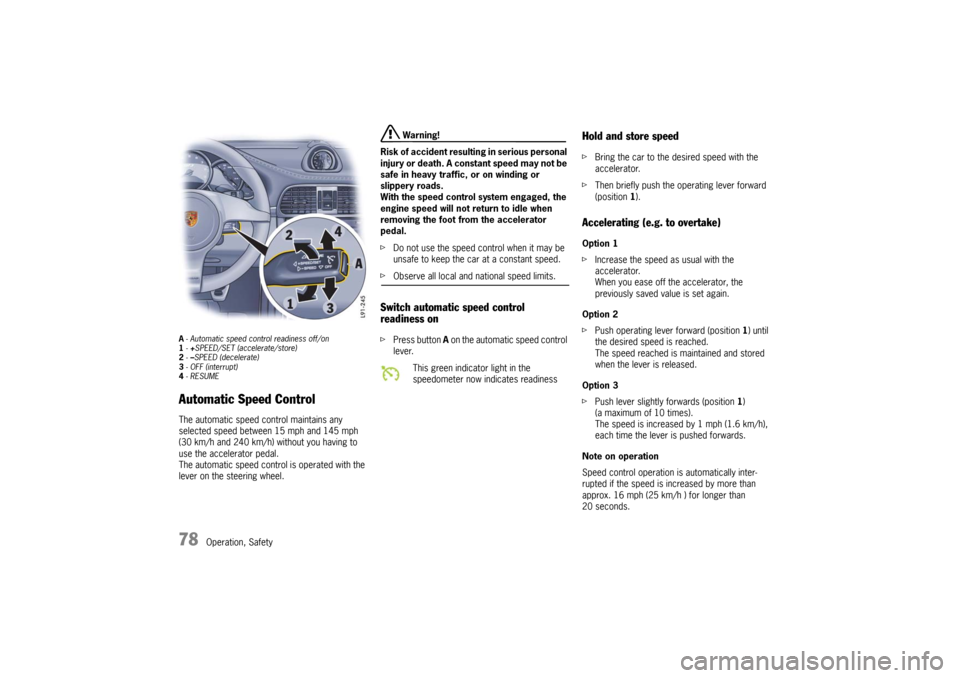
A- Automatic speed control readiness off/on
1-+SPEED/SET (accelerate/store)
2-–SPEED (decelerate)
3- OFF (interrupt)
4-RESUMEAutomatic Speed Control The automatic speed control maintains any
selected speed between 15 mph and 145 mph
(30 km/h and 240 km/h) without you having to
use the accelerator pedal.
The automatic speed control is operated with the
lever on the steering wheel.
Warning!
Risk of accident resulting in serious personal
injury or death. A constant speed may not be
safe in heavy traffic, or on winding or
slippery roads.
With the speed control system engaged, the
engine speed will not return to idle when
removing the foot from the accelerator
pedal.
fDo not use the speed control when it may be
unsafe to keep the car at a constant speed.
fObserve all local and national speed limits. Switch automatic speed control
readiness onfPress button A on the automatic speed control
lever.
Hold and store speed fBring the car to the desired speed with the
accelerator.
fThen briefly push the operating lever forward
(position 1).Accelerating (e.g. to overtake) Option 1
fIncrease the speed as usual with the
accelerator.
When you ease off the accelerator, the
previously saved value is set again.
Option 2
fPush operating lever forward (position 1) until
the desired speed is reached.
The speed reached is maintained and stored
when the lever is released.
Option 3
fPush lever slightly forwards (position 1)
(a maximum of 10 times).
The speed is increased by 1 mph (1.6 km/h),
each time the lever is pushed forwards.
Note on operation
Speed control operation is automatically inter-
rupted if the speed is increased by more than
approx. 16 mph (25 km/h ) for longer than
20 seconds.
This green indicator light in the
speedometer now indicates readiness
10_GT3_21.book Seite 78 Donnerstag, 4. Juni 2009 12:48 12
Page 83 of 251
82
Operation, Safety
Emptying fOpen ashtray and carefully pull out ash insert.
fLeave ashtray lid open.
Push in ash insert.
Warning!
Danger of fire.
fNever use ashtray for waste paper disposal, as it could pose a fire hazard.
Cigarette Lighter
Warning!
Danger of fire and burning.
The cigarette lighter is ready for use, regard-
less of the ignition lock position.
fNever leave unsupervised children in the car.
fNever touch the heating element or sides of
the lighter.
fHold the lighter by the knob only.
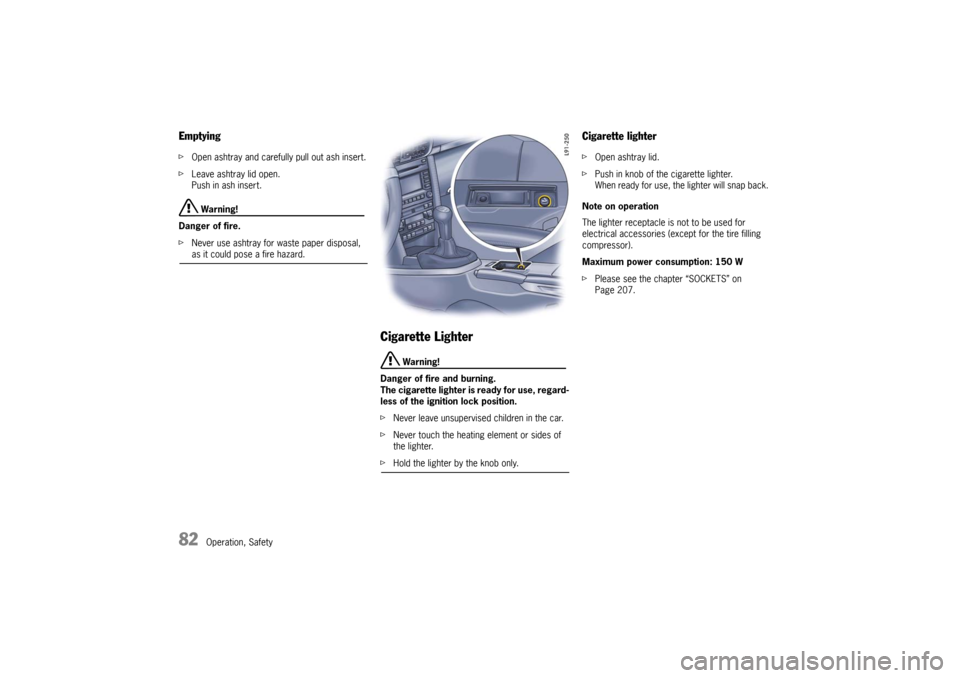
Cigarette lighter fOpen ashtray lid.
fPush in knob of the cigarette lighter.
When ready for use, the lighter will snap back.
Note on operation
The lighter receptacle is not to be used for
electrical accessories (except for the tire filling
compressor).
Maximum power consumption: 150 W
fPlease see the chapter “SOCKETS” on
Page 207.
10_GT3_21.book Seite 82 Donnerstag, 4. Juni 2009 12:48 12
Page 87 of 251
86
Operation, Safety
Opening luggage compartment lid
Caution!
Risk of damage to luggage compartment lid
or windshield wipers.
fMake sure that the windshield wipers are not
folded out forwards when opening the luggage compartment lid.
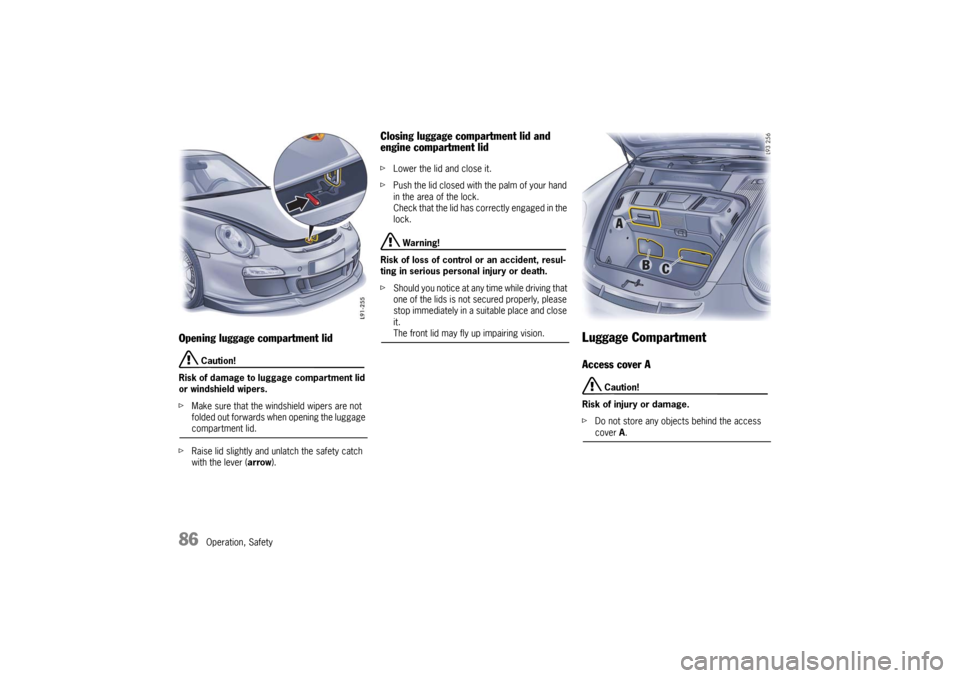
fRaise lid slightly and unlatch the safety catch
with the lever (arrow).
Closing luggage compartment lid and
engine compartment lid fLower the lid and close it.
fPush the lid closed with the palm of your hand
in the area of the lock.
Check that the lid has correctly engaged in the
lock.
Warning!
Risk of loss of control or an accident, resul-
ting in serious personal injury or death.
fShould you notice at any time while driving that
one of the lids is not secured properly, please
stop immediately in a suitable place and close
it. The front lid may fly up impairing vision.
Luggage CompartmentAccess cover A
Caution!
Risk of injury or damage.
fDo not store any objects behind the access cover A.
10_GT3_21.book Seite 86 Donnerstag, 4. Juni 2009 12:48 12
Page 89 of 251
88
Operation, Safety
Trunk EntrapmentYour vehicle is equipped with an internal trunk
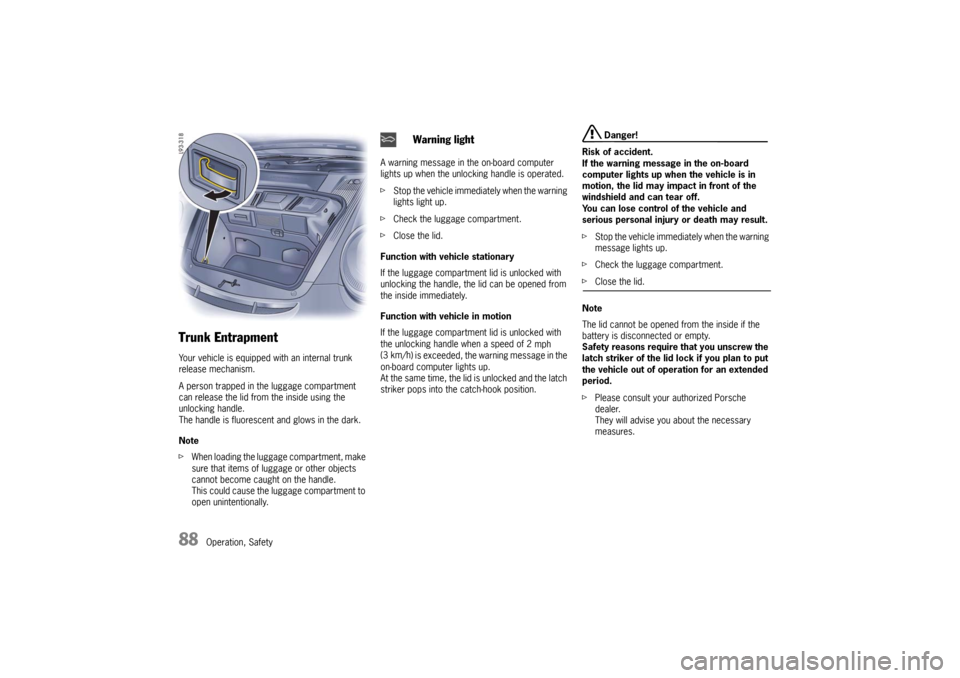
release mechanism.
A person trapped in the luggage compartment
can release the lid from the inside using the
unlocking handle.
The handle is fluorescent and glows in the dark.
Note
fWhen loading the luggage compartment, make
sure that items of luggage or other objects
cannot become caught on the handle.
This could cause the luggage compartment to
open unintentionally.A warning message in the on-board computer
lights up when the unlocking handle is operated.
fStop the vehicle immediately when the warning
lights light up.
fCheck the luggage compartment.
fClose the lid.
Function with vehicle stationary
If the luggage compartment lid is unlocked with
unlocking the handle, the lid can be opened from
the inside immediately.
Function with vehicle in motion
If the luggage compartment lid is unlocked with
the unlocking handle when a speed of 2
mph
(3 km/h
) is exceeded, the warning message in the
on-board computer lights up.
At the same time, the lid is unlocked and the latch
striker pops into the catch-hook position.
Danger!
Risk of accident.
If the warning message in the on-board
computer lights up when the vehicle is in
motion, the lid may impact in front of the
windshield and can tear off.
You can lose control of the vehicle and
serious personal injury or death may result.
fStop the vehicle immediately when the warning
message lights up.
fCheck the luggage compartment.
fClose the lid.
Note
The lid cannot be opened from the inside if the
battery is disconnected or empty.
Safety reasons require that you unscrew the
latch striker of the lid lock if you plan to put
the vehicle out of operation for an extended
period.
fPlease consult your authorized Porsche
dealer.
They will advise you about the necessary
measures.
Warning light
10_GT3_21.book Seite 88 Donnerstag, 4. Juni 2009 12:48 12
Page 92 of 251
Operation, Safety
91
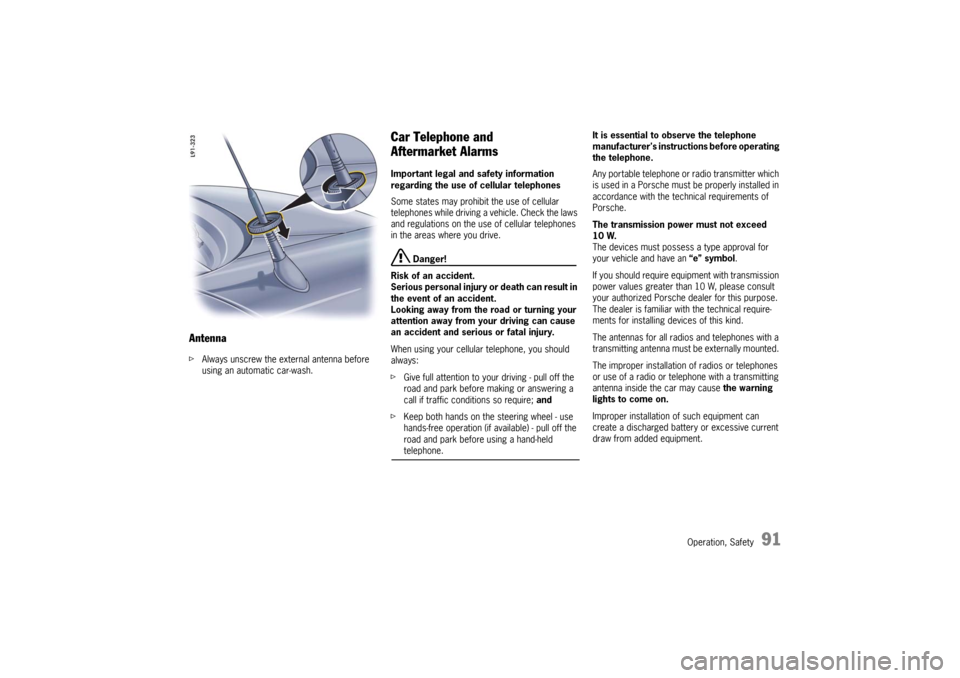
AntennafAlways unscrew the external antenna before
using an automatic car-wash.
Car Telephone and
Aftermarket Alarms Important legal and safety information
regarding the use of cellular telephones
Some states may prohibit the use of cellular
telephones while driving a vehicle. Check the laws
and regulations on the use of cellular telephones
in the areas where you drive.
Danger!
Risk of an accident.
Serious personal injury or death can result in
the event of an accident.
Looking away from the road or turning your
attention away from your driving can cause
an accident and serious or fatal injury.
When using your cellular telephone, you should
always:
fGive full attention to your driving - pull off the
road and park before making or answering a
call if traffic conditions so require; and
fKeep both hands on the steering wheel - use
hands-free operation (if available) - pull off the
road and park before using a hand-held telephone. It is essential to observe the telephone
manufacturer's instructions before operating
the telephone.
Any portable telephone or radio transmitter which
is used in a Porsche must be properly installed in
accordance with the technical requirements of
Porsche.
The transmission power must not exceed
10 W.
The devices must possess a type approval for
your vehicle and have an “e” symbol.
If you should require equipment with transmission
power values greater than 10 W, please consult
your authorized Porsche dealer for this purpose.
The dealer is familiar with the technical require-
ments for installing devices of this kind.
The antennas for all radios and telephones with a
transmitting antenna must be externally mounted.
The improper installation of radios or telephones
or use of a radio or telephone with a transmitting
antenna inside the car may cause the warning
lights to come on.
Improper installation of such equipment can
create a discharged battery or excessive current
draw from added equipment.
10_GT3_21.book Seite 91 Donnerstag, 4. Juni 2009 12:48 12
Page 96 of 251
Operation, Safety
95
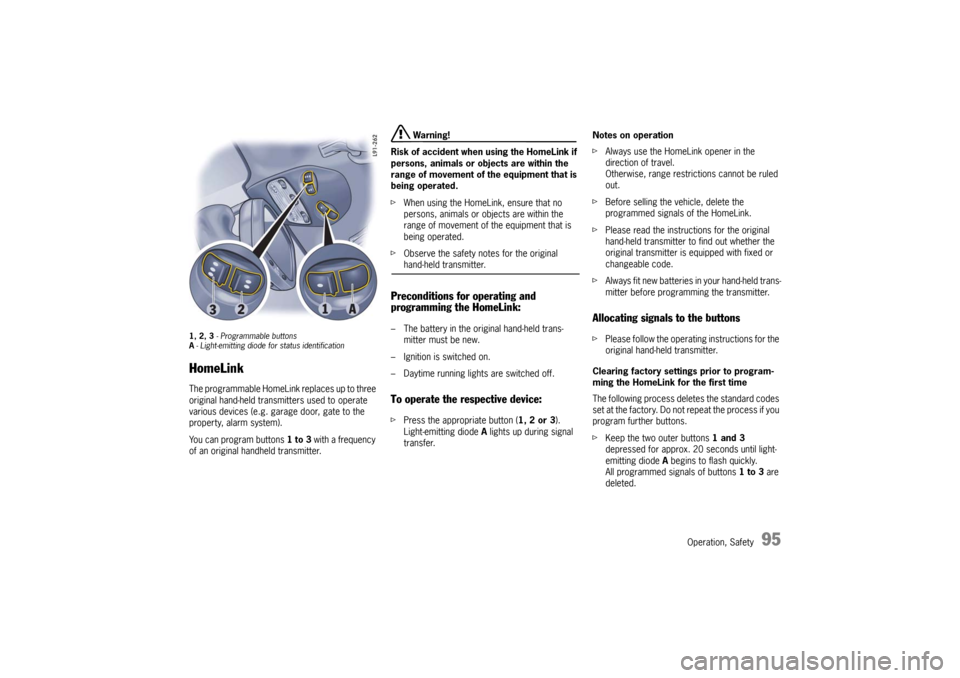
1, 2, 3 - Programmable buttons
A- Light-emitting diode for status identificationHomeLinkThe programmable HomeLink replaces up to three
original hand-held transmitters used to operate
various devices (e.g. garage door, gate to the
property, alarm system).
You can program buttons 1 to 3 with a frequency
of an original handheld transmitter.
Warning!
Risk of accident when using the HomeLink if
persons, animals or objects are within the
range of movement of the equipment that is
being operated.
fWhen using the HomeLink, ensure that no
persons, animals or objects are within the
range of movement of the equipment that is
being operated.
fObserve the safety notes for the original hand-held transmitter.
Preconditions for operating and
programming the HomeLink:– The battery in the original hand-held trans-
mitter must be new.
– Ignition is switched on.
– Daytime running lights are switched off.To operate the respective device:fPress the appropriate button (1, 2 or 3).
Light-emitting diode A lights up during signal
transfer.Notes on operation
fAlways use the HomeLink opener in the
direction of travel.
Otherwise, range restrictions cannot be ruled
out.
fBefore selling the vehicle, delete the
programmed signals of the HomeLink.
fPlease read the instructions for the original
hand-held transmitter to find out whether the
original transmitter is equipped with fixed or
changeable code.
fAlways fit new batteries in your hand-held trans-
mitter before programming the transmitter.
Allocating signals to the buttonsfPlease follow the operating instructions for the
original hand-held transmitter.
Clearing factory settings prior to program-
ming the HomeLink for the first time
The following process deletes the standard codes
set at the factory. Do not repeat the process if you
program further buttons.
fKeep the two outer buttons 1 and 3
depressed for approx. 20 seconds until light-
emitting diode A begins to flash quickly.
All programmed signals of buttons 1 to 3 are
deleted.
10_GT3_21.book Seite 95 Donnerstag, 4. Juni 2009 12:48 12
Page 100 of 251
Automatic air conditioning system, Heated rear window/Door mirror heating
99
Setting temperaturefPress button F upwards or downwards
respectively.
To suit personal comfort, the interior temperature
can be adjusted between 61 °F and 85 °F/16 °C
and 29.5 °C.
Recommendation: 72 °F/22 °C.
If “LO” or “HI” appears on the display, the system
is operating at maximum cooling or heating
power.
Automatic control is no longer active.
Note
If the preselected temperature is changed, the
blower speed can increase automatically in
automatic mode.
The desired temperature is reached more quickly
this way.
Sensors
To avoid affecting the performance of the air-
conditioning system:
fDo not cover the sun sensor on the instrument
panel or the temperature sensor C.fPress button A (switch on or off).
The windshield is defogged or defrosted as
quickly as possible.
Air flows to the windshield only.
The light-emitting diode in the button lights up.
AC OFF – switching compressor for air-
conditioning system on and offThe air-conditioning compressor switches off
automatically at temperatures below approx.
37 °F/3 °C and cannot be switched on, even
manually.
Whenever outside temperatures exceed approx.
37 °F/3 °C, the air-conditioning compressor is
always switched on in automatic mode.
The compressor can be switched off to save fuel,
but control comfort is then limited:
fPress AC OFF button D.
The compressor is switched off.
The light-emitting diode in the button lights up.
fIf the interior temperature is too high, switch
compressor back on or press AUTO button.
To dry incoming air in damp weather, do not
switch off the air-conditioning compressor.
This prevents fogging of windows.fPress button K upwards or downwards respec-
tively.
The preset blower speed is increased or decre-
ased.
The speed stages are indicated by a bar display.
If the button is pressed downwards at the lowest
blower stage, the blower and automatic control
are switched off. “OFF” will appear on the display
field.
Pressing the button upwards or pressing the
AUTO button switches the blower and automatic
control back on again.
Warning!
Risk of accident due to impaired vision,
resulting in serious personal injury or death.
In recirculating-air setting, the windows may
fog up.
fOnly select recirculating-air setting for short
periods.
fIf the windows fog up, switch recirculating-air
setting off immediately by pressing the
circulating-air button again and select the “Defrost windshield” function.
Defrosting the windshield
Adjusting blower speed
Recirculating-air setting
10_GT3_21.book Seite 99 Donnerstag, 4. Juni 2009 12:48 12
Page 104 of 251
Instruments, On-Board Computer, Warnings
103 Instruments, On-Board Computer, Warnings
Instrument Panel USA Models...................... 104
Instrument Panel Canada Models ................. 106
Engine Oil Temperature .............................. 108
Automatic Speed Control Indicator light ....... 108
Instrument Illumination................................ 108
Trip Odometer ........................................... 109
Speedometer ............................................. 110
Changing over between Miles / Kilometers ... 110
Tachometer ............................................... 111
Turn Signal Indicator Light .......................... 111
High Beam Indicator Light ........................... 111
Upshift indicator ......................................... 111
Cooling System.......................................... 112
Fuel........................................................... 113
Clock ........................................................ 114
Outside Temperature.................................. 114
Engine Oil Pressure .................................... 115
Check Engine (Emission Control) ................. 116
On-Board Computer (BC)............................. 117
Warnings on the instrument panel and the
on-board computer ..................................... 148
10_GT3_21.book Seite 103 Donnerstag, 4. Juni 2009 12:48 12
Page 105 of 251

104
Instruments, On-Board Computer
Instrument Panel USA Models Also refer to the corresponding chapters in
the Owner’s Manual.
1.Engine oil temperature gauge
2.Speedometer with analogue display
3.Tire pressure warning light
4.Turn signal indicator light, left
5.Tachometer
6.High beam indicator light
7.Turn signal indicator light, right
8.Upshift indicator
9.Cooling system
Temperature gauge, warning light
10.Fuel
Level gauge, warning light
11.Engine oil pressure gauge
12.Adjustment button for instrument illumination
and trip counter
13.Odometer and daily trip mileage display
14.Automatic speed control indicator light15.Light sensor for instrument illumination
16.Airbag warning light
17.Check Engine warning light
(Emission control warning light)
18.Central warning light
19.On-board computer display
20.Porsche Stability Management
PSM Multifunctional light
21.Brake warning light
22.Safety belt warning light
23.ABS warning light
24.Clock and outside temperature display
25.Adjustment button for clockWhen the ignition is switched on, the warning
lights light up for a lamp check.
Note
Warnings that have been given are stored in the
appropriate control unit memory and can be read
out at an authorized Porsche dealer.
This information can help to warn you about situa-
tions which may be hazardous to you or your car. 10_GT3_21.book Seite 104 Donnerstag, 4. Juni 2009 12:48 12
Page 107 of 251

106
Instruments, On-Board Computer
Instrument Panel Canada Models Also refer to the corresponding chapters in
the Owner’s Manual.
1.Engine oil temperature gauge
2.Speedometer with analogue display
3.Tire pressure warning light
4.Turn signal indicator light, left
5.Tachometer
6.High beam indicator light
7.Turn signal indicator light, right
8.Upshift indicator
9.Cooling system
Temperature gauge, warning light
10.Fuel
Level gauge, warning light
11.Engine oil pressure gauge
12.Adjustment button for instrument illumination
and trip counter
13.Odometer and daily trip mileage display
14.Automatic speed control indicator light15.Light sensor for instrument illumination
16.Airbag warning light
17.Check Engine warning light
(Emission control warning light)
18.Central warning light
19.On-board computer display
20.Porsche Stability Management
PSM Multifunctional light
21.Brake warning light
22.Safety belt warning light
23.ABS warning light
24.Clock and outside temperature display
25.Adjustment button for clockWhen the ignition is switched on, the warning
lights light up for a lamp check.
Note
Warnings that have been given are stored in the
appropriate control unit memory and can be read
out at an authorized Porsche dealer.
This information can help to warn you about situa-
tions which may be hazardous to you or your car. 10_GT3_21.book Seite 106 Donnerstag, 4. Juni 2009 12:48 12