door lock PORSCHE 911 TURBO 2014 6.G User Guide
[x] Cancel search | Manufacturer: PORSCHE, Model Year: 2014, Model line: 911 TURBO, Model: PORSCHE 911 TURBO 2014 6.GPages: 300, PDF Size: 10.61 MB
Page 26 of 300
24 Opening and Locking
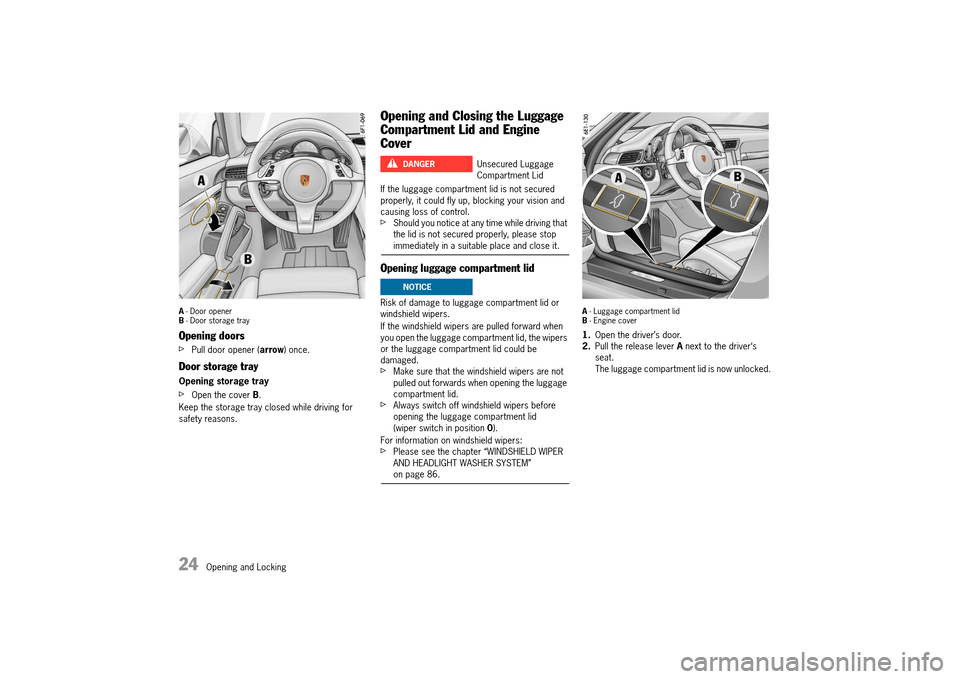
A - Door opener B - Door storage tray
Opening doors
fPull door opener (arrow) once.
Door storage tray
Opening storage tray
fOpen the cover B.
Keep the storage tray closed while driving for safety reasons.
Opening and Closing the Luggage
Compartment Lid and Engine
Cover
If the luggage compartment lid is not secured properly, it could fly up, blocking your vision and causing loss of control.fShould you notice at any time while driving that the lid is not secured properly, please stop immediately in a suitable place and close it.
Opening luggage compartment lid
Risk of damage to luggage compartment lid or windshield wipers.
If the windshield wipers are pulled forward when you open the luggage compartment lid, the wipers or the luggage compartment lid could be damaged.fMake sure that the windshield wipers are not pulled out forwards when opening the luggage compartment lid.fAlways switch off windshield wipers before opening the luggage compartment lid (wiper switch in position 0).
For information on windshield wipers: fPlease see the chapter “WINDSHIELD WIPER AND HEADLIGHT WASHER SYSTEM” on page 86.
A - Luggage compartment lid B - Engine cover
1.Open the driver’s door. 2. Pull the release lever A next to the driver‘s seat.The luggage compartment lid is now unlocked.
Unsecured Luggage Compartment Lid
DANGERh
NOTICE
14_991_Turbo_21.book Seite 24 Mittwoch, 9. April 2014 2:19 14
Page 27 of 300
Opening and Locking 25
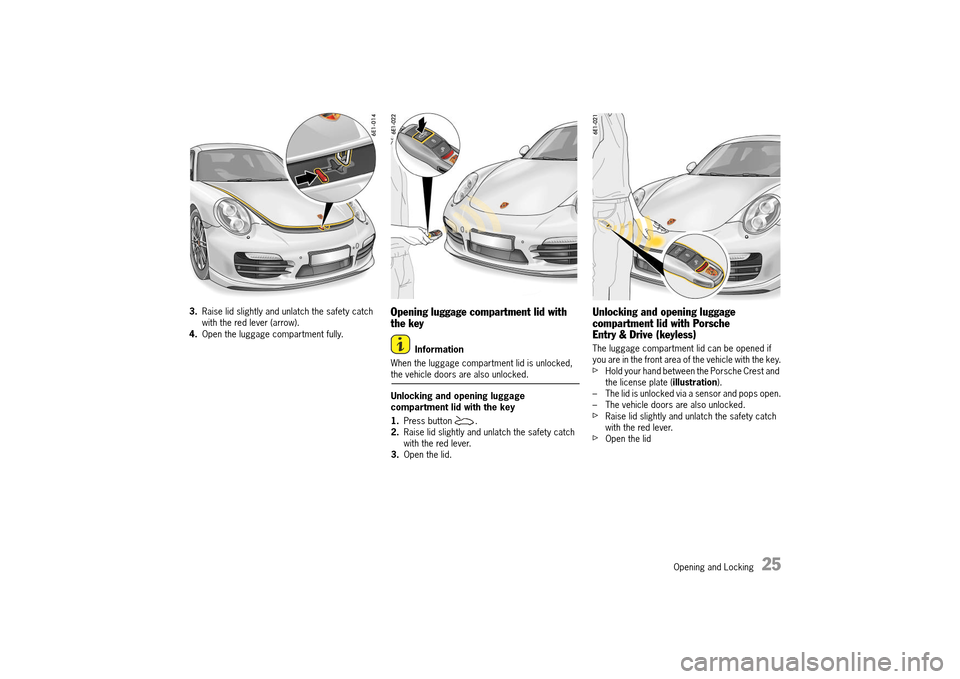
3.Raise lid slightly and unlatch the safety catch with the red lever (arrow).4. Open the luggage compartment fully.
Opening luggage compartment lid with the key
Information
When the luggage compartment lid is unlocked, the vehicle doors are also unlocked.
Unlocking and opening luggage compartment lid with the key
1. Press button . 2. Raise lid slightly and unlatch the safety catch with the red lever.3. Open the lid.
Unlocking and opening luggage compartment lid with Porsche Entry & Drive (keyless)
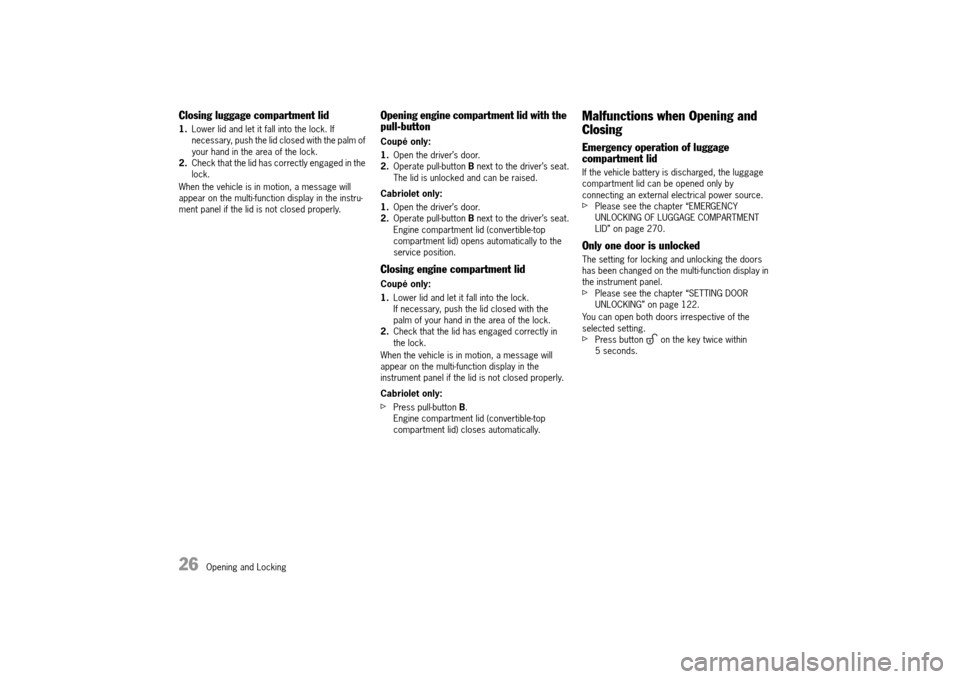
The luggage compartment lid can be opened if you are in the front area of the vehicle with the key.fHold your hand between the Porsche Crest and the license plate ( illustration). – The lid is unlocked via a sensor and pops open.– The vehicle doors are also unlocked.fRaise lid slightly and unlatch the safety catch with the red lever.fOpen the lid
14_991_Turbo_21.book Seite 25 Mittwoch, 9. April 2014 2:19 14
Page 28 of 300
26 Opening and Locking
Closing luggage compartment lid
1.Lower lid and let it fall into the lock. If necessary, push the lid closed with the palm of your hand in the area of the lock.2. Check that the lid has correctly engaged in the lock.
When the vehicle is in motion, a message will appear on the multi-function display in the instru-ment panel if the lid is not closed properly.
Opening engine compartment lid with the pull-button
Coupé only:
1. Open the driver’s door. 2. Operate pull-button B next to the driver’s seat. The lid is unlocked and can be raised.
Cabriolet only:
1. Open the driver’s door. 2. Operate pull-button B next to the driver’s seat. Engine compartment lid (convertible-top compartment lid) opens automatically to the service position.
Closing engine compartment lid
Coupé only:
1. Lower lid and let it fall into the lock. If necessary, push the lid closed with the palm of your hand in the area of the lock.2. Check that the lid has engaged correctly in the lock.
When the vehicle is in motion, a message will appear on the multi-function display in the instrument panel if the lid is not closed properly.
Cabriolet only:
fPress pull-button B. Engine compartment lid (convertible-top compartment lid) closes automatically.
Malfunctions when Opening and
Closing
Emergency operation of luggage compartment lid
If the vehicle battery is discharged, the luggage compartment lid can be opened only by connecting an external electrical power source.fPlease see the chapter “EMERGENCY UNLOCKING OF LUGGAGE COMPARTMENT LID” on page 270.
Only one door is unlocked
The setting for locking and unlocking the doors has been changed on the multi-function display in the instrument panel. fPlease see the chapter “SETTING DOOR UNLOCKING” on page 122.
You can open both doors irrespective of the selected setting.fPress button on the key twice within 5 seconds.
14_991_Turbo_21.book Seite 26 Mittwoch, 9. April 2014 2:19 14
Page 29 of 300
Opening and Locking 27
The vehicle cannot be unlocked
Remote control of the car key may – fail due to a fault,– due to a flat key battery,– not function correctly due to radio waves (also radio contact between remote control and vehicle in the case of Porsche Entry & Drive).
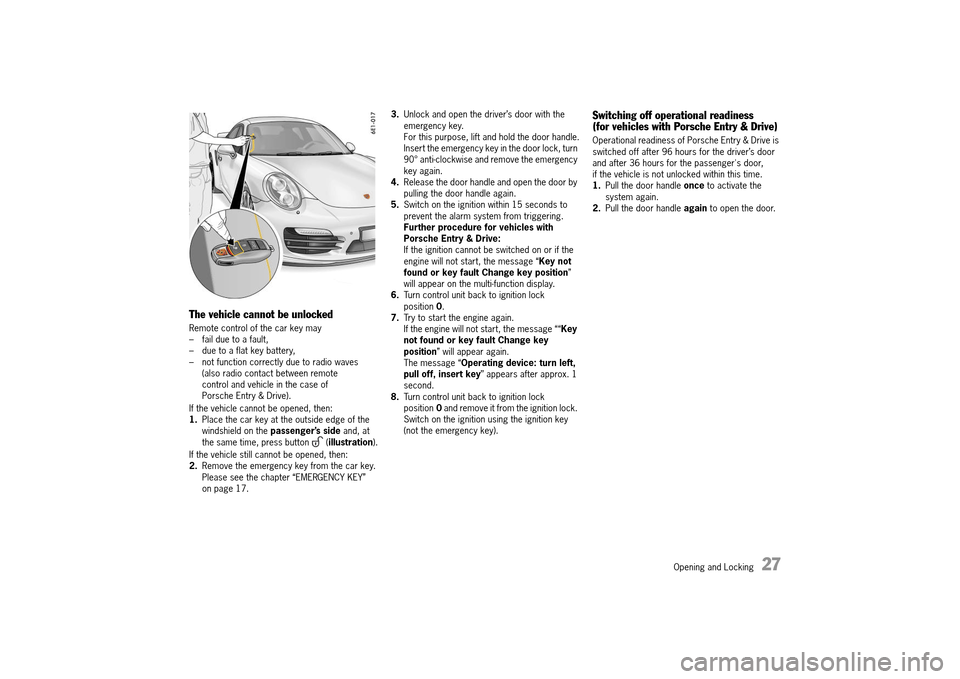
If the vehicle cannot be opened, then: 1. Place the car key at the outside edge of the windshield on the passenger’s side and, at the same time, press button ( illustration).
If the vehicle still cannot be opened, then: 2. Remove the emergency key from the car key. Please see the chapter “EMERGENCY KEY” on page 17.
3. Unlock and open the driver’s door with the emergency key.For this purpose, lift and hold the door handle.Insert the emergency key in the door lock, turn 90° anti-clockwise and remove the emergency key again.4. Release the door handle and open the door by pulling the door handle again.5. Switch on the ignition within 15 seconds to prevent the alarm system from triggering.Further procedure for vehicles with Porsche Entry & Drive:If the ignition cannot be switched on or if the engine will not start, the message “ Key not found or key fault Change key position ” will appear on the multi-function display.6. Turn control unit back to ignition lock position 0. 7. Try to start the engine again. If the engine will not start, the message ““ Key not found or key fault Change key position ” will appear again. The message “ Operating device: turn left, pull off, insert key ” appears after approx. 1 second.8. Turn control unit back to ignition lock position 0 and remove it from the ignition lock. Switch on the ignition using the ignition key (not the emergency key).
Switching off operational readiness (for vehicles with Porsche Entry & Drive)
Operational readiness of Porsche Entry & Drive is switched off after 96 hours for the driver’s door and after 36 hours for the passenger's door, if the vehicle is not unlocked within this time.1. Pull the door handle once to activate the system again.2. Pull the door handle again to open the door.
14_991_Turbo_21.book Seite 27 Mittwoch, 9. April 2014 2:19 14
Page 31 of 300
Opening and Locking 29
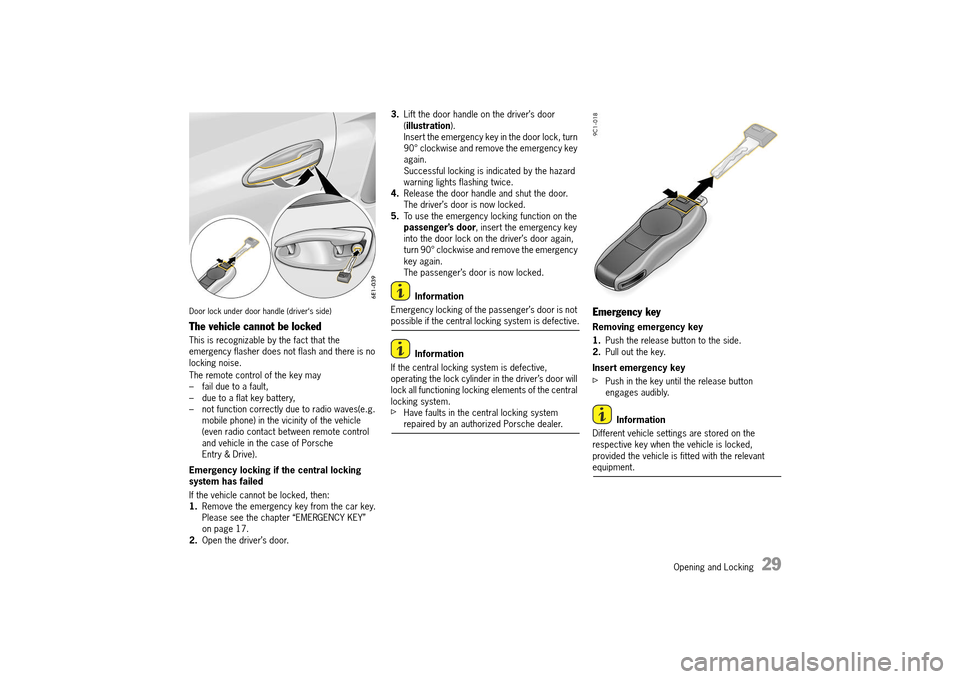
Door lock under door handle (driver‘s side)
The vehicle cannot be locked
This is recognizable by the fact that the emergency flasher does not flash and there is no locking noise.
The remote control of the key may – fail due to a fault,– due to a flat key battery,– not function correctly due to radio waves(e.g. mobile phone) in the vicinity of the vehicle (even radio contact between remote control and vehicle in the case of Porsche Entry & Drive).
Emergency locking if the central locking system has failed
If the vehicle cannot be locked, then: 1. Remove the emergency key from the car key. Please see the chapter “EMERGENCY KEY” on page 17.2. Open the driver’s door.
3. Lift the door handle on the driver’s door ( illustration). Insert the emergency key in the door lock, turn 90° clockwise and remove the emergency key again.Successful locking is indicated by the hazard warning lights flashing twice.4. Release the door handle and shut the door. The driver’s door is now locked.5. To use the emergency locking function on the passenger’s door , insert the emergency key into the door lock on the driver’s door again, turn 90° clockwise and remove the emergency key again.The passenger’s door is now locked.
Information
Emergency locking of the passenger’s door is not possible if the central locking system is defective.
Information
If the central locking system is defective, operating the lock cylinder in the driver’s door will lock all functioning locking elements of the central locking system.fHave faults in the central locking system repaired by an authorized Porsche dealer.
Emergency key
Removing emergency key
1. Push the release button to the side. 2. Pull out the key.
Insert emergency key
fPush in the key until the release button engages audibly.
Information
Different vehicle settings are stored on the respective key when the vehicle is locked, provided the vehicle is fitted with the relevant equipment.
14_991_Turbo_21.book Seite 29 Mittwoch, 9. April 2014 2:19 14
Page 40 of 300
38 Seats, Mirrors and Steering Wheel
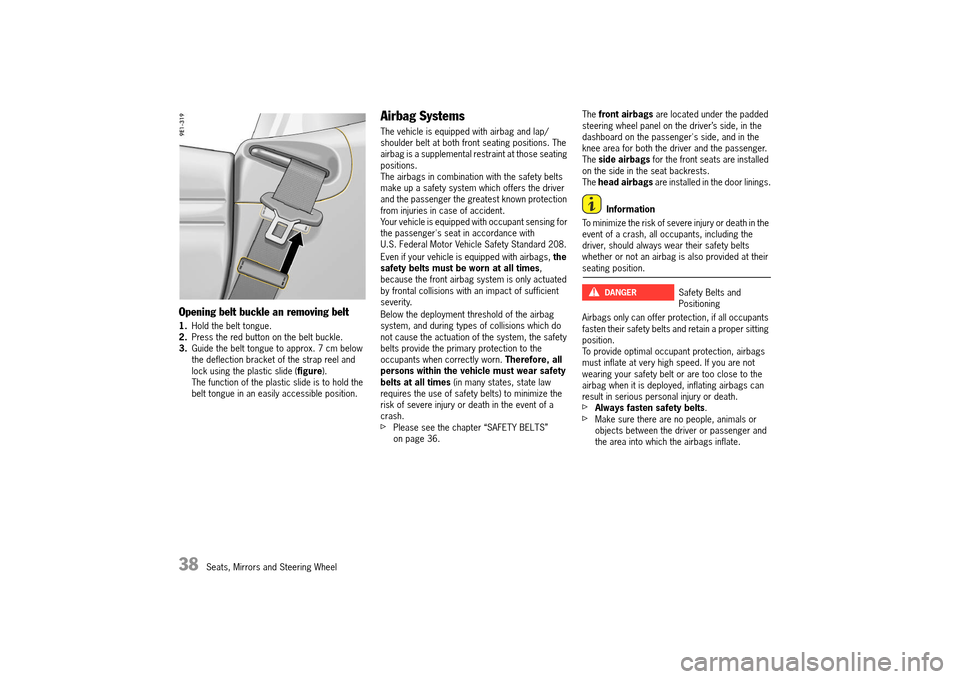
Opening belt buckle an removing belt
1.Hold the belt tongue. 2. Press the red button on the belt buckle. 3. Guide the belt tongue to approx. 7 cm below the deflection bracket of the strap reel and lock using the plastic slide ( figure). The function of the plastic slide is to hold the belt tongue in an easily accessible position.
Airbag Systems
The vehicle is equipped with airbag and lap/shoulder belt at both front seating positions. The airbag is a supplemental restraint at those seating positions.The airbags in combination with the safety belts make up a safety system which offers the driver and the passenger the greatest known protection from injuries in case of accident.Your vehicle is equipped with occupant sensing for the passenger's seat in accordance with U.S. Federal Motor Vehicle Safety Standard 208.
Even if your vehicle is equipped with airbags, the safety belts must be worn at all times , because the front airbag system is only actuated by frontal collisions with an impact of sufficient severity.
Below the deployment threshold of the airbag system, and during types of collisions which do not cause the actuation of the system, the safety belts provide the primary protection to the occupants when correctly worn. Therefore, all persons within the vehicle must wear safety belts at all times (in many states, state law requires the use of safety belts) to minimize the risk of severe injury or death in the event of a crash.fPlease see the chapter “SAFETY BELTS” on page 36.
The front airbags are located under the padded steering wheel panel on the driver’s side, in the dashboard on the passenger's side, and in the knee area for both the driver and the passenger.The side airbags for the front seats are installed on the side in the seat backrests.The head airbags are installed in the door linings.
Information
To minimize the risk of severe injury or death in the event of a crash, all occupants, including the driver, should always wear their safety belts whether or not an airbag is also provided at their seating position.
Airbags only can offer protection, if all occupants fasten their safety belts and retain a proper sitting position.To provide optimal occupant protection, airbags must inflate at very high speed. If you are not wearing your safety belt or are too close to the airbag when it is deployed, inflating airbags can result in serious personal injury or death.fAlways fasten safety belts .fMake sure there are no people, animals or objects between the driver or passenger and the area into which the airbags inflate.
Safety Belts and Positioning
DANGERh
14_991_Turbo_21.book Seite 38 Mittwoch, 9. April 2014 2:19 14
Page 41 of 300
Seats, Mirrors and Steering Wheel 39
fSit back as far from the dashboard or steering wheel as is practical, while still maintaining full vehicle control.fAlways hold the steering wheel by the outer rim. Never rest your hands on the center of the steering wheel where the airbag module is located.fAlways keep feet in the footwell while driving. Do not put feet on the dashboard or the seat area. Do not lean against the inside of the door or outside the window while the vehicle is moving.
Objects and load have to be stored securely to keep from causing injury.fDo not transport heavy objects on or in front of the passenger seat. These could impair the function of the airbags, the safety belts, and occupant sensing.fDo not hang objects (e.g., jackets, coats, coat hangers) over the backrest.fObjects must not protrude out of the door storage compartment.fDo not add any additional coverings or stickers to the steering wheel or in the area of the passenger airbag, side airbags, knee airbags, and head airbags. Doing so may adversely affect the functioning of the airbag system or cause harm to the occupants if the airbag system should deploy.Do not use protective seat covers.
fNo objects should be placed over or near the airbag on the instrument panel, because any such objects could cause harm if the vehicle is in a crash severe enough to cause the airbag to inflate.fGive your passenger all of the information in this chapter.
A modified airbag system cannot offer protection. They may not trigger or could trigger in an uncontrolled way. An uncontrolled triggering of the airbag system can result in serious personal injury or death.fDo not modify the seat coverings, since such changes can block the seat-mounted side airbag. Do not attach additional cushions, protective coverings, or pillows to the seats. Do not affix things to the seats or cover them with other materials. Do not cover the back of the backrest. Do not make changes to the seats, the cushion or foam, the occupant sensor, and to the seat base frame.fNo changes must be made to the wiring or components of the airbag system. Doing so may disable the airbag system or cause inadvertent inflation.fDo not install any wiring for electrical accessory equipment in the vicinity of the airbag wiring harnesses. Doing so may disable the airbag system or cause inadvertent inflation.
fIf the warning light comes on, the airbag system should be repaired immediately by your authorized Porsche dealer.fUsing accessories not approved by Porsche can cause the occupant sensing to be impaired.fDo not squeeze objects, such as the fire extinguisher, or first aid kit under the seat.fOnly have seats removed and installed by an authorized Porsche dealer so that occupant sensing components will not be damaged.
Information
Airbag components (e.g. steering wheel, door lining, seats) may be disassembled only by an authorized Porsche dealer.fWhen disposing of a used airbag unit, our safety instructions must be followed. These instructions can be obtained at any authorized Porsche dealer.
Function of the airbag system
Airbags are a supplemental safety system. Your primary protection comes from your safety belts.
The front airbags are triggered during a frontal collision of sufficient force and direction.In the event of a side impact of corresponding force, the side airbag on the impact side is triggered.
Safe Storage of ObjectsDANGERh
Modification to Airbag SystemDANGERh
14_991_Turbo_21.book Seite 39 Mittwoch, 9. April 2014 2:19 14
Page 64 of 300
62 Windows, Sunroof and Cabriolet
Power Windows
When opening or closing the windows, particularly in one-touch mode, parts of the body may get trapped between the moving window and fixed vehicle parts.fTake care to ensure that nobody can be injured when the windows open or close.fAlways remove the ignition key when leaving the vehicle or switch ignition off on vehicles with Porsche Entry & Drive. Always take the ignition key with you when leaving the vehicle. Uninformed persons could injure themselves by operating the power windows.fDo not leave children in the vehicle unattended.
Readiness for operation of power windows
The power windows are ready for operation:– With ignition switched on.– After the ignition is switched off and before the driver’s or passenger’s door is first opened, but for a maximum of 10 minutes.One-touch operation for closing the door windows is available only when the ignition is switched on.
Cabriolet
When the convertible top is open, the rear side windows can only be closed if the door windows are closed.
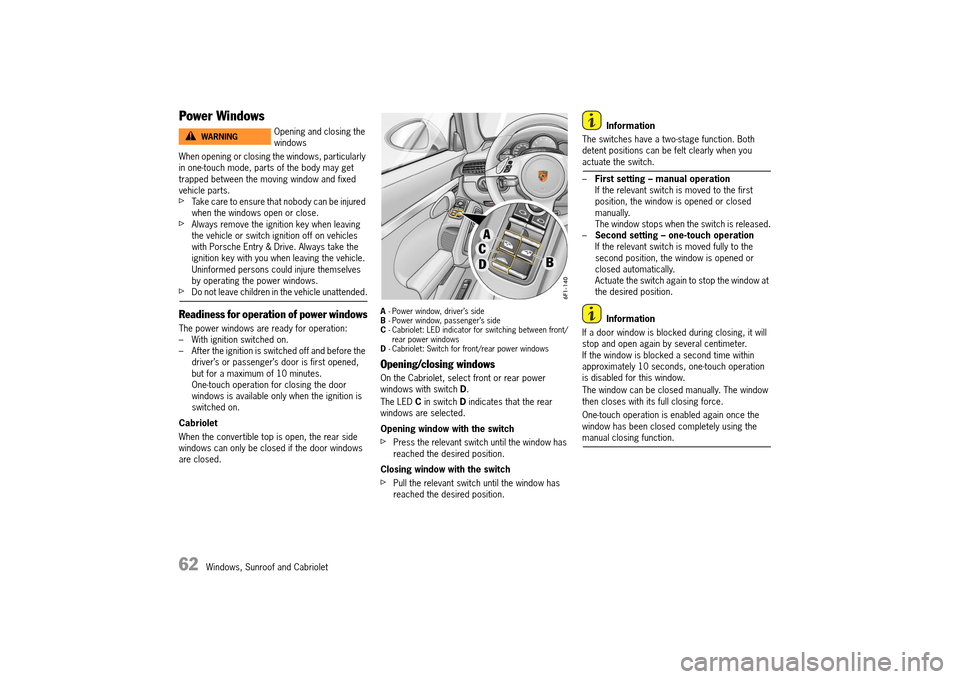
A - Power window, driver’s side B - Power window, passenger’s side C - Cabriolet: LED indicator for switching between front/ rear power windowsD - Cabriolet: Switch for front/rear power windows
Opening/closing windows
On the Cabriolet, select front or rear power windows with switch D.
The LED C in switch D indicates that the rear windows are selected.
Opening window with the switch
fPress the relevant switch until the window has reached the desired position.
Closing window with the switch
fPull the relevant switch until the window has reached the desired position.
Information
The switches have a two-stage function. Both detent positions can be felt clearly when you actuate the switch.
– First setting – manual operation If the relevant switch is moved to the first position, the window is opened or closed manually.The window stops when the switch is released.– Second setting – one-touch operation If the relevant switch is moved fully to the second position, the window is opened or closed automatically.Actuate the switch again to stop the window at the desired position.
Information
If a door window is blocked during closing, it will stop and open again by several centimeter.If the window is blocked a second time within approximately 10 seconds, one-touch operation is disabled for this window.
The window can be closed manually. The window then closes with its full closing force.
One-touch operation is enabled again once the window has been closed completely using the manual closing function.
Opening and closing the windowsWARNINGh
14_991_Turbo_21.book Seite 62 Mittwoch, 9. April 2014 2:19 14
Page 86 of 300
84 Lights, Turn Signals and Windshield Wipers
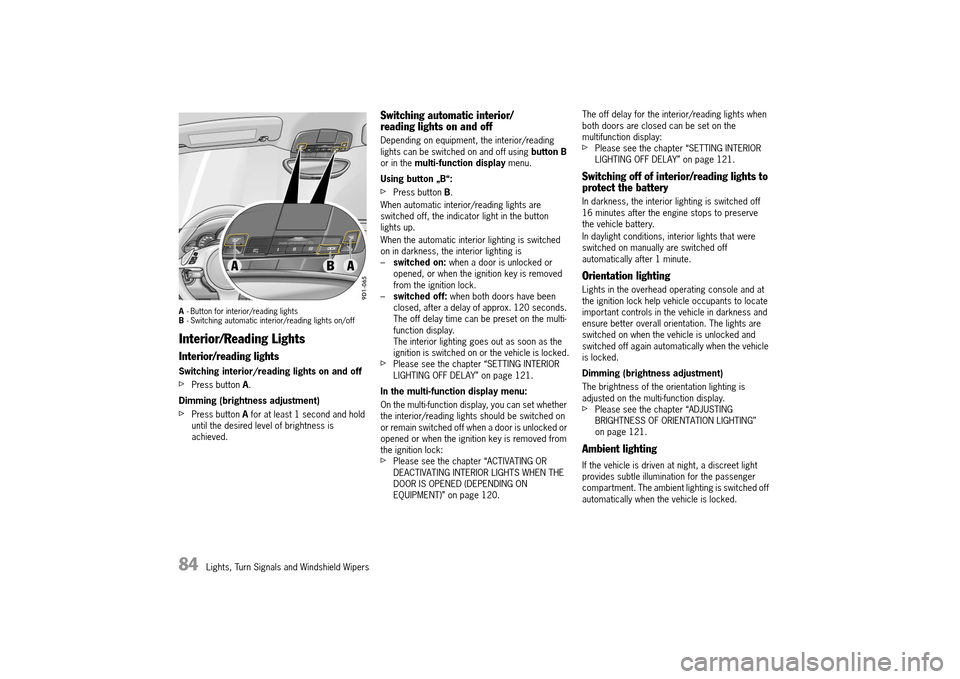
A- Button for interior/reading lights B - Switching automatic interior/reading lights on/off
Interior/Reading Lights
Interior/reading lights
Switching interior/reading lights on and off
fPress button A.
Dimming (brightness adjustment)
fPress button A for at least 1 second and hold until the desired level of brightness is achieved.
Switching automatic interior/ reading lights on and off
Depending on equipment, the interior/reading lights can be switched on and off using button B or in the multi-function display menu.
Using button „B“:
fPress button B.
When automatic interior/reading lights are switched off, the indicator light in the button lights up.
When the automatic interior lighting is switched on in darkness, the interior lighting is– switched on: when a door is unlocked or opened, or when the ignition key is removed from the ignition lock.– switched off: when both doors have been closed, after a delay of approx. 120 seconds. The off delay time can be preset on the multi-function display.The interior lighting goes out as soon as the ignition is switched on or the vehicle is locked.fPlease see the chapter “SETTING INTERIOR LIGHTING OFF DELAY” on page 121.
In the multi-function display menu:
On the multi-function display, you can set whether the interior/reading lights should be switched on or remain switched off when a door is unlocked or opened or when the ignition key is removed from the ignition lock:fPlease see the chapter “ACTIVATING OR DEACTIVATING INTERIOR LIGHTS WHEN THE DOOR IS OPENED (DEPENDING ON EQUIPMENT)” on page 120.
The off delay for the interior/reading lights when both doors are closed can be set on the multifunction display:fPlease see the chapter “SETTING INTERIOR LIGHTING OFF DELAY” on page 121.
Switching off of interior/reading lights to protect the battery
In darkness, the interior lighting is switched off 16 minutes after the engine stops to preserve the vehicle battery.
In daylight conditions, interior lights that were switched on manually are switched off automatically after 1 minute.
Orientation lighting
Lights in the overhead operating console and at the ignition lock help vehicle occupants to locate important controls in the vehicle in darkness and ensure better overall orientation. The lights are switched on when the vehicle is unlocked and switched off again automatically when the vehicle is locked.
Dimming (brightness adjustment)
The brightness of the orientation lighting is adjusted on the multi-function display.fPlease see the chapter “ADJUSTING BRIGHTNESS OF ORIENTATION LIGHTING” on page 121.
Ambient lighting
If the vehicle is driven at night, a discreet light provides subtle illumination for the passenger compartment. The ambient lighting is switched off automatically when the vehicle is locked.
14_991_Turbo_21.book Seite 84 Mittwoch, 9. April 2014 2:19 14
Page 101 of 300
Instrument Panel and Multi-Function Display 99
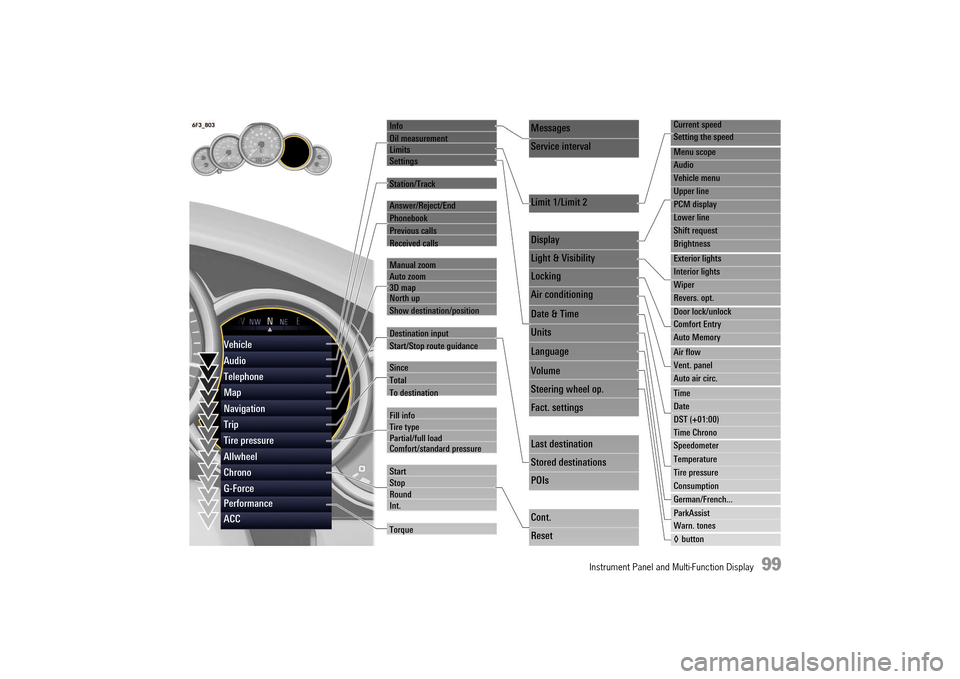
Info
Oil measurement LimitsSettings
Station/Track
Answer/Reject/End
Phonebook
Previous calls
Received calls
Manual zoom Auto zoom3D map North up
Show destination/position
Destination input
Start/Stop route guidance
Since
Total
To destination
Fill info Tire typePartial/full load Comfort/standard pressure
Start StopRoundInt.
Torque
Current speed
Setting the speed
Menu scope
Audio
Vehicle menu
Upper line
PCM display
Lower line
Shift request
Brightness
Exterior lights
Interior lights
Wiper
Revers. opt.
Door lock/unlock
Comfort Entry
Auto Memory
Air flow
Vent. panel
Auto air circ.
Time
Date
DST (+01:00)
Time Chrono
Speedometer
Temperature
Tire pressure
Consumption
German/French...
ParkAssist
Warn. tones
◊ button
Messages
Service interval
Limit 1/Limit 2
Display
Light & Visibility
Locking
Air conditioning
Date & Time
Units
Language
Volume
Steering wheel op.
Fact. settings
Last destination
Stored destinations
POIs
Cont.
Reset
Vehicle
Audio
Telephone
Map
Navigation
Trip
Tire pressure
Allwheel
Chrono
G-Force
Performance
ACC
14_991_Turbo_21.book Seite 99 Mittwoch, 9. April 2014 2:19 14