interior lights PORSCHE 911 TURBO 2014 6.G User Guide
[x] Cancel search | Manufacturer: PORSCHE, Model Year: 2014, Model line: 911 TURBO, Model: PORSCHE 911 TURBO 2014 6.GPages: 300, PDF Size: 10.61 MB
Page 86 of 300
84 Lights, Turn Signals and Windshield Wipers
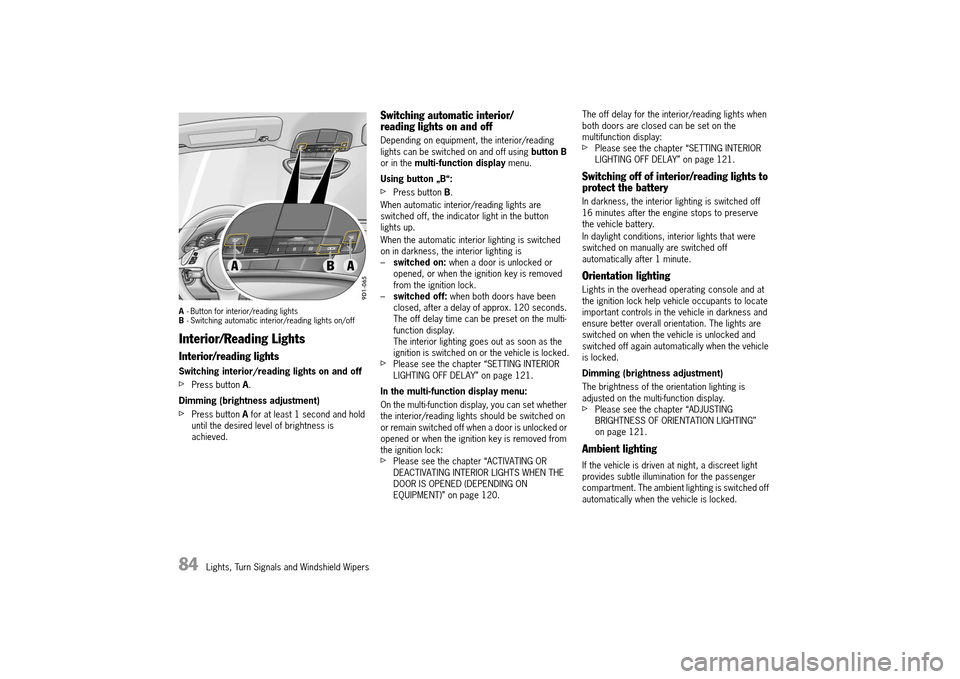
A- Button for interior/reading lights B - Switching automatic interior/reading lights on/off
Interior/Reading Lights
Interior/reading lights
Switching interior/reading lights on and off
fPress button A.
Dimming (brightness adjustment)
fPress button A for at least 1 second and hold until the desired level of brightness is achieved.
Switching automatic interior/ reading lights on and off
Depending on equipment, the interior/reading lights can be switched on and off using button B or in the multi-function display menu.
Using button „B“:
fPress button B.
When automatic interior/reading lights are switched off, the indicator light in the button lights up.
When the automatic interior lighting is switched on in darkness, the interior lighting is– switched on: when a door is unlocked or opened, or when the ignition key is removed from the ignition lock.– switched off: when both doors have been closed, after a delay of approx. 120 seconds. The off delay time can be preset on the multi-function display.The interior lighting goes out as soon as the ignition is switched on or the vehicle is locked.fPlease see the chapter “SETTING INTERIOR LIGHTING OFF DELAY” on page 121.
In the multi-function display menu:
On the multi-function display, you can set whether the interior/reading lights should be switched on or remain switched off when a door is unlocked or opened or when the ignition key is removed from the ignition lock:fPlease see the chapter “ACTIVATING OR DEACTIVATING INTERIOR LIGHTS WHEN THE DOOR IS OPENED (DEPENDING ON EQUIPMENT)” on page 120.
The off delay for the interior/reading lights when both doors are closed can be set on the multifunction display:fPlease see the chapter “SETTING INTERIOR LIGHTING OFF DELAY” on page 121.
Switching off of interior/reading lights to protect the battery
In darkness, the interior lighting is switched off 16 minutes after the engine stops to preserve the vehicle battery.
In daylight conditions, interior lights that were switched on manually are switched off automatically after 1 minute.
Orientation lighting
Lights in the overhead operating console and at the ignition lock help vehicle occupants to locate important controls in the vehicle in darkness and ensure better overall orientation. The lights are switched on when the vehicle is unlocked and switched off again automatically when the vehicle is locked.
Dimming (brightness adjustment)
The brightness of the orientation lighting is adjusted on the multi-function display.fPlease see the chapter “ADJUSTING BRIGHTNESS OF ORIENTATION LIGHTING” on page 121.
Ambient lighting
If the vehicle is driven at night, a discreet light provides subtle illumination for the passenger compartment. The ambient lighting is switched off automatically when the vehicle is locked.
14_991_Turbo_21.book Seite 84 Mittwoch, 9. April 2014 2:19 14
Page 95 of 300
Instrument Panel and Multi-Function Display 93
F – Engine oil pressure gauge
The oil pressure is controlled as required and should be at least 51 psi (3.5 bar) at an engine speed of 5000 rpm.
The engine oil pressure varies depending on the engine speed, oil temperature and engine load.
If oil pressure drops abruptly and a message is displayed on the multi-function display when the engine is running or while driving:fStop immediately in a suitable place.fSwitch off the engine.fCheck whether there is an obvious oil leak on or under the car.fSelect “ Oil measurement” on the multi- function display.fPlease see the chapter “DISPLAY AND MEASUREMENT OF THE ENGINE OIL LEVEL” on page 101.fAdd engine oil if necessary.
Risk of engine damage.fDo not continue driving if there is an obvious oil leak.fDo not continue driving if the warning message appears even when the oil level is correct.fHave the fault corrected at an authorized Porsche dealer.
G – Reset button for trip counter display/ brightness setting for instrument lighting
Resetting trip counter display
fPress rotary switch G for approx. 1 second. The trip counter display is reset to “0”.
Adjusting brightness of instrument lighting
For information on adjusting the brightness of the instrument lighting:fPlease see the chapter “INTERIOR/READING LIGHTS” on page 84.
H – Odometer
The displays for the total mileage and individual trips are integrated in the speedometer on the instrument panel.
The upper display counts the total mileage, the lower display shows individual trips.
After exceeding 6,213 miles or 9,999 kilometers, the trip counter returns to 0.
I – Digital speedometer
The digital speedometer I is integrated in the tachometer on the instrument panel.
J – Upshift prompt indicator
The consumption-oriented shift indicator to the right of the digital speed display on the tachometer helps you to develop a fuel-saving driving style. The upshift indicator lights up – prompting you to shift up to the next-higher gear – depending on the selected gear, engine speed and accelerator pedal position.fChange to the next-higher gear when the upshift indicator lights up.
NOTICE
14_991_Turbo_21.book Seite 93 Mittwoch, 9. April 2014 2:19 14
Page 101 of 300
Instrument Panel and Multi-Function Display 99
Info
Oil measurement LimitsSettings
Station/Track
Answer/Reject/End
Phonebook
Previous calls
Received calls
Manual zoom Auto zoom3D map North up
Show destination/position
Destination input
Start/Stop route guidance
Since
Total
To destination
Fill info Tire typePartial/full load Comfort/standard pressure
Start StopRoundInt.
Torque
Current speed
Setting the speed
Menu scope
Audio
Vehicle menu
Upper line
PCM display
Lower line
Shift request
Brightness
Exterior lights
Interior lights
Wiper
Revers. opt.
Door lock/unlock
Comfort Entry
Auto Memory
Air flow
Vent. panel
Auto air circ.
Time
Date
DST (+01:00)
Time Chrono
Speedometer
Temperature
Tire pressure
Consumption
German/French...
ParkAssist
Warn. tones
◊ button
Messages
Service interval
Limit 1/Limit 2
Display
Light & Visibility
Locking
Air conditioning
Date & Time
Units
Language
Volume
Steering wheel op.
Fact. settings
Last destination
Stored destinations
POIs
Cont.
Reset
Vehicle
Audio
Telephone
Map
Navigation
Trip
Tire pressure
Allwheel
Chrono
G-Force
Performance
ACC
14_991_Turbo_21.book Seite 99 Mittwoch, 9. April 2014 2:19 14
Page 122 of 300
120 Instrument Panel and Multi-Function Display
Adapting lower status area
You can assign the current time and outside temperature to the lower status area B in the multi-function display.
Available display contents: –“ Time” –“ Temperature” –“ Time & Temp.”
Adjusting display brightness
The brightness of the multi-function display can be adjusted to suit individual requirements.
Light and visibility settings
The exterior lights, interior lighting and visual aids for reversing the vehicle can be adapted individually.
Adjusting exterior lights
You can adapt the exterior light functions on the vehicle e.g. off delays of the Welcome Home and Entry functions in the “ Exterior lights” menu.
Activating and deactivating High Beam Assistant
High Beam Assistant can be activated and deactivated. The settings remain stored when the ignition is switched on and off.
Adjusting off delay for Welcome Home and Entry functions
The off delay of the Welcome Home and Entry functions can be adapted individually.
Adjusting interior lights
Interior light functions on the vehicle can be adapted individually in the “ Interior lights” menu.
Activating or deactivating interior lights when the door is opened (depending on equipment)
You can configure the interior lights to be switched on when the door is opened.
1. Main menu “Vehicle” > “ Settings” > “ Display”
2.“Lower line” and confirm.
3. Select the desired display contents and confirm.
1. Main menu “Vehicle” > “ Settings” > “ Display”
2.“Brightness” and confirm.
3. Adjust to the desired display brightness and confirm the setting.
1. Main menu “Vehicle” > “ Settings” > “ Light & Visibility” and confirm.
1. Main menu “Vehicle” > “ Settings” > “ Light & Visibility” > “ Exterior lights” and confirm.
1. Main menu: Select “Vehicle” > “ Settings” > “ Light & Visibility” > “ Exterior lights”
2.Select “High beam assist.”
3.Confirm your selection.
High Beam Assistant is activated.
High Beam Assistant is deactivated.
1. Main menu “Vehicle” > “ Settings” > “ Light & Visibility” > “ Exterior lights”
2.“Fade-out” and confirm.
3. Set desired off delay and confirm the setting.
1. Main menu: Select “Vehicle” > “ Settings” > “ Light & Visibility” > “ Interior lights” and confirm.
1. Main menu “Vehicle” > “ Settings” > “ Light & Visibility” > “ Interior lights”
2.Select “by opening door” in the display.
14_991_Turbo_21.book Seite 120 Mittwoch, 9. April 2014 2:19 14
Page 123 of 300
Instrument Panel and Multi-Function Display 121
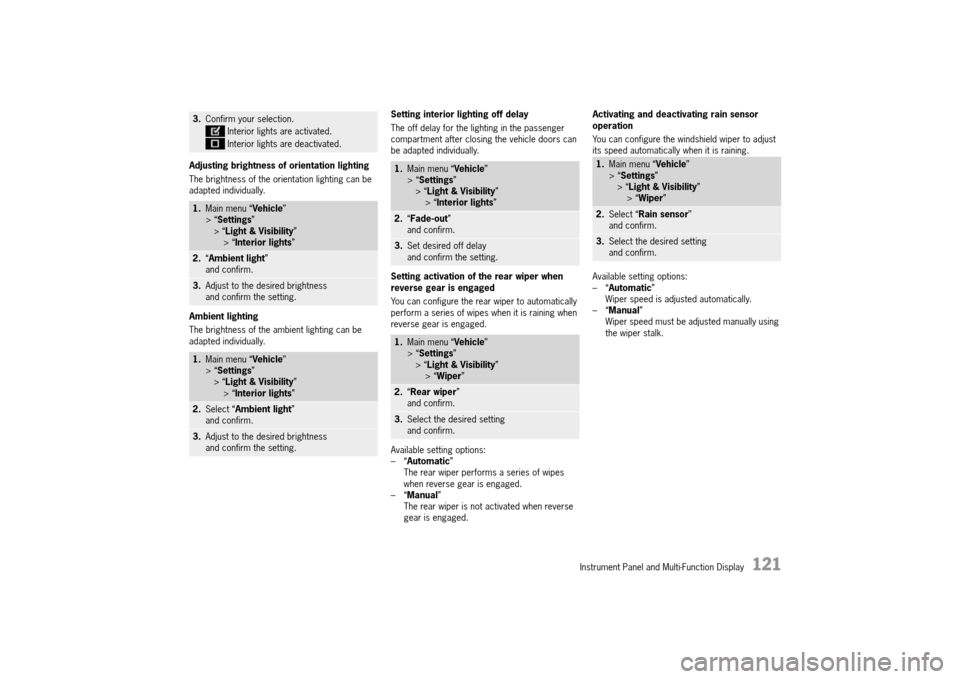
Adjusting brightness of orientation lighting
The brightness of the orientation lighting can be adapted individually.
Ambient lighting
The brightness of the ambient lighting can be adapted individually.
Setting interior lighting off delay
The off delay for the lighting in the passenger compartment after closing the vehicle doors can be adapted individually.
Setting activation of the rear wiper when reverse gear is engaged
You can configure the rear wiper to automatically perform a series of wipes when it is raining when reverse gear is engaged.
Available setting options: –“ Automatic” The rear wiper performs a series of wipes when reverse gear is engaged.–“ Manual” The rear wiper is not activated when reverse gear is engaged.
Activating and deactivating rain sensor operation
You can configure the windshield wiper to adjust its speed automatically when it is raining.
Available setting options: –“ Automatic” Wiper speed is adjusted automatically.–“ Manual” Wiper speed must be adjusted manually using the wiper stalk.
3. Confirm your selection.
Interior lights are activated.
Interior lights are deactivated.
1. Main menu “Vehicle” > “ Settings” > “ Light & Visibility” > “ Interior lights”
2.“Ambient light” and confirm.
3. Adjust to the desired brightness and confirm the setting.
1. Main menu “Vehicle” > “ Settings” > “ Light & Visibility” > “ Interior lights”
2.Select “Ambient light” and confirm.
3. Adjust to the desired brightness and confirm the setting.
1. Main menu “Vehicle” > “ Settings” > “ Light & Visibility” > “ Interior lights”
2.“Fade-out” and confirm.
3. Set desired off delay and confirm the setting.
1. Main menu “Vehicle” > “ Settings” > “ Light & Visibility” > “ Wiper”
2.“Rear wiper” and confirm.
3. Select the desired setting and confirm.
1. Main menu “Vehicle” > “ Settings” > “ Light & Visibility” > “ Wiper”
2.Select “Rain sensor” and confirm.
3. Select the desired setting and confirm.
14_991_Turbo_21.book Seite 121 Mittwoch, 9. April 2014 2:19 14
Page 218 of 300
216 Alarm System and Theft Protection
Alarm System and Passenger
Compartment Monitoring
FCC Numbers :
This device complies with Part 15 of the FCC Rules and RSS-210 of Industry Canada.
Operation of this device is subject to the following two conditions:1. This device may not cause harmful interference, and 2. this device must accept any interference received including interference that may cause undesired operation.
Changes or modifications not expressly approved by the party responsible for compliance could void the user's authority to operate the equipment.
Information
The manufacturer is not responsible for any radio or TV interference caused by unauthorized modifications to this equipment. Such modification could void the user's authority to operate the equipment.
The alarm system monitors the following alarm contacts:– Alarm contacts in doors, luggage compartment lid, engine compartment lid and headlights.– Interior surveillance: Movement in the interior when the vehicle is locked, e.g. attempted theft after breaking a window.– Inclination sensor country-specific equipment: inclination of the vehicle (e.g. when attempting to tow).
If one of these alarm contacts is interrupted, the alarm horn sounds for approx. 30 seconds and the emergency flasher flashes.After 5 seconds of interruption, the alarm is triggered again. This cycle is repeated up to ten times.
Switching on
fThe alarm system is activated when the vehicle is locked.
Switching off
fThe alarm system is deactivated when the vehicle is unlocked.
Information
fIf you unlock the vehicle with the emergency key in the door lock, you must switch the ignition on (ignition lock position 1) within 10 seconds of opening the door in order to prevent the alarm system from being triggered.
Information
If button on the car key is pressed and a door or the luggage compartment lid is not opened, the vehicle is locked again automatically after 30 seconds.
Switching off the alarm system if it is triggered
fUnlock vehicle or switch on ignition.
Switching off interior surveillance and inclination sensor
If people or animals are remaining in the locked vehicle or the vehicle is being transported on, e.g. a train or ship, the interior surveillance system and inclination sensor must be switched off temporarily.fInform any persons remaining in the vehicle that the alarm system will be triggered if the door is opened.
Using the car key
fQuickly press button on the car key twice within 2 seconds.The emergency flasher flashes slowly once.The doors are locked, but can be opened from inside.
USA: KR55WK50138
Canada: 7812D-5WK50138
14_991_Turbo_21.book Seite 216 Mittwoch, 9. April 2014 2:19 14
Page 219 of 300
Alarm System and Theft Protection 217
On vehicles with Porsche Entry & Drive
fQuickly press button A in the door handle twice within 2 seconds. The emergency flasher flashes slowly once.The doors are locked, but can be opened from inside.
Information
The interior surveillance system and inclination sensor remain switched off if:– The interior surveillance system and inclination sensor were switched off when you last locked the vehicleandIf button A was pressed and a door or the luggage compartment lid was not opened.
Function indication
On vehicles without Porsche Entry & Drive, the locking condition of the vehicle is indicated by the indicator lights in the central locking button flashing at different frequencies.The indicator lights go out when the vehicle is unlocked.
On vehicles with Porsche Entry & Drive, the locking condition of the vehicle is indicated by the indicator lights in the doors flashing at different frequencies.
Alarm system is activated
– The indicator lights flash quickly twice when the vehicle is being locked, then flash normally.
Alarm system is activated, interior surveillance and inclination sensor are switched off
– The indicator lights flash quickly while you are locking the vehicle, go out for 10 seconds and then flash normally.
Faults in the central locking system and alarm system
The indicator lights come on for 10 seconds, flash at double speed for 20 seconds and then flash normally.
Avoiding false alarms
fIf people or animals are remaining in the locked vehicle or the vehicle is being transported on a train or ship, for example, the interior surveillance system and inclination sensor must be switched off temporarily.fAlways close the sunroof and all door windows.
Immobilizer
There is a transponder (an electronic component), containing a stored code, in each key. Before the ignition is switched on, the ignition lock checks the code.
The immobilizer can be deactivated and the engine started using an authorized ignition key only.
Theft Protection
When leaving the vehicle, always:fClose the windows.fClose the sunroof.fClose the Convertible top (Cabriolet).fActivate the electric parking brake.fRemove the ignition key (or switch ignition off on vehicles with Porsche Entry & Drive).fClose the glove box.fClose all storage compartments.fRemove valuables, vehicle registration documents, telephone and house keys from the vehicle.fClose the luggage compartment lid.fClose the engine compartment lid.fLock the doors.
14_991_Turbo_21.book Seite 217 Mittwoch, 9. April 2014 2:19 14
Page 237 of 300
Maintenance and Car Care 235
Repairing the underbody protection
The underside of your car is durably protected against chemical and mechanical influences.
As it is not possible to exclude the risk of damage to this protective coating in day to day driving, it is advisable to have the underside of the car inspected at certain intervals - preferably before the start of winter and again in spring - and the undercoating restored as necessary.
Your authorized Porsche dealer is familiar with the bodyseal treatment procedures and has the necessary equipment for applying factory approved materials. We recommend that you entrust them with such work and inspections.
Unlike conventional spray oils, undercoating and rust-proofing compounds based on bitumen or wax do not attack the sound-proofing materials applied at the factory.
The exhaust system becomes very hot when the engine is running. Flammable material close to the exhaust system could ignite. Additional undercoating or rust protection agents on or near the exhaust system can become too hot when driving and ignite.fDo not apply additional undercoating or rust-proofing on or near the exhaust manifold, exhaust pipes, catalytic converters or heat shields. During driving the substance used for undercoating could overheat and ignite.
fBefore applying fresh underseal, carefully remove deposits or dirt and grease. Once it has dried, the new undercoating compound forms a tough protective coating which provides efficient rust-proofing of the floor panels and components.
fAlways apply a fresh coating of suitable preservative to unprotect areas after cleaning the underside of the body, the transmission, the engine or carrying out repairs to under-body, engine or transmission components.
Effective rust-proofing is particularly important during the cold weather season. If your car is driven frequently in areas where salt has been spread on the roads, the whole engine compartment should be cleaned thoroughly after the winter to prevent salt from causing any lasting damage. A full under-body wash should also be performed at the same time.
Cleaning headlights, lights, interior and exterior plastic components, adhesive foils, reversing camera and radar sensor for adaptive cruise control
Observe the following points: fUse only clean water and a little dishwashing liquid or interior window cleaner to clean headlights, lights, plastic components and surfaces.Use a soft sponge or a soft, lint-free cloth.fDo not spray water or interior window cleaner directly onto the plastic components in the passenger compartment, but first onto a sponge or cloth. Cleaning agents may, for example, enter controls or switches and cause damage.
Information
An interior window cleaner can also be used to clean plastic surfaces (always read the cleaning instructions on the container).We recommend Porsche interior window cleaner.fGently wipe the surface without applying too much pressure.fDo not clean when dry.
fNever use other chemical cleaners or solvents.fRinse cleaned surfaces with clear water.
Alloy wheels
Metal particles (e.g. brass or copper in brake dust) must not remain too long on alloy wheels.Contact corrosion can cause pitting.
Information
Cleaners with an oxide-removing effect or wrong pH value, as are commonly used for other metals, as well as mechanical tools and products, will damage the oxide layer and are therefore unsuitable.fUse only cleaners for alloy wheels (pH value 9.5). Products with the wrong pH value can destroy the protective layer on the wheels . We recommend Porsche cleaner for alloy rims.fIf possible, wash the wheels every two weeks with a sponge or washing brush. If the wheels are exposed to road salt, grit or industrial dust, weekly cleaning is necessary.fEvery three months, after cleaning, grease the wheels with car wax or an acid-free grease (e.g. Vaseline).Rub the grease in well with a soft cloth.fPlease see the chapter “CLEANING IN CAR WASHES” on page 233.
Exhaust System Fire Risk
WARNINGh
14_991_Turbo_21.book Seite 235 Mittwoch, 9. April 2014 2:19 14
Page 270 of 300
268 Minor Repairs
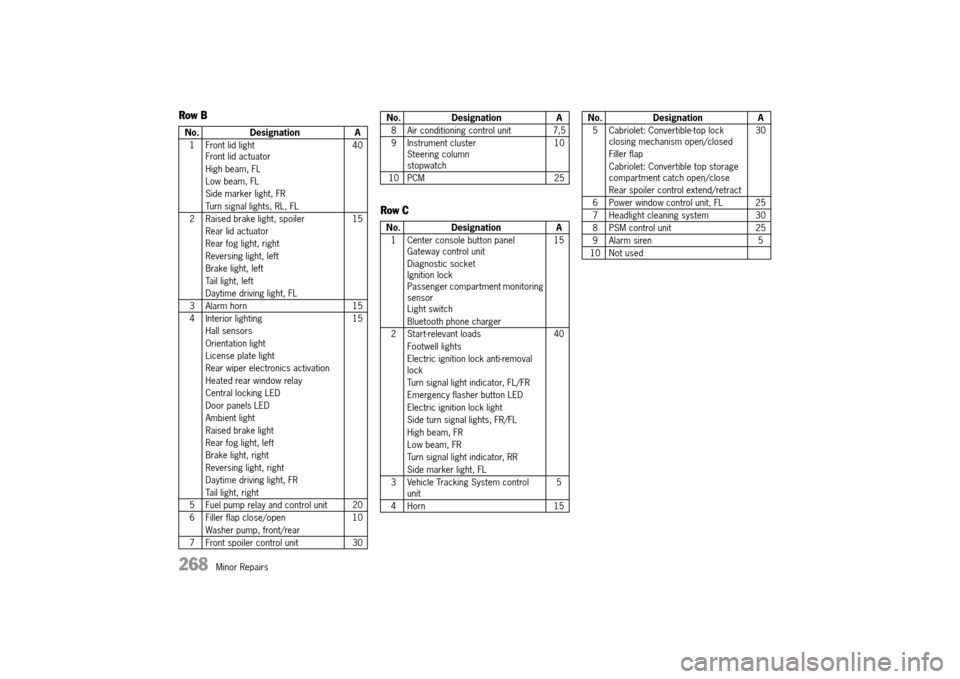
Row B
Row C
No. Designation A
1 Front lid light Front lid actuator
High beam, FL
Low beam, FL
Side marker light, FR
Turn signal lights, RL, FL
40
2 Raised brake light, spoiler
Rear lid actuator
Rear fog light, right
Reversing light, left
Brake light, left
Tail light, left
Daytime driving light, FL
15
3 Alarm horn 15
4 Interior lighting
Hall sensors
Orientation light
License plate light
Rear wiper electronics activation
Heated rear window relay
Central locking LED
Door panels LED
Ambient light
Raised brake light
Rear fog light, left
Brake light, right
Reversing light, right
Daytime driving light, FR
Tail light, right
15
5 Fuel pump relay and control unit 20
6 Filler flap close/open
Washer pump, front/rear
10
7 Front spoiler control unit 30
8 Air conditioning control unit 7,5
9 Instrument cluster Steering columnstopwatch
10
10 PCM 25
No. Designation A
1 Center console button panel Gateway control unit
Diagnostic socket Ignition lock Passenger compartment monitoring sensorLight switch
Bluetooth phone charger
15
2 Start-relevant loads
Footwell lights
Electric ignition lock anti-removal lock
Turn signal light indicator, FL/FR
Emergency flasher button LED
Electric ignition lock light
Side turn signal lights, FR/FL
High beam, FR
Low beam, FR
Turn signal light indicator, RR
Side marker light, FL
40
3 Vehicle Tracking System control unit 5
4 Horn 15
No. Designation A
5 Cabriolet: Convertible-top lock closing mechanism open/closed
Filler flap
Cabriolet: Convertible top storage compartment catch open/close
Rear spoiler control extend/retract
30
6 Power window control unit, FL 25
7 Headlight cleaning system 30
8 PSM control unit 25
9 Alarm siren 5
10 Not used
No. Designation A
14_991_Turbo_21.book Seite 268 Mittwoch, 9. April 2014 2:19 14
Page 278 of 300
276 Minor Repairs
Replacing bulbs
Replacing Light-Emitting Diodes and Long-Life Bulbs
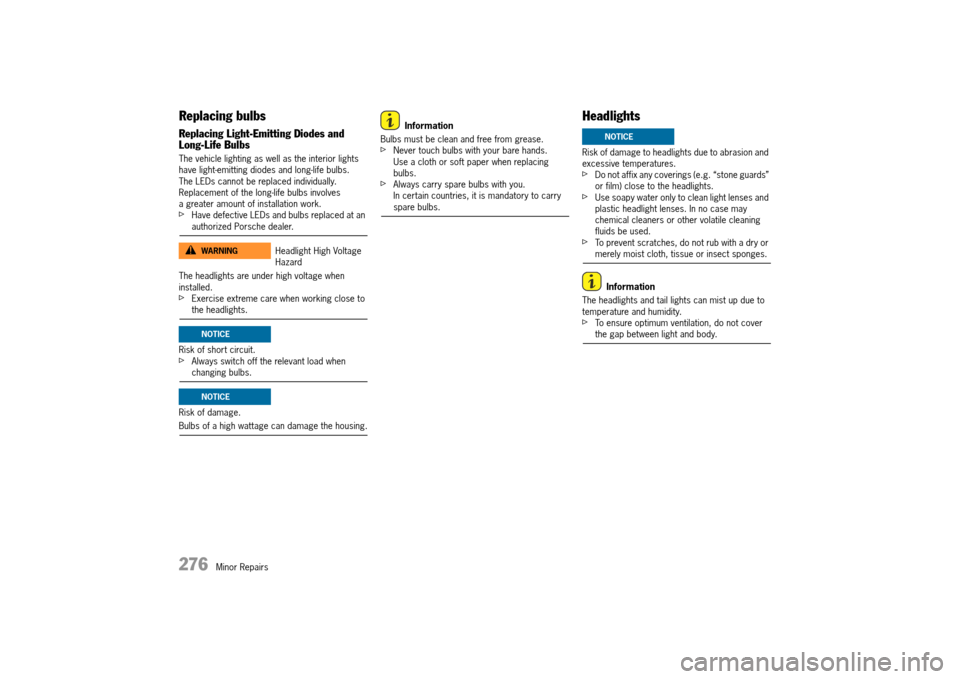
The vehicle lighting as well as the interior lights have light-emitting diodes and long-life bulbs.The LEDs cannot be replaced individually. Replacement of the long-life bulbs involves a greater amount of installation work.fHave defective LEDs and bulbs replaced at an authorized Porsche dealer.
The headlights are under high voltage when installed.fExercise extreme care when working close to the headlights.
Risk of short circuit.fAlways switch off the relevant load when changing bulbs.
Risk of damage.
Bulbs of a high wattage can damage the housing.
Information
Bulbs must be clean and free from grease.fNever touch bulbs with your bare hands. Use a cloth or soft paper when replacing bulbs.fAlways carry spare bulbs with you.In certain countries, it is mandatory to carry spare bulbs.
Headlights
Risk of damage to headlights due to abrasion and excessive temperatures.fDo not affix any coverings (e.g. “stone guards” or film) close to the headlights.fUse soapy water only to clean light lenses and plastic headlight lenses. In no case may chemical cleaners or other volatile cleaning fluids be used.fTo prevent scratches, do not rub with a dry or merely moist cloth, tissue or insect sponges.
Information
The headlights and tail lights can mist up due to temperature and humidity.fTo ensure optimum ventilation, do not cover the gap between light and body.
Headlight High Voltage Hazard
WARNINGh
NOTICE
NOTICE
NOTICE
14_991_Turbo_21.book Seite 276 Mittwoch, 9. April 2014 2:19 14