warning PORSCHE BOXSTER 2006 2.G Workshop Manual
[x] Cancel search | Manufacturer: PORSCHE, Model Year: 2006, Model line: BOXSTER, Model: PORSCHE BOXSTER 2006 2.GPages: 296, PDF Size: 4.12 MB
Page 87 of 296
Controls, Instruments
87
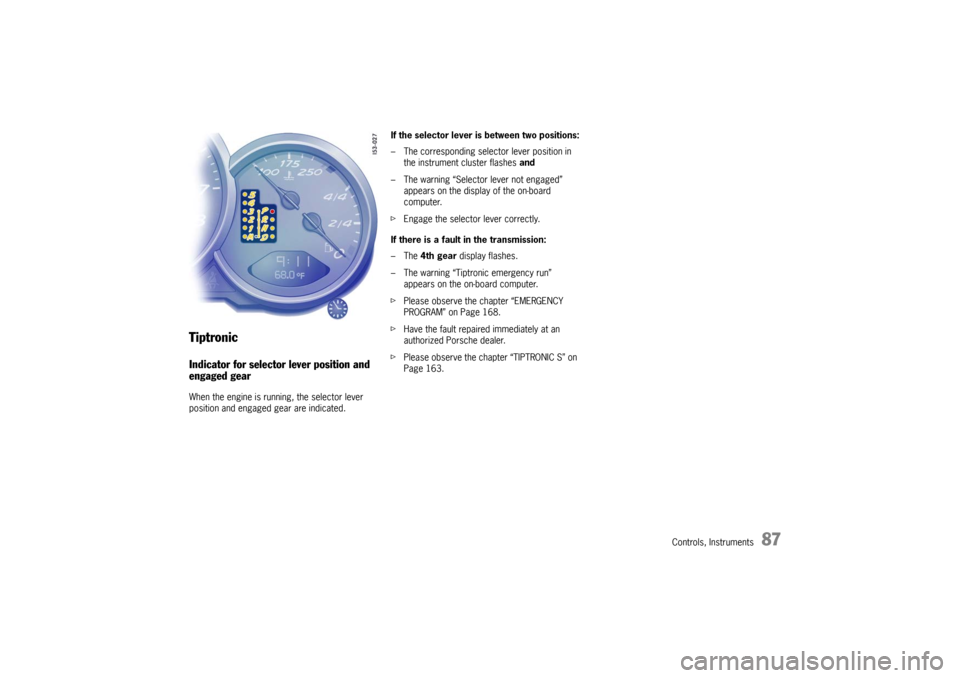
TiptronicIndicator for selector lever position and
engaged gearWhen the engine is running, the selector lever
position and engaged gear are indicated.If the selector lever is between two positions:
– The corresponding selector lever position in
the instrument cluster flashes and
– The warning “Selector lever not engaged”
appears on the display of the on-board
computer.
fEngage the selector lever correctly.
If there is a fault in the transmission:
–The 4th gear display flashes.
– The warning “Tiptronic emergency run”
appears on the on-board computer.
fPlease observe the chapter “EMERGENCY
PROGRAM” on Page 168.
fHave the fault repaired immediately at an
authorized Porsche dealer.
fPlease observe the chapter “TIPTRONIC S” on
Page 163.
Page 88 of 296
88
Controls, Instruments
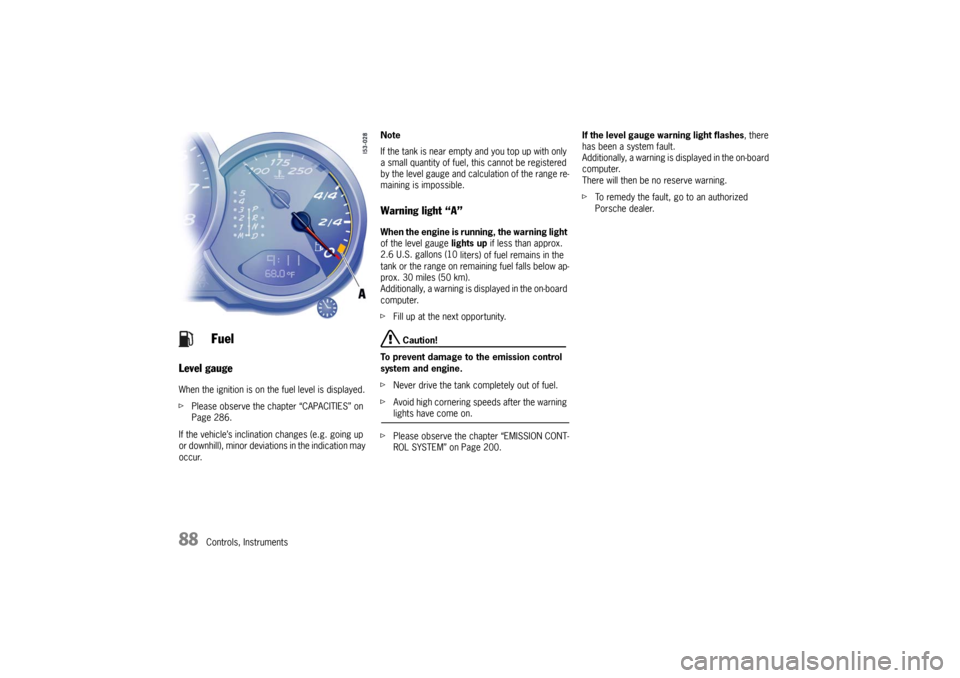
Level gauge
When the ignition is on the fuel level is displayed.
fPlease observe the chapter “CAPACITIES” on
Page 286.
If the vehicle’s inclination changes (e.g. going up
or downhill), minor deviations in the indication may
occur. Note
If the tank is near empty and you top up with only
a small quantity of fuel, this cannot be registered
by the level gauge and calculation of the range re-
maining is impossible.
Warning light “A” When the engine is running, the warning light
of the level gauge lights up if less than approx.
2.6 U.S. gallons (10
liters) of fuel remains in the
tank or the range on remaining fuel falls below ap-
prox. 30 miles (50 km).
Additionally, a warning is displayed in the on-board
computer.
fFill up at the next opportunity.
Caution!
To prevent damage to the emission control
system and engine.
fNever drive the tank completely out of fuel.
fAvoid high cornering speeds after the warning lights have come on.
fPlease observe the chapter “EMISSION CONT-
ROL SYSTEM” on Page 200.If the level gauge warning light flashes, there
has been a system fault.
Additionally, a warning is displayed in the on-board
computer.
There will then be no reserve warning.
fTo remedy the fault, go to an authorized
Porsche dealer.
Fuel
Page 89 of 296
Controls, Instruments
89
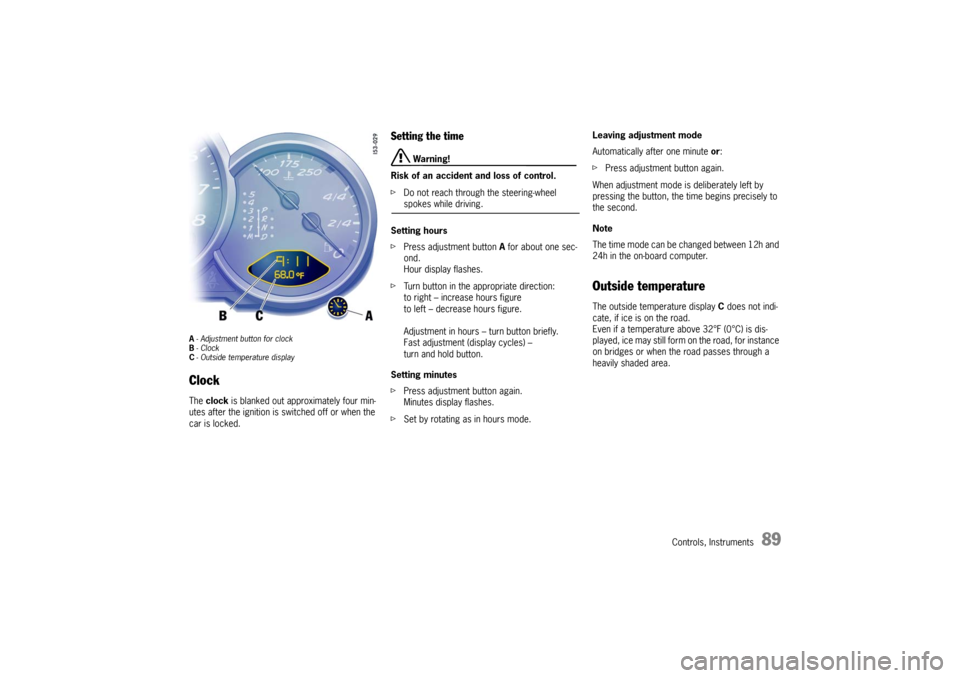
A- Adjustment button for clock
B- Clock
C- Outside temperature displayClock The clock is blanked out approximately four min-
utes after the ignition is switched off or when the
car is locked.
Setting the time
Warning!
Risk of an accident and loss of control.
fDo not reach through the steering-wheel spokes while driving.
Setting hours
fPress adjustment button A for about one sec-
ond.
Hour display flashes.
fTurn button in the appropriate direction:
to right – increase hours figure
to left – decrease hours figure.
Adjustment in hours – turn button briefly.
Fast adjustment (display cycles) –
turn and hold button.
Setting minutes
fPress adjustment button again.
Minutes display flashes.
fSet by rotating as in hours mode. Leaving adjustment mode
Automatically after one minute or:
fPress adjustment button again.
When adjustment mode is deliberately left by
pressing the button, the time begins precisely to
the second.
Note
The time mode can be changed between 12h and
24h in the on-board computer.
Outside temperature The outside temperature display C does not indi-
cate, if ice is on the road.
Even if a temperature above 32°F (0°C) is dis-
played, ice may still form on the road, for instance
on bridges or when the road passes through a
heavily shaded area.
Page 90 of 296

90
Controls, Instruments If the battery voltage drops abruptly, a warning
m e s s a g e w i l l b e d i s p l a y e d b y t h e o n - b o a rd c o m p u -
ter.
If the warning is displayed by the on-board
computer while the engine is running or while
driving:
fStop the car in a safe place and stop the
engine.
Possible causes
– Defect in the battery charging system.
– Broken drive belt. Warning!
Risk of an accident and risk of engine dam-
age.
A broken drive belt means there is no power
assistance to the steering (more effort is re-
quired to steer) and coolant pump function
will stop.
fDo not continue driving.
fHave the fault remedied at the nearest author-ized Porsche dealer. The warning light in the instrument panel comes
on when the ignition is first turned on and remains
on briefly as a bulb check. If the light does not
come on, have the bulb replaced promptly.
If the warning lights in the instrument panel and on-
board computer come on and remain on while
driving, it suggests:
– a potential engine control problem and the
need for system service or
– an improperly fastened tank cap or
– refuelling with engine running.
Although the vehicle is usually driveable and will
not require towing, see your dealer for service as
soon as possible.
Caution!
If the Check engine light in the instrument
panel is flashing, severe catalytic converter
damage and power loss will soon occur.
Prolonged driving with the Check engine light
on could cause damage to the emission con-
trol system. It also could affect fuel economy
and driveability.
fHave the fault remedied at the nearest author-ized Porsche dealer immediately.
Battery
Check Engine
Warning Light
Page 91 of 296

Controls, Instruments
91
The central warning light on the instrument panel
lights up if there are warning messages in the
INFO menu.
The messages can be called in the on-board
computer INFO menu:
fPlease observe the chapter “INFO WARNING
MESSAGES” on Page 96.
The warning light on the instrument panel lights
up:
– if the handbrake is on,
– if the brake fluid level is low,
– if the brake pads have reached the wear limit,
– if the brake circuit division is defective.
Additionally, a warning is displayed by the on-
board computer.
fPlease observe the chapter “WARNINGS ON
THE INSTRUMENT PANEL AND THE ON-
BOARD COMPUTER” on Page 116.
Central warning light
Brake warning light USA
Brake warning light Canada
Page 94 of 296
94
Controls, Instruments
LIMIT
Acoustic warning signal for speed limitThe acoustic warning signal can be activated for
speeds above 6 mph (10 km/h).
The signal sounds when the preset speed is ex-
ceeded.
For the signal to sound again, the driving speed
must fall below the preset speed by at least
3 mph (5 km/h).
Switching on selection field “D”
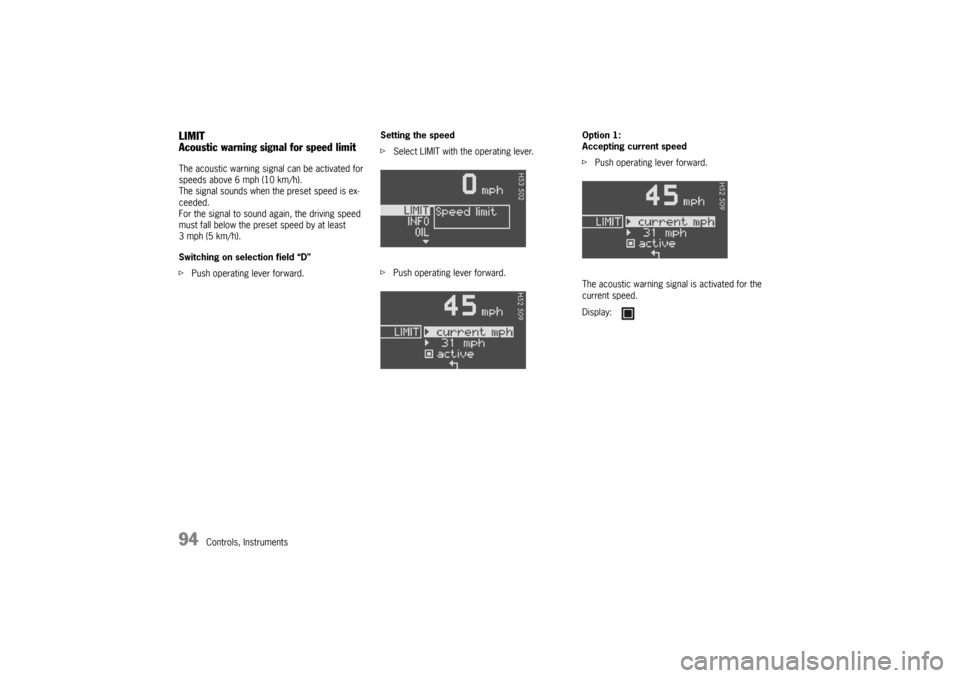
fPush operating lever forward.Setting the speed
fSelect LIMIT with the operating lever.
fPush operating lever forward.Option 1:
Accepting current speed
fPush operating lever forward.
The acoustic warning signal is activated for the
current speed.
Display:
Page 95 of 296
Controls, Instruments
95
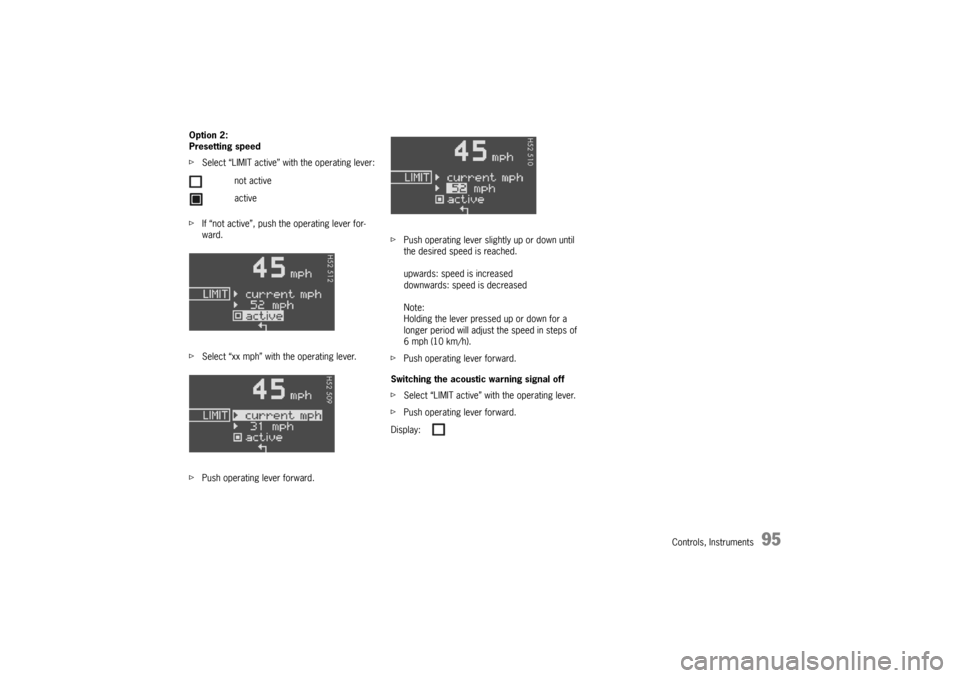
Option 2:
Presetting speed
fSelect “LIMIT active” with the operating lever:
fIf “not active”, push the operating lever for-
ward.
fSelect “xx mph” with the operating lever.
fPush operating lever forward.fPush operating lever slightly up or down until
the desired speed is reached.
upwards: speed is increased
downwards: speed is decreased
Note:
Holding the lever pressed up or down for a
longer period will adjust the speed in steps of
6 mph (10 km/h).
fPush operating lever forward.
Switching the acoustic warning signal off
fSelect “LIMIT active” with the operating lever.
fPush operating lever forward. not active
active
Display:
Page 96 of 296
96
Controls, Instruments
INFO
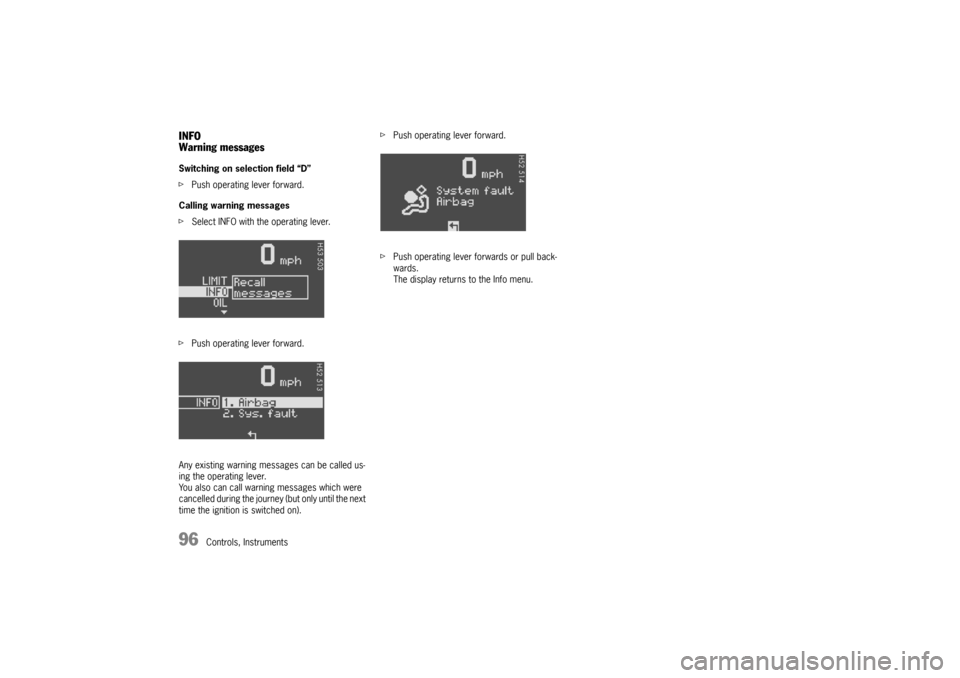
Warning messagesSwitching on selection field “D”
fPush operating lever forward.
Calling warning messages
fSelect INFO with the operating lever.
fPush operating lever forward.
Any existing warning messages can be called us-
ing the operating lever.
You also can call warning messages which were
cancelled during the journey (but only until the next
time the ignition is switched on).fPush operating lever forward.
fPush operating lever forwards or pull back-
wards.
The display returns to the Info menu.
Page 103 of 296

Controls, Instruments
103
TPC
Tire pressure monitoringfPlease observe the chapter “TIRES, RIMS,
TRACKS” on Page 282.
The tire pressure monitoring continuously
monitors tire pressure and tire temperature on all
four wheels and warns the driver when the tire
pressure is too low.
The display as well as the settings for the tire
pressure monitoring take place on the on-board
computer.
However, you must still adjust the tire pressure on
the wheel.
fThe driver is responsible for filling the tires
correctly and making the correct settings on
the on-board computer.
The tire pressure monitoring offers the following
functions:
– Display of the actual tire pressure while the
vehicle is in motion
– Display of the deviation from the required
pressure (refilling pressure)
– Display of currently set tire size and type
– Tire pressure warnings in two stages
Safety notes!
Despite the advantages offered by the tire
pressure monitoring, it is still the driver’s
responsibility to update the corresponding
settings in the on-board computer and
maintain the pressure in the tires. Low tire
pressure reduces the road safety of the
vehicle and destroys the tire and wheel.
fWhen a flat tire has been displayed, immedi-
ately stop in a suitable place and check the
tires for damage. If necessary, remedy the
damage with a tire sealant.
fDo not by any means continue to drive with
defective tires.
fSealing the tire with tire sealant is only an
emergency repair, so you can drive to the next
authorized Porsche dealer. The maximum per-
mitted speed is 50 mph (80 km/h).
fDo not drive with tires whose tire pressure
drops again in a short period of time. In cases
of doubt, have tires checked by an authorized
Porsche dealer.
fDefective tires must be immediately replaced
by an authorized Porsche dealer.
Tire repairs are not permissible under any
circumstances.fIf the tire pressure monitoring is defective (e.g.
defective wheel transmitter), contact an
authorized Porsche dealer immediately and
have the damage repaired.
The tire pressure will not be monitored by a
defective tire pressure monitoring.
fTires lose air over time without a tire defect
being present. A tire pressure warning will then
appear in the on-board computer display.
Correct the tire pressure at the next oppor-
tunity.
fThe tire pressure monitoring gives a warning
about tire damage due to natural pressure loss
as well as about a gradual loss of pressure due
to foreign objects.
The tire pressure monitoring cannot warn you
about tire damage that occurs suddenly (e.g.
flat tire due to abrupt external effects).
Page 107 of 296
Controls, Instruments
107
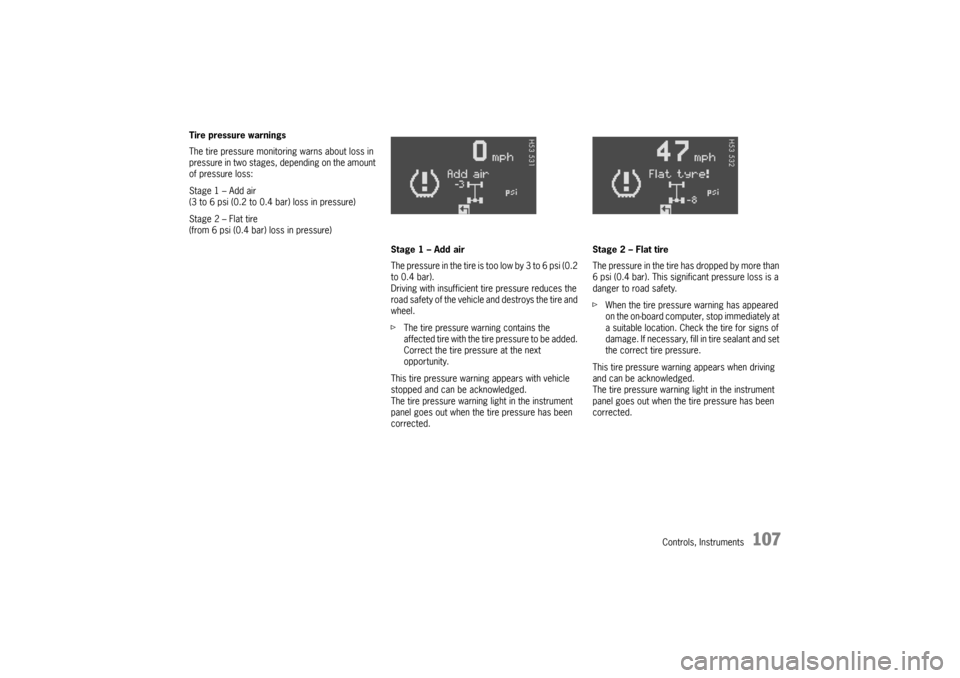
Tire pressure warnings
The tire pressure monitoring warns about loss in
pressure in two stages, depending on the amount
of pressure loss:
Stage 1 – Add air
(3 to 6 psi (0.2 to 0.4 bar) loss in pressure)
Stage 2 – Flat tire
(from 6 psi (0.4 bar) loss in pressure)
Stage 1 – Add air
The pressure in the tire is too low by 3 to 6 psi (0.2
to 0.4 bar).
Driving with insufficient tire pressure reduces the
road safety of the vehicle and destroys the tire and
wheel.
fThe tire pressure warning contains the
affected tire with the tire pressure to be added.
Correct the tire pressure at the next
opportunity.
This tire pressure warning appears with vehicle
stopped and can be acknowledged.
The tire pressure warning light in the instrument
panel goes out when the tire pressure has been
corrected.Stage 2 – Flat tire
The pressure in the tire has dropped by more than
6 psi (0.4 bar). This significant pressure loss is a
danger to road safety.
fWhen the tire pressure warning has appeared
on the on-board computer, stop immediately at
a suitable location. Check the tire for signs of
damage. If necessary, fill in tire sealant and set
the correct tire pressure.
This tire pressure warning appears when driving
and can be acknowledged.
The tire pressure warning light in the instrument
panel goes out when the tire pressure has been
corrected.