radio PORSCHE BOXSTER 2009 2.G User Guide
[x] Cancel search | Manufacturer: PORSCHE, Model Year: 2009, Model line: BOXSTER, Model: PORSCHE BOXSTER 2009 2.GPages: 294, PDF Size: 6.89 MB
Page 94 of 294
92
Operation, Safety
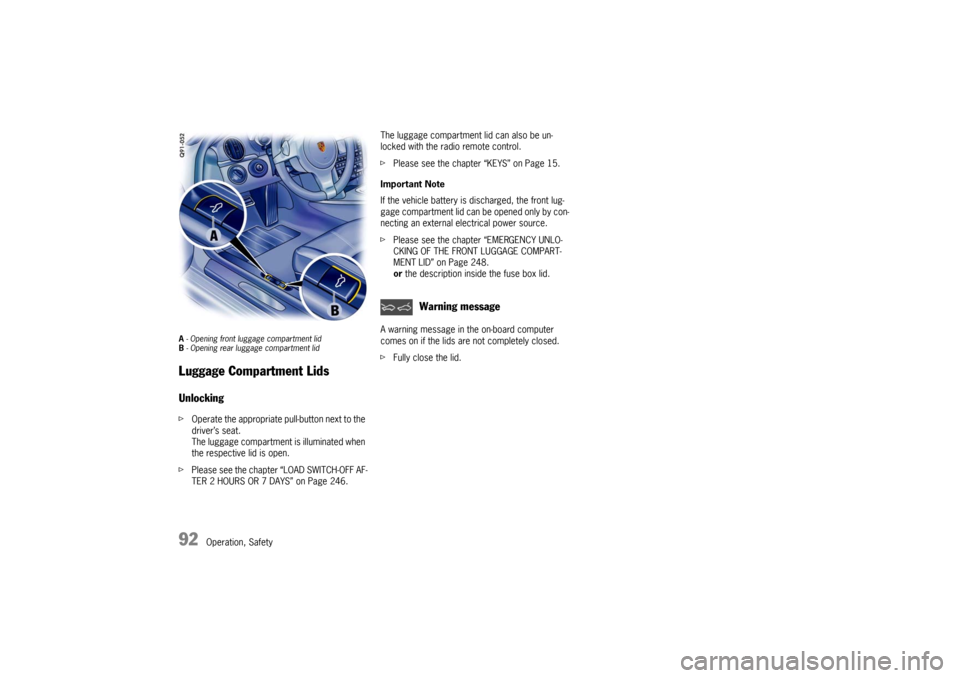
A - Opening front lugga ge compartment lid
B - Opening rear luggage compartment lid Luggage Compartment LidsUnlocking f Operate the appropriate pull-button next to the
driver’s seat.
The luggage compartment is illuminated when
the respective lid is open.
f Please see the chapter “LOAD SWITCH-OFF AF-
TER 2 HOURS OR 7 DAYS” on Page 246. The luggage compartment lid can also be un-
locked with the radio remote control.
f
Please see the chapter “KEYS” on Page 15.
Important Note
If the vehicle battery is discharged, the front lug-
gage compartment lid can be opened only by con-
necting an external electrical power source.
f Please see the chapter “EMERGENCY UNLO-
CKING OF THE FRONT LUGGAGE COMPART-
MENT LID” on Page 248.
or the description inside the fuse box lid.
A warning message in the on-board computer
comes on if the lids are not completely closed.
f Fully close the lid.
Warning message
Page 99 of 294

Operation, Safety
97
Porsche Communication
Management (PCM) fRefer to the separate operating instructions
before putting the PCM into operation.
f Please see the chapter “LOAD SWITCH-OFF
AFTER 2 HOURS OR 7 DAYS” on Page 246.
Warning!
There is a danger of accident if you set or
operate the on-board computer, radio, navi-
gation system, telephone or other equipment
when driving.
This could distract you from the traffic and
cause you to lose control of the vehicle re-
sulting in serious personal injury or death.
f Operate the components while driving only if
the traffic situation allows you to do so safely.
f Carry out any complicated operating or setting procedures only with the vehicle stationary.
The reception conditions for the radio module
integrated in the PCM ch ange continuously as you
drive. Interference from buildings, terrain and the
weather is unavoidable.
FM stereo reception is particularly susceptible to
varying reception conditions.
Electronic accessories should only be retrofitted
by your authorized Porsche dealer. Accessories which have not been tested and
approved by Porsche may impair radio function
and reception.
NavigationWhen put into operation for the first time, a
distance of approx. 30 miles (50 km) must be
driven in order for the navigation system to
complete the process of fine calibration.
The same applies when the tires are changed (e.g.
summer/snow tires) or new tires fitted.
Full location accuracy is not yet achieved during
the fine-calibration process.
If the vehicle has been transported (e.g. ferry, car
train), the system may take a few minutes to deter-
mine the current locati
on after it has been
switched on.
Serious tire slip (e.g. spinning wheels on snow)
may result in temporaril y inaccurate navigation.
When the battery has been disconnected, it may
take up to 15 minutes before the navigation
system is operational again.
Car Audio Operation/Tips For radio operation see your radio manual
which is included with your on-board litera-
ture.
f Please see the chapter “LOAD SWITCH-OFF AF-
TER 2 HOURS OR 7 DAYS” on Page 246.
FM reception
A vehicle is not an ideal pl ace to listen to a radio.
Because the vehicle moves, reception conditions
are constantly changing.
Buildings, terrain, signal distance and noise from
other vehicles are all working against good recep-
tion.
Some conditions affecting FM may appear to be
problems when they are not.
The following characteristics are completely nor-
mal for a given reception area, and they do not in-
dicate any problem with the radio itself.
Note
Electronic accessories shou ld only be installed by
your authorized Porsche dealer.
Equipment which has not been tested and ap-
proved by Porsche may impair radio reception.
Page 100 of 294

98
Operation, Safety
Fading and drifting
FM range is limited to
about 25 miles (40 km),
except for some high power stations.
If a vehicle is moving aw ay from the desired sta-
tion’s transmitter, the signal will tend to fade and/
or drift. This condition is more prevalent with FM
than AM, and is often ac companied by distortion.
Fading and drifting can be minimized to a certain
degree by careful attention to fine tuning or selec-
tion of a stronger signal.
Static and fluttering
When the line-of-sight link between a transmitter
and vehicle is blocked by large buildings or moun-
tains, the radio sound may be accompanied with
static or fluttering because of the characteristic of
FM.
In a similar effect, a fluttering noise is sometimes
heard when driving along a tree-lined road.
This static and fluttering can be reduced by adjust-
ing the tone control for greater bass response un-
til the disturbance has passed.
Multipath
Because of the reflecting characteristics of FM,
direct and reflected signals may reach the antenna
at the same time (multipath) and cancel each other
out.
As a vehicle moves through these electronic dead
spots, the listener may hear a momentary flutter
or loss of reception. Station swapping
When two FM stations are close to each other, and
an electronic dead spot, such as static or multi-
path area, interrupts the original signal, some-
times the stronger second signal will be selected
automatically until the original one returns.
This swapping can also occur as you drive away
from the selected station and approach another
station of a stronger signal.
Compact disc player
Caution!
To avoid damage to compact disc player and
discs.
f Use only compact discs labeled as shown, hav-
ing no dirt, damage or warpage.
f Never attempt to disassemble or oil any part
of the player unit.
Do not insert any object other than a disc into
the slot.
Remember there are no user-serviceable parts
inside the compact disc player.
f Do not allow the disc to sustain any finger-
prints, scrapes or stickers on the surfaces.
This may cause poor sound quality.
Hold the disc only on the edge or center hole. f
When not in use, take th e disc out of the player,
put the disc back into its case and store it
away from dust, heat, damp and direct
sunlight.
Leaving the disc on the dashboard in the sun
can damage the disc.
f If the disc gets dirty, clean the disc by wiping
the surfaces from the center to the outside in
a radial direction with a soft cloth.
Do not use a conventional record cleaner or
anti-static record preservative.
Disc cleaners are available in audio stores.
Page 101 of 294

Operation, Safety
99
Car Telephone and
Aftermarket Alarms Important legal and safety information
regarding the use of cellular telephones
Some states may prohibit the use of cellular tele-
phones while driving a vehicle. Check the laws and
regulations on the use of cellular telephones in the
areas where you drive.
Danger!
Risk of an accident.
Severe personal injury or death can result in
the event of an accident.
Looking away from the road or turning your
attention away from your driving can cause
an accident and seri ous or fatal injury.
When using your cellular telephone, you should al-
ways:
f Give full attention to your driving - pull off the
road and park before making or answering a
call if traffic conditions so require; and
f Keep both hands on the steering wheel - use
hands-free operation (if available) - pull off the
road and park before using a hand-held tele-phone. It is essential to observe the telephone
manufacturer's instructions before operating
the telephone.
Any portable telephone or radio transmitter which
is used in a Porsche must
be properly installed in
accordance with the technical requirements of
Porsche.
The transmission power must not exceed
10 W.
The devices must possess a type approval for
your vehicle and have an “e” symbol.
If you should require equipment with transmission
power values greater than 10 W, please consult
your authorized Porsche dealer for this purpose.
The dealer is familiar with the technical require-
ments for installing devices of this kind.
The antennas for all radios and telephones with a
transmitting antenna must be externally mounted.
The improper installation of radios or telephones
or use of a radio or tele phone with a transmitting
antenna inside the car may cause the warning
lights to come on.
Improper installation of such equipment can cre-
ate a discharged battery or excessive current
draw from added equipment. If aftermarket systems are
installed by non-dealer-
ship technicians or outside the selling dealer,
problems may result. Installation of aftermarket
equipment is not covered under the New Car War-
ranty.
f Consult your authorized Porsche dealer about
the installation of non Porsche approved equip-
ment.
Reception quality
The reception quality of your car telephone will
change constantly when you are driving. Interfer-
ence caused by buildings, landscape and weather
is unavoidable. It may become particularly difficult
to hear when using the hands-free function due to
external noise such as engine and wind noise.
Automatic car-wash
f Unscrew external antennas before using an au-
tomatic car-wash.
Page 133 of 294
Instruments, On-Board Computer, Warnings
131
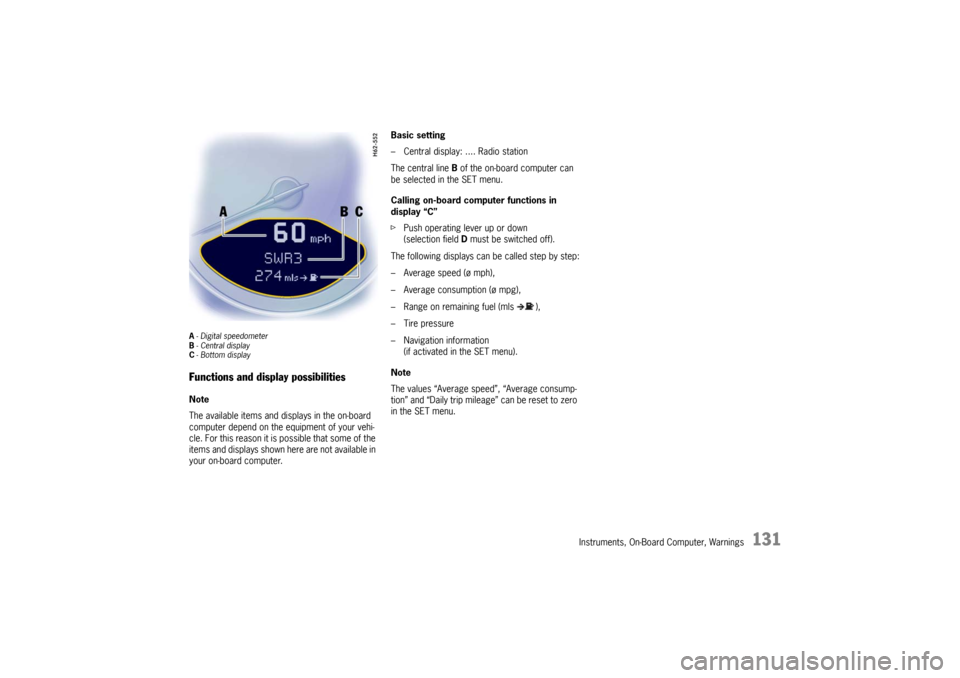
A- Digital speedometer
B -Central display
C - Bottom displayFunctions and display possibilitiesNote
The available items and displays in the on-board
computer depend on the equipment of your vehi-
cle. For this reason it is possible that some of the
items and displays shown here are not available in
your on-board computer. Basic setting
– Central display: .... Radio station
The central line
B of the on-board computer can
be selected in the SET menu.
Calling on-board computer functions in
display “C”
f Push operating lever up or down
(selection field D must be switched off).
The following displays can be called step by step:
– Average speed (ø mph),
– Average consumption (ø mpg),
– Range on remaining fuel (mls ),
– Tire pressure
– Navigation information (if activated in the SET menu).
Note
The values “Average speed”, “Average consump-
tion” and “Daily trip mileag e” can be reset to zero
in the SET menu.
Page 148 of 294
146
Instruments, On-Board Computer, Warnings
f
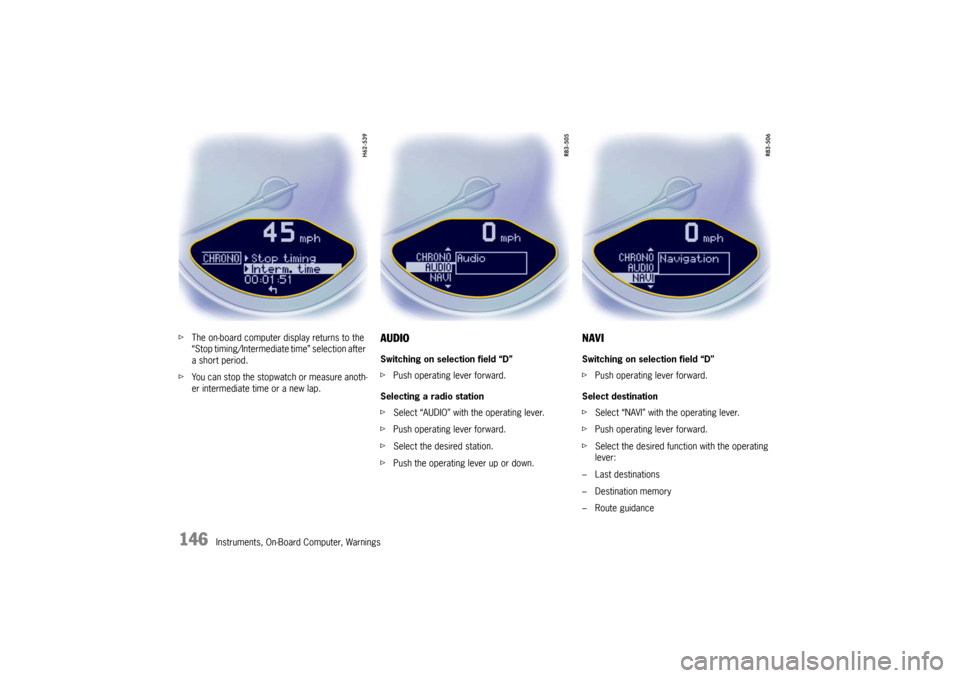
The on-board computer display returns to the
“Stop timing/Intermediate time” selection after
a short period.
f You can stop the stopwatch or measure anoth-
er intermediate time or a new lap.
AUDIOSwitching on selection field “D”
fPush operating lever forward.
Selecting a radio station
f Select “AUDIO” with the operating lever.
f Push operating lever forward.
f Select the desired station.
f Push the operating lever up or down.
NAVISwitching on selection field “D”
fPush operating lever forward.
Select destination
f Select “NAVI” with the operating lever.
f Push operating lever forward.
f Select the desired function with the operating
lever:
– Last destinations
– Destination memory
–Route guidance
Page 156 of 294

154
Instruments, On-Board Computer, Warnings
System learningThe Tire Pressure Monitoring begins to “learn” the
wheels after a wheel change, wheel transmitter
replacement or update of the tire settings. During
this process, the Tire Pressure Monitoring recog-
nizes the tires and their locations.
The on-board computer displayes the message
“TPM is learning, monitoring not act.”.The Tire Pressure Monitoring requires a certain
amount of time to learn the wheels. During this
time, the current tire pressures are not available
on the on-board-computer:
– The tire pressure warning light remains lit until
all wheels have been learned.
– The display of the tire pressure function of the on-board computer shows lines.
– The required pressures for cold tires at 68 °F (20 °C) are indicated in the Info pressure
display in the tire pressure menu.
Position and pressure information is displayed as
soon as the Tire Pressure Monitoring has as-
signed the wheels identified as belonging to the
vehicle to the correct wheel positions.
The wheel learning process takes place
exclusively when the vehicle is being driven
(vehicle speed above 25 km/h (16 mph)).
f Check the tire pressure for all wheels on the
“Info pressure” display.
f Correct the tire pressure to the required
pressure if necessary.
Changing a wheel and replacing tiresfNew wheels must be fitt ed with radio transmit-
ters for the Tire Pressure Monitoring.
Before tires are changed, the battery charge
state of the wheel transmitters should be
checked at an authorized Porsche dealer.
f Switch the ignition off when changing a wheel.
The tire settings on the on-board computer must
be updated after changing a wheel.
If the tire settings are not updated, the message
“Wheel change? Input new TPM settings!” is
displayed on the on-board computer.
f Update the on-board computer settings when
the vehicle is stationary the next time.
Page 157 of 294

Instruments, On-Board Computer, Warnings
155
Warning!
Your vehicle has also be en equipped with a TPM
malfunction indicator to indicate when the system
is not operating properly.
The TPM malfunction indicator is combined with
the low tire pressure telltale.
When the system detects a malfunction, the tellta-
le will flash for approximately one minute and then
remain continuously illuminated. This sequence
will continue upon subsequent vehicle start-ups as
long as the malfunction exists.
When the malfunction indi cator is illuminated, the
system may not be able to detect or signal low tire
pressure as intended.
TPM malfuntions may occur for a variety of
reasons, including the installation of replacement
or alternate tires or wheels on the vehicle that
prevent the TPM from functioning properly.
Always check the TPM malfunction telltale after
replacing one or more tires or wheels on your
vehicle to ensure that the replacement or alter-
nate tires and wheels allow the TPM to continue to
function properly.
The warning light in the speedometer lights up:
– When a loss in pressure has been detected.
– When learning newly mounted wheels/wheel sensors, as long as the vehicle’s own wheels
have not yet been recognized. In the event of a defect in Tire Pressure Monitoring
or a temporary fault, the warning light in the
speedometer flashes for approx. one minute and
then remains continuously illuminated.
The tire pressure warning light in the instrument
panel goes out only when
the cause of the fault
has been rectified.
Partial monitoringMonitoring of the other wheels is continued if there
is a fault in one or two wheel transmitters.
– The tire pressure warning light lights up.
– The message “TPM partial monitoring” is displayed on the on-board computer.
– No tire pressures are displayed on the on- board computer for wheels with faulty wheel
transmitters.
No monitoringIn the event of faults the Tire Pressure Monitoring
cannot monitor the tire pressure.
The warning light in the speedometer flashes for
approx. one minute and then remains continuously
illuminated and a corresponding message
appears on the on-board computer.
Monitoring is not active when:
– the Tire Pressure Monitoring is faulty,
– wheel transmitters for the Tire Pressure Monitoring are missing,
– during the learning phase after the tire settings have been updated,
– after a wheel change without updating the tire settings,
– more than four wheel transmitters are detected,
– there is external interference by other radio sources, e.g. wireless headphones,
– tire temperatures are too high.
f Please see the chapter “WARNINGS ON THE
INSTRUMENT PANEL AND THE ON-BOARD
COMPUTER” on Page 162.
Warning light
Page 161 of 294
Instruments, On-Board Computer, Warnings
159
SET
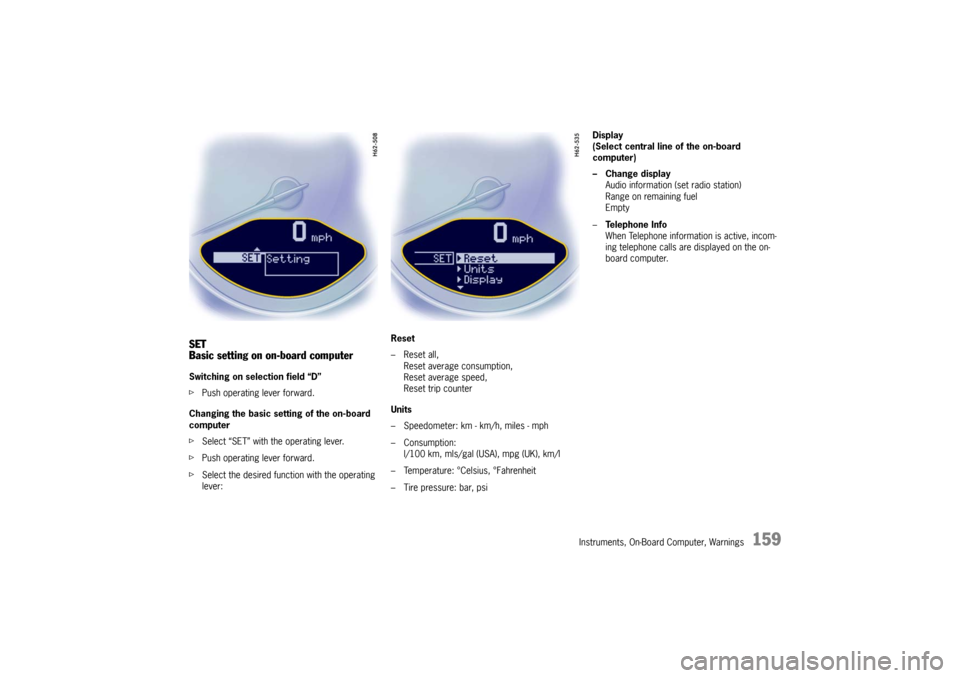
Basic setting on on-board computerSwitching on selection field “D”
fPush operating lever forward.
Changing the basic sett ing of the on-board
computer
f Select “SET” with the operating lever.
f Push operating lever forward.
f Select the desired function with the operating
lever: Reset
– Reset all,
Reset average consumption,
Reset average speed,
Reset trip counter
Units
– Speedometer: km - km/h, miles - mph
– Consumption: l/100 km, mls/gal (USA), mpg (UK), km/l
– Temperature: °Celsius, °Fahrenheit
– Tire pressure: bar, psi Display
(Select central line of the on-board
computer)
– Change display
Audio information (set radio station)
Range on remaining fuel
Empty
– Te l e p h o n e I n f o
When Telephone informat ion is active, incom-
ing telephone calls are displayed on the on-
board computer.
Page 248 of 294

246
Practical Tips, Emergency Service
Alarm system, central lockingThe status of the central locking and alarm system
is not changed by disconnecting the battery.
When the battery is di sconnected, the alarm
system ceases to function.Central locking overload protectionIf the central locking sy stem is operated more
than ten times within a minut e, further operation is
blocked for 30 seconds.
Load switch-off after 2 hours or 7 daysIf the ignition key is removed, loads which are
switched on or are in standby mode (such as the
luggage compartment light and interior light) are
automatically switched off after approx. 2hours.
The Radio/PCM is automatically switched off after
approx. 10 minutes.
If the vehicle is not started or unlocked with the
remote control within 7days , the remote control
standby function is switched off (to save the
vehicle battery).
1. In this case, unlock the driver’s door with the key at the door lock.
Leave the door closed in order to prevent the
alarm system from being triggered.
2. Press button 1 on the remote control.
The remote control is now activated again.