change time PORSCHE CAYMAN 2006 1.G User Guide
[x] Cancel search | Manufacturer: PORSCHE, Model Year: 2006, Model line: CAYMAN, Model: PORSCHE CAYMAN 2006 1.GPages: 280, PDF Size: 4.89 MB
Page 123 of 280

Controls, Instruments
123
Welcome Home LightingSwitching onfMove light switch to the HOME position.
For improved visibility and security when you get
in and out of the car, the fog lights and the tail
lights remain on for a certain period of time:
–When you get out of the car, the lights are
turned on for approx. 30 seconds after the
door is opened. The off-delay time resumes
when the vehicle is locked.
On vehicles with the Sport Chrono Plus
package, the PCM can be used to set the off-
delay time. This setting also changes the
lighting period for unlocking the vehicle.
Please observe the chapter “Individual
Memory” in the separate PCM operating
instructions.
The lights are turned on for approx. 30 seconds
when the vehicle is unlocked.
The lights go out if the ignition is switched on or
when leaving the Welcome Home lighting
If the ignition key is withdrawn and the door is ope-
ned while the lights (not the parking light left/right)
are on, a gong warns of possible battery dis-
charge.
In some countries, differences are possible
due to provisions of law.
Automatic Headlight Beam
Adjustment Vehicles with Litronic headlights feature auto-
matic headlight beam adjustment.
When the ignition is switched on, the level of the
headlight beam automatically changes in accord-
ance with the vehicle load.
The level of the headlight beam is automatically
kept constant during acceleration and braking.
Checking operation
1. Switch the low beam on.
2. Switch ignition on.
The light beam first dips all the way down and
is then adapted to the vehicle load.
The level of the low beam rises perceptibly
when the high beam is switched on.
If these test items are not met, the headlight beam
adjustment must be checked by an authorized
Porsche dealer.
Page 155 of 280

Controls, Instruments
155
Porsche Communication
Management (PCM) fRefer to the separate operating instructions
before putting the PCM into operation.
fPlease observe the chapter “LOAD SWITCH-
OFF AFTER 2 HOURS OR 7 DAYS” on Page
232.
Warning!
There is a danger of accident if you set or
operate the on-board computer, radio, navi-
gation system, telephone or other equipment
when driving.
This could distract you from the traffic and
cause you to lose control of the vehicle resul-
ting in serious personal injury or death.
fOperate the components while driving only if
the traffic situation allows you to do safely.
fCarry out any complicated operating or setting procedures only with the vehicle stationary.The reception conditions for the radio module inte-
grated in the PCM change continuously as you
drive. Interference from buildings, terrain and the
weather is unavoidable.
FM stereo reception is particularly susceptible to
varying reception conditions.
Accessories which have not been tested and
approved by Porsche may impair radio function
and reception.
NavigationWhen put into operation for the first time, a
distance of approx. 31 miles (50 km) must be dri-
ven in order for the navigation system to complete
the process of fine calibration.
The same applies when the tires are changed (e.g.
summer/snow tires) or new tires fitted.
Full location accuracy is not yet achieved during
the fine-calibration process.
If the vehicle has been transported (e.g. ferry, car
train), the system may take a few minutes after
being switched on before it determines the current
location.
Serious tire slip (e.g. spinning wheels on snow)
may result in temporarily inaccurate navigation.
When the battery has been disconnected, it may
take up to 15 minutes before the navigation
system becomes operational again.
Page 160 of 280

160
Controls, Instruments
Allocating signals to the buttonsfPlease follow the operating instructions for the
original hand-held transmitter.
Prior to programming the HomeLink for the
first time
The following process deletes the standard codes
set at the factory. Do not repeat the process if you
program further buttons.
fKeep the two outer buttons 1 and 3
depressed for approx. 20 seconds until light-
emitting diode A begins to flash quickly.
All programmed signals of buttons 1 to 3 are
deleted.HomeLink with fixed code system
1. Press the desired button until the light-emitting
diode begins to flash slowly.
You then have approx. 5 minutes to perform
steps 2 and 3.
2. Hold the original hand-held transmitter approx.
0 to 12 in. (0 to 30 cm) in front of the marked
position (figure) on the vehicle.
3. Press the transmit button on the original hand-
held transmitter until the fog lights flash three
times (up to approx. 45 seconds).
4. Repeat steps 1 to 3 to allocate other buttons.
Note
Several attempts with different distances between
the vehicle and the original hand-held transmitter
might be necessary.
The fog lights will flash once the 5 minutes have
been exceeded. Programming must be repeated
from the beginning.HomeLink with changeable code system
1. Allocate the required keys as for the systems
with fixed code (steps 1 to 3).
2. To synchronize the system:
Press the programming button on the receiver
for the garage door actuator.
Afterwards, you usually have approx.
30 seconds to initiate step 3.
3. Press the allocated HomeLink button twice.
(With some devices, the button to be allocated
must be pressed a third time in order to
complete the setting process.)
4. Repeat the programming steps to allocate
other buttons.
Note
fPlease consult an authorized Porsche dealer if
you have not been able to successfully allocate
signals for the garage door opener to the
buttons even though you have carefully
followed the instructions in this chapter and
the operating instructions for the original hand-
held transmitter.
Page 169 of 280
Shifting Gear
169
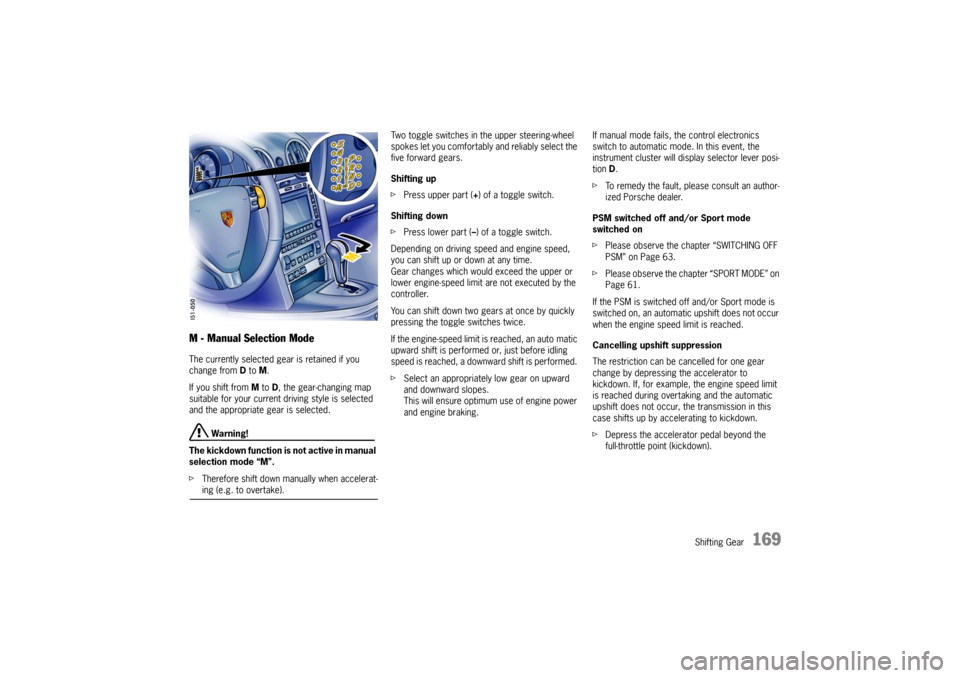
M - Manual Selection Mode The currently selected gear is retained if you
change from D to M.
If you shift from M to D, the gear-changing map
suitable for your current driving style is selected
and the appropriate gear is selected.
Warning!
The kickdown function is not active in manual
selection mode “M”.
fTherefore shift down manually when accelerat-ing (e.g. to overtake). Two toggle switches in the upper steering-wheel
spokes let you comfortably and reliably select the
five forward gears.
Shifting up
fPress upper part (+) of a toggle switch.
Shifting down
fPress lower part (–) of a toggle switch.
Depending on driving speed and engine speed,
you can shift up or down at any time.
Gear changes which would exceed the upper or
lower engine-speed limit are not executed by the
controller.
You can shift down two gears at once by quickly
pressing the toggle switches twice.
If the engine-speed limit is reached, an auto matic
upward shift is performed or, just before idling
speed is reached, a downward shift is performed.
fSelect an appropriately low gear on upward
and downward slopes.
This will ensure optimum use of engine power
and engine braking. If manual mode fails, the control electronics
switch to automatic mode. In this event, the
instrument cluster will display selector lever posi-
tion D.
fTo remedy the fault, please consult an author-
ized Porsche dealer.
PSM switched off and/or Sport mode
switched on
fPlease observe the chapter “SWITCHING OFF
PSM” on Page 63.
fPlease observe the chapter “SPORT MODE” on
Page 61.
If the PSM is switched off and/or Sport mode is
switched on, an automatic upshift does not occur
when the engine speed limit is reached.
Cancelling upshift suppression
The restriction can be cancelled for one gear
change by depressing the accelerator to
kickdown. If, for example, the engine speed limit
is reached during overtaking and the automatic
upshift does not occur, the transmission in this
case shifts up by accelerating to kickdown.
fDepress the accelerator pedal beyond the
full-throttle point (kickdown).
Page 183 of 280

Maintenance, Car Care
183
Changing the brake fluid Brake fluid absorbs moisture from the air over
time. This accumulation of water lowers the boil-
ing point and, under certain operating con ditions,
can affect braking performance.
Therefore have the brake fluid changed in accord-
ance with the change intervals stated in the bro-
chure “Maintenance”. The brake-fluid warning lights in the instrument
panel and on-board computer indicate:
– brake-fluid level too low,
– in conjunction with large pedal travel, braking-
circuit failure.
If the warning lights should light up while
driving:
fStop immediately in a suitable place.
fDo not continue driving.
Please have the fault remedied at your nearest
authorized Porsche dealer.
Warning light USA
Warning light Canada
Page 198 of 280

198
Maintenance, Car Care
Paint fNever rub a dusty car with a dry cloth since
dust particles are abrasive and could dull and
damage the surface finish.
The paintwork of your car is exposed to all types
of mechanical and chemical conditions, particular-
ly climatic ones such as bright sunlight, rain, frost
and snow. Ultraviolet light, rapid changes in tem-
perature, rain, snow, industrial dust and chemical
deposits constantly attack the paint which is only
able to withstand such exposure in the long term
if it is given regular care and attention.
fDo not apply silicone polishes to the windows.
fDo not treat matt-painted components with
preservatives or polishes as this will spoil the
matte effect. Preservation
The paint surface becomes dull over time due to
weathering. It is therefore necessary to preserve
the paint regularly.
This keeps the paint shiny and elastic. Dirt is
prevented from adhering to the paint surface and
industrial dust is prevented from penetrating the
paint.
Provided it is washed and treated with preserva-
tive regularly, the brand new finish of your vehicle
will be retained for years to come.
fSimply apply paint preservative after washing
the vehicle and polish it smooth.
Polishing
Do not resort to using Porsche polish until it be-
comes evident that the normal preservatives no
longer produce the desired finish.
Spots and stains
fRemove tar stains, grease, oil spots and dead
insects as soon as possible with Insect Remov-
er. They can cause discoloration if allowed to
remain on the paintwork.
fWash the affected area immediately after treat-
ing it. Minor paint damage
fHave minor paint damage, such as scratches,
scores or chips caused by flying stones, re-
paired immediately by your authorized
Porsche dealer before corrosion sets in.
However, if there are already traces of corrosion,
they must first be removed carefully and thorough-
ly. Coat the area with a rust-proofing primer and
finish off with a top coat. The paint code and color
number are found on the data bank in the Mainte-
nance booklet.
Page 215 of 280

Practical Tips, Emergency Service
215
Tire replacements If in doubt, contact your Porsche dealer.
Use only tire makes and types approved by
Porsche.
If you do not use a Porsche recommended
replacement tire, make sure that you
purchase your new tires from a reputable tire
dealer and that the dealer complies with all
manufacturers warnings for those tires.
Only tires with the same make and with the
same specification code (e.g. “N0”, “N1”...)
can be mounted.
Before mounting new tires, check with your
Porsche dealer about the current release
status.
Use tires with “ZR” quality standards. There
are currently no standards concerning tire
strength at speeds above 150 mph (240 km/h).
Tires should be replaced no less than on one axle
at the time.
Only tires of the same make and type must be
used. Mixed tires are not permissible.
Initially, new tires do not have their full traction.
You should therefore drive at moderate speeds
during the first 60 - 120 miles (100 - 200 km). If new tires are installed only on one axle, a notice-
able change in handling occurs due to the different
tread depth of the other tires.
This happens especially if only rear tires are re-
placed. However, this condition disappears as the
new tires are broken in.
fPlease adjust your driving style accordingly.
Installation of new tires should only be done by a
qualified tire technician.
Valves
Rubber valve stems must be replaced every time
a tire is replaced.
For metal valves, the installation and replacement
instructions must be observed.
fUse only genuine Porsche metal valves.
fProtect the valve inserts against soiling with
valve caps.
Soiled valve inserts can cause a gradual loss
of air.
fUse only plastic valve caps.
Parking at the curb
Warning!
Hard impacts against curbs (or traffic
islands) are dangerous and may cause hid-
den tire damage which is not noticeable until
later. Such damage can result in accidents at
high speeds causing severe personal injury.
Depending on the force of impact, the edge
of the rim can also be damaged.
fIf you are in doubt, have the wheel checked by
an expert, particularly if you suspect damage
on the inside.
fIf you must drive over a curb or other obstacle,
drive slowly and at an obtuse angle. Exercise care when parking along curbs.
Page 232 of 280

232
Practical Tips, Emergency Service
Electrical System In order to avoid damage and faults in electrical or
electronic systems, electrical accessories should
be installed at your authorized Porsche dealer.
fOnly use accessories authorized by Porsche.
Warning!
Risk of short circuit and fire.
Replacing fuses or relays with the engine
running or the ignition on could cause elec-
trical shock.
fDisconnect the battery during all work on the
electrical system.
Please observe the chapter “BATTERY” on Page 235.
Relays Defective relays should be changed only by an
authorized workshop.
Alarm system, central locking The status of the central locking and alarm system
is not changed by disconnecting the battery.
When the battery is disconnected, the alarm sys-
tem ceases to function. Overload protection If the central locking system is operated more
than ten times within a minute, further operation is
blocked for 30 seconds.
Load switch-off after 2 hours or 7 daysIf the ignition key is removed, loads which are
switched on or are in standby mode (such as the
luggage compartment light, interior light and
radio) are automatically switched off after approx.
2hours.
If the vehicle is not started or unlocked with the
remote control within 7days, the remote control
standby function is switched off (to save the
vehicle battery).
1. In this case, unlock the driver's door with the
key at the door lock.
Leave the door closed in order to prevent the
alarm system from being triggered.
2. Press button 1 on the remote control.
The remote control is now activated again.