change time PORSCHE CAYMAN 2006 1.G Owners Manual
[x] Cancel search | Manufacturer: PORSCHE, Model Year: 2006, Model line: CAYMAN, Model: PORSCHE CAYMAN 2006 1.GPages: 280, PDF Size: 4.89 MB
Page 3 of 280

3
Regularly check your vehicle for signs of
damage.
Damaged or missing aerodynamic compo-
nents such as spoilers or underside panels
affect the driving behavior and therefore
must be replaced immediately.
Your car may have all or some of the components
described in this manual.
Should you have difficulty understanding any of
the explanations of features or equipment installed
in your vehicle, contact your authorized Porsche
dealer. He/She will be glad to assist you. Also
check with your dealer on other available options
or equipment.
Throughout this booklet, left is designated as the
driver’s side of the vehicle, and right as the pas-
senger’s side of the vehicle.
Text, illustrations and specifications in this manual
are based on the information available at the time
of printing.
It has always been Porsche’s policy to continuous-
ly improve its products. Porsche, therefore, re-
serves the right to make changes in design and
specification, and to make additions or
improvements in its product without incurring any
obligation to install them on products previously
manufactured.
We wish you many miles of safe and pleasurable
driving in your Porsche.
Important
For your own protection and longer service life of
your car, please follow all operating instructions
and special warnings. These special warnings use
the safety alert symbol, followed by the words
Danger, Warning and Caution. These special
warnings contain important messages regarding
your safety and/or the potential for damage to
your Porsche. Ignoring them could result in seri-
ous mechanical failure or even physical injury.
fDo not alter your Porsche. Any alteration could
create dangerous conditions or defeat safety
engineering features built into your car.
fDo not misuse your Porsche. Use it safely, and
consistently with the law, according to the driv-
ing conditions, and the instructions in this man-
ual.
Alteration or misuse of your Porsche could
cause accidents and severe or fatal personal
injuries.
Note to owners In Canada, this manual is also available in French.
To obtain a copy contact your dealer or write to: Note aux proprietaires Au Canada, ce manuel est également disponible
en francais. Pour en obtenir un exemplaire, adres-
sez-vous à votre concessionnaire ou écrivez à
l’adresse ci-dessous.
Porsche Cars Canada, Ltd.
Automobiles Porsche Canada, LTEE
5045 Orbitor Drive
Building #8, Suite 200
Mississauga, Ontario
Canada L4W 4Y4
Telephone number for customer assistance:
1-800-PORSCHE / Option 3
Page 19 of 280

Controls, Instruments
19
Central Locking This device complies with:
Part 15 of the FCC Rules
RSS-210 of Industry Canada.
Operation is subject to the following two condi-
tions:
1. This device may not cause harmful interfer-
ence, and
2. this device must accept any interference re-
ceived, including interference that may cause
undesired operation.
Note
The manufacturer is not responsible for any radio
or TV interference caused by unauthorized modifi-
cations to this equipment.
Such modification could void the user’s authority
to operate the equipment.
Warning!
Any changes or modifications not expressly ap-
proved by Porsche could void the user’s authority
to operate this equipment.
fPlease observe the chapter “LOAD SWITCH-
OFF AFTER 2 HOURS OR 7 DAYS” on Page
232.
fPlease observe the chapter “SEAT MEMORY”
on Page 34.fPlease observe the chapter “POWER WIN-
DOWS” on Page 26.
Both car doors and the filler flap can be centrally
unlocked or locked with the remote control.
The vehicle cannot be locked if the driver’s door is
not completely closed.
A short signal from the alarm horn will draw
your attention to the fact that the following
components are not completely closed when you
try to lock the vehicle:
– Doors
– Luggage compartment lids
– Glove compartment
– Passenger compartment
Unlocking the vehicle by using the key in the door
lock and opening the door may activate the alarm
system within 10 seconds.
Note
On vehicles with the Sport Chrono package plus,
the PCM can be used to activate automatic door
locking.
fPlease observe the chapter “Individual Mem-
ory” in the separate PCM operating instruc-
tions.
Automatic relocking If the car is unlocked by remote control and none
of the car doors is opened within approx. 60 sec-
onds, automatic relocking takes place.
This relocking time can be adapted to your individ-
ual requirements (4 - 120 seconds) by an author-
ized Porsche dealer.
Page 61 of 280

Controls, Instruments
61
Sport ModeA sportier car set-up is obtained when Sport mode
is switched on. Interventions by the Porsche
control systems are intentionally shifted towards
greater agility and driving performance.
– PASM (Porsche Active Suspension Manage-
ment) is automatically changed to Sport mode,
resulting in a stiffer suspension setup.
– The Tiptronic S switches to a sporty gear-
changing map and shortens the gear shifting
periods. Gear changes take place faster.
– PSM (Porsche Stability Management) control is
sporty. PSM interventions are later than in
Normal mode; the vehicle can be maneuvered
with greater agility at its performance limits,
without the need to dispense with the assist-
ance of PSM in emergency situations. This
helps to achieve optimal lap times, particularly
on race circuits with a dry road surface.
– The electronic accelerator pedal reacts
sooner, and the engine is more responsive to
throttle inputs. When Sport mode is switched
on, this function is activated only after the
driver has floored the accelerator pedal or
released it briefly.
– The rpm limiter characteristic is “harder”, i.e.
the engine is immediately throttled when the
performance limits are reached.
fPlease observe the appropriate chapters of
this Manual.
Switching Sport mode on and offfPress SPORT button in the center console.
When Sport mode is switched on, the light-
emitting diode in the SPORT button is lit.When Sport mode is switched on, the logo SPORT
appears next to the digital speedometer.
Switching Sport mode on and off simultaneously
activates and deactivates the Sport mode of the
PA S M .
If PASM Sport mode was activated with the PASM
button, PASM remains active.
After the ignition is switched off, Sport mode and
PSAM Sport mode are automatically reset to Nor-
mal mode.
Page 62 of 280

62
Controls, Instruments
Porsche Stability Management
(PSM)PSM is an active control system for stabilization of
the vehicle during extreme driving maneuvers.
Warning!
The increased control that is provided should
not induce you to take greater risks with your
safety. The limits dictated by the laws of
physics cannot be overcome, even with PSM.
The risk of accidents due to inappropriate
speed cannot be reduced, even by PSM.
The driver bears the responsibility for all
driving maneuvers.
fAdapt your driving style to the prevailing road
and weather conditions.
fObey all traffic laws. Advantages of PSM – Superior traction and lane-holding ability in all
driving situations – even on road surfaces with
varying friction.
– PSM actively stabilizes the vehicle during dy-
namic driving maneuvers (e.g. rapid steering
movements, during lane changes or on alter-
nating curves).
– Improved braking stability in curves and on dif-
ferent or varying road surfaces.
Readiness for operationPSM is switched on automatically every time you
start the engine. FunctionSensors at the wheels, brakes, steering system
and engine continuously measure:
– Speed
– Direction of travel (steering angle)
– Lateral acceleration
– Rate of turn about the vertical axis
PSM uses these values to determine the direction
of travel desired by the driver.
PSM intervenes and corrects the course if the
actual direction of motion deviates from the
desired course (steering-wheel position):
It brakes individual wheels as needed. In addition,
the engine power may be manipulated in order to
stabilize the vehicle. The events below inform the driver of PSM control
operations and warn him to adapt his driving style
to the road conditions:
– The multi-functional information light on the
instrument panel flashes.
– Hydraulic noises can be heard.
– The vehicle decelerates and steering-wheel
forces are altered as the PSM controls the
brakes.
– Reduced engine power.
– The brake pedal pulsates and its position is
changed during braking.
In order to achieve full vehicle deceleration,
foot pressure must be increased after the
brake pedal has begun pulsating.
Page 89 of 280

Controls, Instruments
89
A- Adjustment button for clock
B- Clock
C- Outside temperature displayClock The clock is blanked out approximately four min-
utes after the ignition is switched off or when the
car is locked.
Setting the time
Warning!
Risk of an accident and loss of control.
fDo not reach through the steering-wheel spokes while driving.
Setting hours
fPress adjustment button A for about one sec-
ond.
Hour display flashes.
fTurn button in the appropriate direction:
to right – increase hours figure
to left – decrease hours figure.
Adjustment in hours – turn button briefly.
Fast adjustment (display cycles) –
turn and hold button.
Setting minutes
fPress adjustment button again.
Minutes display flashes.
fSet by rotating as in hours mode. Leaving adjustment mode
Automatically after one minute or:
fPress adjustment button again.
When adjustment mode is deliberately left by
pressing the button, the time begins precisely to
the second.
Note
The time mode can be changed between 12h and
24h in the on-board computer.
Outside temperature The outside temperature display C does not indi-
cate, if ice is on the road.
Even if a temperature above 32°F (0°C) is dis-
played, ice may still form on the road, for instance
on bridges or when the road passes through a
heavily shaded area.
Page 99 of 280
Controls, Instruments
99
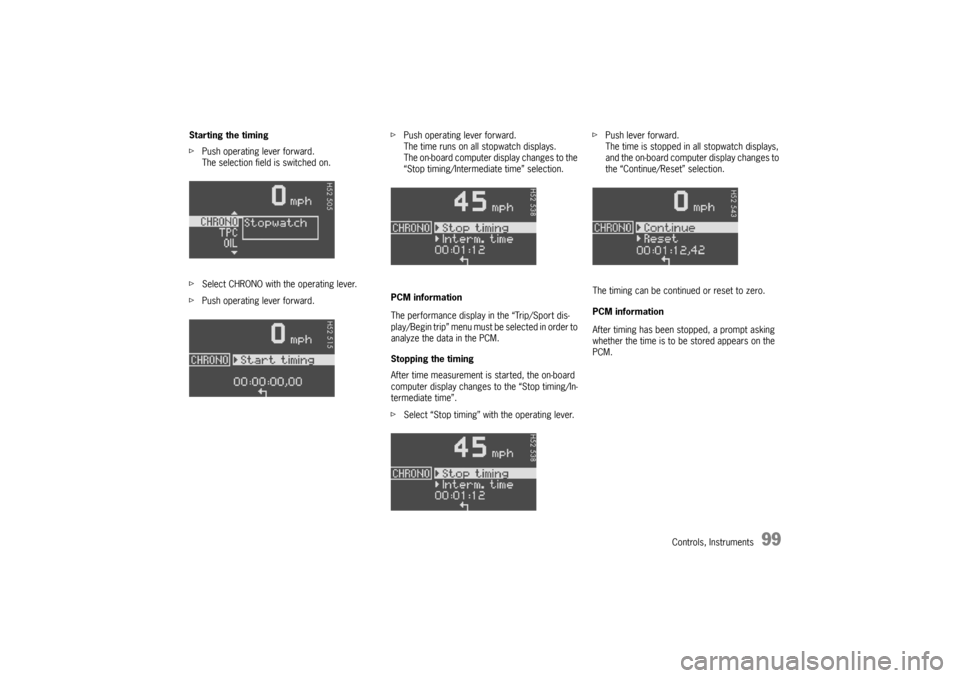
Starting the timing
fPush operating lever forward.
The selection field is switched on.
fSelect CHRONO with the operating lever.
fPush operating lever forward.fPush operating lever forward.
The time runs on all stopwatch displays.
The on-board computer display changes to the
“Stop timing/Intermediate time” selection.
PCM information
The performance display in the “Trip/Sport dis-
play/Begin trip” menu must be selected in order to
analyze the data in the PCM.
Stopping the timing
After time measurement is started, the on-board
computer display changes to the “Stop timing/In-
termediate time”.
fSelect “Stop timing” with the operating lever.fPush lever forward.
The time is stopped in all stopwatch displays,
and the on-board computer display changes to
the “Continue/Reset” selection.
The timing can be continued or reset to zero.
PCM information
After timing has been stopped, a prompt asking
whether the time is to be stored appears on the
PCM.
Page 100 of 280

100
Controls, Instruments Continue timing
After timing has been stopped, the on-board com-
puter display changes to the “Continue/Reset” se-
lection.
fPush operating lever forward.
The stopwatch displays continue the timing.
The on-board computer display returns to the
“Stop timing/Intermediate time” selection. You
can stop the stopwatch or measure an inter-
mediate time.Resetting the time
After timing has been stopped, the on-board com-
puter display changes to the “Continue/Reset” se-
lection.
fSelect “Reset” with the operating lever.
fPush operating lever forward.
The display returns to the “Start timing”
selection.
The stopwatch displays in the instrument panel
and the on-board computer are reset to zero.
Page 101 of 280
Controls, Instruments
101
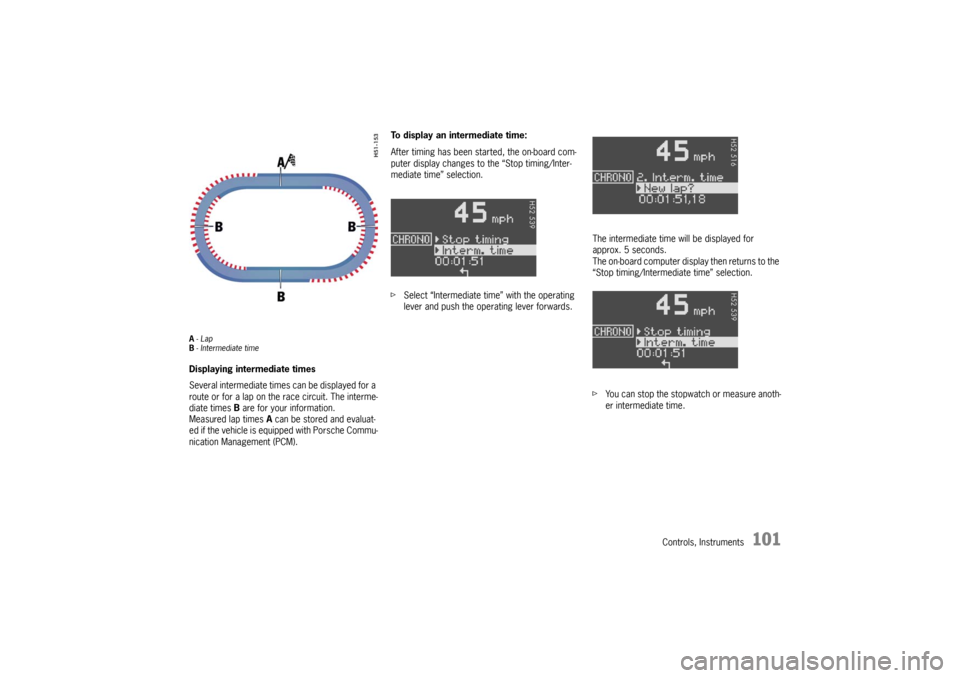
A-Lap
B- Intermediate timeDisplaying intermediate times
Several intermediate times can be displayed for a
route or for a lap on the race circuit. The interme-
diate times B are for your information.
Measured lap times A can be stored and evaluat-
ed if the vehicle is equipped with Porsche Commu-
nication Management (PCM).To display an intermediate time:
After timing has been started, the on-board com-
puter display changes to the “Stop timing/Inter-
mediate time” selection.
fSelect “Intermediate time” with the operating
lever and push the operating lever forwards.The intermediate time will be displayed for
approx. 5 seconds.
The on-board computer display then returns to the
“Stop timing/Intermediate time” selection.
fYou can stop the stopwatch or measure anoth-
er intermediate time.
Page 108 of 280
108
Controls, Instruments
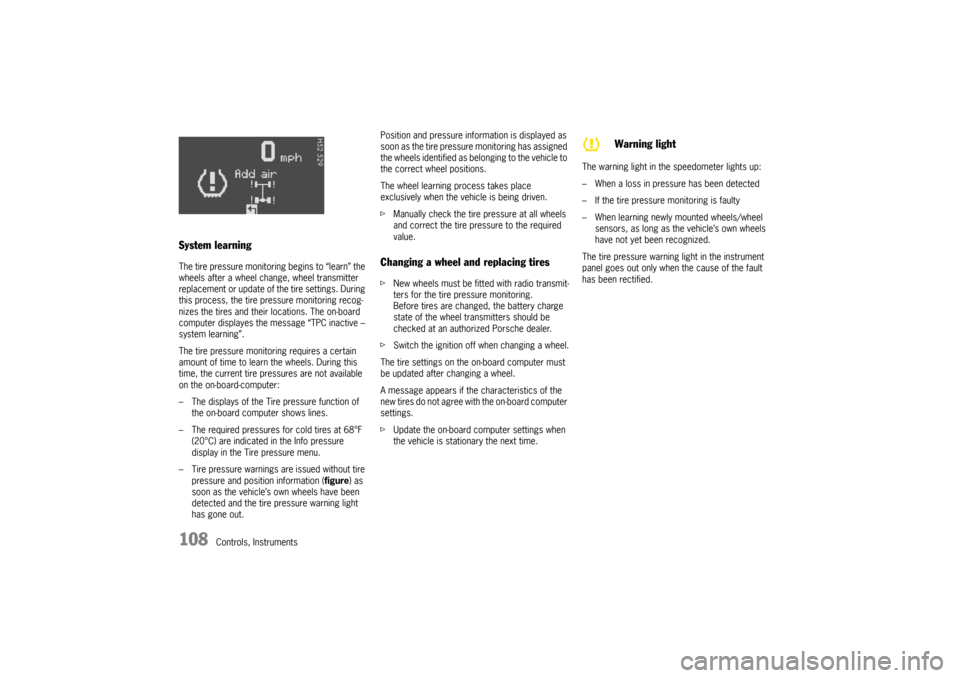
System learningThe tire pressure monitoring begins to “learn” the
wheels after a wheel change, wheel transmitter
replacement or update of the tire settings. During
this process, the tire pressure monitoring recog-
nizes the tires and their locations. The on-board
computer displayes the message “TPC inactive –
system learning”.
The tire pressure monitoring requires a certain
amount of time to learn the wheels. During this
time, the current tire pressures are not available
on the on-board-computer:
– The displays of the Tire pressure function of
the on-board computer shows lines.
– The required pressures for cold tires at 68°F
(20°C) are indicated in the Info pressure
display in the Tire pressure menu.
– Tire pressure warnings are issued without tire
pressure and position information (figure) as
soon as the vehicle’s own wheels have been
detected and the tire pressure warning light
has gone out.Position and pressure information is displayed as
soon as the tire pressure monitoring has assigned
the wheels identified as belonging to the vehicle to
the correct wheel positions.
The wheel learning process takes place
exclusively when the vehicle is being driven.
fManually check the tire pressure at all wheels
and correct the tire pressure to the required
value.
Changing a wheel and replacing tiresfNew wheels must be fitted with radio transmit-
ters for the tire pressure monitoring.
Before tires are changed, the battery charge
state of the wheel transmitters should be
checked at an authorized Porsche dealer.
fSwitch the ignition off when changing a wheel.
The tire settings on the on-board computer must
be updated after changing a wheel.
A message appears if the characteristics of the
new tires do not agree with the on-board computer
settings.
fUpdate the on-board computer settings when
the vehicle is stationary the next time.The warning light in the speedometer lights up:
– When a loss in pressure has been detected
– If the tire pressure monitoring is faulty
– When learning newly mounted wheels/wheel
sensors, as long as the vehicle’s own wheels
have not yet been recognized.
The tire pressure warning light in the instrument
panel goes out only when the cause of the fault
has been rectified.
Warning light
Page 113 of 280

Controls, Instruments
113
Navigation
– Integrated in the BC
(Navigation instructions can be recalled on the
on-board computer display)
– When turning off
(Navigation instructions are only shown before
changing direction)
Basic setting
– Restore the basic setting of the on-board com-
puter
Language
– Select language version
12/24h mode
– Select time mode:
12h (small squares on the right side of the time
display for AM/PM),
24h
General information regarding the
on-board computer functionsRange on remaining fuel
The range on remaining fuel is continuously recal-
culated during the journey based on the fuel level,
current consumption and average consumption.
The more the fuel level falls, the more spontan-
eously the display reacts. For this reason, the
range on remaining fuel is not displayed if less
than 9 miles (15 kilometers).
If the vehicle's inclination changes while driving or
refueling, incorrect range information may tempo-
rarily be given.
Note
If the tank is nearly empty and you top up with only
a small quantity of fuel, an accurate range on re-
maining fuel is impossible.Average consumption and average speed
The values displayed are based on the distance
travelled since the last reset to “zero”.
You can set the starting time for a measurement
before or during the trip.
Switching the ignition off does not reset the meas-
urements. It is therefore possible to collect values
over long periods.
Disconnecting the car battery will cause these
memories to be erased.
Tire pressure
The Tire pressure function of the on-board com-
puter displays the tire pressures dependent on
temperature in the four wheels. You can watch the
tire pressure rise and fall while driving.
The display is only for information. To correct the
tire pressures, always use the displayed values
from the “Info pressure” display in the Tire pres-
sure menu.