menu PORSCHE CAYMAN 2009 1.G User Guide
[x] Cancel search | Manufacturer: PORSCHE, Model Year: 2009, Model line: CAYMAN, Model: PORSCHE CAYMAN 2009 1.GPages: 284, PDF Size: 5.94 MB
Page 146 of 284

144
Instruments, On-Board Computer, Warnings
CHRONO
StopwatchYou can use the stopwatch to measure time inter-
vals, e.g. on the race circuit or on work-related
journeys. Measured lap times can be stored and
evaluated if the vehicle is equipped with Porsche
Communication Management (PCM).
fPlease observe the chapte r “Sport display” in
the separate PCM operating instructions. Stopwatch on the instrument panel
The stopwatch has an analogue and a digital dis-
play.
The large pointer of the analogue display meas-
ures the seconds. The two small pointers measure
hours and minutes. The display re-starts at zero af-
ter 12 hours.
Seconds and increments of
1/100th of a second
can be read on the digital display.
The digital display and the display in the on-board
computer can indicate up to 99 hours and
59 minutes.
The stopwatch can be swiv elled both to the left
and to the right.
Stopwatch displays:
– on the stopwatch on the instrument panel,
– in the on-board computer menu CHRONO,
– on the performance display in the PCM.
Starting/stopping stopwatch
All stopwatch displays are started and stopped via
the on-board computer menu CHRONO. Note on operation
When you leave the CHRONO menu while the stop-
watch is running, meas
urement will continue.
The stopwatch stops after the ignition is switched
off. If the ignition is sw itched on again within ap-
prox. 4 minutes, the stopwatch will continue to
run.
The only way to reset the stopwatch to zero is by
selecting “Reset” in the CHRONO menu.
Page 154 of 284
152
Instruments, On-Board Computer, Warnings
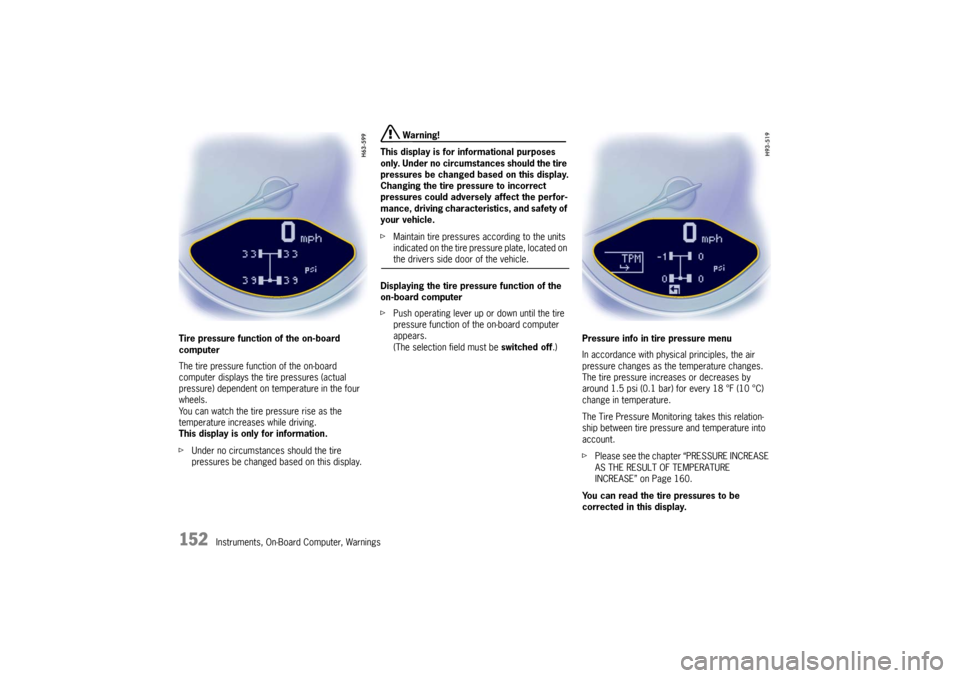
Tire pressure function of the on-board
computer
The tire pressure function of the on-board
computer
displays the tire pressures (actual
pressure) dependent on temperature in the four
wheels.
You can watch the tire pressure rise as the
temperature increases while driving.
This display is only for information.
f Under no circumstances should the tire
pressures be changed based on this display.
Warning!
This display is for informational purposes
only. Under no circumsta nces should the tire
pressures be changed based on this display.
Changing the tire pressure to incorrect
pressures could adversely affect the perfor-
mance, driving character istics, and safety of
your vehicle.
f Maintain tire pressures according to the units
indicated on the tire pressure plate, located on the drivers side door of the vehicle.
Displaying the tire pressure function of the
on-board computer
f Push operating lever up or down until the tire
pressure function of the on-board computer
appears.
(The selection field must be switched off.)Pressure info in tire pressure menu
In accordance with physical principles, the air
pressure changes as the temperature changes.
The tire pressure increases or decreases by
around 1.5 psi (0.1 bar) for every 18 °F (10 °C)
change in temperature.
The Tire Pressure Monitoring takes this relation-
ship between tire pressure and temperature into
account.
f
Please see the chapter “PRESSURE INCREASE
AS THE RESULT OF TEMPERATURE
INCREASE” on Page 160.
You can read the tire pressures to be
corrected in this display.
Page 155 of 284
Instruments, On-Board Computer, Warnings
153
The tire pressure to be corrected (refill pressure)
is indicated on the displayed wheel.
Example: If “ –1.5 psi (–0.1 bar)” is displayed,
1.5 psi (0.1 bar) must be added to this tire.
Note
The tire pressure menu can only be called up when
the vehicle is stationary.
Calling up the “Info pressure” display
fPush operating lever forward in order to switch
on the selection field.
f Select “TPM” with the operating lever.
f Push operating lever forward.
The display changes to the tire pressure menu.
f Select “Info pressure” with the operating lever.
f Push operating lever forward.
Note
After the ignition is switch ed on, it can take up to
approx. 1 minute before all tire pressures are
displayed. Dashes (“-.-”) appear instead of the tire
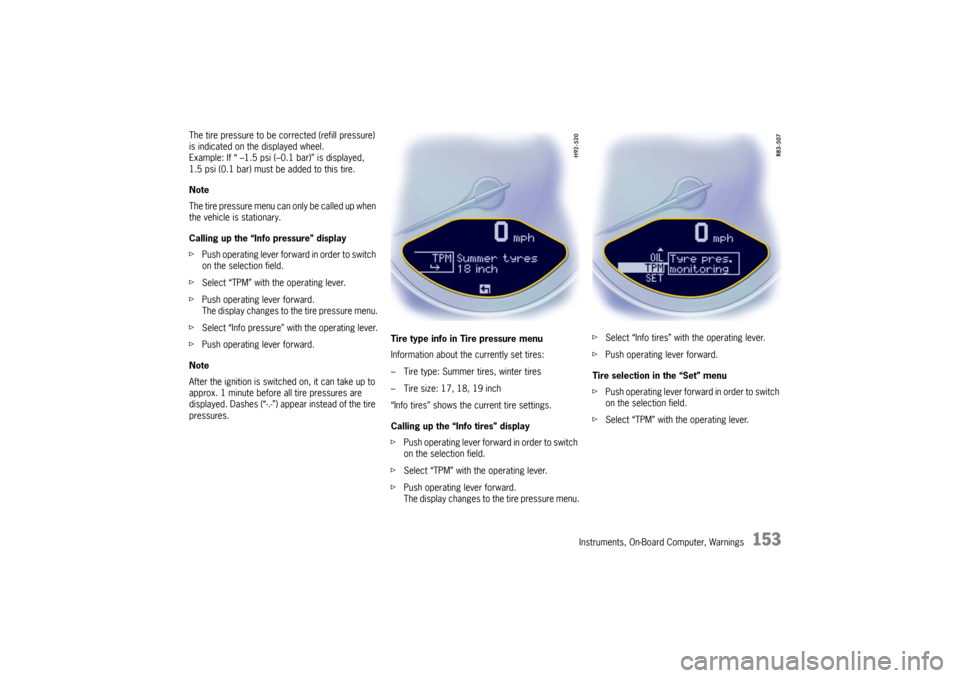
pressures. Tire type info in Tire pressure menu
Information about the currently set tires:
– Tire type: Summer tires, winter tires
– Tire size: 17, 18, 19 inch
“Info tires” shows the current tire settings.
Calling up the “Info tires” display
f
Push operating lever forward in order to switch
on the selection field.
f Select “TPM” with the operating lever.
f Push operating lever forward.
The display changes to the tire pressure menu. f
Select “Info tires” with the operating lever.
f Push operating lever forward.
Tire selection in the “Set” menu
f Push operating lever forward in order to switch
on the selection field.
f Select “TPM” with the operating lever.
Page 156 of 284
154
Instruments, On-Board Computer, Warnings
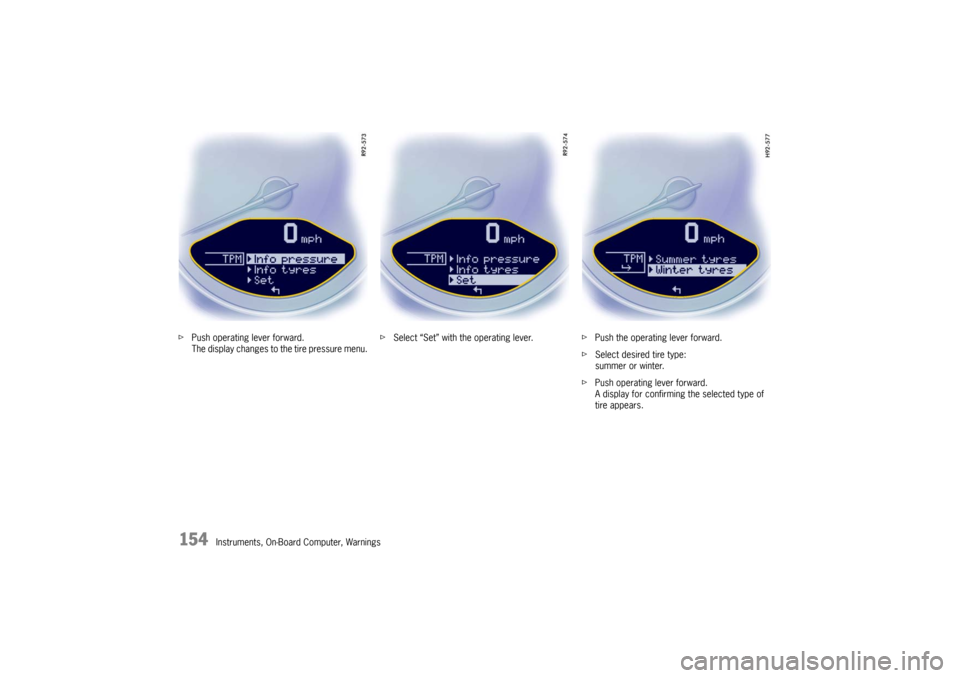
f
Push operating lever forward.
The display changes to the tire pressure menu. f
Select “Set” with the operating lever. fPush the operating lever forward.
f Select desired tire type:
summer or winter.
f Push operating lever forward.
A display for confirming the selected type of
tire appears.
Page 157 of 284
Instruments, On-Board Computer, Warnings
155
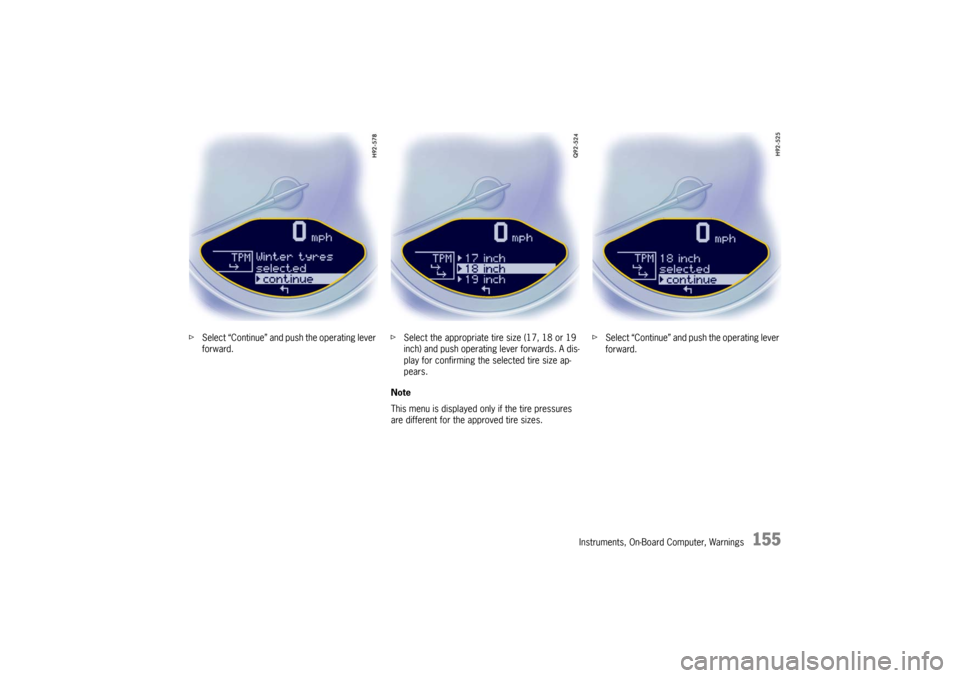
fSelect “Continue” and push the operating lever
forward. f
Select the appropriate tire size (17, 18 or 19
inch) and push operating lever forwards. A dis-
play for confirming the selected tire size ap-
pears.
Note
This menu is displayed only if the tire pressures
are different for the approved tire sizes. f
Select “Continue” and push the operating lever
forward.
Page 158 of 284
156
Instruments, On-Board Computer, Warnings
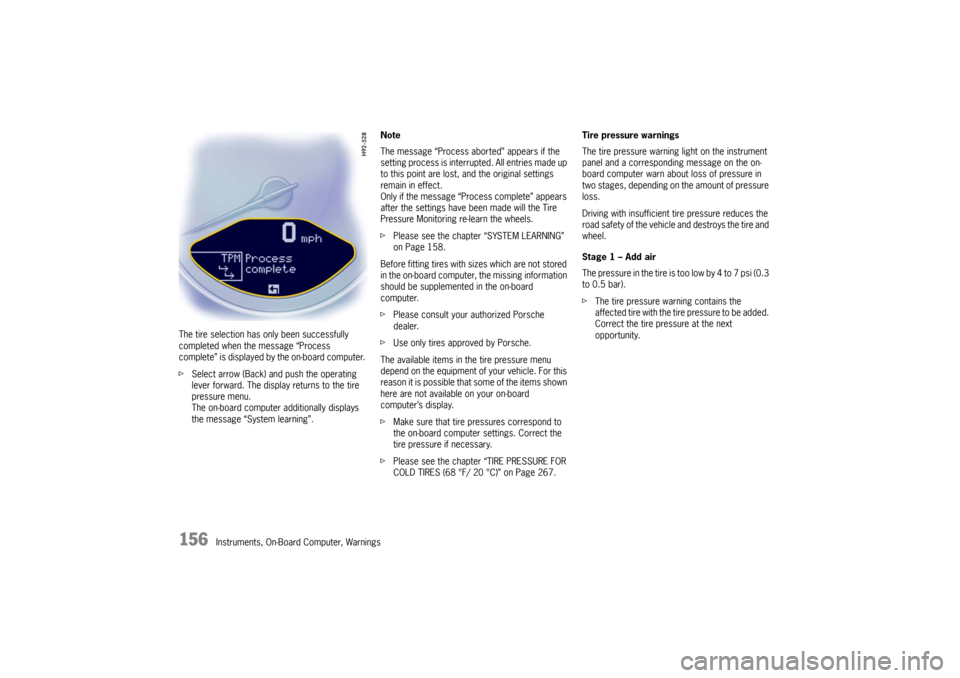
The tire selection has only been successfully
completed when the message “Process
complete” is displayed by the on-board computer.
f
Select arrow (Back) and push the operating
lever forward. The display returns to the tire
pressure menu.
The on-board computer additionally displays
the message “System learning”. Note
The message “Process aborted” appears if the
setting process is interrupted. All entries made up
to this point are lost, and the original settings
remain in effect.
Only if the message “Process complete” appears
after the settings have been made will the Tire
Pressure Monitoring re-learn the wheels.
f
Please see the chapter “SYSTEM LEARNING”
on Page 158.
Before fitting tires with sizes which are not stored
in the on-board computer, the missing information
should be supplemented in the on-board
computer.
f Please consult your authorized Porsche
dealer.
f Use only tires approved by Porsche.
The available items in the tire pressure menu
depend on the equipment of your vehicle. For this
reason it is possible that some of the items shown
here are not available on your on-board
computer’s display.
f Make sure that tire pressures correspond to
the on-board computer settings. Correct the
tire pressure if necessary.
f Please see the chapter “TIRE PRESSURE FOR
COLD TIRES (68 °F/ 20 °C)” on Page 267. Tire pressure warnings
The tire pressure warning light on the instrument
panel and a corresponding message on the on-
board computer warn about loss of pressure in
two stages, depending on the amount of pressure
loss.
Driving with insufficient tire pressure reduces the
road safety of the vehicle
and destroys the tire and
wheel.
Stage 1 – Add air
The pressure in the tire is too low by 4 to 7 psi (0.3
to 0.5 bar).
f The tire pressure warning contains the
affected tire with the tire pressure to be added.
Correct the tire pressure at the next
opportunity.
Page 160 of 284

158
Instruments, On-Board Computer, Warnings
System learningThe Tire Pressure Monitoring begins to “learn” the
wheels after a wheel change, wheel transmitter
replacement or update of the tire settings. During
this process, the Tire Pressure Monitoring recog-
nizes the tires and their locations.
The on-board computer displayes the message
“TPM is learning, monitoring not act.” .The Tire Pressure Monitoring requires a certain
amount of time to learn the wheels. During this
time, the current tire pressures are not available
on the on-board-computer:
– The tire pressure warning light remains lit until
all wheels have been learned.
– The display of the tire pressure function of the on-board computer shows lines.
– The required pressures for cold tires at 68 °F (20 °C) are indicated in the Info pressure
display in the tire pressure menu.
Position and pressure information is displayed as
soon as the Tire Pressure Monitoring has as-
signed the wheels identified as belonging to the
vehicle to the correct wheel positions.
The wheel learning process takes place
exclusively when the vehicle is being driven
(vehicle speed above 25 km/h (16 mph)).
f Check the tire pressure for all wheels on the
“Info pressure” display.
f Correct the tire pressure to the required
pressure if necessary.
Changing a wheel and replacing tiresfNew wheels must be fitt ed with radio transmit-
ters for the Tire Pressure Monitoring.
Before tires are changed, the battery charge
state of the wheel transmitters should be
checked at an authorized Porsche dealer.
f Switch the ignition off when changing a wheel.
The tire settings on the on-board computer must
be updated after changing a wheel.
If the tire settings are not updated, the message
“Wheel change? Input new TPM settings!” is
displayed on the on-board computer.
f Update the on-board computer settings when
the vehicle is stationary the next time.
Page 167 of 284

Instruments, On-Board Computer, Warnings
165
Average consumption and average speed
The values displayed are based on the distance
travelled since the last reset to “zero”.
You can set the starting time for a measurement
before or during the trip.
Switching the ignition off does not reset the meas-
urements. It is therefore possible to collect values
over long periods.
Disconnecting the car ba ttery will cause these
memories to be erased. Tire pressure
The
Tire pressure function of the on-board
computer displays the tire pressures dependent
on temperature in the four wheels. You can watch
the tire pressure rise and fall while driving.
The display is only for information.
f To correct the tire pressures, always use the
displayed values from the “Info pressure”
display in the tire pressure menu.
Page 175 of 284

Warnings
173
Acknowledging warning messagesWarning messages can be deleted from the on-board computer display.
f Push the on-board computer operating lever forward.
You can recall erased warning messages in the “INFO” menu.
TPM partial monitoring 1 or 2 wheel transmitters are faulty. The tyre
pressures of these wheels are not monitored.
The other wheels are still monitored.
Consult an authorized Porsche dealer.
TPM inactive
Brief disturbance
TPM inactive
Too many wheel transmitters The Tire Pressure Monitoring is temporarily de-
activated by excessive tire temperatures (ap-
prox. 248 °F (120 °C)) or external interference
(e.g. from other wheel transmitters inside the
car). Once the source of
the interference is re-
moved, the system is automatically reactivated.
Wheel change?
Input new
TPM settings! Update the settings in the TPM menu of the
on-board computer at the next opportunity.
Wrong entries will affect
the correct pressure in-
formation in the menu. The safety of your vehi-
cle is at risk.
TPM
Indicator faulty The display of the Tire Pressure Monitoring is
faulty.
Consult an authorized Porsche dealer.
Instrument
panelOn-board
computerText display on on-board
computer Meaning/measure